AppCorpus MCP gives your agent current app data, prices, screens, features and sources.
View JSON
GET /api/v3/apps/6767709887
{
  "app_id": 6767709887,
  "canonical_url": "https://appcorpus.com/apps/dual-degree-fahrenheit-celsius-6767709887",
  "identity": {
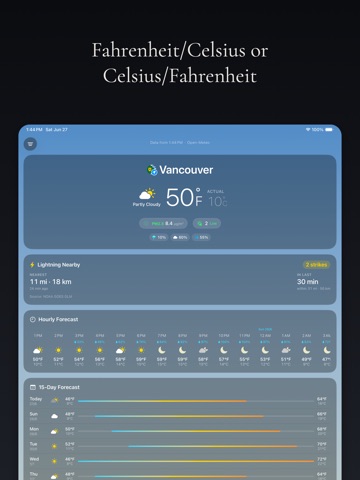
    "name": "Dual Degree Fahrenheit Celsius",
    "slug": "dual-degree-fahrenheit-celsius",
    "developer": {
      "name": "Motomatic LLC",
      "url": "https://appcorpus.com/developers/motomatic-llc-developer_2a0c4f160c192b17d77433654217ead4"
    },
    "icon_url": "https://is1-ssl.mzstatic.com/image/thumb/Purple221/v4/c6/c6/d2/c6c6d2c0-dbd9-5e22-09bf-e2c83b0776a6/AppIcon-0-0-1x_U007epad-0-1-sRGB-85-220.png/512x512bb.jpg",
    "stores": [
      "apple"
    ],
    "platforms": [
      "iphone",
      "ipad"
    ],
    "status": {
      "state": "active",
      "label": "Active",
      "last_checked": "2026-08-07",
      "last_checked_label": "7 Aug 2026",
      "banner": null,
      "region_note": null
    }
  },
  "listings": [
    {
      "store": "apple",
      "status": "ACTIVE",
      "url": "https://apps.apple.com/us/app/dual-degree-fahrenheit-celsius/id6767709887?uo=4",
      "rating": 5.0,
      "rating_count": 2,
      "formatted_price": "$2.99",
      "is_free": false,
      "has_iap": false,
      "has_subscription": false,
      "version": "1.0.11",
      "updated": "2026-07-22",
      "currency": "USD"
    }
  ],
  "summary": {
    "one_liner": null,
    "summary": null,
    "best_for": [],
    "not_for": [],
    "status": "fallback",
    "at_a_glance": [
      "$2.99"
    ]
  },
  "categories": {
    "official": [
      "Weather",
      "Utilities"
    ],
    "appcorpus": [
      {
        "category_id": "weather",
        "label": "Weather",
        "url": "https://appcorpus.com/categories/weather"
      },
      {
        "category_id": "utilities",
        "label": "Utilities",
        "url": "https://appcorpus.com/categories/utilities"
      }
    ]
  },
  "use_cases": [],
  "features": [
    {
      "capability_id": "family_sharing",
      "label": "Family Sharing",
      "availability": "yes",
      "access_level": "unknown",
      "scope": "App Store",
      "evidence": "Store published"
    }
  ],
  "pricing": [
    {
      "store": "apple",
      "formatted_price": "$2.99",
      "is_free": false,
      "has_iap": false,
      "has_subscription": false,
      "currency": "USD",
      "market": "us",
      "last_verified": "2026-08-07",
      "rows": [
        "Price: $2.99"
      ]
    }
  ],
  "screens": [
    {
      "url": "https://is1-ssl.mzstatic.com/image/thumb/PurpleSource221/v4/d8/60/5a/d8605a2f-bea3-2b1a-730a-7bb6d7f70575/iPad_Pro_13_Weather.png/1600x1600bb.jpg",
      "store": "apple",
      "platform": "ipad",
      "alt": "Dual Degree Fahrenheit Celsius ipad screenshot 1"
    },
    {
      "url": "https://is1-ssl.mzstatic.com/image/thumb/PurpleSource221/v4/d8/60/5a/d8605a2f-bea3-2b1a-730a-7bb6d7f70575/iPad_Pro_13_Weather.png/360x480bb.jpg",
      "store": "apple",
      "platform": "ipad",
      "alt": "Dual Degree Fahrenheit Celsius ipad screenshot 2"
    },
    {
      "url": "https://is1-ssl.mzstatic.com/image/thumb/PurpleSource211/v4/28/c3/28/28c328d2-a11b-bba4-3fbc-ca6998536c11/iPad_Pro_13_Nowcast.png/1600x1600bb.jpg",
      "store": "apple",
      "platform": "ipad",
      "alt": "Dual Degree Fahrenheit Celsius ipad screenshot 3"
    },
    {
      "url": "https://is1-ssl.mzstatic.com/image/thumb/PurpleSource211/v4/28/c3/28/28c328d2-a11b-bba4-3fbc-ca6998536c11/iPad_Pro_13_Nowcast.png/360x480bb.jpg",
      "store": "apple",
      "platform": "ipad",
      "alt": "Dual Degree Fahrenheit Celsius ipad screenshot 4"
    },
    {
      "url": "https://is1-ssl.mzstatic.com/image/thumb/PurpleSource211/v4/d3/5c/e2/d35ce2e5-f608-6814-6d7b-9024e71282e1/iPad_Pro_13_Widgets.png/1600x1600bb.jpg",
      "store": "apple",
      "platform": "ipad",
      "alt": "Dual Degree Fahrenheit Celsius ipad screenshot 5"
    },
    {
      "url": "https://is1-ssl.mzstatic.com/image/thumb/PurpleSource211/v4/d3/5c/e2/d35ce2e5-f608-6814-6d7b-9024e71282e1/iPad_Pro_13_Widgets.png/360x480bb.jpg",
      "store": "apple",
      "platform": "ipad",
      "alt": "Dual Degree Fahrenheit Celsius ipad screenshot 6"
    },
    {
      "url": "https://is1-ssl.mzstatic.com/image/thumb/PurpleSource221/v4/8e/64/74/8e6474fc-ae1e-094b-fe22-c7632b36989c/iPad_Pro_13_AirQuality.png/1600x1600bb.jpg",
      "store": "apple",
      "platform": "ipad",
      "alt": "Dual Degree Fahrenheit Celsius ipad screenshot 7"
    },
    {
      "url": "https://is1-ssl.mzstatic.com/image/thumb/PurpleSource221/v4/8e/64/74/8e6474fc-ae1e-094b-fe22-c7632b36989c/iPad_Pro_13_AirQuality.png/360x480bb.jpg",
      "store": "apple",
      "platform": "ipad",
      "alt": "Dual Degree Fahrenheit Celsius ipad screenshot 8"
    },
    {
      "url": "https://is1-ssl.mzstatic.com/image/thumb/PurpleSource221/v4/ef/96/41/ef964120-444c-9288-e127-228a2ab1bb7b/iPad_Pro_13_Lightning.png/1600x1600bb.jpg",
      "store": "apple",
      "platform": "ipad",
      "alt": "Dual Degree Fahrenheit Celsius ipad screenshot 9"
    },
    {
      "url": "https://is1-ssl.mzstatic.com/image/thumb/PurpleSource221/v4/ef/96/41/ef964120-444c-9288-e127-228a2ab1bb7b/iPad_Pro_13_Lightning.png/360x480bb.jpg",
      "store": "apple",
      "platform": "ipad",
      "alt": "Dual Degree Fahrenheit Celsius ipad screenshot 10"
    },
    {
      "url": "https://is1-ssl.mzstatic.com/image/thumb/PurpleSource221/v4/57/ab/d5/57abd5d4-c953-87aa-92c5-7353c70a0b56/iPad_Pro_13_Settings.png/1600x1600bb.jpg",
      "store": "apple",
      "platform": "ipad",
      "alt": "Dual Degree Fahrenheit Celsius ipad screenshot 11"
    },
    {
      "url": "https://is1-ssl.mzstatic.com/image/thumb/PurpleSource221/v4/57/ab/d5/57abd5d4-c953-87aa-92c5-7353c70a0b56/iPad_Pro_13_Settings.png/360x480bb.jpg",
      "store": "apple",
      "platform": "ipad",
      "alt": "Dual Degree Fahrenheit Celsius ipad screenshot 12"
    },
    {
      "url": "https://is1-ssl.mzstatic.com/image/thumb/PurpleSource221/v4/0a/ba/be/0ababe9b-aacb-50df-dc09-a654919ec527/iPhone_6.9_Weather.png/1320x1600bb.jpg",
      "store": "apple",
      "platform": "iphone",
      "alt": "Dual Degree Fahrenheit Celsius iphone screenshot 13"
    },
    {
      "url": "https://is1-ssl.mzstatic.com/image/thumb/PurpleSource221/v4/36/ea/99/36ea993f-441d-d462-381b-9ec02248645f/iPhone_6.9_Nowcast.png/1320x1600bb.jpg",
      "store": "apple",
      "platform": "iphone",
      "alt": "Dual Degree Fahrenheit Celsius iphone screenshot 14"
    },
    {
      "url": "https://is1-ssl.mzstatic.com/image/thumb/PurpleSource221/v4/fc/87/ff/fc87ffb5-4bcd-5a6e-407d-a898e4c64a7d/iPhone_6.9_Widgets.png/1320x1600bb.jpg",
      "store": "apple",
      "platform": "iphone",
      "alt": "Dual Degree Fahrenheit Celsius iphone screenshot 15"
    },
    {
      "url": "https://is1-ssl.mzstatic.com/image/thumb/PurpleSource221/v4/c5/26/e7/c526e7bc-cdf0-bdf3-6c8d-db206e2a72ea/iPhone_6.9_AirQuality.png/1320x1600bb.jpg",
      "store": "apple",
      "platform": "iphone",
      "alt": "Dual Degree Fahrenheit Celsius iphone screenshot 16"
    },
    {
      "url": "https://is1-ssl.mzstatic.com/image/thumb/PurpleSource221/v4/4e/00/c2/4e00c285-1467-ef26-bdca-8e499aa68a44/iPhone_6.9_Lightning.png/1320x1600bb.jpg",
      "store": "apple",
      "platform": "iphone",
      "alt": "Dual Degree Fahrenheit Celsius iphone screenshot 17"
    },
    {
      "url": "https://is1-ssl.mzstatic.com/image/thumb/PurpleSource221/v4/95/72/28/95722821-739f-9da8-dbfc-33eb5d943daf/iPhone_6.9_Settings.png/1320x1600bb.jpg",
      "store": "apple",
      "platform": "iphone",
      "alt": "Dual Degree Fahrenheit Celsius iphone screenshot 18"
    }
  ],
  "ratings": [
    {
      "store": "apple",
      "average": 5.0,
      "count": 2,
      "market": "us",
      "observed_at": "2026-08-07",
      "reviews": [
        {
          "rating": 5,
          "title": "Creates domestic harmony",
          "body": "Great for partners who grew up with different measurement systems!",
          "author": "jc sf",
          "date": "7 Aug 2026"
        }
      ]
    }
  ],
  "privacy": [
    {
      "store": "apple",
      "declarations": [
        {
          "title": "Data Not Linked to You",
          "detail": "App Functionality — Identifiers — Device ID",
          "source": "Developer declared"
        },
        {
          "title": "Data Not Linked to You",
          "detail": "App Functionality — Location — Precise Location",
          "source": "Developer declared"
        },
        {
          "title": "Data Not Linked to You",
          "detail": "Identifiers",
          "source": "Developer declared"
        },
        {
          "title": "Data Not Linked to You",
          "detail": "Location",
          "source": "Developer declared"
        }
      ],
      "accessibility": []
    }
  ],
  "changes": [
    {
      "store": "apple",
      "version": "1.0",
      "released_at": null,
      "notes": ""
    },
    {
      "store": "apple",
      "version": "1.0.1",
      "released_at": null,
      "notes": "What's new: Lightning nearby. A new card surfaces when a thunderstorm is within range of your selected city, with the closest strike, the time it landed, and a count for the last 30 minutes. Tap the corner bolt for a full-screen map of every recent strike, including coordinates, the resolved address, and a one-tap handoff to Google Maps or Apple Maps. Optional push alerts when a strike lands near a saved city. Maps app preference. Pick Google Maps or Apple Maps for \"open in maps\" actions. The setting hides itself if Google Maps isn't installed. Standardized weather icon colors. The sun renders the same color in every variant (clear, mostly clear, partly cloudy, sun with rain), so you don't get an orange sun next to a yellow one anymore. UV at night reads gray. \"Low UV\" is a daytime concept; once the sun is below the horizon the icon now signals \"not active\" rather than \"safe to go outside.\" Widget polish. Dropped the pill backgrounds and added a subtle text shadow so the labels stay legible on bright weather palettes. Fixed an \"Offline\" banner that could briefly flash at launch even when you were connected. Footer now credits Open-Meteo alongside Apple Weather."
    },
    {
      "store": "apple",
      "version": "1.0.10",
      "released_at": null,
      "notes": "- Every temperature is now labeled: a small ACTUAL or FEELS LIKE tag sits above the second scale, so you always know which reading you're seeing, in the app and across all widgets - Minor refinements and fixes"
    },
    {
      "store": "apple",
      "version": "1.0.11",
      "released_at": "2026-07-22",
      "notes": "Fixed the big temperature sometimes breaking onto two lines, and the app now grabs a fresh reading whenever you open it, so you're never looking at an old temp. Widgets update right after a refresh too. Thanks to Paolo Garcia for the great bug reports!"
    },
    {
      "store": "apple",
      "version": "1.0.2",
      "released_at": null,
      "notes": "Bug fixes and polish: - Granting location access on first launch now resolves your current city immediately, no relaunch needed. - New \"Use my location\" row in Settings if you ever need to re-enable it. - New radar-sweep loading animation."
    },
    {
      "store": "apple",
      "version": "1.0.3",
      "released_at": null,
      "notes": "Bug fixes and performance improvements."
    },
    {
      "store": "apple",
      "version": "1.0.4",
      "released_at": null,
      "notes": "Visual fixes and a new lightning alert distance setting."
    },
    {
      "store": "apple",
      "version": "1.0.5",
      "released_at": null,
      "notes": "New: severe weather alerts, a minute-by-minute forecast of the next hour of rain or snow (in the app and in widgets), and optional notifications just before rain starts at a saved city. Widgets now always show the same temperatures as the app."
    },
    {
      "store": "apple",
      "version": "1.0.6",
      "released_at": null,
      "notes": "The rain panel is now a real chart: expected rainfall against a labeled axis, minute-by-minute chance of rain, and touch to read exact values. Widgets add a rain countdown, up to four metrics of your choice, and three new metrics: wind gusts, ozone, and NO2. The large widget now fits 18 hours of forecast. Also: brighter weather icons, flags in widgets, and a fix for the app forgetting your selected city."
    },
    {
      "store": "apple",
      "version": "1.0.7",
      "released_at": null,
      "notes": "Flag improvements: US state flags now built in. Widget layout fixes."
    },
    {
      "store": "apple",
      "version": "1.0.8",
      "released_at": null,
      "notes": "The hourly forecast now returns to the current hour when you reopen the app."
    },
    {
      "store": "apple",
      "version": "1.0.9",
      "released_at": null,
      "notes": "- Widgets can now follow your current location, and a badge marks it on the home screen - Rain alerts: choose which cities to watch - Tap the coordinates in Details to copy them"
    }
  ],
  "alternatives": [
    {
      "app_id": 6759970553,
      "name": "Weather Forecast & Radar - AQI",
      "url": "https://appcorpus.com/apps/weather-forecast-radar-aqi-6759970553",
      "reason": "Same category + similar ratings"
    },
    {
      "app_id": 6771326141,
      "name": "Air Quality: AQI Tracker",
      "url": "https://appcorpus.com/apps/air-quality-aqi-tracker-6771326141",
      "reason": "Same category + similar ratings"
    },
    {
      "app_id": 6745724163,
      "name": "Dual Degrees – C° & F° Weather",
      "url": "https://appcorpus.com/apps/dual-degrees-c-f-weather-6745724163",
      "reason": "Same category + similar ratings"
    },
    {
      "app_id": 6759792594,
      "name": "Weather Widgets - Clock Widget",
      "url": "https://appcorpus.com/apps/weather-widgets-clock-widget-6759792594",
      "reason": "Same category + similar ratings"
    }
  ],
  "evidence_summary": {
    "index_state": "S1",
    "evidence_level": 1,
    "level_label": "Live store listing",
    "indexable": true,
    "last_verified_at": "2026-08-07",
    "unknown_fields": [
      "Independent summary has not been published yet."
    ],
    "sources": [
      "App Store"
    ]
  },
  "availability_markets": {
    "live": [
      "us"
    ],
    "selected": "us",
    "note": null
  },
  "feature_events": {
    "events": []
  },
  "features_slice": {
    "plans": [],
    "features": [],
    "unknown_features": [
      "family_sharing"
    ],
    "data_cutoff": "7 Aug 2026"
  }
}