
Quick verdict
- What it is
- Store information collected; independent summary not yet available.
- At a glance
-
- Free to download
Categories and search queries
Official categories
- Productivity
- Utilities
AppCorpus categories
Key functions
| Function | Availability | Access | Scope | Evidence |
|---|---|---|---|---|
| Free app | Yes | Free | — | Store published |
Screens
App Store
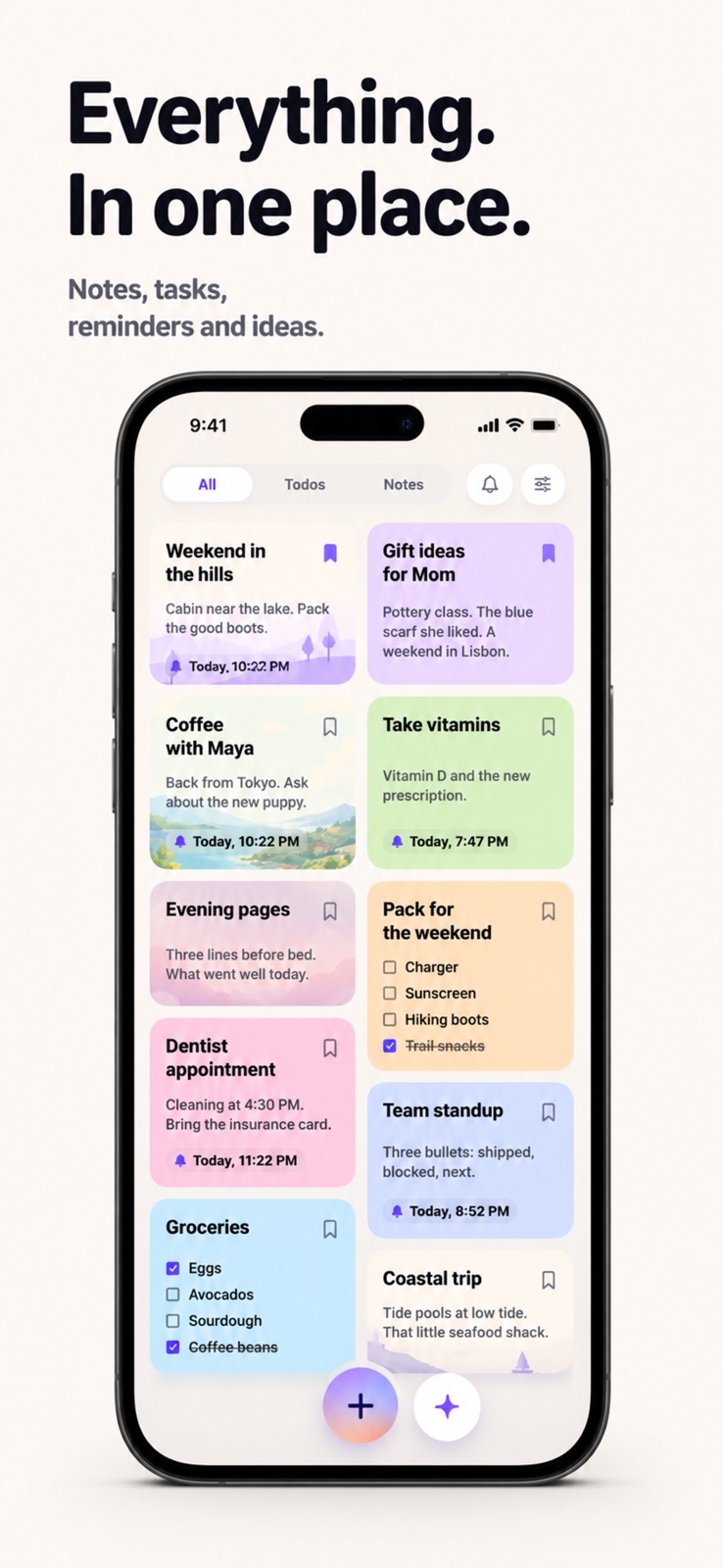
5 store screenshots



Pricing & paywalls
App Store
- Free
Ratings & reviews
App Store
No store reviews collected for App Store · US
Privacy & accessibility
App Store
Privacy
- Data Linked to You — Analytics — Identifiers — Device ID Developer declared
- Data Linked to You — Analytics — Identifiers — User ID Developer declared
- Data Linked to You — Analytics — Usage Data — Product Interaction Developer declared
- Data Linked to You — App Functionality — Contact Info — Email Address Developer declared
- Data Linked to You — App Functionality — Identifiers — Device ID Developer declared
- Data Linked to You — App Functionality — Identifiers — User ID Developer declared
- Data Linked to You — App Functionality — Usage Data — Product Interaction Developer declared
- Data Linked to You — App Functionality — User Content — Audio Data Developer declared
- Data Linked to You — App Functionality — User Content — Other User Content Developer declared
- Data Linked to You — Contact Info Developer declared
- Data Linked to You — Identifiers Developer declared
- Data Linked to You — Usage Data Developer declared
- Data Linked to You — User Content Developer declared
- Data Not Linked to You — App Functionality — Diagnostics — Crash Data Developer declared
- Data Not Linked to You — App Functionality — Diagnostics — Other Diagnostic Data Developer declared
- Data Not Linked to You — App Functionality — Diagnostics — Performance Data Developer declared
- Data Not Linked to You — Diagnostics Developer declared
Accessibility
- Larger Text — SUPPORTED Store published
- VoiceOver — SUPPORTED Store published
Versions
App Store
- 1.0
-
1.0.1
Polish & fixes • Long notes now wrap cleanly in the editor instead of running off the screen. • Tapping Done in a note now saves and closes in a single tap. • Creating a note from the To-do or Important filter starts it in the right state automatically. • Fixed the date filter pill clipping when switching views. • The home view toggle now reflects the layout you're currently in. • Welcome notes show up reliably for new sign-ups.
-
1.1.0
Your Dodo flies to the Home Screen. New "Today" widget shows what's due, lets you check things off with a tap, and gives you a one-tap + and mic to capture anything that pops into your head. Three sizes — small, medium, and "give me everything."
-
1.2.0
• Save anything from anywhere — share a link from your browser, YouTube, Insta, wherever, and your Dodo catches it as a bookmark, preview and all. • The app icon now wears a little red badge when reminders are piling up. So you won't miss a thing! • Big accessibility pass: VoiceOver across the app, type that scales with your system size, and a roomier layout so nothing feels cramped at larger sizes. • New notes open with the cursor ready. Tap anywhere under the title, and you're typing. Less fuss, more thought. • Plus: reminders, archives, and favorites sync across your flock of devices without dropping anything.
-
1.3.0
We taught Dodo to listen. When you record a voice note, just tell Dodo: "remind me to call mom tomorrow at 3pm," and the reminder shows up — no date picker, no fiddling. Same for "every morning at 8", "next Tuesday at noon", and most of the ways you'd say it out loud. If Dodo guesses wrong, tap the bell to tweak. Talk through your shopping list, and Dodo writes it down. "Don't forget to buy avocado, eggs, and milk" lands as three tickable items. Your voice memo stays attached, in case you mumbled.
-
1.3.1
• Your Dodo stops nagging about notes you've already archived. • Long checklists scroll under your finger again. • The day filter now sticks to actual reminders.
-
1.4.0
• Your Dodo opens the front door. There's now an Export everything button in Settings — tap it and your notes, voice recordings, and pictures pack themselves into one tidy file you can take anywhere. Markdown for humans, JSON for machines, attachments for everything else. No strings, no support ticket, no — well, no wings attached. • Your Dodo also got a new outfit. Spotify went disco, the Dodo heard about it, and — being extinct and flightless — couldn't fly to the party. So it became the party.
-
1.5.0
They say that "Sharing is caring", so your Dodo learned how to share. Add a friend to any note by email or with a link, and both of you can edit it. Their changes land on your copy. Yours land on theirs. Good for shopping lists, packing lists, and the eternal "who's bringing what."
-
2.0.0
Dodo's all grown up. This is the biggest change since Dodo hatched — a new look, a new feel, and one new trick at the center of it: Dodo doesn't just keep your notes anymore. It brings them back. There's a new Today screen, and Dodo fills it for you — a reminder right when it's due, the note about a friend the morning you're having lunch with them, a list tied to a place when you're near it, a birthday a day before it sneaks up. Swipe any row to check it off, snooze it, or push it to tomorrow. It's guessing from your time, place, and calendar, so it won't always nail it — every source has an off switch in Settings. You can ask Dodo things now, too. "What was I supposed to bring to the picnic?" — it reads back what you wrote. And reminders take dictation: say "remind me to call mom tomorrow at 3pm" and Dodo sets the bell. The rest got a fresh coat — calmer colors, bigger type, less in your way. Same bird. Much better memory.
-
2.1.0
Dodo learned to bag the groceries. Make a checklist that reads like a shopping run — "milk, eggs, spinach, paper towels" — and Dodo sorts it by aisle, so you're not doubling back for the thing you missed. Share it with whoever's heading to the store, and check items off together as they land in the cart. Also: press and hold a reminder notification to knock it out without opening the app.
-
2.2.0
Dodo pins your photos to the wall. Notes with a picture now show it right on the card, so a snapped receipt or screenshot, something you can spot at a glance, instead of a card with nothing on it.
-
2.2.1
bug fixes :)
-
2.2.2
Dodo learns to find you. Tie a note to a place, pick "when I arrive" or "when I leave," and Dodo brings it back right when you get there. Search for the grocery store, set it to nudge you on the way in, and "remember the oat milk" lands in the aisle instead of on your couch. One heads up: Dodo needs the location set to Always to spot you while it's tucked in your pocket — flip it on when it asks.
-
2.2.3
• Dodo keeps what you type, even when you wander off. Start a note, get pulled away without closing it, and it's still there when you come back. • Set a reminder or a place and Dodo tells you exactly what it heard — "Reminder set to Mon, 23 Jun · 3:00 PM" — so you can trust it landed. • Also: the Home Screen widget now shows the date next to "Today," so you always know what day you're looking at.
-
2.2.4
bug fixes :)
-
2.2.5
· 11 Jul 2026
A few quiet fixes. Checklist notes no longer vanish when you close the sheet — Dodo was eating them; it's stopped. The dismiss also no longer triggers mid-scroll when the list reaches the top. Also: the widget header now shows today's date alongside "Today," and chip toasts wrap to a second line when the value is long.
Alternatives
- Caliu - Markdown Notes — Same category + similar ratings
- Notis: Screenshot to Calendar — Same category + similar ratings
- Notestream: Fast Notes to Self — Same category + similar ratings
Availability by market
- US
Data quality & evidence
- Page completeness
- Live store listing
- Last verified
- 6 Aug 2026
- Sources
- App Store
- Independent summary has not been published yet.