
Documents (Office Docs)
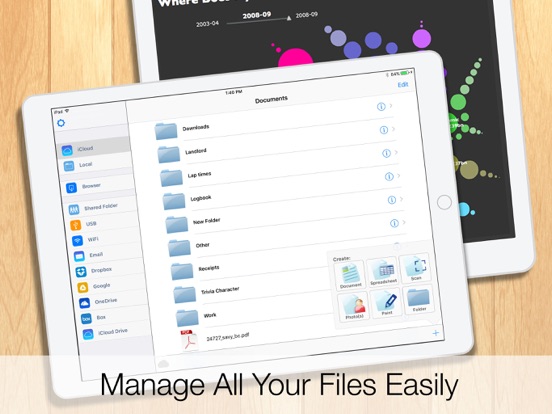
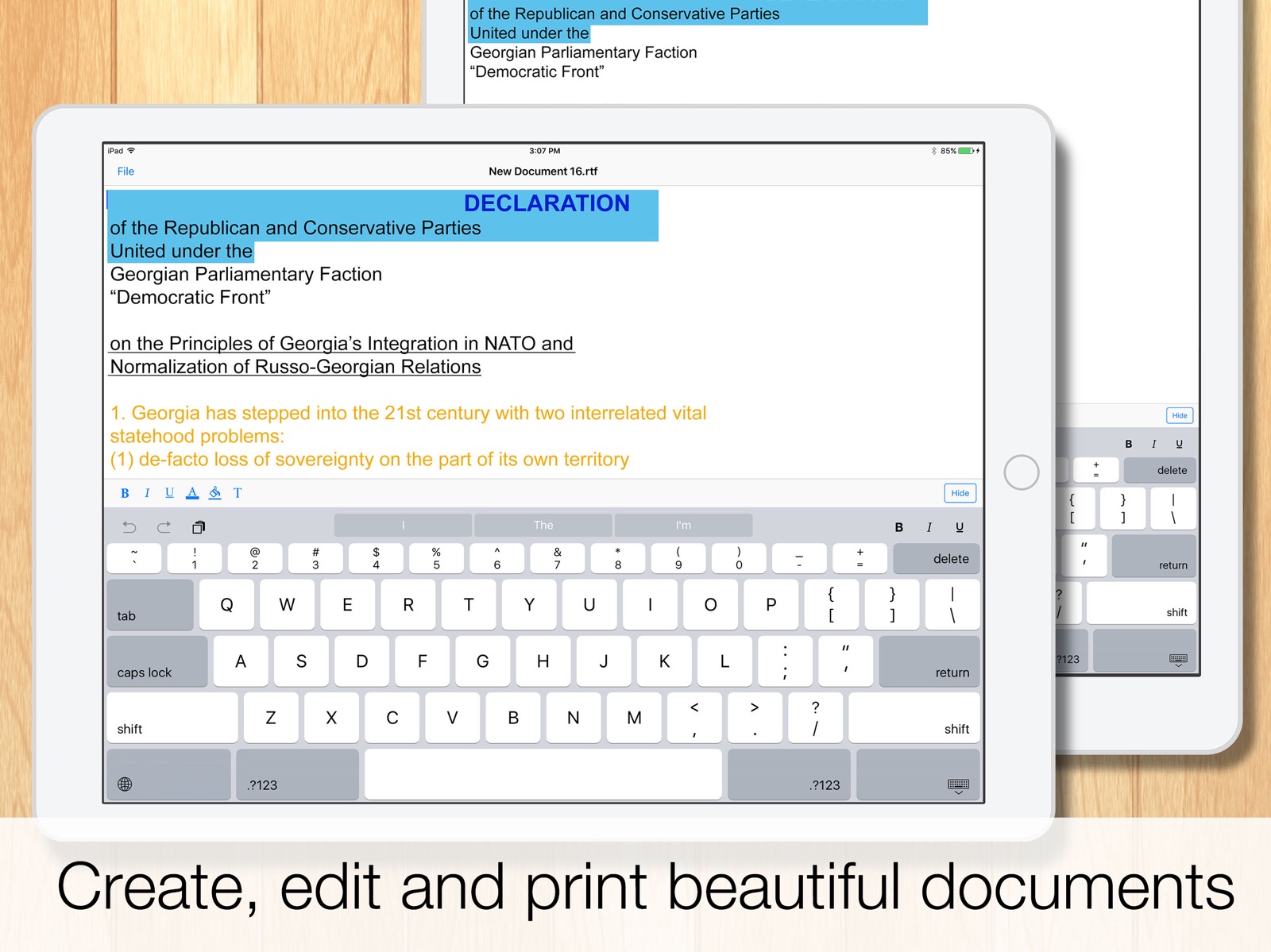
A mobile office suite for editing and managing documents
iPhone · iPad
Quick verdict
- What it is
- Documents is a lightweight mobile office suite that allows users to edit and manage spreadsheet and rich text files on their iPhone. It works both online and offline and synchronizes files with Google Drive, Dropbox, Box, and SkyDrive accounts.
- Best for
-
- someone who needs a mobile office suite
- someone who wants to edit documents on the go
- At a glance
-
- Free to download
Categories and search queries
Official categories
- Business
- Productivity
AppCorpus categories
Key functions
| Function | Availability | Access | Scope | Evidence |
|---|---|---|---|---|
| Free app | Yes | Free | — | Store published |
Screens
App Store
17 store screenshots


Pricing & paywalls
App Store
- Free
Ratings & reviews
App Store
-
5/5An app that has aged well
This app was initially released in the era of the iPhone, the phone that made you feel dumb not to have because finally...a smartphone that works and looks like a PC. In the early days, there weren’t a ton of apps. I wanted to be able to write parts of my papers for school and then I could easily export my papers as .doc .ppt .xls, which kept formatting and allowed me to move directly from iPhone to MSOffice. All we had during early iOS was a notes app that was just TextEdit and then you could email text. Couldn’t even send photos via text! You had to call AT&T and convince them to click on some random box they’re not supposed to click! But this era of iPhone and Apps were aligned with the iPod. A place to disconnect, dissolve into your own space and finally people could have their records on the go without some lame radio DJ and ads, and anything your could dream of having In your pocket. If I want to write a letter, update a customers invoice, or anything worth keeping – you know, not just a note...then my go to has been this app for personal & professional work. Google is the obvious choice any group projects but I like writing in the app because I don’t have to worry about permissions and accidentally sharing stuff. Sometimes I want to write things and never see them again....The modern trend with tech is to never disconnect. This app will remain on my iPhone, and it’s one of the 15-20 apps the will go on my final iPod – the end of privacy and ability to unplug, just for a bit... & the end of piece and quiet. Maybe it’s just a relic to some but this app has been like a goddess to me. Thanks for your work over the years devs!
#29517164993451528 · 4 Sep 2026
-
1/5Ads on my phone???
I am trying to open a document that I need to send urgently to my insurance. This is on my phone. MY phone, my document. And how in the world it is popping up an ad for a scanner that I dont want and no matter what I do, the ad doesnt leave the screen and I cannot access my doxument at all! There is no option to close it and i even chose “install” just to get rid of it, it still wont go away! I dont need to scan anything. I just need to s nd a pdf file to the inaurance and now i cannot access it because of the ads!! Since when we have ada on our phones to open our phone hard drive?? This is outrageous and abusive. More and more I want to remove myself from the grid but unfortunately the world doesnt allow it. Lots of companies only offer the app to interact with them. Basically if you dont want a smart phone you cannot funcion in the current world. These companies are horrible and abusive invading our life and privacy and giving us no way out. Ugh 😤 I have started going back to the past and have only hard copies on paper of everything. They have the control over my phone apparently and the files I have saved in it. So thia Documents app is now useless. Because of a stupid ad blocking access to my files.
Gahsyrer · 4 Sep 2026
-
5/5Suggestions on improvements
Hi, I appreciate this App, and like it very much. I have the following suggestions on improvements for your consideration: (1) Suggest to add a function: when tap the top of an opened document (maybe the document name), it will automatically bring the document to the bottom line. If would be helpful when the document is really long. (2) Suggest to NOT alway popping out a dialogue box to choose “save” or “not save” when closing a document, IF the document was only opened and viewed without any revisions or updates. The save/not save options should be only given when a document was modified. (3) Suggest to add a function of “bullet” for editing the content of a document. Thanks!
Welcome66!! · 4 Sep 2026
-
2/5Trying again to post my 2 star review
Funny how they don't post negative reviews. I left a 2 star review a while ago and it never got posted. This app doesn’t work correctly. It doesn't save colors. It doesn’t save with .doc extension, it only saves documents with RTF extension. Spreadsheet files are limited to CSV extension. It does not copy and paste from other csv or xls files. It saves newly created empty files and multiple copies of edited documents even when you hit “don’t save”. It doesn’t save files to iCloud folder even after you set the document storage folder to iCloud. The help files are either nonexistent or they don’t make sense for this app. There is no possible way there could be so many recently posted 5 star reviews of this app! It doesn't work correctly. Very few critical reviews. LOL. Really? By all means, download this app! Find out for yourself. However, if they ever actually fix any of the above mentioned issues, I'll be happy to update my review with 5 stars 😊
SoUknow · 4 Sep 2026
-
2/5Please Fix These Bugs That Are Keeping Me from Wanting to Use This App
I love this app. I used this app for three years with no issues. I’m giving it two stars in this review because I have uninstalled and reinstalled this app several times because of a bug that I can’t figure out how to manually fix. I kept doing so because I was hoping the problem would be resolved eventually. The issue has been that I can’t apply changes to the font. There’s no option anymore to apply the changes I make after I click the font button. I can set it to “Times New Roman”, size “15”, but I cannot apply the change, or exit out of the font changer. It may be just that my device is “behind” (I am working with an iPod Touch 6th Gen), but if I can download the app, it should function correctly regardless of what I’m working with. I love this app, it’s been very useful to me as a writer, so please check and fix this problem.
disgruntledavidreader:( · 4 Sep 2026
Privacy & accessibility
App Store
Privacy
- Data Linked to You — Analytics — Diagnostics — Performance Data Developer declared
- Data Linked to You — Analytics — Identifiers — Device ID Developer declared
- Data Linked to You — Other Purposes — Diagnostics — Crash Data Developer declared
- Data Linked to You — Third-Party Advertising — Diagnostics — Performance Data Developer declared
- Data Linked to You — Third-Party Advertising — Identifiers — Device ID Developer declared
- Data Linked to You — Third-Party Advertising — Location — Coarse Location Developer declared
- Data Linked to You — Third-Party Advertising — Usage Data — Advertising Data Developer declared
- Data Linked to You — Diagnostics Developer declared
- Data Linked to You — Identifiers Developer declared
- Data Linked to You — Location Developer declared
- Data Linked to You — Usage Data Developer declared
- Data Used to Track You — Diagnostics — Performance Data Developer declared
- Data Used to Track You — Diagnostics Developer declared
- Data Used to Track You — Identifiers — Device ID Developer declared
- Data Used to Track You — Identifiers Developer declared
- Data Used to Track You — Usage Data — Advertising Data Developer declared
- Data Used to Track You — Usage Data Developer declared
Accessibility
- Differentiate Without Color Alone — SUPPORTED Store published
- Larger Text — SUPPORTED Store published
- Reduced Motion — SUPPORTED Store published
- Sufficient Contrast — SUPPORTED Store published
- Voice Control — SUPPORTED Store published
- VoiceOver — SUPPORTED Store published
Versions
App Store
-
10.0
This update adds multitasking support for iPad. Rich text editing enhancements. Improved connectivity to Microsoft OneDrive, Google Drive, and Dropbox. File browsing speed has been improved and a number of ui updates.
-
11
Compatibility updates for iOS 11. Fixes a number of page alignment issues and keyboard issues. Also, added updated support for Dropbox v2.
-
11.1
Compatibility updates for iOS 11. Fixes a number of page alignment issues and keyboard issues. Also, added updated support for Dropbox v2.
-
11.2
A Stability update fixing issues when tapping on menu on iPad, and selecting certain font families.
-
11.3
Fixed UI issue which caused the formatting bar to be obstructed on iPad.
-
11.4
Improved support for Keyboard overlay on iPad and support for wireless keyboards in Document Editing. Minor bug fixes for when changing documents rapidly.
-
12.0
iOS 12 Update with Siri Shortcuts support. You can now setup a shortcut to open your favourite documents by speaking to Siri! Shortcuts can be custom configured using the Settings > Siri & Search page on your device. Also featuring improved AirPrint support for word documents, improvements to Google Drive integrations, and improved open with integrations. A number of stability and security updates included.
-
12.1
12.1 UI Update Improved Localization Improved support for background music handling Improvements to toolbar ui for iPhone X and XS Improvements to loading Fixed a bug with opening files directly from Siri and Spotlight
-
12.2
12.2 Patch Fix Fixes some UI errors Fixes issue with banner ads blocking toolbar on some devices Fixes a crash when exporting photos
-
14.1
14.1 Update - Modernized sharing & connectivity to iOS 14 - Fixed a layout issue for iPad - Performance Improvements - UI Improvements
-
15.0
15.0 Update - Updated UI support for devices running latest iOS - Improved Google Drive support - UI Toolbar Improvements - Bugfixes
-
17.1
iOS 17 Compatibility Update Dropbox Update A number of resolution improvements
-
17.2
- UI Improvement for Google Drive - Fixes a crash for PDF scanner
-
18.0
· 24 Feb 2025
- iOS 18 compatibility update - Improved Google Drive Supported
-
7.5
-= v7.5 =- - Reduced app size & memory usage - Minor bugfixes -= v7.4 =- - Improved scrolling speed - Added Box.com support - Fixed row selection on spreadsheet - Improved Sharing UI -= V7.3 =- - Fixed UI Glitches -= v7.2 =- - Fixed issue exiting scan mode -= v7.1 =- - Fixed a issue crash on launch when large pdf files exist - Fixed a UI display issue -= v7.0 =- - iOS 7 Update - Improved performance - Improved rich text file support - Improved support for attachments - Refreshed UI and transitions - New file transfer options - New tutorial screens - Fixed a rare crash issue on saving -= v6.4 =- - Fixed a slowdown/crash issue on directory screen -= v6.3 =- - Added support for new video codecs - Fixed a rare launch crash bug -= v6.2 =- - Fixed open with bug - Fixed default print margins -= v6.1 =- - Added Automatic Document Scanning Option - Added Enhanced Data Protection - Added export to photos feature - Added export to pdf feature - Enhanced media playback support - UI Improvements - Improved rendering speed -= v5.9 =- - fixed orientation rotation issues. - fixed multiple email attachment issues. - added document search functionality. -= v5.8 =- - Improved handling of currency and percentages in iSpreadsheet -= v5.7 =- - Updated UI. - Improved editing for paint documents. - Improved moving documents. - Improved support for online files. - Bugfixes. -= v5.6 =- - Fixed issue with copying of empty spreadsheet cells - Fixed a crash issue - Fixed issue with Dropbox file modifications
-
7.6
-= v7.6 =- - Fixed a bug with local file updates not refreshing the UI -= v7.5 =- - Reduced app size & memory usage - Minor bugfixes -= v7.4 =- - Improved scrolling speed - Added Box.com support - Fixed row selection on spreadsheet - Improved Sharing UI -= V7.3 =- - Fixed UI Glitches -= v7.2 =- - Fixed issue exiting scan mode -= v7.1 =- - Fixed a issue crash on launch when large pdf files exist - Fixed a UI display issue -= v7.0 =- - iOS 7 Update - Improved performance - Improved rich text file support - Improved support for attachments - Refreshed UI and transitions - New file transfer options - New tutorial screens - Fixed a rare crash issue on saving -= v6.4 =- - Fixed a slowdown/crash issue on directory screen -= v6.3 =- - Added support for new video codecs - Fixed a rare launch crash bug -= v6.2 =- - Fixed open with bug - Fixed default print margins -= v6.1 =- - Added Automatic Document Scanning Option - Added Enhanced Data Protection - Added export to photos feature - Added export to pdf feature - Enhanced media playback support - UI Improvements - Improved rendering speed -= v5.9 =- - fixed orientation rotation issues. - fixed multiple email attachment issues. - added document search functionality. -= v5.8 =- - Improved handling of currency and percentages in iSpreadsheet -= v5.7 =- - Updated UI. - Improved editing for paint documents. - Improved moving documents. - Improved support for online files. - Bugfixes. -= v5.6 =- - Fixed issue with copying of empty spreadsheet cells - Fixed a crash issue - Fixed issue with Dropbox file modifications
-
7.7
-= v7.8 =- - iOS 8 Compatibility fix - Fixed crash in text editing - Stability update in Spreadsheet - Fixed icon rendering on iOS 7.1 - Improved file browsing speed -= v7.7 =- - Improved landscape support - Additional subscription length - Stability improvements -= v7.6 =- - Faster file browsing - Multipage and B&W scanning - Stability bugfixes -= v7.5 =- - Minor Bugfixes -= v7.4 =- - Improved Landscape Support - Added Chinese Localization - Speed improvements - Stability improvements - Fixed issue with autoscroll -= v7.3 =- - Fixed minor UI glitches -= v7.2 =- - Fixed issue exiting scanning mode -= v7.1 =- - Fixed a issue crash on launch when large pdf files exist - Fixed a UI display issue - Fixed Save As Logic -= v7.0 =- - iOS 7 Update - Improved performance - Improved rich text file support - Improved support for attachments - Refreshed UI and transitions - New file transfer options - New tutorial screens - Fixed a rare crash issue on saving -= v6.4 =- - Fixed a slowdown/crash issue on directory screen -= v6.3 =- - Added support for new video codecs - Fixed a rare launch crash bug -= v6.2 =- - Fixed open with bug - Fixed default print margins -= v6.1 =- - Added Automatic Document Scanning Option - Added Enhanced Data Protection - Added export to photos feature - Added export to pdf feature - Enhanced media playback support - UI Improvements - Improved rendering speed -= v5.9 =- - fixed orientation rotation issues. - fixed multiple email attachment issues. - added document search functionality. -= v5.8 =- - Improved handling of currency and percentages in iSpreadsheet -= v5.7 =- - Updated UI. - Improved editing for paint documents. - Improved moving documents. - Improved support for online files. - Bugfixes. -= v5.6 =- - Fixed issue with copying of empty spreadsheet cells - Fixed a crash issue - Fixed issue with Dropbox file modifications -= v5.5 =- - Added workflow feature. Open any stored documents with other Apps! - Fixed issue with printing RTF Files. - Fixed localization support for Spreadsheets. - Improved UI for exporting files
-
7.8
-= v7.8 =- - iPhone 6 & iPhone 6 Plus native UI Support - iOS 8 Compatibility fix - Fixed crash in text editing - Stability update in Spreadsheet - Fixed icon rendering on iOS 7.1 - Improved file browsing speed -= v7.7 =- - Improved landscape support - Additional subscription length - Stability improvements -= v7.6 =- - Faster file browsing - Multipage and B&W scanning - Stability bugfixes -= v7.5 =- - Minor Bugfixes -= v7.4 =- - Improved Landscape Support - Added Chinese Localization - Speed improvements - Stability improvements - Fixed issue with autoscroll -= v7.3 =- - Fixed minor UI glitches -= v7.2 =- - Fixed issue exiting scanning mode -= v7.1 =- - Fixed a issue crash on launch when large pdf files exist - Fixed a UI display issue - Fixed Save As Logic -= v7.0 =- - iOS 7 Update - Improved performance - Improved rich text file support - Improved support for attachments - Refreshed UI and transitions - New file transfer options - New tutorial screens - Fixed a rare crash issue on saving -= v6.4 =- - Fixed a slowdown/crash issue on directory screen -= v6.3 =- - Added support for new video codecs - Fixed a rare launch crash bug -= v6.2 =- - Fixed open with bug - Fixed default print margins -= v6.1 =- - Added Automatic Document Scanning Option - Added Enhanced Data Protection - Added export to photos feature - Added export to pdf feature - Enhanced media playback support - UI Improvements - Improved rendering speed -= v5.9 =- - fixed orientation rotation issues. - fixed multiple email attachment issues. - added document search functionality. -= v5.8 =- - Improved handling of currency and percentages in iSpreadsheet -= v5.7 =- - Updated UI. - Improved editing for paint documents. - Improved moving documents. - Improved support for online files. - Bugfixes. -= v5.6 =- - Fixed issue with copying of empty spreadsheet cells - Fixed a crash issue - Fixed issue with Dropbox file modifications -= v5.5 =- - Added workflow feature. Open any stored documents with other Apps! - Fixed issue with printing RTF Files. - Fixed localization support for Spreadsheets. - Improved UI for exporting files
-
7.9
- v7.9 =- - Additional iOS 8 Fixes and Enhancements - Fixed crash issues on iPad when sharing/printing - Added iCloud Drive import/export option - Google Drive improvements - Improved Icons in iPhone 6 and 6 Plus -= v7.8 =- - iPhone 6 & iPhone 6 Plus Native Support - iOS 8 Compatibility fix - Fixed crash in text editing - Stability update in Spreadsheet - Fixed icon rendering on iOS 7.1 - Improved file browsing speed -= v7.7 =- - Improved landscape support - Additional subscription length - Stability improvements -= v7.6 =- - Faster file browsing - Multipage and B&W scanning - Stability bugfixes -= v7.5 =- - Minor Bugfixes -= v7.4 =- - Improved Landscape Support - Added Chinese Localization - Speed improvements - Stability improvements - Fixed issue with autoscroll -= v7.3 =- - Fixed minor UI glitches -= v7.2 =- - Fixed issue exiting scanning mode -= v7.1 =- - Fixed a issue crash on launch when large pdf files exist - Fixed a UI display issue - Fixed Save As Logic -= v7.0 =- - iOS 7 Update - Improved performance - Improved rich text file support - Improved support for attachments - Refreshed UI and transitions - New file transfer options - New tutorial screens - Fixed a rare crash issue on saving -= v6.4 =- - Fixed a slowdown/crash issue on directory screen -= v6.3 =- - Added support for new video codecs - Fixed a rare launch crash bug -= v6.2 =- - Fixed open with bug - Fixed default print margins -= v6.1 =- - Added Automatic Document Scanning Option - Added Enhanced Data Protection - Added export to photos feature - Added export to pdf feature - Enhanced media playback support - UI Improvements - Improved rendering speed -= v5.9 =- - fixed orientation rotation issues. - fixed multiple email attachment issues. - added document search functionality. -= v5.8 =- - Improved handling of currency and percentages in iSpreadsheet -= v5.7 =- - Updated UI. - Improved editing for paint documents. - Improved moving documents. - Improved support for online files. - Bugfixes.
-
8.0
-= v8.0 =- - This update does not support iPad 1, and iPhone 3. Please do not update if using these devices - Improved Image Editing Tools - Improved Google Drive Integration - Fixed Crash Issues on pre iOS 8.0 devices -= v7.9 =- - Additional iOS 8 Fixes and Enhancements - Fixed crash issues on iPad when sharing/printing - Added iCloud Drive import/export option - Google Drive improvements - Improved Icons in iPhone 6 and 6 Plus -= v7.8 =- - iPhone 6 & iPhone 6 Plus Native Support - iOS 8 Compatibility fix - Fixed crash in text editing - Stability update in Spreadsheet - Fixed icon rendering on iOS 7.1 - Improved file browsing speed -= v7.7 =- - Improved landscape support - Additional subscription length - Stability improvements -= v7.6 =- - Faster file browsing - Multipage and B&W scanning - Stability bugfixes -= v7.5 =- - Minor Bugfixes -= v7.4 =- - Improved Landscape Support - Added Chinese Localization - Speed improvements - Stability improvements - Fixed issue with autoscroll -= v7.3 =- - Fixed minor UI glitches -= v7.2 =- - Fixed issue exiting scanning mode -= v7.1 =- - Fixed a issue crash on launch when large pdf files exist - Fixed a UI display issue - Fixed Save As Logic -= v7.0 =- - iOS 7 Update - Improved performance - Improved rich text file support - Improved support for attachments - Refreshed UI and transitions - New file transfer options - New tutorial screens - Fixed a rare crash issue on saving -= v6.4 =- - Fixed a slowdown/crash issue on directory screen -= v6.3 =- - Added support for new video codecs - Fixed a rare launch crash bug -= v6.2 =- - Fixed open with bug - Fixed default print margins -= v6.1 =- - Added Automatic Document Scanning Option - Added Enhanced Data Protection - Added export to photos feature - Added export to pdf feature - Enhanced media playback support - UI Improvements - Improved rendering speed -= v5.9 =- - fixed orientation rotation issues. - fixed multiple email attachment issues. - added document search functionality. -= v5.8 =- - Improved handling of currency and percentages in iSpreadsheet -= v5.7 =- - Updated UI. - Improved editing for paint documents. - Improved moving documents. - Improved support for online files. - Bugfixes.
-
8.1
-= v8.1 =- - Fixed issue with iCloud document list not refreshing correctly on iOS 8.1.x -= v8.0 =- - Added quick link Today Widget - Fixed connectivity bugs running on iOS 8 - Improved stability - Improved speed on 64bit devices -= v7.9 =- - Additional iOS 8 Fixes and Enhancements - Fixed crash issues on iPad when sharing/printing - Added iCloud Drive import/export option - Google Drive improvements - Improved Icons in iPhone 6 and 6 Plus -= v7.8 =- - iPhone 6 & iPhone 6 Plus Native Support - iOS 8 Compatibility fix - Fixed crash in text editing - Stability update in Spreadsheet - Fixed icon rendering on iOS 7.1 - Improved file browsing speed -= v7.7 =- - Improved landscape support - Additional subscription length - Stability improvements -= v7.6 =- - Faster file browsing - Multipage and B&W scanning - Stability bugfixes -= v7.5 =- - Minor Bugfixes -= v7.4 =- - Improved Landscape Support - Added Chinese Localization - Speed improvements - Stability improvements - Fixed issue with autoscroll -= v7.3 =- - Fixed minor UI glitches -= v7.2 =- - Fixed issue exiting scanning mode -= v7.1 =- - Fixed a issue crash on launch when large pdf files exist - Fixed a UI display issue - Fixed Save As Logic -= v7.0 =- - iOS 7 Update - Improved performance - Improved rich text file support - Improved support for attachments - Refreshed UI and transitions - New file transfer options - New tutorial screens - Fixed a rare crash issue on saving -= v6.4 =- - Fixed a slowdown/crash issue on directory screen -= v6.3 =- - Added support for new video codecs - Fixed a rare launch crash bug -= v6.2 =- - Fixed open with bug - Fixed default print margins -= v6.1 =- - Added Automatic Document Scanning Option - Added Enhanced Data Protection - Added export to photos feature - Added export to pdf feature - Enhanced media playback support - UI Improvements - Improved rendering speed -= v5.9 =- - fixed orientation rotation issues. - fixed multiple email attachment issues. - added document search functionality.
-
9.0
-= v9.0 =- - Fixes various stability issues when running on iOS 9 - Apple Watch Support - Spotlight Search Support - 3D Touch Support -= v8.1 =- - Fixed issue with iCloud document list not refreshing correctly on iOS 8.1.x -= v8.0 =- - Added quick link Today Widget - Fixed connectivity bugs running on iOS 8 - Improved stability - Improved speed on 64bit devices -= v7.9 =- - Additional iOS 8 Fixes and Enhancements - Fixed crash issues on iPad when sharing/printing - Added iCloud Drive import/export option - Google Drive improvements - Improved Icons in iPhone 6 and 6 Plus -= v7.8 =- - iPhone 6 & iPhone 6 Plus Native Support - iOS 8 Compatibility fix - Fixed crash in text editing - Stability update in Spreadsheet - Fixed icon rendering on iOS 7.1 - Improved file browsing speed -= v7.7 =- - Improved landscape support - Additional subscription length - Stability improvements -= v7.6 =- - Faster file browsing - Multipage and B&W scanning - Stability bugfixes -= v7.5 =- - Minor Bugfixes -= v7.4 =- - Improved Landscape Support - Added Chinese Localization - Speed improvements - Stability improvements - Fixed issue with autoscroll -= v7.3 =- - Fixed minor UI glitches -= v7.2 =- - Fixed issue exiting scanning mode -= v7.1 =- - Fixed a issue crash on launch when large pdf files exist - Fixed a UI display issue - Fixed Save As Logic -= v7.0 =- - iOS 7 Update - Improved performance - Improved rich text file support - Improved support for attachments - Refreshed UI and transitions - New file transfer options - New tutorial screens - Fixed a rare crash issue on saving -= v6.4 =- - Fixed a slowdown/crash issue on directory screen -= v6.3 =- - Added support for new video codecs - Fixed a rare launch crash bug -= v6.2 =- - Fixed open with bug - Fixed default print margins -= v6.1 =- - Added Automatic Document Scanning Option - Added Enhanced Data Protection - Added export to photos feature - Added export to pdf feature - Enhanced media playback support - UI Improvements - Improved rendering speed
-
9.1
-= v9.1 =- - Fixed a crash when opening files in iOS 8 - Fixed a crash when tapping save as -= v9.0 =- - Fixes various stability issues when running on iOS 9 - Apple Watch Support - Spotlight Search Support - 3D Touch Support -= v8.1 =- - Fixed issue with iCloud document list not refreshing correctly on iOS 8.1.x -= v8.0 =- - Added quick link Today Widget - Fixed connectivity bugs running on iOS 8 - Improved stability - Improved speed on 64bit devices -= v7.9 =- - Additional iOS 8 Fixes and Enhancements - Fixed crash issues on iPad when sharing/printing - Added iCloud Drive import/export option - Google Drive improvements - Improved Icons in iPhone 6 and 6 Plus -= v7.8 =- - iPhone 6 & iPhone 6 Plus Native Support - iOS 8 Compatibility fix - Fixed crash in text editing - Stability update in Spreadsheet - Fixed icon rendering on iOS 7.1 - Improved file browsing speed -= v7.7 =- - Improved landscape support - Additional subscription length - Stability improvements -= v7.6 =- - Faster file browsing - Multipage and B&W scanning - Stability bugfixes -= v7.5 =- - Minor Bugfixes -= v7.4 =- - Improved Landscape Support - Added Chinese Localization - Speed improvements - Stability improvements - Fixed issue with autoscroll -= v7.3 =- - Fixed minor UI glitches -= v7.2 =- - Fixed issue exiting scanning mode -= v7.1 =- - Fixed a issue crash on launch when large pdf files exist - Fixed a UI display issue - Fixed Save As Logic -= v7.0 =- - iOS 7 Update - Improved performance - Improved rich text file support - Improved support for attachments - Refreshed UI and transitions - New file transfer options - New tutorial screens - Fixed a rare crash issue on saving -= v6.4 =- - Fixed a slowdown/crash issue on directory screen -= v6.3 =- - Added support for new video codecs - Fixed a rare launch crash bug -= v6.2 =- - Fixed open with bug - Fixed default print margins -= v6.1 =- - Added Automatic Document Scanning Option - Added Enhanced Data Protection - Added export to photos feature - Added export to pdf feature - Enhanced media playback support - UI Improvements - Improved rendering speed
-
9.2
-= v9.2 =- - Fixed a bug where changing fonts in the rich text editor could cause the App to crash -= v9.1 =- - Fixed a crash when opening files in iOS 8 - Fixed a crash when tapping save as -= v9.0 =- - Fixes various stability issues when running on iOS 9 - Apple Watch Support - Spotlight Search Support - 3D Touch Support -= v8.1 =- - Fixed issue with iCloud document list not refreshing correctly on iOS 8.1.x -= v8.0 =- - Added quick link Today Widget - Fixed connectivity bugs running on iOS 8 - Improved stability - Improved speed on 64bit devices -= v7.9 =- - Additional iOS 8 Fixes and Enhancements - Fixed crash issues on iPad when sharing/printing - Added iCloud Drive import/export option - Google Drive improvements - Improved Icons in iPhone 6 and 6 Plus -= v7.8 =- - iPhone 6 & iPhone 6 Plus Native Support - iOS 8 Compatibility fix - Fixed crash in text editing - Stability update in Spreadsheet - Fixed icon rendering on iOS 7.1 - Improved file browsing speed -= v7.7 =- - Improved landscape support - Additional subscription length - Stability improvements -= v7.6 =- - Faster file browsing - Multipage and B&W scanning - Stability bugfixes -= v7.5 =- - Minor Bugfixes -= v7.4 =- - Improved Landscape Support - Added Chinese Localization - Speed improvements - Stability improvements - Fixed issue with autoscroll -= v7.3 =- - Fixed minor UI glitches -= v7.2 =- - Fixed issue exiting scanning mode -= v7.1 =- - Fixed a issue crash on launch when large pdf files exist - Fixed a UI display issue - Fixed Save As Logic -= v7.0 =- - iOS 7 Update - Improved performance - Improved rich text file support - Improved support for attachments - Refreshed UI and transitions - New file transfer options - New tutorial screens - Fixed a rare crash issue on saving -= v6.4 =- - Fixed a slowdown/crash issue on directory screen -= v6.3 =- - Added support for new video codecs - Fixed a rare launch crash bug -= v6.2 =- - Fixed open with bug - Fixed default print margins -= v6.1 =- - Added Automatic Document Scanning Option - Added Enhanced Data Protection - Added export to photos feature - Added export to pdf feature - Enhanced media playback support - UI Improvements - Improved rendering speed
-
9.3
-= v9.3 =- - Native iPad Pro Support - Improved support for hardware keyboards - Improved support for iPads -= v9.2 =- - Fixed a issue with rich text editing where changing to some font sizes causes the app to crash. -= v9.0 =- - Fixes various stability issues when running on iOS 9 - Apple Watch Support - Spotlight Search Support - 3D Touch Support -= v8.1 =- - Fixed issue with iCloud document list not refreshing correctly on iOS 8.1.x -= v8.0 =- - Added quick link Today Widget - Fixed connectivity bugs running on iOS 8 - Improved stability - Improved speed on 64bit devices -= v7.9 =- - Additional iOS 8 Fixes and Enhancements - Fixed crash issues on iPad when sharing/printing - Added iCloud Drive import/export option - Google Drive improvements - Improved Icons in iPhone 6 and 6 Plus -= v7.8 =- - iPhone 6 & iPhone 6 Plus Native Support - iOS 8 Compatibility fix - Fixed crash in text editing - Stability update in Spreadsheet - Fixed icon rendering on iOS 7.1 - Improved file browsing speed -= v7.7 =- - Improved landscape support - Additional subscription length - Stability improvements -= v7.6 =- - Faster file browsing - Multipage and B&W scanning - Stability bugfixes -= v7.5 =- - Minor Bugfixes -= v7.4 =- - Improved Landscape Support - Added Chinese Localization - Speed improvements - Stability improvements - Fixed issue with autoscroll -= v7.3 =- - Fixed minor UI glitches -= v7.2 =- - Fixed issue exiting scanning mode -= v7.1 =- - Fixed a issue crash on launch when large pdf files exist - Fixed a UI display issue - Fixed Save As Logic -= v7.0 =- - iOS 7 Update - Improved performance - Improved rich text file support - Improved support for attachments - Refreshed UI and transitions - New file transfer options - New tutorial screens - Fixed a rare crash issue on saving -= v6.4 =- - Fixed a slowdown/crash issue on directory screen -= v6.3 =- - Added support for new video codecs - Fixed a rare launch crash bug -= v6.2 =- - Fixed open with bug - Fixed default print margins
Alternatives
- OpenDocument Reader - view ODT — Same category + similar ratings
- Office Suite-Word, PDF, Sheets — Same category + similar ratings
Availability by market
- US
Data quality & evidence
- Page completeness
- Independent summary published
- Last verified
- 4 Sep 2026
- Sources
- App Store