
Documents - File Manager
A file management and editing app
by Readdle Technologies Limited
iPhone · iPad
Quick verdict
- What it is
- Documents is a file management and editing app that allows users to scan receipts, edit PDFs, and manage files.
- Best for
-
- someone who needs to scan receipts
- someone who needs to edit PDFs
- someone who needs to manage files
- At a glance
-
- Free to download
- In-app purchases
Categories and search queries
Official categories
- Productivity
- Business
AppCorpus categories
People use this app to
Relevant searches
- OCR scanner without watermark
- camera to PDF
- document scanner
Key functions
| Function | Availability | Access | Scope | Evidence |
|---|---|---|---|---|
| Document scanning | Yes | Unknown | — |
From listing
|
| Free app | Yes | Free | — | Store published |
| In-app purchases | Yes | Limited free | — | Store published |
Screens
App Store
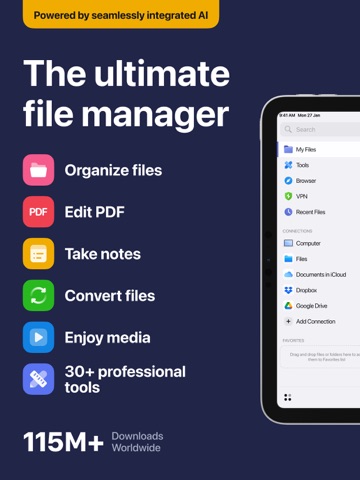
26 store screenshots



Pricing & paywalls
App Store
Shown for US
- Documents Plus — $9.99
- Documents Plus — $14.99
- Documents Plus — $49.99
- Documents Plus — $59.99
- Documents VPN — $12.49
- Documents VPN — $89.99
Ratings & reviews
App Store
Shown for US
-
5/5Top tier App for iPhone files!
Though I am using the Documents app for personal use, and have been for many years, my personal life includes being a pre-pandemic Wild Schooling parent (homeschool). Our days are spent outside at the beaches and on trails - low signal and no wi-fi. I purchase many bundles of material for curriculum through homeschool blogs and these always come to me via compressed files. I required the ability to open these files for viewing from my iPhone. I have a paid Google One account for storage so something that could work seamless was ideal. I tried many apps but they fell flat - until Documents by Readdle. I can seamlessly transfer unzipped documents back to my G1, view the documents, print and even store them in organized little files - all 200GB for myself. The app is extremely simple to use without overwhelming information, is aesthetically pleasing keeping distractions at a minimum and your files at the forefront. There are no ads or pop-ups, and you are only informed of their availability for upgraded service when you try to use the two services (VPN and pro pdf) that require the upgrade. I have purchased many new iPhones in my time of using Documents, and have had zero issues. I also have transferred files from Documents to my laptop - also without issue. I use this app daily and it is one of the first to go on any new device. Documents by Readdle is impeccable - surpassing so many apps that require a purchase for much lesser quality and performance. I am beyond grateful for the hard work, engineering, thought and intuitiveness by the developer You have created something so simplistic and useful while still being humble and kind. A great example for any for profit company. Thank you!
MCDCTorres · 30 Aug 2026
-
5/5hemorrhagic stroke, special forces army veteran
before I’ve had the stroke, I’ve had the stroke in April 2021 I have been using a slew of different programs, but I’ve used documents in lately of late. I have began using Documents more. I am in special forces army veteran. I was on active duty station at Fort Campbell Kentucky on the halo team since I’ve had the stroke and other things I’ve come to use Documents more and I didn’t like as much but now I’m liking it a lot better the functionality and the connectivity they’ve inserted into it and the useful that you have now on devices other than just your desktop computer or laptop computer portable devices is much better. You can see the evolution over the years so I will say a little organization I’ve had for years but I do like where it’s going and I like it currently as this now. I should say that I also have Evernote. I’ve used it for years. I have it too, but like I said I have had emerged and I’m experiencing declines especially the last year that’s normal with this type of entry anyhow, with the connections of the connectivity documents Now has and words movie too really like it a lot. I should say this is been dictated so the grammar and punctuation may not be correct and I’ll be honest it’s about time depending on who I’m texting or talking to me I will prove some messages this one. I probably won’t just tell you just let you know anyways I really like this last a few years where it is now especially if you’re using mobile devices which a lot of people now have it it’s really good. Used to be good if you had a desktop or a full laptop but now on devices such as devices they they made a lot better and a lot easier to navigate. 19 April 2024 Friday Keith Windham.
DJKWindham · 30 Aug 2026
-
5/5💯Download It – You Will Not Be Disappointed
Hands-down, without a question this is the best folder, organization app on the App Store. Completely free, not including features that are not needed, with built-in, audio, video, PDF, and any other file preview that you need. Built-in cloud access, which enables you to literally login to all of your cloud accounts, across-the-board all at the same time and stays logged in so you have access to all of those files. You also have access to the native files and the native photos, making it the only app that you need to access every single file on your iPad/iPhone. Built-in Web-DAV server, giving you the ability to transfer any file or folder to and from your iPad/iPhone. Built-in browser so that you don’t have to go from one app to the other if you need to grab something off the Internet that you haven’t already downloaded. Readdle is an amazing developer who has my backing 100%. I have no intention of using any other app because literally there is no other app that can do as much as this app can do; at least not all in one place. If I could give it a 10 star rating I would because after three years of using it, I have not been disappointed once.
p0015h4rk · 30 Aug 2026
-
5/5CAN’T BE BEAT! 10 STARS!
It would become a novel to write ALL that this app does & has done for me and my sanity! The amount of storage and tools that this app has at your fingertips is astounding! The monthly upgrade for the extra-useful tools is awesome & reasonably priced! I would like to see an option for a discounted yearly upgrade & would possibly consider that over the monthly subscription. However, the basic/FREE version is JUST AS GOOD/USEFUL & WORTH IT! This app is the multiple accounts meeting place! I LOVE that I can save & work with documents & files from multiple accounts WITHIN ONE APP! I LOVE to have the ability to compress large files and open to view zipped files! I LOVE that I can immediately open SVG files & view them; that has saved me A LOT of time and hassle! I LOVE that I can open, save, create, & sign documents, convert files! I LOVE that I can open my google pictures app within this Docs app & edit them, all within this app! I LOVE that I can create new files/folders & save within this Doc’s app! I LOVE the amount of storage and useful/necessary editing tools with basic &, of course, the extra tools, with the upgrade! The FREE VPN with basic use and the ability to search the web within this app itself and save sites is amazing & just an added benefit! THIS APP IS A BREATH OF FRESH AIR! This app is THE ONLY documents/files/editing app that I kept coming back to; I could NOT find another that even compares! I SWARE BY THIS APP TO EVERYONE and anyone needing ALL of their documents and files & editing in one place that will hold- it seems- unlimited amounts of storage! WELL DONE DOC’S APP! THANK YOU for such a functional, user-friendly, & high quality, performance application!!! 10 STARS! Download NOW, you won’t regret it!
Tiffers33 · 30 Aug 2026
-
5/5Oh god the massive icons
2nd EDIT: I feel like I’ve been a bit harsh. Sorry devs, i know you work hard to make a great product. I just checked, and i first downloaded Documents (and also Scanner Pro) in 2010! That’s how long I’ve been on the Readdle train, and have been a happy customer the whole time. I still hope you give us the option to have small icons again though. :) EDIT: I appreciate the dev response, but it’s basically “You’ll get used to it”. I don’t use the grid view and I don’t want massive icons on my screen ok any view. I’m pretty sure this goes against Apple’s design guidelines (none of their apps use massive icons). Of course you can make your app how you want, but just in case you need an example that you are the anomaly. Please at least give us the option to resize. I don’t have a phablet-sized screen. ORIGINAL: Did you even do some UX testing, or just decide that you personally liked this better? My eyes are burning. Please follow Apple’s UI and UX guidelines. Or at least give us a “normal size” button so we can choose. Also, reading your reply to another review, I don’t want to see all this information the massive icons allow.
djc0 · 30 Aug 2026
Privacy & accessibility
App Store
Privacy
- Data Linked to You — Analytics — Contact Info — Email Address Developer declared
- Data Linked to You — Analytics — Usage Data — Product Interaction Developer declared
- Data Linked to You — App Functionality — Contact Info — Email Address Developer declared
- Data Linked to You — App Functionality — Usage Data — Product Interaction Developer declared
- Data Linked to You — Product Personalization — Contact Info — Email Address Developer declared
- Data Linked to You — Product Personalization — Usage Data — Product Interaction Developer declared
- Data Linked to You — Contact Info Developer declared
- Data Linked to You — Usage Data Developer declared
- Data Not Linked to You — Analytics — Diagnostics — Crash Data Developer declared
- Data Not Linked to You — Analytics — Usage Data — Other Usage Data Developer declared
- Data Not Linked to You — App Functionality — Diagnostics — Crash Data Developer declared
- Data Not Linked to You — App Functionality — Diagnostics — Other Diagnostic Data Developer declared
- Data Not Linked to You — App Functionality — Usage Data — Other Usage Data Developer declared
- Data Not Linked to You — Product Personalization — Diagnostics — Crash Data Developer declared
- Data Not Linked to You — Product Personalization — Usage Data — Other Usage Data Developer declared
- Data Not Linked to You — Diagnostics Developer declared
- Data Not Linked to You — Usage Data Developer declared
Accessibility
No accessibility labels collected yet.
Versions
App Store
-
8.18.1
New update, better experience! We've resolved issues and improved performance. Help us make Documents even better — reach out at [email protected]!
-
8.18.2
This update includes several behind-the-scenes technical improvements to keep Documents running smoothly. We're always working to make it better — feel free to share your thoughts at [email protected].
-
8.19.0
We’ve made a round of technical refinements in this update to keep your experience smooth and stable. As always, we're listening — drop us a note at [email protected].
-
8.19.1
We've made some under-the-hood improvements in this update to ensure Documents continues to perform reliably. Your feedback is always welcome at [email protected]!
-
8.19.10
New update, better experience! We've resolved issues and improved performance. Help us make Documents even better — reach out at [email protected]!
-
8.19.11
New update, better experience! We've resolved issues and improved performance. Help us make Documents even better — reach out at [email protected]!
-
8.19.12
Meet Extract Insights – a powerful new way to get more out of your documents. You can now quickly analyze selected PDF files to generate clear summaries, key takeaways, glossaries, and even detect potential bias, all in just a few taps. This feature is designed with your privacy in mind, your data stays secure and is never used to train AI models. Update now to try Extract Insights and let us know what you think as your feedback helps us make it even better!
-
8.19.13
This update includes several behind-the-scenes technical improvements to keep Documents running smoothly. We're always working to make it better — feel free to share your thoughts at [email protected].
-
8.19.14
We’ve made a round of technical refinements in this update to keep your experience smooth and stable. As always, we're listening — drop us a note at [email protected].
-
8.19.15
Documents now lets you save generated insights as PDF, making it easier to keep, share, and revisit your AI-powered summaries and key takeaways whenever you need them. We hope this makes working with your documents even more convenient.
-
8.19.2
Nothing flashy, just some solid technical tune-ups in this update. Got ideas or feedback? Send them our way: [email protected].
-
8.19.3
New update, better experience! We've resolved issues and improved performance. Help us make Documents even better — reach out at [email protected]!
-
8.19.4
This update includes several behind-the-scenes technical improvements to keep Documents running smoothly. We're always working to make it better — feel free to share your thoughts at [email protected].
-
8.19.5
We’ve made a round of technical refinements in this update to keep your experience smooth and stable. As always, we're listening — drop us a note at [email protected].
-
8.19.6
We’ve made a round of technical refinements in this update to keep your experience smooth and stable. As always, we're listening — drop us a note at [email protected].
-
8.19.7
We've made some under-the-hood improvements in this update to ensure Documents continues to perform reliably. Your feedback is always welcome at [email protected]!
-
8.19.8
Bring your Documents app into bloom with spring icons, backgrounds and Plus button! You can find customization options in Control Center. Get your picnic blanket ready and enjoy the spring! If you need us, you can always find us at [email protected]
-
8.19.9
Nothing flashy, just some solid technical tune-ups in this update. Got ideas or feedback? Send them our way: [email protected].
-
8.20.0
We've made some under-the-hood improvements in this update to ensure Documents continues to perform reliably. Your feedback is always welcome at [email protected]!
-
8.20.1
Documents. Summer Edition. Send your files on holiday. This update brings a sunny makeover to Documents: fresh new icons, juicy "+" buttons, and vibrant summer backgrounds. Choose your favorite style and take your files on a well-deserved summer getaway.
-
8.20.2
We've made some under-the-hood improvements in this update to ensure Documents continues to perform reliably. Your feedback is always welcome at [email protected]!
-
8.20.3
Nothing flashy, just some solid technical tune-ups in this update. Got ideas or feedback? Send them our way: [email protected].
-
8.20.4
We've made a round of technical refinements in this update to keep your experience smooth and stable. As always, we're listening — drop us a note at [email protected].
-
8.20.5
New update, better experience! We've resolved issues and improved performance. Help us make Documents even better — reach out at [email protected]!
-
8.20.6
· 27 Jul 2026
This update includes several behind-the-scenes technical improvements to keep Documents running smoothly. We're always working to make it better — feel free to share your thoughts at [email protected].
-
8.20.7
We've made some under-the-hood improvements in this update to ensure Documents continues to perform reliably. Your feedback is always welcome at [email protected]!
-
8.20.8
Nothing flashy, just some solid technical tune-ups in this update. Got ideas or feedback? Send them our way: [email protected].
-
8.21.0
Introducing built-in media converters and compressors in Documents. You can now convert audio, video, and image formats or compress your files directly inside the app, all without switching tools. We have also resolved bugs and enhanced overall stability. Update Documents today to try the new media tools, and share your feedback with us.
-
8.21.1
· 27 Aug 2026
This update includes several behind-the-scenes technical improvements to keep Documents running smoothly. We're always working to make it better — feel free to share your thoughts at [email protected].
Alternatives
- Files - File Manager & Browser — Same category + similar ratings
- Ostrich VPN Light - Fast Proxy — Same category + similar ratings
- SHAREit: Transfer, Share Files — Same category + similar ratings
- Best VPN Proxy AppVPN — Same category + similar ratings
- Ostrich VPN - Proxy Master — Same category + similar ratings
- HaloVPN: Fast Secure VPN Proxy — Same category + similar ratings
Availability by market
- US
Data quality & evidence
- Page completeness
- Independent summary published
- Last verified
- 30 Aug 2026
- Sources
- App Store