
Quick verdict
- What it is
- Store information collected; an Apoku editorial summary is not yet published.
- At a glance
-
- Free to download
Categories and search queries
Official categories
- Photo & Video
- Graphics & Design
Apoku categories
Key functions
| Function | Availability | Access | Scope | Evidence |
|---|---|---|---|---|
| Free app | Yes | Free | Context-specific | Store published |
Screens
App Store
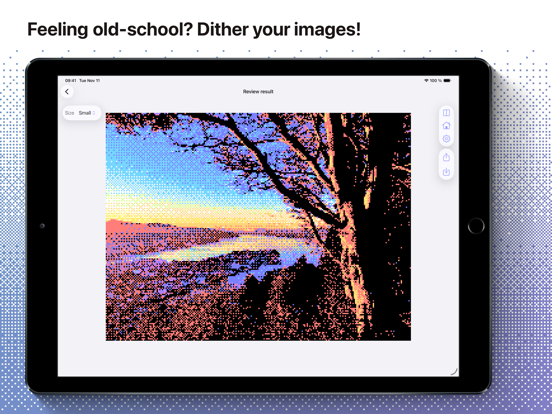
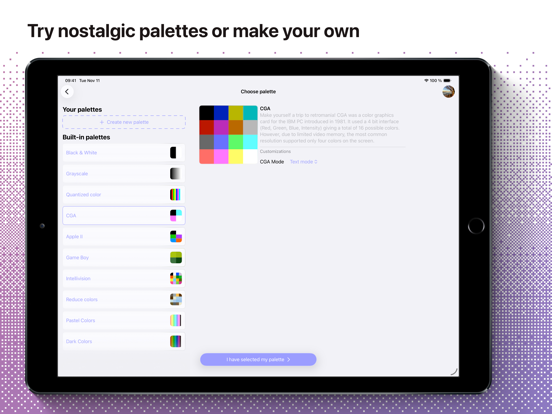
12 store screenshots


Pricing & paywalls
App Store
- Free to download
Ratings & reviews
App Store
-
5/5A Favorite App
This app is perfect for creating fun images and gives the user many tools to work with. If I could suggest a new feature: I wish there was a build in "pixel-perfect" upscaler and a way to save as PNG directly to the camera roll. My current workflow involves saving as PNG to Files, using an external 4x scaler, then saving to camera roll. Hope to see this app's continued support in the far future!
CREATERman · 7 Aug 2026
-
3/5Almost works perfect, but there’s one hard limit
It does almost everything I need, but I can’t import palettes with it for some reason. Whenever I try to grab a .ase file (took a while to even figure out that was the format it wanted since it doesn’t specify) from my Files, it tells me I can’t open the palette file because I don’t have permission to do so. I’ve looked at every option in my iPad settings and searched the internet for a solution but I can’t find one that works. Please fix this so I don’t have to manually insert large palettes myself, right now all I can do is use the preset palettes unless I want to input every single color of a new palette by hand.
KiraTheRat · 7 Aug 2026
-
5/5Incredible Dither App
What I love most about this app is the workflow of this app, the flow is opinionated left to right in a way that’s familiar but also on rails. I don’t mean this in a bad way at all! Far from it. I enjoy being led to the end goal, especially when the goal is narrow and to get the completed job done.
nostopplzwiththe · 7 Aug 2026
-
5/5Too good
Thank you for creating this. I have not reviewed an app in years. It is truly amazing. Try adding a 8bit audio feature so that the sound can match the effect of videos somewhat.
ThickStonks · 7 Aug 2026
-
4/5In-app camera mode
This app has a lot of features already, but I would also like to have an in-app camera mode for photos and videos so that I can use the app to make videos that already are dithered without having to do post processing.
I Like Cops (They are cool) · 7 Aug 2026
Privacy & accessibility
App Store
Privacy
- Data Not Collected Developer declared
Accessibility
- Dark Interface — SUPPORTED Store published
- Differentiate Without Color Alone — SUPPORTED Store published
- Larger Text — SUPPORTED Store published
- Reduced Motion — SUPPORTED Store published
- Sufficient Contrast — SUPPORTED Store published
- VoiceOver — SUPPORTED Store published
Versions
App Store
- 1.0.0
-
1.1.0
The following improvements are present in this version of Ditherable: • Check out two new dither methods: White noise and Blue noise • New and refined landscape mode which looks gorgeous on iPad • Now available in Norwegian (Bokmål and Nynorsk) • Try a new demo image • Bug fixes and UI tweaks
-
1.2.0
In this version: - You can use Ditherable to edit photos directly in the Photos app - You can apply dithering to a photo from the share menu - Certain dithering methods have been optimized for performance - Reduced Moiré pattern when zooming the final image - Reduced app size
-
1.3.0
Ditherable now enables you to dither videos! The app experience has been slightly improved and some bugs have been fixed.
-
1.4.0
This version of Ditherable allows you to customize even more how the dithering should affect your image, and try out three new palettes—Intellivision, Pastel colors and Dark colors. - You can now adjust the intensity of ordered dithering methods like Bayer, Blue Noise and White Noise - Three new paletts have been added: Intellivision, Pastel colors, Dark colors - You will now see a preview of palettes and dithering methods
-
1.5.0
This version of Ditherable comes with stability improvements and updates for iOS 18. - New dark mode and tinted icons for iOS 18 - Added a page to see information about the app - Stability improvements for video dithering
-
1.6.0
This version of Ditherable allows you to save your custom palettes, set a custom output size and adds support for transparent images. Everything new: - Create and save your own palettes - Use the original image size or a custom output size - Preserving transparency is now supported - Improved and refined some foundational inner workings
-
1.6.1
This version of Ditherable allows you to save your custom palettes, set a custom output size and adds support for transparent images. Everything new: ----- 1.6.0 ----- - Create and save your own palettes - Use the original image size or a custom output size - Preserving transparency is now supported - Improved and refined some foundational inner workings ----- 1.6.1 ----- - Fixed issue with color picker sometimes not updating the color - Fixed incorrect sizing of the custom size and image options sheets on for certain iPad users - Fixed position of share sheet for iPad users
-
1.7.0
This version of Ditherable allows you to reduce the colors of an image, import and export custom palettes and comes with a refined user interface. Everything new: - A new “Reduce colors” palette that computes the dominant colors in your image - Import and export palettes you’ve created in the app - Support for duplicating palettes - Refined user interface - Adjusted blue noise dithering - Improved failure messages - Stability improvements and big internal changes
-
1.7.1
· 14 Nov 2025
This version of Ditherable allows you to reduce the colors of an image, import and export custom palettes and comes with a refined user interface. Everything new: ----- 1.7.0 ----- - A new “Reduce colors” palette that computes the dominant colors in your image - Import and export palettes you’ve created in the app - Support for duplicating palettes - Refined user interface - Adjusted blue noise dithering - Improved failure messages - Stability improvements and big internal changes ----- 1.7.1 ----- - Fixed an issue where some controls would not receive touch input on certain devices
Alternatives
- Retrospecs — Same category + similar ratings
Availability by market
- US
Data quality & evidence
- Page completeness
- Live store listing
- Last verified
- 7 Aug 2026
- Sources
- App Store
- Apoku editorial summary has not been published yet.