
Quick verdict
- What it is
- Store information collected; independent summary not yet available.
- At a glance
-
- From $2.99/mo
- Free to download
- In-app purchases
Categories and search queries
Official categories
- Entertainment
- Utilities
AppCorpus categories
Key functions
| Function | Availability | Access | Scope | Evidence |
|---|---|---|---|---|
| Free app | Yes | Free | — | Store published |
| In-app purchases | Yes | Limited free | — | Store published |
Screens
App Store
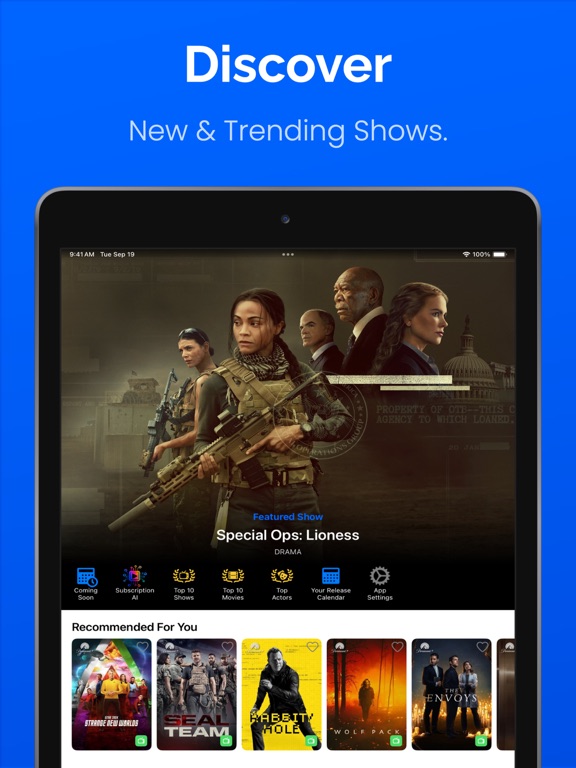
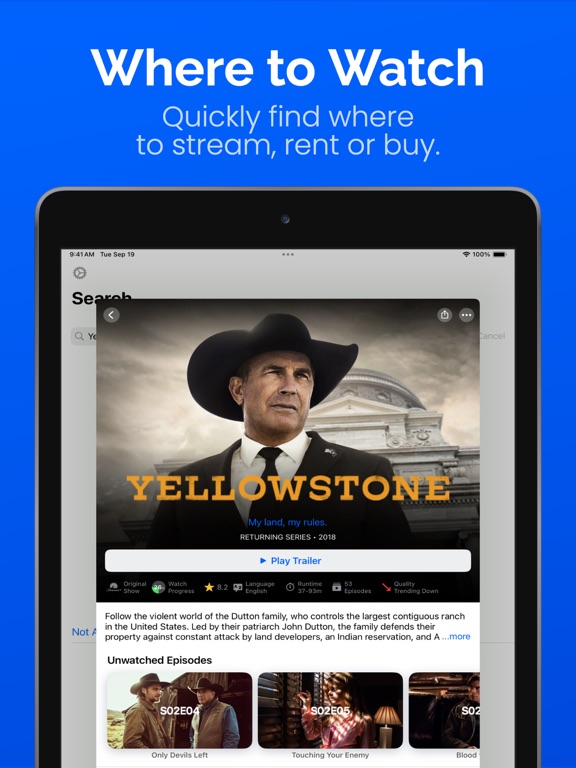
18 store screenshots


Pricing & paywalls
App Store
- Pro - Monthly — $2.99/month
- Pro - Monthly — $14.99/year ($1.24/mo)
- Pro - Lifetime — $39.99
Ratings & reviews
App Store
-
5/5Scam app
This app total scam after paying I can’t watch movies there !?
Pamilerin2 · 7 Aug 2026
-
1/5This is an app that really has no value to it.
I just purchased the year $14 something. This is an app that really has no value to it. This app resembles an app that has tv shows, and movies, but when you go in to watch the show or movie there’s no play button. It tricks you into thinking it’s one of those apps like peacock, Pluto, where it has old shows waiting in archive to enjoy. I thought there was going to be a way to watch the paramount network on this app. I’m trying to watch the last season part 2 of season 5 of Yellowstone. This app is all about Paramount shows and movies and where to find them to watch apparently. I think you can set up watch parties with your friends if they have this app. I again did not find what I was looking for. I’m not sure what happened to the Paramount Network app that used to be available on the App Store. Hi Andy, I’m not sure how to reply to your message that you left for me below. I personally did not find a value in your app. If you the developer find a value in your app, write your own review on how great the app is. I’m writing for the people like myself that may come into the App Store looking for away to watch shows like Yellowstone season 5 part 2 and see the image of Yellowstone with Keven Costner and across the image watch here. They may get confused, decide to purchase the app thinking it’s paramount, and once they get the app set up they find out it wasn’t worth the purchase. It wasn’t paramount, you couldn’t watch Yellowstone, you cannot watch anything on the app. They may not care about the other benefits of the AI, because they weren’t here looking for that in the first place. No they were looking for an app to watch a show and this app was not it. So to that person or persons… no value was found. Thank you Ps. I’m not looking for a refund or I would have cried about that in my review, but not reading your description on what your app is designed to do makes me the idiot, not you or your app. William
Poetmissing · 7 Aug 2026
-
1/5Useless app -waste of money
Don’t recall what this is supposed to do now as it promised. It doesn’t seem to do anything except renew my credit card with its “service”! Even an Apple tech helping me recently asked me about the charge listed and neither of us could figure its function or value etc I’m going to alert my credit card company and call the number but it’s troubling to know this App is so mysterious and can’t be good.
Cboyajian · 7 Aug 2026
-
4/5Informational App Only
I’m a bit unsure what exactly this app does. Are there any type of tools that can help me understand how to utilize this app?
Hrlycstm1 · 7 Aug 2026
-
3/5Yelloatone
I can’t find Yellowstone. Yall are difficult
tequilas mm · 7 Aug 2026
Privacy & accessibility
App Store
Privacy
- Data Linked to You — Analytics — Diagnostics — Performance Data Developer declared
- Data Linked to You — Analytics — Identifiers — Device ID Developer declared
- Data Linked to You — Analytics — Purchases — Purchase History Developer declared
- Data Linked to You — Analytics — Usage Data — Advertising Data Developer declared
- Data Linked to You — Analytics — Usage Data — Product Interaction Developer declared
- Data Linked to You — App Functionality — Identifiers — Device ID Developer declared
- Data Linked to You — App Functionality — Purchases — Purchase History Developer declared
- Data Linked to You — Product Personalization — Identifiers — Device ID Developer declared
- Data Linked to You — Third-Party Advertising — Diagnostics — Performance Data Developer declared
- Data Linked to You — Third-Party Advertising — Identifiers — Device ID Developer declared
- Data Linked to You — Third-Party Advertising — Location — Coarse Location Developer declared
- Data Linked to You — Third-Party Advertising — Usage Data — Advertising Data Developer declared
- Data Linked to You — Third-Party Advertising — Usage Data — Product Interaction Developer declared
- Data Linked to You — Diagnostics Developer declared
- Data Linked to You — Identifiers Developer declared
- Data Linked to You — Location Developer declared
- Data Linked to You — Purchases Developer declared
- Data Linked to You — Usage Data Developer declared
- Data Not Linked to You — Analytics — Diagnostics — Crash Data Developer declared
- Data Not Linked to You — App Functionality — Identifiers — User ID Developer declared
- Data Not Linked to You — Product Personalization — Identifiers — User ID Developer declared
- Data Not Linked to You — Third-Party Advertising — Diagnostics — Crash Data Developer declared
- Data Not Linked to You — Diagnostics Developer declared
- Data Not Linked to You — Identifiers Developer declared
- Data Used to Track You — Diagnostics — Crash Data Developer declared
- Data Used to Track You — Diagnostics — Performance Data Developer declared
- Data Used to Track You — Diagnostics Developer declared
- Data Used to Track You — Identifiers — Device ID Developer declared
- Data Used to Track You — Identifiers Developer declared
- Data Used to Track You — Location — Coarse Location Developer declared
- Data Used to Track You — Location Developer declared
- Data Used to Track You — Usage Data — Advertising Data Developer declared
- Data Used to Track You — Usage Data — Product Interaction Developer declared
- Data Used to Track You — Usage Data Developer declared
Accessibility
- Dark Interface — SUPPORTED Store published
Versions
App Store
-
2025.11
Behind the scenes speed improvements and minor bug fixes and improvements.
-
2025.12
# Episode Insights Improvements To make finding and watching the best episodes for a show, Episode Insights now shows episodes you have watched with a little green dot indicator. # Bug Fixes This update has minor bug fixes and performance improvements.
-
2025.13
# Improvements * Improved hiatus and break detection, making it easier to see when a show is on a break or hiatus — so you’ll always know when the next episode is out. * Enhanced scrolling behavior for the latest season, making it easier to pick up where you left off. * Made notification settings easier to find and update. # Bug Fixes * Includes minor bug fixes and performance improvements.
-
2025.14
# Notification Updates - Apps notification settings UI has been updated to make it easier to find and set your desired notification level and get more personalised notifications. - Updated app to make it clearer what features are Pro or not. # Bug Fixes This update also includes minor bug fixes and performance improvements.
-
2025.15
# Minor Updates & Improvements * Improvements to advanced searching * Movies now show dated watched (at the bottom) * More labels are tapable to copy the text * Minor bug fixes
-
2025.16
# Banned Episodes The app not tracks all banned episodes gives you a clear, up-to-date list of any episodes that have been banned, removed, or restricted across streaming platforms or countries. If you think there is a mistake please reach out to me via support. # Bug Fixes This update also includes minor bug fixes and improvements
-
2025.17
# Minor Improvements * Made it easier to find out what episodes of a show an actor or guest is in. * Improved security of the app * Minor bug fixes and improvements
-
2025.18
# New Feature Actors ages at the time of release - Long press on an actors profile picture in a season or episode will reveal the age they were at the time of filming, useful when watching old shows. # Bug Fixes This update also includes minor bug fixes and improvements
-
2025.19
# Minor Bug Fixes * Fixed issue with acting credits not displaying correctly.
-
2025.20
Minor bug fixes
-
2025.21
# Liquid Glass Updated the design for Liquid Glass on iOS 26
-
2025.22
# UI Updates Even more Liquid Glass updates and bug fixes.
-
2025.23
Minor bug fixes
-
2025.24
Minor bug fixes and performance improvements.
-
2025.25
# Bug Fixes & UI Updates * Fixed issue with episode details UI visibility. * Made it easier to find and access specials
-
2025.26
# Minor Improvements This update has minor UI updates, code clean up, and improvements to get ready for the new year.
-
2026.1
# New Year, New Update This update has minor bug fixes and improvements to get ready for some big updates this year.
-
2026.2
# New Feature - All Characters All Characters is a powerful feature that lets you explore every actor and character that appears in a TV show, all in one place. Whether you're trying to remember where you’ve seen an actor before, discover recurring characters across seasons, or dive deep into a show’s full cast, this feature makes it easy. # Bug Fixes This update includes some minor bug fixes and UI/accessibility improvements.
-
2026.3
# Collections Update Movie franchise collections now include a ratings chart, making it easier to compare films across a series. # Bug Fixes This update has minor bug fixes.
-
2026.4
# New Feature – True 4K Detection This AI-powered feature analyses all available information about a show or movie to determine the optimal quality to watch. Many streaming services offer 4K streams, but if the content wasn't filmed or produced with 4K cameras and equipment, it has to be upscaled — which can result in reduced clarity and a lower quality experience. In these cases, watching in HD often looks better. Originals will now alert you when a movie or show is in true 4K and recommend the best medium to watch it on. # New Feature – Tech Specs You can now view tech specs for movies and shows to discover how and what they were made with. Whether you're learning more about filmmaking or looking for the best quality stream, this is a great new way to explore content. # Bug Fixes This update also contains minor bug fixes and improvements.
-
2026.5
# Minor Updates This update has some minor updates, bug fixes and performance improvements.
-
2026.6
# Bug Fixes This update has a few minor bug fixes, including fix for genres not displaying correctly.
-
2026.7
# New Feature You can now see how many remaining episodes and runtime is left in your binge watch, just check at the bottom of the media page or season page. # Bug Fixes This update has minor bug fixes.
-
2026.8
# All Cast/Character Improvements You can now filter by Appearance and Popularity when viewing all characters, allowing you to more easily find your favorite actors in long running shows. Also updated how characters/cast is displayed in the main page. # Bug Fixes Minor bug fixes and improvements
-
2026.9
· 21 Jul 2026
# Improvements This update I've improved how cast are displayed to show more cast members to make it easier to see the full cast of a show or movie. # Bug Fixes This update also has a few minor bug fixes and improvements.
Alternatives
- My UPtv — Same category + similar ratings
- UP Faith & Family — Same category + similar ratings
- Philo: Shows, Movies & Live TV — Same category + similar ratings
- PlayOn Cloud - Streaming DVR — Same category + similar ratings
- Freebie TV — Same category + similar ratings
- Animal Planet GO — Same category + similar ratings
Availability by market
- US
Data quality & evidence
- Page completeness
- Live store listing
- Last verified
- 7 Aug 2026
- Sources
- App Store
- Independent summary has not been published yet.