
Quick verdict
- What it is
- Store information collected; independent summary not yet available.
- At a glance
-
- Free to download
Categories and search queries
Official categories
- Sports
- Utilities
AppCorpus categories
Key functions
| Function | Availability | Access | Scope | Evidence |
|---|---|---|---|---|
| Free app | Yes | Free | — | Store published |
Screens
App Store
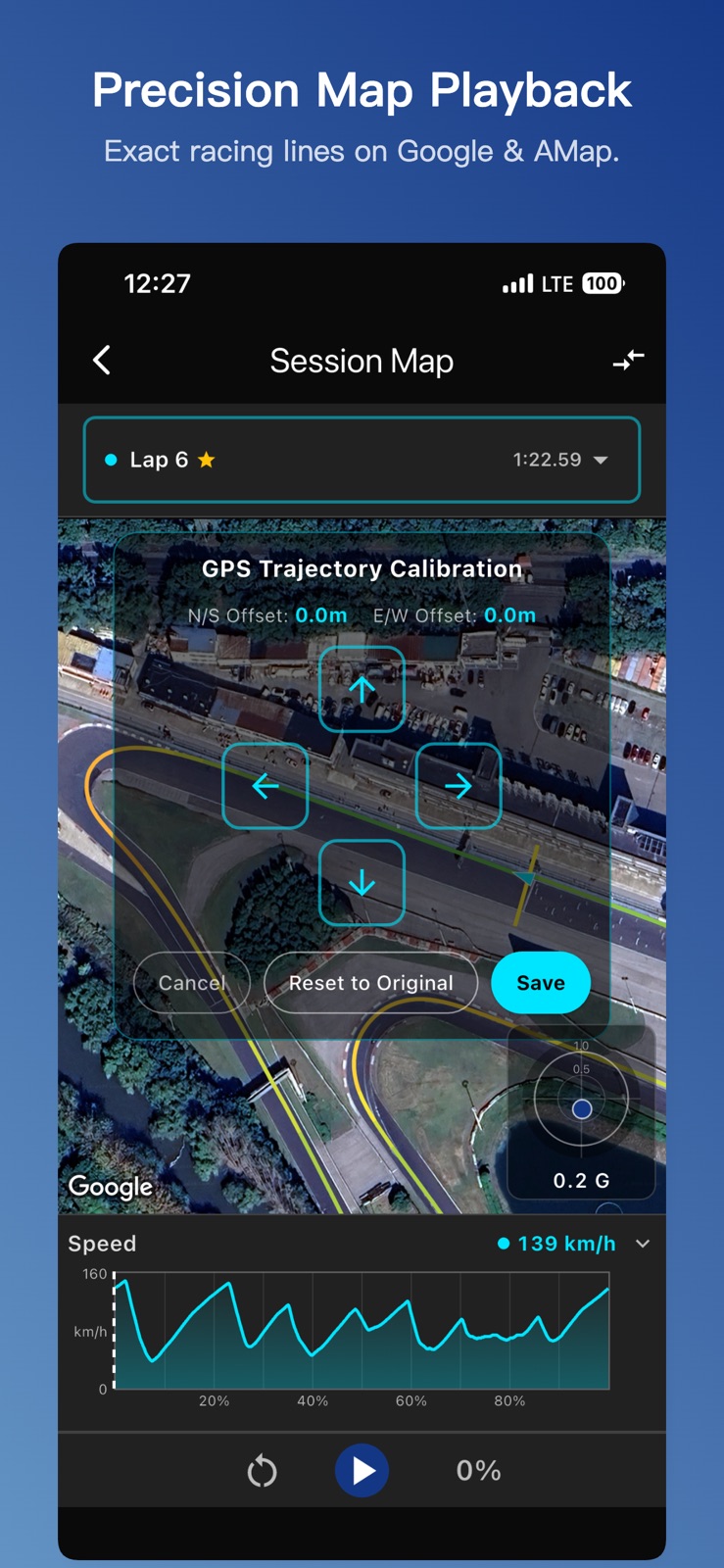
7 store screenshots


Pricing & paywalls
App Store
Shown for US
- Free
Ratings & reviews
App Store
Shown for US
No store reviews collected for App Store · DE
Privacy & accessibility
App Store
Privacy
- Data Not Linked to You — App Functionality — Location — Precise Location Developer declared
- Data Not Linked to You — Location Developer declared
Accessibility
No accessibility labels collected yet.
Versions
App Store
- 1.0
-
1.0.1
New Features: Added multi-video import support for action cameras! Action cameras often split long recordings into segments. You can now select multiple sequential video files; the app will automatically validate the combined duration against your GPS data and switch seamlessly between videos during playback. Improvements & Fixes: Further improved timing accuracy and data quality, refined the GPS update rate display, and resolved a few UI issues.
-
1.1.0
New Features: Lap Video Export with Data Overlay: We are thrilled to introduce lap video exports featuring professional data overlays! The newly redesigned dashboard includes speed, a G-force friction circle, a mini track map, and more, making your track highlights look incredibly professional and ready to share with a single tap. Dynamic G-Force Friction Circle: Added a professional G-force friction circle overlay to the session map interface. It is fully draggable, allowing you to position it anywhere within the video and map area to suit your preference. Point-to-Point Track Support: Added full support for Point-to-Point tracks with separate start and finish lines, perfect for hill climbs or special stages (such as Nürburgring BTG). New Track Support: Added Heze International Circuit, Shangyu Shunkang International Racing Park, Shunde P1 International Circuit (under construction), Dongguan Jingsu Karting (Daojiao), and Fuzhou Subo Karting tracks. Improvements & Fixes: UI & Visual Enhancements: Comprehensively improved dashboard readability for bright sunlight and high-glare driving environments. Interactive UX Tweaks: Tapping any specific lap from the session detail list now directly jumps to display that exact lap's map trajectory and corresponding telemetry data. Persistent Video Links Fix: Fixed an issue where linked onboard videos from your local photo album would break after reinstalling the app. The system now automatically re-resolves and restores your previously linked video assets. Trajectory & Map Alignment Optimization: Improved the underlying curve smoothing algorithms for much smoother GPS map trajectories. Also fixed a bug where the start/finish line would not move synchronously with the GPS trajectory during calibration mode. Compliance Update: Officially added the China Mainland ICP filing number to the About page.
-
1.1.1
New Features: VDE (Vehicle & Driver Evaluation Protocol) Analysis (Beta): Leverages a physics-based vehicle dynamics model to independently evaluate driver skill and vehicle performance, providing precise corner-by-corner suggestions for lap time improvement. Currently supported at Shanghai Tianma Circuit, Zhejiang International Circuit, Ningbo International Circuit, Guangdong International Circuit, and Chengdu Tianfu International Circuit. Nearby Tracks: Introduced a "Supported Tracks" feature to quickly discover racing circuits around your current location. Dual-Lap Friction Circle: The dynamic G-force friction circle is now available in dual-lap comparison mode! It features two distinct colored dots on the same screen, allowing you to instantly visualize the differences in cornering limits and driving dynamics between two laps. Google Maps Integration: Added Google Maps as an alternative satellite map provider for users outside of Mainland China. New Track Support: Added the Macau Coloane Karting track. Improvements & Fixes: Data Analysis & Comparison Fixes: Fixed an issue where the comparison lap's vehicle chevron heading would display incorrectly when rotating the map. UI & General Optimizations: Refined the Delta Plot header layout and updated the built-in sample session data for a better trial experience.
-
1.1.2
New Features: GPS-Based Custom Track Creation: You can now create your own custom tracks! Simply drive and mark the start/finish lines using GPS to easily set up your personal circuits. Custom Track Sharing & Import: Support for exporting and sharing your custom tracks with other drivers, as well as instantly importing tracks shared by the community. Portrait Live Dashboard: The live timing dashboard now fully supports portrait orientation, featuring a completely redesigned layout to accommodate various in-car phone mounting setups.
-
1.1.3
New Features: 1. Built-in Phone Camera Recording: You can now use your phone's native camera to record your track sessions directly within the app, seamlessly syncing onboard video with your telemetry data without needing an external action camera. 2. Transparent Overlay Export: Designed for advanced video creators, you can now export your telemetry HUD with a completely transparent background. This is perfect for custom compositing in third-party video editing software like Premiere Pro or Final Cut Pro. 3. New Track Support: Added Beijing Wenyuhe Karting, Hangzhou Ruisu Karting, and Nanjing Liwan (Jiangning) Karting tracks. Improvements & Fixes: 1. Dashboard Rotation Lock: The live dashboard orientation is now automatically locked during active recording sessions. This prevents unintended screen flips caused by heavy G-forces, sharp cornering, or track bumps.
-
1.1.4
New Features: 1. Landscape Dashboard Clock: Added a real-time wall clock display to the landscape live dashboard, allowing drivers to easily keep track of the current time during their track day sessions. Improvements & Fixes: 1. Track Data Hotfix: Corrected the start/finish line coordinates for the Shunde P1 International Circuit to ensure perfectly accurate auto-lap timing and telemetry analysis. 2. Video Sync Optimization: Loosened the duration tolerance when matching onboard videos with GPS telemetry data. This significantly reduces import errors caused by minor duration discrepancies.
-
1.2.0
· 16 Jul 2026
New Features: Universal Video Auto-Sync: A pioneering new feature! Freeing you from being tied to specific camera brands or models, this provides a truly universal sync solution. A dynamic timestamp QR code is now displayed on the ready-to-record screen. Simply use any camera to record your phone screen capturing this QR code before driving. Upon video import, the system will automatically perform a visual scan to achieve millisecond-perfect alignment between your video and telemetry data, completely eliminating the need for tedious manual timeline adjustments. Live Delta Reference Customization: We have added a new baseline reference setting, allowing you to set your "Day-Best" lap as the reference lap. This provides a more tailored real-time delta calculation that better fits your actual driving needs. New Track Support: Added track data for Hangzhou HKC Huahai Karting Club and Nanjing Racing Galaxy Karting Club. Improvements & Fixes: Dashboard Visual Enhancements: Significantly enlarged the live delta value font in the portrait dashboard to greatly improve quick-glance readability while driving; redesigned and optimized the layout of the home status cards, hardware controls, and recording buttons. Interactive UX Tweaks: Improved the "Stop Recording" confirmation dialog and button sizing, and introduced a 3-second auto-dismissal timeout for inactivity. This effectively prevents accidental taps from keeping the dialog on screen and blocking your driving view; optimized the scrolling logic on the data review page, allowing the session summary to now scroll seamlessly with the lap list. Voice Announcements: Refined the lap time voice announcements while driving, adopting a more natural and accurate pronunciation for decimal milliseconds to provide clearer and more professional audio feedback.
Availability by market
- US
Data quality & evidence
- Page completeness
- Live store listing
- Last verified
- 5 Aug 2026
- Sources
- App Store
- Independent summary has not been published yet.