
Quick verdict
- What it is
- Store information collected; an Apoku editorial summary is not yet published.
- At a glance
-
- From $2.91/mo
- Free to download
- In-app purchases
Categories and search queries
Official categories
- Reference
- Utilities
Apoku categories
Key functions
| Function | Availability | Access | Scope | Evidence |
|---|---|---|---|---|
| Free app | Yes | Free | Context-specific | Store published |
| In-app purchases | Yes | Limited free | Context-specific | Store published |
| Family Sharing | Unknown | Unknown | Scope unknown | Store published |
Screens
App Store
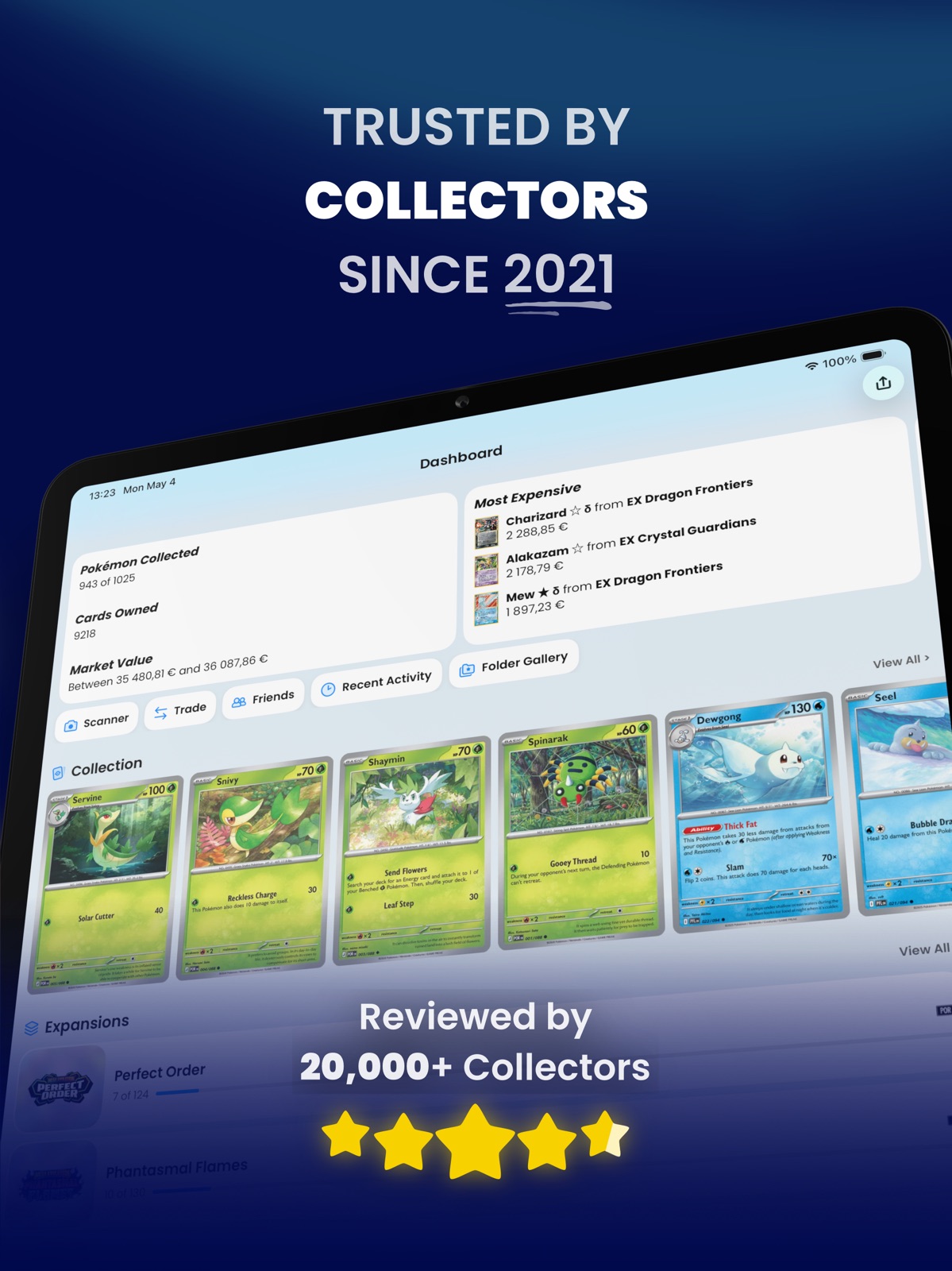
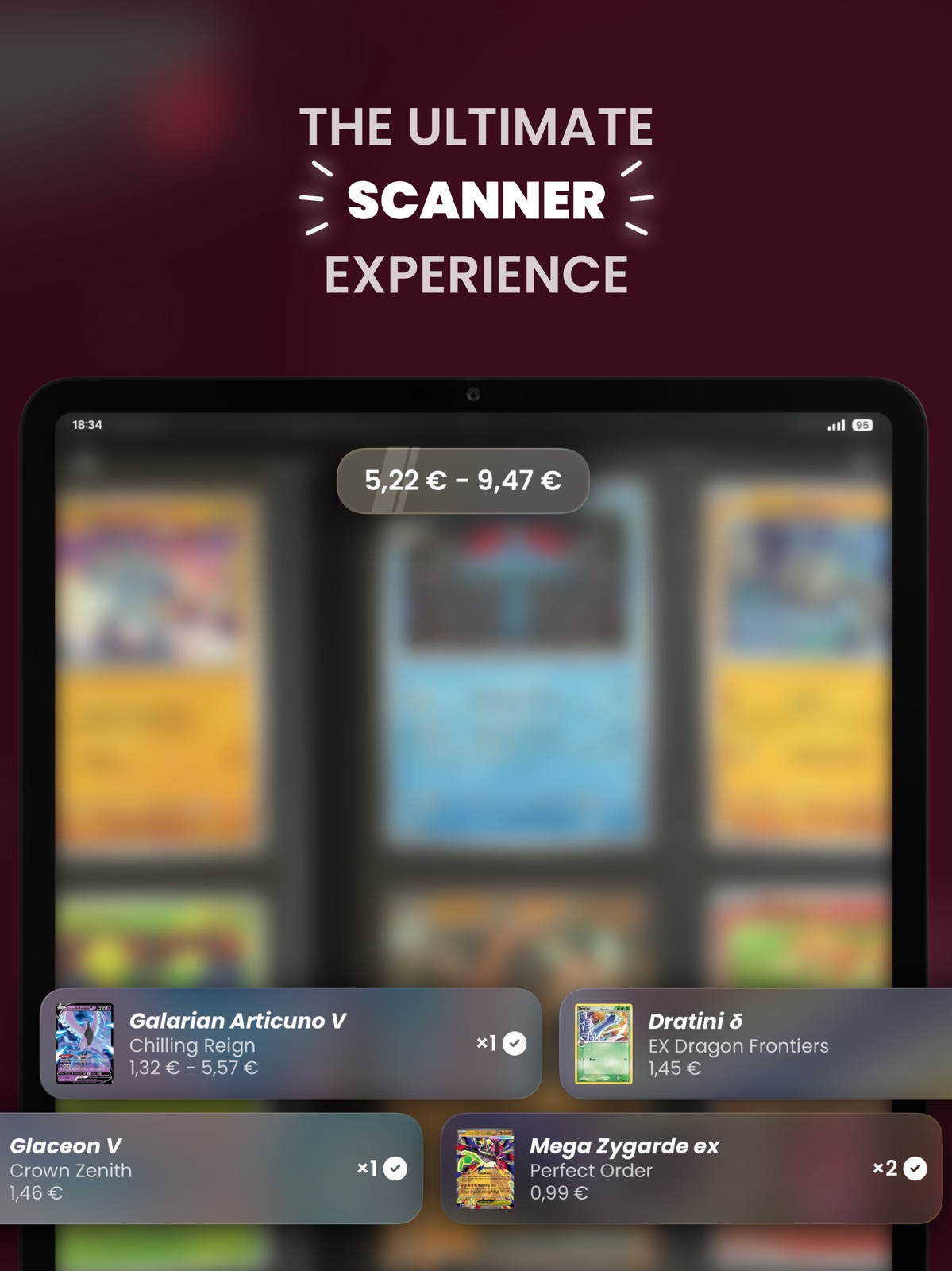
30 store screenshots
Pricing & paywalls
App Store
- 1-Year of Dex+ — $44.99/year ($3.74/mo)
- Dex+ (Monthly) — $3.99/month
- Dex+ (Monthly) — $4.99/month
- Dex+ (Monthly) — $34.99/year ($2.91/mo)
- Dex+ (Lifetime) — $109.00
Ratings & reviews
App Store
-
5/5Without Question - Best Pokemon TCG App Out There
I’ve been tracking my Pokemon cards via an excel spreadsheet my whole life… until this app! Most TCG apps out there don’t prioritize specific franchises, so the interface isn’t great. I have downloaded many apps over the years, but I’ve always hated the UI. Never simple and clean, usually clunky to navigate. This app wins in both looks and function, no question. I collect Pokemon cards for fun, so the value tracking is icing on the cake. Having a “Pokédex” feel to the app is beautiful. You can select a Pokemon and see all the cards for them (on top of the normal filtering/sections for expansions). You add a card to your collection, it’s marked everywhere else it’s referenced. Honestly, my favorite part, is that the subscription isn’t necessary to use it for all my needs. The free version is definitely sufficient. The subscription is totally reasonable though, for all of the additional features (notes, badges, dynamic folders, and scanner, etc…). I’m totally converted to this experience for card collecting/tracking and I recommend this app to anyone that is into the TCG. This is the app that I’ve been waiting for (even close to how I would build it myself if I had the know-how) and I will be forever grateful for the love and care the developers put into this app. I hope for their continued success!
JurasSicRick · 29 Sep 2026
-
5/5Fantastic app, and some suggestions
I just downloaded this app today and logged all the cards I have stored in my binder. This app is AMAZING to log your collection, but alas without the Pokémon app’s scanner. The redeeming quality of the app here is the TCGPlayer price estimates. Seeing the range of what my collection is worth is what makes this app great. Basically, this is the TCGPlayer app I wish existed (and now it does!). As a collector this seems like a must have, as there’s Dex approaches to view your collection and even a cute medal to represent how close you are to catching them all. If the developer reads this I have a few quick suggestions. 1.) Remove (or edit) the “set distribution stats” box on the set list stats, as I feel it doesn’t represent anything meaningful. The bar graph is a poor choice to represent the ratio between Pokémon, trainer, and energy cards. 2.) A quick “hold selection” to mark cards as owned. To mark a card as owned, the quickest method is to double tap each card individually. As someone with near 1k unique cards, this is a bit taxing. Something similar to how email apps have a hold and select function to delete emails could be implemented here to make it a bit more efficient.
Kfrhvsthvs · 29 Sep 2026
-
3/5Great app, however..
This app is a great concept and I love the interface and navigation. You can track each pokemon you own as well as which card(s) you have. My complaints however come from the subscription. The card scanner is awful, compared to other apps that include scanners for FREE, this apps card scanner feels like a beta version. And aside from that there is almost nothing else worth paying for with the $4 subscription, especially if the most convenient feature of all barely works. The "achievements" they provide in the app (subscription required) seems like a feature added just to make the subscription seem more valuable than it actually is. Dont get me wrong I like the idea, but there are only 60 achievements to collect and over 1000 Pokemon. Most people using this app alone could probably think of at least 100 achievements that could be added. And that wouldnt be a complaint if it wasnt behind a paywall. With the subscription you can also make more than 3 folders in a separate thing unrelated to the dex, personally I think is useless anyways, but making it cost money is another thing other apps dont do. Its a cool app, and an app I will continue to use, but I will not be paying the subscription because its a waste of money. -1 star for the scanner being bad, -1 star for making me pay for a half baked premium for a month.
Buschlight1984 · 29 Sep 2026
-
5/5Surprisingly good
All of the other tcg collection and scanning apps I’ve tried haven’t met my expectations. This is the only one that is really close to perfect. My only complaint is the scanning feature. I appears to only work in very stable and lit up environments. This makes sense but can be difficult to maintain. Sometimes it is also not as accurate with scanning cards even though I can see it highlighting text areas on the card. I’m sure it’s a combination of human and mechanical error. However, I am thoroughly impressed with the accuracy of which all cards are recorded in the database through the expansions tab and the search tab. One thing I would like to highlight is that other languages such as Portuguese don’t seem to be present as a selectable option if your card happens to be printed in that language. My 1st ed jolteon holo from jungle is in Portuguese and I can’t categorize it as such. Just minor critiques at that point but it would be nice to see that language distinction. Overall I am very very pleased with the app as a whole so far!
joescoitalia · 29 Sep 2026
-
5/5A fantastic option for master set collectors
I’ve been using this for such a long time now, got it almost basically when it came out. Within this timeframe I have recommend this app to so many people and they all enjoyed using it just as much as I have, so dear devs thank you for that! Some of the best features that Dex offers is just how clean the UI is, truly it is a work of art. The filter and search on each page is fantastic as well allowing you to easily find and navigate a specific card or grouping of cards you are looking for, its really nice to be able to see those obscure versions of cards like the “eb games” stamped versions or the the “professor program” stuff in just a simple two taps. However I do think there can be some room for improvement for some things. I wish there was a real-time tracker to see how your collection has grown over time, just a simple graph section would be nice enough. I’ve also noticed that there has been some missing prices on some stuff like 1st edition base set cards, but I am sure the devs will add that in time just as they have done for many older sets that didn’t used to have accurate values. Another thing is the long scrolls between modern and vintage expansions, I feel as though it would be more user friendly if all the scarlet and violet sets could be grouped up in a “Scarlet and Violet portfolio” and all the SWSH sets grouped up into a “SWSH” portfolio etc. So that way if you wanted to get into let’s say the Stormfront expansion you would just need to click on the “Diamond and Peal” portfolio and then Stormfront, instead of scrolling for an extra 10s. But all around truly a wonderful job on this app, I love Pokemon and this app has made it so much easier to track everything that happens in my collection. Honestly I would love to work on this app with the devs since I need a summer internship still 🥲 but I digress. Wish the devs all the best and hope this app continues to flourish for many years to come!
Achang1017 · 29 Sep 2026
Privacy & accessibility
App Store
Privacy
- Data Not Linked to You — Analytics — Usage Data — Product Interaction Developer declared
- Data Not Linked to You — App Functionality — Diagnostics — Crash Data Developer declared
- Data Not Linked to You — Diagnostics Developer declared
- Data Not Linked to You — Usage Data Developer declared
Accessibility
No accessibility labels collected yet.
Versions
App Store
-
20.0.12
• Welcome Home Say hello to your new default home tab. The Dashboard gives you a quick overview of everything about your account with stats, folders, expansions, badges, and even our latest stories. It’s customizable so you can make it your own, and we plan to expand it even further in the future. • Scanner, Smarter & Faster With the new Dashboard taking the spotlight, we’ve moved the scanner button to the Search tab. It may take a moment to get used to, but don’t forget you can still open the scanner anytime by simply shaking your device. We’ve also added an undo button to quickly remove incorrect scans, plus a new rarity filter for faster, more accurate results. • Build Your Pokédex There’s a growing trend of fans creating their own Pokédex binders, and we decided to join the fun! Dex now includes a dedicated folder type built just for this. We’ve been putting together our own illustrated art Pokédex and even used it at the Frankfurt Regional Championships. We can’t wait to see what you create with it! • A Fresh New Look The new look adds more color and polish to Dex, and we’re in love with every pixel. Dexter also has a batch of fresh illustrations that adapt to your themes. See how many you can spot! • Links That Stay Fresh Static links are out, dynamic links are in! Share an expansion with filters applied and the link will always stay up to date, no need to regenerate it every time. This feature will be coming to folders later this year. • Stories, Right in Dex We post a lot of cool content on social media, but algorithms often make it hard to see everything. Now you don’t have to worry, our stories are available directly inside Dex. You’ll find them waiting for you in your new Dashboard! • Stats Galore More stats than ever! The Dashboard now includes new insights, and the Pokédex has its own set of stats as well. And this is just the beginning, we plan to keep expanding them over time. • Unified Filters As part of expanding Dex to more platforms, we’ve standardized our filters to ensure consistency and make them easier to work with in the future. This required some behind-the-scenes changes, so you may notice that a few of your filters have been reset. We apologize for any inconvenience but these updates lay the groundwork for a more powerful and unified experience moving forward. In addition, we’ve enhanced Card State filters with new options alongside filtering by Expansion type for even greater flexibility. ... and a few more things! Bulk add card notes, set Cardmarket preferences (condition and language), use Norwegian krone as a currency, plus a ton of bug fixes and performance improvements.
-
20.0.13
• Welcome Home Say hello to your new default home tab. The Dashboard gives you a quick overview of everything about your account with stats, folders, expansions, badges, and even our latest stories. It’s customizable so you can make it your own, and we plan to expand it even further in the future. • Scanner, Smarter & Faster With the new Dashboard taking the spotlight, we’ve moved the scanner button to the Search tab. It may take a moment to get used to, but don’t forget you can still open the scanner anytime by simply shaking your device. We’ve also added an undo button to quickly remove incorrect scans, plus a new rarity filter for faster, more accurate results. • Build Your Pokédex There’s a growing trend of fans creating their own Pokédex binders, and we decided to join the fun! Dex now includes a dedicated folder type built just for this. We’ve been putting together our own illustrated art Pokédex and even used it at the Frankfurt Regional Championships. We can’t wait to see what you create with it! • A Fresh New Look The new look adds more color and polish to Dex, and we’re in love with every pixel. Dexter also has a batch of fresh illustrations that adapt to your themes. See how many you can spot! • Links That Stay Fresh Static links are out, dynamic links are in! Share an expansion with filters applied and the link will always stay up to date, no need to regenerate it every time. This feature will be coming to folders later this year. • Stories, Right in Dex We post a lot of cool content on social media, but algorithms often make it hard to see everything. Now you don’t have to worry, our stories are available directly inside Dex. You’ll find them waiting for you in your new Dashboard! • Stats Galore More stats than ever! The Dashboard now includes new insights, and the Pokédex has its own set of stats as well. And this is just the beginning, we plan to keep expanding them over time. • Unified Filters As part of expanding Dex to more platforms, we’ve standardized our filters to ensure consistency and make them easier to work with in the future. This required some behind-the-scenes changes, so you may notice that a few of your filters have been reset. We apologize for any inconvenience but these updates lay the groundwork for a more powerful and unified experience moving forward. In addition, we’ve enhanced Card State filters with new options alongside filtering by Expansion type for even greater flexibility. ... and a few more things! Bulk add card notes, set Cardmarket preferences (condition and language), use Norwegian krone as a currency, plus a ton of bug fixes and performance improvements.
-
20.1.0
It’s been a while, but here we are again. Dex is now available on all platforms, and we still managed to bring you something before Christmas. This update lays the foundation for major features to come while already elevating your current experience. As always in December, we’ll also be releasing our yearly post on What’s Next for Dex in 2026, along with Dex Wrapped 2026 after Christmas. Stay tuned! Profiles Level Up With the addition of the Dashboard, we knew user profiles felt a bit out of place. Profiles, including those of your friends, now match the new Dashboard experience. For the first time ever, you’ll also be able to view other users’ stats. These changes opened the door for major performance improvements, reducing load times by around 80 percent, and they lay the foundation for showing other users’ folders in the near future. Scanner, Smarter & Faster We slightly adjusted the scanner to more accurately detect Trainer cards, and improved overall performance across all cards.
-
20.1.1
It’s been a while, but here we are again. Dex is now available on all platforms, and we still managed to bring you something before Christmas. This update lays the foundation for major features to come while already elevating your current experience. As always in December, we’ll also be releasing our yearly post on What’s Next for Dex in 2026, along with Dex Wrapped 2026 after Christmas. Stay tuned! Profiles Level Up With the addition of the Dashboard, we knew user profiles felt a bit out of place. Profiles, including those of your friends, now match the new Dashboard experience. For the first time ever, you’ll also be able to view other users’ stats. These changes opened the door for major performance improvements, reducing load times by around 80 percent, and they lay the foundation for showing other users’ folders in the near future. Scanner, Smarter & Faster We slightly adjusted the scanner to more accurately detect Trainer cards, and improved overall performance across all cards.
-
20.1.2
It’s been a while, but here we are again. Dex is now available on all platforms, and we still managed to bring you something before Christmas. This update lays the foundation for major features to come while already elevating your current experience. As always in December, we’ll also be releasing our yearly post on What’s Next for Dex in 2026, along with Dex Wrapped 2026 after Christmas. Stay tuned! Profiles Level Up With the addition of the Dashboard, we knew user profiles felt a bit out of place. Profiles, including those of your friends, now match the new Dashboard experience. For the first time ever, you’ll also be able to view other users’ stats. These changes opened the door for major performance improvements, reducing load times by around 80 percent, and they lay the foundation for showing other users’ folders in the near future. Scanner, Smarter & Faster We slightly adjusted the scanner to more accurately detect Trainer cards, and improved overall performance across all cards.
-
20.1.3
It’s been a while, but here we are again. Dex is now available on all platforms, and we still managed to bring you something before Christmas. This update lays the foundation for major features to come while already elevating your current experience. As always in December, we’ll also be releasing our yearly post on What’s Next for Dex in 2026, along with Dex Wrapped 2026 after Christmas. Stay tuned! Profiles Level Up With the addition of the Dashboard, we knew user profiles felt a bit out of place. Profiles, including those of your friends, now match the new Dashboard experience. For the first time ever, you’ll also be able to view other users’ stats. These changes opened the door for major performance improvements, reducing load times by around 80 percent, and they lay the foundation for showing other users’ folders in the near future. Scanner, Smarter & Faster We slightly adjusted the scanner to more accurately detect Trainer cards, and improved overall performance across all cards.
-
21.0.0
This might feel like a small update, but it carries real weight. With Dex available on multiple platforms, our image, brand, and icons matter more than ever. New Pic, Who's This? Our entire icon suite has been redesigned from the ground up, alongside many small design improvements across Dex. Everything should feel familiar, but more polished, more intentional, and better aligned with your theme. What Folder? Many of you may not be familiar with everything our folder system can do. Did you know there are five different folder types, with a sixth coming soon? When creating a new folder, the experience is now more educational, helping you choose the right option at the right time. While not necessarily an improvement on its own, due to work happening across other platforms, we’ve updated folder limits: standard folders now support up to 3000 unique cards, and decks are capped at 100 cards. Based on our data, this change should have little to no impact on almost all users. We understand that imposing limits isn’t ideal, and we’re sorry to have to do so. However, as we continue to grow, it’s important that the platform remains stable and sustainable. Small, but Mighty! Quite a few months ago, a small number of users shared a suggestion that ended up taking us longer than expected to get just right. They wanted an easy way to tell, directly from card details, that they owned more variants than the one they were currently viewing. This update finally delivers on that idea. The hint is intentionally subtle and fits naturally into our interface. Whenever you own additional variants beyond the one you’re looking at, the small arrow inside the button will change from grey to your theme’s accent color and become bolder.\nTo the users who came up with this lovely idea and patiently waited while we figured out the best way to implement it: a huge thank you. We hope you’re happy with the result, and we’re sorry it took us this long to ship it. Yes, Search by That! You already know our search is powerful, with queries like 'Chari 4' instantly finding all Charizard cards numbered 4. Many of you wanted to search using the exact card number format on the card, like 004/100, and very soon you'll be able to! We’ll enable this feature remotely over the next few days without the need to update Dex.
-
21.0.1
This might feel like a small update, but it carries real weight. With Dex available on multiple platforms, our image, brand, and icons matter more than ever. New Pic, Who's This? Our entire icon suite has been redesigned from the ground up, alongside many small design improvements across Dex. Everything should feel familiar, but more polished, more intentional, and better aligned with your theme. What Folder? Many of you may not be familiar with everything our folder system can do. Did you know there are five different folder types, with a sixth coming soon? When creating a new folder, the experience is now more educational, helping you choose the right option at the right time. While not necessarily an improvement on its own, due to work happening across other platforms, we’ve updated folder limits: standard folders now support up to 3000 unique cards, and decks are capped at 100 cards. Based on our data, this change should have little to no impact on almost all users. We understand that imposing limits isn’t ideal, and we’re sorry to have to do so. However, as we continue to grow, it’s important that the platform remains stable and sustainable. Small, but Mighty! Quite a few months ago, a small number of users shared a suggestion that ended up taking us longer than expected to get just right. They wanted an easy way to tell, directly from card details, that they owned more variants than the one they were currently viewing. This update finally delivers on that idea. The hint is intentionally subtle and fits naturally into our interface. Whenever you own additional variants beyond the one you’re looking at, the small arrow inside the button will change from grey to your theme’s accent color and become bolder.\nTo the users who came up with this lovely idea and patiently waited while we figured out the best way to implement it: a huge thank you. We hope you’re happy with the result, and we’re sorry it took us this long to ship it. Yes, Search by That! You already know our search is powerful, with queries like 'Chari 4' instantly finding all Charizard cards numbered 4. Many of you wanted to search using the exact card number format on the card, like 004/100, and very soon you'll be able to! We’ll enable this feature remotely over the next few days without the need to update Dex.
-
21.0.2
This might feel like a small update, but it carries real weight. With Dex available on multiple platforms, our image, brand, and icons matter more than ever. New Pic, Who's This? Our entire icon suite has been redesigned from the ground up, alongside many small design improvements across Dex. Everything should feel familiar, but more polished, more intentional, and better aligned with your theme. What Folder? Many of you may not be familiar with everything our folder system can do. Did you know there are five different folder types, with a sixth coming soon? When creating a new folder, the experience is now more educational, helping you choose the right option at the right time. While not necessarily an improvement on its own, due to work happening across other platforms, we’ve updated folder limits: standard folders now support up to 3000 unique cards, and decks are capped at 100 cards. Based on our data, this change should have little to no impact on almost all users. We understand that imposing limits isn’t ideal, and we’re sorry to have to do so. However, as we continue to grow, it’s important that the platform remains stable and sustainable. Small, but Mighty! Quite a few months ago, a small number of users shared a suggestion that ended up taking us longer than expected to get just right. They wanted an easy way to tell, directly from card details, that they owned more variants than the one they were currently viewing. This update finally delivers on that idea. The hint is intentionally subtle and fits naturally into our interface. Whenever you own additional variants beyond the one you’re looking at, the small arrow inside the button will change from grey to your theme’s accent color and become bolder.\nTo the users who came up with this lovely idea and patiently waited while we figured out the best way to implement it: a huge thank you. We hope you’re happy with the result, and we’re sorry it took us this long to ship it. Yes, Search by That! You already know our search is powerful, with queries like 'Chari 4' instantly finding all Charizard cards numbered 4. Many of you wanted to search using the exact card number format on the card, like 004/100, and very soon you'll be able to! We’ll enable this feature remotely over the next few days without the need to update Dex.
-
21.0.3
This might feel like a small update, but it carries real weight. With Dex available on multiple platforms, our image, brand, and icons matter more than ever. New Pic, Who's This? Our entire icon suite has been redesigned from the ground up, alongside many small design improvements across Dex. Everything should feel familiar, but more polished, more intentional, and better aligned with your theme. What Folder? Many of you may not be familiar with everything our folder system can do. Did you know there are five different folder types, with a sixth coming soon? When creating a new folder, the experience is now more educational, helping you choose the right option at the right time. While not necessarily an improvement on its own, due to work happening across other platforms, we’ve updated folder limits: standard folders now support up to 3000 unique cards, and decks are capped at 100 cards. Based on our data, this change should have little to no impact on almost all users. We understand that imposing limits isn’t ideal, and we’re sorry to have to do so. However, as we continue to grow, it’s important that the platform remains stable and sustainable. Small, but Mighty! Quite a few months ago, a small number of users shared a suggestion that ended up taking us longer than expected to get just right. They wanted an easy way to tell, directly from card details, that they owned more variants than the one they were currently viewing. This update finally delivers on that idea. The hint is intentionally subtle and fits naturally into our interface. Whenever you own additional variants beyond the one you’re looking at, the small arrow inside the button will change from grey to your theme’s accent color and become bolder.\nTo the users who came up with this lovely idea and patiently waited while we figured out the best way to implement it: a huge thank you. We hope you’re happy with the result, and we’re sorry it took us this long to ship it. Yes, Search by That! You already know our search is powerful, with queries like 'Chari 4' instantly finding all Charizard cards numbered 4. Many of you wanted to search using the exact card number format on the card, like 004/100, and very soon you'll be able to! We’ll enable this feature remotely over the next few days without the need to update Dex.
-
21.0.4
This might feel like a small update, but it carries real weight. With Dex available on multiple platforms, our image, brand, and icons matter more than ever. New Pic, Who's This? Our entire icon suite has been redesigned from the ground up, alongside many small design improvements across Dex. Everything should feel familiar, but more polished, more intentional, and better aligned with your theme. What Folder? Many of you may not be familiar with everything our folder system can do. Did you know there are five different folder types, with a sixth coming soon? When creating a new folder, the experience is now more educational, helping you choose the right option at the right time. While not necessarily an improvement on its own, due to work happening across other platforms, we’ve updated folder limits: standard folders now support up to 3000 unique cards, and decks are capped at 100 cards. Based on our data, this change should have little to no impact on almost all users. We understand that imposing limits isn’t ideal, and we’re sorry to have to do so. However, as we continue to grow, it’s important that the platform remains stable and sustainable. Small, but Mighty! Quite a few months ago, a small number of users shared a suggestion that ended up taking us longer than expected to get just right. They wanted an easy way to tell, directly from card details, that they owned more variants than the one they were currently viewing. This update finally delivers on that idea. The hint is intentionally subtle and fits naturally into our interface. Whenever you own additional variants beyond the one you’re looking at, the small arrow inside the button will change from grey to your theme’s accent color and become bolder.\nTo the users who came up with this lovely idea and patiently waited while we figured out the best way to implement it: a huge thank you. We hope you’re happy with the result, and we’re sorry it took us this long to ship it. Yes, Search by That! You already know our search is powerful, with queries like 'Chari 4' instantly finding all Charizard cards numbered 4. Many of you wanted to search using the exact card number format on the card, like 004/100, and very soon you'll be able to! We’ll enable this feature remotely over the next few days without the need to update Dex.
-
21.0.5
This might feel like a small update, but it carries real weight. With Dex available on multiple platforms, our image, brand, and icons matter more than ever. New Pic, Who's This? Our entire icon suite has been redesigned from the ground up, alongside many small design improvements across Dex. Everything should feel familiar, but more polished, more intentional, and better aligned with your theme. What Folder? Many of you may not be familiar with everything our folder system can do. Did you know there are five different folder types, with a sixth coming soon? When creating a new folder, the experience is now more educational, helping you choose the right option at the right time. While not necessarily an improvement on its own, due to work happening across other platforms, we’ve updated folder limits: standard folders now support up to 3000 unique cards, and decks are capped at 100 cards. Based on our data, this change should have little to no impact on almost all users. We understand that imposing limits isn’t ideal, and we’re sorry to have to do so. However, as we continue to grow, it’s important that the platform remains stable and sustainable. Small, but Mighty! Quite a few months ago, a small number of users shared a suggestion that ended up taking us longer than expected to get just right. They wanted an easy way to tell, directly from card details, that they owned more variants than the one they were currently viewing. This update finally delivers on that idea. The hint is intentionally subtle and fits naturally into our interface. Whenever you own additional variants beyond the one you’re looking at, the small arrow inside the button will change from grey to your theme’s accent color and become bolder.\nTo the users who came up with this lovely idea and patiently waited while we figured out the best way to implement it: a huge thank you. We hope you’re happy with the result, and we’re sorry it took us this long to ship it. Yes, Search by That! You already know our search is powerful, with queries like 'Chari 4' instantly finding all Charizard cards numbered 4. Many of you wanted to search using the exact card number format on the card, like 004/100, and very soon you'll be able to! We’ll enable this feature remotely over the next few days without the need to update Dex.
-
22.0.0
This might feel like a small update, but it carries real weight. With Dex available on multiple platforms, our image, brand, and icons matter more than ever. New Pic, Who's This? Our entire icon suite has been redesigned from the ground up, alongside many small design improvements across Dex. Everything should feel familiar, but more polished, more intentional, and better aligned with your theme. What Folder? Many of you may not be familiar with everything our folder system can do. Did you know there are five different folder types, with a sixth coming soon? When creating a new folder, the experience is now more educational, helping you choose the right option at the right time. While not necessarily an improvement on its own, due to work happening across other platforms, we’ve updated folder limits: standard folders now support up to 3000 unique cards, and decks are capped at 100 cards. Based on our data, this change should have little to no impact on almost all users. We understand that imposing limits isn’t ideal, and we’re sorry to have to do so. However, as we continue to grow, it’s important that the platform remains stable and sustainable. Small, but Mighty! Quite a few months ago, a small number of users shared a suggestion that ended up taking us longer than expected to get just right. They wanted an easy way to tell, directly from card details, that they owned more variants than the one they were currently viewing. This update finally delivers on that idea. The hint is intentionally subtle and fits naturally into our interface. Whenever you own additional variants beyond the one you’re looking at, the small arrow inside the button will change from grey to your theme’s accent color and become bolder.\nTo the users who came up with this lovely idea and patiently waited while we figured out the best way to implement it: a huge thank you. We hope you’re happy with the result, and we’re sorry it took us this long to ship it. Yes, Search by That! You already know our search is powerful, with queries like 'Chari 4' instantly finding all Charizard cards numbered 4. Many of you wanted to search using the exact card number format on the card, like 004/100, and very soon you'll be able to! We’ll enable this feature remotely over the next few days without the need to update Dex.
-
22.0.1
This is one of our most community-driven updates yet. You asked for better ways to trade, share, and show off your collection, and we delivered. Whether you’re hunting for trades with friends or sharing your favorite folder, Dex just got a whole lot more social. • Let’s Make a Deal! Trading is finally here! The new Trade feature lets you pick what you want to complete, whether it’s an expansion or a folder, and instantly shows which of your friends have the cards you need. You can search across all your friends at once or check a specific one, and results are ranked by who can help the most.\nOnce you find a match, you compare collections side by side: cards you own that they don’t, and cards they own that you don’t. You can even share these lists as images to discuss trades outside the app. Look for the new shortcut on your Dashboard to get started! • Split vs Stack This one’s big, especially for master set collectors. The new Split Variants mode breaks cards down to the individual variant level, so instead of seeing a single stacked card, you see each variant as its own card. This gives you a much clearer picture of exactly what you own and what you’re missing.\nOn top of that, we’re adding a lot more scans for individual variants, making each one even more recognizable at a glance. Combined with the Trade feature, where toggling Split Variants can reveal trade opportunities you’d otherwise miss, this is a game changer for anyone chasing a master set. • Share Everything Dynamic shareable links, which you already know from expansions and profiles, now work with folders too! Share a folder and the link will always reflect its latest state, so your friends always see what’s current.\nWhether you’re sharing a trade binder, a tournament deck, or a Pokédex folder, it’s now just a tap away and it will always be up to date. • Your Profile, Your Way Your profile just got a lot more interesting. Folders now show up directly on your profile, so friends and visitors can see more of your collection at a glance. Combined with the new trade and sharing features, your profile is now the best way to showcase what you’ve built. • Scanner, Even Smarter We’ve made several improvements to the scanner behind the scenes. It’s now smarter at avoiding duplicate scans, more reliable during quick card transitions, and overall faster at recognizing what you’re scanning. You should notice a smoother, more accurate experience.\nWe also owe you an apology: the previous update introduced some scanner issues that shouldn’t have made it through. They were meant to be improvements, but we missed the mark. This update hopefully fixes those problems and then some. Thank you for your patience, and sorry about that!
-
22.0.2
This is one of our most community-driven updates yet. You asked for better ways to trade, share, and show off your collection, and we delivered. Whether you’re hunting for trades with friends or sharing your favorite folder, Dex just got a whole lot more social. • Let’s Make a Deal! Trading is finally here! The new Trade feature lets you pick what you want to complete, whether it’s an expansion or a folder, and instantly shows which of your friends have the cards you need. You can search across all your friends at once or check a specific one, and results are ranked by who can help the most.\nOnce you find a match, you compare collections side by side: cards you own that they don’t, and cards they own that you don’t. You can even share these lists as images to discuss trades outside the app. Look for the new shortcut on your Dashboard to get started! • Split vs Stack This one’s big, especially for master set collectors. The new Split Variants mode breaks cards down to the individual variant level, so instead of seeing a single stacked card, you see each variant as its own card. This gives you a much clearer picture of exactly what you own and what you’re missing.\nOn top of that, we’re adding a lot more scans for individual variants, making each one even more recognizable at a glance. Combined with the Trade feature, where toggling Split Variants can reveal trade opportunities you’d otherwise miss, this is a game changer for anyone chasing a master set. • Share Everything Dynamic shareable links, which you already know from expansions and profiles, now work with folders too! Share a folder and the link will always reflect its latest state, so your friends always see what’s current.\nWhether you’re sharing a trade binder, a tournament deck, or a Pokédex folder, it’s now just a tap away and it will always be up to date. • Your Profile, Your Way Your profile just got a lot more interesting. Folders now show up directly on your profile, so friends and visitors can see more of your collection at a glance. Combined with the new trade and sharing features, your profile is now the best way to showcase what you’ve built. • Scanner, Even Smarter We’ve made several improvements to the scanner behind the scenes. It’s now smarter at avoiding duplicate scans, more reliable during quick card transitions, and overall faster at recognizing what you’re scanning. You should notice a smoother, more accurate experience.\nWe also owe you an apology: the previous update introduced some scanner issues that shouldn’t have made it through. They were meant to be improvements, but we missed the mark. This update hopefully fixes those problems and then some. Thank you for your patience, and sorry about that!
-
22.0.4
This is one of our most community-driven updates yet. You asked for better ways to trade, share, and show off your collection, and we delivered. Whether you’re hunting for trades with friends or sharing your favorite folder, Dex just got a whole lot more social. • Let’s Make a Deal! Trading is finally here! The new Trade feature lets you pick what you want to complete, whether it’s an expansion or a folder, and instantly shows which of your friends have the cards you need. You can search across all your friends at once or check a specific one, and results are ranked by who can help the most.\nOnce you find a match, you compare collections side by side: cards you own that they don’t, and cards they own that you don’t. You can even share these lists as images to discuss trades outside the app. Look for the new shortcut on your Dashboard to get started! • Split vs Stack This one’s big, especially for master set collectors. The new Split Variants mode breaks cards down to the individual variant level, so instead of seeing a single stacked card, you see each variant as its own card. This gives you a much clearer picture of exactly what you own and what you’re missing.\nOn top of that, we’re adding a lot more scans for individual variants, making each one even more recognizable at a glance. Combined with the Trade feature, where toggling Split Variants can reveal trade opportunities you’d otherwise miss, this is a game changer for anyone chasing a master set. • Share Everything Dynamic shareable links, which you already know from expansions and profiles, now work with folders too! Share a folder and the link will always reflect its latest state, so your friends always see what’s current.\nWhether you’re sharing a trade binder, a tournament deck, or a Pokédex folder, it’s now just a tap away and it will always be up to date. • Your Profile, Your Way Your profile just got a lot more interesting. Folders now show up directly on your profile, so friends and visitors can see more of your collection at a glance. Combined with the new trade and sharing features, your profile is now the best way to showcase what you’ve built. • Scanner, Even Smarter We’ve made several improvements to the scanner behind the scenes. It’s now smarter at avoiding duplicate scans, more reliable during quick card transitions, and overall faster at recognizing what you’re scanning. You should notice a smoother, more accurate experience.\nWe also owe you an apology: the previous update introduced some scanner issues that shouldn’t have made it through. They were meant to be improvements, but we missed the mark. This update hopefully fixes those problems and then some. Thank you for your patience, and sorry about that!
-
22.1.0
This is one of our most community-driven updates yet. You asked for better ways to trade, share, and show off your collection, and we delivered. Whether you’re hunting for trades with friends or sharing your favorite folder, Dex just got a whole lot more social. • Let’s Make a Deal! Trading is finally here! The new Trade feature lets you pick what you want to complete, whether it’s an expansion or a folder, and instantly shows which of your friends have the cards you need. You can search across all your friends at once or check a specific one, and results are ranked by who can help the most.\nOnce you find a match, you compare collections side by side: cards you own that they don’t, and cards they own that you don’t. You can even share these lists as images to discuss trades outside the app. Look for the new shortcut on your Dashboard to get started! • Split vs Stack This one’s big, especially for master set collectors. The new Split Variants mode breaks cards down to the individual variant level, so instead of seeing a single stacked card, you see each variant as its own card. This gives you a much clearer picture of exactly what you own and what you’re missing.\nOn top of that, we’re adding a lot more scans for individual variants, making each one even more recognizable at a glance. Combined with the Trade feature, where toggling Split Variants can reveal trade opportunities you’d otherwise miss, this is a game changer for anyone chasing a master set. • Share Everything Dynamic shareable links, which you already know from expansions and profiles, now work with folders too! Share a folder and the link will always reflect its latest state, so your friends always see what’s current.\nWhether you’re sharing a trade binder, a tournament deck, or a Pokédex folder, it’s now just a tap away and it will always be up to date. • Your Profile, Your Way Your profile just got a lot more interesting. Folders now show up directly on your profile, so friends and visitors can see more of your collection at a glance. Combined with the new trade and sharing features, your profile is now the best way to showcase what you’ve built. • Scanner, Even Smarter We’ve made several improvements to the scanner behind the scenes. It’s now smarter at avoiding duplicate scans, more reliable during quick card transitions, and overall faster at recognizing what you’re scanning. You should notice a smoother, more accurate experience.\nWe also owe you an apology: the previous update introduced some scanner issues that shouldn’t have made it through. They were meant to be improvements, but we missed the mark. This update hopefully fixes those problems and then some. Thank you for your patience, and sorry about that!
-
22.1.1
This is one of our most community-driven updates yet. You asked for better ways to trade, share, and show off your collection, and we delivered. Whether you’re hunting for trades with friends or sharing your favorite folder, Dex just got a whole lot more social. • Let’s Make a Deal! Trading is finally here! The new Trade feature lets you pick what you want to complete, whether it’s an expansion or a folder, and instantly shows which of your friends have the cards you need. You can search across all your friends at once or check a specific one, and results are ranked by who can help the most.\nOnce you find a match, you compare collections side by side: cards you own that they don’t, and cards they own that you don’t. You can even share these lists as images to discuss trades outside the app. Look for the new shortcut on your Dashboard to get started! • Split vs Stack This one’s big, especially for master set collectors. The new Split Variants mode breaks cards down to the individual variant level, so instead of seeing a single stacked card, you see each variant as its own card. This gives you a much clearer picture of exactly what you own and what you’re missing.\nOn top of that, we’re adding a lot more scans for individual variants, making each one even more recognizable at a glance. Combined with the Trade feature, where toggling Split Variants can reveal trade opportunities you’d otherwise miss, this is a game changer for anyone chasing a master set. • Share Everything Dynamic shareable links, which you already know from expansions and profiles, now work with folders too! Share a folder and the link will always reflect its latest state, so your friends always see what’s current.\nWhether you’re sharing a trade binder, a tournament deck, or a Pokédex folder, it’s now just a tap away and it will always be up to date. • Your Profile, Your Way Your profile just got a lot more interesting. Folders now show up directly on your profile, so friends and visitors can see more of your collection at a glance. Combined with the new trade and sharing features, your profile is now the best way to showcase what you’ve built. • Scanner, Even Smarter We’ve made several improvements to the scanner behind the scenes. It’s now smarter at avoiding duplicate scans, more reliable during quick card transitions, and overall faster at recognizing what you’re scanning. You should notice a smoother, more accurate experience.\nWe also owe you an apology: the previous update introduced some scanner issues that shouldn’t have made it through. They were meant to be improvements, but we missed the mark. This update hopefully fixes those problems and then some. Thank you for your patience, and sorry about that!
-
22.1.2
This is one of our most community-driven updates yet. You asked for better ways to trade, share, and show off your collection, and we delivered. Whether you’re hunting for trades with friends or sharing your favorite folder, Dex just got a whole lot more social. • Let’s Make a Deal! Trading is finally here! The new Trade feature lets you pick what you want to complete, whether it’s an expansion or a folder, and instantly shows which of your friends have the cards you need. You can search across all your friends at once or check a specific one, and results are ranked by who can help the most.\nOnce you find a match, you compare collections side by side: cards you own that they don’t, and cards they own that you don’t. You can even share these lists as images to discuss trades outside the app. Look for the new shortcut on your Dashboard to get started! • Split vs Stack This one’s big, especially for master set collectors. The new Split Variants mode breaks cards down to the individual variant level, so instead of seeing a single stacked card, you see each variant as its own card. This gives you a much clearer picture of exactly what you own and what you’re missing.\nOn top of that, we’re adding a lot more scans for individual variants, making each one even more recognizable at a glance. Combined with the Trade feature, where toggling Split Variants can reveal trade opportunities you’d otherwise miss, this is a game changer for anyone chasing a master set. • Share Everything Dynamic shareable links, which you already know from expansions and profiles, now work with folders too! Share a folder and the link will always reflect its latest state, so your friends always see what’s current.\nWhether you’re sharing a trade binder, a tournament deck, or a Pokédex folder, it’s now just a tap away and it will always be up to date. • Your Profile, Your Way Your profile just got a lot more interesting. Folders now show up directly on your profile, so friends and visitors can see more of your collection at a glance. Combined with the new trade and sharing features, your profile is now the best way to showcase what you’ve built. • Scanner, Even Smarter We’ve made several improvements to the scanner behind the scenes. It’s now smarter at avoiding duplicate scans, more reliable during quick card transitions, and overall faster at recognizing what you’re scanning. You should notice a smoother, more accurate experience.\nWe also owe you an apology: the previous update introduced some scanner issues that shouldn’t have made it through. They were meant to be improvements, but we missed the mark. This update hopefully fixes those problems and then some. Thank you for your patience, and sorry about that!
-
23.0.0
Hey, how have you been? Hopefully keeping up with our socials and catching all the awesome posts we’ve been sharing! While you were out there pulling cards, we were heads down giving Dex a complete makeover. We’ve embraced Apple’s new Liquid Glass design language while keeping every pixel of the experience our own, so the whole app feels fresher, more alive, and a little more yours than ever. • A Brand New Look Dex has finally adopted Apple’s latest design language, blended with our own principles and ideas. The result is a fresh, translucent take on the app that feels right at home on iOS 26 while still looking unmistakably like Dex. The tab bar is a good example: it now floats as a glass pill at the bottom of every screen, with your profile avatar tucked into it so it’s always one tap away. We’ve also sprinkled little animations all across the app to make it feel more alive than ever. Open stats and you’ll see rows cascade in, rings stroke around their circles, and numbers count up. Multiply that across every corner of Dex, and the whole app just feels better to use. • Pick Your Ownership Style Some collectors love seeing a clear checkmark. Others prefer a subtle dim, or a splash of color. Now you decide. The new Ownership Style preference lets you choose between Check, Opacity, and Color, with a live preview so you can see exactly how your collection will look before committing. Multi-select also got a glow up: instead of fading cards out, we now overlay a tinted border that stays readable no matter which ownership style you’ve picked. • Scanner, Rebuilt The scanner infrastructure has been completely rebuilt from the ground up. It’s now faster, more accurate, and sets the stage for a major feature coming soon. From a user perspective, everything works as before, just better. We’ve also introduced a contextual expansion banner that suggests the right expansion as you scan, helping you spend less time tapping and more time hunting. • Folders, Yours and Yours Alone Folders marked as private now show a small eye-slash indicator on their cell, so you can tell at a glance which ones only you can see. We also added four new earthy folder colors, Saddle Brown, Sienna, Peru, and Tan, for collectors who like their organization a little more grounded.
-
23.1.0
Hey, how have you been? Hopefully keeping up with our socials and catching all the awesome posts we’ve been sharing! While you were out there pulling cards, we were heads down giving Dex a complete makeover. We’ve embraced Apple’s new Liquid Glass design language while keeping every pixel of the experience our own, so the whole app feels fresher, more alive, and a little more yours than ever. • A Brand New Look Dex has finally adopted Apple’s latest design language, blended with our own principles and ideas. The result is a fresh, translucent take on the app that feels right at home on iOS 26 while still looking unmistakably like Dex. The tab bar is a good example: it now floats as a glass pill at the bottom of every screen, with your profile avatar tucked into it so it’s always one tap away. We’ve also sprinkled little animations all across the app to make it feel more alive than ever. Open stats and you’ll see rows cascade in, rings stroke around their circles, and numbers count up. Multiply that across every corner of Dex, and the whole app just feels better to use. • Pick Your Ownership Style Some collectors love seeing a clear checkmark. Others prefer a subtle dim, or a splash of color. Now you decide. The new Ownership Style preference lets you choose between Check, Opacity, and Color, with a live preview so you can see exactly how your collection will look before committing. Multi-select also got a glow up: instead of fading cards out, we now overlay a tinted border that stays readable no matter which ownership style you’ve picked. • Scanner, Rebuilt The scanner infrastructure has been completely rebuilt from the ground up. It’s now faster, more accurate, and sets the stage for a major feature coming soon. From a user perspective, everything works as before, just better. We’ve also introduced a contextual expansion banner that suggests the right expansion as you scan, helping you spend less time tapping and more time hunting. • Folders, Yours and Yours Alone Folders marked as private now show a small eye-slash indicator on their cell, so you can tell at a glance which ones only you can see. We also added four new earthy folder colors, Saddle Brown, Sienna, Peru, and Tan, for collectors who like their organization a little more grounded.
-
23.1.1
Hey, how have you been? Hopefully keeping up with our socials and catching all the awesome posts we’ve been sharing! While you were out there pulling cards, we were heads down giving Dex a complete makeover. We’ve embraced Apple’s new Liquid Glass design language while keeping every pixel of the experience our own, so the whole app feels fresher, more alive, and a little more yours than ever. • A Brand New Look Dex has finally adopted Apple’s latest design language, blended with our own principles and ideas. The result is a fresh, translucent take on the app that feels right at home on iOS 26 while still looking unmistakably like Dex. The tab bar is a good example: it now floats as a glass pill at the bottom of every screen, with your profile avatar tucked into it so it’s always one tap away. We’ve also sprinkled little animations all across the app to make it feel more alive than ever. Open stats and you’ll see rows cascade in, rings stroke around their circles, and numbers count up. Multiply that across every corner of Dex, and the whole app just feels better to use. • Pick Your Ownership Style Some collectors love seeing a clear checkmark. Others prefer a subtle dim, or a splash of color. Now you decide. The new Ownership Style preference lets you choose between Check, Opacity, and Color, with a live preview so you can see exactly how your collection will look before committing. Multi-select also got a glow up: instead of fading cards out, we now overlay a tinted border that stays readable no matter which ownership style you’ve picked. • Scanner, Rebuilt The scanner infrastructure has been completely rebuilt from the ground up. It’s now faster, more accurate, and sets the stage for a major feature coming soon. From a user perspective, everything works as before, just better. We’ve also introduced a contextual expansion banner that suggests the right expansion as you scan, helping you spend less time tapping and more time hunting. • Folders, Yours and Yours Alone Folders marked as private now show a small eye-slash indicator on their cell, so you can tell at a glance which ones only you can see. We also added four new earthy folder colors, Saddle Brown, Sienna, Peru, and Tan, for collectors who like their organization a little more grounded.
-
23.2.0
A small update, but an exciting one nonetheless! Over the past two months, we’ve been working on integrating a brand-new scanning technology, and we’re thrilled to finally share it with everyone. Give it a try and let us know what you think!
-
23.2.1
A small update, but an exciting one nonetheless! Over the past two months, we’ve been working on integrating a brand-new scanning technology, and we’re thrilled to finally share it with everyone. Give it a try and let us know what you think!
-
24.0.0
· 27 Jul 2026
We spent this release rethinking how you organize, browse, and share your collection, and it’s easily one of our biggest yet. There’s a lot to get through, so let’s dig in. • Flip Through Your Collection A brand-new Binder display mode joins Grid and List. View any expansion as a virtual binder and flip through pocket pages just like the real thing. Pick your page size (4, 9, 12, or 16 pockets), skip the first page to line up your spreads, and stack or split variants however you like. Turn pages with a swipe, the arrow keys, or jump straight to any page. Your layout syncs across every device. And this is just the start. We’re bringing Binder mode to even more screens soon, and a brand-new Binder folder type is on the way that’ll let you build your very own binder from scratch, card by card. • Standard Folders, Leveled Up Standard folders got a ground-up rebuild, and the headline is variants. You can now add a specific variant of a card to a folder instead of the whole card. Want the reverse holo in one folder and the regular printing in another? Now you can, tracking exactly the printings you care about rather than lumping them together. Just switch on variant tracking when you create a new folder, and from there you can add cards by their exact variant and set a precise quantity for each one with a simple stepper. It’s a far more exact way to build sets and track duplicates. Your existing folders keep working exactly as before. • No Account? No Problem Public profiles no longer need an account to view. Share a single link and anyone can browse your collection, folders, and stats, no sign-up, no app, nothing to install. It’s perfect for your local store community where not everyone uses (or wants to use) Dex, or for family members who just want to peek at your wishlist before a birthday. ... and a few more things! This update also comes packed with smaller wins and fixes: • Variant splitting now works inside Standard folders, not just grids. • The Card Scanner got sharper, with tighter focus on the card itself, and you can now toggle its sound effects from preferences. • Filter your collection by card notes, and even by note color. • Filter owned and not-owned cards per variant, with stats that respect split variants. • Lock a deck to freeze its list and prevent accidental changes, then unlock it whenever you want to edit again. • Various design tweaks, performance boosts, and bug fixes across the app.
-
24.1.0
This update starts with a thank you, and ends with a few things we’ve been quietly building. Let’s get into it. • Every Marketplace, Free Consider this one a thank you. Marketplaces are no longer a Dex+ feature, for anyone. Your support is what carried Dex past the point of needing a paywall on something as basic as a price, and Dex+ has more than enough of its own to offer without it. It only felt right to give this one back. So from today, every collector can choose where their prices come from, browse the full price listings, and set their Cardmarket preferences, no subscription needed. Every market, every price listing, for everyone. • Say Hello to CardTrader There’s a new marketplace in Dex: CardTrader. It started in Italy and now covers sellers and stores around the world, and it prices English, Japanese and Chinese cards, so you’ll see it wherever prices appear in the app. Friendly reminder that you pick your own primary marketplaces, one for each region, over in Preferences. They lead on card details, value your collection, and set the order when you sort by price. • Binders, Everywhere When we introduced Binder mode last update, we said we’d bring it to more places. It’s now on every card screen: My Collection, smart folders, standard folders, Pokédex folders, and the folders on other people’s profiles, alongside the expansions and Pokédex pages it already covered. Each binder keeps its own page size and layout, so a 9-pocket spread for one folder and a 4-pocket for another is entirely fine. The one we promised last time is still on its way too: a Binder folder type you build yourself, placing each card in exactly the pocket you want. • One Phone, Every Account If you keep more than one Dex account, moving between them used to mean signing out and waiting for everything to sync back down. Now you can store up to five on the same phone and switch from Settings in a couple of taps, each with its own collection, folders and stats. Anything you collected offline is uploaded before the switch, so nothing gets left behind. • Spotted a Wrong Price? Prices come from listings we match to each card, variant and marketplace, and every so often we match the wrong one. There’s now a “Incorrect or missing price? Let us know” line right under the prices on any card, opening a short form already filled in with the card, the variant you’re looking at, and your marketplace. Paste the correct listing link and we’ll take it from there. ... and a few more things! This update also comes with a handful of smaller wins and fixes: • Preferences are now grouped into sections, so related settings sit together instead of being scattered by control type. • Settings has a new footer with all our social accounts, plus quick access to About and System Status, with a live indicator when something’s up. • Multi-select now works per variant and per slot, so batch actions act on exactly the row you picked. • Standard folders with variant tracking now show up properly when you’re browsing someone else’s profile. • Card data and prices moved to a new on-device database, so launches, search and large collections are all noticeably quicker. • Various design tweaks, performance boosts, and bug fixes across the app.
-
24.1.1
This update starts with a thank you, and ends with a few things we’ve been quietly building. Let’s get into it. • Every Marketplace, Free Consider this one a thank you. Marketplaces are no longer a Dex+ feature, for anyone. Your support is what carried Dex past the point of needing a paywall on something as basic as a price, and Dex+ has more than enough of its own to offer without it. It only felt right to give this one back. So from today, every collector can choose where their prices come from, browse the full price listings, and set their Cardmarket preferences, no subscription needed. Every market, every price listing, for everyone. • Say Hello to CardTrader There’s a new marketplace in Dex: CardTrader. It started in Italy and now covers sellers and stores around the world, and it prices English, Japanese and Chinese cards, so you’ll see it wherever prices appear in the app. Friendly reminder that you pick your own primary marketplaces, one for each region, over in Preferences. They lead on card details, value your collection, and set the order when you sort by price. • Binders, Everywhere When we introduced Binder mode last update, we said we’d bring it to more places. It’s now on every card screen: My Collection, smart folders, standard folders, Pokédex folders, and the folders on other people’s profiles, alongside the expansions and Pokédex pages it already covered. Each binder keeps its own page size and layout, so a 9-pocket spread for one folder and a 4-pocket for another is entirely fine. The one we promised last time is still on its way too: a Binder folder type you build yourself, placing each card in exactly the pocket you want. • One Phone, Every Account If you keep more than one Dex account, moving between them used to mean signing out and waiting for everything to sync back down. Now you can store up to five on the same phone and switch from Settings in a couple of taps, each with its own collection, folders and stats. Anything you collected offline is uploaded before the switch, so nothing gets left behind. • Spotted a Wrong Price? Prices come from listings we match to each card, variant and marketplace, and every so often we match the wrong one. There’s now a “Incorrect or missing price? Let us know” line right under the prices on any card, opening a short form already filled in with the card, the variant you’re looking at, and your marketplace. Paste the correct listing link and we’ll take it from there. ... and a few more things! This update also comes with a handful of smaller wins and fixes: • Preferences are now grouped into sections, so related settings sit together instead of being scattered by control type. • Settings has a new footer with all our social accounts, plus quick access to About and System Status, with a live indicator when something’s up. • Multi-select now works per variant and per slot, so batch actions act on exactly the row you picked. • Standard folders with variant tracking now show up properly when you’re browsing someone else’s profile. • Card data and prices moved to a new on-device database, so launches, search and large collections are all noticeably quicker. • Various design tweaks, performance boosts, and bug fixes across the app.
-
24.1.3
This update starts with a thank you, and ends with a few things we’ve been quietly building. Let’s get into it. • Every Marketplace, Free Consider this one a thank you. Marketplaces are no longer a Dex+ feature, for anyone. Your support is what carried Dex past the point of needing a paywall on something as basic as a price, and Dex+ has more than enough of its own to offer without it. It only felt right to give this one back. So from today, every collector can choose where their prices come from, browse the full price listings, and set their Cardmarket preferences, no subscription needed. Every market, every price listing, for everyone. • Say Hello to CardTrader There’s a new marketplace in Dex: CardTrader. It started in Italy and now covers sellers and stores around the world, and it prices English, Japanese and Chinese cards, so you’ll see it wherever prices appear in the app. Friendly reminder that you pick your own primary marketplaces, one for each region, over in Preferences. They lead on card details, value your collection, and set the order when you sort by price. • Binders, Everywhere When we introduced Binder mode last update, we said we’d bring it to more places. It’s now on every card screen: My Collection, smart folders, standard folders, Pokédex folders, and the folders on other people’s profiles, alongside the expansions and Pokédex pages it already covered. Each binder keeps its own page size and layout, so a 9-pocket spread for one folder and a 4-pocket for another is entirely fine. The one we promised last time is still on its way too: a Binder folder type you build yourself, placing each card in exactly the pocket you want. • One Phone, Every Account If you keep more than one Dex account, moving between them used to mean signing out and waiting for everything to sync back down. Now you can store up to five on the same phone and switch from Settings in a couple of taps, each with its own collection, folders and stats. Anything you collected offline is uploaded before the switch, so nothing gets left behind. • Spotted a Wrong Price? Prices come from listings we match to each card, variant and marketplace, and every so often we match the wrong one. There’s now a “Incorrect or missing price? Let us know” line right under the prices on any card, opening a short form already filled in with the card, the variant you’re looking at, and your marketplace. Paste the correct listing link and we’ll take it from there. ... and a few more things! This update also comes with a handful of smaller wins and fixes: • Preferences are now grouped into sections, so related settings sit together instead of being scattered by control type. • Settings has a new footer with all our social accounts, plus quick access to About and System Status, with a live indicator when something’s up. • Multi-select now works per variant and per slot, so batch actions act on exactly the row you picked. • Standard folders with variant tracking now show up properly when you’re browsing someone else’s profile. • Card data and prices moved to a new on-device database, so launches, search and large collections are all noticeably quicker. • Various design tweaks, performance boosts, and bug fixes across the app.
-
24.1.4
This update starts with a thank you, and ends with a few things we’ve been quietly building. Let’s get into it. • Every Marketplace, Free Consider this one a thank you. Marketplaces are no longer a Dex+ feature, for anyone. Your support is what carried Dex past the point of needing a paywall on something as basic as a price, and Dex+ has more than enough of its own to offer without it. It only felt right to give this one back. So from today, every collector can choose where their prices come from, browse the full price listings, and set their Cardmarket preferences, no subscription needed. Every market, every price listing, for everyone. • Say Hello to CardTrader There’s a new marketplace in Dex: CardTrader. It started in Italy and now covers sellers and stores around the world, and it prices English, Japanese and Chinese cards, so you’ll see it wherever prices appear in the app. Friendly reminder that you pick your own primary marketplaces, one for each region, over in Preferences. They lead on card details, value your collection, and set the order when you sort by price. • Binders, Everywhere When we introduced Binder mode last update, we said we’d bring it to more places. It’s now on every card screen: My Collection, smart folders, standard folders, Pokédex folders, and the folders on other people’s profiles, alongside the expansions and Pokédex pages it already covered. Each binder keeps its own page size and layout, so a 9-pocket spread for one folder and a 4-pocket for another is entirely fine. The one we promised last time is still on its way too: a Binder folder type you build yourself, placing each card in exactly the pocket you want. • One Phone, Every Account If you keep more than one Dex account, moving between them used to mean signing out and waiting for everything to sync back down. Now you can store up to five on the same phone and switch from Settings in a couple of taps, each with its own collection, folders and stats. Anything you collected offline is uploaded before the switch, so nothing gets left behind. • Spotted a Wrong Price? Prices come from listings we match to each card, variant and marketplace, and every so often we match the wrong one. There’s now a “Incorrect or missing price? Let us know” line right under the prices on any card, opening a short form already filled in with the card, the variant you’re looking at, and your marketplace. Paste the correct listing link and we’ll take it from there. ... and a few more things! This update also comes with a handful of smaller wins and fixes: • Preferences are now grouped into sections, so related settings sit together instead of being scattered by control type. • Settings has a new footer with all our social accounts, plus quick access to About and System Status, with a live indicator when something’s up. • Multi-select now works per variant and per slot, so batch actions act on exactly the row you picked. • Standard folders with variant tracking now show up properly when you’re browsing someone else’s profile. • Card data and prices moved to a new on-device database, so launches, search and large collections are all noticeably quicker. • Various design tweaks, performance boosts, and bug fixes across the app.
-
24.1.5
This update starts with a thank you, and ends with a few things we’ve been quietly building. Let’s get into it. • Every Marketplace, Free Consider this one a thank you. Marketplaces are no longer a Dex+ feature, for anyone. Your support is what carried Dex past the point of needing a paywall on something as basic as a price, and Dex+ has more than enough of its own to offer without it. It only felt right to give this one back. So from today, every collector can choose where their prices come from, browse the full price listings, and set their Cardmarket preferences, no subscription needed. Every market, every price listing, for everyone. • Say Hello to CardTrader There’s a new marketplace in Dex: CardTrader. It started in Italy and now covers sellers and stores around the world, and it prices English, Japanese and Chinese cards, so you’ll see it wherever prices appear in the app. Friendly reminder that you pick your own primary marketplaces, one for each region, over in Preferences. They lead on card details, value your collection, and set the order when you sort by price. • Binders, Everywhere When we introduced Binder mode last update, we said we’d bring it to more places. It’s now on every card screen: My Collection, smart folders, standard folders, Pokédex folders, and the folders on other people’s profiles, alongside the expansions and Pokédex pages it already covered. Each binder keeps its own page size and layout, so a 9-pocket spread for one folder and a 4-pocket for another is entirely fine. The one we promised last time is still on its way too: a Binder folder type you build yourself, placing each card in exactly the pocket you want. • One Phone, Every Account If you keep more than one Dex account, moving between them used to mean signing out and waiting for everything to sync back down. Now you can store up to five on the same phone and switch from Settings in a couple of taps, each with its own collection, folders and stats. Anything you collected offline is uploaded before the switch, so nothing gets left behind. • Spotted a Wrong Price? Prices come from listings we match to each card, variant and marketplace, and every so often we match the wrong one. There’s now a “Incorrect or missing price? Let us know” line right under the prices on any card, opening a short form already filled in with the card, the variant you’re looking at, and your marketplace. Paste the correct listing link and we’ll take it from there. ... and a few more things! This update also comes with a handful of smaller wins and fixes: • Preferences are now grouped into sections, so related settings sit together instead of being scattered by control type. • Settings has a new footer with all our social accounts, plus quick access to About and System Status, with a live indicator when something’s up. • Multi-select now works per variant and per slot, so batch actions act on exactly the row you picked. • Standard folders with variant tracking now show up properly when you’re browsing someone else’s profile. • Card data and prices moved to a new on-device database, so launches, search and large collections are all noticeably quicker. • Various design tweaks, performance boosts, and bug fixes across the app.
-
25.0.1
· 28 Aug 2026
The one we promised is finally here. • Your Binder, Your Rules A few updates ago we promised a Binder folder type you build yourself. It’s here. Create a Binder folder and place each card in exactly the pocket you want: pick the page size, leave pockets empty on purpose, and arrange every spread the way it sits in your real binder. • Card Details, Remastered Card details got a serious glow-up, with one goal in mind: making each section a bit more compact to clear the way for some major features coming soon. Market prices now scroll horizontally as cards, so comparing marketplaces is a swipe instead of a scroll. The friends section follows the same style, showing who owns the card in a scrollable row. Everything important now fits in the first screenful, the background art got a subtle new blur treatment, and swiping between cards now lands on the exact variant of the row you tapped. ... and a few more things! • Smart folders, the Folders tab and the Dashboard are now dramatically faster with large collections. • The CSV export is customizable before sharing, and gained card notes, number and illustrator columns, with rows sorted by card number. • Smart folder rules for Card Type and Trainer Type now support picking multiple values. • Multi-select folder actions now respect the exact variant you picked. • The stack/split toggle is back on the trade screens. • Card names now update properly when you change your device language. • Various design tweaks, performance boosts, and bug fixes across the app.
-
25.0.3
The one we promised is finally here. • Your Binder, Your Rules A few updates ago we promised a Binder folder type you build yourself. It’s here. Create a Binder folder and place each card in exactly the pocket you want: pick the page size, leave pockets empty on purpose, and arrange every spread the way it sits in your real binder. • Card Details, Remastered Card details got a serious glow-up, with one goal in mind: making each section a bit more compact to clear the way for some major features coming soon. Market prices now scroll horizontally as cards, so comparing marketplaces is a swipe instead of a scroll. The friends section follows the same style, showing who owns the card in a scrollable row. Everything important now fits in the first screenful, the background art got a subtle new blur treatment, and swiping between cards now lands on the exact variant of the row you tapped. ... and a few more things! • Smart folders, the Folders tab and the Dashboard are now dramatically faster with large collections. • The CSV export is customizable before sharing, and gained card notes, number and illustrator columns, with rows sorted by card number. • Smart folder rules for Card Type and Trainer Type now support picking multiple values. • Multi-select folder actions now respect the exact variant you picked. • The stack/split toggle is back on the trade screens. • Card names now update properly when you change your device language. • Various design tweaks, performance boosts, and bug fixes across the app.
-
25.0.4
The one we promised is finally here. • Your Binder, Your Rules A few updates ago we promised a Binder folder type you build yourself. It’s here. Create a Binder folder and place each card in exactly the pocket you want: pick the page size, leave pockets empty on purpose, and arrange every spread the way it sits in your real binder. • Card Details, Remastered Card details got a serious glow-up, with one goal in mind: making each section a bit more compact to clear the way for some major features coming soon. Market prices now scroll horizontally as cards, so comparing marketplaces is a swipe instead of a scroll. The friends section follows the same style, showing who owns the card in a scrollable row. Everything important now fits in the first screenful, the background art got a subtle new blur treatment, and swiping between cards now lands on the exact variant of the row you tapped. ... and a few more things! • Smart folders, the Folders tab and the Dashboard are now dramatically faster with large collections. • The CSV export is customizable before sharing, and gained card notes, number and illustrator columns, with rows sorted by card number. • Smart folder rules for Card Type and Trainer Type now support picking multiple values. • Multi-select folder actions now respect the exact variant you picked. • The stack/split toggle is back on the trade screens. • Card names now update properly when you change your device language. • Various design tweaks, performance boosts, and bug fixes across the app.
-
26.0.0
· 16 Sep 2026
This release is about understanding your collection and finishing the binder. There’s a lot to get through, so let’s dig in! • Say Hello to Insights Stats got a brand-new name and a ground-up redesign. Every screen with a collection now leads with a row of Insight cards: your progress ring, the market value of what you own with your priciest cards fanned out, and a breakdown of energy types, card types, rarities, and more. Tap a type or a status and the grid filters to match. Behind every row sits a full Insights page. • Spot the Cameo A Pokémon doesn’t only appear on its own cards. Cameos are the cards it’s drawn on without being named, hiding in the background of someone else’s illustration, and Dex now knows about every one of them. Switch between Card and Cameo on any Pokémon’s page to browse them, track your cameo progress in its Insights, and see every Pokémon drawn on a card right from card details. Cameos were built in direct collaboration with RottomAmiti, the creator and maintainer of the most popular cameo spreadsheet out there. Huge thanks for the years of work that made this possible! • Share Cards, Beautifully Share images have been redesigned from scratch: a gradient in your accent color, a subtle Dex pattern, and the Dex wordmark. Share any single card as a poster-style image straight from card details, where the share button now offers Share Link and Share Image. Decks can be exported as an image too, with quantities and the deck name. Shared card links now open on the exact variant you were looking at. • A Better Binder The binder settings moved into the Display chip, so Pockets and First Page no longer crowd the filter row. The control bar above the pages is gone: the page chip now sits with the other filters, a row of dots shows where you are, and pages turn with a swipe or while dragging a card. Pockets are now capped at a sensible size on iPad, and page counts go all the way up to 92, with 32 and 36 pages added for other popular binders. You can also flip through your friends’ binders from their profile. • Fewer Chips, Same Filters Sort and Types each collapse into a single chip that opens a sheet, so the filter row fits on a phone again. Sort carries its direction, Types groups card, energy, and trainer types together, and Stack / Split shortens its label once you’ve used it. A new Additional Variants filter shows every additional printing of a set, owned or not. • Folders, Sharpened Creating a folder now starts with a dedicated type picker that explains each type before you commit. Quick Add remembers your search and filters until you close the folder, so adding a run of cards is one piece of work, and the restored query is pre-selected so typing replaces it. ... and a few more things! This update also comes with a handful of smaller wins and fixes: • Upcoming expansions show a release countdown, and sets released in the last month get a New pill. • Dex+ now lets you add up to 50 friends, up from 25. • Your profile banner was redesigned around your avatar color. • The About screen tells the story of Dex, from 2019 to today, and introduces the team. • A friend’s collection now sorts by acquisition date, continuing what the Recently Acquired preview shows. • Fixed smart folder rules disappearing after an update. • Card values and price rules now follow the card’s master-set variants, so promos no longer inflate your folder and expansion totals. • Fixed a new binder losing its first pages when syncing. • Opening a Dex link while a card is already open now works. • Various design tweaks, performance boosts, and bug fixes across the app.
Alternatives
- PriceCharting: TCG, Games+ — Same category + similar ratings
- MyDex TCG Cards — Same category + similar ratings
Availability by market
- US
Data quality & evidence
- Page completeness
- Live store listing
- Last verified
- 29 Sep 2026
- Sources
- App Store
- Apoku editorial summary has not been published yet.