
Quick verdict
- What it is
- Store information collected; independent summary not yet available.
- At a glance
-
- Free to download
- In-app purchases
Categories and search queries
Official categories
- Productivity
- Utilities
AppCorpus categories
Key functions
| Function | Availability | Access | Scope | Evidence |
|---|---|---|---|---|
| Free app | Yes | Free | — | Store published |
| In-app purchases | Yes | Limited free | — | Store published |
Screens
App Store
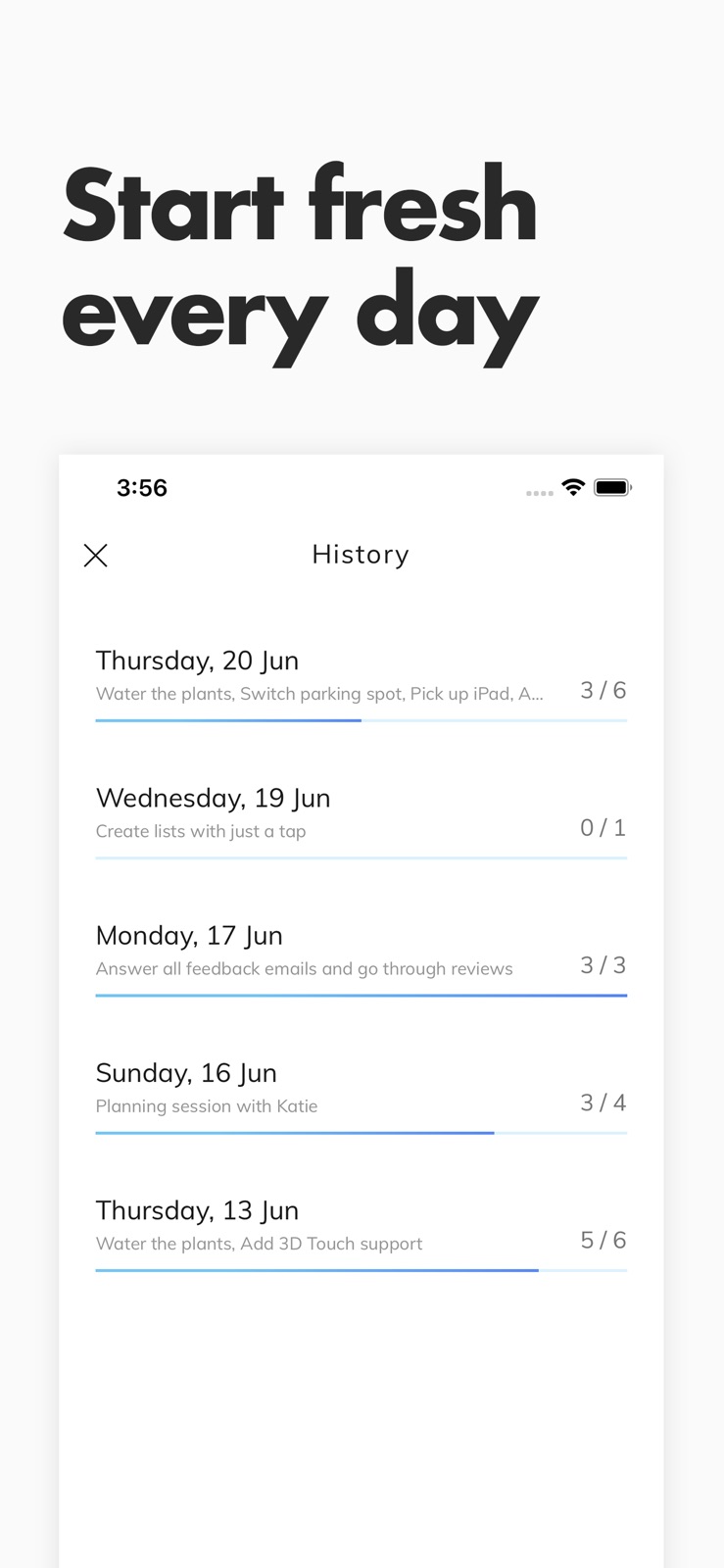
3 store screenshots


Pricing & paywalls
App Store
- Daylist Lifetime Unlocked — $4.99
Ratings & reviews
App Store
-
5/5Simple and exactly what I was looking for 👍🏽
Happy with all the simplicity. I would like an option to forward unfinished tasks to be a permanent fixture, not just a pop up window for the next day. If it’s been more than a day, I would still like to forward tasks and can’t seem to find a way other than retyping.
just rachelle · 6 Aug 2026
-
3/5Not perfect
The appearance is really cute but that’s the only thing that did it for me with this app. In order to rearrange the order of tasks, you have to click and hold, and then click and drag, every time you leave the app and come back if even for one second, it reverts it back to today’s tasks so if you have to keep going back and forth to add schedules for tomorrow etc. it will be a real pain. The keyboard takes up half of the screen and you have to click “done” every time you need to see the other tasks as you’re entering them in. It’s just too time costly for a person who of course is busy since they need an app like this. Also it asked me if I wanted to save a bunch of things I just entered and I automatically clicked the button on the right because in America that would be the “yes” button, but they had left and right switched so I lost all progress. That happened twice.
Nibythyhtygy · 6 Aug 2026
-
5/5Perfectly Designed
This is the planner/to-do app I would have designed for myself. It’s exactly what I need to keep track of things day to day with just the customization and recall that I wanted.
Jennimay · 6 Aug 2026
-
5/5Simple, smooth and beautiful
It’s a very intuitive app that does exactly what you’d expect. The color customization is a nice touch. The history view is probably my favorite feature. Even got my not-super-savvy parents to download and use this app 😊
knishy · 6 Aug 2026
-
5/5Clean, simple, beautiful
After using Buddy for my budgeting app, I was ecstatic to see the same developers create a to-do list one. Daylist is fantastic. As someone that appreciates simple to-do apps over overly complicated ones like Todoist, this is perfect for me. The app is fast, animations are gorgeous, and I like being able to easily organize tasks by different categories/groups. There are two big things I’d love to see in future updates — 1) An Apple Watch app 2) Dark mode support. Keep up the great work!!
JoeMaring · 6 Aug 2026
Privacy & accessibility
App Store
Privacy
- Data Not Collected Developer declared
Accessibility
No accessibility labels collected yet.
Versions
App Store
- 1.0
-
1.1
- Added a shortcut to get to Today after switching to another day. - Now smoother when scrolling through long lists, especially for iPhone 8 and earlier. - When editing a task, the lists plus button is now disabled to avoid confusion - Fixed issue with texts in Settings - Reminder notifications now display the task description in the notification body instead of title Let me know if you have any feedback, I'd love to hear what you think! [email protected] If you're enjoying the app, I would be very grateful if you would leave a review here in the App Store, it really makes a big difference
-
1.10
Here are a few bugfixes that I wanted to get out as soon as possible, thank everyone for reporting! Previous release: • Calendar You can now see a monthly calendar view of your tracked tasks. Days that you have created tasks are highlighted with color and the number of unfinished tasks for each day is shown. • Reorder your lists Long press any task to enter editing mode. In editing mode, you can reorder your tasks and move them between different lists. • Move tasks to today When swiping a task to the right, it now moves it to today's date instead of moving it forward one day. However, if the task was already on today, it will still be moved forward to tomorrow. Again, thanks for all the feedback, even if you haven't got a response, know that I do read them all and base future updates from it. If you're feeling happy with Daylist, I would really appreciate a review here on the App Store, it makes a big difference!
-
1.11
Almost all the feedback I've received since the last version has mentioned a specific feature, so here it comes: - Editable List Templates - From the settings view you can now go to 'My Lists' and add create your own list templates, or edit the existing ones. Let me know what you want to see next! If you're feeling happy with Daylist, please go ahead and add a rating here in the App Store. I really appreciate it!
-
1.12
Almost all the feedback I've received since the last version has mentioned a specific feature, so here it comes: - Editable List Templates - From the settings view you can now go to 'My Lists' and add create your own list templates, or edit the existing ones. Let me know what you want to see next! If you're feeling happy with Daylist, please go ahead and add a rating here in the App Store. I really appreciate it!
-
1.13
Dark mode lovers, this one is for you! Not only is dark mode easier on your eyes, but it can also increase your phone's battery life by up to 30%! With this version, we've added dark mode support throughout Daylist. Even if you're not using dark mode yourself, make sure to check it out!
-
1.14
Dark mode lovers, this one is for you! Not only is dark mode easier on your eyes, but it can also increase your phone's battery life by up to 30%! With this version, we've added dark mode support throughout Daylist. Even if you're not using dark mode yourself, make sure to check it out!
-
1.2
- Added a shortcut to get to Today after switching to another day. - Now smoother when scrolling through long lists, especially for iPhone 8 and earlier. - When editing a task, the lists plus button is now disabled to avoid confusion - Fixed issue with texts in Settings - Reminder notifications now display the task description in the notification body instead of title Let me know if you have any feedback, I'd love to hear what you think! [email protected] If you're enjoying Daylist, I would be very grateful if you would leave a review here in the App Store, it really makes a big difference
-
1.3
- Fixed the crash when opening the app on a new day after leaving the app while editing a task. - Added a shortcut to get to Today after switching to another day. - Now smoother when scrolling through long lists, especially for iPhone 8 and earlier. - When editing a task, the lists plus button is now disabled to avoid confusion - Fixed issue with texts in Settings - Reminder notifications now display the task description in the notification body instead of title Let me know if you have any feedback, I'd love to hear what you think! [email protected] If you're enjoying Daylist, I would be very grateful if you would leave a review here in the App Store, it really makes a big difference
-
1.4
Big thanks to everyone who have sent me feedback over the last two weeks. Here are the fixes I promised you, and some other goodies ;) • If you have any unfinished tasks from the previous day, you'll now get an option to move them to Today instead. Tip: You can also swipe tasks to the right to move them to the next day. • You can now send feedback from within the app, much smoother than writing an email. You'll find the feedback form in Settings. • Added an extra trial day for those of you who need just a little more time to decide. • Fixed the issue where some times a new task would take the title of a previous task (yea, it was weird). • The black theme is now even more black. Do let me know if you have any feedback, I'd love to hear what you think of the app! If you're enjoying Daylist, I would be very grateful if you would leave a review here in the App Store, it really makes a big difference for me. Until next update, I wish you all days full of checkmarks!
-
1.5
• Optimizations for the new iPhones and iOS 13. If you haven't upgraded yet, go for it! • If you have any unfinished tasks from the previous day, you'll now get an option to move them to Today instead. Tip: You can also swipe tasks to the right to move them to the next day. • You can now send feedback from within the app, much smoother than writing an email. You'll find the feedback form in Settings. • Added an extra trial day for those of you who need just a little more time to decide. • Fixed the issue where some times a new task would take the title of a previous task (yea, it was weird). • The black theme is now even more black. Do let me know if you have any feedback, I'd love to hear what you think of the app! If you're enjoying Daylist, I would be very grateful if you would leave a review here in the App Store, it really makes a big difference for me. Until next update, I wish you all days full of checkmarks!
-
1.6
• Optimizations for the new iPhones and iOS 13. If you haven't upgraded yet, go for it! • If you have any unfinished tasks from the previous day, you'll now get an option to move them to Today instead. Tip: You can also swipe tasks to the right to move them to the next day. • You can now send feedback from within the app, much smoother than writing an email. You'll find the feedback form in Settings. • Added an extra trial day for those of you who need just a little more time to decide. • Fixed the issue where some times a new task would take the title of a previous task (yea, it was weird). • The black theme is now even more black. Do let me know if you have any feedback, I'd love to hear what you think of the app! If you're enjoying Daylist, I would be very grateful if you would leave a review here in the App Store, it really makes a big difference for me. Until next update, I wish you all days full of checkmarks!
-
1.7
Big thanks to everyone who has sent feedback over the last couple of weeks. In this version, the top most requested features have been added! • Calendar You can now see a monthly calendar view of your tracked tasks. Days that you have created tasks are highlighted with color and the number of unfinished tasks for each day is shown. • Reorder your lists Long press any task to enter editing mode. In editing mode, you can reorder your tasks and move them between different lists. • Move tasks to today When swiping a task to the right, it now moves it to today's date instead of moving it forward one day. However, if the task was already on today, it will still be moved forward to tomorrow. Again, thanks for all the feedback, even if you haven't got a response, know that I do read them all and base future updates from it. If you're feeling happy with Daylist, I would really appreciate a review here on the App Store, it makes a big difference!
-
1.8
Big thanks to everyone who has sent feedback over the last couple of weeks. In this version, the top most requested features have been added! • Calendar You can now see a monthly calendar view of your tracked tasks. Days that you have created tasks are highlighted with color and the number of unfinished tasks for each day is shown. • Reorder your lists Long press any task to enter editing mode. In editing mode, you can reorder your tasks and move them between different lists. • Move tasks to today When swiping a task to the right, it now moves it to today's date instead of moving it forward one day. However, if the task was already on today, it will still be moved forward to tomorrow. Again, thanks for all the feedback, even if you haven't got a response, know that I do read them all and base future updates from it. If you're feeling happy with Daylist, I would really appreciate a review here on the App Store, it makes a big difference!
-
1.9
Here are a few bugfixes that I wanted to get out as soon as possible, thank everyone for reporting! Previous release: • Calendar You can now see a monthly calendar view of your tracked tasks. Days that you have created tasks are highlighted with color and the number of unfinished tasks for each day is shown. • Reorder your lists Long press any task to enter editing mode. In editing mode, you can reorder your tasks and move them between different lists. • Move tasks to today When swiping a task to the right, it now moves it to today's date instead of moving it forward one day. However, if the task was already on today, it will still be moved forward to tomorrow. Again, thanks for all the feedback, even if you haven't got a response, know that I do read them all and base future updates from it. If you're feeling happy with Daylist, I would really appreciate a review here on the App Store, it makes a big difference!
-
2.0
Made the app completely free! No ads No subscriptions No signup required Enjoy!
-
2.1
· 23 Feb 2025
Made the app completely free! No ads No subscriptions No signup required Enjoy!
Alternatives
- ToDo List - Task manager list — Same category + similar ratings
Availability by market
- US
Data quality & evidence
- Page completeness
- Live store listing
- Last verified
- 6 Aug 2026
- Sources
- App Store
- Independent summary has not been published yet.