
Quick verdict
- What it is
- Store information collected; independent summary not yet available.
- At a glance
-
- $9.99
Categories and search queries
Official categories
- Photo & Video
- Entertainment
AppCorpus categories
Key functions
| Function | Availability | Access | Scope | Evidence |
|---|---|---|---|---|
| Family Sharing | Yes | Unknown | App Store | Store published |
Screens
App Store
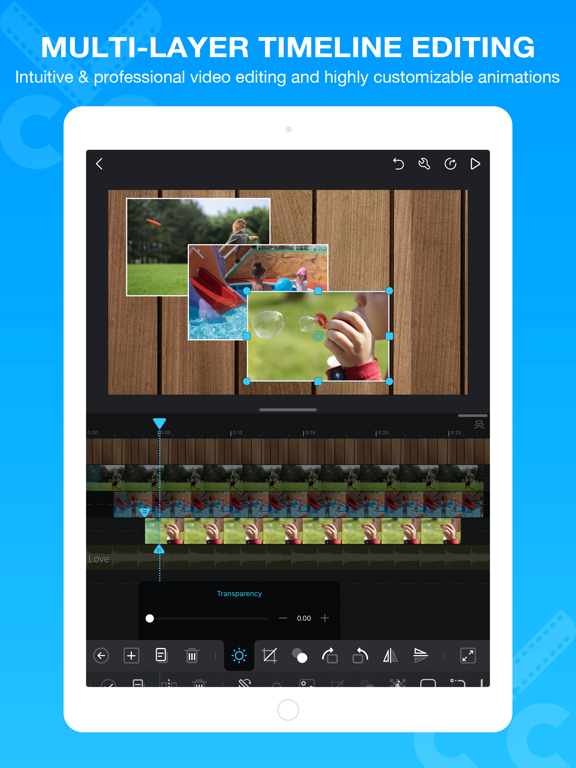
17 store screenshots


Pricing & paywalls
App Store
Shown for US
- Price: $9.99
Ratings & reviews
App Store
Shown for US
-
4/5For what it is, it’s great, but it could use some more editing features
I’ve been editing with Cute Cut for about 4 years now. I’ve learned just about all the tricks and all the features to make your videos look great, but it’s far from Perfect. For one thing, there is no GreenScreen option. I’ve seen some people change the video filter to make Green Screen possible but in my case, it always looks like crap. There needs to be a Native Green Screen feature. There’s also no possible way to have a video play in reverse, which would be nice to have. Some of the transitions can be limiting. The app has some major bugs that can mess up your file and your app in general. There is no Audio editing beyond lowering the Volume, you cannot raise the volume even. The Max is what your video maxes out at. But looking past all that, there are some great things about the App. It’s easy to use for beginners. Very User friendly, even for those who have No experience, anyone can pick up the app to make something simple. I can’t use iMovie to save my Life because the UI is utter garbage. That’s what makes this one so great. The UI is nearly perfect. I love how I can edit in different Aspect Ratio’s like 4:3 or 1:1. No 18:9 unfortunately which is Odd since most Phones these days have an 18:9 display but it’s still nice to have the other options. You can also chose to edit in some Frame Rates. From 24fps to 60fps. And the Price is perfect. $6 for a nice editing Tool. While it is missing Key features other video editors will have, the good does outweigh the Bad.
Iceman BXR · 30 Aug 2026
-
5/5Updates?
I’ve been using CCP ( cute cut pro )for 2 years now & its been great but I think some updates would make it even more great like, let us be able to add overlays onto clips / photos or let us add more than 2 layers of clips so that its easier for us, add maybe 3D shapes and effects?, etc etc. It’s just cute cut pro is just exactly like the free version except it only have the watermark removed and that’s fine but I think you should like let ppl pay to remove watermark on the free version instead so they can decide instead of making a whole new app that is literally the same as the other but without it. I think since ccp is something we need to pay for you should add a lot more things to it besides that why would you make an app thats the same as the original for? like I think you guys should add well everything I just listed earlier + whatever else you can think of. Also, please fix the quality. We work hard on edits and people won’t like low quality edits so please fix that as well. No pressure but just a suggestion because that’s what been bothering us ccp editors. Not just that, but crashes. Ccp randomly crashes while we edit for no reason and whenever it does crash the quality doesn’t look as good and I don’t want that. I’m not trying to hate because I really do like this editing app and have been using it for a really long time now but, just some suggestions on how to make it better :) Thanks for taking your time to read this, I really appreciate it.
LDgamerYT · 30 Aug 2026
-
4/5Good starter editing app
I’ve been using this app since 2019, and overall you can do a lot with it! Built in transitions that you can adjust to suit your needs, visualized audio wave patterns to help you get precise in your edits/timing, in-app tutorials to teach you how to use different tools, and the biggest selling point has to be the one-time payment at a reasonable price. However, this app is best used for short, relatively simple projects. The more layering or time you add, the more the app struggles to load everything, and the more likely your audio timing will be thrown off. I finished editing a two-minute video that was almost exclusively clips laid out next to each other on a timeline and had to export the video and then start a new project to replace the audio so it would not have glitches. Also, the app will link to videos saved elsewhere on your device rather than downloading them onto the app itself, so if you delete the video from your device it will no longer be accessible within the app! Just something worth keeping in mind! If you’re just starting out and want a cheap editing program then this app is a good choice, but I would not recommend it for more detailed, lengthy, or sophisticated projects.
ravn plaw · 30 Aug 2026
-
3/5Good But Somethings I Suggest Adding
I enjoy Cute Cut Pro. I usually use iMovie but when I got Cute Cut Pro I found myself going BACK to iMovie. Here are some reasons and suggestions and I’m sorry if this is wasting your time. 1) I think you should add a select button when adding pictures, videos, and more. iMovie has a select button as soon as you make the video. With Cute Cut Pro I have to one by one pick a picture. This is annoying when I have a BIG project with tons of pictures I need to add. 2) You should add an add music button. If you do this, please add the button so you can choose music from YOUR OWN library, playlists, and albums. Also I’m not sure if you have this or not, but can you please also add sound effects you can add? Some Examples for this is, footsteps, horns, trains, dog barking, cats meowing, and more. 3) Can you add a bigger screen for when editing so you can replay with better sight. Also when you click on the video you should have a selection of “Watch Video” and “Edit” instead of just going to edit. I only use Cute Cut Pro because on iMovie I don’t know how to make the going up and down stop. Somethings when I’m making videos with dialogue you can’t see some of it because the screen goes up and down. Also because Cute Cut Pro has better text placing, and colors, and sizes. Thank you for reading this. I’m super sorry if I’m wasting your time with this review. All I have to say is: I love Cute Cut Pro but I would like to see some improvements. Thank you. ~Keiko
Ken-Cypress · 30 Aug 2026
-
5/5Best phone video editor
I have been using Cute CUT pro since 2015, and it has never let me down. While cute cut isn’t the most advance and technical editing software out there, it can do some amazing things for how easy it is to use. I used to make short video edits with quick transitions to music, and what I was able to do looked really advanced. A lot of people would ask what I use and were surprised I’m using a phone app rather than adobe or some other computer editing program. Making custom transitions and video effects is straightforward and easy. Combining different videos, photos, texts, and audios is seamless. Now days I make more traditional videos for TikTok (mainly reviews) and they look outstanding when compared to TikTok’s built-in software. With the developers adding transparent backgrounds, alignment assist, and a better UI, the app is much better than previous versions. I would definitely suggest getting the free version first and then paying the one time payment for cute CUT pro if it works for you. 100% would recommend cute CUT pro to anyone who wants to make video content off their phone or even if you just want to make some cool at home videos.
RooGames · 30 Aug 2026
Privacy & accessibility
App Store
Privacy
- Data Not Linked to You — Analytics — Usage Data — Product Interaction Developer declared
- Data Not Linked to You — App Functionality — Contact Info — Email Address Developer declared
- Data Not Linked to You — Contact Info Developer declared
- Data Not Linked to You — Usage Data Developer declared
Accessibility
No accessibility labels collected yet.
Versions
App Store
-
1.8.10
• Fixed YouTube uploading error. • Changed Facebook uploading process. • Some bug fixes.
-
1.8.5
• Fixed YouTube uploading problem.
-
1.8.6
• Fixed YouTube uploading login error. • Fixed Facebook uploading problem.
-
1.8.7
• Improved iPhone X compatibility.
-
1.8.8
• 60 fps exporting supported. • movie editing performance improved.
-
1.8.9
• Fixed a crash bug.
-
2.10
• Filters added. • Custom .cube format LUT filters supported • Some bug fixes.
-
2.11
· 7 Jul 2026
• Segment hierarchy (Parent-Child relationship) supported. Now it is possible to create composite scenes. • Fixed some issues.
-
2.12
· 1 Aug 2026
• Generate captions offline from video/audio on the timeline (model downloads on first use). • Translate captions offline into other languages (model downloads on first use). • Import and export SRT subtitle files. • Add memos/notes to segments. • Option to keep transition duration absolute when resizing clips. • Clear cached assets and downloaded offline models in Settings. • Bug fixes.
-
2.2
What's New in V2.2 • Transparent background movie editing (with HEVC video codec) now supported. You can set a movie's background as transparent and export it. And you can add a transparent background video into your movie in the app for editing. • Image stroke supported. For a transparent background image, now you can add stroke (draw outline) on it. • Text border improved. Now you can set more elegant border for text. • Text background improved. The spacing and round corner options provided. • Shadow improved. You can change color and radius for shadow. What's New in V2.1 • Color picker tool added. You can pick colors from the preview area. • Range selection and operations added. You can manipulate multiple segments at once. • Chromakey improved. What's New in V2.0 • Redesigned movies management with folders. • The new 'Local Files' to manage materials from other place. • The new desktop UI layout on iPad. • More movie aspect ratios (16:9, 1:1, 4:3, 5:4, 19.5:9 and 21:9, with Portrait Mode). • The new 'Media Explorer' help you easily drag & drop material to movie track. • Insert mode and Overwrite mode of track. • Chromakey (Green screen) supported. • Redesigned SELF-DRAW tools. • The new voice recording. • 4K ultra HD exporting.
-
2.2.5
• New settings option 'Auto align when moving objects' added, now you can turn the auto align function off. • Added behavior selection when splitting a segment that has transition(s). • Fixed the movie does not playing issue when voice recording with headphone. • Other bug fixes.
-
2.3
• The video tracks increased to a maximum of 4. • Unlimited Self-Draw undo history. • Bug fixes.
-
2.3.10
• Transparent background movie outputs video to File Sharing if which cannot be saved to Photos. • Added date range in video/photo picker. • Bug fixes.
-
2.3.11
• Performance improved. • Some bug fixes.
-
2.3.12
• Performance improved. • Image color accuracy improved. • Some bug fixes.
-
2.3.8
• New video editing engine. • Improved video editing stability. • Changed maximum audio volume to 10. • Bug fixes.
-
2.3.9
• Fixed some issues on iOS 18.
-
2.4
• Pitch shifter added. • Performance improved. • Some bug fixes.
-
2.4.4
• 'Apply to all segments' added. • Some bug fixes.
-
2.4.6
• 'Geometry' button added, allowing for fine-tuning of position, size and angle. • 2K exporting supported. • Some bug fixes.
-
2.5
• Added four-point positioning function for video/picture/text. • Some bug fixes.
-
2.6
• Added feathering function to the cropping tool. • Optimized the image stroke feature. • Some bug fixes.
-
2.6.2
• Bug fixes.
-
2.7
• Added object tracking. • Some bug fixes.
-
2.8
• Added audio noise reduction feature. • Added video reverse playback feature. • Fixed some issues.
-
2.9
• Rich text editing supported. • Bug fixes.
Alternatives
- Superimpose X — Same category + similar ratings
- Mega Photo Pro — Same category + similar ratings
- Superimpose — Same category + similar ratings
- VideoPad - Video Editor — Same category + similar ratings
- Retrospecs — Same category + similar ratings
Availability by market
- US
Data quality & evidence
- Page completeness
- Live store listing
- Last verified
- 30 Aug 2026
- Sources
- App Store
- Independent summary has not been published yet.