
Quick verdict
- What it is
- Store information collected; independent summary not yet available.
- At a glance
-
- Free to download
- In-app purchases
Categories and search queries
Official categories
- Utilities
- Graphics & Design
AppCorpus categories
Key functions
| Function | Availability | Access | Scope | Evidence |
|---|---|---|---|---|
| Family Sharing | Yes | Unknown | App Store | Store published |
| Free app | Yes | Free | — | Store published |
| In-app purchases | Yes | Limited free | — | Store published |
Screens
App Store
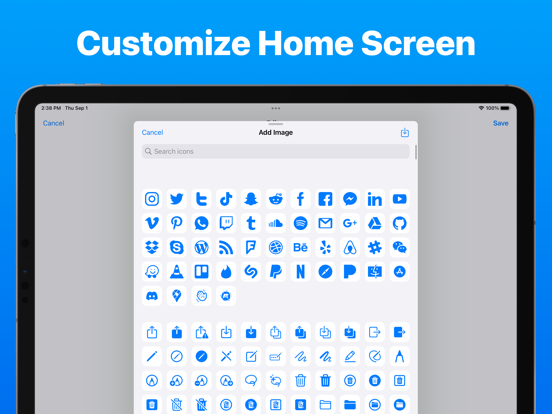
13 store screenshots


Pricing & paywalls
App Store
- IconKit Pro — $7.99
- IconKit Pro — $9.99
- IconKit Pro — $14.99
- IconKit Pro — $24.99
- IconKit Pro — $29.99
Ratings & reviews
App Store
-
4/5Nice!
This app is great! I have made such unique icons with this app. I also like that it’s a one time purchase that is not way overpriced like some other apps. However, there are a few minor things that need to be fixed in order for me to rate this app ⭐️⭐️⭐️⭐️⭐️. 1. Some icons, like App Store, come out black and blurry and impossible to change the color and make them high definition. 2. I tried to upload one photo and it didn’t come up. Are some photos too small or big to upload? If so, I think it should be listed at the bottom saying this file is too small or big or whatever other reason the photo won’t upload. Other than that, this app is flawless. I would just appreciate if these problems were solved!
bubble - T E A - pom · 7 Aug 2026
-
5/5Read this if your wondering anything
I definitely recommend this app, I do wish there was a center button to make the symbol/text snap into the center but other then that this app is perfect if you want to change the app icons without needing to pay 20 bucks. Also for the people wondering what actually costs money, it’s $3.99 for a lifetime plan and you get: •pre made themes (though you could make on your own. I think) •multiple layers (adding more then 1 symbol/text) •adding images (custom icon type images, you can change the background image for free) Note I downloaded this app around 7 minutes ago so as you can tell it’s pretty easy to understand and navigate.
Chocolitte · 7 Aug 2026
-
4/5Great app but I want more
I stumbled upon this app by accident after using many of the competitor apps. This app is great and below are the pros and cons: Pros: 1. Multiple Layers 2. Actually imports transparent images correctly. 3. Able to assign shortcut. 4. Offers discount at launch that allowed me to purchase a a cheaper price. Of course I took that opportunity right away. Cons: 1. No grid can be found. I actually want this feature the most. Especially when trying to recreate a specific size and position this is a must. 2. App has some minor bugs where the app refreshes in the middle of editing and all changes are lost. 3. Unable to find any ability to package up icons into family or groups. Advice for users: Support your independent developers.
The Cook Family · 7 Aug 2026
-
5/5This app is amaze
I love it very much I am so glad I gave it a chance this app does not disappoint
celstian · 7 Aug 2026
-
3/5Is there any way to use this app without shortcuts?
The functionality here is great so far and I really appreciated the one time premium fee instead of a subscription! That being said, using the Shortcuts workaround to change app icons seems to mean that the Shortcuts app opens before the app that you’ve changed the icon for. Dev - is there any other way to do this?
Diana452765 · 7 Aug 2026
Privacy & accessibility
App Store
Privacy
- Data Linked to You — Analytics — Purchases — Purchase History Developer declared
- Data Linked to You — App Functionality — Purchases — Purchase History Developer declared
- Data Linked to You — Purchases Developer declared
Accessibility
No accessibility labels collected yet.
Versions
App Store
-
2.1.1
· Added new symbols · Added alternate app tint colors · Added new app icons · UI Improvements · Bug Fixes
-
2.2
· Improved the app icon detail screen · UI improvements on iPad & smaller iPhones · Bug fixes
-
2.3
· Added hundreds of new symbols · Added over 100 new fonts and font styles · Improved Accessibility · Added Dynamic Type support · Sidebar UI & navigation improvements on iPad · Improved pointer interactions/mouse support · Added a more visible delete button on the app screen · Added alternate app theme fonts · Fixed the sketch layer sizing issue on the iPad · Improved the tutorial screen · Updated the share sheet presentation style · Updated the color picker presentation style
-
2.3.1
· Added hundreds of new symbols · Added over 100 new fonts and font styles · Improved Accessibility · Added Dynamic Type support · Sidebar UI & navigation improvements on iPad · Improved pointer interactions/mouse support · Added a more visible delete button on the app screen · Added alternate app theme fonts · Fixed the sketch layer sizing issue on the iPad · Improved the tutorial screen · Updated the share sheet presentation style · Updated the color picker presentation style
-
2.3.2
· Added hundreds of new symbols · Added over 100 new fonts and font styles · Improved Accessibility · Added Dynamic Type support · Sidebar UI & navigation improvements on iPad · Improved pointer interactions/mouse support · Added a more visible delete button on the app screen · Added alternate app theme fonts · Fixed the sketch layer sizing issue on the iPad · Improved the tutorial screen · Updated the share sheet presentation style · Updated the color picker presentation style
-
2.3.3
· Fixed iPad navigation issues · UI improvements · Bug fixes
-
2.4
· Added over 500 new icons · Added the ability to create custom widgets · UI updates · Bug fixes
-
2.4.1
· Upcoming iOS version support · Added over 500 new icons · Added the ability to create custom widgets · UI updates · Bug fixes
-
2.4.2
· Upcoming iOS version support · Added over 500 new icons · Added the ability to create custom widgets · UI updates · Bug fixes
-
2.4.3
· Improved the tutorial screen · Added new symbols · Updated the placeholder app icon & widget image · Icon exporter improvements · UI improvements · Bug fixes
-
2.4.4
UI improvements & bug fixes
-
2.4.5
UI improvements & bug fixes
-
2.4.6
UI improvements & bug fixes.
-
2.4.7
UI improvements & bug fixes.
-
2.4.8
Bug Fixes & UI Improvements.
-
2.5
· Editor improvements · Added a blur tool · Added a more in-depth tutorial screen · Improved icon menu organization · Improved font picker organization · Added new half modals for layer customization · Improved app navigation · Added tab bar for iPhone & sidebar for iPad · Improved iPad split-screen support · Fixed crashes
-
2.5.1
IconKit is a feature-rich app icon and widget creator. Easily customize your home screen to fit your personality. This update includes: - Added CloudKit sync status monitor - New app icon - UI improvements - Bug fixes
-
2.6
- New and improved editor - Added editing grid - Added blur tool for image layers - Improved layer management - Fixed the editor resetting when the app is closed (in the background) - Added a new tint color - Improved iCloud sync manager - UI improvements - Bug fixes
-
2.6.1
IconKit is the ultimate app for anyone who wants to personalize their home screen and make it truly unique. With IconKit, users can create custom app icons and widgets that perfectly match their style and preferences. Whether you want to add a touch of color, a favorite photo, or a fun design to your home screen, IconKit has you covered. This update includes the following changes: - Added larger font size for text layers - Fixed some image layers appearing blurry and not being able to change colors - UI improvements - Bug fixes
-
2.6.2
IconKit is the ultimate app for anyone who wants to personalize their home screen and make it truly unique. With IconKit, users can create custom app icons and widgets that perfectly match their style and preferences. Whether you want to add a touch of color, a favorite photo, or a fun design to your home screen, IconKit has you covered. This update includes the following changes: - Support for the upcoming version of iOS & iPadOS - UI improvements & bug fixes
-
2.7
IconKit is the ultimate app for anyone who wants to personalize their home screen and make it truly unique. With IconKit, users can create custom app icons and widgets that perfectly match their style and preferences. Whether you want to add a touch of color, a favorite photo, or a fun design to your home screen, IconKit has you covered. This update includes the following changes: - Performance enhancements - Bug fixes - UI improvements
-
2.7.1
IconKit is the ultimate app for anyone who wants to personalize their home screen and make it truly unique. With IconKit, users can create custom app icons and widgets that perfectly match their style and preferences. Whether you want to add a touch of color, a favorite photo, or a fun design to your home screen, IconKit has you covered. This update includes the following changes: - Updates for the upcoming iOS release
-
2.7.2
IconKit is the ultimate app for anyone who wants to personalize their home screen and make it truly unique. With IconKit, users can create custom app icons and widgets that perfectly match their style and preferences. Whether you want to add a touch of color, a favorite photo, or a fun design to your home screen, IconKit has you covered. This update includes the following changes: - UI improvements - Bug fixes
-
3.0
IconKit is the ultimate app for anyone who wants to personalize their home screen and make it truly unique. With IconKit, users can create custom app icons and widgets that perfectly match their style and preferences. Whether you want to add a touch of color, a favorite photo, or a fun design to your home screen, IconKit has you covered. This update includes the following: - Complete UI refresh for a smoother, optimized experience - Expanded icon library with new designs - Added search functionality for quick icon discovery - Introduced a Shortcuts template to streamline home screen icon setup - Enhanced Shortcuts integration for seamless customization - Various bug fixes and performance improvements
-
3.1
· 17 Aug 2025
IconKit is the ultimate app for anyone who wants to personalize their home screen and make it truly unique. With IconKit, users can create custom app icons and widgets that perfectly match their style and preferences. Whether you want to add a touch of color, a favorite photo, or a fun design to your home screen, IconKit has you covered. This update includes the following: - UI improvements - Bug fixes
Alternatives
- App Icon Maker & Custom Theme — Same category + similar ratings
- Next Icon — Same category + similar ratings
Availability by market
- US
Data quality & evidence
- Page completeness
- Live store listing
- Last verified
- 7 Aug 2026
- Sources
- App Store
- Independent summary has not been published yet.