AppCorpus MCP gives your agent current app data, prices, screens, features and sources.
View JSON
GET /api/v3/apps/6753732659
{
  "app_id": 6753732659,
  "canonical_url": "https://appcorpus.com/apps/cueboard-creator-shot-lists-6753732659",
  "identity": {
    "name": "Cueboard - Creator Shot Lists",
    "slug": "cueboard-creator-shot-lists",
    "developer": {
      "name": "Dominic Esposito",
      "url": "https://appcorpus.com/developers/dominic-esposito-developer_63e98711ec2168a10fbca784a77a3c90"
    },
    "icon_url": "https://is1-ssl.mzstatic.com/image/thumb/Purple221/v4/67/f9/fc/67f9fcdf-41c8-f7b3-d8f7-110e9d5bee07/cueboard-icon-0-0-1x_U007epad-0-1-sRGB-85-220.png/512x512bb.jpg",
    "stores": [
      "apple"
    ],
    "platforms": [
      "iphone",
      "ipad"
    ],
    "status": {
      "state": "active",
      "label": "Active",
      "last_checked": "2026-08-07",
      "last_checked_label": "7 Aug 2026",
      "banner": null,
      "region_note": null
    }
  },
  "listings": [
    {
      "store": "apple",
      "status": "ACTIVE",
      "url": "https://apps.apple.com/us/app/cueboard-creator-shot-lists/id6753732659?uo=4",
      "rating": 5.0,
      "rating_count": 7,
      "formatted_price": "Free",
      "is_free": true,
      "has_iap": false,
      "has_subscription": false,
      "version": "1.1.6",
      "updated": "2026-07-15",
      "currency": "USD"
    }
  ],
  "summary": {
    "one_liner": null,
    "summary": null,
    "best_for": [],
    "not_for": [],
    "status": "fallback",
    "at_a_glance": [
      "Free to download"
    ]
  },
  "categories": {
    "official": [
      "Photo & Video",
      "Productivity"
    ],
    "appcorpus": [
      {
        "category_id": "photo-video",
        "label": "Photo & video",
        "url": "https://appcorpus.com/categories/photo-video"
      },
      {
        "category_id": "productivity",
        "label": "Productivity",
        "url": "https://appcorpus.com/categories/productivity"
      }
    ]
  },
  "use_cases": [],
  "features": [
    {
      "capability_id": "free_app",
      "label": "Free app",
      "availability": "yes",
      "access_level": "free",
      "scope": null,
      "evidence": "Store published"
    }
  ],
  "pricing": [
    {
      "store": "apple",
      "formatted_price": "Free",
      "is_free": true,
      "has_iap": false,
      "has_subscription": false,
      "currency": "USD",
      "market": "de",
      "last_verified": "2026-08-07",
      "rows": [
        "Free"
      ]
    }
  ],
  "screens": [
    {
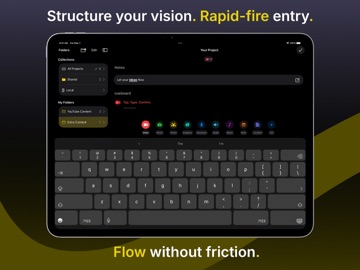
      "url": "https://is1-ssl.mzstatic.com/image/thumb/PurpleSource221/v4/5c/92/28/5c9228f1-f6fa-6a9e-3497-afa5657347da/iPad1.jpeg/1600x1600bb.jpg",
      "store": "apple",
      "platform": "ipad",
      "alt": "Cueboard - Creator Shot Lists ipad screenshot 1"
    },
    {
      "url": "https://is1-ssl.mzstatic.com/image/thumb/PurpleSource221/v4/5c/92/28/5c9228f1-f6fa-6a9e-3497-afa5657347da/iPad1.jpeg/360x480bb.jpg",
      "store": "apple",
      "platform": "ipad",
      "alt": "Cueboard - Creator Shot Lists ipad screenshot 2"
    },
    {
      "url": "https://is1-ssl.mzstatic.com/image/thumb/PurpleSource221/v4/a7/b2/28/a7b228d1-009d-85ad-acf6-a0013fd42197/iPad2.jpeg/1600x1600bb.jpg",
      "store": "apple",
      "platform": "ipad",
      "alt": "Cueboard - Creator Shot Lists ipad screenshot 3"
    },
    {
      "url": "https://is1-ssl.mzstatic.com/image/thumb/PurpleSource221/v4/a7/b2/28/a7b228d1-009d-85ad-acf6-a0013fd42197/iPad2.jpeg/360x480bb.jpg",
      "store": "apple",
      "platform": "ipad",
      "alt": "Cueboard - Creator Shot Lists ipad screenshot 4"
    },
    {
      "url": "https://is1-ssl.mzstatic.com/image/thumb/PurpleSource211/v4/b9/84/09/b9840921-be32-4ab6-bdc5-4df3cea8a412/iPad3.jpeg/1600x1600bb.jpg",
      "store": "apple",
      "platform": "ipad",
      "alt": "Cueboard - Creator Shot Lists ipad screenshot 5"
    },
    {
      "url": "https://is1-ssl.mzstatic.com/image/thumb/PurpleSource211/v4/b9/84/09/b9840921-be32-4ab6-bdc5-4df3cea8a412/iPad3.jpeg/360x480bb.jpg",
      "store": "apple",
      "platform": "ipad",
      "alt": "Cueboard - Creator Shot Lists ipad screenshot 6"
    },
    {
      "url": "https://is1-ssl.mzstatic.com/image/thumb/PurpleSource221/v4/a4/4e/f0/a44ef057-5502-6fb3-b368-43b6360147ff/iPad4.jpeg/1600x1600bb.jpg",
      "store": "apple",
      "platform": "ipad",
      "alt": "Cueboard - Creator Shot Lists ipad screenshot 7"
    },
    {
      "url": "https://is1-ssl.mzstatic.com/image/thumb/PurpleSource221/v4/a4/4e/f0/a44ef057-5502-6fb3-b368-43b6360147ff/iPad4.jpeg/360x480bb.jpg",
      "store": "apple",
      "platform": "ipad",
      "alt": "Cueboard - Creator Shot Lists ipad screenshot 8"
    },
    {
      "url": "https://is1-ssl.mzstatic.com/image/thumb/PurpleSource221/v4/84/02/db/8402db70-8b7b-8fd6-4875-76219b455bd7/iPad5.jpeg/1600x1600bb.jpg",
      "store": "apple",
      "platform": "ipad",
      "alt": "Cueboard - Creator Shot Lists ipad screenshot 9"
    },
    {
      "url": "https://is1-ssl.mzstatic.com/image/thumb/PurpleSource221/v4/84/02/db/8402db70-8b7b-8fd6-4875-76219b455bd7/iPad5.jpeg/360x480bb.jpg",
      "store": "apple",
      "platform": "ipad",
      "alt": "Cueboard - Creator Shot Lists ipad screenshot 10"
    },
    {
      "url": "https://is1-ssl.mzstatic.com/image/thumb/PurpleSource211/v4/e5/21/c0/e521c089-f492-e2ea-ea41-0ddad15fe653/iPad6.jpeg/1600x1600bb.jpg",
      "store": "apple",
      "platform": "ipad",
      "alt": "Cueboard - Creator Shot Lists ipad screenshot 11"
    },
    {
      "url": "https://is1-ssl.mzstatic.com/image/thumb/PurpleSource211/v4/e5/21/c0/e521c089-f492-e2ea-ea41-0ddad15fe653/iPad6.jpeg/360x480bb.jpg",
      "store": "apple",
      "platform": "ipad",
      "alt": "Cueboard - Creator Shot Lists ipad screenshot 12"
    },
    {
      "url": "https://is1-ssl.mzstatic.com/image/thumb/PurpleSource211/v4/30/6b/63/306b634a-7c0d-7fdd-7895-31d7fd37b8cc/AppStore1.jpeg/1284x1600bb.jpg",
      "store": "apple",
      "platform": "iphone",
      "alt": "Cueboard - Creator Shot Lists iphone screenshot 13"
    },
    {
      "url": "https://is1-ssl.mzstatic.com/image/thumb/PurpleSource221/v4/0c/6e/95/0c6e9534-1bb0-9ccd-25e5-62557d1f31a9/AppStore2.jpeg/1284x1600bb.jpg",
      "store": "apple",
      "platform": "iphone",
      "alt": "Cueboard - Creator Shot Lists iphone screenshot 14"
    },
    {
      "url": "https://is1-ssl.mzstatic.com/image/thumb/PurpleSource211/v4/1a/c3/52/1ac352fd-afc3-a2a4-1172-7be27d2a5b7c/AppStore3.jpeg/1284x1600bb.jpg",
      "store": "apple",
      "platform": "iphone",
      "alt": "Cueboard - Creator Shot Lists iphone screenshot 15"
    },
    {
      "url": "https://is1-ssl.mzstatic.com/image/thumb/PurpleSource221/v4/ce/4a/d9/ce4ad9e1-a6b8-9ec0-8284-86d4bef77701/AppStore4.jpeg/1284x1600bb.jpg",
      "store": "apple",
      "platform": "iphone",
      "alt": "Cueboard - Creator Shot Lists iphone screenshot 16"
    },
    {
      "url": "https://is1-ssl.mzstatic.com/image/thumb/PurpleSource211/v4/3e/f0/2c/3ef02cb5-2ce1-697f-0788-abac44505d87/AppStore5.jpeg/1284x1600bb.jpg",
      "store": "apple",
      "platform": "iphone",
      "alt": "Cueboard - Creator Shot Lists iphone screenshot 17"
    },
    {
      "url": "https://is1-ssl.mzstatic.com/image/thumb/PurpleSource211/v4/ca/1a/d5/ca1ad591-b46a-597a-021e-6d5de5890f7a/AppStore6.jpeg/1284x1600bb.jpg",
      "store": "apple",
      "platform": "iphone",
      "alt": "Cueboard - Creator Shot Lists iphone screenshot 18"
    }
  ],
  "ratings": [
    {
      "store": "apple",
      "average": 5.0,
      "count": 7,
      "market": "de",
      "observed_at": "2026-08-07",
      "reviews": [
        {
          "rating": 5,
          "title": "Great App",
          "body": "I love this app. It helps me keep my content ideas organized. Definitely recommend!",
          "author": "Sharon.B03",
          "date": "7 Aug 2026"
        }
      ]
    }
  ],
  "privacy": [
    {
      "store": "apple",
      "declarations": [
        {
          "title": "Data Not Collected",
          "detail": "",
          "source": "Developer declared"
        }
      ],
      "accessibility": []
    }
  ],
  "changes": [
    {
      "store": "apple",
      "version": "1.0",
      "released_at": null,
      "notes": ""
    },
    {
      "store": "apple",
      "version": "1.0.1",
      "released_at": null,
      "notes": "What's New in 1.0.1: - Tab Navigation: Tab and Shift+Tab now work seamlessly between title and details fields on iPad and Mac keyboards, following your project hierarchy for lightning-fast cue creation - Smarter Deletion Logs: Deleted cues now show exactly what was removed, including subcue and visual counts (e.g., \"Deleted Hero Shot and its 8 subcues and 3 visuals\") - iPad Polish: Fixed duplicate \"Preparing share...\" overlays on iPad split view - Keyboard Refinements: Cue type picker updates instantly when using keyboard shortcuts or tapping when initially opened, and stays hidden when creating custom types to avoid visual confusion - Subcue Consistency: Subcue editor now matches the main view's immersive full-screen style Thanks for the feedback! Keep it coming."
    },
    {
      "store": "apple",
      "version": "1.0.2",
      "released_at": null,
      "notes": "Cueboard 1.0.2 — What’s New - Swipe to Nest & Unnest Cues (Reorder Mode) Instantly reorganize your shot list with horizontal swipes: - Swipe right to nest a cue as a subcue - Swipe left to promote a subcue back to root level Works seamlessly across all input methods: - Touch on iPhone and iPad - Two-finger trackpad gestures on iPad and Mac - Live visual feedback, plus haptic confirmation on iPhone New in Settings: Invert trackpad gesture direction to match your preference. - Improved Keyboard Navigation Press Escape to quickly return from a project back to the project list. Escape also now properly closes the note editor when using a keyboard. - Cleaner Note Editing Experience The note editor toolbar has been visually refined for a cleaner look. Toolbars now automatically stay out of the way when the keyboard is visible. - Clearer Project Status Indicators Read-only projects are easier to identify thanks to improved overlay contrast. - Better Template Import Titles Template names are now displayed in a clean, readable format during import. - Version Info in Settings The Settings screen now shows the app’s current version and build number for easy reference. - Under-the-Hood Improvements Enhanced iCloud Sync performance Other bug fixes This update focuses on faster organization, better input parity across devices, and overall polish."
    },
    {
      "store": "apple",
      "version": "1.1.0",
      "released_at": null,
      "notes": "Cueboard 1.1.0 — What's New NEW FEATURES - Cue Director: AI-Powered Shot List Planning (iOS 26 with supported devices) - Generate complete shot lists instantly from natural language prompts - Powered by Apple Intelligence with private, on-device processing - Unlimited generations with no subscription required - Watch your plan's project structure build in real-time as AI creates it IMPROVEMENTS - Enhanced Keyboard Support - Added ⌘⇧D shortcut to open Cue Director - Added ⌘⇧⏎ to submit prompts and generate projects - ESC now works reliably to dismiss sheets and editors - Better keyboard navigation across iPad and Mac - Refined User Experience - Sort projects by cue count now displaying either highest or lowest first. - Improved visual feedback during project creation - Better placeholder states while content loads - Optimized performance when editing large projects BUG FIXES - Fixed keyboard occasionally dismissing during Flow Mode editing - Fixed overlays showing wrong colors for shared projects and folders - Fixed note preview not wrapping text properly in project list - Improved stability and performance throughout the app"
    },
    {
      "store": "apple",
      "version": "1.1.1",
      "released_at": null,
      "notes": "Cueboard 1.1.1 — What's New - Press ESC from within a nested folder to navigate to the root folder. Press it again from the root folder to return to All Projects. - Bug fixes and performance enhancements"
    },
    {
      "store": "apple",
      "version": "1.1.2",
      "released_at": null,
      "notes": "Cueboard 1.1.2 — What's New - Improved keyboard navigation with TAB in projects and editing reliability across cues and subcues, with better iPad layout behavior and stronger sync stability - Bug fixes and performance enhancements"
    },
    {
      "store": "apple",
      "version": "1.1.3",
      "released_at": null,
      "notes": "Cueboard 1.1.3 — What's New - Improved project move experience - Better reliability for shared projects and offline use - Cleaner export and template filenames - General stability and polish improvements"
    },
    {
      "store": "apple",
      "version": "1.1.4",
      "released_at": null,
      "notes": "Cueboard 1.1.4 — What's New - Bug fixes and performance enhancements"
    },
    {
      "store": "apple",
      "version": "1.1.5",
      "released_at": null,
      "notes": "Cueboard 1.1.5 — What's New - Bug fixes and performance enhancements"
    },
    {
      "store": "apple",
      "version": "1.1.6",
      "released_at": "2026-07-15",
      "notes": "We've made Cueboard even better to help you create content! This update includes bug fixes."
    }
  ],
  "alternatives": [],
  "evidence_summary": {
    "index_state": "S1",
    "evidence_level": 1,
    "level_label": "Live store listing",
    "indexable": true,
    "last_verified_at": "2026-08-07",
    "unknown_fields": [
      "Independent summary has not been published yet."
    ],
    "sources": [
      "App Store"
    ]
  },
  "availability_markets": {
    "live": [
      "us"
    ],
    "selected": "de",
    "note": "No LIVE observation for DE yet."
  },
  "feature_events": {
    "events": []
  },
  "features_slice": {
    "plans": [
      {
        "code": "free",
        "label": "Free",
        "kind": "free",
        "status": "inferred",
        "prices": [],
        "trial": null
      }
    ],
    "features": [],
    "unknown_features": [],
    "data_cutoff": "7 Aug 2026"
  }
}