
Quick verdict
- What it is
- Store information collected; an Apoku editorial summary is not yet published.
- At a glance
-
- Free to download
Categories and search queries
Official categories
- Food & Drink
Apoku categories
Key functions
| Function | Availability | Access | Scope | Evidence |
|---|---|---|---|---|
| Free app | Yes | Free | Context-specific | Store published |
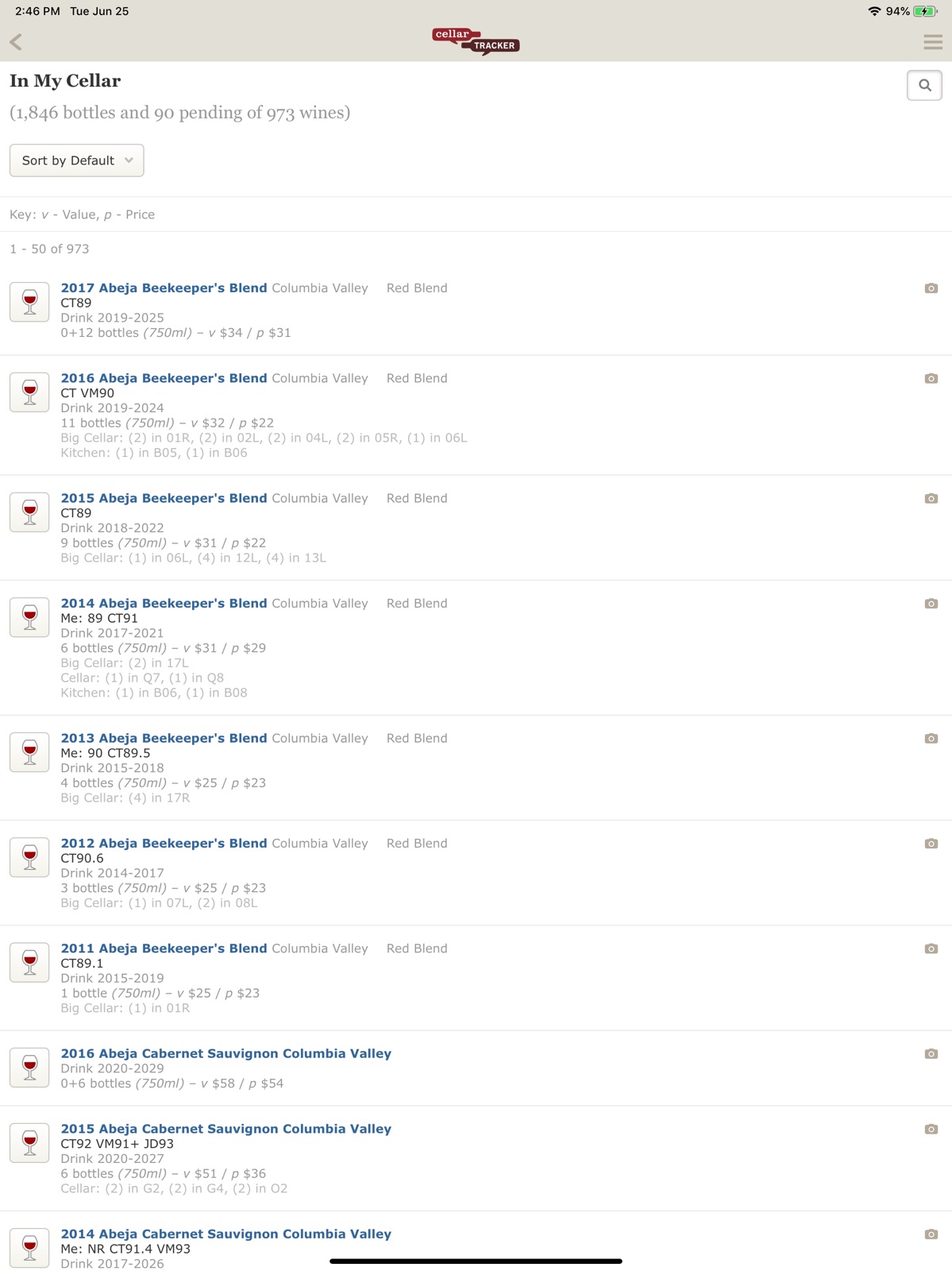
Screens
App Store
10 store screenshots



Pricing & paywalls
App Store
Shown for US
- Free to download
Ratings & reviews
App Store
Shown for US
-
4/5Good, functional, needs updating/tweaking
I am a paying customer and have been for quite a few years. It’s very helpful to manage my recently growing inventory. A few things to improve: - A sort by delivery date. When I get a lot of new wine in, I’d like to be able to sort the new stuff out so I’m not considering it to drink while it is resting from travel. - Really need a flag, tab, a sort, to keep track of wines that have been Coravined. Right now the only way to do that in the app is to put a bottle note in, and can’t sort on that! - I find they have 99% + of the wines I get already identified. However, I agree with other comments that when you do get something not already identified, the add new wine process is cumbersome and time consuming, and you usually have to go the website to do it. - I have talked to them before about this and it hasn’t been done yet, but being able to copy an entry on the app would be a great time saver. When you get different wines from the same winery or place and all you really need to change is wine info, cost and location, copying all the other information per entry would be very helpful! I hope the developer is watching!
Billy Guitar · 31 Jul 2026
-
5/5Just what I needed
This app was recommended to me by a winery associate after I was lamenting about needing to inventory my wine. I was tired of going over each bottle every time we wanted to open one, trying to remember what we had and what should or shouldn't be opened yet. CellerTracker has been exactly what we needed. It took a couple hours to enter in all 90 of our bottles, but so worth it. There were a couple that weren't in the system, but the app gives you the option to send an email requesting the addition, and out of the five, there was only 1 that they just couldn't find. It was a pretty obscure bottle though, I'm not even sure how we ended up with it. I think my favorite part of the app is that it provides recommended drink by dates. So if we're not looking to open anything in particular, we just search our cellar by latest drink by date. As I've entered new bottles, I try to enter in price so I can also use that as a factor in choosing a bottle. In addition, you can search your cellar by wine type, down to the grape if you want, winery, or region. So now instead of crouching in front of our wine fridges, I can just scroll through my iPad or phone with an app that helps me make a better choice. I love how much time and headache this has saved me!
JoJoWA2013 · 31 Jul 2026
-
5/5*THE* wine tracking app
I’ve been using CellarTracker for several years now, and it’s great. Easy to add wines, keeps track of how much you paid, where & when you bought it, whether it’s in your cellar or pending delivery, etc. You can see how many bottles you own, how many are pending delivery, how many you’ve drunk, etc. After drinking a bottle you can enter private notes for yourself, public tasting notes that are viewable by the community, or none at all. Additionally, you can access all this and much more via a web browser on a computer. The programmers have been very responsive to help requests and any new wines I need added. The community is, by and large, pretty knowledgeable. If I don’t know anything about a wine, I’ll look it up and read through the public reviews to see if it’s something I might like. Can’t say enough good things about this app.
Regular Guy 95 · 31 Jul 2026
-
5/5Does many things better than the new app
I’ve been using CellarTracker for over 10 years, long before there was an app. Is this app great? Not at all, the website does many things way better, especially when managing multiple bottles. But this is nice for finding a specific bottle to open, and for removing it from your cellar. I write this review to contrast it with the new app. That one is far less focused on your cellar and more on wine in general. (I’m expecting that they’ll be selling ad space to wineries soon.) It’s less of a “cellar tracker” and more of a “cellar filler” and wine guide. While I don’t expect this app to be further developed, I’m hoping they incorporate this feedback into the direction of the new app. Or at least keep this one functional.
Will fjdnenxjenxn · 31 Jul 2026
-
4/5Straightforward, capable database
I’ve loved this app. I’ve voluntarily paid since the beginning of use in 2019. I’ll admit I paid what I considered a reasonable value for the service, $40 a year or equivalent of a decent bottle of wine for me. I don’t need reviews. I don’t need a “community”. I don’t need “drink now” assistance or photos. I just need the database function and that is solid in this app. I dread the day the old app is cut off and the upgrade to the new version is mandatory. I will not pay the excessive rates they expect. My cost would be 10x higher per year which far exceeds the value for a database function. I’ll drop it when that occurs. It’ll be a pity, but I can’t imagine the server space for my data costs that much to maintain.
5 year paying customer · 31 Jul 2026
Privacy & accessibility
App Store
Privacy
- Data Linked to You — Analytics — Identifiers — Device ID Developer declared
- Data Linked to You — Analytics — Search History Developer declared
- Data Linked to You — Analytics — Usage Data — Product Interaction Developer declared
- Data Linked to You — App Functionality — Contact Info — Email Address Developer declared
- Data Linked to You — App Functionality — Contact Info — Name Developer declared
- Data Linked to You — App Functionality — Diagnostics — Crash Data Developer declared
- Data Linked to You — App Functionality — Identifiers — Device ID Developer declared
- Data Linked to You — App Functionality — Identifiers — User ID Developer declared
- Data Linked to You — App Functionality — Search History Developer declared
- Data Linked to You — App Functionality — Usage Data — Product Interaction Developer declared
- Data Linked to You — App Functionality — User Content — Other User Content Developer declared
- Data Linked to You — App Functionality — User Content — Photos or Videos Developer declared
- Data Linked to You — Developer’s Advertising or Marketing — Contact Info — Email Address Developer declared
- Data Linked to You — Product Personalization — Search History Developer declared
- Data Linked to You — Product Personalization — Usage Data — Product Interaction Developer declared
- Data Linked to You — Product Personalization — User Content — Other User Content Developer declared
- Data Linked to You — Contact Info Developer declared
- Data Linked to You — Diagnostics Developer declared
- Data Linked to You — Identifiers Developer declared
- Data Linked to You — Search History Developer declared
- Data Linked to You — Usage Data Developer declared
- Data Linked to You — User Content Developer declared
Accessibility
No accessibility labels collected yet.
Versions
App Store
- 1.0.0
-
1.0.1
This update improves barcode scanning and recognition, and includes other small fixes and updates. - NEW: Torch (flashlight) is available to help barcode scanning in low-light situations. - IMPROVED: Barcode scanning accuracy has been improved, allowing for improved recognition of UPC barcodes. We've also made a number of improvements for iPhone 4 users. - IMPROVED: We've enhanced the barcode scanning interface to make it easier to use. - FIX: An infinite hang on the splash screen has been resolved. - NEW: A settings page, available via the Settings app, will allow you to opt-out of analytics data collection, and show you the current version of the app. Thanks for using CellarTracker, and please continue to send us feedback (and report issues) via our Support page!
-
1.1.0
This update improves barcode scanning, iOS 8 compatibility, and iPhone 6/6 Plus support. Thank you for all of your feedback to date! - IMPROVED: Barcode scanning has been overhauled for better speed and accuracy - IMPROVED: Barcode interface has been updated with more appropriate guides and scan result display - NEW: Vibration on successful barcode scan (with device support) - NEW: If we don't have access to the camera, we'll let you know (instead of showing a black screen) - NEW: iPhone 6 and 6 Plus now run at their native device resolutions, so you can see more on screen! Thanks for using CellarTracker, and please continue to send us feedback (and report issues) via our Support page!
-
1.5.0
• NEW: Label Search - Search for a wine simply by taking a photo of the label. • NEW: Quick Capture - Capture photos and notes on multiple wines (e.g. at a tasting), and then go back later to create tasting notes and see more details on the wines themselves. • NEW: My Label Searches - See a full history of your label searches, map them to individual wines, and create tasting notes (if you provided notes during a quick capture session). Available from the right panel. • NEW: Sharing Wines - A share button on wine detail pages allows you quickly and easily share that wine via a variety of methods. • FIXED: Barcode scanning now works properly on iOS 6. • FIXED: Numerous other improvements and bug fixes.
-
1.5.1
By popular request, you can now select photos from your photo library to use for label search! New in 1.5.0: • NEW: Label Search - Search for a wine simply by taking a photo of the label. • NEW: Quick Capture - Capture photos and notes on multiple wines (e.g. at a tasting), and then go back later to create tasting notes and see more details on the wines themselves. • NEW: My Label Searches - See a full history of your label searches, map them to individual wines, and create tasting notes (if you provided notes during a quick capture session). Available from the right panel. • NEW: Sharing Wines - A share button on wine detail pages allows you quickly and easily share that wine via a variety of methods. • FIXED: Barcode scanning now works properly on iOS 6. • FIXED: Numerous other improvements and bug fixes.
-
1.6.0
We've optimized the app for iOS 9 and fixed some bugs, too! - Universal Links are now supported, so many links to cellartracker.com will open directly in the app. - Label searches and uploads are now saved to your photo library by default, but you can turn this off via the app settings in the right panel. Need help with the app? You can reach us at [email protected].
-
1.6.1
We've optimized the app for iOS 9 and fixed some bugs, too! - Universal Links are now supported, so many links to cellartracker.com will open directly in the app. - Label searches and uploads are now saved to your photo library by default, but you can turn this off via the app settings in the right panel. - Feedback links (that open a new email) are working again. - Videos embedded in help topics are playable in the app. Need help with the app? You can reach us at [email protected].
-
1.6.3
This update contains some bug fixes. Need help with the app? You can reach us at [email protected].
-
1.7.0
We've added proper iPhone X and iOS 11 support! Questions or issues? Reach out to [email protected] for help!
-
1.7.1
We've added proper iPhone X and iOS 11 support! We've also fixed a pesky bug that caused a crash when trying to upload label images from your photo library. Questions or issues? Reach out to [email protected] for help!
-
1.7.2
We've added proper iPhone X and iOS 11 support! We've also fixed an issue when opening Restaurant Style Wine Lists. Questions or issues? Reach out to [email protected] for help!
-
1.7.3
We've added support for Quick Actions on the home screen icon, and multitasking on iPad! We've also squashed a few pesky bugs from the prior release. Reach out to us at [email protected] if you run into any issues or need assistance!
-
1.7.4
That annoying issue where the keyboard covers the field you're typing into? It's fixed! Plus, we fixed a crash with the barcode scanner on iPhone Xs Max devices. See any other issues? Let us know at [email protected]!
-
1.7.5
That problem with the header disappearing after performing a label search on iOS 13? It's fixed!
-
1.7.6
Fixes an issue with iOS 14 showing clipboard access on startup. We do not read the clipboard without a user's explicit action.
-
1.8.0
This release ensures the header stays at the top of the page.
-
1.8.1
The barcode scanner now utilizes the macro camera on iPhone 13 and later Pro/Pro Max devices for better scanning results!
-
1.9.0
This version is an important update that streamlines transitioning to our new mobile app, coming soon!
-
1.9.1
- maintenance release
-
1.9.2
· 13 Jun 2025
- bug fix
Alternatives
- Pocket Wine: Guide & Cellar — Same category + similar ratings
- Vinocell – Wine cellar manager — Same category + similar ratings
Availability by market
- US
Data quality & evidence
- Page completeness
- Live store listing
- Last verified
- 31 Jul 2026
- Sources
- App Store
- Apoku editorial summary has not been published yet.