
Quick verdict
- What it is
- Store information collected; an Apoku editorial summary is not yet published.
- At a glance
-
- Free download · core features require a paid plan
- In-app purchases
Categories and search queries
Official categories
- Lifestyle
- Utilities
Apoku categories
Key functions
| Function | Availability | Access | Scope | Evidence |
|---|---|---|---|---|
| Free app | Yes | Free | Context-specific | Store published |
| In-app purchases | Yes | Limited free | Context-specific | Store published |
| Subscription | Yes | Paid | Context-specific | Store published |
| Apple Wallet | Unknown | Unknown | Scope unknown | Store published |
| Family Sharing | Unknown | Unknown | Scope unknown | Store published |
Screens
App Store
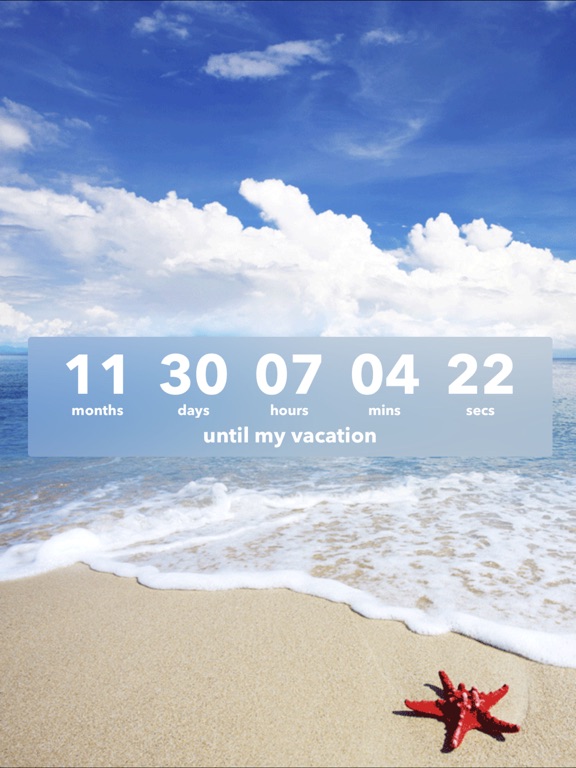
10 store screenshots

Pricing & paywalls
App Store
Shown for US
- Countdown Premium
Ratings & reviews
App Store
Shown for US
-
4/5Love this app! But i have a few questions.
I use this app for all of my dates and when things are due for school, but why do i have to pay for the widgets? I feel like it’s unnecessary to pay for them. So many other apps have free widgets, so i was kind of really hoping that this app would too. I’m trying to keep track of all my things that are due and when my boyfriend and I’s anniversarys are because i cannot remember a thing off the top of my head but could we try and have free widgets please? It would be so much better for the company and people would use your app more and more if it had more free stuff. It’s also a hassle trying to find your app in my phone so i can find what date is when and what’s due what day. I rather just be able to see when i get on my screen “Oh i have 3 more days to turn in this essay” or “ oh 7 more days till my boyfriend and I have been together for a year”. But overall this app is really nice but could use some work. Please and Thanm you for your time -Coraline
coraline0727 · 30 Sep 2026
-
5/5Perfect for Apollo 50th anniversaries
(First of all, the “most helpful” review is 2 years old, and says they’ll update it up from 3 stars to 5 if the app can share a countdown; it’s been doing that at least since July 2019, and it’s still 3 stars. Others are similar low reviews for no good reason.) Bach to Apollo: If you use the Apollo in Real Time site and like following alone with NASA’s Apollo timelines, this app is critical. It’s the only one I found that lets you display in hours:minutes:seconds (with days turned off, so 3 days shows as 72 hours), before or after the event date. (And, you can set the font to Futura, the same one NASA used!) You can also download a copy of the mission patch from Wikipedia or NASA, view in Photos full-screen and screenshot it so it’s the right size, and use that as the background. If you need/want to, you can then generate a URL to share the image & time to another device (the only issue is placement of the time, but you can drag it back into position). Everything I mentioned is in the free app - the only reason I’m paying for it is to support the author and hide the non-obtrusive banner ad at the top of the page.
GS/LS · 30 Sep 2026
-
4/5Not in my Notifications on iPhone
I can’t get the badge/countdown icon to work. (I bought the upgrade for that feature). I think it’s because the app doesn’t appear in my Settings-Notifications. I’ve closed the app, deleted and reinstalled 10 times. Anyone else had this problem and fixed it? Customer support has been good about responding but hasn’t been able to fix it. Maybe it’s time to give up and ask for a refund. UPDATE 3/9/18 I upgraded to 4 stars because I finally got the badge icon to work. The only thing I might have done differently is I made sure to CLOSE the app before I deleted and reinstalled it. So it works now. Strange though because when I open the app the countdown says one number and the number on the icon is one less than that. But I’ll take it. The customer service people have been responsive.
Nelle49 · 30 Sep 2026
-
5/5Awesome!
I have been using this app for a while now, and me and my family always use this app as it is really nice to know how long it is until you get to go somewhere fun. I had no problems with the app, as other reviews have said, they had some major bugs. Those bugs must have been hit or miss because mine worked fine. Developers, please fix the bugs as quick as you can. They seem to be really bothering people. I will update when my current countdown is over, which is in 2 weeks, and see if the notifications work, because I forget from the last time I used this app. Everyone, stay safe! Edit: I have just found out that you can turn reminders on and off on the app. I think many of the reviews were saying that their reminder didn’t work. All of you that want to customize things tap at the top of your screen (right below that adds) then press that gears!
CamCorn124 · 30 Sep 2026
-
3/5Do not purchase if you want to share your Countdowns
Can’t give this app more than three stars without the ability to share my Countdown. I have an important event coming up next year, one that is particularly special for me and a friend; I poured a couple hours into creating a dynamic countdown, with personalized music and a slideshow containing dozens of edited photographs. I would not have spent so much time if I had known sharing my work with others, a feature that commonly comes with other (free) countdown apps, is not possible with this one. What a bummer. You guys have done so many other things right; but none of it matters if can’t share your creation with other people. A person typically starts a countdown for an important event in their life, something they want to share with others; it’s such a fundamental feature on an app like this, I really am shocked you have not prioritized this fix above all else. Please update your app with sharing capabilities and I will update my review to five stars.
RobinAW · 30 Sep 2026
Privacy & accessibility
App Store
Privacy
- Data Not Linked to You — Analytics — Diagnostics — Crash Data Developer declared
- Data Not Linked to You — Analytics — Diagnostics — Other Diagnostic Data Developer declared
- Data Not Linked to You — Analytics — Diagnostics — Performance Data Developer declared
- Data Not Linked to You — Analytics — Identifiers — Device ID Developer declared
- Data Not Linked to You — Third-Party Advertising — Identifiers — Device ID Developer declared
- Data Not Linked to You — Diagnostics Developer declared
- Data Not Linked to You — Identifiers Developer declared
- Data Used to Track You — Identifiers — Device ID Developer declared
- Data Used to Track You — Identifiers Developer declared
Accessibility
No accessibility labels collected yet.
Versions
App Store
-
4.4.7
Announcing Sunflowr! Countdown is now part of the Sunflowr family! Sunflowr (“sunflower” without the “e”) is the new name and look of our brand. Learn more at sunflowr.com. Here's what's new in this update: • Minor bug fixes and improvements Thanks for using Countdown! Happy counting!
-
4.5.0
Our big widget update is here! Take a quick look at what's new: • iOS 14 Widgets: Now you can count down the days to your event right from your home screen! Just long hold an empty area on your home screen and tap the "+" in the top-left corner to get started. • Other minor bug fixes and improvements Remember to leave us a review if you enjoy the app! Or shoot us an email at [email protected] – feedback is super important to us. Happy counting!
-
4.5.1
Our big widget update is here! Take a quick look at what's new: • iOS 14 Widgets: Now you can count down the days to your event right from your home screen! Just long hold an empty area on your home screen and tap the "+" in the top-left corner to get started. • Other minor bug fixes and improvements Remember to leave us a review if you enjoy the app! Or shoot us an email at [email protected] – feedback is super important to us. Happy counting!
-
4.5.10
• Premium subscription still seeing ad issue is fixed now. • Minor improvement Thanks for using Countdown! Happy counting!
-
4.5.11
• Premium subscription still seeing ad issue is fixed • Improve Premium version loading performance • Other Minor improvements Thanks for using Countdown! Happy counting!
-
4.5.12
• Minor improvements Thanks for using Countdown! Happy counting!
-
4.5.2
Our big widget update is here! Take a quick look at what's new: • iOS 14 Widgets: Now you can count down the days to your event right from your home screen! Just long hold an empty area on your home screen and tap the "+" in the top-left corner to get started. • Other minor bug fixes and improvements Remember to leave us a review if you enjoy the app! Or shoot us an email at [email protected] – feedback is super important to us. Happy counting!
-
4.5.3
Our big widget update is here! Take a quick look at what's new: • iOS 14 Widgets: Now you can count down the days to your event right from your home screen! Just long hold an empty area on your home screen and tap the "+" in the top-left corner to get started. • Other minor bug fixes and improvements Remember to leave us a review if you enjoy the app! Or shoot us an email at [email protected] – feedback is super important to us. Happy counting!
-
4.5.4
• Minor bug fixes and improvements Remember to leave us a review if you enjoy the app! Or shoot us an email at [email protected] - feedback is super important us. Happy counting!
-
4.5.5
• Minor bug fixes and improvements Remember to leave us a review if you enjoy the app! Or shoot us an email at [email protected] - feedback is super important us. Happy counting!
-
4.5.6
• Minor bug fixes and improvements Remember to leave us a review if you enjoy the app! Or shoot us an email at [email protected] - feedback is super important us. Happy counting!
-
4.5.7
• Minor bug fixes and improvements Remember to leave us a review if you enjoy the app! Or shoot us an email at [email protected] - feedback is super important us. Happy counting!
-
4.5.8
• iOS 16 Lock Screen Widgets – Add countdown widgets to your lock screen! First, set up your countdown in the Countdown app. Then pull down your lock screen, long-hold an empty area, and tap "Customize." Thanks for using Countdown!
-
4.5.9
• Minor bug fixes and improvements Thanks for using Countdown! Happy counting!
-
4.6.0
• Ready for iOS 17 • Widget issue fixed • Minor fixes and improvements Thanks for using Countdown! Happy counting!
-
4.6.1
• Minor fixes and improvements Thanks for using Countdown! Happy counting!
-
4.6.2
• Minor fixes and improvements Thanks for using Countdown! Happy counting!
-
4.6.3
• Minor fixes and improvements Thanks for using Countdown! Happy counting!
-
4.6.4
• Minor fixes and improvements Thanks for using Countdown! Happy counting!
-
4.6.5
• Minor fixes and improvements Thanks for using Countdown! Happy counting!
-
4.6.6
• Minor fixes and improvements Thanks for using Countdown! Happy counting!
-
4.6.7
• Optimize custom photos storage • Minor fixes and improvements Thanks for using Countdown! Happy counting!
-
4.6.8
• Minor fixes and improvements Thanks for using Countdown! Happy counting!
-
4.6.9
• fix the widget issue with Tinted/Clear mode • other minor improvements Thanks for using Countdown! Happy counting!
-
4.7.0
· 20 Jan 2026
• Minor fixes and improvements Thanks for using Countdown! Happy counting!
-
4.8.0
· 24 Sep 2026
• Optimized for iOS 27 • Minor fixes and improvements Thanks for using Countdown! Happy counting!
Alternatives
- Days • Countdown & Widgets — Same category + similar ratings
- Outside: Countdown for Couples — Same category + similar ratings
- Countdown with widget — Same category + similar ratings
- Countdown Widget & Countdown — Same category + similar ratings
- The Knot: Wedding Planner App — Same category + similar ratings
- TheDayBefore (days countdown) — Same category + similar ratings
Availability by market
- US
Data quality & evidence
- Page completeness
- Live store listing
- Last verified
- 30 Sep 2026
- Sources
- App Store
- Apoku editorial summary has not been published yet.