
Quick verdict
- What it is
- Store information collected; an Apoku editorial summary is not yet published.
- At a glance
-
- Free to download
- In-app purchases
Categories and search queries
Official categories
- Utilities
- Lifestyle
Apoku categories
Key functions
| Function | Availability | Access | Scope | Evidence |
|---|---|---|---|---|
| Free app | Yes | Free | Context-specific | Store published |
| In-app purchases | Yes | Limited free | Context-specific | Store published |
| Family Sharing | Unknown | Unknown | Scope unknown | Store published |
Screens
App Store
34 store screenshots


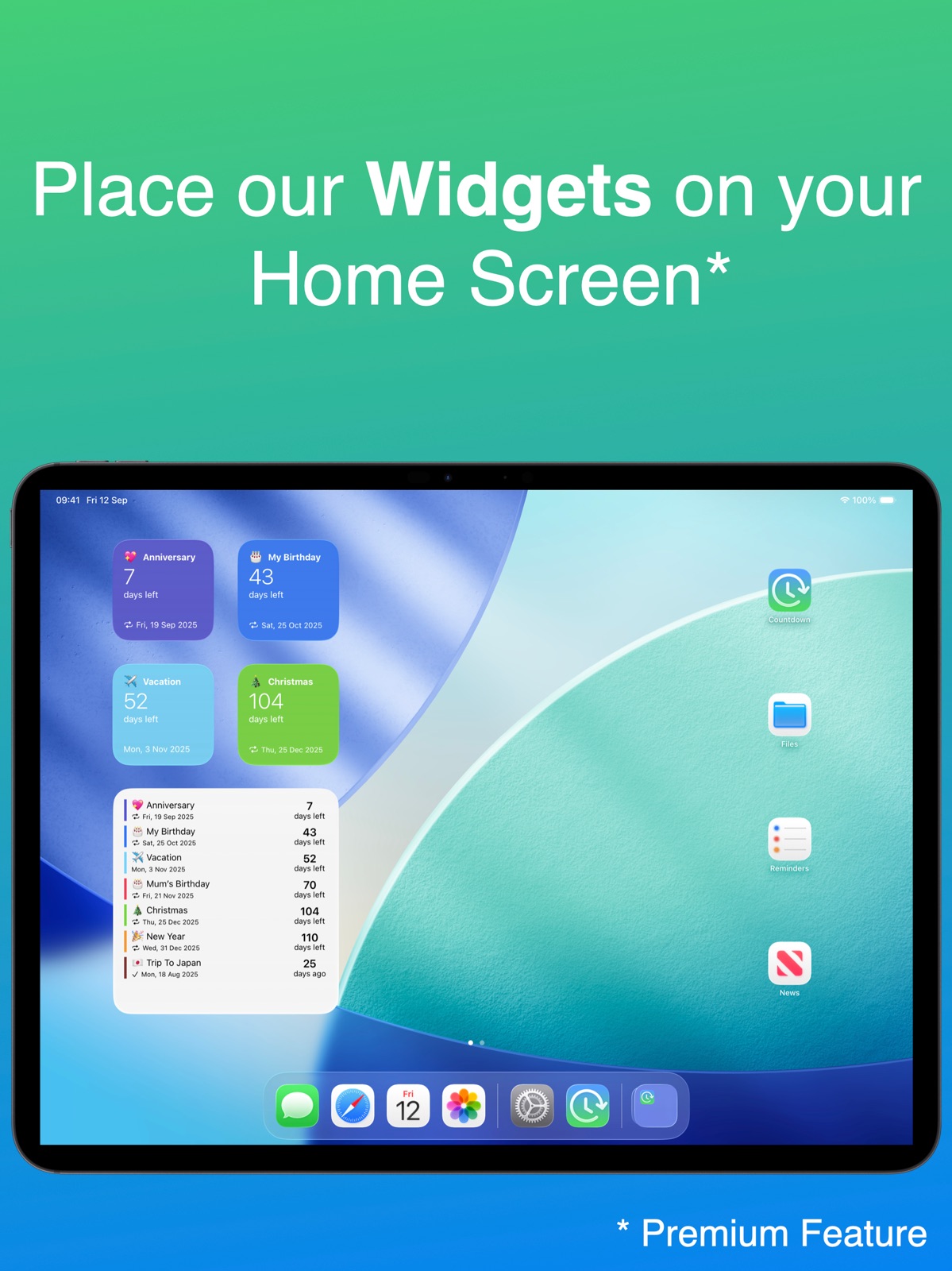
Pricing & paywalls
App Store
- Countdown Widget — $6.99
Ratings & reviews
App Store
-
5/5This is the best Countdown app ever!!
It’s literally the best! I saw this app on TikTok and I was like “ I need to download this right now.” It would be way better for organizing events! And when I tell you… THIS WORKED SO WELL! I was able to keep track of my events so I could not forget them and I could arrive on time for events and this is the best! I could not recommend another better Countdown app than this one right here. If you’re thinking about getting this app, definitely get it and you will definitely love it! One of the flaws about the app though, was that it really didn’t teach you how to use it and I was a little confused first because the app when you downloaded it and made events didn’t look like the ones popping up on my fyp and it took me like a few minutes to figure out how the whole app was working, maybe if you have the budget to kind of like install or make a tutorial so that users know exactly what to do the minute you get on the app! other than that though the app is exactly what I needed. Thanks so much for the creators for making this an awesome app! If you’re thinking about getting it, I recommend it, five out of five!
nayaaayagirl · 29 Sep 2026
-
5/5So Useful! New Update MUCH Appreciated!
Well, you see the title. This app is literally just amazing. This new update is AMAZING. I’m so happy I can now choose only week days, (Maybe add like the option to customize your amount of days?) as it is a bit nice to be able to count how many days of work are left until vacation. =P I also find the ability to categorize your countdowns into Reminders, Birthdays, Custom, etc. This is the BEST countdown app you will find on the Apple Store, that much is guaranteed. I’m not sure what people are talking about when it comes to ads. I haven’t gotten any besides the small ones inside the countdowns that DO NOT replace the app/screen. Those, I basically don’t count as advertisements. Super cute and colorful app! TL;DR -App is super convenient -New update ROCKS with new perks! -You can choose to only count weekdays if you scroll down -Very customizable -User Friendly -You can categorize/organize your countdowns! Than you so much for reading, and developer, this app is amazing! I’ve gone through so many countdown apps before I found yours and I am so glad I did! Thanks for the new update too!
HanneFerMyne<33333 · 29 Sep 2026
-
5/5Very useful
Very easy to use, simple layout and nothing hidden. Tap + to add an event, the layout is easy to follow and set event info. Includes some fun features to set a background color and emoji, such as birthday cake to represent a birthdate. I did my whole calendar list of holidays, special days, birthdays of family and anniversaries in no time. Love the countdown and count up for past events, I put in my birthdate and know know to the second how old I am, really cool. Easily shares with another devices, had same list on iPad and iPhone instantly. I added the widget, very nice and shows either next two event or more. Nothing complicated to set up. I still gave 5 stars as its almost perfect. It includes a feature to have event repeat next year, great for like birthdays that occur on same number day of a month each year, but for some holidays it won’t be correct as they occur not on a specific number day, but say, 2nd Monday of February and each year that will be a different number day, where the app has no setting for this. Overall much better than anything else I tried and glad I found this and replaced previous app I’ve used for a few years.
Keith-50 · 29 Sep 2026
-
5/5LOVE THIS APP!! ❤️❤️❤️
At first my mom downloaded this app for birthdays, holidays, etc. Then, I downloaded the app and I’m in love with it! I have not once forgotten a holiday or a family member’s birthday! And it’s not just for holidays, you can add countdowns for anything! (I have a countdown for when my braces are expected to get off 🤪). For any countdown that you add, you can program it to repeat yearly, so you don’t have to keep reentering the info in. It also allows you to organize the countdowns entered. You can have the app organize it from soonest, to furthest, or you can organize it yourself. Whether you want it to be holidays first, then birthdays, or birthdays then holidays. Also, when you download the app, it will give you the option to have VIP subscription. I highly recommend purchasing that as well. It is a $4 fee, and you only have to pay once. If you have an Apple device, and you get the iOS 14 update, then you can unlock larger widgets on your phone, only with the VIP subscription. I 100% recommend this app!!!
fmarlow1! · 29 Sep 2026
-
5/5Hands down THE BEST personal reminder / visual list EVER I’ve used
Not only is it visually stunning and intuitively easy to use and add to and reorder and update and delete entries from but it seamlessly uses iCloud in the background to sync and work on iPad and MacBook (and iMac and any other Apple device apparently) including giving widgets on MacBook which itself is awesome. AND even notes typed on the MacBook into an entry’s note field instantly syncs to the notes field on that entry on all devices. Beyond amazingly helpful to track appointments, doctor appointments especially, anniversaries/birthdays, any other recurring reminder needed, from mundane air conditioner filter changes to car maintenance to business trips and vacations. The no nonsense list instantly gives perspective of how many days/months away each item is. Cannot say enough about this app and fantastic developer skill in making this thing work flawlessly!!
leaseguru · 29 Sep 2026
Privacy & accessibility
App Store
Privacy
- Data Not Linked to You — Analytics — Identifiers — Device ID Developer declared
- Data Not Linked to You — Analytics — Identifiers — User ID Developer declared
- Data Not Linked to You — Analytics — Location — Coarse Location Developer declared
- Data Not Linked to You — Analytics — Usage Data — Advertising Data Developer declared
- Data Not Linked to You — Analytics — Usage Data — Product Interaction Developer declared
- Data Not Linked to You — App Functionality — Diagnostics — Crash Data Developer declared
- Data Not Linked to You — App Functionality — Diagnostics — Other Diagnostic Data Developer declared
- Data Not Linked to You — App Functionality — Diagnostics — Performance Data Developer declared
- Data Not Linked to You — App Functionality — Usage Data — Other Usage Data Developer declared
- Data Not Linked to You — App Functionality — Usage Data — Product Interaction Developer declared
- Data Not Linked to You — Product Personalization — Usage Data — Product Interaction Developer declared
- Data Not Linked to You — Third-Party Advertising — Identifiers — Device ID Developer declared
- Data Not Linked to You — Third-Party Advertising — Usage Data — Advertising Data Developer declared
- Data Not Linked to You — Diagnostics Developer declared
- Data Not Linked to You — Identifiers Developer declared
- Data Not Linked to You — Location Developer declared
- Data Not Linked to You — Usage Data Developer declared
- Data Used to Track You — Identifiers — Device ID Developer declared
- Data Used to Track You — Identifiers Developer declared
Accessibility
- Dark Interface — SUPPORTED Store published
- Differentiate Without Color Alone — SUPPORTED Store published
- Larger Text — SUPPORTED Store published
- Sufficient Contrast — SUPPORTED Store published
- Voice Control — SUPPORTED Store published
- VoiceOver — SUPPORTED Store published
Versions
App Store
-
6.2.2
In this release, we’ve introduced several improvements and new features: • Auto Import (Premium): Connect your calendars to Countdown and automatically add new events. No more manual imports. • Share Countdowns: Select the events you want to share and we’ll generate a link. Anyone with the link can import those events into their app. (Currently supported on iOS only.) • Improved Calendar Import: Easily filter by calendar, search across all your calendars, and assign tags to imported events. • Export to Calendar Enhancements: Choose which calendar to export to and filter events by tags before exporting. Have feedback? We’d love to hear from you: [email protected]
-
6.3.0
This update brings a refreshed design. The event screen has been redesigned to focus on the date that matters and lists are cleaner.
-
6.3.1
This update brings a refreshed design. The event screen has been redesigned to better highlight the date that matters, and lists are now cleaner and easier to read. This is one of the biggest design updates we've released in a while, so I'd love to hear what you think. If you have any feedback, positive or negative, please email me at [email protected].
-
6.3.2
This update brings a refreshed design. The event screen has been redesigned to better highlight the date that matters, and lists are now cleaner and easier to read. This is one of the biggest design updates we've released in a while, so I'd love to hear what you think. If you have any feedback, positive or negative, please email me at [email protected].
-
6.3.3
World Cup 2026 Match Countdowns Follow your favorite team and add upcoming World Cup 2026 matches directly to Countdown. Visit https://events.thecountdown.app/worldcup2026 to add fixtures to the app and start counting down to kickoff. If you have any feedback, I'd love to hear it. Email me at [email protected].
-
6.3.4
World Cup 2026 Match Countdowns Follow your favorite team and add upcoming World Cup 2026 matches directly to Countdown. Visit https://events.thecountdown.app/worldcup2026 to add fixtures to the app and start counting down to kickoff. If you have any feedback, I'd love to hear it. Email me at [email protected].
-
6.3.5
Improved medium and large widgets, plus various UI refinements. Football Match Countdowns: Follow your favorite team and add upcoming matches directly to Countdown. Visit https://events.thecountdown.app/football2026 to add fixtures to the app and start counting down to kickoff. If you have any feedback, I'd love to hear it. Email me at [email protected].
-
6.4.0
New: Pinned Events Keep your most important countdowns at the top of your list. Just swipe right on an event and tap Pin. Have feedback or a feature request? Email me at [email protected].
-
6.4.1
New: Pinned Events Keep your most important countdowns at the top of your list. Just swipe right on an event and tap Pin. Have feedback or a feature request? Email me at [email protected].
-
6.4.2
New: Pinned Events Keep your most important countdowns at the top of your list. Just swipe right on an event and tap Pin. Have feedback or a feature request? Email me at [email protected].
-
6.4.3
New: Pinned Events Keep your most important countdowns at the top of your list. Just swipe right on an event and tap Pin. Have feedback or a feature request? Email me at [email protected].
-
6.4.5
New: Pinned Events Keep your most important countdowns at the top of your list. Just swipe right on an event and tap Pin. Have feedback or a feature request? Email me at [email protected].
-
6.4.6
New: Pinned Events Keep your most important countdowns at the top of your list. Just swipe right on an event and tap Pin. Have feedback or a feature request? Email me at [email protected].
-
6.4.7
New: Pinned Events Keep your most important countdowns at the top of your list. Just swipe right on an event and tap Pin. Have feedback or a feature request? Email me at [email protected].
-
6.5.0
New: Pinned Events Keep your most important countdowns at the top of your list. Just swipe right on an event and tap Pin. Have feedback or a feature request? Email me at [email protected].
-
6.5.1
New: Pinned Events Keep your most important countdowns at the top of your list. Just swipe right on an event and tap Pin. Have feedback or a feature request? Email me at [email protected].
-
6.5.2
New: Pinned Events Keep your most important countdowns at the top of your list. Just swipe right on an event and tap Pin. Have feedback or a feature request? Email me at [email protected].
-
6.6.0
New: Pinned Events Keep your most important countdowns at the top of your list. Just swipe right on an event and tap Pin. Have feedback or a feature request? Email me at [email protected].
-
6.6.1
New: Pinned Events Keep your most important countdowns at the top of your list. Just swipe right on an event and tap Pin. Have feedback or a feature request? Email me at [email protected].
-
6.6.2
• Bug fixes and improvements Have feedback or a feature request? Email me at [email protected].
-
6.6.3
• Bug fixes and improvements Have feedback or a feature request? Email me at [email protected].
-
6.6.4
• Bug fixes and improvements Have feedback or a feature request? Email me at [email protected].
-
6.7.0
• Change colors in bulk: Tap Edit, filter by tag or search, select multiple events, and change their color all at once. • More monthly repeat options: Repeat events on a specific day of the month—such as the second Tuesday—plus several other new monthly options. • End repeat: Choose a date for a repeating event to end. • VoiceOver support: VoiceOver is now supported throughout the app, widgets, and Apple Watch app. Have feedback or a feature request? Email me at [email protected].
-
6.7.1
• Create custom reminders/notifications (Premium feature) • Change colors in bulk: Tap Edit, filter by tag or search, select multiple events, and change their color all at once. • More monthly repeat options: Repeat events on a specific day of the month—such as the second Tuesday—plus several other new monthly options. • End repeat: Choose a date for a repeating event to end. • VoiceOver support: VoiceOver is now supported throughout the app, widgets, and Apple Watch app. Have feedback or a feature request? Email me at [email protected].
-
6.7.2
· 24 Jul 2026
• Create custom reminders/notifications (Premium feature) • Change colors in bulk: Tap Edit, filter by tag or search, select multiple events, and change their color all at once. • More monthly repeat options: Repeat events on a specific day of the month—such as the second Tuesday—plus several other new monthly options. • End repeat: Choose a date for a repeating event to end. • VoiceOver support: VoiceOver is now supported throughout the app, widgets, and Apple Watch app. Have feedback or a feature request? Email me at [email protected].
-
6.7.3
• Create custom reminders/notifications (Premium feature) • Change colors in bulk: Tap Edit, filter by tag or search, select multiple events, and change their color all at once. • More monthly repeat options: Repeat events on a specific day of the month—such as the second Tuesday—plus several other new monthly options. • End repeat: Choose a date for a repeating event to end. • VoiceOver support: VoiceOver is now supported throughout the app, widgets, and Apple Watch app. Have feedback or a feature request? Email me at [email protected].
-
6.7.4
• Create custom reminders/notifications (Premium feature) • Change colors in bulk: Tap Edit, filter by tag or search, select multiple events, and change their color all at once. • More monthly repeat options: Repeat events on a specific day of the month—such as the second Tuesday—plus several other new monthly options. • End repeat: Choose a date for a repeating event to end. • VoiceOver support: VoiceOver is now supported throughout the app, widgets, and Apple Watch app. Have feedback or a feature request? Email me at [email protected].
-
7.0.0
• Create custom reminders/notifications (Premium feature) • Change colors in bulk: Tap Edit, filter by tag or search, select multiple events, and change their color all at once. • More monthly repeat options: Repeat events on a specific day of the month—such as the second Tuesday—plus several other new monthly options. • End repeat: Choose a date for a repeating event to end. • VoiceOver support: VoiceOver is now supported throughout the app, widgets, and Apple Watch app. Have feedback or a feature request? Email me at [email protected].
-
7.0.1
• Create custom reminders/notifications (Premium feature) • Change colors in bulk: Tap Edit, filter by tag or search, select multiple events, and change their color all at once. • More monthly repeat options: Repeat events on a specific day of the month—such as the second Tuesday—plus several other new monthly options. • End repeat: Choose a date for a repeating event to end. • VoiceOver support: VoiceOver is now supported throughout the app, widgets, and Apple Watch app. Have feedback or a feature request? Email me at [email protected].
-
7.1.0
• Create custom reminders/notifications (Premium feature) • Change colors in bulk: Tap Edit, filter by tag or search, select multiple events, and change their color all at once. • More monthly repeat options: Repeat events on a specific day of the month—such as the second Tuesday—plus several other new monthly options. • End repeat: Choose a date for a repeating event to end. • VoiceOver support: VoiceOver is now supported throughout the app, widgets, and Apple Watch app. Have feedback or a feature request? Email me at [email protected].
-
7.1.1
· 27 Aug 2026
• Improved Tag Filtering: Move the tag bar to the top-left corner to hide your tags while keeping your filters active. • Auto Archive & Auto Delete (Premium): Visit the Archive section to automatically archive or delete events after they’re finished. Have feedback or a feature request? Email me at [email protected].
-
7.2.0
• Improved Tag Filtering: Move the tag bar to the top-left corner to hide your tags while keeping your filters active. • Auto Archive & Auto Delete (Premium): Visit the Archive section to automatically archive or delete events after they’re finished. Have feedback or a feature request? Email me at [email protected].
-
7.2.1
• Improved Tag Filtering: Move the tag bar to the top-left corner to hide your tags while keeping your filters active. • Auto Archive & Auto Delete (Premium): Visit the Archive section to automatically archive or delete events after they’re finished. Have feedback or a feature request? Email me at [email protected].
-
7.2.2
• Improved Tag Filtering: Move the tag bar to the top-left corner to hide your tags while keeping your filters active. • Auto Archive & Auto Delete (Premium): Visit the Archive section to automatically archive or delete events after they’re finished. Have feedback or a feature request? Email me at [email protected].
-
7.3.0
Do more with Siri and Shortcuts: • Create countdowns by voice. Say “Hey Siri, create a new Countdown.” Follow the prompts to set a title, date, and either an all-day event or a specific time. • Find out what’s next. Ask “What's next in Countdown?” to hear what’s coming up and how much time is left. • Open a countdown directly. Say “Open [event name] in Countdown” — for example, “Open Birthday in Countdown.” • Keep your countdowns handy. Ask Siri how long until an event, or say “Show my countdowns in Countdown” to open your full list. • Build your own routines. Add countdown actions to custom shortcuts and automations. We’ve also improved language support, countdown recognition, and reliability for a smoother Siri experience. Have feedback or a feature request? Email me at [email protected].
-
7.3.1
Do more with Siri and Shortcuts: • Create countdowns by voice. Say “Hey Siri, create a new Countdown.” Follow the prompts to set a title, date, and either an all-day event or a specific time. • Find out what’s next. Ask “What's next in Countdown?” to hear what’s coming up and how much time is left. • Open a countdown directly. Say “Open [event name] in Countdown” — for example, “Open Birthday in Countdown.” • Keep your countdowns handy. Ask Siri how long until an event, or say “Show my countdowns in Countdown” to open your full list. • Build your own routines. Add countdown actions to custom shortcuts and automations. We’ve also improved language support, countdown recognition, and reliability for a smoother Siri experience. Have feedback or a feature request? Email me at [email protected].
-
7.3.2
• Extra Large Widget (iOS 27, Premium): The countdown list widget now comes in a new extra large size. See more of your events at a glance. • iPad & iPhone Duo: Several improvements for a better experience on large screens. Do more with Siri and Shortcuts: • Create countdowns by voice. Say “Hey Siri, create a new Countdown.” Follow the prompts to set a title, date, and either an all-day event or a specific time. • Find out what’s next. Ask “What's next in Countdown?” to hear what’s coming up and how much time is left. • Open a countdown directly. Say “Open [event name] in Countdown” — for example, “Open Birthday in Countdown.” • Keep your countdowns handy. Ask Siri how long until an event, or say “Show my countdowns in Countdown” to open your full list. • Build your own routines. Add countdown actions to custom shortcuts and automations. We’ve also improved language support, countdown recognition, and reliability for a smoother Siri experience. Have feedback or a feature request? Email me at [email protected].
-
7.3.3
· 21 Sep 2026
• Extra Large Widget (iOS 27, Premium): The countdown list widget now comes in a new extra large size. See more of your events at a glance. • iPad & iPhone Duo: Several improvements for a better experience on large screens. Do more with Siri and Shortcuts: • Create countdowns by voice. Say “Hey Siri, create a new Countdown.” Follow the prompts to set a title, date, and either an all-day event or a specific time. • Find out what’s next. Ask “What's next in Countdown?” to hear what’s coming up and how much time is left. • Open a countdown directly. Say “Open [event name] in Countdown” — for example, “Open Birthday in Countdown.” • Keep your countdowns handy. Ask Siri how long until an event, or say “Show my countdowns in Countdown” to open your full list. • Build your own routines. Add countdown actions to custom shortcuts and automations. We’ve also improved language support, countdown recognition, and reliability for a smoother Siri experience. Have feedback or a feature request? Email me at [email protected].
Alternatives
- Swipewipe: Photo Cleaner — Same category + similar ratings
- Photo & Video Cleaner: Slider — Same category + similar ratings
Availability by market
- US
Data quality & evidence
- Page completeness
- Live store listing
- Last verified
- 29 Sep 2026
- Sources
- App Store
- Apoku editorial summary has not been published yet.