
Quick verdict
- What it is
- Store information collected; independent summary not yet available.
- At a glance
-
- From $0.83/mo
- Free to download
- In-app purchases
Categories and search queries
Official categories
- Productivity
- Utilities
AppCorpus categories
Key functions
| Function | Availability | Access | Scope | Evidence |
|---|---|---|---|---|
| Free app | Yes | Free | — | Store published |
| In-app purchases | Yes | Limited free | — | Store published |
Screens
App Store
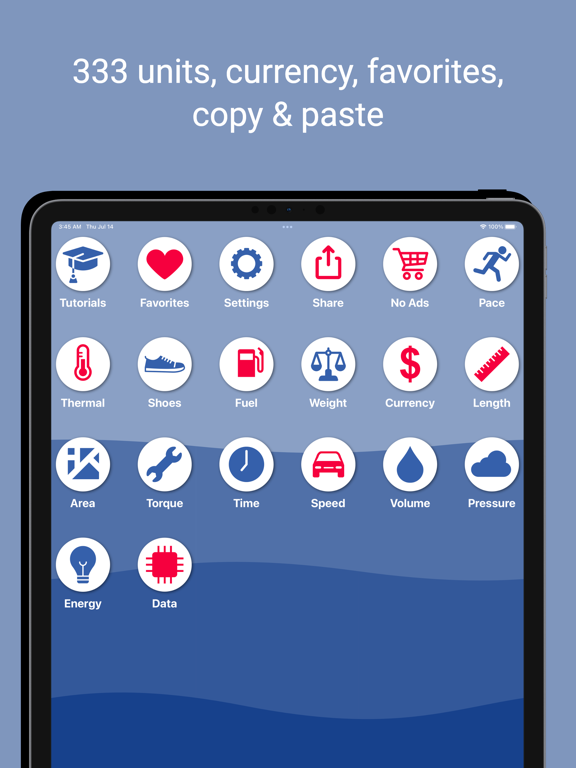
41 store screenshots



Pricing & paywalls
App Store
Shown for US
- No Ads For One Year — $9.99/year ($0.83/mo)
Ratings & reviews
App Store
Shown for US
-
5/5Latest update is GREAT
The conversion app I had always used before is gone and no longer available. I had to do a search and definitely looked for specific options. The initial version of my download wasn’t quite what I was hoping for but I stuck with it. This latest update is GREAT and gets much closer to what I was used to with the previous app I used so much. Thanks for this!! Keep the updates coming.
SAudio · 6 Sep 2026
-
1/5Whoops
My feedback in situations like this, for every app that holds me hostage for my opinion before releasing me to go about my business ,as I had planned, is evermore the same “Stop!“ Please show me the respect and common decency that I deserve by not hijacking my process and requiring me to answer a question before I can be free to complete my tasks. Please assume my intelligence and ability to find an use a “contact us” link to submit my suggestions and feedback should I choose to do so. I am extremely busy and have difficulty focusing on any one task in the midst of annoyances and distractions. It seems to me the reasonable question for your company would be: “do we want this individual using/exploring the benefits of our product or would we rather interrupt his thought process and cause him to forget what the heck he was trying to use it for in the first place, or would we rather have him click yes or no and then give us an answer that we won’t be actionable with anyway, and in this way end up with no changes to our annoying policies and now a potential upgrade gone, or a referral to new business is left feeling unappreciated and frustrated with nothing nice to say about the product?”
jcmarkhus · 6 Sep 2026
-
1/5Forced to select “Allow App to Track”
I haven’t launched the app in a week or so and when I do there is instructions to click a consent button, I guess I’m consenting to viewing ads. So I click the consent button. Next there are instructions regarding the option for allowing or not allowing the app to track you. These instructions tell me I have to click allow the app to track otherwise I won’t be able to use the app. The instructions go on to say I can go back in and change it after. I’m not sure if that’s immediately or if I have to wait, it doesn’t specify. I’ve never had any of the other app force me to click the allow to track option. Even if I can go in and change the option immediately that doesn’t sit right with me. Maybe I’m being paranoid, but I’m deleting this app. Maybe specify why you’re forcing people to select the track option.
stlr79 · 6 Sep 2026
-
1/5Doesn’t work anymore
The app no longer works after the latest update. Ever since I’ve had it, it’s been fantastic, but there was an update today that made it stop working. When I open the app, it teases me with the main menu for half a second, and then locks the screen, not letting me do anything! It’s telling me to reorder the icons, but no matter what I do it won’t let me do that! I’ve tried to do what it’s telling me, but nothing works! I can’t even use the app! Just get rid of the icon rearranging so that I can use the app again! I have to hope that this is a bug, because this new feature certainly isn’t working as intended, since it’s locking out all other features and preventing the app from being used!
SooFabulous · 6 Sep 2026
-
5/5the best conversion app I’ve found
I had probably tried half a dozen other apps for converting units of measure. They were all klunky and hard to use, with an awkward interface that made it difficult to switch between different kinds of measurements. This one is the first I found that’s really well-designed and intuitive. It’s easy to find the one I’m looking for and easy to switch to another. Definitely a keeper!
MaryMc · 6 Sep 2026
Privacy & accessibility
App Store
Privacy
- Data Not Linked to You — App Functionality — Identifiers — Device ID Developer declared
- Data Not Linked to You — Third-Party Advertising — Identifiers — Device ID Developer declared
- Data Not Linked to You — Third-Party Advertising — Usage Data — Advertising Data Developer declared
- Data Not Linked to You — Identifiers Developer declared
- Data Not Linked to You — Usage Data Developer declared
- Data Used to Track You — Identifiers — Device ID Developer declared
- Data Used to Track You — Identifiers Developer declared
- Data Used to Track You — Usage Data — Advertising Data Developer declared
- Data Used to Track You — Usage Data Developer declared
Accessibility
No accessibility labels collected yet.
Versions
App Store
-
1.2.1
Added new pressure units: -centimetres of mercury -hectopascal -hectobar -centimetres of water -inches of water -dyne / centimeter -kilogram per meter^2 -kilogram per centimeter^2 -kilonewton per centimeter^2 -megaNetwon per m^2 -poundals per foot^2 -Torr Added a share button to share the app with your friends
-
1.2.10
Updated sdk and built with newer frameworks Updated for iPhone 14 pro, iPhone 14 pro Max, iPad Pro 2022 versions Fixed Section headers in Simple Design showing a white background Added new units: Volume(drops), Area(rai and square wah, these are Thai units)
-
1.2.11
- added grain conversion in weights
-
1.2.12
Fixed currency not working
-
1.2.2
Fixed a major bug with the Carousel, if you scroll very fast and hit the top or bottom the carousel no longer is able to change a new "from" or "to" unit Changed Carousel Quick Sections to be at the Bottom with the keypad Added to value in the carousel's right side "To Unit" carousel, so now you don't need to keep moving the right "To Unit" carousel to show new values for other "To Unit" values Converion spelling changed to Conversion Fixed Carousel in iPad not working properly when rotating between landscape and potrait. Cells would not update to the correct height and they would be misalligned Fixed from and to Carousel Quick Sections from not being simultaneously touched
-
1.2.3
-Fixed a major bug with the Carousel, if you scroll very fast and hit the top or bottom the carousel no longer is able to change a new "from" or "to" unit -Changed Carousel Quick Sections to be at the Bottom with the keypad -Added to value in the carousel's right side "To Unit" carousel, so now you don't need to keep moving the right "To Unit" carousel to show new values for other "To Unit" values -Converion spelling changed to Conversion -Fixed Carousel in iPad not working properly when rotating between landscape and potrait. Cells would not update to the correct height and they would be misalligned -Fixed from and to Carousel Quick Sections from not being simultaneously touched -Made flags bigger for iPad -Fixed shrinking of text for symobol in "To" unit Carousel cells when value was to large -Fixed on launch not showing proper values
-
1.2.4
- fixed left and right side single letter index carousel buttons not working if your fingers were not fully over the index buttons - copy and paste functionality now added to the carousel view - added the top row for the copying, pasting and favorite button. Now users can have both cancel and favorite working at the same time - fixed pasting not working in simple mode
-
1.2.5
Added onboarding page: to make some users aware they can rearrange the home screen Added images to choosing design mode: to make people more aware of the choice
-
1.2.6
Fixed pace not converting properly. Conversion was internally working correctly but was failing to output to view
-
1.2.7
Pace unit was not converting correctly. For instance: 120mph would convert to 29 secs instead of 30secs This has been fixed
-
1.2.8
Created a new power unit type. Many units that were in energy were moved into power. Many energy and power units had their conversions fixed
-
1.2.9
Added a continue button to make sure that it is clear how to move to the next screen after the rearranging the icon screen
-
1.3
Fixed currency not updating. Added 5 crypto currencies, BTC, Cardano, Dogecoin, Ethereum and XRP to currency exchange rates
-
1.3.1
Update to marketing url
-
1.4
Version update for iOS 18. Fixes potential bugs for iOS 18 Internally Swift 6 updated Fixed visual display of copy and paste icons. Icons have been swapped. Paste icon looked more like the copy, etc.
-
1.4.1
Fixed search view not working, units were previously were not selectable when search Version update for iOS 18. Fixes potential bugs for iOS 18 Internally Swift 6 updated Fixed visual display of copy and paste icons. Icons have been swapped. Paste icon looked more like the copy, etc.
-
1.4.2
Fixed search view not working properly, if user was in carousel view when units were selected there was a chance that the carousel's alignments would be broken. Paste icon was missing for iOS 17 and below. Version update for iOS 18. Fixes potential bugs for iOS 18 Internally Swift 6 updated Fixed visual display of copy and paste icons. Icons have been swapped. Paste icon looked more like the copy, etc.
-
1.5
Fixed search view not working properly, if user was in carousel view when units were selected there was a chance that the carousel's alignments would be broken. Paste icon was missing for iOS 17 and below. Version update for iOS 18. Fixes potential bugs for iOS 18 Internally Swift 6 updated Fixed visual display of copy and paste icons. Icons have been swapped. Paste icon looked more like the copy, etc. Fixed Google Ads for Europe correctly asking for consent
-
1.5.1
Crypto Currency update Consent message fixed
-
1.5.2
Added micoinch unit
-
1.5.3
Added microinch Fixed the GDPR message.
-
1.5.4
Updated debug information to help customers fix issues.
-
1.5.5
Hectometer and Decameter units have been added
-
1.5.6
Updated 3rd party sdks Removed gdpr overlay
-
1.6.0
· 19 Jan 2026
Updated for the iOS 26 platform Updated google ads SDK Fixed YouTube links not working in the tutorial Fixed keyboard not disappearing when other views are shown after search was used Added MegaWatt, GigaWatt, TeraWatt WattHour, MegaWatt hour, Giga Watt hour, Tera Watt hour added Change title of automatic category launch to make things easier to understand Scandinavian Mile added Changed color accents of Energy and Torque to red as there were too many buttons with blue accents Fixed automatically show category on startup Removed share from list of categories you could choose to automatically show on startup
-
2.0
Version 2.0 • Currency rows now show real cryptocurrency coin logos, country flags for fiat, and metallic gold, silver, platinum and palladium badges — so the right currency is easy to spot. • Refreshed, faster currency picker. • The app is now fully localized in 13 languages. • Stability improvements and refinements throughout.
-
2.1
Version 2.1 • Currency rows now show real cryptocurrency coin logos, country flags for fiat, and metallic gold, silver, platinum and palladium badges — so the right currency is easy to spot. • Refreshed, faster currency picker. • The app is now fully localized in 13 languages. • Stability improvements and refinements throughout.
-
2.2
Version 2.2 • Currency rows now show real cryptocurrency coin logos, country flags for fiat, and metallic gold, silver, platinum and palladium badges — so the right currency is easy to spot. • Refreshed, faster currency picker. • The app is now fully localized in 13 languages. • Stability improvements and refinements throughout.
-
2.3
Now in 33 languages. • 20 new languages: Thai, Turkish, Vietnamese, Swedish, Norwegian, Danish, Dutch, Romanian, Ukrainian, Czech, Polish, Croatian, Hungarian, Slovak, Malay, Indonesian, Urdu, Tamil, Telugu, and Bangla. Urdu joins Arabic with full right-to-left layout. • Not just the buttons — every category, unit and currency name is translated too. • Numbers are written the way your own country writes them. Also since 2.0: • Currency rows show real cryptocurrency coin logos, country flags for fiat, and gold, silver, platinum and palladium badges, so the right currency is easy to spot. • A refreshed, faster currency picker. • Stability improvements and refinements throughout.
-
2.4
· 2 Sep 2026
Now in 33 languages. • 20 new languages: Thai, Turkish, Vietnamese, Swedish, Norwegian, Danish, Dutch, Romanian, Ukrainian, Czech, Polish, Croatian, Hungarian, Slovak, Malay, Indonesian, Urdu, Tamil, Telugu, and Bangla. Urdu joins Arabic with full right-to-left layout. • Not just the buttons — every category, unit and currency name is translated too. • Numbers are written the way your own country writes them. Also since 2.0: • Currency rows show real cryptocurrency coin logos, country flags for fiat, and gold, silver, platinum and palladium badges, so the right currency is easy to spot. • A refreshed, faster currency picker. • Stability improvements and refinements throughout. • Fixed the search bar and ad banner appearing twice and jumping as the app opened.
Alternatives
- OneCalc: All-in-one Calculator — Same category + similar ratings
- Fraction Calculator — Same category + similar ratings
- Calcularium — Same category + similar ratings
Availability by market
- US
Data quality & evidence
- Page completeness
- Live store listing
- Last verified
- 6 Sep 2026
- Sources
- App Store
- Independent summary has not been published yet.