
Quick verdict
- What it is
- Store information collected; independent summary not yet available.
- At a glance
-
- Free to download
- In-app purchases
Categories and search queries
Official categories
- Music
- Entertainment
AppCorpus categories
Key functions
| Function | Availability | Access | Scope | Evidence |
|---|---|---|---|---|
| Family Sharing | Yes | Unknown | App Store | Store published |
| Free app | Yes | Free | — | Store published |
| In-app purchases | Yes | Limited free | — | Store published |
Screens
App Store
12 store screenshots

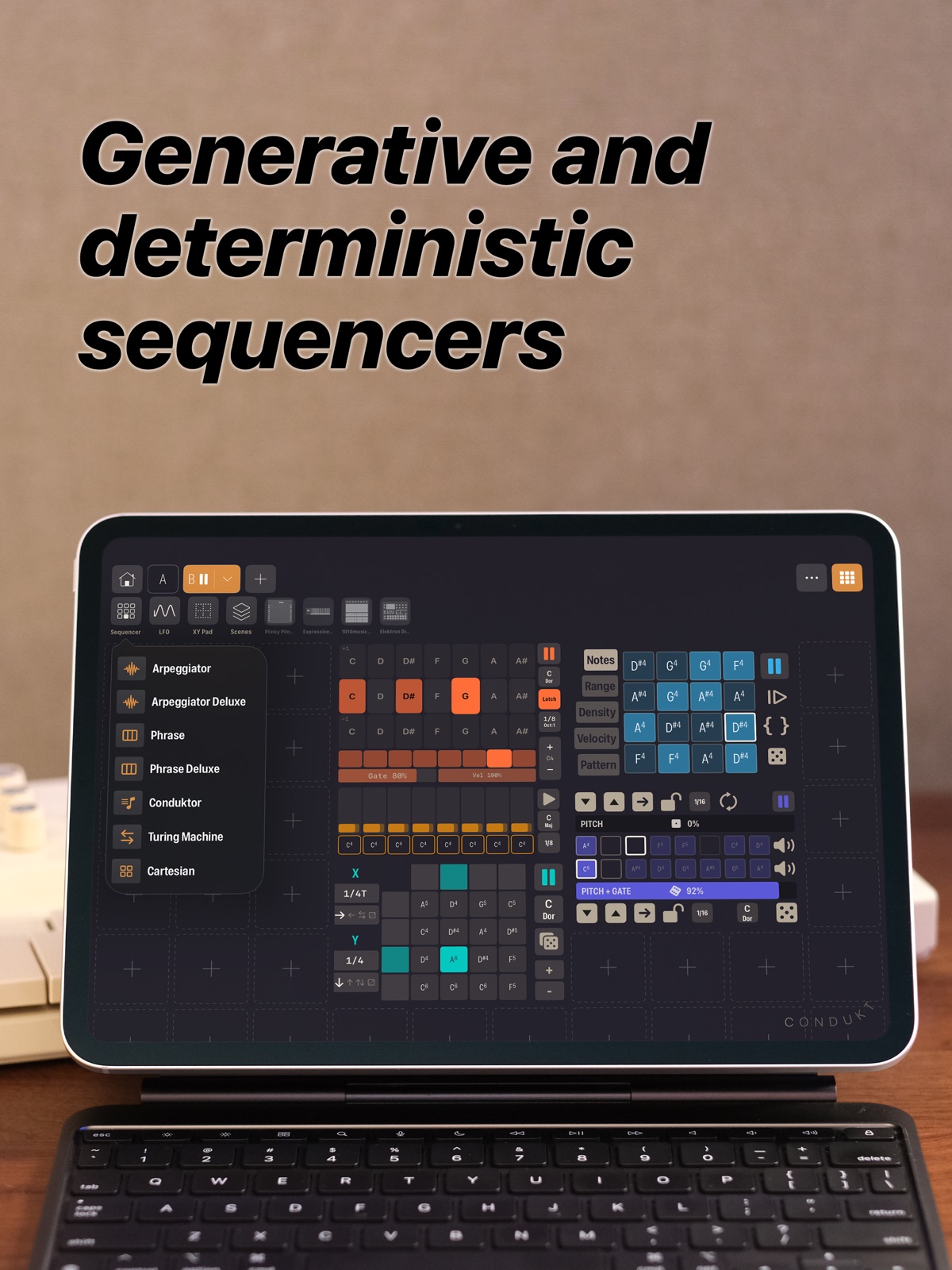


Pricing & paywalls
App Store
Shown for US
- Condukt Unlimited — $4.99
- Unlock Condukt — $39.99
Ratings & reviews
App Store
Shown for US
No store reviews collected for App Store · GB
Privacy & accessibility
App Store
Privacy
- Data Not Collected Developer declared
Accessibility
No accessibility labels collected yet.
Versions
App Store
- 1.0
-
1.0.1
Adds a new sequencer.
-
1.0.2
4 Sequencers, 6 LFOs, 250+ Synthesizers - make some music now :)
-
1.1
1. **Free to Try with Lifetime Unlock** - Condukt is now free to download and see if it works with your synths - Full access via a one-time in-app purchase (no subscriptions) - Existing paid users get everything, no action needed 2. **Phrase Sequencer Overhaul** - Resizable: switch between 8 steps (3x1) and 16 steps (3x2 "Phrase Deluxe") - Per-step accumulators (Metropolix-inspired): pitch evolves across sequence passes with Wrap and Pendulum modes - Ghost indicator shows accumulated pitch offset on each fader - All Steps popover for batch editing with randomize dice buttons - Per-step button rows for Gate, Enabled, and Options (in 3x2 layout) - Global step options: apply Gate, Velocity, Tie, Gate Length, Retrigger, and Probability to all steps - Octave shift buttons - New modulation destinations: Active Steps rotation, Gates rotation, Pitch Offset (±3 octaves, scale-quantized) 3. **Virtual MIDI Source** - Always-on "Condukt" virtual MIDI source for inter-app routing - Works with AUM and other iOS MIDI hosts - No hardware required, use Condukt as a standalone software MIDI controller 4. **Hardware CC Feedback** - Faders update from incoming hardware CC messages - Turn a knob on your synth and see it reflected in Condukt - Inverse curve mapping matches the original parameter range ### Other Notable - **Keyboard & MIDI CC Bindings:** Bind hardware CCs and keyboard keys to faders, crossfaders, and XY pads - **General MIDI Controls:** Mod Wheel (CC1), Breath (CC2), Expression (CC11), and Sustain (CC64) are always available for every synth definition - **MIDI Panic Button:** Sends All Notes Off, All Sound Off, Reset All Controllers, and MIDI Stop to all destinations - **Board Notes:** Add notes to boards from create and edit sheets - **3-Level Board Zoom:** 1x, 1.5x, and 2x zoom levels - **XY Pad Snapshot Recall:** XY Pads now support recall transitions and crossfader morphing, see your recorded doodles morph in real time - **Crossfader Editor:** Dedicated editor sheet for crossfader bindings and settings - **Board Import Fix:** Import button now handles ExportableBoard format correctly - Performance optimizations throughout
-
1.2
A brand new Arpeggiator built to be played: two sizes, multitouch pads, four poly modes including Canon, diatonic chord voicings, scale-quantized Spread modulation, and external keyboard control with held keys mirrored into the grid. The Arp is also a patch cable target now, and LFO rates reach down to 10-minute cycles.
-
1.3
Condukt 1.3 is the biggest update since launch: a community of boards to pull from, a looper that captures your playing and exports it as MIDI, a synth inside the app, an envelope editor that reaches into all your hardware, and a much better iPhone layout. COMMUNITY: BOARDS BUILT BY OTHER CONDUKTERS The new Community tab is a catalog of boards made by people who use Condukt, ready to install with one tap. See a board built for the synth in front of you? Tap it, install it, and start playing. Every board remembers which synths it controls, so build a Microfreak board you love, share it, and every other Microfreak owner benefits. Boards group into per-manufacturer sections (ELEKTRON, KORG, MOOG, etc) so it's easy to browse by the gear you own. This feature is yours to shape. THE RECORDER: A LOOPER THAT CAPTURES EVERYTHING A beat-synced tape looper that captures gestures and notes from anywhere on your board, plays them back in a loop, and exports the take as a MIDI file. Wire it to a Fader, XY Pad, Crossfader, sequencer, or the new MIDI Notes Input, set a tape length, and hit REC. It captures everything routable, and each note replays on the channel it was captured on. Export any tape as a standard MIDI file you can drop into your DAW, and recordings save with the board so a take comes back exactly as you left it. MIDI NOTES INPUT: BRING IN YOUR KEYBOARD A new source control that listens to incoming MIDI notes and lights up a grid as you play. Route it into the Recorder and a performance on your external keyboard gets captured straight to tape. CONDUKT POLY: A SYNTH INSIDE THE APP Condukt has always controlled your hardware. Now it makes sound of its own. Condukt Poly is the first in-app synth: an 8-voice subtractive instrument with two oscillators, noise, a Moog-style ladder filter, a dedicated filter envelope, and glide. Its parameters route into faders, sequencers, and the Recorder exactly like a hardware synth. A patch editor gives you interactive ADSR envelopes, five factory presets, and Save As. Each channel running Poly gets its own audio instance, so two Polys play side by side. It's a great way to sketch an idea or learn the app without anything plugged in. ENVELOPES: EDIT THE SHAPE OF ANY SOUND Condukt 1.3 scans your connected synths and finds their envelopes automatically, surfacing them as interactive curve editors. We found some 553 envelopes across 210 devices! Instead of hunting for attack and decay CCs, you grab the curve and shape it. The editor stays bound to the underlying CCs, so a fader or LFO on the same parameter stays in sync. A THIRD AXIS FOR THE XY PAD On iPad with an Apple Pencil, the XY Pad now captures pressure as a third axis. Press harder and Condukt records a Z value alongside X and Y, routable like any other source. Send it to velocity and your gesture's pressure shapes how hard each note hits. The XY Pad recorder can also replay finger gestures up to 100x slower, for great ambient build-ups. A MUCH BETTER IPHONE Lots of work to make Condukt feel right on a phone. Board zoom now goes below 1x (0.25x, 0.5x, 0.75x) so you can see more of the grid at once, and zoom saves per board. Horizontal swipes use velocity tiers: a nudge steps one column, a short swipe jumps a viewport, a long flick drifts freely. Controls you add now stack into visible grid slots instead of landing off screen, and multi-channel instrument tiles read better with channel badges. EVERYTHING ELSE - Custom MIDI definitions: point an instrument at your own MIDI.guide-format CSV to rename parameters or define a device that isn't in the database yet - Audio routing follows your gear: plug in an interface or headphones mid-session and the engine follows - Sharper everywhere: crisper board thumbnails, higher-quality icons, smoother scrolling through big rigs - Plus a long list of smaller fixes and refinements throughout If you build a board you're proud of, share it. We can't wait to see what shows up in the catalog.
-
1.3.1
Condukt 1.3 is the biggest update since launch: a community of boards to pull from, a looper that captures your playing and exports it as MIDI, a synth inside the app, an envelope editor that reaches into all your hardware, and a much better iPhone layout. COMMUNITY: BOARDS BUILT BY OTHER CONDUKTERS The new Community tab is a catalog of boards made by people who use Condukt, ready to install with one tap. See a board built for the synth in front of you? Tap it, install it, and start playing. Every board remembers which synths it controls, so build a Microfreak board you love, share it, and every other Microfreak owner benefits. Boards group into per-manufacturer sections (ELEKTRON, KORG, MOOG, etc) so it's easy to browse by the gear you own. This feature is yours to shape. THE RECORDER: A LOOPER THAT CAPTURES EVERYTHING A beat-synced tape looper that captures gestures and notes from anywhere on your board, plays them back in a loop, and exports the take as a MIDI file. Wire it to a Fader, XY Pad, Crossfader, sequencer, or the new MIDI Notes Input, set a tape length, and hit REC. It captures everything routable, and each note replays on the channel it was captured on. Export any tape as a standard MIDI file you can drop into your DAW, and recordings save with the board so a take comes back exactly as you left it. MIDI NOTES INPUT: BRING IN YOUR KEYBOARD A new source control that listens to incoming MIDI notes and lights up a grid as you play. Route it into the Recorder and a performance on your external keyboard gets captured straight to tape. CONDUKT POLY: A SYNTH INSIDE THE APP Condukt has always controlled your hardware. Now it makes sound of its own. Condukt Poly is the first in-app synth: an 8-voice subtractive instrument with two oscillators, noise, a Moog-style ladder filter, a dedicated filter envelope, and glide. Its parameters route into faders, sequencers, and the Recorder exactly like a hardware synth. A patch editor gives you interactive ADSR envelopes, five factory presets, and Save As. Each channel running Poly gets its own audio instance, so two Polys play side by side. It's a great way to sketch an idea or learn the app without anything plugged in. ENVELOPES: EDIT THE SHAPE OF ANY SOUND Condukt 1.3 scans your connected synths and finds their envelopes automatically, surfacing them as interactive curve editors. We found some 553 envelopes across 210 devices! Instead of hunting for attack and decay CCs, you grab the curve and shape it. The editor stays bound to the underlying CCs, so a fader or LFO on the same parameter stays in sync. A THIRD AXIS FOR THE XY PAD On iPad with an Apple Pencil, the XY Pad now captures pressure as a third axis. Press harder and Condukt records a Z value alongside X and Y, routable like any other source. Send it to velocity and your gesture's pressure shapes how hard each note hits. The XY Pad recorder can also replay finger gestures up to 100x slower, for great ambient build-ups. A MUCH BETTER IPHONE Lots of work to make Condukt feel right on a phone. Board zoom now goes below 1x (0.25x, 0.5x, 0.75x) so you can see more of the grid at once, and zoom saves per board. Horizontal swipes use velocity tiers: a nudge steps one column, a short swipe jumps a viewport, a long flick drifts freely. Controls you add now stack into visible grid slots instead of landing off screen, and multi-channel instrument tiles read better with channel badges. EVERYTHING ELSE - Custom MIDI definitions: point an instrument at your own MIDI.guide-format CSV to rename parameters or define a device that isn't in the database yet - Audio routing follows your gear: plug in an interface or headphones mid-session and the engine follows - Sharper everywhere: crisper board thumbnails, higher-quality icons, smoother scrolling through big rigs - Plus a long list of smaller fixes and refinements throughout If you build a board you're proud of, share it. We can't wait to see what shows up in the catalog.
-
1.4
Condukt 1.4 adds two brand-new ways to sequence: Painter, where you draw your part onto a grid, and a Drum Sequencer with a classic trig-grid workflow. PAINTER: SEQUENCE BY DRAWING Painter is a polyphonic sequencer you play by drawing. Add it to any board and paint notes straight onto the grid. It's chord-quantized, so everything you draw snaps to the chord you pick and stays musical even when you're just doodling. Press harder with an Apple Pencil for louder steps (each pill's opacity shows its velocity), scrub through the loop by hand, and replace, erase, or mute individual steps as you go. The Recorder can capture a painted part and export it as MIDI like anything else. THE DRUM SEQUENCER: A TRIG GRID FOR YOUR RHYTHMS A new XOX-style step sequencer built for drums and rhythmic parts. Each track gets its own note row and 16 steps per page. Swipe across to toggle trigs, set a per-step velocity that drives each step's brightness so you can read your dynamics at a glance, and tap "Listen" to grab a track's note straight from a MIDI keypress. Stretch tracks across up to four pages so they loop at different lengths and drift into polyrhythms, then layer in a non-destructive Euclidean pattern on any track, rotating it with a swipe while your hand-placed steps stay put underneath. Like everything in Condukt, drum tracks support recall snapshots, board export and import, and the Recorder, which captures every track at once for live looping. Painter and the Drum Sequencer both pair with everything else in Condukt, so wire them up, record a take, and see where they take you.
-
1.4.1
· 9 Jul 2026
This update adds two brand-new ways to sequence: Painter, where you draw your part onto a grid, and a Drum Sequencer with a classic trig-grid workflow. PAINTER: SEQUENCE BY DRAWING Painter is a polyphonic sequencer you play by drawing. Add it to any board and paint notes straight onto the grid. It's chord-quantized, so everything you draw snaps to the chord you pick and stays musical even when you're just doodling. Press harder with an Apple Pencil for louder steps (each pill's opacity shows its velocity), scrub through the loop by hand, and replace, erase, or mute individual steps as you go. The Recorder can capture a painted part and export it as MIDI like anything else. THE DRUM SEQUENCER: A TRIG GRID FOR YOUR RHYTHMS A new XOX-style step sequencer built for drums and rhythmic parts. Each track gets its own note row and 16 steps per page. Swipe across to toggle trigs, set a per-step velocity that drives each step's brightness so you can read your dynamics at a glance, and tap "Listen" to grab a track's note straight from a MIDI keypress. Stretch tracks across up to four pages so they loop at different lengths and drift into polyrhythms, then layer in a non-destructive Euclidean pattern on any track, rotating it with a swipe while your hand-placed steps stay put underneath. Like everything in Condukt, drum tracks support recall snapshots, board export and import, and the Recorder, which captures every track at once for live looping. Painter and the Drum Sequencer both pair with everything else in Condukt, so wire them up, record a take, and see where they take you.
Alternatives
- Low Poly Synth — Same category + similar ratings
- Battlestation Groovebox — Same category + similar ratings
Availability by market
- US
Data quality & evidence
- Page completeness
- Live store listing
- Last verified
- 5 Aug 2026
- Sources
- App Store
- Independent summary has not been published yet.