
Quick verdict
- What it is
- Store information collected; an Apoku editorial summary is not yet published.
- At a glance
-
- From $0.49/mo
- Free to download
- In-app purchases
Categories and search queries
Official categories
- Photo & Video
- Utilities
Apoku categories
Key functions
| Function | Availability | Access | Scope | Evidence |
|---|---|---|---|---|
| Free app | Yes | Free | Context-specific | Store published |
| In-app purchases | Yes | Limited free | Context-specific | Store published |
| Family Sharing | Unknown | Unknown | Scope unknown | Store published |
Screens
App Store
15 store screenshots


Pricing & paywalls
App Store
- Compress Videos Pro (monthly) — $4.99/month
- Compress Videos Pro (monthly) — $5.99/year ($0.49/mo)
- Compress Video Pro (lifetime) — $12.99
Ratings & reviews
App Store
-
5/5As a professional DJ it’s unbelievably awesome
I own a professional DJ entertainment company and I don’t wanna record video at Parties in a low resolution because then it won’t come out very good and the customer wont be happy, but what if there was a way to record it in the highest resolution and then simply compress the video so the resolution is still excellent, but the video itself is not taking up that much space so you’re able to put it on a USB drive or wherever you need so it still looks great and it doesn’t take up a lot of space. This little device this little app is unbelievable. I went through so much trouble to put everything in the highest resolution to have to go back and undo everything? Forget it, this device allows you to keep everything in the highest resolution and then compresses it. It’s really awesome. I bought the pro version because it was $10. No subscriptions $10 one time and you have it for life. It worked in less than 10 minutes. I got 18 videos compressed. Wow! This is great. I have been sitting here all night trying to figure out how to get the videos to AirDrop onto my Mac from my iPhone and I couldn’t do it this little app got me to do it and got me to do it fast thank you very much. I definitely recommend it!!!! Shoot in high resolution and then simply compress it. It still looks great. It doesn’t take up a lot of space and everybody walks away happy! 👍👍👍
DJ Greg-G · 6 Oct 2026
-
5/5Video compression
I had to do a video for my nurse practitioner program and it was done on my iPhone. It was about 30 minutes long. I tried every way possible to transfer it to my computer and NOTHING worked. It was even too large to email to myself. I tried several compression apps, talked to the tech support at the school, tried transferring it with the USB cable, nothing would work! Then, I found this app, downloaded it and tried it on another video first because I worked so hard on getting one that was good enough to turn in, I didn’t want to chance messing it up. It worked great on that video AND gave me the option to keep the original video so I was happy to have that as a safety net. I was able to transfer this one easily to my computer and it was still just as good of quality as the original video. I did it with my final video and it worked perfectly! I was able to download it into Kaltura for school and turn it in. This app saved me! Love it!
Sandie D RN · 6 Oct 2026
-
1/5Looked promising, ended up wasting my time.
Just wasted an hour of my time *trying to* compress the same file 4 times. First time, after losing all the progress made from switching between apps and leaving it running in the background and coming back to it, which it didn’t inform of that happening if I were to not have it running in the foreground. Second time, after about 20+ minutes of it processing a message popped up saying ‘file couldn't be compressed to a smaller size, try adjusting the parameters before compressing to see if that will work’. So I adjusted, and frankly don't want to waste any more time writing this review, but long story short- third time told me there wasn't enough space on my iphone once it was nearing done, which I followed its prompts to clear some space in settibgs, which when i came back to it again all the progress (of 20+ minutes !!) — again — lost!! Only to persevere and now try for the win, with smaller parameters, only to after over a half an hour come back to it (in the foreground on my phone) 100% complete — and now says ‘file couldn't be compressed to a smaller size...’ Couldn't it figure all of this out BEFORE having me go through the motions and entire processes just to tell me it can’t!?? Great intention with creating the app — but needs more practical user-in-mind design. Best of luck towards improvement.
Lmno61830 · 6 Oct 2026
-
5/5OK to try different settings
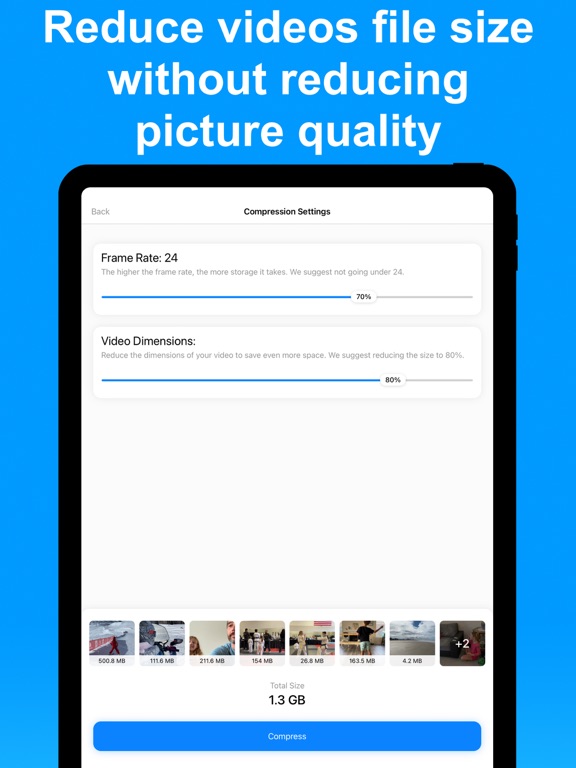
Amazing app with great control options. Developer recommends a minimum of 24 frames (70%) and 80% resolution but I tried all the way down to 5 frames (5%) and 64x36 res (5%). I found 18 frames (45%) with 512x288 res (40%) to be ok for me. At that medium compression I could just barely detect some jerkiness and some blurring but, in my opinion, it was just fine for viewing on my phone and even on a big screen TV and the file-compression is much better than the developer recommendations. Your results may vary. Note that the amount of file-size compression depends greatly on your default camera settings. If you shoot in 4K your compression will be much more than if your default is only 720. If you want cinematic quality you probably should not be using this app. But if you want to save storage space on your phone or in the cloud, then this app is fantastic!!!
Lour33 · 6 Oct 2026
-
5/5Wow
Wow wow wow, what a great app, i haven been struggling with not having enough space for over a year, my 256gb iphone 12 was full dues to the 4k videos i took in the past that would take so much space, 207GB. I couldn’t compress all of them one by way, over 4500 videos. And also i would worry that the compressed videos wouldn’t go to their original position or location with the same date, but this app automatically did it for me. Because i had too many videos to compress i paid for pro version for only 3$ i proudly say this 3$ and the best 3$ i have ever spend for the best price. I got over 90GB of free space in my phone due to this app. Thanks again
Sabr_Kurdi · 6 Oct 2026
Privacy & accessibility
App Store
Privacy
- Data Not Linked to You — Third-Party Advertising — Diagnostics — Performance Data Developer declared
- Data Not Linked to You — Third-Party Advertising — Identifiers — Device ID Developer declared
- Data Not Linked to You — Third-Party Advertising — Location — Coarse Location Developer declared
- Data Not Linked to You — Third-Party Advertising — Usage Data — Advertising Data Developer declared
- Data Not Linked to You — Diagnostics Developer declared
- Data Not Linked to You — Identifiers Developer declared
- Data Not Linked to You — Location Developer declared
- Data Not Linked to You — Usage Data Developer declared
- Data Used to Track You — Diagnostics — Performance Data Developer declared
- Data Used to Track You — Diagnostics Developer declared
- Data Used to Track You — Identifiers — Device ID Developer declared
- Data Used to Track You — Identifiers Developer declared
- Data Used to Track You — Location — Coarse Location Developer declared
- Data Used to Track You — Location Developer declared
- Data Used to Track You — Usage Data — Advertising Data Developer declared
- Data Used to Track You — Usage Data Developer declared
Accessibility
No accessibility labels collected yet.
Versions
App Store
- 1.0
-
1.1
Small adjustments to how the app looks and works.
-
1.2
This update brings support for iPad.
-
1.3
This update fixes an issue that would sometimes cause the app to crash after selecting a video to compress.
-
1.4
This update enforces Apple's latest privacy features.
-
2.0
The app now works and looks even better with this complete redesign. If you love the app, please take a moment to rate it in the App Store. If you're having issues, please feel free to contact me directly and I'll do my best to help.
-
2.1
This update fixes a display issue that appeared on smaller screens such as the iPhone 5s.
-
2.10
This version adds the ability to bypass the app's Home Screen, and save compressed videos to their original album (if they were in an album to begin with).
-
2.11
This version fixes an issue that would prevent the app to work properly with videos shot on the new iPhone 18 models.
-
2.12
This version bring support for HEVC files.
-
2.13
This update fixes a small issue that would sometimes occur with videos recorded at 60 frames per second.
-
2.14
This update brings small invisible enhancements to the app.
-
2.15
This update fixes small visual bugs that most users might not have noticed to begin with.
-
2.16
· 28 Apr 2026
This update brings small enhancements to the user interface.
-
2.2
This update brings compatibility with iOS 15. More specifically, it fixes an issue that sometimes created strange artifacts in compressed videos.
-
2.3
This update brings compatibility with iOS 15. More specifically, it fixes an issue that sometimes created strange artifacts in compressed videos.
-
2.4
This version fixes a small issue that would sometimes display an inaccurate frame rate. Thank you to users who reported the bug and helped troubleshoot.
-
2.5
This version adds landscape support for iPad.
-
2.6
This update brings small changes to the free version of the app.
-
2.7
This update fixes an issue that would sometimes occur on iPad.
-
2.8
This latest version comes offers great new features and enhancements. New in this version: - New layout design for photo picker (albums and videos) - Ability to select multiple videos at once just by swiping your finger over them Improved in this version: - Video albums are now sorted by alphabetical order
-
2.9
This update brings under-the-hood changes to make the app compliant with new UK and EU privacy laws.
Alternatives
- Video Compress - Shrink Videos — Same category + similar ratings
- Video Compress - Shrink Vids — Same category + similar ratings
- Video Compressor - resize all — Same category + similar ratings
- Video Compressor : Save Space — Same category + similar ratings
- Video Converter and Compressor — Same category + similar ratings
- Video Compressor-Shrink videos — Same category + similar ratings
Availability by market
- US
Data quality & evidence
- Page completeness
- Live store listing
- Last verified
- 6 Oct 2026
- Sources
- App Store
- Apoku editorial summary has not been published yet.