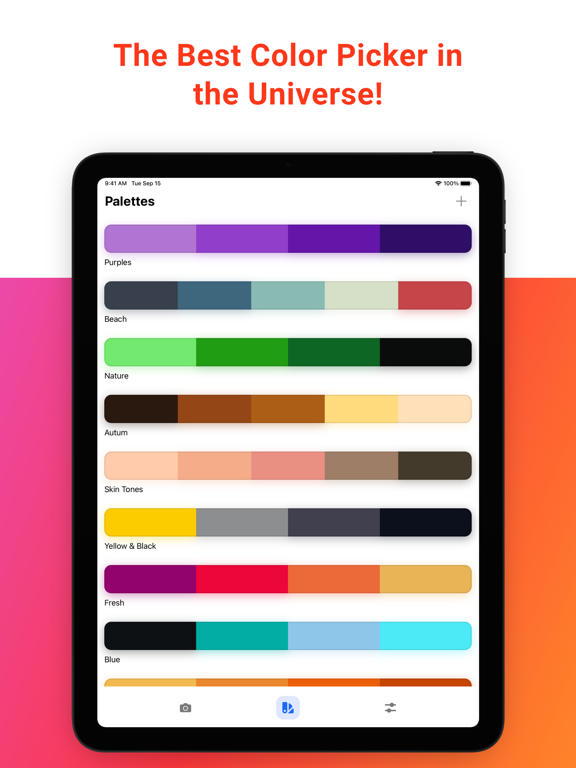
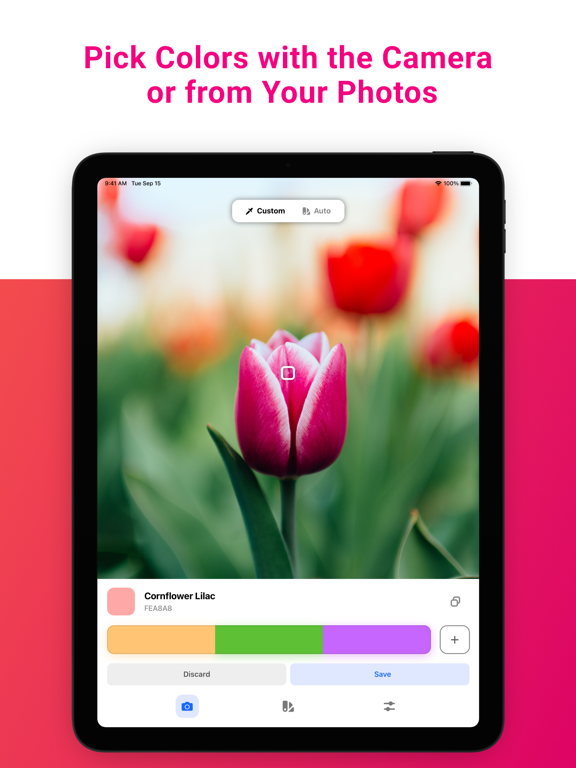
AppCorpus MCP gives your agent current app data, prices, screens, features and sources.
View JSON
GET /api/v3/apps/1287239339
{
  "app_id": 1287239339,
  "canonical_url": "https://appcorpus.com/apps/colorslurp-1287239339",
  "identity": {
    "name": "ColorSlurp",
    "slug": "colorslurp",
    "developer": {
      "name": "IdeaPunch",
      "url": "https://appcorpus.com/developers/ideapunch-developer_6dd84215d341f14241240a10d0a093c6"
    },
    "icon_url": "https://is1-ssl.mzstatic.com/image/thumb/Purple126/v4/ef/51/fc/ef51fc8c-ef5d-beb2-5ffe-8644a0041835/AppIcon-iOS-0-1x_U007emarketing-0-6-0-85-220.png/512x512bb.jpg",
    "stores": [
      "apple"
    ],
    "platforms": [
      "iphone",
      "ipad"
    ],
    "status": {
      "state": "abandoned-risk",
      "label": "Abandoned risk",
      "last_checked": "2026-08-06",
      "last_checked_label": "6 Aug 2026",
      "banner": null,
      "region_note": null
    }
  },
  "listings": [
    {
      "store": "apple",
      "status": "ACTIVE",
      "url": "https://apps.apple.com/us/app/colorslurp/id1287239339?uo=4",
      "rating": 4.5,
      "rating_count": 91,
      "formatted_price": "Free",
      "is_free": true,
      "has_iap": true,
      "has_subscription": false,
      "version": "1.5.3",
      "updated": "2023-07-14",
      "currency": "USD"
    }
  ],
  "summary": {
    "one_liner": null,
    "summary": null,
    "best_for": [],
    "not_for": [],
    "status": "fallback",
    "at_a_glance": [
      "From $1.66/mo",
      "Free to download",
      "In-app purchases"
    ]
  },
  "categories": {
    "official": [
      "Developer Tools",
      "Graphics & Design"
    ],
    "appcorpus": [
      {
        "category_id": "developer-tools",
        "label": "Developer tools",
        "url": "https://appcorpus.com/categories/developer-tools"
      },
      {
        "category_id": "graphics-design",
        "label": "Graphics & design",
        "url": "https://appcorpus.com/categories/graphics-design"
      }
    ]
  },
  "use_cases": [],
  "features": [
    {
      "capability_id": "free_app",
      "label": "Free app",
      "availability": "yes",
      "access_level": "free",
      "scope": null,
      "evidence": "Store published"
    },
    {
      "capability_id": "in_app_purchases",
      "label": "In-app purchases",
      "availability": "yes",
      "access_level": "free_limited",
      "scope": null,
      "evidence": "Store published"
    }
  ],
  "pricing": [
    {
      "store": "apple",
      "formatted_price": "Free",
      "is_free": true,
      "has_iap": true,
      "has_subscription": false,
      "currency": "USD",
      "market": "us",
      "last_verified": "2026-08-06",
      "rows": [
        "ColorSlurp Pro Yearly — $19.99/year ($1.66/mo)"
      ]
    }
  ],
  "screens": [
    {
      "url": "https://is1-ssl.mzstatic.com/image/thumb/PurpleSource126/v4/eb/96/10/eb9610a6-7444-b1b6-5615-2b843d93d83e/3354ae3e-64d5-4003-9a9c-82ff0e530b6b_ipad-third-1.png/1600x1600bb.jpg",
      "store": "apple",
      "platform": "ipad",
      "alt": "ColorSlurp ipad screenshot 1"
    },
    {
      "url": "https://is1-ssl.mzstatic.com/image/thumb/PurpleSource126/v4/ae/25/29/ae252950-d446-b183-6682-79d94321f430/5f3d118f-ca14-4811-a1e1-b20d143411ff_ipad-third-1.png/576x768bb.png",
      "store": "apple",
      "platform": "ipad",
      "alt": "ColorSlurp ipad screenshot 2"
    },
    {
      "url": "https://is1-ssl.mzstatic.com/image/thumb/Purple126/v4/55/66/5d/55665d22-af73-9a17-2360-eb8283a3f096/613e08a1-64a6-4e97-96f7-49c2b818e23d_ipad-third-2.png/1600x1600bb.jpg",
      "store": "apple",
      "platform": "ipad",
      "alt": "ColorSlurp ipad screenshot 3"
    },
    {
      "url": "https://is1-ssl.mzstatic.com/image/thumb/Purple116/v4/8c/9a/c5/8c9ac5e4-a178-07ee-a6d5-fbe05fd2b828/09e4dbfd-128d-4521-bacf-230376c901cd_ipad-third-2.png/576x768bb.png",
      "store": "apple",
      "platform": "ipad",
      "alt": "ColorSlurp ipad screenshot 4"
    },
    {
      "url": "https://is1-ssl.mzstatic.com/image/thumb/Purple126/v4/57/7f/47/577f476e-819d-764d-096c-bea6323adf2e/58fd9ade-b428-46ef-8946-5eb9ec9bdc79_ipad-third-3.png/1600x1600bb.jpg",
      "store": "apple",
      "platform": "ipad",
      "alt": "ColorSlurp ipad screenshot 5"
    },
    {
      "url": "https://is1-ssl.mzstatic.com/image/thumb/Purple116/v4/05/0e/72/050e72b7-e772-7b93-e243-7e308133e002/3a353fd9-7cf1-46b1-83d6-c7cb06412807_ipad-third-3.png/576x768bb.png",
      "store": "apple",
      "platform": "ipad",
      "alt": "ColorSlurp ipad screenshot 6"
    },
    {
      "url": "https://is1-ssl.mzstatic.com/image/thumb/Purple116/v4/7b/20/3b/7b203b4a-fd2c-7598-10c3-34c08611f0cc/28b7440b-bfdd-41c5-a4e9-5384208cdefa_ipad-third-4.png/1600x1600bb.jpg",
      "store": "apple",
      "platform": "ipad",
      "alt": "ColorSlurp ipad screenshot 7"
    },
    {
      "url": "https://is1-ssl.mzstatic.com/image/thumb/Purple116/v4/4d/28/8d/4d288d05-039b-667e-7972-2ead1416c290/39ea17c6-209b-48e1-836b-642cedacf301_ipad-third-4.png/576x768bb.png",
      "store": "apple",
      "platform": "ipad",
      "alt": "ColorSlurp ipad screenshot 8"
    },
    {
      "url": "https://is1-ssl.mzstatic.com/image/thumb/PurpleSource126/v4/f0/5f/ab/f05fabe7-406e-7e46-b468-b309c75eae07/489a9d37-94d1-4ce4-9051-e82292d30da8_ipad-third-5.png/1600x1600bb.jpg",
      "store": "apple",
      "platform": "ipad",
      "alt": "ColorSlurp ipad screenshot 9"
    },
    {
      "url": "https://is1-ssl.mzstatic.com/image/thumb/PurpleSource126/v4/54/80/6a/54806ad8-ad31-b993-331b-ebbc4131b313/c3502930-100d-4a87-9c06-6a767be7735b_ipad-third-5.png/576x768bb.png",
      "store": "apple",
      "platform": "ipad",
      "alt": "ColorSlurp ipad screenshot 10"
    },
    {
      "url": "https://is1-ssl.mzstatic.com/image/thumb/PurpleSource126/v4/5c/de/4d/5cde4d3f-95a5-b92f-0f22-fbf497dede2f/088f6907-0eee-4bbb-b90e-53e6babd9f5d_iphone-1.png/1284x1600bb.jpg",
      "store": "apple",
      "platform": "iphone",
      "alt": "ColorSlurp iphone screenshot 11"
    },
    {
      "url": "https://is1-ssl.mzstatic.com/image/thumb/Purple116/v4/0c/c1/ca/0cc1cafb-9838-4f1a-9d99-763f27ea1a6a/63740beb-ee51-4917-abdb-cd556be90e30_iphone-2.png/1284x1600bb.jpg",
      "store": "apple",
      "platform": "iphone",
      "alt": "ColorSlurp iphone screenshot 12"
    },
    {
      "url": "https://is1-ssl.mzstatic.com/image/thumb/Purple116/v4/c2/85/d4/c285d40b-8200-cd6c-326a-fb5d362af546/389b499e-9763-4ce4-8e5b-6ae216a4d35b_iphone-3.png/1284x1600bb.jpg",
      "store": "apple",
      "platform": "iphone",
      "alt": "ColorSlurp iphone screenshot 13"
    },
    {
      "url": "https://is1-ssl.mzstatic.com/image/thumb/Purple126/v4/6c/4e/5b/6c4e5b1f-6d3f-37ee-381c-61b4539dd9ce/bce888cd-b68c-4168-80a8-541fcb8d2713_iphone-4.png/1284x1600bb.jpg",
      "store": "apple",
      "platform": "iphone",
      "alt": "ColorSlurp iphone screenshot 14"
    },
    {
      "url": "https://is1-ssl.mzstatic.com/image/thumb/PurpleSource116/v4/a3/6b/21/a36b21be-5ccb-9178-aab6-02e0375f0a81/24b23034-9157-454f-b8f3-2c53e31545be_iphone-5.png/1284x1600bb.jpg",
      "store": "apple",
      "platform": "iphone",
      "alt": "ColorSlurp iphone screenshot 15"
    },
    {
      "url": "https://is1-ssl.mzstatic.com/image/thumb/PurpleSource211/v4/62/d2/60/62d26014-a574-6b47-ef28-b4bb534664d6/app-store-1.png/1440x900bb.jpg",
      "store": "apple",
      "platform": "mac",
      "alt": "ColorSlurp mac screenshot 16"
    },
    {
      "url": "https://is1-ssl.mzstatic.com/image/thumb/PurpleSource211/v4/60/2a/06/602a0657-1231-e3a6-d8f4-2f866f2fe99b/app-store-2.png/1440x900bb.jpg",
      "store": "apple",
      "platform": "mac",
      "alt": "ColorSlurp mac screenshot 17"
    },
    {
      "url": "https://is1-ssl.mzstatic.com/image/thumb/PurpleSource221/v4/1c/1b/59/1c1b598e-0ba7-1f06-341f-3a092b2d8b49/app-store-3.png/1440x900bb.jpg",
      "store": "apple",
      "platform": "mac",
      "alt": "ColorSlurp mac screenshot 18"
    },
    {
      "url": "https://is1-ssl.mzstatic.com/image/thumb/PurpleSource211/v4/82/5d/48/825d488d-b986-6c38-94c5-59e68b5c8931/app-store-4.png/1440x900bb.jpg",
      "store": "apple",
      "platform": "mac",
      "alt": "ColorSlurp mac screenshot 19"
    },
    {
      "url": "https://is1-ssl.mzstatic.com/image/thumb/PurpleSource221/v4/15/e9/3c/15e93cb9-4fb4-168b-889b-a0e2a9b54d12/app-store-5.png/1440x900bb.jpg",
      "store": "apple",
      "platform": "mac",
      "alt": "ColorSlurp mac screenshot 20"
    },
    {
      "url": "https://is1-ssl.mzstatic.com/image/thumb/PurpleSource221/v4/bd/8c/7b/bd8c7bba-2b99-0f00-806b-dba02e546f10/app-store-7.png/1440x900bb.jpg",
      "store": "apple",
      "platform": "mac",
      "alt": "ColorSlurp mac screenshot 21"
    },
    {
      "url": "https://is1-ssl.mzstatic.com/image/thumb/PurpleSource221/v4/5d/65/94/5d6594e0-51b3-a084-e1dc-8916c0bf72ec/app-store-6.png/1440x900bb.jpg",
      "store": "apple",
      "platform": "mac",
      "alt": "ColorSlurp mac screenshot 22"
    },
    {
      "url": "https://is1-ssl.mzstatic.com/image/thumb/PurpleSource211/v4/8d/4d/af/8d4daf23-e16d-5342-a350-cab1d4615d7d/app-store-8.png/1440x900bb.jpg",
      "store": "apple",
      "platform": "mac",
      "alt": "ColorSlurp mac screenshot 23"
    }
  ],
  "ratings": [
    {
      "store": "apple",
      "average": 4.5,
      "count": 91,
      "market": "us",
      "observed_at": "2026-08-06",
      "reviews": [
        {
          "rating": 5,
          "title": "Absolutely indespensible",
          "body": "Color Slurp has proven to be an absolutely indespenisble tool as a graphic designer. My favorite part is how quickly and easily this lets me use colors from one color space in another. As a freelance designer, I get all sorts of files from my clients, oftentimes inconsistent with one another. Thanks to Color Slurp it's now a breeze to pick CMYK colors from InDesign and use them as RGB colors over in Illustrator. I can even easily convert my brand colors to the weird colorspace Squarespace uses without having to Google a random website to help me out! I also really love how if you have it on one device, you're able to sync it through iCloud with all your others. I can create custom palettes on my computer and use them immediately over in a procreate file. The camera color selection tool is a really neat and useful addition as well– my favorite palette comes from a sunflower I saw while I was out walking! All in all, if you do design or artistic work of any kind, I highly recommend this app on all your devices, and I recommend buying the pro version to unlock all the extremly useful features it has!",
          "author": "AshervilleNC",
          "date": "6 Aug 2026"
        },
        {
          "rating": 5,
          "title": "Great app, great developers who support legacy purchases",
          "body": "Years ago, these developers were among the first to recognize the glaring omission of a color picker in certain note taking applications (cough, Goodnotes) and rectified it with this comprehensive color picker app that extends far beyond note taking to everyday life. I use this for note taking, paint projects—anything under the sun. It’s great to see how far they’ve come with the app, AND they have the integrity to continue providing support for those of us who bought the app early. That’s one of many reasons why I recommend the app, even if you’re just discovering it now. Beyond the everyday usefulness of the app itself, you want to support developers you can trust. With these ColorSlurp developers, trust and respect is something you can count on.",
          "author": "Eazy Triple OG",
          "date": "6 Aug 2026"
        },
        {
          "rating": 5,
          "title": "Prety great tool",
          "body": "This product is very cool, very intuitive and well designed. Note if you're having trouble getting this to work with full screen apps you need te enable \"Show App Icon In\": \"Menu Bar Only\" under the general settings tab. Would love to see this product just appear as \"menu-bar window\" always linked to the top of the screen like the \"Color Note\" app instead of a window you can drag around and have to click the close button on to dismiss, as that seems a little easier to use. The app also makes a \"Slurp\" sound when you select color.. which is hilarious... but a little wierd. Luckily you can turn it off if you don't want to scare your co-workers.",
          "author": "mrapogee",
          "date": "6 Aug 2026"
        },
        {
          "rating": 5,
          "title": "Indispensable!",
          "body": "This is the best color picker and color blender in the market! This app is incredibly well crafted and the fact that you can create and save many different collections makes it indispensable for designers, photographers, app developers, you name it. You can also use the palette and blend colors until you find the perfect combination. Never seen anything like this. It's now one of my favorite apps. Just get the full app with in-app purchase, you won't regret it. I had an issue with the store and the developer replied right away and helped solve the issue. Very nice guy. Excellent support.",
          "author": "runningupthehill",
          "date": "6 Aug 2026"
        },
        {
          "rating": 4,
          "title": "Latest Update is Broken",
          "body": "If you try to do anything screen-related, like move the windows, take screenshots, etc. the icons will disappear. No matter what you do, short of a reboot, do not get them ro reappear. Also took away the single menubar click to open. Now shows a menu so there is an annoying 2-step open process. How about leaving the behavior and add a right-click or CTRL-click to open the menu? A nice simple program is trending downward because the developer is trying to sell you something. Unfortunately, I don't pay for annoying software. Go back to simple and then I can be convinced to pay for a \"Pro\" version to support development.",
          "author": "DC Dawg",
          "date": "6 Aug 2026"
        }
      ]
    }
  ],
  "privacy": [
    {
      "store": "apple",
      "declarations": [
        {
          "title": "Data Not Linked to You",
          "detail": "Analytics — Purchases — Purchase History",
          "source": "Developer declared"
        },
        {
          "title": "Data Not Linked to You",
          "detail": "App Functionality — Purchases — Purchase History",
          "source": "Developer declared"
        },
        {
          "title": "Data Not Linked to You",
          "detail": "Purchases",
          "source": "Developer declared"
        }
      ],
      "accessibility": []
    }
  ],
  "changes": [
    {
      "store": "apple",
      "version": "1.0.0",
      "released_at": null,
      "notes": ""
    },
    {
      "store": "apple",
      "version": "1.1.0",
      "released_at": null,
      "notes": "What's new in ColorSlurp 1.1.0: - Added collection import - Added recently picked colors to the swatches - Minor improvements"
    },
    {
      "store": "apple",
      "version": "1.1.1",
      "released_at": null,
      "notes": "What's new in ColorSlurp 1.1.0: - Added collection import - Added recently picked colors to the swatches - Minor improvements Version 1.1.1 fixes a bug where you could not create more than 4 collections even with ColorSlurp PRO."
    },
    {
      "store": "apple",
      "version": "1.2.0",
      "released_at": null,
      "notes": "This update renamed collections to palettes to be more consistent with standard color terminology. We also squashed some bugs, and added a link to ColorSlurp's documentation in the settings!"
    },
    {
      "store": "apple",
      "version": "1.3.0",
      "released_at": null,
      "notes": "This update adds new export formats and options, and fixes a crash when exporting on iPad. - Export files to ASE, XML Color Resource, and Compose colors - Added settings to the plain text and JSON export formats - You can now edit the color name when editing a color - Renamed the CSS Hex color format to Hex, since it’s not directly tied to CSS - Improved the ColorSlurp PRO store - Fixed a bug with the camera picker - Fixed a crash when exporting palettes on iPad - Bug fixes"
    },
    {
      "store": "apple",
      "version": "1.3.1",
      "released_at": null,
      "notes": "This update adds new export formats and options, and fixes a crash when exporting on iPad. - Export files to ASE, XML Color Resource, and Compose colors - Added settings to the plain text and JSON export formats - You can now edit the color name when editing a color - Renamed the CSS Hex color format to Hex, since it’s not directly tied to CSS - Improved the ColorSlurp PRO store - Fixed a bug with the camera picker - Fixed a crash when exporting palettes on iPad - Bug fixes Version 1.3.1 fixes a bug with restoring purchases."
    },
    {
      "store": "apple",
      "version": "1.4.0",
      "released_at": null,
      "notes": "This small update squashed some bugs, and added new localizations! - Fixed a bug with the camera on iOS. - Added localizations for Spanish and Russian. - Fixed a bug where PDF export would not work. - Tweaked the wording of some of the app's text. Happy slurping!"
    },
    {
      "store": "apple",
      "version": "1.5.0",
      "released_at": null,
      "notes": "This update adds a brand new language: French! We also added localization for British English and improved our existing translations!"
    },
    {
      "store": "apple",
      "version": "1.5.1",
      "released_at": null,
      "notes": "You can now pick colors with your camera when editing a palette! Fixed multiple crashes."
    },
    {
      "store": "apple",
      "version": "1.5.2",
      "released_at": null,
      "notes": "This update tweaks some things under the hood. We've also updated our terms of use and privacy policy. You can read both of them here: https://colorslurp.com/legal"
    },
    {
      "store": "apple",
      "version": "1.5.3",
      "released_at": "2023-07-14",
      "notes": "This update fixes a bug where ColorSlurp forgets that you purchased pro. Everything should be working fine now! If you lost access to pro, just click \"Restore Purchase\" button in ColorSlurp's pro preferences."
    }
  ],
  "alternatives": [
    {
      "app_id": 1573972480,
      "name": "Colorlogix - Color Design Tool",
      "url": "https://appcorpus.com/apps/colorlogix-color-design-tool-1573972480",
      "reason": "Same category + similar ratings"
    },
    {
      "app_id": 413897608,
      "name": "Pastel",
      "url": "https://appcorpus.com/apps/pastel-413897608",
      "reason": "Same category + similar ratings"
    },
    {
      "app_id": 1522625245,
      "name": "JellyCuts",
      "url": "https://appcorpus.com/apps/jellycuts-1522625245",
      "reason": "Same category + similar ratings"
    },
    {
      "app_id": 1465080890,
      "name": "SQLite Mobile Client",
      "url": "https://appcorpus.com/apps/sqlite-mobile-client-1465080890",
      "reason": "Same category + similar ratings"
    },
    {
      "app_id": 1548934513,
      "name": "React Native Paper",
      "url": "https://appcorpus.com/apps/react-native-paper-1548934513",
      "reason": "Same category + similar ratings"
    },
    {
      "app_id": 1591150334,
      "name": "Docker Server Admin",
      "url": "https://appcorpus.com/apps/docker-server-admin-1591150334",
      "reason": "Same category + similar ratings"
    }
  ],
  "evidence_summary": {
    "index_state": "S1",
    "evidence_level": 1,
    "level_label": "Live store listing",
    "indexable": true,
    "last_verified_at": "2026-08-06",
    "unknown_fields": [
      "Independent summary has not been published yet."
    ],
    "sources": [
      "App Store"
    ]
  },
  "availability_markets": {
    "live": [
      "us"
    ],
    "selected": "us",
    "note": null
  },
  "feature_events": {
    "events": []
  },
  "features_slice": {
    "plans": [
      {
        "code": "pro",
        "label": "ColorSlurp Pro Yearly",
        "kind": "subscription",
        "status": "store_listed",
        "prices": [
          {
            "storefront": "us",
            "formatted": "$19.99",
            "billing_period": "yearly"
          }
        ],
        "trial": null
      }
    ],
    "features": [],
    "unknown_features": [],
    "data_cutoff": "6 Aug 2026"
  }
}