
Quick verdict
- What it is
- Store information collected; independent summary not yet available.
- At a glance
-
- From $0.99/mo
- Free to download
- In-app purchases
Categories and search queries
Official categories
- Productivity
- Utilities
AppCorpus categories
Key functions
| Function | Availability | Access | Scope | Evidence |
|---|---|---|---|---|
| Free app | Yes | Free | — | Store published |
| In-app purchases | Yes | Limited free | — | Store published |
Screens
App Store
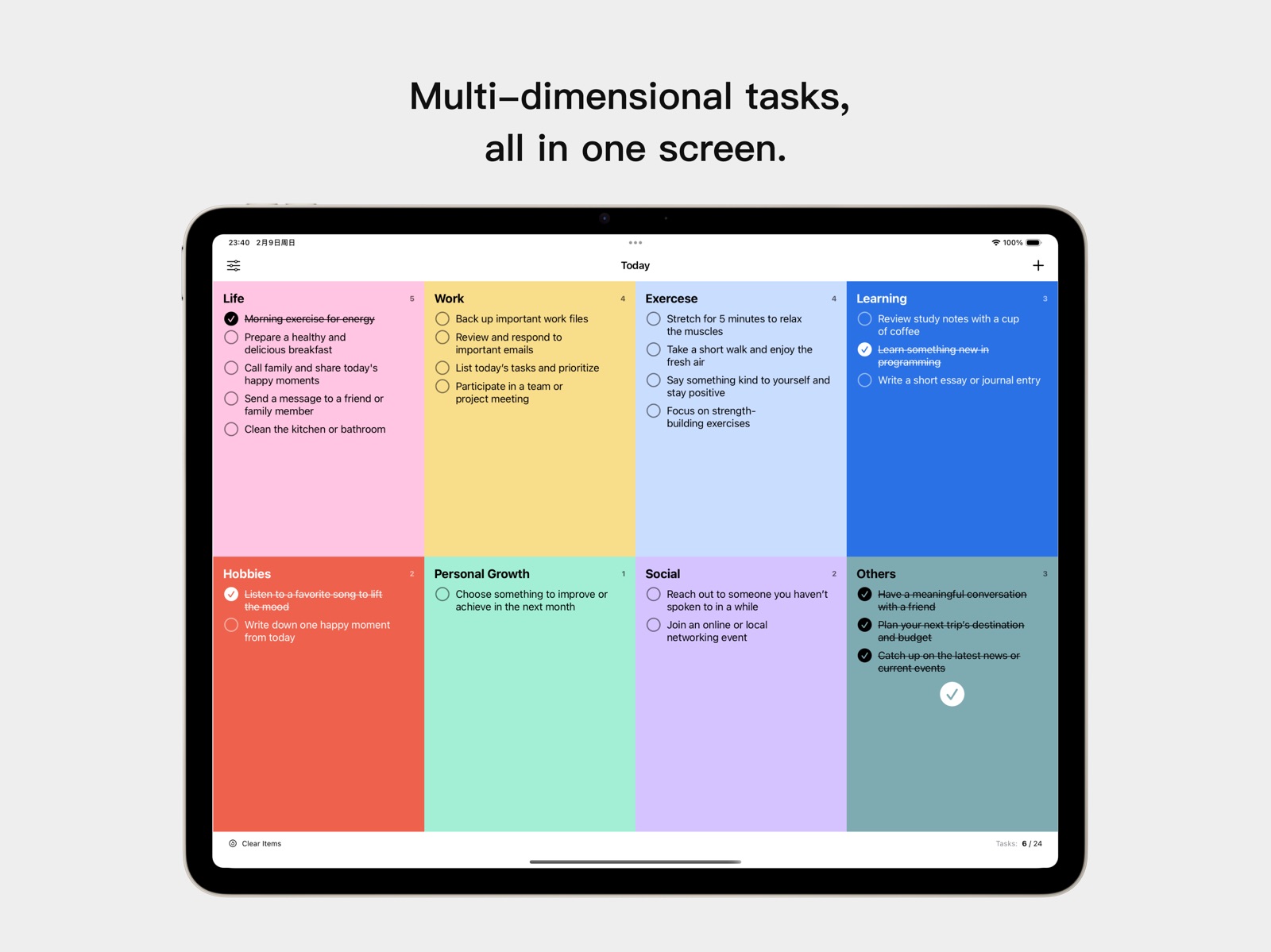
13 store screenshots


Pricing & paywalls
App Store
- Monthly Pro — $0.99/month
- Monthly Pro — $7.99/year ($0.66/mo)
- All Time Membership — $12.99
Ratings & reviews
App Store
-
5/5Visually pleasing, simple design
I’ve been looking for an app like this forever. Because I’m highly visual I needed something that was aesthetically pleasing and with the subscription you get all kinds of color choices. I also needed to have a place for all my different lists to be in one place and to be able to have the option of putting dates on them to be done. It’s really helped me a lot in a short time.
Yellowyak2 · 6 Aug 2026
-
4/5Unique daily task and memo app
Overall I like this app a lot. It has a new spin on task management and is loaded with potential to win me over, withstanding these minor issues … - Needs larger task font options on date views (today, tomorrow, etc.) pending and all task view. Even though there are 3 options the large is still quite small. The large I would consider small. Note: the list view screens work with dynamic type and can be adjusted exactly to the user’s preference. Wish all screens could use dynamic type. That would solve all of it. - Larger memo font. Unlike tasks, memo has no option to increase text size in preferences and also doesn’t work with dynamic type on any screen. It’s so tiny that it makes me squint. If these user experience issues could be addressed the app would be a joy to use. Only things else I would suggest is: - URL highlighting in task note field. Be nice if we could tap on a link and have it launch a webpage or callback URL (deep link) to an other app. Why not add it to memos too? - A task log view across all lists sorted by date completed. Like Things. Be nice if we could see our accomplishments in one timeline. There is a stats page, that gives insight into category completion, but it doesn’t list our tasks by date. The idea I’m taking about is to have a tab in the main view for Task Log or Archive. Example: Monday, October 5 2025: - Wash car - Do Errands - Read Book Sunday, October 4, 2025: - Dinner out - Movie night - Christmas shopping Hope that is helpful. Keep going. The app continues to improve after each update.
iOSBliss · 6 Aug 2026
Privacy & accessibility
App Store
Privacy
- Data Not Collected Developer declared
Accessibility
No accessibility labels collected yet.
Versions
App Store
-
3.1.14
Urgently fixed some UI interaction bugs.
-
3.1.15
Optimized UI performance and added a new "Day After Tomorrow" module (disabled by default).
-
3.1.16
1. Improved the performance of the home screen 2. Added “This Week” and “This Month” views, which can be enabled in Settings / Content Settings 3. Added date filtering to the statistics view
-
3.1.17
1. Fixed bugs in the “This Week” and “This Month” detail views 2. Added AI Smart Color Themes (Pro users only)
-
3.1.18
1. Significantly improved performance 2. Fixed a bug in preview tasks
-
3.1.19
Fixed bugs in the weekly and monthly views, and resolved the task ordering issue when adding new tasks.
-
3.1.20
Minor performance improvements
-
3.1.21
* Supports syncing with the Reminders app * Fully optimized the card detail page UX * Improved the calendar page UX for a smoother, more fluid experience
-
3.1.22
1. Optimized the overall card page logic 2. Improved the widget editing interface 3. Improved the way the calendar opens
-
3.1.23
1. Cards now use seamless scrolling instead of paged swiping for a smoother experience. 2. Improved the Settings page with a clearer and more streamlined information architecture. 3. Smoother opening for the task detail page, with faster focus on the input field and support for swiping to dismiss the keyboard. 4. Improved the experience of switching tags horizontally. 5. Optimized the calendar interface. 6. The widget now supports vertical scrolling (tap the page button to navigate).
-
3.1.24
Fix a crash that occurred when entering the detail view from a card.
-
3.1.25
Fixed a few small issues.
-
3.1.26
Fixed an issue where switching view modes did not take effect immediately Calendar view now follows the user’s system preferences (e.g., first day of the week) Improved performance when switching views horizontally
-
4.0.10
Optimized “Time Mode” and added a Timeline widget.
-
4.0.11
Optimized the home page date-switching experience, reducing blank areas, flickering, and lag when swiping left or right. Improved loading and transitions in Quick Mode, making it smoother to switch between task pages like “Today,” “Tomorrow,” and “Yesterday.” Added a new “Yesterday” task entry and refined the display of overdue tasks, making Quick Mode clearer and easier to navigate. Improved recurring task logic so missed recurring tasks can advance to the next occurrence more reliably. Refined the memo and statistics entry points on task pages, resulting in a more stable and cleaner layout. Adjusted task spacing and drag-preview width in Time Mode for a more natural visual presentation. Unified all AI-related entry points under the name “Smart Assistant” for clearer wording. Reduced unnecessary haptic feedback during mode switching, creating a quieter and calmer interaction experience.
-
4.0.13
Optimized the task editing interface with a more polished design, better information organization, and more convenient interactions. The timeline interface is now cleaner and easier to use, with smoother and more natural sorting.
-
4.0.14
Improved widget task display limits and fixed a few minor issues.
-
4.0.15
Improved the interaction experience and fixed several bugs.
-
4.0.16
Improved the interaction experience and fixed several bugs.
-
4.0.17
Fixed an issue where the widget failed to refresh across dates and duplicated schedules. Resolved a bug that caused the smart color palette to fail. Squashed some minor bugs to improve overall stability.
-
4.0.18
· 1 Aug 2026
Added an app icon badge showing today’s incomplete task count, updated automatically after changes in the app or widgets. Fixed calendar monthly statistics for recurring tasks to prevent missing or duplicate counts.
-
4.0.5
Comprehensively improved the interaction experience, and introduced an intelligent task assistant feature.
-
4.0.7
Fixed some UI bugs.
-
4.0.8
Fixed some UI bugs.
-
4.0.9
* Fixed a bug where widgets disappeared after completing a task * Improved the smart assistant * Fixed a crash issue on the Mac version
Availability by market
- US
Data quality & evidence
- Page completeness
- Live store listing
- Last verified
- 6 Aug 2026
- Sources
- App Store
- Independent summary has not been published yet.