
Quick verdict
- What it is
- Store information collected; an Apoku editorial summary is not yet published.
- At a glance
-
- $17.99
Categories and search queries
Official categories
- Reference
- Education
Apoku categories
Key functions
| Function | Availability | Access | Scope | Evidence |
|---|---|---|---|---|
| Family Sharing | Unknown | Unknown | Scope unknown | Store published |
Screens
App Store
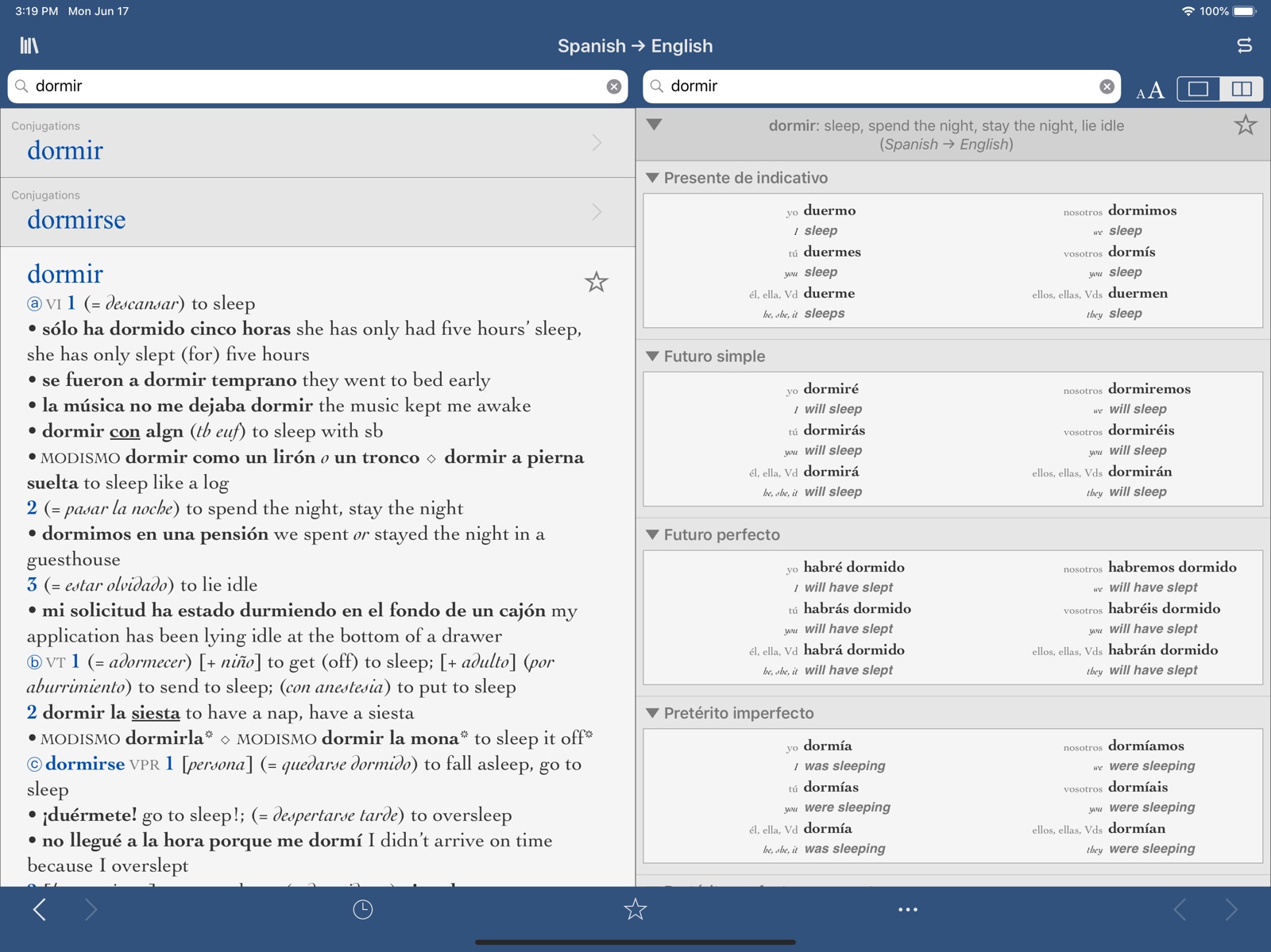
6 store screenshots


Pricing & paywalls
App Store
- Price: $17.99
Ratings & reviews
App Store
-
5/5Review:
The Collins Spanish translator has been the most elegant and most useful that I have yet to find. Not only does it include comprehensive dictionaries in both Spanish and English, but it includes conjugations of almost all the verbs and “frases” or sentences that include the verbs. I am grateful that. translator didn’t forget to include idiomatic expressions. I could say much more such as it is embarrassingly inexpensive. Almost all of those idioms are present within the context of a sentence or a short paragraph. Thank you for this broad and deep surprise. I will enroll in a college class next Spring with much more optimism and confidence because of the Collins. With gratitude.
Benjamark · 31 Jul 2026
-
5/5Fabulous app
I like this Spanish English app more on the iPad than the iPhone because it shows two columns side-by-side for the definitions and the verb declensions. This app will speak whatever word you press so that you get the correct pronunciation. When it defines it give several examples of how to use the word, it translates the verb declensions which is very helpful when you get to the pretérito pluscuamperfecto. It's expensive but it's worth it.
RobinC96 · 31 Jul 2026
-
1/5lacks advertised functionality
there is currently no icloud sync. both the bookshelf and individual collins dictionaries by the same developer advertise syncing favorites and transferring them to other devices but this function is broken which, for an app with this price tag, is unacceptable. the developer responded to an email inquiry letting me know that they are aware and have no timeline as to when a fix can be expected. i have many favorites in an individual dictionary app and after buying another one of their expensive dictionaries i am unable to use them both in the bookshelf app because there is no way of transferring all the favorites. the favorites also don’t sync between the iphone and ipad versions of the dictionary or bookshelf apps. the developer either needs to provide a fix, which honestly is not that serious of a coding job, or update the store description before people spend $18 for each of their dictionaries expecting the advertised features.
Elektrius · 31 Jul 2026
-
3/5Some great, some not so great...
Ok, first the good - great and comprehensive linguistic reference from a trusted source. No analytics or telemetry - thank you, developers for being conscientious! However... the app interface is crude and awkward, the icon is defective - the close and open animation results in tearing and artifacts, revealing white background. Unacceptable for iOS app. If you want an UI to emulate look no further than the Harper-Collins Dictionary and Thesaurus (dark blue icon, red lettering). They have nailed the interface. Otherwise you have a promising product on your hands.
Sarassine · 31 Jul 2026
-
5/5A Comprehensive Spanish Verb Reference Source
By far the best source for Spanish verbs! It not only contains the various, and often numerous uses of a verb, but unlike most other sources, it will pull up this information regardless of the verb tense searched. It also gives you a complete breakdown of the verb in the numerous tenses. Worth every penny I paid and more!
Billy.Bayou · 31 Jul 2026
Privacy & accessibility
App Store
Privacy
- Data Not Collected Developer declared
Accessibility
No accessibility labels collected yet.
Versions
App Store
-
1.2.3
- Pinch and drag the screen to zoom in on results in the dictionary tool - Sort the history list alphabetically or by date - Clear individual history items, or clear the whole history at once - Minor bug fixes
-
1.2.4
- Improvements to the search-as-you-type feature - Minor bug fixes Let us know what you think of the update with a review!
-
1.2.5
- Added "Did-you-mean" results in the dictionary tool to help you find the right entry - Added a Quick Reference Guide to the About screen - Minor bug fix in the history tool Ultralingua is on Twitter! Follow us for iPhone news, language learning tips, and more http://twitter.com/ultralingua Feedback from our users is important to us, and drives many of the updates you see here. Let us know what you like and make suggestions with a review in the App Store. Thanks for using Ultralingua!
-
1.2.5.1
- Minor bug fixes
-
1.3.3
Now localized into six languages! View the interface in English, French, German, Spanish, Italian and Portuguese. A new localization will automatically appear in the app when you change your preferences in your device settings. Rotate to view in either portrait or landscape mode! Join us on Facebook and Twitter for app giveaways, language tips and trivia, and more! Twitter: http://twitter.com/ultralingua Facebook: http://www.facebook.com/pages/Ultralingua/358676325359 Please update your review in the App Store to let us know what you like about this app. Feedback helps us make our apps even better with updates like this one.
-
1.4
All Collins and Vox apps by Ultralingua are now available for iPad! Current Collins and Vox users on iPhone and iPod touch can load their apps onto an iPad for no additional charge to experience the optimized display.
-
1.4.1
• Speed improvements on iPad • Minor bug fixes Are you following us on Facebook and Twitter, yet? We post language learning tips, app news, product giveaways, tricky trivia and more here: http://www.twitter.com/ultralingua http://on.fb.me/ifI8Hy Thanks for using Ultralingua!
-
1.4.2
New in 1.4.2 • Now compatible with iOS 5 -------------------------- New in 1.4.1 • Speed improvements on iPad • Minor bug fixes Are you following us on Facebook and Twitter, yet? We post language learning tips, app news, product giveaways, tricky trivia and more here: http://www.twitter.com/ultralingua http://on.fb.me/ifI8Hy
-
1.4.3
New in 1.4.3 • Minor bug fixes -------------------------- New in 1.4.2 • Now compatible with iOS 5 -------------------------- New in 1.4.1 • Speed improvements on iPad • Minor bug fixes Are you following us on Facebook and Twitter, yet? We post language learning tips, app news, product giveaways, tricky trivia and more here: http://www.twitter.com/ultralingua http://on.fb.me/ifI8Hy
-
1.5
THANK YOU for using Ultralingua dictionaries! This long-awaited update has some features you've been asking for, and we're excited to hear what you think. We're even giving away a couple free copies of the apps at our blog, so if you’ve had your eye on another dictionary, go check it out now: blog.ultralingua.com ★ New for iPhone users ★ Infinite scrolling! Browse the dictionary forever, without being interrupted by breaks between entries. Check out this video demo to see it in action: http://bit.ly/ultra15ios ★ New for iPad users ★ Retina art! The before and after is really outstanding. ★ New for EVERYONE ★ • Copy and paste are back! Tap individual words in the iPhone or iPad app to bring up the copy and paste menu items. • Minimum iOS version raised to 3.2 • Minor bug fixes
-
1.5.1
Thanks for all the kind words about version 1.5! Here's a quick fix for various crashing scenarios, especially on older devices. ★ Stop by blog.ultralingua.com for the latest news, giveaways, language and tech tips, behind-the-scenes peeks into Ultralingua, and more goodies.
-
1.5.2
★ Update to Copy and Paste You could copy individual words before, but now you can copy and paste *whole entries* as well. ★ THANK YOU Thanks for using Ultralingua dictionaries! This update has some features you've been asking for, and we're excited to hear what you think. We're even giving away a couple free copies of the apps at our blog, so if you’ve had your eye on another dictionary, go check it out now: blog.ultralingua.com
-
1.5.3
PLEASE NOTE: We are fixing the rotation bug in version 1.5.3 and will have a free update released as soon as possible! Added support for iOS 6 and the iPhone 5 – See more dictionary content on the new taller screen!
-
1.5.4
• Fixed a bug where some iPhones would freeze when you tapped in the search box to look up a word. • Fixed a bug where the app would not rotate properly on some iPads.
-
2.10
• Updated for iOS 16 • Support for Dark Mode • Many data improvements • Miscellaneous small bug fixes
-
2.11
• Updated for iOS 17 • Improved dark mode • Many data improvements • Miscellaneous small bug fixes
-
2.11.1
• Fixed a bug with the "Speak" feature • Miscellaneous small bug fixes
-
2.12
· 21 Jul 2026
• Updated for iOS 26 • Miscellaneous bug fixes
-
2.3
This is a complete rewrite and redesign of the app, based on years of experience and customer feedback. • Streamlined navigation, for fast consultation. All searching, conjugation, number translation, etc. happens from a single search box, with all results on a single screen. • Smart search searches both languages simultaneously, finds root words and accent-insensitive matches, adjusts for articles and prepositions (e.g. "l'homme" finds "homme"), etc. • Beautiful redesigned dictionary display • Combine your separate Ultralingua dictionaries via iCloud into the convenient all-in-one Ultralingua Bookshelf app (https://itunes.apple.com/us/app/ultralingua-dictionary/id512347062?mt=8) • Change fonts and font sizes • Powerful and convenient in-line verb conjugator includes translations and many new tenses. • Mark your Favorites, including words, number translations, and verb conjugations.
-
2.4.1
*** Some customers are reporting crashes. If the app crashes, delete the app and re-install it from the App Store. Contact us at [email protected] for more help! • Redesigned to look great in iOS 7 • Use AirDrop to share your Ultralingua Favorites • Quick tap-once-to-search • Dictionary display adapts to the new system-wide text size setting • Miscellaneous bug fixes and performance improvements
-
2.4.2
• Repaired a bug that caused the app to crash after updating on some devices. • Sped up launch. • Eliminated network access. • Miscellaneous bug fixes and performance improvements.
-
2.6
• Tap-and-hold any word or phrase and choose "Speak" from the popup menu to hear that word spoken using Apple's built-in text-to-speech feature. • Updated for iOS 8 • Supports iPhone 6 and 6 Plus • Many data improvements and small bug fixes
-
2.7
• Updated for iOS 9 • Updated for iPhone 6s, iPhone 6s Plus, and iPad Pro • Simplified navigation • Optional side-by-side dictionary and conjugations on iPad • Faster loading of Favorites • Export your Favorites via AirDrop or email • Many data improvements and small bug fixes
-
2.8
• Updated for iOS 11 and iPhone X • Data improvements • Small bug fixes
-
2.9
• Updated for iOS 13 and the iPhone 11, 11 Pro, and 11 Pro Max • Improved navigation of verb tenses • We have stopped collecting usage analytics • Data improvements • Small bug fixes
Alternatives
- Larousse Spanish Advanced — Same category + similar ratings
Availability by market
- US
Data quality & evidence
- Page completeness
- Live store listing
- Last verified
- 31 Jul 2026
- Sources
- App Store
- Apoku editorial summary has not been published yet.