
Quick verdict
- What it is
- Store information collected; independent summary not yet available.
- At a glance
-
- Free to download
- In-app purchases
Categories and search queries
Official categories
- Productivity
- Education
AppCorpus categories
Key functions
| Function | Availability | Access | Scope | Evidence |
|---|---|---|---|---|
| Free app | Yes | Free | — | Store published |
| In-app purchases | Yes | Limited free | — | Store published |
Screens
App Store
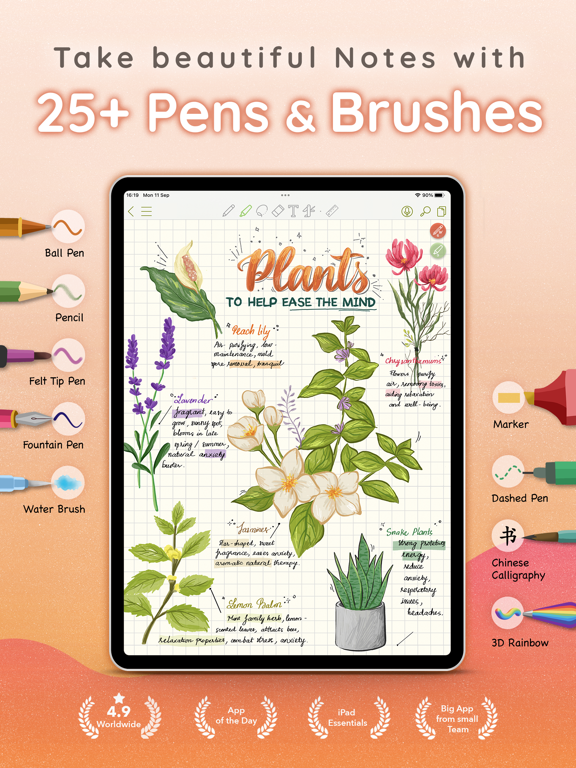
29 store screenshots



Pricing & paywalls
App Store
Shown for US
- Lifetime Premium — $13.90
- Lifetime Premium Loyal Users — $6.95
- Lifetime Premium Welcome Offer — $9.69
- Premium: Time Limited Sale — $6.95
Ratings & reviews
App Store
Shown for US
-
5/5Used to be better
I thought this app was good until a recent update… I loved all the features, but now when I double tap my Apple Pencil it doesn’t automatically switch to my eraser and instead of brings up random features that I might want to switch to, but I don’t. I just want to have the same Apple Pencil functionality as I do in other Apple apps. Also, the update, moved the undo button into a weird little side panel that always disappear disappears, and it’s very inconvenient to have to tap the panel and then open it up and then press undo instead of having the undo button at the top like it used to be. I wish that I could just have the setting where double tap my pencil will allow to switch between eraser and the utensil I was just using. I think this is better than the auto switch feature, that just switches me back to my old utensil after I tap on the eraser. But I would prefer to just be able to switch between pencil and eraser by double tapping my pencil instead. This is a lot more helpful for people who take notes and erase often because it is faster. Other than that, I love the app. I hope the developers will take this into account and make an update where we can choose what double tapping our pencil will do and put the undo button back to where it was before :) this is the only reason I read it four stars, but if these functions are implemented, I think the app will be more user-friendly and I will rate it at five :)) UPDATE: saw that the developers responded :)
strawberryFiend · 30 Aug 2026
-
5/5Sooo close to perfect, it gets all five stars!
I had recently been trying a whole bunch of note-taking apps and they all fall short in one way or another. One of them was CollaNote, which I also dismissed as I found the interface kind of clunky and too cutesy for my taste. However, as a visual note-taker — lots of pen color-changes, and highlights, arrows, etc. — I was happy to try it again when I received a CollaNote 3.0 notification somewhere. Wow. Just wow. Interface is totally cleaned up. There’s an arc menu for quick access to color-changes, pen widths, highlights, etc! Still a bit clunky, but it’s WAY better than it used to be. There’s lots of paper choices, and templates. Folder covers are customizable. The filing mechanism is a bit strange for cloud storage/sync which lives alongside “on the iPad” storage. Took a bit to figure that out. The handwriting recognition and execution is also a bit clunky and could use some work — and the scratch-out to erase function is a little too slow, but holy cow, this really does check all the boxes. Sooo many pens (although I am really missing Apple’s flat-edge, fixed angle calligraphy nib here), ability to set up to ten pens in a quick-access sidebar across all notebooks, is really stellar. I am not really an AI person, so I haven’t tried the AI functions beyond a simple look-up for text and the image generation was just awful (a request for a smiley face gave one result — a smiling female anime type character). But as a work in progress, I was more than happy to upgrade to paid version, and look forward to great updates in the future. Thank you!
Tamanzi · 30 Aug 2026
-
4/5Occasional bugs
I have been using this app for about 3 weeks now, (since the start of the semester) and for the most part, it has worked great. However, I have noticed that since paying for premium, I have had a few issues. This could be due to the fact that I have been using it so much, in which case I may need to find another app that can handle my personal usage requirements. (Or take more breaks) When moving large chunks of text or drawing, sometimes the note or app will crash. Worse, it will sometimes delete things entirely, which is especially problematic when taking notes in a live lecture. I also have recently experienced this odd phenomenon where a line of ink will appear on the page usually disrupting text or images, and will not be erased. (In the note preview, there isn't a line, but for some reason the line is still on the page despite attempts to erase, and rebooting both the app and iPad.) This could indicate possible issues with the stability tool for the pen? But I’m not sure. Other than these mild issues, the app is really easy to use with an enjoyable user interface, and I would recommend it if you're not going to be regularly spending more than 4 hours at a time with no breaks on it. While yes, more app stability would be nice, it’s just important to keep in mind that this review is coming from a senior college student who is taking notes on readings/lectures/research most hours of the day every day of the week, so my usage is possibly above an “average” user’s usage.
Mezmorizing · 30 Aug 2026
-
5/5Best note taking experience
I don’t like to leave reviews. But this app truly provides the best features for both handwritten and typed notes so much so that I want to thank the developer with a monetary donation. Not sure where to do that yet, though. You can really tell that the person who developed this app did so with students in mind—there are so many useful, convenient features that make note-taking and studying very easy, and all of it is FREE, which is one of the biggest factors that makes this app even more underrated. I’m actually surprised it doesn’t have more reviews, but I’m so glad I found it. I usually take non-digital handwritten notes, but as a masters student, it’s easier to erase, re-write, and upload everything as a PDF. There are a ton of little details that make life as a student easier. You have to take a small amount of time to go through the different features and customize certain things, but that’s part of the reason I love it. Once I set everything up, it’s so quick to change the font, size, color, utensil-type, page background and it soon becomes part of your motor memory. I encourage everyone to utilize this note-taking app, especially if you rely on hand-written notes. Please keep up the good work, man! We really appreciate all the hard work you’ve put into continually improving this app.
Woowoowoowooooo · 30 Aug 2026
-
5/5Awesome
I’m in awe😳 with all that this app offers and for free no less. Very impressive to have many options and truly be able to utilize the app. So, great Job and kudos to the developer. Many should learn from you. There’s no subscription being shoved our throats or making the app unusable without a subscription or ads every 2 seconds, but I will say that for that reason alone with having an amazing app, I wish there was a an option to make a donation like some YouTubers have so we can show our appreciation. I understand developers need to make a living as well and cost of keeping apps updated or adding new features but this whole needing a subscription for everything it seems like now a days, it’s just out of hand So to see a developer offer what you know we would want and would like to have is greatly appreciated. I wish many others learned from you. You should be one that is a featured app. Your doing something right when you have a near perfect rating of a 4.9. Know that if you ever develop more apps, those that have used this app would also follow you to what ever else you develop bc they know what you offer and that it would be just as great as this one. Keep up the amazing job. And for those considering this app? You will love it. You won’t be disappointed. Good job buddy and keep up the good work !!!! 👍🏼⭐️⭐️⭐️⭐️⭐️
!_JustMe_! · 30 Aug 2026
Privacy & accessibility
App Store
Privacy
- Data Not Linked to You — App Functionality — Contact Info — Email Address Developer declared
- Data Not Linked to You — App Functionality — Contact Info — Name Developer declared
- Data Not Linked to You — App Functionality — Contact Info — Phone Number Developer declared
- Data Not Linked to You — Contact Info Developer declared
Accessibility
No accessibility labels collected yet.
Versions
App Store
-
3.0.10
Minor Bug Fixes
-
3.0.7
Minor Bug Fixes
-
3.0.8
Fixed translation tool for Traditional Chinese
-
3.0.9
Minor bug fixes
-
3.1.0
BIG UPDATE: A BIG Step Forward! - Introducing the Sidebar: A brand-new sidebar packed with essential tools to enhance your productivity. Customize its placement—left or right of your screen—for seamless access. - New TimeTool: Manage your time effectively with three powerful features designed to boost your focus and productivity: + Timer: Perfect for timed study sessions, helping you stay disciplined and on track for tests or deadlines. + Stopwatch: Ideal for tracking how long you spend on specific tasks or activities, great for reviewing and improving study efficiency. + Pomodoro Timer: Enhance your learning experience with the proven Pomodoro Technique. Alternate between focused study intervals and short breaks to maintain concentration, with a longer break to recharge after multiple cycles. - Redesigned Note-Taking UI: A fresh, intuitive interface to make note-taking even more enjoyable and efficient. - Audio Recording Revamped: Smarter functionality, improved sound quality, and a user experience designed to capture your thoughts with ease. - Bug Fixes Update now and take your note-taking experience to the next level!
-
3.1.1
- Enhanced translation tool for more natural and accurate translations. - Added clock tool messages to the note-taking screen. - Relocated the export button to the top-right corner.
-
3.1.2
Bug fixes and performance improvements
-
3.1.4
Bug fixes and performance improvements
-
3.1.5
- Updated the UI of the Home screen - Added drag-and-drop support for moving notes and folders - Improved background performance significantly - Preparations for an upcoming major update
-
3.1.6
Preparing for the next big update
-
3.1.7
Preparing for the next big update & Fix bugs in the Text Tool.
-
3.1.8
Preparing for the next big update & Fix small bugs
-
3.9.0
Fix compatibility issues with iOS 26
-
4.0.0
BIG UPDATE — CollaNote 4.0 - Completely Redesigned UI/UX with Glass Design + A brand-new interface featuring modern glass effects, improved navigation, and a cleaner layout. + More intuitive, more self-explained, and designed for focus and clarity. - Audio Tool with AI Transcript + Record notes, lectures, or meetings. + AI automatically creates accurate transcripts. + Handwriting, audio, and transcript now sync together during playback. - Smarter Translation Tool + Improved translation accuracy. + Faster and more context-aware. + Ideal for multilingual note-taking and learning. - Introduce Flashcard Library + Browse and find ready-made flashcards tailored to your study needs. + Perfect for learning languages or memorizing key concepts. - Introduce Digital Planner Library + Access a growing library of digital planners. + Plan your day, week, or month with stylish, functional templates. - New Import Feature + Import not only PDF files, but also Word and PowerPoint documents. + Work with all your study or work materials in one place. - New Papers, Templates and Sticker Packs - General Performance and Stability Improvements
-
4.0.1
Fix minor bugs in iOS 26
-
4.0.2
- New AI Pen: Squeeze Apple Pencil Pro and circle on the note to select an area and activate AI • Turn hand-drawn doodles into beautiful stickers • Convert handwriting into text • Chat with AI based on selected content • Requires Apple Pencil Pro and iOS 18+ - New CollaNote AI document chat: • Chat directly inside your document with CollaNote AI • Supports both offline mode and online mode with web search - Improved AI Generated Stickers: • Now works offline • Creates even more beautiful, high-quality stickers
-
4.0.3
Improved stability on iOS 26
-
4.0.4
Fix a minor issue with displaying notes
-
4.0.5
Fix small bugs
-
4.0.6
Lunar New Year update: Introducing the Firecracker Pen
-
4.0.7
- Added a variety of new pens to give you more creative ways to decorate your notes - Improved performance - Fixed minor bugs
-
4.0.9
Fixed minor bugs
-
4.1.0
Fixed minor bugs
-
4.1.1
- Improved Lasso Tool: The Lasso Tool now supports selectable content types: pen strokes, marker strokes, and boxes. - Improved Translation Tool + Added 2 selection modes: rectangular selection and freehand selection. + Improved translation quality. - Hover Support for Pen Tools: Added hover support for all pen tools. - New Trash Bin UI: Redesigned the Trash Bin with a new interface. - New Note History Feature: You can now manage the edit history of your notes and restore earlier versions. - Bug Fixes and Performance Improvements
-
4.1.2
· 14 May 2026
Bug fixes and performance improvements
-
4.3.0
CollaNote 4.3.0 — Power up your new semester! Start the semester ahead of the curve — CollaNote 4.3.0 brings powerful new tools built for students. HELP EACH OTHER LEARN: COMMUNITY NOTES Don't start the semester alone. Explore the community map and see what students around you are studying — from classmates across the street to learners around the world. Have notes worth passing on? Share them with the CollaNote Team. Our staff prepares each one and publishes the notes that will genuinely help other students, so everything you find in the Community comes from us. YOUR PERSONAL MATH TUTOR: STEP-BY-STEP SOLVING Write down a math problem, and the handwriting calculator doesn't just give you the answer — it walks you through the solution, step by step. Understand every lesson from day one, instead of falling behind. TRAIN FOR TEST DAY: EXAM CALCULATOR MODE The new Emulator mode turns CollaNote into the classic calculator you're allowed to bring into the exam room. Practice all semester with the exact same buttons and workflow you'll have on test day — no surprises when it counts. AND MORE FOR THE NEW SEMESTER - New Back to School pens to make your notes shine - Export your note as images to share with friends - Redesigned Export and Print screens - Many bug fixes and stability improvements - Support iOS 27 with resizable screen Good luck this semester — CollaNote has your back!
-
4.3.1
CollaNote 4.3.0 — Power up your new semester! Start the semester ahead of the curve — CollaNote 4.3.0 brings powerful new tools built for students. HELP EACH OTHER LEARN: COMMUNITY NOTES Don't start the semester alone. Explore the community map and see what students around you are studying — from classmates across the street to learners around the world. Have notes worth passing on? Share them with the CollaNote Team. Our staff prepares each one and publishes the notes that will genuinely help other students, so everything you find in the Community comes from us. YOUR PERSONAL MATH TUTOR: STEP-BY-STEP SOLVING Write down a math problem, and the handwriting calculator doesn't just give you the answer — it walks you through the solution, step by step. Understand every lesson from day one, instead of falling behind. TRAIN FOR TEST DAY: EXAM CALCULATOR MODE The new Emulator mode turns CollaNote into the classic calculator you're allowed to bring into the exam room. Practice all semester with the exact same buttons and workflow you'll have on test day — no surprises when it counts. AND MORE FOR THE NEW SEMESTER - New Back to School pens to make your notes shine - Export your note as images to share with friends - Redesigned Export and Print screens - Many bug fixes and stability improvements - Support iOS 27 with resizable screen Good luck this semester — CollaNote has your back!
-
4.3.2
CollaNote 4.3 — Power up your new semester! Start the semester ahead of the curve — CollaNote 4.3 brings powerful new tools built for students. HELP EACH OTHER LEARN: COMMUNITY NOTES Don't start the semester alone. Explore the community map and see what students around you are studying — from classmates across the street to learners around the world. Have notes worth passing on? Share them with the CollaNote Team. Our staff prepares each one and publishes the notes that will genuinely help other students, so everything you find in the Community comes from us. YOUR PERSONAL MATH TUTOR: STEP-BY-STEP SOLVING Write down a math problem, and the handwriting calculator doesn't just give you the answer — it walks you through the solution, step by step. Understand every lesson from day one, instead of falling behind. TRAIN FOR TEST DAY: EXAM CALCULATOR MODE The new Emulator mode turns CollaNote into the classic calculator you're allowed to bring into the exam room. Practice all semester with the exact same buttons and workflow you'll have on test day — no surprises when it counts. AND MORE FOR THE NEW SEMESTER - New Back to School pens to make your notes shine - Export your note as images to share with friends - Redesigned Export and Print screens - Many bug fixes and stability improvements - Support iOS 27 with resizable screen Good luck this semester — CollaNote has your back!
-
4.3.3
· 27 Aug 2026
CollaNote 4.3 — Power up your new semester! Start the semester ahead of the curve — CollaNote 4.3 brings powerful new tools built for students. HELP EACH OTHER LEARN: COMMUNITY NOTES Don't start the semester alone. Explore the community map and see what students around you are studying — from classmates across the street to learners around the world. Have notes worth passing on? Share them with the CollaNote Team. Our staff prepares each one and publishes the notes that will genuinely help other students, so everything you find in the Community comes from us. YOUR PERSONAL MATH TUTOR: STEP-BY-STEP SOLVING Write down a math problem, and the handwriting calculator doesn't just give you the answer — it walks you through the solution, step by step. Understand every lesson from day one, instead of falling behind. TRAIN FOR TEST DAY: EXAM CALCULATOR MODE The new Emulator mode turns CollaNote into the classic calculator you're allowed to bring into the exam room. Practice all semester with the exact same buttons and workflow you'll have on test day — no surprises when it counts. AND MORE FOR THE NEW SEMESTER - New Back to School pens to make your notes shine - Export your note as images to share with friends - Redesigned Export and Print screens - Many bug fixes and stability improvements - Support iOS 27 with resizable screen Good luck this semester — CollaNote has your back!
Alternatives
- Kilonotes-Notes & Mark up PDF — Same category + similar ratings
- Noteful: Notes & PDF Markup — Same category + similar ratings
Availability by market
- US
Data quality & evidence
- Page completeness
- Live store listing
- Last verified
- 30 Aug 2026
- Sources
- App Store
- Independent summary has not been published yet.