
Quick verdict
- What it is
- Store information collected; independent summary not yet available.
- At a glance
-
- Free to download
Categories and search queries
Official categories
- Business
- Finance
AppCorpus categories
Key functions
| Function | Availability | Access | Scope | Evidence |
|---|---|---|---|---|
| Free app | Yes | Free | — | Store published |
Screens
App Store
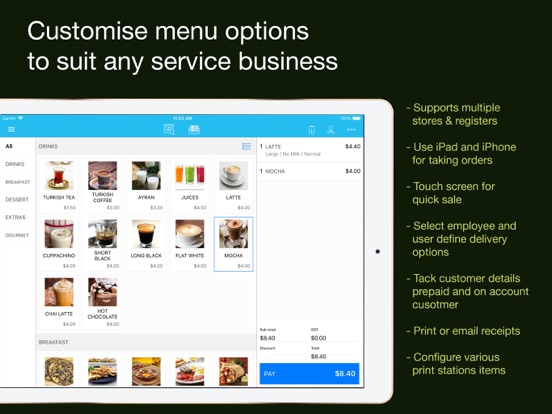
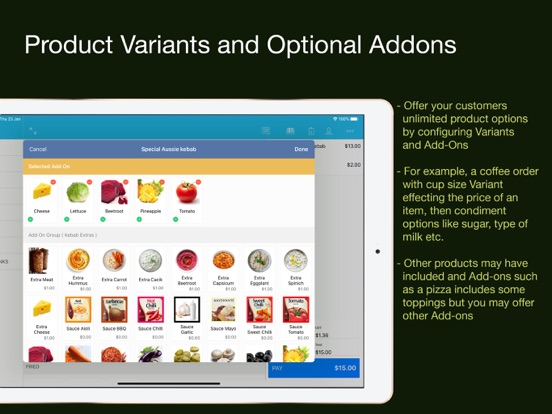
16 store screenshots


Pricing & paywalls
App Store
- Free
Ratings & reviews
App Store
No store reviews collected for App Store · US
Privacy & accessibility
App Store
Privacy
- Data Linked to You — App Functionality — Contact Info — Email Address Developer declared
- Data Linked to You — App Functionality — Identifiers — User ID Developer declared
- Data Linked to You — Contact Info Developer declared
- Data Linked to You — Identifiers Developer declared
- Data Not Linked to You — App Functionality — Contact Info — Name Developer declared
- Data Not Linked to You — App Functionality — Contact Info — Phone Number Developer declared
- Data Not Linked to You — App Functionality — Contact Info — Physical Address Developer declared
- Data Not Linked to You — App Functionality — Identifiers — Device ID Developer declared
- Data Not Linked to You — App Functionality — Location — Coarse Location Developer declared
- Data Not Linked to You — App Functionality — User Content — Emails or Text Messages Developer declared
- Data Not Linked to You — App Functionality — User Content — Photos or Videos Developer declared
- Data Not Linked to You — Contact Info Developer declared
- Data Not Linked to You — Identifiers Developer declared
- Data Not Linked to You — Location Developer declared
- Data Not Linked to You — User Content Developer declared
Accessibility
No accessibility labels collected yet.
Versions
App Store
-
2.3.10
- Hide the dictation button and auto-correction and auto-spelling check on the barcode scan mode. - Add print the label button on the add product page. - The Jewellery label changed from the barcode to the sale price. - Support multiple opening hours for a day. - Improve the stability.
-
2.3.11
- Fixed the SPI payment issue on iOS 18.1.
-
2.3.3
- Improve the Epson printer connection issue. - Fixed the customer credit issue. - Change the Add-On price based on the sale item discount. - Improve stability.
-
2.3.4
- Sale History can be searched with the company name, customer name, sale note, invoice number, customer mobile, and customer email. - The outstanding sale can be paid through the normal payment view. - Sale View shows the service fee, credit card surcharge, and delivery fee. - Changed the customer's regular discount logic. - Foodpod supports the guest order and the pay later order. - The holiday surcharge label can be changed. - Improve the stability.
-
2.3.5
- New feature: Xero accounting integration - Incoming online orders – Now includes CLOSE button - Online Orders – Auto Accept order - History Search – Outstanding status search - Close Register - Print before closing day. - Improve stability.
-
2.3.6
- Improve the stability.
-
2.3.7
- Improve stability.
-
2.3.8
- New order melody sound notification in the kitchen - Zebra printer support for Label printing - Improve the user experience and stability
-
2.3.9
- Improve the stability.
-
2.4.0
- The account payment button now only pays the remaining customer credit. - Tyro/SPI payment options have been moved from Settings > Hardware to Payment Type. - A new feature in the price category now supports multiple prices and menus. - Fixed an issue where the report action button did not work on iOS 18. - Removed the holiday surcharge on sales. - Introduced a new payment type called "Send." - Removed the "Display count" option from the product report.
-
2.4.1
- Improve the stability
-
2.4.2
What’s New in This Version - Customize tax labels in store settings - Fresh new introduction images - Change production server URL in company settings - “Save” button added to Telephone Pickup for faster input - Company name now visible on receipts and customer views - Search products using supplier code - Quick access to open the cash drawer - Discounts now show on PDF receipts - Offline sales automatically stored and uploaded when back online - Offline mode is now smoother and easier to spot - Improved Stock Report – More details and filters by supplier & category - Fixed printer issues (Element & Zebra) - Tyro & SPI payments disabled while offline
-
2.4.3
New Features - Invoice format editor now supports multi-line headers and footers. - Stock quantity is displayed in product search and product list views. - Stock changes are now logged for inventory tracking. - Added emoji support in locally stored settings for improved user experience. - PDF invoices now hide discount values. - Updated license check logic.
-
2.4.4
- Improve the stability
-
2.4.5
What's New - Foreign Exchange Display: The receipt now shows the price in the selected foreign currency. - Allow Payment for Zero Sale Price: Enabled the ability to complete a payment even when the sale price is $0. - First-Time Guide Tips: Added helpful tips for newly created stores with no setup. - QR Code Printing Fix: Resolved an issue where the table QR code would not print correctly at size 10. - Delivery Pop-up Fix: Fixed an issue where the delivery pop-up would reappear when changing the price category. - iPhone UI Improvements: Enhanced the user interface for better usability on iPhone devices. - Improve the stability.
-
2.4.6
New Features & Improvements – Version 2.4.6 - Added option to set/reset Zebra label printer defaults based on selected label size. - Adjusted the font size for foreign exchange currency on receipts for better clarity. - Shortened the “Stock” label to “S” on sale items for better display on iPhone screens. - Added Zebra Printer Setup Utility install button on the printer setup screen for easier access. - Improved app stability and performance.
-
2.4.7
New Features & Enhancements Stock Auto-Update: Stock levels now automatically update after each sale. Duplicate Order: Create a new sale directly from an existing sale with the new “Duplicate Order” option. Stock Management Shortcut: Added a Stock Management button to the Add Product view for faster inventory access. Dynamic Link Update: Updated the QR code dynamic link from Google Firebase. Add-ons Management: Added an “Add-ons” section under Settings for managing: - User License - Online Order - Xero Integration - Inventory - Floor Plan - Bump Screen Adjustable Menu Width: Users can now customize menu width under Settings > General > Display Menu Width. Name Length Restrictions: - Customer Name: max 30 characters - Company Name: max 50 characters Online Sales Filter: Added “Online Sale Only” filter to the History view. PDF Invoice Display: When no printer is available, a PDF invoice will now be shown instead of a “No Printer” message. Report Options: Added two new report filters: - Exclude Surcharge - Exclude Foodpod Service Close All Sales: Added a “Close All Sales” button in the Online Accept view. New Branch Feature: ClickPOS now supports adding new locations with New Branch functionality. Payment Flexibility: Tyro and SPI payments can now be processed even if the app is not connected to a receipt printer. Improved QR Code: Enhanced QR code generation for better reliability and performance. Bug Fixes Fixed the issue causing app crashes after changing the supplier. Fixed incorrect stock levels after processing outstanding sales. Fixed the Delivery Report count issue. Fixed the issue with resetting items in the Floor Plan.
-
2.4.8
New Features & Enhancements - Dark Mode Support: The Sales App now fully supports Dark Mode for improved visibility and user experience. - Improved Payment Handling: When using SPI or Tyro payments without a connected receipt printer, the app now correctly displays a “No Printer” error message. Bug Fixes - Active Device List Fix: Resolved the issue where multiple device names were appearing on the Active Device list.
-
2.4.9
New Features & Enhancements - Bump Screen QR Code: Added a QR code for the Bump Screen URL to simplify access and setup. - EFTPOS Printing Control: Users can now control printing of merchant and customer copies for EFTPOS transactions. - Improved Date & Time Picker: Enhanced the date/time picker controller for better usability and reliability. - Improved Foodpod Invoice Handling: Improved handling when multiple Foodpod invoices are allocated to the same table. - User-Friendly Network Errors: Updated network error messages to be clearer and more user-friendly. Behavior Changes - Floor Plan Cleanup: Floor plan items are no longer displayed if the associated table has been deleted. - iOS Version Requirement: The minimum required iOS version has been updated from iOS 13 to iOS 14. Bug Fixes & Stability - Floor Plan Activation Fix: Fixed an issue where the floor plan was not displayed after activation. - Improved Stability: General performance and stability improvements across the app.
-
2.5.0
New Features & Improvements - Updated the user interface to better align with the iOS 26 Liquid Glass design. - Improved overall stability and performance. - Removed “Powered by ClickPOS” from station printing. - Reduced top and bottom margins for station printing. Bug Fixes - Fixed an issue where sale payments did not correctly reflect the removal of the holiday surcharge. - Resolved a problem with docket printing after renaming a category.
-
2.5.1
ClickPOS Sales App v2.5.1 – New Features & Improvements - Enhanced transaction logging for Tyro payments (including Cancelled and Declined states) - Removed dashed lines for group deals on order dockets - Added “Automatically print receipt when order is accepted” option under Settings > Online Orders - Introduced Top Margin setting for station printer formatting - External payment reference is now displayed in the sale detail view - Sales can now be searched by payment reference and total paid amount - General stability improvements and enhanced user experience
-
2.5.2
- Fixed an issue where the delivery address was not displayed on guest orders - Improved overall stability and performance
-
2.5.3
- Updated Star printer SDK from StarPRNT v5.5 to StarXpand v2.12. Star Micronics has deprecated the older StarPRNT SDK. Added support for the latest Star printers. - Enhanced the Sales Search Filter. Added a delivery filter to make searching and managing delivery orders easier. - Added report export format selection. Users can now export reports in either PDF or CSV format. - Enhanced Add-on Add-on groups can now be configured with Mandatory Selection. Add-on groups can now define a Maximum Selection limit. When Mandatory Selection is enabled, customers must select the required number of add-ons before proceeding. If Maximum Selection is set to 0, customers can select an unlimited number of add-ons.
-
2.5.4
- Improved Tyro transaction handling for better reliability. - Improved Epson printer stability and compatibility by upgrading the Epson ePOS SDK from v2.26.0 to v2.37.0a. - Optimized Floor Plan sale synchronization logic. - Improved PDF generation by replacing the HTML-based renderer with the native SwiftUI PDF renderer. - Added the sale note to PDF invoices. - Product grid size is now adjusted dynamically based on the available screen space. - Added the top-left navigation menu button to the Sales, Reports, Product Catalogue, and Settings screens on iPhone. - Fixed an issue where newly created Add-on Groups were always placed at the end of the sort order. - Fixed an issue where Offline Mode continued attempting to sync even when no internet connection was available. - Fixed date and time formatting issues for devices using Language & Region settings with calendars other than Gregorian. - Prevent accepting Foodpod orders when the register is not open. - Added validation to prevent accepting online orders unless a register has been selected on the device. - Fixed an issue where the 0 button was missing from the passcode keypad.
-
2.5.5
· 3 Aug 2026
- Fixed the Tyro connection issue.
Alternatives
- Nomni Point of Sale (POS) — Same category + similar ratings
- SkyPOS Cloud POS — Same category + similar ratings
- POS Billing System by Moon — Same category + similar ratings
- PosKing — Same category + similar ratings
- Loyverse KDS - Kitchen Display — Same category + similar ratings
- TinyPOS:Tools for Business — Same category + similar ratings
Availability by market
- US
Data quality & evidence
- Page completeness
- Live store listing
- Last verified
- 6 Aug 2026
- Sources
- App Store
- Independent summary has not been published yet.