
Quick verdict
- What it is
- Store information collected; an Apoku editorial summary is not yet published.
- At a glance
-
- Free to download
Categories and search queries
Official categories
- Medical
Apoku categories
Key functions
| Function | Availability | Access | Scope | Evidence |
|---|---|---|---|---|
| Free app | Yes | Free | Context-specific | Store published |
Screens
App Store
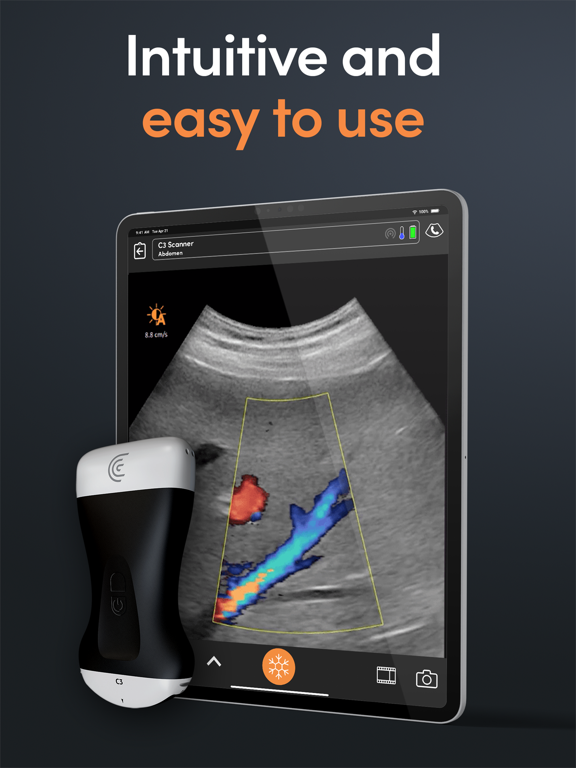
15 store screenshots



Pricing & paywalls
App Store
- Free to download
Ratings & reviews
App Store
-
4/5Clarius
Nice app and interface. Very easy to adjust depth, adjust and gain is a little odd. Quite doable. It’s very easy to select different scanners and modes. Saving images is also quite nice. Measurement and m mode are easy to do. Images tend to be very good compared to vscan and some larger machines. The two issues that come up or when updates are needed. This can be quite painful as it does not tell you ahead of time so you may want to consider updating when you first start up your scanner before you go to see patients. Second issue is that this app would be 100% more useful if it was allowed to be used on a MacBook, allowing for a larger screen, and not having prop up a phone or an iPad on various things in the patient room. However, Clarius did not want to do this for some unknown reason. It would only require clicking a checkbox, but I suppose they are unwilling to do this.
Politovski · 7 Aug 2026
-
4/5Trouble with dopler mode
Im having trouble with my device i have L20 and in color dopler mode it keeps freezing by it self after this app doesn’t works till i restart the app and the scanner
HamidehS · 7 Aug 2026
-
1/5Extremely Disappointing Experience with Defective Product and Poor Customer Service
I purchased a Clarius MSK ultrasound probe, expecting a high-quality product and responsive customer service based on the company’s reputation. Unfortunately, my experience has been far from satisfactory. From the moment I received the product, it was defective. The probe took 2–5 minutes to load images, rendering it essentially unusable. I immediately contacted Clarius customer support to resolve the issue, and while I received initial assistance from a representative who suggested adjusting settings, nothing resolved the problem. After a Zoom call with a trainer, it was confirmed that the issue was likely hardware-related. I requested a refund or exchange promptly after that confirmation, but Clarius stopped responding to my emails and phone calls. Despite returning the probe over a week ago, I have yet to receive my refund. I had no choice but to escalate the matter by contacting my credit card company to initiate a chargeback. In my opinion, Clarius failed to meet basic standards of customer service and product reliability. These issues include: 1. Selling a defective product. 2. Poor communication and lack of follow-up from the customer service team. 3. Delays in processing my refund after returning the product. This experience has been time-consuming, frustrating, and disappointing. Based on my experience, I cannot recommend Clarius products, as their customer support and return process do not align with the expectations one would have when purchasing a medical device. I hope this review informs others and encourages Clarius to improve their policies and customer service.
TheITClinic · 7 Aug 2026
-
5/5Revolutionizing Point-of-Care Ultrasound
As a clinician, the Clarius Ultrasound App has significantly enhanced my diagnostic capabilities. The seamless wireless connection to the HD3 scanner and the intuitive interface make scanning efficient and straightforward. The AI-driven image optimization ensures high-quality visuals, rivaling traditional cart-based systems. Features like Auto Preset™ AI and Settings Sync streamline workflows, allowing for quick transitions between different scanning modes and devices. The ability to capture and annotate images directly within the app is invaluable for documentation and patient education. Overall, Clarius has set a new standard for portable ultrasound solutions.
bokul13 · 7 Aug 2026
-
5/5Rehabilitation progress
Super happy with my purchase about a year into using it! It’s so helpful to be able to show a patient HOW they are recruiting a muscle and what impact that has on them being able to manage pressure onto the pelvic floor or their abdominal wall. I am able to do much less internal examination for pelvic health which increases accessibility and also carry over into functional tasks such as scanning while doing a squat or curl-up task.
AmyJayneZ · 7 Aug 2026
Privacy & accessibility
App Store
Privacy
- Data Linked to You — Analytics — Contact Info — Email Address Developer declared
- Data Linked to You — Analytics — Diagnostics — Crash Data Developer declared
- Data Linked to You — Analytics — Diagnostics — Other Diagnostic Data Developer declared
- Data Linked to You — Analytics — Diagnostics — Performance Data Developer declared
- Data Linked to You — Analytics — Identifiers — Device ID Developer declared
- Data Linked to You — Analytics — Usage Data — Product Interaction Developer declared
- Data Linked to You — App Functionality — Contact Info — Email Address Developer declared
- Data Linked to You — App Functionality — Identifiers — Device ID Developer declared
- Data Linked to You — App Functionality — Location — Coarse Location Developer declared
- Data Linked to You — App Functionality — Location — Precise Location Developer declared
- Data Linked to You — App Functionality — Usage Data — Product Interaction Developer declared
- Data Linked to You — Developer’s Advertising or Marketing — Contact Info — Email Address Developer declared
- Data Linked to You — Contact Info Developer declared
- Data Linked to You — Diagnostics Developer declared
- Data Linked to You — Identifiers Developer declared
- Data Linked to You — Location Developer declared
- Data Linked to You — Usage Data Developer declared
Accessibility
No accessibility labels collected yet.
Versions
App Store
-
10.1.1
Enjoy the best high-definition and hospital-performance imaging with the latest Clarius Ultrasound App! What’s new? NEW Focal Zone control – Simply center the focal zone to the structure of interest and enjoy higher contrast and resolution in that area to aid a better diagnosis. NEW Procedure Recording Mode - With just one tap, you can enable your device camera to capture the whole ultrasound-guided procedure in real-time. NEW Facial Aesthetics Presets - New Presets have been added to the Advanced Aesthetics Package to empower medical aesthetic practitioners with clear imaging of the skin, muscles, vessels, and fascia for safe, consistent outcomes. The new presets are BBL, Forehead, Infraorbital, Lips, Pyriform and Sclerotherapy. Additionally, the Advanced MSK Package now includes Spine, Pelvic Floor, Shoulder, Hip and Thigh presets for the C7. Download this version to take advantage of the latest innovations in high-definition ultrasound imaging and further enhancements. A complete list of updates can be found at https://www.clarius.com/release-notes.
-
10.1.2
Minor fixes and enhancements.
-
10.1.3
Fixed reporting of incorrect dates.
-
10.2.2
Enjoy the best high-definition and hospital-performance imaging with the latest Clarius Ultrasound App! What’s new? NEW! Quick 2D Simply tap the 2D icon to instantly change to B mode or Spatial Compound with one click (horizontal or tablet viewing). NEW! Mean Sac Diameter calculation is now available in all obstetrics applications as an alternative to the Hellman GS measurement in earlier stage pregnancies NEW! Push Notifications provide a new way to communicate with our users. Please enable Clarius notifications in Settings! Download this version to take advantage of the latest innovations in high-definition ultrasound imaging and further enhancements. A complete list of updates can be found at https://www.clarius.com/release-notes.
-
10.2.3
Minor fixes and enhancements.
-
10.3.0
Experience cutting-edge ultrasound imaging with the latest Clarius Ultrasound App 10.3! What's new? NEW! Voice Controls: Go hands-free with AI-powered Voice Controls that let you adjust your image, capture images and videos, switch imaging modes, and more. Using just your voice! Access Voice Controls from the Tools & Measurements menu. (English only) NEW! MSK AI: Introducing the first FDA-cleared AI ultrasound application for identifying, measuring, and labeling MSK tendons. Perfect for novice users learning ultrasound anatomy and for efficient exams where consistent tendon measurements are critical. NEW! Dynamic Spectrum Resizing: Personalize your Doppler exams with the ability to resize spectrums on the go for optimal visualization. NEW! Veterinary OB Growth Tables: Elevate your veterinary obstetric ultrasound examinations with species-specific growth tables for accurate gestational age and fetal growth estimations. NEW! Push Notifications: Stay connected and informed with our new communication feature. Don't forget to enable Clarius notifications in Settings! Upgrade to Clarius App 10.3 and experience these exciting new features and enhancements. For a complete list of updates, visit https://www.clarius.com/release-notes.
-
11.0.0
Welcome to Clarius Ultrasound 11.0.0 revolutionizing ultrasound imaging with innovative features and enhancements! What's new? NEW! Slider Wheel Improve your workflow using the new slider wheel. This slider wheel lets you choose from various imaging modes like B-Mode, Gain, Dynamic Range, Sector, Smooth, Steer, Color Gain, Color PRF, and Color Persistence and display them on a slider wheel within the user interface. This allows for convenient adjustment of each mode or setting through a user-friendly slider, making them easily accessible and providing greater flexibility. NEW! Auto Hide Controls Auto-Hide Controls is designed to elevate your scanning experience. With this innovative addition, controls vanish seamlessly upon scanning initiation, instantly decluttering your user interface. This enhancement not only simplifies the scanning process but also ensures an uncluttered and distraction-free environment, ultimately enriching your overall user experience. NEW! Sector Control (requires Membership) Gain more flexibility in your ultrasound scans with the addition of sector control. Adjust the angular range of your scans as per your requirements. NEW! De-identify Export Mode Your privacy matters to us. Now you can de-identify your imaging data while exporting, making it perfect for research or educational purposes. NEW! Sorted Presets Lists by Usage Our latest update brings you a more user-friendly experience with Sorted Preset Lists by Usage. This feature organizes your presets, placing the most frequently used ones at the top of the list. No more scrolling through all options to find your favourites. Your top presets are now just a tap away, allowing for faster, more efficient scanning sessions. Your time is valuable and this feature ensures that it's well spent. We look forward to hearing your feedback on this enhancement. NEW! Synovitis Scoring for Rheumatology (requires Membership or the MSK Advanced Package) Introducing a semi-automated or automated scoring system for synovitis, aiding in faster and more accurate diagnosis of rheumatic diseases. NEW! Bladder Volume Coefficient Settings Ability to select the bladder volume coefficient to enable precise and personalized bladder volume assessments, allowing clinicians to fine-tune ultrasound settings according to each patient's unique bladder characteristics. NEW! Echo Mind Ai (requires Membership) Echo Mind Ai, a tele-sonography service provider, introduces an integrated solution for physiotherapists and sports medicine physicians, enabling point-of-care ultrasound in their clinics. It's accessible through Clarius Marketplace, offering Clarius members tools to enhance ultrasound training, workflow efficiency, diagnosis speed, and reporting automation. (USA only). Enhancements and Fixes: - Improved DICOM worklist synchronization for large lists or slower connections - Improved Needle Enhance Mode - Enhanced Connectivity - Penetration Advanced Control added to more Scanners and Presets: Enables deeper imaging, useful when visualizing deep structures within the body. - Improved Center Guide and Biopsy Guide Graphics: Provides clearer visual guidance for procedures like biopsies. - Auto Eco-Mode Engagement: Power-saving feature that extends battery life. - Default Settings Changed: Default cine capture is now set to 5 seconds. - Sorted Preset Lists by Usage: Easier selection of presets through lists sorted by frequency of use - Removed Support for iOS 11/12: To continue using the software, update your device's operating system to a newer version Upgrade to Clarius App 11.0.0 and experience these exciting new features and enhancements. For a complete list of updates, visit https://www.clarius.com/release-notes.
-
11.1.0
Welcome to Clarius Ultrasound App 11.1.0. Revolutionizing ultrasound imaging with innovative features and enhancements! What’s New? NEW! Enhanced Cardiac Measurements and Calculations We're thrilled to introduce an expanded range of 15+ advanced cardiac measurements and calculations to enhance cardiac assessments for patients in critical care. This update enables comprehensive evaluation of left and right ventricular function, IVC diameter measurement for accurate volume status estimation, and assessments for aortic annulus, root, and atrial dimensions. NEW! Veterinary Cardiac Now Supports LA/Ao Ratio Measurements The left atrial appearance is a valuable diagnostic indicator in veterinary echocardiography, often showing early changes compared to other cardiac chambers. The widely used left atrial to aortic (LA:Ao) ratio, obtained from the right parasternal short axis view, is now available in the Advanced Veterinary Package. Upgrade to Clarius App 11.1.0 and experience these exciting new features and enhancements. For a complete list of updates, visit https://www.clarius.com/release-notes.
-
11.2.0
# T-Mode™ To help new users quickly master ultrasound anatomy, our patented AI-powered T-Mode™ overlays distinctive colors, patterns, and labels to instantly identify and differentiate anatomical structures during an ultrasound exam. # eFAST Preset eFAST (Extended Focused Assessment with Sonography in Trauma) is a useful protocol designed to identify free intraperitoneal and pericardial fluid, pneumothorax and/or hemothorax. The eFAST Preset was created specifically for emergency room clinicians, aiming to enhance image quality and frame rates essential for detecting pericardial effusion. It also addresses the resolution and penetration requirements for evaluating the peritoneal cavity. # Automated Spectral Trace Automated spectral trace enables the analysis of blood flow patterns, and the evaluation of key parameters such as peak systolic and end-diastolic velocities, S/D ratio, VTI and resistive index. These distinctive features play a vital role in diagnosing a range of vascular and organ diseases. # Enhancements & Changes * Formatting dates according to device region * Males can now be selected to be scanned in the pelvic floor region * Cleaning instructions now available in the Clarius App under Support * M-Mode cardiac measurements moved to B-Mode Upgrade to Clarius App 11.2.0 and experience these exciting new features and enhancements. For a complete list of updates, visit https://www.clarius.com/release-notes.
-
11.2.1
# New Features and Enhancements - We've made it easier for you to see which AI-enabled features are available to you. Now, you these features before their content is downloaded and they become ready to use. - We've expanded our cardiac measurement capabilities. You can now perform some cardiac measurements on 2D or M mode. # Bug Fixes - We've fixed a bug that prevented PW measurements from being made on existing image captures. - We've made sure measurement results won't be pushed off screen when the control orientation is flipped. - We've fixed a bug that prevented auto-measurements from being made on existing image captures. - We've improved the End Exam page. Now, the reviewer checkbox will be hidden when Clarius Cloud is disabled. - We've fixed a bug that prevented VET bladder volume calculations from being made. - We've fixed a bug that affected the export folder for applications with "/" in the title. Now, these applications will export correctly.
-
11.2.2
Minor fixes and enhancements.
-
12.0.2
Introducing Shoulder T-Mode™ Clarius T-Mode Shoulder AI is designed for novice ultrasound users in physiotherapy and sports medicine. With AI-powered anatomical overlays, you’ll have the guidance you need to enhance. Quick Cardiac Preset This preset is designed for emergency medicine and critical care, featuring a simplified worksheet for ease of use. POCUS CPT Codes Access automatic CPT codes directly within the Clarius App to streamline your billing and reimbursement workflow. Aesthetics Protocol Effortlessly switch between aesthetics presets on-screen for quick facial anatomy selection, enhancing workflow efficiency. Enhancements * Updated LED light indicators for optimal user experience * Improved imaging for all Clarius linear scanners and presets * Manual and auto follicle measurement options for user preference * Lung ultrasound scoring is organized by quadrant and included in the lung worksheet for easy reference * Clarius Bladder AI measurement guidance * Scanner buttons disabled by default and programmable by the user * Onboarding tutorials and wizard for new users * All lung settings now start at 12cm * Cloud DICOM exports now include annotations For more, visit https://www.clarius.com/release-notes.
-
12.0.3
Minor fixes and enhancements.
-
12.0.4
Enhancements * Increase the maximum PRF available for C7 PW veterinary cardiac from 5kHz to 7kHz * Add Filler fields to Impressions for Aesthetics applications Changes * Move the Membership Feature configuration page out of the Membership Page to the Status Page * Remove the Profile page's Save and instead save changes automatically Fixes * Restore the ability to scan barcodes * Ensure prospective cine captures don't run beyond the configured cine duration limit * Correct the display of labeling protocols
-
12.0.5
Bug fixes.
-
12.0.6
Minor fixes and enhancements.
-
12.0.7
Bug fixes.
-
12.2.10
· 8 Jul 2026
New in-app experience for discovering Clarius Intelligence and other Clarius features. - New Summary section for key cardiac values in PDF reports and calculations - Thyroid volume calculation in the Superficial preset - Warning when device performance may affect automated measurements - More reliable background uploads and multi-series exam completion - Cardiac report corrections - Removed duplicate region data from multi-frame cine DICOM files.
-
12.2.2
New For Veterinarian Users * Auto Preset AI makes FAST exams easier * Enhanced animal sizing tools, improved presets, and new pictograms New For Medical Practitioners * T-Mode Abdominal Wall * T-Modes Now Available on PAL * Instantly Access Cloud Exams in the App * New Aortic Measurements for AAA * New Hand and Lung Pictograms * Start in T-Mode: Save a preset to start in T-Mode automatically * Diagnostic AI tools can be used on saved images * Bladder AI for post-void measurements
-
12.2.3
Restore T-Mode opacity.
-
12.2.5
Veterinary Imaging: Bladder AI for instant bladder volume measurements in companion animals. T-Mode™ Advancements: Real-time learning with labels that can be toggled on/off during live scanning for hands-on learning without freezing the image.
-
12.2.6
Minor fixes and enhancements.
-
12.2.7
Bug fixes.
-
12.2.9
NEW: Ejection Fraction AI Automatically calculates left ventricular ejection fraction in real time across 4 cardiac views — for faster, more consistent cardiac assessments at the bedside. Available in the USA and select global regions on PA HD3, PAL HD3, and C3 HD3.
-
9.3.3
Minor fixes.
Alternatives
- ScanBaby learn baby ultrasound — Same category + similar ratings
- Vscan Air Wireless Ultrasound — Same category + similar ratings
- Scanbooster Ultrasound Sim — Same category + similar ratings
- HeraBEAT — Same category + similar ratings
- Butterfly iQ — Ultrasound — Same category + similar ratings
- Pregnancy Test Checker Scanner — Same category + similar ratings
Availability by market
- US
Data quality & evidence
- Page completeness
- Live store listing
- Last verified
- 7 Aug 2026
- Sources
- App Store
- Apoku editorial summary has not been published yet.