
Quick verdict
- What it is
- Store information collected; independent summary not yet available.
- At a glance
-
- Free download · core features require a paid plan
- In-app purchases
- From $8.33/mo
Categories and search queries
Official categories
- Productivity
- Reference
AppCorpus categories
Key functions
| Function | Availability | Access | Scope | Evidence |
|---|---|---|---|---|
| Family Sharing | Yes | Unknown | App Store | Store published |
| Free app | Yes | Free | — | Store published |
| In-app purchases | Yes | Limited free | — | Store published |
| Subscription | Yes | Paid | — | Store published |
Screens
App Store
37 store screenshots


Pricing & paywalls
App Store
- Chunk Subscription — $99.99/year ($8.33/mo) (derived from the IAP title)
- Chunk AI Subscription — $9.99/month (derived from the IAP title)
Ratings & reviews
App Store
-
5/5Good support
Edit 2/22: The developer has been very responsive in trying to resolve the issues. I've also discovered that some of the issues I experienced were related to an ongoing ChatGPT issue with referencing uploaded documents, as I've seen similar errors when interfacing ChatGPT directly. Original: I was very drawn in by the description of this app, but I've found that in use it doesn't seem to do what it has promised. It does not pull from any of the documents I've added, and continuously gives me responses telling me that it, in fact, cannot reference uploaded documents. Considering that this seems to be the point of the app, this is super disappointing. Tags are super buggy, and I can only add them using my iPhone, not the Mac or the Vision Pro apps. Not that they seem to do anything. Chats are not persistent if you hit reload, so you just lose everything that's been generated.
Panifex · 7 Aug 2026
-
5/5Amazing
I started using this app for grad school and it has seriously changed how I study. I have ADHD and usually get overwhelmed trying to keep track of everything I read, especially for technical subjects. Chunk helps me slow down and actually think through what I am reading. It lets me focus on the important stuff without getting distracted or lost. It feels like it was made by someone who actually gets how hard reading can be when your brain is bouncing all over the place. I use it pretty much every day now. It is simple, clean, and really useful. If you do a lot of reading or research and struggle to stay organized or focused, this is worth trying.
Jabo1111 · 7 Aug 2026
-
2/5Not finding information within your own documents
I’m not sure what to truly think about this app. It’s a great concept, allowing you to store your notes and documents within the app. The idea is that you will be able to find specific information by chatting with the built-in AI. In concept, the app is designed to give you information specific to your notes per your request or query while also supplementing it with any relevant information based on its online search. So in concept, you would be able to cheery your notes well being supported by additional online information. But this is where it fails. Anytime I’ve asked for specific information which is very clearly found within the documents I uploaded to the app, it returns a response, stating nothing is found within my notes or documents that matches my query.
abeautifulnewworld · 7 Aug 2026
-
5/5So helpful!
I’ve been using the app to organize my class notes and it’s been so helpful! I use the chat feature to give it some basic instructions on what I want and it’s able to take my mess of notes and create outlines that are helping me understand the concepts better. It’s really like having your own assistant! I’m sure I haven’t even realized all the other ways I can use it.
TLanoix · 7 Aug 2026
-
2/5Ehh it’s tough to import information in
I should have never subscribed but alas here we are. The good: - clean UI - nice MacOS counterpart - built in LLMs do work The bad: - it is very hard to get information into this app on iOS. With respect to each productivity app I’ve used, I always import 10 or so random stock related files (in different formats) to see how the app handles the uploads. Well, unfortunately, the only information i was successfully able to import was an Apple note and a URL. Had no luck with PDFs, .jpegs, sharing from X, sharing from email, sharing from files or from photos. …..and that’s when i gave up interest because if you can’t easily import and export information into an PKM or second brain app, then it serves no purpose. See HyNote….it is hands down the best all encompassing productivity tool on the market - across any device or platform - but it’s harddddd to get information into it for processing (and out of it for incorporation into a larger note system). Recall is probably the second best tool but it just doesn’t have a great iOS UI and doesn’t have a macOS app.
Johnny Guierrmo · 7 Aug 2026
Privacy & accessibility
App Store
Privacy
- Data Linked to You — App Functionality — Contact Info — Email Address Developer declared
- Data Linked to You — Developer’s Advertising or Marketing — Contact Info — Email Address Developer declared
- Data Linked to You — Contact Info Developer declared
- Data Not Linked to You — Analytics — Identifiers — User ID Developer declared
- Data Not Linked to You — Analytics — Usage Data — Product Interaction Developer declared
- Data Not Linked to You — App Functionality — Diagnostics — Crash Data Developer declared
- Data Not Linked to You — App Functionality — Identifiers — User ID Developer declared
- Data Not Linked to You — App Functionality — Usage Data — Product Interaction Developer declared
- Data Not Linked to You — App Functionality — User Content — Customer Support Developer declared
- Data Not Linked to You — App Functionality — User Content — Photos or Videos Developer declared
- Data Not Linked to You — Product Personalization — Contact Info — Name Developer declared
- Data Not Linked to You — Product Personalization — Identifiers — User ID Developer declared
- Data Not Linked to You — Contact Info Developer declared
- Data Not Linked to You — Diagnostics Developer declared
- Data Not Linked to You — Identifiers Developer declared
- Data Not Linked to You — Usage Data Developer declared
- Data Not Linked to You — User Content Developer declared
Accessibility
No accessibility labels collected yet.
Versions
App Store
-
2.0.9
Chunk now has the ability to create and generate advanced Images powered by OpenAI's GPT-Image-1 model. Allowing you to create high quality, professional images for your work. Private Search: You can now turn on Private Search so searches don't save to your history. The most privacy focused AI app just got more private! Chunk now also supports Apple Maps natively directly in Chat whenever location based questions are asked!
-
2.1.0
Chunk now has the ability to create and generate advanced Images powered by OpenAI's GPT-Image-1 model. Allowing you to create high quality, professional images for your work. Private Search: You can now turn on Private Search so searches don't save to your history. The most privacy focused AI app just got more private! Chunk now also supports Apple Maps natively directly in Chat whenever location based questions are asked!
-
2.1.1
Chunk now has the ability to create and generate advanced Images powered by OpenAI's GPT-Image-1 model. Allowing you to create high quality, professional images for your work. Private Search: You can now turn on Private Search so searches don't save to your history. The most privacy focused AI app just got more private! Chunk now also supports Apple Maps natively directly in Chat whenever location based questions are asked!
-
2.1.2
Bug fixes
-
2.1.3
We have a HUGE update this month! Possibly our biggest release ever. Hope you enjoy! New Features - Home Screen Widgets Add Chunk widgets to your home screen on iPhone, iPad, Mac, and Apple Vision Pro Choose from different widget sizes to fit your style Quick shortcuts right from your lock screen Get instant access to your AI assistant without opening the app - Better Image Generation & Editing Support Send and view images in your conversations on iPhone, iPad, and Mac Images now appear directly in your chat messages Added camera for taking photos to use with Image generation or analysis Improved image processing - Full Keyboard Shortcut support for all platforms - Easy File Sharing Drag and drop documents directly into your chats Improvements - Mac Updates Fixed crashes that happened when clearing chat history Faster and more reliable message streaming Better formatting when viewing documents Interface improvements designed specifically for Mac - iPhone & iPad Updates Interface improvements optimized for mobile devices - Notes & Memory Notes feature uses less memory and runs smoother Clearer navigation and better organization Handles large collections of notes more efficiently - Bug Fixes
-
2.1.4
New Features - Home Screen Widgets Add Chunk widgets to your home screen on iPhone, iPad, Mac, and Apple Vision Pro Choose from different widget sizes to fit your style Quick shortcuts right from your lock screen Get instant access to your AI assistant without opening the app - Better Image Generation & Editing Support Send and view images in your conversations on iPhone, iPad, and Mac Images now appear directly in your chat messages Added camera for taking photos to use with Image generation or analysis Improved image processing - Full Keyboard Shortcut support for all platforms - Easy File Sharing Drag and drop documents directly into your chats Improvements - Mac Updates Fixed crashes that happened when clearing chat history Faster and more reliable message streaming Better formatting when viewing documents Interface improvements designed specifically for Mac - iPhone & iPad Updates Interface improvements optimized for mobile devices - Notes & Memory Notes feature uses less memory and runs smoother Clearer navigation and better organization Handles large collections of notes more efficiently - Bug Fixes
-
2.1.5
GPT-5 now available on Chunk
-
2.1.6
Added support for GPT-5 & Google Gemini 2.5 image generation model and editor. (Nano Banana) Simply ask Chunk to generate or edit existing images. Choose either Gemini in the model selector to use the new image model and image editing tools. We've added an image gallery to make it easier to find, download or share your generated images in Chunk
-
2.1.7
Updates to support macOS 26 Liquid Glass and other bug fixes and improvements
-
2.1.8
Updates to support iOS 26 Liquid Glass and other bug fixes and improvements
-
2.2.0
Introducing Memory – Your AI That Truly Knows You Chunk now remembers what matters to you. Memory automatically learns your preferences, interests, and important details from your conversations—making every interaction more personalized and helpful over time. • Learns as you chat – No manual input required. Just talk naturally and Chunk remembers what's important • Full transparency & control – View all your memories organized into 10 categories in Settings • Edit or delete anytime – You're always in control of what Chunk remembers • Privacy-first design – Sensitive information like health data, financial details, and passwords are never stored • Opt-in feature – Memory is disabled by default. Enable it when you're ready Collections Reimagined – Go Deeper on Any Topic Collections just got a major upgrade. Now you can add URLs, documents, and conversations to build comprehensive knowledge bases—then chat with everything at once. • Multiple context types – Add web pages, PDFs, documents, and past conversations all in one place • Chat with your collection – Ask questions across all your added context simultaneously• Smart context management – Automatic token tracking ensures optimal performance • Seamless across devices – Beautiful redesigned interfaces for iPhone, iPad, Mac, and Vision Pro • Auto-extract & summarize – URLs and documents are automatically processed for instant use Plus: • Performance improvements across all platforms • UI refinements for a smoother experience • Bug fixes and stability enhancements
-
2.2.1
Introducing Memory – Your AI That Truly Knows You Chunk now remembers what matters to you. Memory automatically learns your preferences, interests, and important details from your conversations—making every interaction more personalized and helpful over time. • Learns as you chat – No manual input required. Just talk naturally and Chunk remembers what's important • Full transparency & control – View all your memories organized into 10 categories in Settings • Edit or delete anytime – You're always in control of what Chunk remembers • Privacy-first design – Sensitive information like health data, financial details, and passwords are never stored • Opt-in feature – Memory is disabled by default. Enable it when you're ready Collections Reimagined – Go Deeper on Any Topic Collections just got a major upgrade. Now you can add URLs, documents, and conversations to build comprehensive knowledge bases—then chat with everything at once. • Multiple context types – Add web pages, PDFs, documents, and past conversations all in one place • Chat with your collection – Ask questions across all your added context simultaneously• Smart context management – Automatic token tracking ensures optimal performance • Seamless across devices – Beautiful redesigned interfaces for iPhone, iPad, Mac, and Vision Pro • Auto-extract & summarize – URLs and documents are automatically processed for instant use Plus: • Performance improvements across all platforms • UI refinements for a smoother experience • Bug fixes and stability enhancements
-
2.2.2
Introducing Gemini 3 Pro + Nano Banana Pro Support We’ve integrated the latest state-of-the-art AI models to take your data visualization and image generation to the next level. - Professional Data Visualization: Transform complex data into highly detailed, professional-grade charts, diagrams, and infographics. The new Gemini 3 engine understands your data better than ever, delivering precise and publication-ready visuals in seconds. - Ultra-Realistic Image Generation: Powered by Nano Banana Pro, Chunk can now generate stunning, photo-realistic images with incredible fidelity. Whether you need concept art or realistic mockups, the results are sharper and more lifelike than ever before. - Enhanced Detail & Accuracy: Experience superior text rendering within images and deeper visual reasoning for your most demanding research tasks.
-
2.2.3
Chunk now supports: GPT-5.2 & Gemini 3 Pro + Nano Banana Pro We’ve integrated the latest state-of-the-art AI models to take your data visualization and image generation to the next level. - Professional Data Visualization: Transform complex data into highly detailed, professional-grade charts, diagrams, and infographics. The new Gemini 3 engine understands your data better than ever, delivering precise and publication-ready visuals in seconds. - Ultra-Realistic Image Generation: Powered by Nano Banana Pro, Chunk can now generate stunning, photo-realistic images with incredible fidelity. Whether you need concept art or realistic mockups, the results are sharper and more lifelike than ever before. - Enhanced Detail & Accuracy: Experience superior text rendering within images and deeper visual reasoning for your most demanding research tasks.
-
2.2.4
Chat UI improvements, performance improvements and bugs fixes
-
2.2.5
Deep Research & Research Reports are here! Ask any question and get a professionally structured report — from a 30-second Quick Outline to a multi-minute Deep Research dive. Customize your tone and citations, export to PDF, and save everything to your Research History. Five report types. Real-time progress. One tap to export. Completely rebuilt Markdown Notes — a full WYSIWYG editing experience where your formatting is always visible as you type. Supports headings, bold, italic, strikethrough, bullet lists, numbered lists, checklists with interactive checkboxes, code blocks, blockquotes, tables, inline images, and links — all backed by clean markdown storage. Full hardware keyboard shortcut support (Cmd+B, Cmd+I, Cmd+K, and more), a quick-access formatting toolbar, and an Apple Notes-style format sheet make Chunk Notes a complete productivity tool for capturing and organizing your ideas.
-
2.3.0
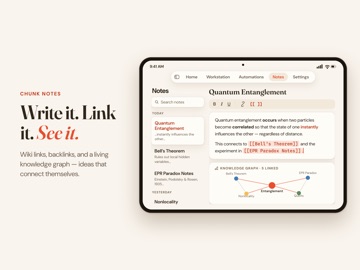
The biggest Chunk update ever. Research reports, sharable links, connected notes, and a visual knowledge graph — all in one release. Research Reports Ask any question, get a structured report. Choose from five report types — from a quick outline to a deep multi-source dive. Customize tone and citations, track progress in real time, and export to PDF with one tap. Share Your Research Turn any conversation or report into a public link. Share it with a colleague, drop it in a group chat, or bookmark it for later. Smarter Notes - Save chats as notes — One tap turns any AI conversation into a note. No more copy-pasting. - Templates — Start with Research Summary, Meeting Notes, Essay Outline, or Project Brief. Or go blank. - AI writing tools — Select any text and let AI improve, shorten, expand, translate, or shift the tone. - Version history — Every edit is saved. Browse up to 50 versions and restore with a tap. Knowledge Graph & Wiki Links Your notes are now a connected network. - Wiki links — Type [[ to link notes together. Autocomplete finds the right one instantly. - Visual graph — See all your notes and connections as an interactive map you can pan, zoom, and explore. - Backlinks — Every note shows what links to it and what it links to. - AI that understands your connections — Chat pulls in context from linked notes automatically for smarter answers. - Map of Content — AI generates a hub note that organizes a cluster of related notes with summaries. - Related notes — Discover notes you didn't know were connected, ranked by similarity. - Orphan detection — Find unconnected notes worth linking. - Graph search — Search by connections, not just titles. - Wiki Links in Chat — Tap any [[wiki link]] in a chat response to preview the note, open it, or add it to a collection. - Smart Collection Suggestions — When you add a note to a collection, Chunk suggests other linked notes you might want to include too.
-
2.3.1
The biggest Chunk update ever. Research reports, sharable links, connected notes, and a visual knowledge graph — all in one release. Research Reports Ask any question, get a structured report. Choose from five report types — from a quick outline to a deep multi-source dive. Customize tone and citations, track progress in real time, and export to PDF with one tap. Share Your Research Turn any conversation or report into a public link. Share it with a colleague, drop it in a group chat, or bookmark it for later. Smarter Notes - Save chats as notes — One tap turns any AI conversation into a note. No more copy-pasting. - Templates — Start with Research Summary, Meeting Notes, Essay Outline, or Project Brief. Or go blank. - AI writing tools — Select any text and let AI improve, shorten, expand, translate, or shift the tone. - Version history — Every edit is saved. Browse up to 50 versions and restore with a tap. Knowledge Graph & Wiki Links Your notes are now a connected network. - Wiki links — Type [[ to link notes together. Autocomplete finds the right one instantly. - Visual graph — See all your notes and connections as an interactive map you can pan, zoom, and explore. - Backlinks — Every note shows what links to it and what it links to. - AI that understands your connections — Chat pulls in context from linked notes automatically for smarter answers. - Map of Content — AI generates a hub note that organizes a cluster of related notes with summaries. - Related notes — Discover notes you didn't know were connected, ranked by similarity. - Orphan detection — Find unconnected notes worth linking. - Graph search — Search by connections, not just titles. - Wiki Links in Chat — Tap any [[wiki link]] in a chat response to preview the note, open it, or add it to a collection. - Smart Collection Suggestions — When you add a note to a collection, Chunk suggests other linked notes you might want to include too.
-
2.3.2
Two major new capabilities in this release: Artifacts lets you transform any source — YouTube videos, podcasts, PDFs, web articles — into structured study materials. Summaries, transcripts, flashcards, quizzes, and concept maps, generated in seconds and saved to your library for easy access. Memory 2.0 gives Chunk a long-term memory. It learns from your research sessions and conversations, building a personal context layer that makes every interaction more relevant. The more you use Chunk, the smarter it gets.
-
2.3.3
New capabilities in this release: Artifacts lets you transform any source — YouTube videos, podcasts, PDFs, web articles — into structured study materials. Summaries, transcripts, flashcards, quizzes, and concept maps, generated in seconds and saved to your library for easy access. Memory 2.0 gives Chunk a long-term memory. It learns from your research sessions and conversations, building a personal context layer that makes every interaction more relevant. The more you use Chunk, the smarter it gets. Live Activity support for longer running tasks. Chunk will now continue working even when you leave the app. You'll receive a notification once your task is complete. Added support for GPT-5.5, Claude Opus 4.7 and GPT-Image 2.0 models Other bugs fixes and regular improvements
-
2.4.0
Meet Connectors — bring your favorite tools right into chat. • Gamma: Type @gamma and a prompt to generate a full slide deck without leaving the conversation. Tweak the format, length, images, and language, flip through an interactive preview, save it to Artifacts, or share a public link. • Notion: Type @notion to search your workspace, create or update pages, drop notes into databases, and pull rows back into chat. Multi‑database workspaces are handled cleanly — no more guessing which one you meant. Connect either tool from Settings → Connectors. Sign in once with your existing account, and disconnect any time.
-
2.5.0
Our biggest update yet. Automations — set it once, let Chunk do the work Automations are standing AI agents that keep working while you don't. Set one up in a few taps and Chunk runs it on a schedule, then delivers a clean, cited digest. • Research — re-run any question on a cadence and get only what's new, summarized with sources • Watchers — track a price, a restock, or a page change and get alerted the moment it moves • Digests — a weekly roundup of your own notes, stale-note nudges, and connections you'd have missed • Agent Tasks — hand Chunk a job across your notes and the web; it plans, works, and drops the result straight into a note or report Save to Chunk — capture anything, from anywhere Share a link, article, screenshot, or PDF from any app right into Chunk. Your Inbox files it for you: AI titles it, tags it, and suggests the right folder and note links. Send it to a Collection in one tap, or keep it for later. Works from the Share Sheet, Siri, Shortcuts, and the Action Button — on iPhone, iPad. A warmer new look We've rolled out Paper & Ember — a calmer, more focused design across the whole app, with cleaner cards, better dark mode, and color accents that make everything easier to find. Plus dozens of fixes and refinements across Settings, account management, and overall reliability on iPhone & iPad.
-
2.5.1
Our biggest update yet. Universal Search for all your data + Design updates! Automations — set it once, let Chunk do the work Automations are standing AI agents that keep working while you don't. Set one up in a few taps and Chunk runs it on a schedule, then delivers a clean, cited digest. • Research — re-run any question on a cadence and get only what's new, summarized with sources • Watchers — track a price, a restock, or a page change and get alerted the moment it moves • Digests — a weekly roundup of your own notes, stale-note nudges, and connections you'd have missed • Agent Tasks — hand Chunk a job across your notes and the web; it plans, works, and drops the result straight into a note or report Save to Chunk — capture anything, from anywhere Share a link, article, screenshot, or PDF from any app right into Chunk. Your Inbox files it for you: AI titles it, tags it, and suggests the right folder and note links. Send it to a Collection in one tap, or keep it for later. Works from the Share Sheet, Siri, Shortcuts, and the Action Button — on iPhone, iPad. A warmer new look We've rolled out Paper & Ember — a calmer, more focused design across the whole app, with cleaner cards, better dark mode, and color accents that make everything easier to find. Plus dozens of fixes and refinements across Settings, account management, and overall reliability on iPhone & iPad.
-
2.5.2
Our biggest update yet. Universal Search for all your data + Design updates! Automations — set it once, let Chunk do the work Automations are standing AI agents that keep working while you don't. Set one up in a few taps and Chunk runs it on a schedule, then delivers a clean, cited digest. • Research — re-run any question on a cadence and get only what's new, summarized with sources • Watchers — track a price, a restock, or a page change and get alerted the moment it moves • Digests — a weekly roundup of your own notes, stale-note nudges, and connections you'd have missed • Agent Tasks — hand Chunk a job across your notes and the web; it plans, works, and drops the result straight into a note or report Save to Chunk — capture anything, from anywhere Share a link, article, screenshot, or PDF from any app right into Chunk. Your Inbox files it for you: AI titles it, tags it, and suggests the right folder and note links. Send it to a Collection in one tap, or keep it for later. Works from the Share Sheet, Siri, Shortcuts, and the Action Button — on iPhone, iPad. A warmer new look We've rolled out Paper & Ember — a calmer, more focused design across the whole app, with cleaner cards, better dark mode, and color accents that make everything easier to find. Plus dozens of fixes and refinements across Settings, account management, and overall reliability on iPhone & iPad.
-
2.5.3
· 27 Jul 2026
New: - Claude Opus 5 and Claude Sonnet 5 - Personalized chat starters on the new-chat screen - Memory privacy controls: retention windows, export, and delete-all - Full research history, now browsable and searchable Improved & fixed: - Saving a chat answer as a note captures the right response - Collections chat against your most recent note content - Research reports survive interruptions; long reports no longer stall the app - Search results reliably open the item you tapped - Faster chat, clearer error messages, and more complete translations
Alternatives
- Task: To do list — Same category + similar ratings
- Robat: AI friend, chat master — Same category + similar ratings
Availability by market
- US
Data quality & evidence
- Page completeness
- Live store listing
- Last verified
- 7 Aug 2026
- Sources
- App Store
- Independent summary has not been published yet.