
Quick verdict
- What it is
- Store information collected; independent summary not yet available.
- At a glance
-
- Free to download
- In-app purchases
Categories and search queries
Official categories
- Finance
- Productivity
AppCorpus categories
Key functions
| Function | Availability | Access | Scope | Evidence |
|---|---|---|---|---|
| Free app | Yes | Free | — | Store published |
| In-app purchases | Yes | Limited free | — | Store published |
Screens
App Store
28 store screenshots

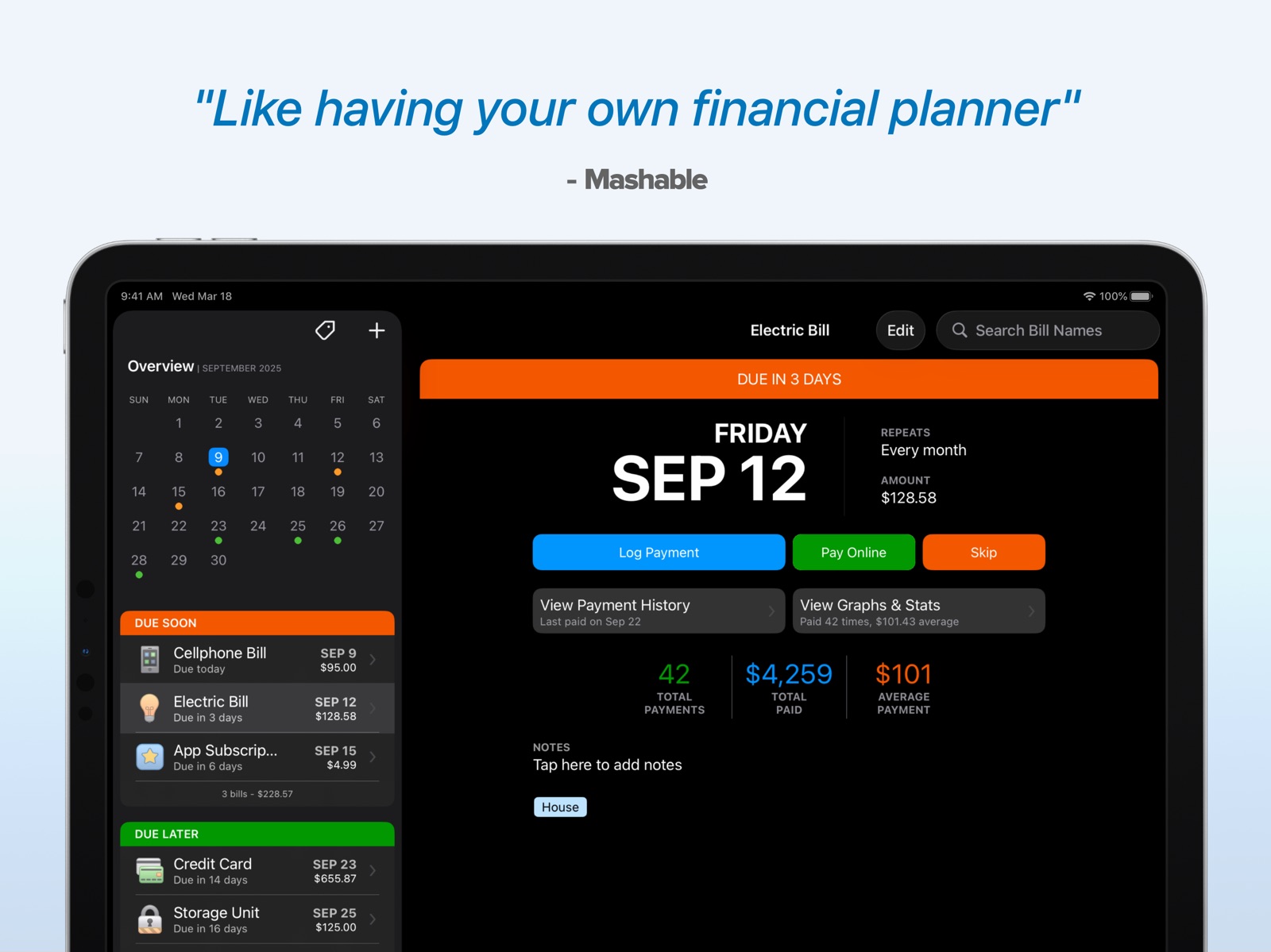


Pricing & paywalls
App Store
- Chronicle Pro — $11.99
Ratings & reviews
App Store
-
5/5Just Simple to Use - Great!
I have used multiple payment and reminder apps, but there were always features missing that made it difficult to stay abreast of my bills. Most of the times the app would not sync with my bank account making me do double duty by checking each bill for currency. I decided to no longer use bill pay apps and look for the best bill management app available. I found one with Chronicle! Here are a few helpful features I love: 1. Persistent and timely reminders 2. Easy to use with multiple settings for my needs 3. I can see my forecast for the next month 4. The monthly overview helps me view and stay on top of upcoming bills in one place. 5. Syncs with my calendar for additional reminders 6. Payment history with inserted ID 7. Easy to make changes and updates 8. Automatic payments can be set to login payments without me having to do it manually. 9. Insert biller url in the app. A quick click takes me directly to biller website to make a payment. Thank you for this app. I very enthusiastically recommend it for those who want to stay on top of their bills and budget.
grofrofit · 6 Aug 2026
-
3/5This app is just ‘okay’
This app, for the low price point per year, is decent enough. I like that I can enter the balance and interest rate on bills. You can also see a forecast for the next month, partially what I was looking for in an app. Unfortunately, figuring out how to enter items and do other things in the app is tricky. Then, when I looked at the help documents, they were scarce and provided no genuine assistance. Because I was getting so frustrated, I just had all my bills set to automatically pay because I couldn’t figure out how logging bills worked. Additionally, you can see a forecast for next month of how much money you’ll have remaining after bills. But once the month starts, there’s no way for you to see the totals anymore. As a result, I take my total income from Chronicle and total bills for the next month from Chronicle and input them into a Numbers spreadsheet to keep up with my balance as I make additional purchases and payments. Like right now, it’s March 3, so the only way to know how much money I should have remaining is by calculating it myself. I wish I had known this before paying for the app. For now, this is just an ‘okay’ solution. I’ll look for an app showing my remaining total, not just a forecast. In summary, this app is genuinely JUST to TRACK bills, not so much remaining money. I don’t know why; if the app knows how many bills I have for March and how much income I receive, it cannot show me a total of what’s left throughout the month. That way, as I add more bills, I can continue to see my remaining income.
ShantaJ. · 6 Aug 2026
-
3/5It’s Ok not Great
I used to have access to the “Bill Tracker“ app until I switched to an iPhone 14. It’s no longer available on this phone. This app is the closest I’ve come to it. I do not need anything other than the app to show me the month, what the total $ amount of bills would be for the month, if a bill got paid or is upcoming or overdue, and be able to have an ending date for a particular creditor and just repeat. I DO NOT NEED, charts, graphs, speculation etc. Just a simple online calendar like you might have on your wall at home with your notes on it. This app does not allow you to do a quick look at what the TOTAL dollar amount of your bills will be for the month every month. I had months where the amounts would vary and it was convenient to plan savings ahead of time. It also does not allow you to put an ending date on the payments. I like that the old app, below the calendar, would only show that particular month’s bills upcoming and overdue and not just continually scroll forward to show what due for only 30 days from the date you are using the app and no further. It would also automatically forward to the next day even if you had a no payment amount for a particular creditor listed(as in, no dollar amount due). This app DOES delete the particular bill that had been paid and show when due the following month only. This app will only show bills due for 30 days from the day you are using the app though you can scroll months ahead but with no bills indicated. I’m using it for now until I can find another totally free app that does what I’m used to.
medic385 · 6 Aug 2026
-
5/5Extremely helpful
I’ve been using Chronicle for several years now and have found it extremely helpful for managing upcoming bills. My gratitude for Chronicle increased recently when my son moved out of the house and was trying to juggle due dates for all his new bills (like apartment rent, car taxes, etc.). He was struggling to manage his bills across multiple apps and I told him about having Chronicle to consolidate and categorize expenses, alerting him to upcoming bills and keeping current with payments. Thank you for a great app that’s simple, intuitive, and powerful. **My one suggestion for an upcoming version would be a calculator function within Chronicle. It would be useful for totaling multiple bills when I need to transfer sufficient funds between accounts (e.g. when I have 4 bills coming due on a certain date and need to calculate the total amount that I need to move between accounts or banks).
Greenville guy · 6 Aug 2026
-
3/5So many issues since purchasing
I’d been using the app for a while, the free version and decided I wanted to track income and a few other bills that needed custom due dates and boy am I sorry I did because now every bill is off. I decided to purchase mainly for the ability to also track income and ever since I’ve done that every bills due date has been thrown off for some reason. For example I have a bill due every other Tuesday with the free version, no problem I’d log payment and the date would change to two Tuesdays later but now I have to manually go in after logging payment to change it back to Tuesday. This is also true for all my other bills. Once I log the payment I have to go manually change the next due date every time. Example my due date is the 5th every month but once I log the payment the next due date is always 2-3 days off even though I’ve changed nothing else other than logging the payment. Very disappointing because not only did I spend money but I loved the ease of the app and how great it tracked compared to other apps I tried.
JaxxD21 · 6 Aug 2026
Privacy & accessibility
App Store
Privacy
- Data Linked to You — Analytics — Usage Data — Product Interaction Developer declared
- Data Linked to You — App Functionality — Contact Info — Email Address Developer declared
- Data Linked to You — App Functionality — Financial Info — Other Financial Info Developer declared
- Data Linked to You — App Functionality — Identifiers — Device ID Developer declared
- Data Linked to You — App Functionality — Identifiers — User ID Developer declared
- Data Linked to You — App Functionality — Usage Data — Product Interaction Developer declared
- Data Linked to You — App Functionality — User Content — Other User Content Developer declared
- Data Linked to You — Contact Info Developer declared
- Data Linked to You — Financial Info Developer declared
- Data Linked to You — Identifiers Developer declared
- Data Linked to You — Usage Data Developer declared
- Data Linked to You — User Content Developer declared
- Data Not Linked to You — Analytics — Diagnostics — Other Diagnostic Data Developer declared
- Data Not Linked to You — Diagnostics Developer declared
Accessibility
No accessibility labels collected yet.
Versions
App Store
-
14.1.0
New: Lock Screen Widgets! See your next bill due right on the Lock Screen Fixed: Minor bugs and typos
-
14.2.0
- New: Sharing feature—Tag Filter allows you to limit the bills that are shown by default, a useful feature if a family member only wants to see a subset of bills. More information can be found at our support article on Sharing Bills: https://littlefin.zendesk.com/hc/en-us/articles/360034786352-Sharing-Bills-with-a-Partner - New: Adds an option to turn estimated amounts on or off - Improved: When editing a bill, the cursor starts in the amount field instead of the name field, to make editing amounts faster - Improved: You can now delete a bill from the bill edit screen - Fixed: Bills past their end date could still show up in the forecast - Other minor bug fixes and improvements
-
14.2.1
Fixes a bug where it could be impossible to remove the balance from a bill. Also, improves bill editing when adding a balance or end date. Added in 14.2: - New: Sharing feature—Tag Filter allows you to limit the bills that are shown by default, a useful feature if a family member only wants to see a subset of bills. More information can be found at our support article on Sharing Bills: https://littlefin.zendesk.com/hc/en-us/articles/360034786352-Sharing-Bills-with-a-Partner - New: Adds an option to turn estimated amounts on or off - Improved: When editing a bill, the cursor starts in the amount field instead of the name field, to make editing amounts faster - Improved: You can now delete a bill from the bill edit screen - Fixed: Bills past their end date could still show up in the forecast
-
14.2.2
- Fixed a bug where the app could crash when switching bills while viewing payment history on the iPad. Added in 14.2: - New: Sharing feature—Tag Filter allows you to limit the bills that are shown by default, a useful feature if a family member only wants to see a subset of bills. More information can be found at our support article on Sharing Bills: https://littlefin.zendesk.com/hc/en-us/articles/360034786352-Sharing-Bills-with-a-Partner - New: Adds an option to turn estimated amounts on or off - Improved: When editing a bill, the cursor starts in the amount field instead of the name field, to make editing amounts faster - Improved: You can now delete a bill from the bill edit screen - Fixed: Bills past their end date could still show up in the forecast
-
14.2.3
Fixes a bug that could cause some users to be logged out of Chronicle Cloud on occasion.
-
14.2.4
Fixes an issue where Pro features could be repeatedly disabled for some users, even with an active subscription.
-
14.3.0
Chronicle is more flexible and powerful than ever before. New in this update: - Mark bills as paid on right from the widget, and confirm the payments the next time you launch the app. - Widget visual improvements—medium and large widgets both display more bills now, taking full advantage of the available space. - Helpful occasional tips to help you use the app and take the most of its features. - Shortcuts support! Chronicle supports the shortcuts app for creating bills and logging payments.
-
14.3.1
Fixed in 14.3.1: - Fixed a bug that prevented Chronicle from adding bills to the calendar in iOS 17. New in 14.3: Chronicle is more flexible and powerful than ever before. New in this update: - Mark bills as paid on right from the widget, and confirm the payments the next time you launch the app. - Widget visual improvements—medium and large widgets both display more bills now, taking full advantage of the available space. - Helpful occasional tips to help you use the app and take the most of its features. - Shortcuts support! Chronicle supports the shortcuts app for creating bills and logging payments.
-
14.3.2
Improved: If calendar integration is on, all bills will be added to the calendar, not just ones with a reminder enabled. Fixed: An issue where the new bill window might not close after saving in a few rare cases. Fixed: An issue where trials might keep their trial tag even after the trial has ended. Other minor improvements.
-
14.4.0
- Tags now display on bill details page. - Bill payment History can now be sorted by date or name. - New shortcut to set bill amount. - Fixed: Bug where totals for bills due soon could be incorrect in some cases. - Fixed: Calendar did not hide when rotated into landscape on iPhone.
-
14.5.0
New: Completely rewritten / updated currency entry. Easier to paste in currency, and easier to enter currency values. Improved: Faster Chronicle Cloud syncing Fixed: Interactive widget functionality did not work in some cases on the most recent iOS update. Fixed: Typos
-
14.5.1
New in 14.5: Completely rewritten / updated currency entry. Easier to paste in currency, and easier to enter currency values. Fixed: Crash that could occur when entering an amount on log payment or bill editing screen. Fixed: Log payment screen was defaulting to the date instead of the amount due. Fixed: Some rows would appear erroneously when editing bills.
-
14.5.5
New: Balance View allows you to enter your bank balance and see how it changes over time as you pay your bills.
-
14.5.6
- Fixed: Bills on balance view did not correctly respect the end date - Fixed: A potential crash
-
14.5.7
- NEW: Makes available light, dark and tinted versions of the app icon for iOS 18. - IMPROVED: Tweaked colors on the widget to make it easier to read in dark mode. - IMPROVED: Behind the scenes updates for improved actions in shortcuts and iOS integration improvements.
-
14.5.8
- FIXED: A bug where the pay online button wouldn't work.
-
14.6.0
Improved: Chronicle's balance view now shows all bill transactions since the balance was last updated, giving you a more accurate view of what your bank balance is.
-
14.7.0
- NEW: Preference to enable remembering the selected tag for each report, while overview & other views retain the original tag selection - Fixed: Fixes a bug where trials might not convert to regular bills when the trial ends - Cleaned up Chronicle's settings area
-
14.8.0
New Icons: Chronicle now includes icons for Watches & Smartwatches, Apps & App Subscriptions, Dental, Gaming, and Sports.
-
14.9.0
New: Updated and refined UI, adopting the new look for the latest version of iOS. New: Refined iPad experience with more accessible search fields, and support for improved multitasking behavior.
-
14.9.1
- Slightly tweaked app icon - Fixed: Some bill icons inadvertently went missing in the last update. They are back now!
-
14.9.2
Fixed: Button to re-display the confirmation screen for logging bills as paid on the widget was not appearing. Fixed: Fixed a crash that could occur when marking a bill as paid on the widget, and then disabling the option to show the logging screen automatically. Fixed: The version number was displayed inaccurately in the app's about screen.
-
14.9.3
Improved: Balance view now shows the last updated balance and a new line for the current balance as of the current date, taking into account bills that have been paid since the last update. Improved: New option to exclude bills paid on the same day as a balance update. Improved: Income now shows on the history view, as it does on macOS. Visual Change: Search bar is no longer merged with the menu bar on iOS 26. Fixed: Fixed a bug that could cause Chronicle Cloud to repeatedly sign out in rare causes.
-
14.9.4
Fixed: Odd sidebar appearance that might look washed out in iOS 26.2 Fixed: Keyboard might not appear in some cases on iOS 26.2
-
14.9.5
· 2 May 2026
NEW: Two new icons: for clothing and photography. New: Option to auto-log bills even if amount due isn't set. Fixed: UI Icons for balance and income were inadvertently reversed. Improved: Other small UI tweaks and improvements.
Alternatives
- Bills Organizer — Same category + similar ratings
- BillOut - Bill Tracker — Same category + similar ratings
Availability by market
- US
Data quality & evidence
- Page completeness
- Live store listing
- Last verified
- 6 Aug 2026
- Sources
- App Store
- Independent summary has not been published yet.