
Quick verdict
- What it is
- Store information collected; independent summary not yet available.
- At a glance
-
- Free to download
- In-app purchases
Categories and search queries
Official categories
- Books
- Education
AppCorpus categories
Key functions
| Function | Availability | Access | Scope | Evidence |
|---|---|---|---|---|
| Free app | Yes | Free | — | Store published |
| In-app purchases | Yes | Limited free | — | Store published |
Screens
App Store
14 store screenshots
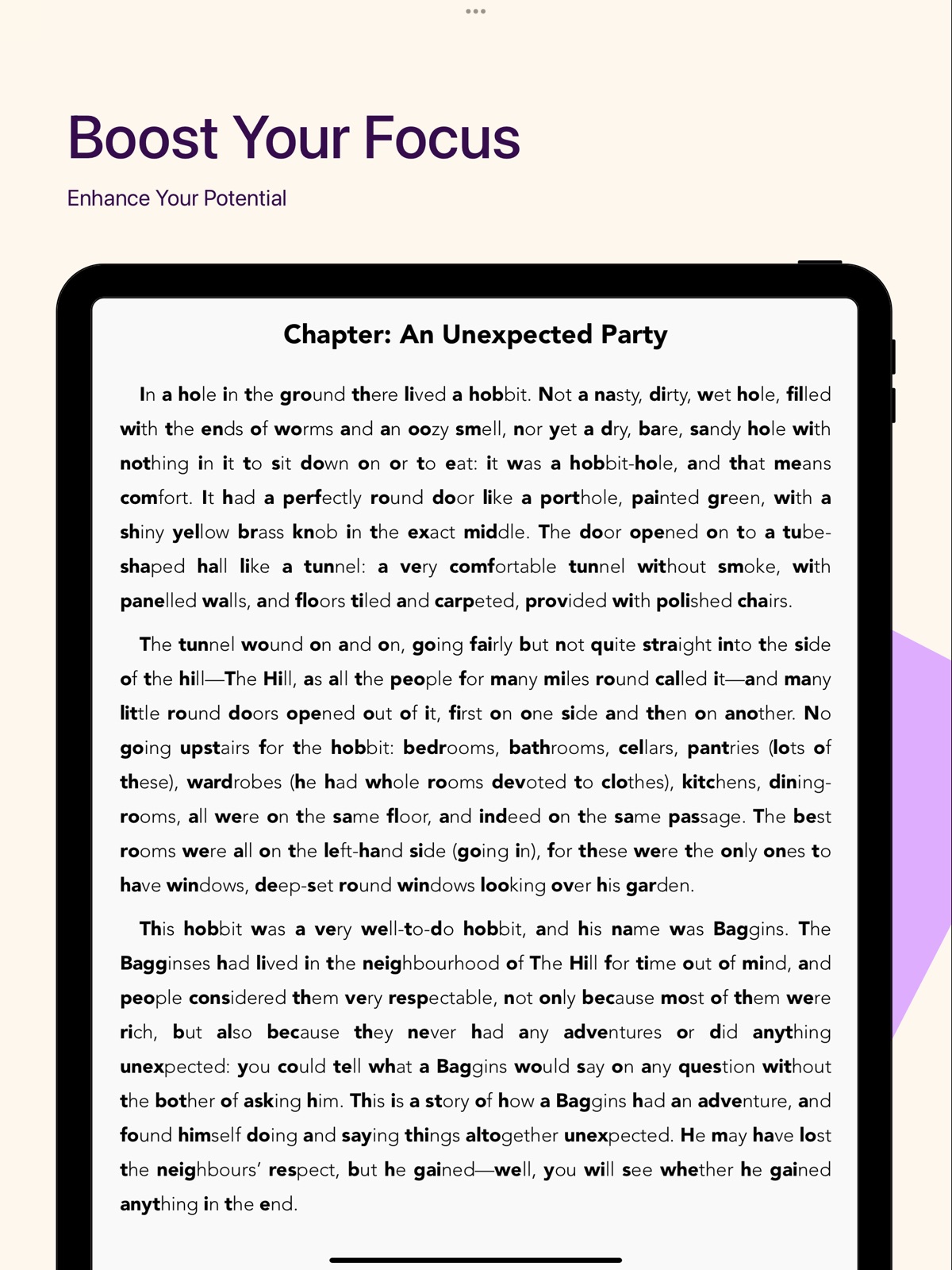


Pricing & paywalls
App Store
Shown for US
- Free to download
- In-app purchases
Ratings & reviews
App Store
Shown for US
-
4/5Working great for me so far, better than the others
I tried a few of the other bionic reading apps on the App Store and was disappointed in the features. The bionic processing was great on the other apps, but I couldn’t even save my place in a book. This app has a great interface and tons of features which makes it just what I was looking for. The bolding of the syllables seems to be a bit more random and less helpful than the more popular apps, but the interface makes up for it. My one request to the devs is for a darker “dark mode”. The current one is not high contrast enough, I’d really love to be able to have full black background with full white text.
Colo.gti · 31 Jul 2026
-
5/5Finally I can read faster
I had the opportunity to try out the Celer reading platform, and I must say, I am very impressed. The platform utilizes advanced algorithms to enhance the reading experience by highlighting important parts of words, which makes text recognition faster and more efficient. This, in turn, allows for increased concentration while reading, making it easier to comprehend and retain information. What sets Celer apart from other reading platforms is its ability to double or even triple reading speed, without sacrificing comprehension. The platform achieves this by optimizing the eye movement between fixation points, also known as saccades, which is a significant contributor to slowing down reading speed. With Celer, this process becomes much more efficient, allowing readers to read at a faster pace and achieve their goals quicker. In addition to its impressive algorithms, Celer also offers handpicked reading themes and immersive environments, which help improve focus and boost deep learning skills, memory, cognitive ability, and capacity to learn more. I found these features to be especially helpful when reading challenging or dense material. For individuals with ADHD or dyslexia, Celer can be life-saving by improving concentration and eliminating symptoms. The platform's ability to enhance focus and concentration can help individuals achieve their goals and boost their productivity dramatically. Overall, I highly recommend Celer to anyone looking to improve their reading speed and comprehension, and those looking to enhance their learning and cognitive abilities. The platform offers a unique and innovative approach to reading, which makes it stand out from other reading platforms on the market.
MantasKub · 31 Jul 2026
-
5/5Really Love This App
This app is better than the official bionic reading and way more affordable for those with ADHD or any reading difficulties. The developer is also very active and passionate about it and is open to feedback and improvement. Super grateful for his continued work and to be able to afford an app that helps me get through grad school and any readings I chose. It’s not all the time that I can rate an app 5/5 for its reliability of the developer.
dorr32 · 31 Jul 2026
-
5/5BasicallyBlind
Found this very helpful
Reiia2424 · 31 Jul 2026
-
1/5Ripoff
Just like all the others, this one is a ripoff. You cannot download your bionic-processed books, so they have to remain on the app’s servers, meaning you will lose whatever you had if you quit the app. There is zero reason to do that except to force people to pay for the ludicrous annual fee - really? $80/year? It’s too bad this app isn’t a reasonable one-time fee, because the app seems to work better than others I’ve tried. But because it’s just as punishing to disabled people who need it, I will give it the same one star rating.
DolphinNWO · 31 Jul 2026
Privacy & accessibility
App Store
Privacy
- Data Not Linked to You — Analytics — Diagnostics — Crash Data Developer declared
- Data Not Linked to You — Analytics — Usage Data — Product Interaction Developer declared
- Data Not Linked to You — App Functionality — Diagnostics — Performance Data Developer declared
- Data Not Linked to You — App Functionality — Usage Data — Product Interaction Developer declared
- Data Not Linked to You — Diagnostics Developer declared
- Data Not Linked to You — Usage Data Developer declared
Accessibility
No accessibility labels collected yet.
Versions
App Store
-
2.7.0
- Added Assistance section to answer most frequent questions and help navigate through the app - Added App Settings in Profile
-
2.7.1
- Bug fixes and performance improvements
-
2.7.2
- Added report bug section - Bug fixes and performance improvements
-
2.7.3
- Bug fixes and performance improvements
-
2.7.4
- Bug fixes and performance improvements
-
2.7.5
- Bug fixes and performance improvements
-
3.0.0
- New Reading Settings offer more options for configuring accents, such as adjusting length or enabling word skipping - Added margins configuration - Bug fixes and performance improvements
-
3.0.1
- Fixed macOS crashes
-
3.0.3
Bug fixes and performance improvements
-
3.0.4
- Bug fixes and performance improvements
-
3.0.5
- Fix AppClip crashes
-
3.1.0
- Added new PDF processing algorithm - Added report file, to send feedback about poorly processed files - Added an import feedback message for DRM protected eBooks
-
3.1.1
- PDF processing optimizations - Smoother animations
-
3.1.2
- Performance improvements for PDFs
-
3.1.3
- PDF processing improvements
-
3.1.4
- Bug fixes and performance improvements
-
3.1.5
- PDF processing improvements and crash fixes
-
3.2.0
- Added language support: German, Italian, French, Polish, Dutch, Spanish, Portuguese, Russian - Added Notes
-
3.3.0
- Add more accents weights (you can now increase bold intensity) - Search and import files directly from Google or other websites
-
3.3.1
- You can now import epub, pdf outside app. Tap share and choose Celer app to import
-
3.4.0
- Build your custom files using text editor - Added convert section to prepare your .mobi, .rtf, .docx and other files to be read in .epub format - Tap ‘share’ outside the app on any epub or pdf file and select Celer app to import it - You can now browse web and download files directly from within the app
-
3.4.1
- Bug fixes and some visual improvements
-
3.5.0
- Read news, articles, and browse websites in accented text - Download & Import files directly from within the app - Add iOS 26 Support
-
3.5.1
- bug fixes and performance improvements
-
3.5.2
· 27 Sep 2025
- fixed highlighting bug, where sometimes highlight wasn't applied to the selected text
Availability by market
- US
Data quality & evidence
- Page completeness
- Live store listing
- Last verified
- 31 Jul 2026
- Sources
- App Store
- Independent summary has not been published yet.