
Quick verdict
- What it is
- Store information collected; independent summary not yet available.
- At a glance
-
- From $2.49/mo
- Free to download
- In-app purchases
Categories and search queries
Official categories
- Music
- Education
AppCorpus categories
Key functions
| Function | Availability | Access | Scope | Evidence |
|---|---|---|---|---|
| Family Sharing | Yes | Unknown | App Store | Store published |
| Free app | Yes | Free | — | Store published |
| In-app purchases | Yes | Limited free | — | Store published |
Screens
App Store
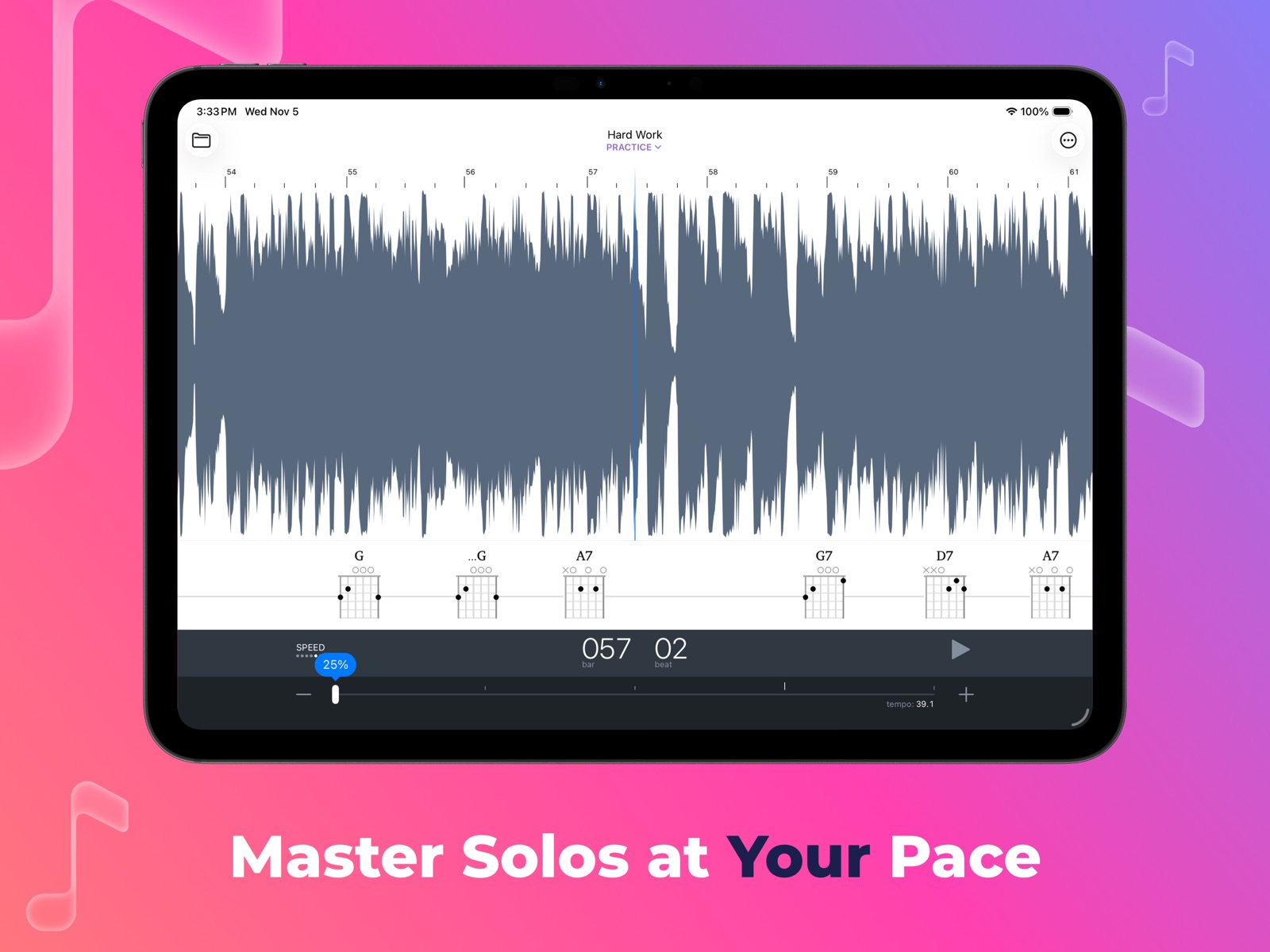
20 store screenshots



Pricing & paywalls
App Store
- Capo touch Pro - Monthly — $2.49/month
- Capo touch Pro - Monthly — $4.99/month
- Capo touch Pro - Monthly — $19.99/year ($1.66/mo)
- Capo Platinum — $49.99
- Capo Platinum - Upgrade — $39.99
- Capo touch Pro - Upgrade — $9.99
Ratings & reviews
App Store
-
5/5Simply Outstanding
I’ve been a user of this for years now. Can’t imagine doing without it so they better keep supporting this thing. If I need to subscribe , I’ll subscribe. It’s that good. For someone as musically challenged as I am, this is the only thing that gives me hope of learning new tunes. I can transcribe Warp speed Chris Thile solos and catch every note. Can’t play it that fast but hey, I got it transcribed. Tremendous power to manipulate the songs to your comfort level and to isolate the part you want to work on. And all on my phone. Thanks very much folks.
Wolfed Up · 6 Aug 2026
-
4/5Best app for learning Jazz solos and Irish tunes from recordings.
As an amateur musician, I’ve found Capo to be the best App out there for learning Jazz solos and the intricate ornamentation of Irish tunes. It provides the cleanest “slow-down” of any of the apps that I’ve tried. The flexibility of its looping and other playback features makes it much easier to breakdown complicated riffs. It’s ability to sort out the key and chord changes is truly remarkable; while not infallible, this provides a great starting point for piecing together transcriptions for both chord and melody instruments. The interface is clean and very well thought out. This becomes even more obvious the longer you use Capo, since its many capabilities do require some patience to learn/uncover. I could go on and on. The developers are solid and seem committed to a quality product for the long term, as evidenced by the updates that have been deployed since Capo’s inception (check out their newsletter to get a sense of what their team is about). At $10 a YEAR, this app is way worth it! One suggestion. I’d love there to be an option to have the identified/edited chords automatically sound out, while the original recording rolls along in the background - rather than having to tap each and every chord symbol at the appropriate moments.
IceKole · 6 Aug 2026
-
1/5Ihopeyougobroke
Subscription services are lucrative for developers, I guess. But, for the user I have to decide which apps to subscribe to (if any) and which ones I have to quit using because I can’t afford a subscription for every app I use. I don’t mind buying an app at all, but having to pay an annual fee is just beyond my means. And so, I will switch my slow-down app to something else other than Capo because they, at some point, will go to the next version (x.x or Y.x or whatever) and I will be left in the dust having to subscribe again to enjoy some minor tweak of the app. If every developer ends up with subscription requirements I will just have to abandon my support for them all. How many $50, $20, $75, $20, $40, $20, $25 services can you afford? For me it’s not many and so I just stop using an app that thinks their product should charge me a monthly or annual fee to use it!! There are plenty of alternatives out there. The smart developer should appreciate their customer’s PURCHASE of an app, like I did with Capo years ago, to support their further development of the app. They should take into consideration that users will have to decide which apps to keep or which apps to abandon. The less used apps I have will be the first to go. And, Capo falls into that category as there are many alternatives that don’t require a subscription fee after purchase.
Wdav · 6 Aug 2026
-
1/5Can’t stand subscriptions
I am pretty sure I paid for this at some point, I have the desktop version as well. I certainly don't mind paying for upgrades when new features are released. But removing functionality and putting it behind a subscription model is one way for sure to lose me as a customer. I am thinking that is what has happened here. I went to see if I could rescan a song I did a long time ago (it did a poor job the first time around) and it warned me that I would lose the saved changes unless I subscribed… OK, time to look for something else that can do this trick. I only use it very rarely to try to figure out chord progressions on my own songs that I recorded long ago and forgot to document, so I can always just do a little more work and NOT pay a crazy subscription. Oh well.
Murdock Scott · 6 Aug 2026
-
5/5Stellar App
Papers extraordinarily is full for anybody who has written and recorded something and wants to find out how they played it previously or just to learn other songs by other people that you have no idea how it is written. I find Capo to be most useful when writing songs when i am spitballing and am just freely improvising chord progressions and want to know what i played. It would be nice to have a monthly fee option as well Perhaps $1.99 - $2.99/mo.
Christopher Johnson NMA · 6 Aug 2026
Privacy & accessibility
App Store
Privacy
- Data Linked to You — App Functionality — User Content — Customer Support Developer declared
- Data Linked to You — User Content Developer declared
- Data Not Linked to You — Analytics — Purchases — Purchase History Developer declared
- Data Not Linked to You — App Functionality — Identifiers — User ID Developer declared
- Data Not Linked to You — App Functionality — Purchases — Purchase History Developer declared
- Data Not Linked to You — Identifiers Developer declared
- Data Not Linked to You — Purchases Developer declared
Accessibility
No accessibility labels collected yet.
Versions
App Store
-
2.10
NEW FEATURES - Dark Mode: On iOS 13, Capo supports the new system-wide Dark appearance! - New Chord Chooser: After upgrading to iOS 13, you will also be treated to an all-new chord editing experience. We re-designed it to be faster, easier to use, and to reflect your preferred chord display mode. ENHANCEMENTS - Recently Played Songs: In addition to browsing by Album, Artist, or Playlist, you can now select songs based on the date they were last played. BUG FIXES - Capo should no longer take you to the Music app instead of the iTunes Store when you tap the "Buy on iTunes" button while browsing your music library. We love hearing from our customers, so please leave a review on the App Store to share your positive experiences with others, or send us a support email if you have any questions for us. We're listening, and appreciate all your bug reports and feedback!
-
2.10.1
BUG FIXES - Capo no longer crashes for those users that updated to iOS 13, and were unable to browse their music library. - When editing certain chords, Capo will no longer crash while trying to present the new Chord Chooser. - While snapping is enabled, Capo's haptic feedback no longer triggers excessively when resizing regions or moving markers. - On certain models of iPhone, the Chord Chooser no longer disappears briefly after it is presented in the landscape orientation. We love hearing from our customers, so please leave a review on the App Store to share your positive experiences with others, or send us a support email if you have any questions for us. We're listening, and appreciate all your bug reports and feedback!
-
2.10.2
ENHANCEMENTS - Attention Platinum subscribers! Activation across all your devices is now automatic, and no longer requires the use of activation codes. Please ensure that iCloud Drive is enabled on all the iOS and macOS devices that you wish to activate, and all devices are updated to the latest version of Capo. BUG FIXES - Fixed the most common crashes that were reported by users. Thanks for your submissions and feedback! We love hearing from our customers, so please leave a review on the App Store to share your positive experiences with others, or send us a support email if you have any questions for us. We're listening, and appreciate all your bug reports and feedback!
-
2.9.3
This update contains bug fixes and improvements based on user feedback and crash submissions. We love hearing from our customers, so please leave a review on the App Store to share your positive experiences with others, or send us a support email if you have any questions for us. We're listening, and appreciate all your bug reports and feedback! ENHANCEMENTS - When you tap on the time position in the Heads-Up Display to switch between bar/beat and time displays, the timeline now also updates to reflect the current position display mode. - When searching for inversions (a.k.a. “slash chords”) such as D/A in the chord chooser, Capo now provides results that include all the inversions available in the chord once you type the “/“ character. - The progress meter that is displayed during the song analysis now updates more smoothly as the calculations are happening, and should better reflect the weight of the individual processing steps. BUG FIXES - Certain inversions (Dm/C, D/A) are no longer missing important/common shapes in the chord chooser - Capo no longer includes shapes in the chord chooser that are missing the specified bass note in their inversions (e.g. D/A no longer includes a straight, open D shape) - Chords will no longer flicker when displaying the notation settings UI with a capo applied
-
4.0
4th Generation Chord Detection Capo's newest chord detection engine is faster, more accurate, and identifies a wider range of chords—including inversions! If you'd like to read more about the development of this new technology, visit our blog at supermegaultragroovy.com. Song Views (iOS 14+) Following Capo's counterpart on macOS, Capo touch offers alternate views of your song that are tailored to specific tasks while you're learning. You can switch between the available song views by tapping the new button that appears at the top-right of the project view. Structure Song View (Subscription Only, iOS 14+) You can now see and mark up your songs at a high level—bar by bar—to define the sections of the song. Mark the Verse, Chorus, A Section, B Section, or use whatever names you choose! You can also apply colors to the sections to help you identify similar ones. Many users will be excited to learn that this all-new song view _also_ allows you to edit Capo's beat grid that's used to power Capo's snapping and metronome features. By clicking along with the beat to mark the start of each bar, you can replace Capo's detected beats with your own. You can also change the number of beats in specific bars when you're working with songs that have mixed time signatures, and make fine adjustments to improve precision. Chords Song View (Subscription Only, iOS 14+) An all-new, vertically-scrolling look at the chords in your song displays more chords on screen at the same time. It also uses the sections you define in the Structure song view to group the chords according to the section they belong in. This is a massive improvement for chord-oriented musicians that are looking to analyze a song's overall harmony, or those that want a better view of what's coming ahead. Trial Mode (Paid, Non-Subscribers) If you are a paid user that has not yet subscribed to Capo Pro, you can try the new, subscription-only features as many times as you'd like, for as long as you'd like! Just select one of the song views that are marked TRIAL, and Capo will let you play with the feature with only one catch—your edits to the project will no longer be saved. Don't see anything worth paying for? No problem! Close the project, and you'll be back to using Capo as usual. We will keep trying to earn your subscription in future releases, and hope you enjoy the massive improvements to the chord detection engine! Improved Free Edition The free version of Capo no longer has a playback timer! You now have full access to Capo's full feature set, but Capo will not save any of your edits to Projects without an active subscription. This change results in a more useful product for a wider audience. Teachers, be sure to tell all your students! ENHANCEMENTS * We modified the Simple Piano chord display to make it easier to distinguish the bass note from the others. * You can now disable the system-wide display sleep timer from the Settings screen. * The Control Strip and play/pause buttons are now easier to tap. * Long pressing the time (or bar-beat) indicator in the HUD will reveal the new Go To Time (or Bar-Beat) feature that lets you seek to a specific location in the song. * It's now possible to quickly toggle the metronome by long-pressing its icon in the PLAYBACK control strip. BUG FIXES * Capo no longer crashes in the chord chooser when searching for chord inversions * We addressed a handful of crashes that were submitted by users since the last release. Please keep sending us your bug reports! We love hearing from our customers, so please leave a review on the App Store to share your positive experiences with others, or send us a support email if you have any questions for us. We're listening, and appreciate all your bug reports and feedback!
-
4.0.1
This update contains bug fixes and improvements based on user feedback and crash submissions. BUG FIXES * Capo no longer crashes when creating or loading projects on A7-powered devices (iPad Air, iPad mini 2, iPad mini 3, iPhone 5S) We love hearing from our customers, so please leave a review on the App Store to share your positive experiences with others, or send us a support email if you have any questions for us. We're listening, and appreciate all your bug reports and feedback!
-
4.0.2
This update contains bug fixes and improvements based on user feedback and crash submissions. BUG FIXES * When seeking to the start of the song using the new Go To Location feature in the Structure or Chords song views, the display is now correctly scrolled to the top. * Capo now correctly auto-scrolls to the currently playing bar in the Structure and Chords song views after creating new sections. * In landscape mode on larger iPhones, the controls in the isolation UI are no longer clipped out of view. * Capo will now return results for music library searches that include apostrophes and other punctuation characters. * When editing the location of bars in landscape mode on iPhone, the display is no longer clipped and drawn outside the bounds of the screen. * We addressed some of the crashes that were submitted by users since the last release. Please keep sending us your bug reports! We love hearing from our customers, so please leave a review on the App Store to share your positive experiences with others, or send us a support email if you have any questions for us. We're listening, and appreciate all your bug reports and feedback!
-
4.1
This update contains bug fixes and improvements based on user feedback and crash submissions. NEW FEATURES * Using Handoff, you can easily continue your work on projects that are stored in iCloud when switching between your Mac, iPhone, and iPad. ENHANCEMENTS * You can now import from FLAC audio files when creating a new project. BUG FIXES * Capo no longer allows an existing project to continue playing in the background when a new project is loaded using the Recents list on an iPad. * We addressed some of the crashes that were submitted by users since the last release. Please keep sending us your bug reports! We love hearing from our customers, so please leave a review on the App Store to share your positive experiences with others, or send us a support email if you have any questions for us. We're listening, and appreciate all your bug reports and feedback!
-
4.1.1
This update contains bug fixes and improvements based on user feedback and crash submissions. BUG FIXES * Capo no longer crashes when activating the song scrubbing feature with certain audio files. * The song scrubber is no longer silent when using audio files that have a 96kHz sample rate. We love hearing from our customers, so please leave a review on the App Store to share your positive experiences with others, or send us a support email if you have any questions for us. We're listening, and appreciate all your bug reports and feedback!
-
4.2
WHAT'S NEW * You can now export slowed, transposed, pitch-adjusted, and isolated audio from Capo, just like you can on the Mac! You can long-press on a region to export the audio in that range, or you can export modified audio for the whole song from the new menu located at the top-right of the in-song view. ENHANCEMENTS * We rearranged the header of Capo's in-song view so that it now shows the currently selected song view front & center. Tapping on this new header will now let you switch the current song view. * The User Guide is now also located in the new menu found at the top right corner of the in-song view, so you no longer have to leave your projects to access it. We love hearing from our customers, so please leave a review on the App Store to share your positive experiences with others, or send us a support email if you have any questions for us. We're listening, and appreciate all your bug reports and feedback!
-
4.3
# New Features ## Larger Chord Sizes (iPad Only) On the iPad, you can now choose to display chords with a larger size, making them easier to read in the PRACTICE, TABBING, and CHORDS song views. Note that using Capo in split-screen mode may override your size preference when there isn't enough room for the larger chords. ## Improved In-App Release Notes Thanks to automatic updates, it's easy to miss out on the details of our ongoing work on Capo between larger releases. To keep you in the loop, we now ship Capo with a more comprehensive set of change history that goes all the way back to the 4.0 release that shipped in late 2019. In future updates to Capo, you'll be prompted to view these release notes at your convenience, and you can revisit them at any time by selecting the What's New item in Capo's top-level settings screen. # Enhancements * Chord boxes for 4- and 5-stringed instruments are now rendered slightly more narrow than the standard 6-string diagrams, which looks a little closer to what folks might expect * Added support for a few chords that have been requested in support: 6add9 (aka 6/9), 7sus2, maj7sus2, 7sus4, and maj7sus4. (Note: You have to specify "6add9" in your chord searches, because "6/9" throws off our support for recognizing inversions. We plan to address this issue soon!) # Bug Fixes * On devices running iOS 12, projects that are received via AirDrop now get copied to the correct location, and no longer get lost when they are closed. (#1842) * When browsing songs in your music library, the title for the back button no longer disappears (#1840) * The control strip no longer displays a placeholder title, or grays out any active PLAYBACK buttons when you tap the folder icon to return to the list of projects. (#1774) * When loading projects that have the playhead positioned near bar numbers greater than 100 in the PRACTICE song view, the bar label is no longer truncated. (#1835) * When switching your instrument to something other than a guitar in standard tuning, Capo now correctly remembers this selection for new projects (#1803) * Capo no longer takes you to an outdated (and apparently broken!) URL on Apple's servers when you attempt to change or cancel your subscription from the settings screen.
-
4.3.1
This update contains bug fixes and improvements based on user feedback and crash submissions. # Enhancements * You can now replace chords with their enharmonic equivalent. For example, an Eb can now be replaced with a D#. Please note: Your changes may not apply when a project is transposed to another key. See the blog for a technical explanation of the issue. # Bug Fixes * We resolved a handful of reported crashes that were triggered by incorrect logic that led to excessive layout in the PRACTICE song view. * When Capo is left playing in the background, it now generates far less CPU activity. We love hearing from our customers, so please leave a review on the App Store to share your positive experiences with others, or send us a support email if you have any questions for us. We're listening, and appreciate all your bug reports and feedback!
-
4.3.2
This update contains bug fixes and improvements based on user feedback and crash submissions. # Bug Fixes * Capo now (once again) spells detected chords using the correct accidental for the detected key of the song. * Corrected some back-end errors that could lead to audio glitches in very rare circumstances while the system is under heavy load. # Maintenance * Updated Capo's code base for the latest Xcode toolchain. This was a larger job than it should have been, but at least it's finally done now! We love hearing from our customers, so please leave a review on the App Store to share your positive experiences with others, or send us a support email if you have any questions for us. We're listening, and appreciate all your bug reports and feedback!
-
4.3.3
This update contains bug fixes and improvements based on user feedback and crash submissions. # Bug Fixes * Corrected an issue that caused a crash on launch for users on older devices, with older releases of iOS. We love hearing from our customers, so please leave a review on the App Store to share your positive experiences with others, or send us a support email if you have any questions for us. We're listening, and appreciate all your bug reports and feedback!
-
4.3.4
This update contains bug fixes and improvements based on user feedback and crash submissions. # Bug Fixes * In the beat recording interface, Capo now shows the correct "Start Recording" button title when it first appears. We love hearing from our customers, so please leave a review on the App Store to share your positive experiences with others, or send us a support email if you have any questions for us. We're listening, and appreciate all your bug reports and feedback!
-
4.3.5
This update contains bug fixes and improvements based on user feedback and crash submissions. # Maintenance * Capo is now built against Apple's latest SDKs while still maintaining its compatibility window back to iOS 12. This was a delicate, and extremely difficult set of changes that slowed progress to a halt for far too long. # Bug Fixes * Capo no longer crashes while zooming out on the timeline in certain circumstances. * When Capo encounters inversions of diminished and augmented chords, it no longer crashes while rendering those guitar shapes. We love hearing from our customers, so please leave a review on the App Store to share your positive experiences with others, or send us a support email if you have any questions for us. We're listening, and appreciate all your bug reports and feedback!
-
4.3.6
This update contains bug fixes and improvements based on user feedback and crash submissions. # Bug Fixes * Capo no longer crashes when trying to display the settings sheet in the Chords Song View. * When encountering certain inversions of Ukulele chords, Capo no longer crashes while it attempts to draw those chord boxes. We love hearing from our customers, so please leave a review on the App Store to share your positive experiences with others, or send us a support email if you have any questions for us. We're listening, and appreciate all your bug reports and feedback!
-
4.4
# New Features **Remote Control:** On iOS 17 and later, Capo now offers integration with MIDI foot pedals, control surfaces, and keyboard controllers. You can now use continuous controls like knobs, sliders, and expression pedals to change playback speed or adjust Capo's built-in mixer in real time. Additionally, we've enhanced keyboard shortcut customization to distinguish between keyDown and keyUp events, allowing for more sophisticated control configurations. Consult the new chapter in the User Guide for more information about this exciting new feature. While you try the Remote Control features for as long as you wish, a subscription or previous purchase is required to save all your command bindings. So we hope you’ll try it out, fall in love, and subscribe today! # Enhancements - In the Structure Song View, you can now long-press on bars to create new sections. - The Structure Song View now opens without an initial delay, and has been optimized to run quicker and use less energy. - When subscribing, Capo now shows an improved “sales pitch” screen that provides much more information than before. - In response to several user requests, Capo now offers a monthly Pro subscription tier.
-
4.4.1
This update contains bug fixes and improvements based on user feedback and crash submissions. # Enhancements * The Chords song view should now load more quickly than it did in previous releases. # Bug Fixes * Capo now correctly applies the capo value that is set from the chord settings within the Chords song view. * When changing the instrument type or tuning in the Chords song view, Capo no longer crashes. We love hearing from our customers, so please leave a review on the App Store to share your positive experiences with others, or send us a support email if you have any questions for us. We're listening, and appreciate all your bug reports and feedback!
-
4.5
This update contains bug fixes and improvements based on user feedback and crash submissions. # New Features **New Chord Layout Options**: The Chords song view now includes three layout styles: Compact (the original), Full-Width, and Grid-Aligned. Choose your preferred look in the chord display settings. **Manually Set the Song Key**: You can now override the automatically detected key by choosing Change Song Key from the menu at the top-right of the song view. # Enhancements - Further improved performance across the Structure and Chords views. # Bug Fixes - Capo no longer refuses to play audio after receiving a phone call on iPhone or iPad. - Beat recording now captures downbeats with greater precision and updates the display more smoothly. We love hearing from our customers, so please leave a review on the App Store to share your positive experiences with others, or send us a support email if you have any questions for us. We're listening, and appreciate all your bug reports and feedback!
-
4.5.1
This update contains bug fixes and improvements based on user feedback and crash submissions. # Bug Fixes - Guitar chords for 7(#9) now correctly include the "Hendrix style" shape (e.g., E7(#9) should have x7678x in the list) - In the Practice song view, you should no longer see chords, regions, or time labels disappearing at random - When running Capo on upcoming iOS releases, there is no longer a lock-up when choosing projects from the document browser We love hearing from our customers, so please leave a review on the App Store to share your positive experiences with others, or send us a support email if you have any questions for us. We're listening, and appreciate all your bug reports and feedback!
-
4.6
# Enhancements - Capo has been updated for the latest version of iOS, and supports the all-new system design - The app icon has also been updated to match the new design, and now fully supports the new home screen customization
-
4.6.1
This maintenance update addresses some minor issues reported by our users. Thanks everyone for providing your feedback! # Bug Fixes - Capo will no longer display the chord chooser popover at the extreme left or right bottom edge after scrolling the list of available shapes.
-
4.6.2
This maintenance update addresses bugs that were reported by our users over the holidays. Happy New Year, everyone! # Bug Fixes - After dragging to adjust the size of a region, Capo once again ensures that the region remains selected. This regression was introduced in the 4.6.1 update, and we regret the error. - When executing the `resizeRegion()` command from a keyboard or MIDI binding, Capo no longer interrupts the in-progress playback by seeking to the start or end of the region. However, this seek still happens while playback is stopped, so that the new boundary location is reflected in the position display.
-
4.7
· 4 Jun 2026
# New Features ## Call & Response Mode Loop regions can now alternate between playback (the call) and silence (the response), giving you a built-in gap to play what you just heard. Select a region, then press and hold the loop button to open the settings. # Enhancements - In the metronome settings, you can now mute the click track after the count-in is done. - Count-in will now work when there is no active looping region. When the playhead isn't on the downbeat, count-in gives you fewer clicks to get you in on time. See the user guide for more details. - The region is no longer deactivated when you tap on chord entries to audition them during playback. - Capo's User Guide has a new look, is searchable, and now covers both platforms. # Bug Fixes - We corrected an issue with the timing between the count-in and regular metronome clicks—there used to be a slightly longer gap between the last count-in click and the downbeat click. - The last string in the guitar chord boxes no longer draws a shade darker than the rest. - The last-set instrument (e.g., Ukulele, Banjo) is now restored correctly from user defaults in new projects.
Alternatives
- Autochords — Same category + similar ratings
- Music Memos - Chords & Lyrics — Same category + similar ratings
- Anytune: Transcribe & Practice — Same category + similar ratings
- Chord ai - Play any song! — Same category + similar ratings
- Piano Chords, Scales Companion — Same category + similar ratings
- Guitar Gravitas: Chords Scales — Same category + similar ratings
Availability by market
- US
Data quality & evidence
- Page completeness
- Live store listing
- Last verified
- 6 Aug 2026
- Sources
- App Store
- Independent summary has not been published yet.