
Canvas by Instructure
A learning app for students to stay organized and engaged with their courses.
iPhone · iPad · Android
Quick verdict
- What it is
- The Canvas app allows students to view grades, track assignments, and collaborate with classmates in real-time. It also enables offline learning by downloading full courses.
- Best for
-
- someone who takes online courses
- a student who needs to submit assignments
- Not ideal for
-
- instructors who need to teach and grade
- parents who need to follow student progress
- At a glance
-
- Free to download
Categories and search queries
Official categories
- Education
- Productivity
Apoku categories
Key functions
| Function | Availability | Access | Scope | Evidence |
|---|---|---|---|---|
| Free app | Yes | Free | Context-specific | Store published |
Screens
14 store screenshots
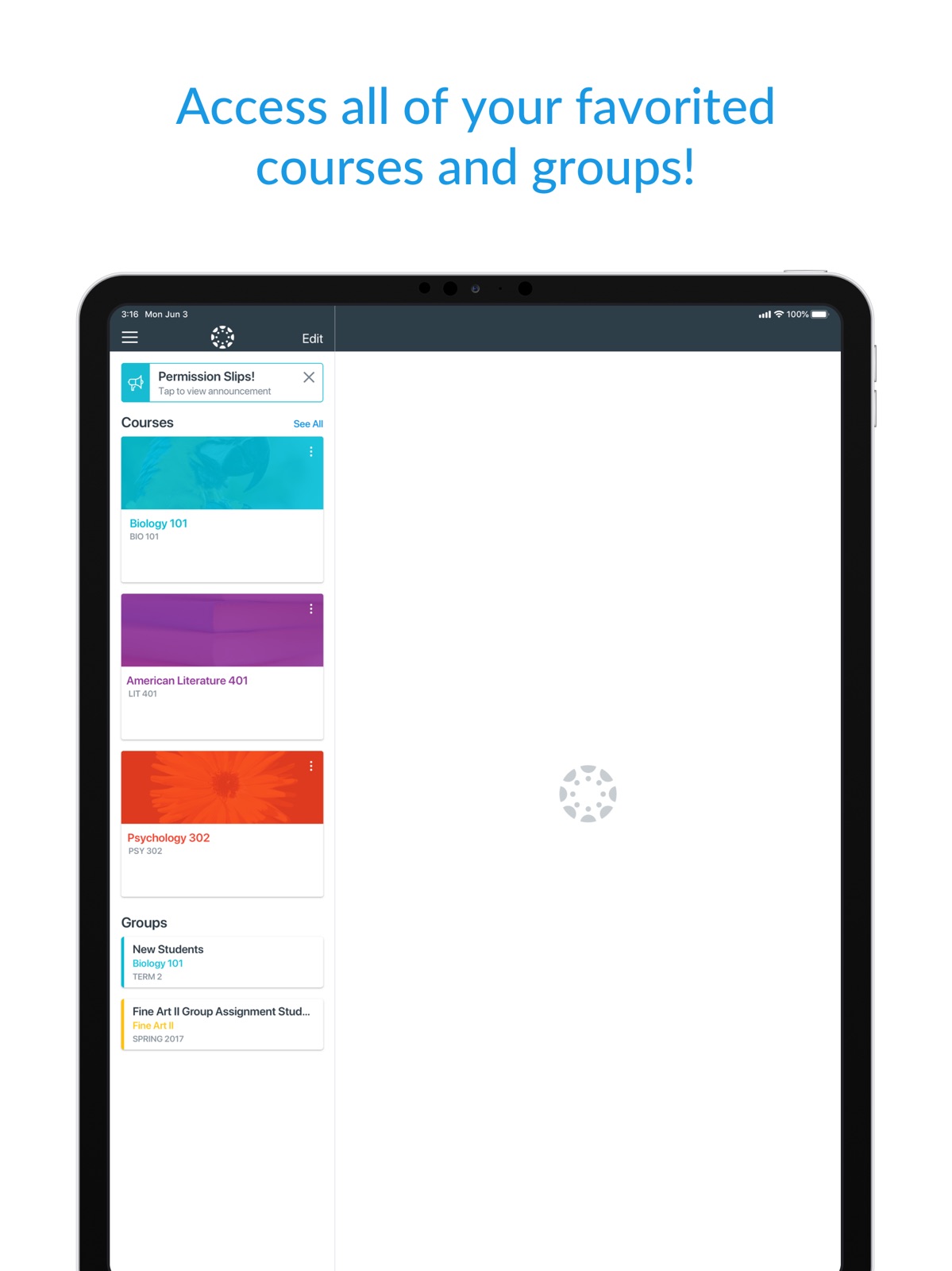


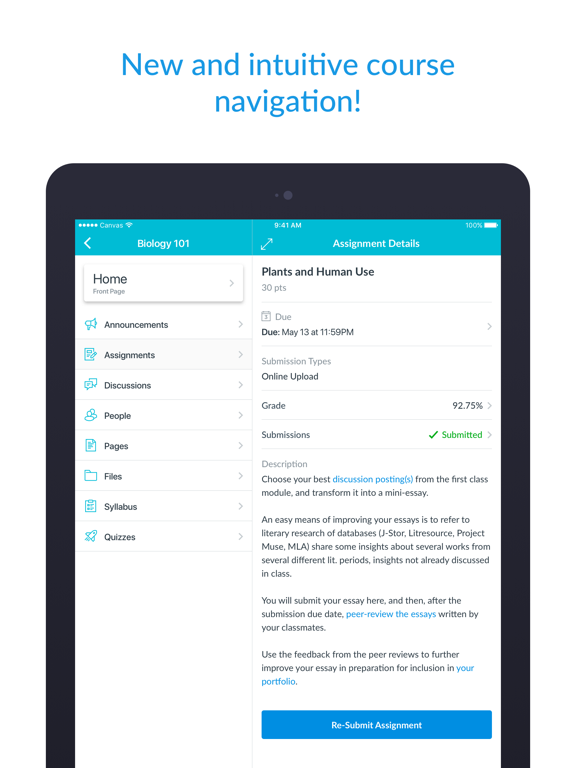
15 store screenshots


Pricing & paywalls
- Free to download
- Free to download
Ratings & reviews
-
5/5Excellent app but…
This app is excellent. I had never used the Canvas app before yesterday and I’ve found the app to be excellent overall (in fact, I had never used the Canvas website for school before this semester). The app is easy to navigate. It has ALMOST all the things you would need. The only thing I’ve found so far that could be improved is that I can’t find the notification INSIDE the app that showed up on my phone’s Lock Screen. My professor assigned me an anonymous “grading” of one of my classmate’s submission (I’m sure every student got assigned to grade some other student’s submission) and it showed up on my phone’s Lock Screen the first thing this morning when I woke up (keep in mind that I just downloaded this app about 15 hours ago) and I almost didn’t click on the notification. When I clicked on it, I was taken to Canvas’s website on my phone’s web browser where my fellow student’s submission showed up and I proceeded to read the student’s work before I could give my feedback but I had to stop in the middle because I started doing something else. However, later when I went back into the app to compete this feedback, I could NOT find this assignment anywhere in the app. Then, after a few minutes, I remembered it was in the browser and not in the app that I was working on it so I opened my browser and found the assignment still there so I completed it. But what if I had not clicked on the notification on my phone’s Lock Screen? It would have gone away. How would I have found it then? Hopefully, this was a “user error” on my part but I doubt it because I clicked on every single tab in the app under my course (quizzes, assignments, notifications, etc.), but it’s nowhere to be found. Any helpful suggestions would be appreciated.
Camediadoc · 29 Sep 2026
-
5/5The many benefits
I love the app, helps me find assignments quick has a tab for me to check my grades and to check if the teacher put any announcements if their is a substitute. This app has helped me better my education and when I graduate hopefully help me through college. The app has many benefits and not gonna lie almost a better platform than Google Classroom, it was great to keep in touch with my classmates but not to keep organized. Google Classroom just listed assignments by date not category, with Canvas it has modules when the teacher say what unit subject we are on it help my whole class find the assignment in less than a second. I approve this app and suggest that all schools use it, and for those who has a kid with a personal computer for their homework I suggest you sign your kid up you will see a great improvement in their grades if they struggle and helps with the syllabus if the parent has the app so they can check their child’s grades and they can help the child through the course and help study. I am rating this app as a freshman in high school and I promise it makes such a great learning experience and makes school a lot easier. I rate this app a million out of ten.
Valeria Sagaribay · 29 Sep 2026
-
1/5Genuine complaints, not just an annoyed student!
These are genuine issues I have with the app as someone who can’t afford a laptop right now & have been doing all of my work on an iPad. If these actually reach the devs I’d be over the moon! 1. Completed assignments are not crossed out/dimmed like they are on the browser website: it is stressful to look at my calendar and think I have 5 assignments to do, when in reality, I’ve already submitted 4 of those 5 assignments. Even if I know in my mind that those assignments are done, it would be nice to not have them at the top fo my calendar page. 2. Unable to access groups on the app: on the browser Canvas, there is a section on the sidebar for groups. This is 100% simply not available on the app ANYWHERE. I did not mind this so much at first, but I have had many group projects that span the whole semester recently, and it is very inconvenient to not be able to readily access the people or announcements in those groups. 3. Cannot go directly from assignment to course: if I am looking at an assignment, it’d be really nice to be able to tap on the course name & be directed to the course page. That is not an option right now, so if I view an assignment directly from the calendar or to-do page (as opposed to going to the course, then to assignments or modules), I have to go backwards by 2 pages, scroll down to the right course, and click through pages to get to the module. I wish it was even a little bit as direct as the browser. THANK YOU DEVS!! LOVE YOU!
y2kat · 29 Sep 2026
-
1/5Quite possibly the worst LMS that I've used!
I feel like the UI on Canvas is very counterintuitive, and it is nowhere near as fluid and easy to use as Classroom. I like how Classroom is linked directly to drive, and although Canvas can incorporate Drive, it is nowhere near as seamless and easy to use as Classroom. However, my biggest complaint with Canvas is the To-Do list and home screen. On Classroom, the different classes are easy to discern by color and background, but on Canvas, everything looks the same. Also, Classroom says which assignment is due when, and it shows assignments that are due the next day. I am used to checking this, so I often had missing assignments since Canvas only displays assignments that are due today. Another shortcoming that Canvas has compared to Classroom is the notifications. Every student here has a smartphone, and Classroom directly sends notifications to students on their phones reminding them when something is due, and what assignment it is. Canvas sends me notifications when an assignment is created, and when it has been returned, but not when it is due. Again, I am used to using the notifications to keep my scheduling on track. Going back to ecosystem integration, I like how Classroom syncs with my Google Calendar, which I have synced with my iCloud Calendar which shows up on my iPhone, and my MacBook which are what I use. To sum all of my points up, Canvas is less intuitive, has worse ecosystem integration, and has a much worse design for students.
Raaj_Thakur · 29 Sep 2026
-
1/5Lack of Safari support
My child was having problem with jpg loading on his school pages. At first, the jpg pictures were just more for the improvement of the site aesthetic so we didn’t bother. Then one day there is an image on his quiz that he was suppose to analyze and answer. He CAN’T see the image. The image won’t download. It was a timed quiz and he wasn’t able to get the teacher to email him the image on such a short notice. I reported the problem to Canvas and then started googling the issues online. It turned out that this is a known issue for YEARS. I am in disbelief that this has not/cannot be fixed. Safari is not a no name niche browser. It shocks me that Canvas, also not a no name small educational platform, has no solution to this. After several days, I got a respond from Canvas, actually the online school IT, to say just use Chrome. Really?!?! We use Safari because of Screentime parental control. I DON’T want to use Chrome. I didn’t use Chrome on the my computer (without any monitoring filter) and the jpg still didn’t load in all instances. Canvas, get it together and work out the issue with Safari! We used Schoology all last year and had ZERO issues. This is totally unacceptable for such a popular platform. As a user, there is no customer support to speak of. No way to contact them except to fill out a form. I wouldn’t use this platform if I am the school admin making a decision on what technology to use.
eskibear · 29 Sep 2026
-
5/5
swift
Emmanuel Tom · 29 Jul 2026
-
5/5
God Bless the Founder of BYU-Pathway, I am Just Starting my journey with them I Pray That God ll see me through Amen, as for the Canvas it's Excellent.
Bethuel Lynn · 29 Jul 2026
-
5/5
One thing I like about this app is because it has no ads. This is the only educational app I have use that is user-friendly. Thank you Canvas by Instruction. More ideas !!!!!
Joseph Thompson · 29 Jul 2026
-
1/5
can't open files, mic randomly opens during meetings, and confusing UI for mobile
Renzo Vaughn Halili · 29 Jul 2026
-
5/5
having access to learning material while on the go is awesome. But I would not not recommend using the mobile app for long periods.
Gavin Egan · 29 Jul 2026
Privacy & accessibility
Privacy
- Data Linked to You — Analytics — Diagnostics — Crash Data Developer declared
- Data Linked to You — App Functionality — Contact Info — Email Address Developer declared
- Data Linked to You — App Functionality — Contact Info — Name Developer declared
- Data Linked to You — App Functionality — Identifiers — User ID Developer declared
- Data Linked to You — App Functionality — Other Data — Other Data Types Developer declared
- Data Linked to You — App Functionality — User Content — Audio Data Developer declared
- Data Linked to You — App Functionality — User Content — Customer Support Developer declared
- Data Linked to You — App Functionality — User Content — Emails or Text Messages Developer declared
- Data Linked to You — App Functionality — User Content — Other User Content Developer declared
- Data Linked to You — App Functionality — User Content — Photos or Videos Developer declared
- Data Linked to You — Contact Info Developer declared
- Data Linked to You — Diagnostics Developer declared
- Data Linked to You — Identifiers Developer declared
- Data Linked to You — Other Data Developer declared
- Data Linked to You — User Content Developer declared
- Data Not Linked to You — Analytics — Diagnostics — Other Diagnostic Data Developer declared
- Data Not Linked to You — Analytics — Usage Data — Other Usage Data Developer declared
- Data Not Linked to You — Analytics — Usage Data — Product Interaction Developer declared
- Data Not Linked to You — Diagnostics Developer declared
- Data Not Linked to You — Usage Data Developer declared
Accessibility
- Captions — SUPPORTED Store published
- Dark Interface — SUPPORTED Store published
- Differentiate Without Color Alone — SUPPORTED Store published
- Larger Text — SUPPORTED Store published
- Sufficient Contrast — SUPPORTED Store published
- VoiceOver — SUPPORTED Store published
Privacy
- Data collected — Analytics — App activity — App interactions Developer declared
- Data collected — Analytics — App info and performance — Crash logs Developer declared
- Data collected — Analytics — App info and performance — Diagnostics Developer declared
- Data collected — Analytics — Device or other IDs Developer declared
- Data collected — Analytics — Location — Approximate location Developer declared
- Data collected — App functionality — App activity — Other user-generated content Developer declared
- Data collected — App functionality — Audio — Voice or sound recordings Developer declared
- Data collected — App functionality — Files and docs Developer declared
- Data collected — App functionality — Messages — Other in-app messages Developer declared
- Data collected — App functionality — Photos and videos — Photos Developer declared
- Data collected — App functionality — Photos and videos — Videos Developer declared
- Data collected — App functionality, Account management — Personal info — Name Developer declared
- Data collected — App functionality, Analytics, Account management — Personal info — User IDs Developer declared
- Data collected — App functionality, Fraud prevention, security, and compliance, Account management — Personal info — Email address Developer declared
- Data shared — Analytics — App activity — App interactions Developer declared
- Data shared — Analytics — App info and performance — Crash logs Developer declared
- Data shared — Analytics — App info and performance — Diagnostics Developer declared
- Data shared — Analytics — Device or other IDs Developer declared
- Data shared — Analytics — Location — Approximate location Developer declared
- Security practices — Your data is transferred over a secure connection — Data is encrypted in transit Developer declared
- Security practices — The developer provides a way for you to request that your data be deleted — You can request that data be deleted Developer declared
Accessibility
No accessibility labels collected yet.
Versions
-
7.11.1
- Same as 7.11.0. - Fixed course home page not showing automatically in some cases on iPads.
-
7.12.0
- Discussions and announcements can now be created from mobile. - New Quizzes navigation improved. - Unified UX for various filter and preferences screens. - Improved assignment list and assignment list preferences screens. - Improved the Smart Search screens. - Improved accessibility on various screens. - Fixed a bug that caused the grade list to become unresponsive sometimes. - Fixed grade list screen not showing total grades for concluded enrollments. - Fixed grade list preferences screen not displaying grading periods in some cases. - Fixed course files not showing up in some cases. - Fixed course home front page not visible in some cases. - Fixed external tool link being disabled in some cases. - Fixed groups from unpublished courses showing up on the “All Courses” screen. - Fixed a dashboard navigation bar glitch on iPads running iOS 18.
-
7.13.0
- Updated the app icon, now it also supports Dark and Tinted modes on iOS 18. - Updated dark colors to provide better accessibility. - Reduced loading time on the Grades screen. - Your favorite courses are now listed first when composing a new message. - Improved accessibility on various screens. - Fixed the current page not refreshing properly after switching to another app. - Fixed file share submission issues after changing users. - Fixed Studio videos not playing in offline mode in some cases. - Fixed embedded Studio videos not showing in some cases. - Fixed an issue where hidden navigation tabs were not handled correctly.
-
7.14.0
- Inbox signature is now added to inbox messages if the feature flag is enabled. - Added re-login support for expired sessions. - Improved accessibility on various screens. - Removed the "Canvas on Github" link from the settings screen. - Fixed total grade not being displayed in the correct format on the Grades screen. - Fixed grades not being displayed in the correct format on the Assignments screen. - Fixed an issue where the open button was unreachable in some cases on the submission details screen. - Fixed attached media files in discussions not being accessible in some cases. - Fixed wrong dates appearing on the notifications page in some cases. - Fixed new calendar events having incorrect end time in some cases. - Fixed the issue of masquerading users being unable to pick files for assignment submission.
-
7.15.0
- The current grading period is now auto-selected when entering the grades screen. - Fixed assignment screen disappearing after refresh in some cases. - Fixed letter grades being displayed incorrectly in some cases. - Fixed a dark mode issue on various screens. - Improved accessibility of the submission screen.
-
7.16.0
- New widget for displaying the Todos from Calendar. - Added further explanation to the QR login screen. - Inbox messages are no longer shown on Notifications screen. - Improved accessibility on various screens. - Fixed score being rounded on assignment details screen when late penalty was applied. - Fixed groups disappearing from dashboard on first refresh after login. - Fixed an issue that made the grade list screen jump when scrolling. - Fixed discussions being inaccessible in some cases. - Fixed some content being truncated when switching Dark/Light themes. - Fixed New Quizzes not opening submitted files in some cases. - Fixed external tool links being inaccessible from page content. - Fixed Studio videos not getting downloaded in some cases for offline mode. - Fixed embedded media playback not getting stopped when switching to another module item.
-
7.17.0
- Added a small widget that can display a single course’s grade. - Added medium and large size widgets that display multiple course grades. - Fixed a bug that caused the camera not appearing on the QR login screen. - Fixed submission list not refreshing properly after grading. - Fixed issue where Rubric Option buttons overlapping with the underlaying hint box - Fixed the issue where cross-shared users were not able to preview files in the Modules screen. - Fixed font size issue with navigation bar subtitled header on (200%+) accessibility size - Fixed the issue where cross-shard users couldn’t view announcements details.
-
8.0.0
- Redesigned Instructure logo. - Redesigned Canvas Mobile app logos. - Submission media comments can now be viewed without downloading. - Added support for displaying custom grade statuses. - Fixed total grades not showing for test students when teachers open the app in Student View. - Fixed issue of root account Teacher user unable to access Assignments and Quizzes. - Fixed issues of attaching audio/video comments in SpeedGrader.
-
8.0.1
- Redesigned Instructure logo. - Redesigned Canvas Mobile app logos. - Submission media comments can now be viewed without downloading. - Added support for displaying custom grade statuses. - Fixed total grades not showing for test students when teachers open the app in Student View. - Fixed a login error affecting older versions of self-hosted Canvas.
-
8.1.0
- Upgraded Todo screen and widget to support Discussion Checkpoints. - Upgraded Calendar to support Discussion Checkpoints. - Improved scrolling performance on grades list screen. - Fixed an issue of shard account users not being able to access classic quizzes from certain menus. - Fixed an issue of users of cross-shard instances not being able to view embedded Studio videos. - Career - Improved the Assist AI companion. - Career - Enhanced IgniteAI Flashcards to prevent generating irrelevant questions. - Career - Updated text casing in IgniteAI.
-
8.10.0
- Discontinued support for iOS 17. - Added support for prompting users when a required app update is available. - Added support for MDM logins to the New Canvas Login UI. - Increased security for data protection. - Updated privacy settings in applicable regions. - Studio videos in course modules can now be synced for offline mode. - Improved Learner Dashboard's Courses & Groups widget. - Improved accessibility on the Learner Dashboard. - Improved file picker UI. - Enhanced course Offline sync failure reporting for embedded media content. - Fixed embedded rich content showing the login screen after reconnecting from offline mode. - Fixed inconsistent grades appearing on Dashboard. - Fixed a bug about email link formatting. - Career - IgniteAI is replaced with Study tools
-
8.10.1
- Discontinued support for iOS 17. - Added support for prompting users when a required app update is available. - Added support for MDM logins to the New Canvas Login UI. - Increased security for data protection. - Updated privacy settings in applicable regions. - Studio videos in course modules can now be synced for offline mode. - Improved Learner Dashboard's Courses & Groups widget. - Improved accessibility on the Learner Dashboard. - Improved file picker UI. - Enhanced course Offline sync failure reporting for embedded media content. - Fixed embedded rich content showing the login screen after reconnecting from offline mode. - Fixed inconsistent grades appearing on Dashboard. - Fixed a bug about email link formatting. - Career - IgniteAI is replaced with Study tools
-
8.1.1
- Reverted ToDo screen to its previous version. - Fixed calendar feed not opening calendar app. - Fixed assignments not showing up in some cases.
-
8.11.0
- Improved offline sync for Studio videos. - Inbox message video & audio recordings now play in an in-app player instead of opening in Safari. - Fixed modules screen not loading for some Elementary courses. - Fixed custom tabs opening in the Sidebar on iPads. - Fixed rubric marks getting truncated. - Fixed root account user unable to access course content. - Fixed course invitations appearing after a course has been concluded. - Fixed submitted files (PDF/DOC/DOCX) not previewing for New Quizzes. - Fixed some assignments not appearing in Learner Dashboard's Weekly summary widget. - Fixed courses incorrectly showing as available offline after logout. - Fixed a crash that could occur on the Calendar and Modules screens. - Fixed incorrect Learner Dashboard appearing when opening the app with Student View. - Career - Added support for offline usage.
-
8.11.1
· 16 Jul 2026
- Improved file download for conversation and syllabus attachments.
-
8.12.0
- What-if scores are now supported on the grades screen. - Added free text search for the grades list screen. - Text entry submissions now open in a resizable sheet with a toggle between writing and reading instructions.. - Improved filters for the grades list screen. - Improved file download for conversation attachments. - Fixed a crash when rotating the device on the Submission Details screen while the drawer is closed. - Fixed Syllabus Summary tab not being available offline after syncing a course. - Fixed detail screens losing their content after rotating the device. - Fixed some external LTI tools, custom links not being available. - Fixed a crash during offline course sync when downloading embedded HTML files.
-
8.12.1
· 12 Aug 2026
- Fixed navigation issues on iOS 27.
-
8.2.0
- Discussion checkpoints are now handled in the assignment list. - Discussion checkpoints are now handled in the discussion list. - Added support for the restricted user access feature. - Fixed the reply button from the menu in Inbox’s navigation bar adding all recipients. - Fixed front page not loading in some cases. - Fixed some file links not loading from rich content. - Career - Added Push Notifications. - Career - Added Report a Bug feature.
-
8.3.0
- Discussion checkpoints are now handled in the grade list and on the assignment details screen. - Fixed submit button disappearing on text submission screen when using iOS 26. - Fixed some crashes affecting iOS 26 users. - Fixed assignments not loading for some institutions. - Fixed QR code login failing for some users. - Fixed groups from concluded courses being shown in All Courses view. - Fixed an issue that caused message sending not being disabled for concluded courses. - Fixed To-dos for pages and ungraded discussions not being shown in syllabus. - Fixed the issue of disappearing annotation toolbar for PDF documents. - Fixed app not starting in offline mode. - Career - Added LTI tools support for courses. - Career - Enhanced new notifications screen.
-
8.4.0
- Discussion checkpoints are now handled in the module list, the notifications list, and the syllabus summary. - Discussion checkpoint status and points are now displayed in assignment details. - List item selections now stay highlighted on iPad on various screens. - Fixed assignments not loading in some cases. - Fixed embedded media in text entry submissions not playing in some cases. - Fixed a crash that could occur when uploading files for assignment submissions. - Fixed some crashes affecting iOS 26 users. - Career - Redesigned learner dashboard experience.
-
8.5.0
- Introduced a completely re-imagined To-do screen with filters and improved UX. - Added immersive experience for embedded videos for institutions where this feature is enabled. - Improved submission status display on various screens. - Future grading periods now appear when filtering grades. - Fixed "View Discussion" button not being visible on the Assignment Details page when discussion is closed for comments. - Fixed submit button not being visible on assignments with custom statuses. - App icons now support Liquid Glass. - Career - Redesigned notebook experience.
-
8.6.0
- Improved searching on "Find your school" screen. - Improved scrolling performance on grades screen. - Fixed compose message not allowing sending messages to specific active courses. - Fixed not showing the correct login screen in some cases. - Fixed displaying points instead of letter grade for assignments with letter grade display and zero possible points. - Fixed layout issues when camera is opened to attach photos in Inbox.
-
8.7.0
- Added Liquid Glass support. - Added support for image scanning and merging for assignments limited to PDF submissions. - Added Portfolio to the profile menu for eligible accounts. - Added Korean language localization. - Fixed not yet graded submissions not being reachable when Restrict Quantitative Data is enabled. - Fixed UI issues in the rubric tab on the submission details screen. - Career - Redesigned Report a problem screen.
-
8.7.1
- Added Liquid Glass support. - Added support for image scanning and merging for assignments limited to PDF submissions. - Added Portfolio to the profile menu for eligible accounts. - Added Korean language localization. - Fixed not yet graded submissions not being reachable when Restrict Quantitative Data is enabled. - Fixed UI issues in the rubric tab on the submission details screen. - Fixed occasional freezing on the calendar filter and the all courses screens. - Fixed an issue with split view on iPad. - Career - Redesigned Report a problem screen.
-
8.8.0
- Renamed “Submission & Rubric” button to “Submission & Feedback” on Assignment Details. - Fixed freezes occurring on iOS 26 on Assignment List and Grade List screens. - Fixed Smart Search field visibility issues on iPadOS 26. - Fixed assignments not appearing if there are more than 10 grading periods. - Fixed unpublished future courses not appearing in All Courses screen. - Fixed a bug in Inbox where the "reply" button incorrectly appeared. - Fixed course invitations not being shown on Dashboard after opening. - Fixed visual issues of the offline banner on iPads. - Career - Redesigned the course and program lists.
-
8.8.1
- Renamed “Submission & Rubric” button to “Submission & Feedback” on Assignment Details. - Fixed freezes occurring on iOS 26 on Assignment List and Grade List screens. - Fixed Search field visibility issues on iPadOS 26. - Fixed assignments not appearing if there are more than 10 grading periods. - Fixed unpublished future courses not appearing in All Courses screen. - Fixed a bug in Inbox where the "reply" button incorrectly appeared. - Fixed course invitations not being shown on Dashboard after opening. - Fixed visual issues of the offline banner on iPads. - Career - Redesigned the course and program lists.
-
8.9.0
- Customizable Dashboard for Learners is available if the feature flag is enabled. - Fixed a crash on iPads when the syllabus was empty. - Fixed tinted widgets not appearing correctly. - Fixed urls pointing to cross-shard course files in Syllabus not working. - Fixed assignments not loading when opened from a push notification for users logged-in with different account domains. - Career - Added Learning Library.
- 8.10.0 · 30 Jul 2026
- 8.9.1 · 17 Jul 2026
Alternatives
- iClicker Student — Same category + similar ratings
- Top Hat - Better Learning — Same category + similar ratings
- Corq — Same category + similar ratings
- CampusGroups — Same category + similar ratings
- Navigate360 Student — Same category + similar ratings
- StudentVUE — Same category + similar ratings
Availability by market
- US
Data quality & evidence
- Page completeness
- Apoku summary published
- Last verified
- 29 Sep 2026
- Sources
- App Store, Google Play