
Quick verdict
- What it is
- Store information collected; an Apoku editorial summary is not yet published.
- At a glance
-
- From $1.58/mo
- Free to download
- In-app purchases
Categories and search queries
Official categories
- Productivity
- Photo & Video
Apoku categories
Key functions
| Function | Availability | Access | Scope | Evidence |
|---|---|---|---|---|
| Free app | Yes | Free | Context-specific | Store published |
| In-app purchases | Yes | Limited free | Context-specific | Store published |
| Family Sharing | Unknown | Unknown | Scope unknown | Store published |
Screens
App Store
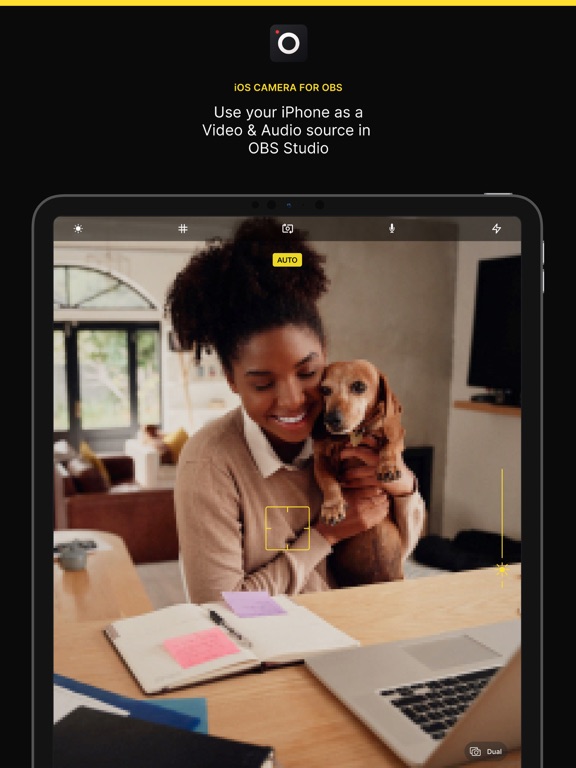
18 store screenshots



Pricing & paywalls
App Store
- 1 month — $4.99/month
- 1 month — $10.99/month
- 1 month — $11.99/month
- 1 month — $18.99/year ($1.58/mo)
- 1 month — $24.99/year ($2.08/mo)
- 1 month — $34.99/year ($2.91/mo)
- 1 month — $39.99/year ($3.33/mo)
- Lifetime — $69.99
- Lifetime Premium — $99.99
Ratings & reviews
App Store
-
5/5A huge improvement !!
I use OBS to make videos and I had bought a web cam for it. But the image was not sharp and the biggest issue was that green screening in OBS was a nightmare. Getting a good result was extremely fickle requiring filter adjustment depending time of day and outside light coming in. I always assumed OBS chromakey filter just was not that good. After reading about this app I decided to give it a try. It took just minutes to set up and get a video feed. Wow! the picture from an iPhone really is a magnitude of order better than a good webcam! Then I decided to try the chromakey filter........as soon as I turned on the filter it was perfect! The default settings have a great image. No need to spend 5 minutes tweaking the filter settings! I really really did not want to spend 15 bucks for the App fearing it would not be any better than what I had with the webcam. But it turns out this was money well spent! Installation really was a breeze, I use a USB connection. Can’t speak for the WiFi connection. But it was very quick and simple and the improvements in image quality were huge!
Cjohnson6 · 7 Aug 2026
-
5/5Not even close
Purchased the app because EpocCam isn’t the best thing in the world. I’ve heard from several people that OBS Studio is what they use to stream. I’m not a streamer, but I do podcasts and would like to have a way to sync up my external mics to the video I take on my iPhone. I found this app that promises to this exact thing I needed. I set it up as described in the instructions for a USB connection as I’m not familiar with the other wireless connection option. ITunes works with my iPhone and I can sync just fine. Epoc also worked ok, but the quality was not the best. I even set up Epoc with OBS Studio’s desktop client. So why did I pay $15 for an app specifically made for OBS Desktop client and it does not work? I’m not really sure. Creators love to support other creators, but also....the content needs to be quality content as well. There is not an option on my “scene” selection for “Add iOS device” as described on the instructions. Messed around with it for about an hour looking through all the different settings and stuff. The forum seems outdated so I’m not even really sure this app is being supported? Anyway, if I’m dead wrong and I’m missing something I do apologize and please let me know! I love the idea, that’s why I spent money on an app. (No one likes to pay a lot for an app...cause normally they under deliver). TL;DR -No “Add iOS Device” option listed in order to add my iPhone with the app client -Looks to be no support anymore for the app -App is overpriced if it does not do as advertised -If I’m wrong, please tell me
Skye Day · 7 Aug 2026
-
5/5Not sure why people don’t like this, it’s great
I have tried several of the options out there, including paying for epoccam. None of them are as easy to use as this one. Yes it’s expensive, but the developer gets to choose what it costs. If you want it, you pay. If you don’t, walk away. This is also the only app that I could get to send 1080p from my phone to the mac. The other option I tried could not get obs to receive it that way. For people thinking you can use this to get obs to send your phones video to skype, why would you think that? This app is specifically for getting the video to obs. Obs to skype/zoom/etc is entirely different functionality, called virtual webcam. The devs of this have nothing to do with that. There is a plug-in for obs to serve as a virtual webcam. It’s not available for Mac, but currently being worked on to be brought in natively to obs. But it makes no sense to slam the developer of this because of a lack of that feature in obs.
Fralcon · 7 Aug 2026
-
5/5Irreplaceable!
I noticed some low reviews for this app, and I can only assume that this person has other issues that were unrelated to this app, and they jumped the gun. Trust me when I tell you... during the quarantine, I was forced into a position to learn (quickly) how to stream our worship service at Forks United Church of Christ in Stockertown, PA. I’m their A/V Tech as well as Music Director. I quickly discovered OBS, but was extremely disheartened by camera quality. I tried multiple webcams... and I mean decent ones. I even purchased a game capture device and tried using my Sony HD camcorder. It was noticeably better, but latency was an issue, and the video still lacked what I needed. This app is incredible. The iPhone cameras are SO much better than moderately priced webcam options. I love it so much, I purchased an iPhone 8 from eBay just to use as a second camera. Even at $200, it’s far better than any option in that price range. Here’s the best part... I ran into a slight technical issue, so I emailed Will. He was incredibly helpful and extremely nice. I love this app! Get it!
Anthony Newett · 7 Aug 2026
-
5/5What I’d love to see...
The app works great overall. I’d love to see one possible feature developed though. During livestreams for my band we use 4 phones to give different views (one overview, one for each bandmate) but the view in each is a static field of view. It would be REALLY something if there was an extension of the app to allow each camera to randomly zoom in for closeups once in a while—just to give a bit more visual dynamics to the livestream. A 5 second zoom in for a closeup, then pull back out to full frame. We are playing so we can’t control the cameras—they are fixed frame. It would add a bit of dramatic flair to the footage if that feature was added. The controls would include speed of zoom, extent of zoom, and perhaps have it react to transients in the audio feed to go “monkeycam” when the music gets really frenetic. Maybe someone else will do this first in their app. I’d love yours to be the first to do so though!
MasterMichio · 7 Aug 2026
Privacy & accessibility
App Store
Privacy
- Data Not Linked to You — Analytics — Identifiers — Device ID Developer declared
- Data Not Linked to You — Analytics — Purchases — Purchase History Developer declared
- Data Not Linked to You — Analytics — Usage Data — Product Interaction Developer declared
- Data Not Linked to You — App Functionality — Purchases — Purchase History Developer declared
- Data Not Linked to You — Identifiers Developer declared
- Data Not Linked to You — Purchases Developer declared
- Data Not Linked to You — Usage Data Developer declared
Accessibility
No accessibility labels collected yet.
Versions
App Store
-
3.0.0
- Add all new capture screen including manual camera controls, exposure peaking, focus peaking & histogram - Add ability to switch Camera Lens (Ultra-wide now supported on iPhone 11) - Improve encoding performance when switching/flipping cameras - Fix audio streaming glitches on newer devices (sound is bearable now)
-
3.0.1
- Revert some changes to the encoding pipeline that introduced some delays for a small percentage of people. - Fix crash on iPad when presenting connection details
-
3.0.2
- Fix a crash when switching cameras on some devices. - Fix issue where selecting a custom FPS before selecting a custom Resolution could revert FPS selection.
-
3.0.3
- Fix issue where the autofocus was triggering too often. - Fix issue where occasionally the autofocus crosshair was shown as locked when it wasn't. - Prevent screen flicker when rotating the device. Thank you all for your feedback!
-
3.1.0
- Add support for bluetooth microphones! - Add ability to use the torch. - New Shutter Speed controller. - Fix issue where the settings might not lock. - Fix crash related to the white balance.
-
3.1.1
Fixed audio issues introduced in the previous version. Thank you everyone who reached out and helped us.
-
3.1.2
Today we've published a new build that improves many of the subsystems in the app in preparation for the future. - Added ability to turn on Video Stabilization in the settings - Updated NDI library which fixed Local Network Permissions requests. NDI works much better on iOS14+ now. - Fixed NDI issue where it would stop working after resuming the app from the background - Fixed issue where overexposure zebras would be disabled in some configurations when they should be enabled
-
3.1.3
- Fixed a small issue where the app would flick between automatic and manual mode after configuring manual mode in low light situations
-
3.2.0
- Add remote control. Control the app from your web browser on your computer. No need to have access to the device anymore to line up that shot perfectly. - Add support for iOS15 portrait mode
-
3.2.1
- Fixed an issue where a few of you experienced freezes in 4K 60fps. - Fixed an issue where the remote control web page in Chrome wouldn't load as expected.
-
3.2.2
- You can now tap the remote control URL to share it with your computer, no more typing! IPv6 is now supported. - Improved onboarding for new users.
-
3.2.3
- The IPv4 address will be displayed instead of IPv6 for the remote controls address. - Fix the remote controls not always starting when launching the application for the first time. - The exposure now behaves as expected when the scene's lighting is changing. - The microphone status is now remembered between launches. - You can now enter any URL to connect to in the remote controls interface, use Enter + Alt to submit a new connection. - The remote controls interface now matches OBS Studio.
-
3.3.0
- Setup your iPhone faster than ever with Camera Profiles. You can now save your camera settings and apply them back with one tap. - Clean HDMI output added. You can now use an HDMI Video Capture with the application. - The microphone permission is now optional to use the application. - The remote controls will now reconnect after the application goes in background. - Fixed slow camera startup.
-
3.3.1
- Setup your iPhone faster than ever with Camera Profiles. You can now save your camera settings and apply them back with one tap. - Clean HDMI output added. You can now use an HDMI Video Capture with the application. - The microphone permission is now optional to use the application. - The remote controls will now reconnect after the application goes in background. - Fixed slow camera startup.
-
3.3.2
- General maintenance
-
3.3.3
- Just a couple of tweaks under the hood.
-
3.3.4
- Just a couple of tweaks under the hood.
-
3.3.5
- General maintenance and tweaks
-
3.3.6
- Miscellaneous maintenance and tweaks
-
3.4.0
- Update NDI to version 5 - Add support for multiple Remote Control clients at the same time - Improve user experience after subscribing - including a little easter egg :) - Fix a couple of issues with Remote Control WebSocket connection (end result improves reliability) - Fix UI glitches when connected to Remote Control - Fix issue where NDI wouldn't restart after application is resumed from background - Fix issue where Remote Control wouldn't start after disabling and enabling in settings without app restart
-
3.4.1
- Fix issue where tapping the plus or minus buttons on the parameter controls would crash the app
-
3.5.0
- Fixed an issue where display toggle didn't work on iOS 16 - Fixed an issue where the microphone audio wouldn't stream to OBS Studio correctly in some cases on iOS 16 - Fixed an issue where changing camera device/configuration while outputting on NDI would crash the app - Fixed an issue where NDI wouldn't start steaming in one case - Update NDI to version 5.1.1
-
3.6.0
- Improved high-frame-rate H.264 encoding - More reliable USB connection and reconnection handling - Improved camera preview performance when using visual effects - General stability and compatibility improvements This version requires iOS 16 or later.
-
3.6.1
- Fixed remote control connection in some cases
-
3.6.2
· 6 Aug 2026
- Adding new onboarding setup walkthrough - Fixed macos hardware encoding for OBS 23 with plugin v2.9.6
Alternatives
- Teleprompter.com — Same category + similar ratings
- TeamViewer Remote Control — Same category + similar ratings
Availability by market
- US
Data quality & evidence
- Page completeness
- Live store listing
- Last verified
- 7 Aug 2026
- Sources
- App Store
- Apoku editorial summary has not been published yet.