
Quick verdict
- What it is
- Store information collected; independent summary not yet available.
- At a glance
-
- From $2.99/mo
- Free to download
- In-app purchases
Categories and search queries
Official categories
- Utilities
- Productivity
AppCorpus categories
Key functions
| Function | Availability | Access | Scope | Evidence |
|---|---|---|---|---|
| Free app | Yes | Free | — | Store published |
| In-app purchases | Yes | Limited free | — | Store published |
Screens
App Store
21 store screenshots


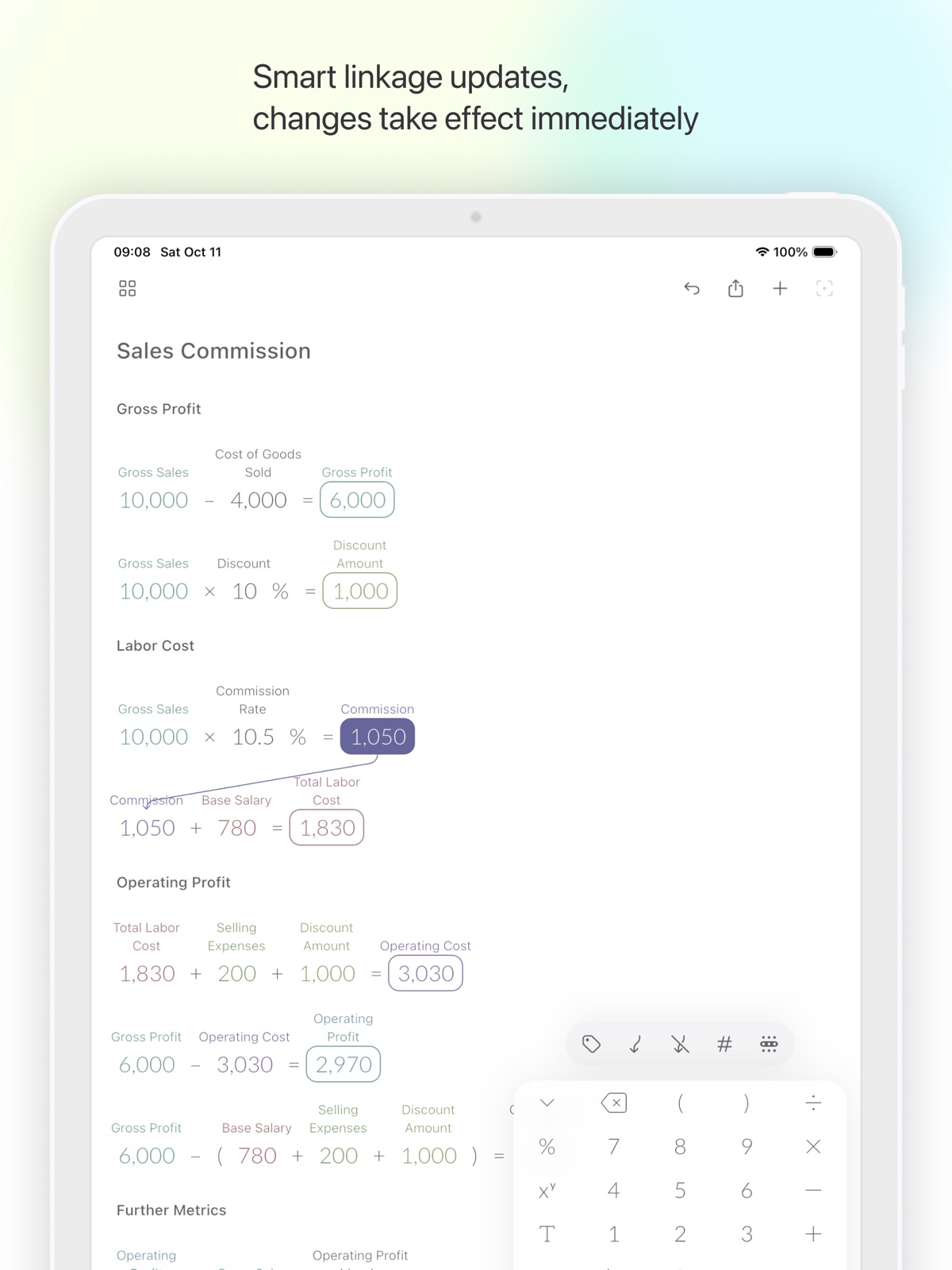
Pricing & paywalls
App Store
- Monthly Premium — $2.99/month
- Monthly Premium — $29.99/year ($2.49/mo)
Ratings & reviews
App Store
-
3/5Could be good but subscription… eh
First, let’s be real, this app is a copy of Tydlig. Which is a calculator app that’s been around for years here (but hasn’t been updated in years. Still works great though). This app does include a few small new features, and the app works well, but unfortunately I can’t justify paying a recurring subscription for what I get from a one time purchase of Tydlig. If this was a one-time purchase… $5-7 or something like that, I’d buy it. But there’s no way I’d pay subscription for this. In fact, I suspect this app isn’t gonna take off if they keep this subscription model. Who’s gonna pay a subscription for this except professionals who do constant calculations, and those people generally already have more advanced tools for what they do, so I don’t see them paying for it either. I think the only target you can hit is the average user who needs it regularly but not frequently, and that user isn’t gonna wanna pay a subscription. (And again, this app is literally a clone of Tydlig with a few bells n whistles). If you change it to one time purchase, I’d prob buy it. It works well.
Janejrank · 7 Aug 2026
Privacy & accessibility
App Store
Privacy
- Data Not Linked to You — Analytics — Usage Data — Product Interaction Developer declared
- Data Not Linked to You — Usage Data Developer declared
Accessibility
No accessibility labels collected yet.
Versions
App Store
- 1.0.0
-
1.1.0
- New UI design; - Added support for landscape mode and iPad; - Improved user experience; - Fixed known bugs.
-
1.10.0
New Features: • Canvas sync is now available for Premium users, so your canvases stay consistent across devices; • Sign in with Apple, Google, or Email to enable sync. Improvements: • Rebuilt the canvas engine for smoother editing and more reliable interactions; • Faster canvas loading and thumbnail handling. Bug Fixes: • General stability improvements.
-
1.10.1
Fixed known issues.
-
1.10.2
Fixed known issues.
-
1.11.0
Added a keyboard haptic feedback toggle, which you can turn on or off in Settings. Fixed known issues to improve stability and overall experience.
-
1.11.1
Fixed known issues to improve stability and overall experience.
-
1.11.2
Fixed an issue where formula layout became incorrect after reopening a canvas.
-
1.12.0
· 29 Jul 2026
This update focuses on a major refactor of the canvas internals, preserving existing features and workflows while further improving the overall experience. Improvements: • Improved calculation precision, preserving exact results for basic arithmetic and using higher-precision calculations for advanced functions; • Smoother, more reliable canvas editing, loading, and recovery; • Improved interactions for large canvases, drag selection, input, references, undo, and redo; • More reliable canvas sync, account switching, and data upgrades; • Refined haptic feedback for selected long-press and number-reset actions. Fixes: • Fixed issues that could affect formula layouts, reference lines, thumbnails, and the canvas list; • Fixed other known issues and improved stability. This update includes substantial under-the-hood changes. If you encounter any problems, contact us at [email protected].
-
1.2.0
New Features: • One-tap canvas clear for rapid removal of all content; • Double-tap a number to reset it quickly; • Preloaded demo data on first launch to help you get started quickly. Updates: • Help documentation is now clearer and the usage guide more intuitive; • The free version now supports 8 formulas instead of 5 for enhanced functionality. Fixes: • Fixed issues when adjusting numbers using the slider; • Optimized menu text overflow display; • Resolved other minor issues. Additionally, we have made significant internal optimizations, laying a solid foundation for future enhancements and updates.
-
1.3.0
# New Features - Guided Tutorial: A new step-by-step tutorial now appears on first launch to help you quickly master core operations. # Improvements - Smoother Value Adjustments: Optimized slider controls ensure precise and fluid number tweaking—say goodbye to accidental slips! # Bug Fixes - Stable Canvas Clearing: Fixed unexpected errors that occurred when clearing the canvas. - Under-the-Hood Fixes: We’ve quietly resolved minor issues to make your calculations even smoother!
-
1.4.0
New Features: • Text Elements: You can now add text notes, titles, or comments directly on your canvas, making your calculations clearer and easier to understand, enhancing both documentation and sharing. • Quick Alignment: New alignment tools help you quickly align equations and text elements to the left, center, or right, and tidy up spacing, keeping your canvas neatly organized. • Duplicate Canvas: Long-press any canvas in the canvas list to create a duplicate, allowing you to easily back up and reuse existing calculations for exploring more possibilities. Improvements & Fixes: • Fixed an issue where sliders could unintentionally appear outside their boundaries when adjusting maximum or minimum values. • Fixed an issue where undoing the deletion of equations arranged at the beginning did not correctly restore their positions. • Fixed an issue causing repeated use of colors for linked numbers after deleting equations. • Fixed inaccuracies in the display positions of certain elements within the onboarding tutorial. • Additional stability improvements and fixes for other reported issues. Thank you for using Calvance! We’ll keep improving the app to enhance your experience.
-
1.5.0
New Features: • Custom Number Formatting: Now you can format individual calculation results as percentages, set decimal places, and toggle thousand separators for clearer numbers. Improvements: • Simplified onboarding experience, making it even easier to understand and start using Calvance quickly. Bug Fixes: • Fixed various known issues for improved app stability and performance. Thanks for your continued support! We keep enhancing Calvance for your best experience.
-
1.5.1
Fixed known issues.
-
1.6.0
New Features: • New Element Cursor: Indicates where new canvas elements will be added. • Drag Alignment: Automatically aligns canvas elements when dragging. • Long Formula Line Break: Select the position in a formula where you want to break the line, press the return key on the keyboard to display long formulas with line breaks. • Insert Empty Line: Select a canvas element, press the return key to insert an empty line below it. • Drag Selection: Long-press on empty canvas area and drag to create a selection box, quickly selecting multiple canvas elements. • Select All: Tap on empty canvas area to open the "Select All" menu, one-click selection of all elements on the canvas. Improvements: • Redesigned app bar, keyboard, and toolbar • Removed the number adjustment slider that had limited practical use • New faster, more precise calculation engine • New help tutorials • New app icon Bug Fixes: • Fixed the issue where canvas content occupying too large an area would cause incomplete image exports • Fixed number formatting errors and calculation failures in certain language environments This update includes significant changes. If you encounter any issues, please contact us at [email protected]. Thank you for your feedback, and we will continue to update to provide a better experience!
-
1.7.0
New Features: • Dark Mode: Support for dark theme, providing eye-friendly experience in low-light environments and reducing visual fatigue. Improvements: • Updated calculation engine, making "100 + 23% = 123". Bug Fixes: • Fixed issue where changing system font size would cause incomplete display; • Fixed issues with abnormal operation on macOS; • Other discovered issues and stability improvements. If you encounter any problems during use, please contact us at [email protected]. Thank you for your feedback, and we will continue to update to provide a better experience!
-
1.8.0
New Features: • Multiple calculation templates have been added. When creating a new canvas, you can start by selecting a template; • Negative signs can be added to functions and left parentheses, allowing the creation of calculations such as -ln and -(3 × 5); • Transparent background images can be exported; • It is now possible to directly open canvas files shared by other users. Improvements: • Optimize the calculation engine to make the calculations more accurate and efficient. Bug Fixes: • Corrected the issue of 5% × 5 = ?; • Corrected the problem of incorrect calculation of 15% + 10%; • Fixed the issue of animation delay when dragging the calculation result; • Other discovered issues and stability improvements. If you encounter any problems during use, please contact us at [email protected]. Thank you for your feedback, and we will continue to update to provide a better experience!
-
1.9.0
New Features: • Support for physical keyboard input, improving typing efficiency; • Added support for 9 new languages including German, French, etc.; • Adopted new canvas file format (.calvx). Optimizations: • Toolbar styling; • iOS 26 style app icon. Bug Fixes: • Fixed canvas jitter issue during rapid input; • Fixed incorrect number link updates when switching positive/negative signs; • Fixed issue with line breaks in formulas not being properly processed; • Other discovered issues and stability improvements.
Availability by market
- US
Data quality & evidence
- Page completeness
- Live store listing
- Last verified
- 7 Aug 2026
- Sources
- App Store
- Independent summary has not been published yet.