
Quick verdict
- What it is
- Store information collected; an Apoku editorial summary is not yet published.
- At a glance
-
- Free to download
- In-app purchases
Categories and search queries
Official categories
- Productivity
- Business
Apoku categories
Key functions
| Function | Availability | Access | Scope | Evidence |
|---|---|---|---|---|
| Free app | Yes | Free | Context-specific | Store published |
| In-app purchases | Yes | Limited free | Context-specific | Store published |
| Family Sharing | Unknown | Unknown | Scope unknown | Store published |
Screens
App Store
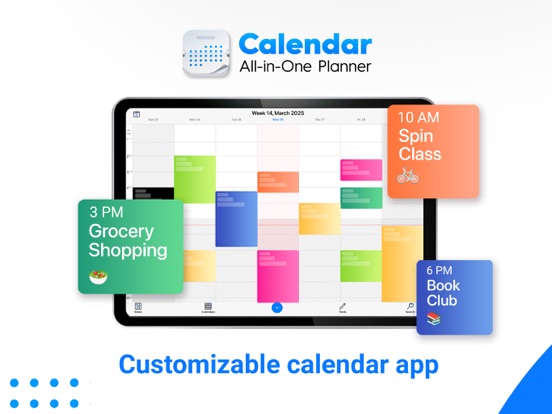
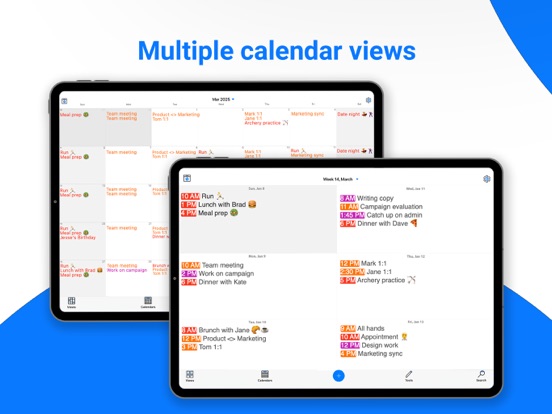
17 store screenshots


Pricing & paywalls
App Store
- Calendar Bundle — $14.99
- Calendar Bundle — $129.99
- Pro Subscription — $19.99
Ratings & reviews
App Store
-
5/5Best Calendar App Out There
I’ve tried dozens of calendar apps over the years, and this one is still by far the best. I originally left a 1-star review after my lifetime purchases weren’t restoring, but to their credit, the devs responded and quickly fixed the issue. After updating, I hit “Restore Purchase” and everything came back like it should. Clean interface, dense layout, and exactly the kind of visibility I need for managing multiple calendars. Glad to have it fully working again. If you’re a longtime user like I am—update and hit Restore, it works now. Thanks to the team for making it right.
Jwalzer · 6 Aug 2026
-
3/5One of the better calendar options, but not the best
One word of caution: This is NOT a universal app. So if you think you’re going to get around the subscriptions to use both the iPhone and iPad versions buy buying this over priced version you’ll be disappointed. While the app does have some very nice views and UI (WAY better than the stock app) there are quite a few short comings. The options screens are quite confusing, there is lack of instructions on how to get calendars loaded and there are no options for increasing the boldness and type of text. A worthy replacement for the stock app but definitely not worth the cost. I’ll be going back to CalenGoo, my go to for years now and possibly one of the most underrated apps out there.
Dbuenger · 6 Aug 2026
-
1/5Intrusive ads for subscription version
Great calendar app but I have complaints. I made a one time purchase for the first unlocked version of WeekCal years ago when there was only one version of this app back then. The in-app ads pushing their pro subscription became completely obnoxious in recent years. There were also the repeated attempts to lock functions/views behind their subscription service paywall. I gave in and made another one time purchase of their fully unlocked app (not the subscription version) but here they go again pushing the in-app ads for their pro subscription version. I’m having a hard time giving this app up because I’ve had it for so long but I’m getting there.
M Chen2 · 6 Aug 2026
-
1/5Bought Premium WeekCal, Forced to Change to a New FREE App
I’ve been using WeekCal for years, upgraded to premium a few years ago, and recommended to friends and family. Just got a family member their own phone, got WeekCal install, and just REALIZED that the “WeekCal app” with premium subscription on my phone has been changed the name to a free version of “Calendar All-in-One Planner” — basically my Premium WeekCal, without my knowledge or notice from the developer, became a completely new app!! Now I cannot use the same or choose a different app icon and my family members cannot use the premium features that I paid earlier. I don’t think this is a good business practice!
Arweephan · 6 Aug 2026
-
5/5Updated review
I purchased this app in 2019, and have enjoyed its functionality since then. I had an issue with this app with the latest update but after speaking to customer service, they rectified its functionality and once again I am quite pleased. Thank you for a great app!
Sharon55 · 6 Aug 2026
Privacy & accessibility
App Store
Privacy
- Data Linked to You — Analytics — Identifiers — Device ID Developer declared
- Data Linked to You — Analytics — Identifiers — User ID Developer declared
- Data Linked to You — Analytics — Purchases — Purchase History Developer declared
- Data Linked to You — App Functionality — Identifiers — Device ID Developer declared
- Data Linked to You — App Functionality — Identifiers — User ID Developer declared
- Data Linked to You — App Functionality — Purchases — Purchase History Developer declared
- Data Linked to You — Developer’s Advertising or Marketing — Contact Info — Email Address Developer declared
- Data Linked to You — Developer’s Advertising or Marketing — Identifiers — Device ID Developer declared
- Data Linked to You — Developer’s Advertising or Marketing — Identifiers — User ID Developer declared
- Data Linked to You — Developer’s Advertising or Marketing — Purchases — Purchase History Developer declared
- Data Linked to You — Product Personalization — Identifiers — Device ID Developer declared
- Data Linked to You — Product Personalization — Identifiers — User ID Developer declared
- Data Linked to You — Product Personalization — Purchases — Purchase History Developer declared
- Data Linked to You — Third-Party Advertising — Contact Info — Email Address Developer declared
- Data Linked to You — Third-Party Advertising — Identifiers — Device ID Developer declared
- Data Linked to You — Third-Party Advertising — Purchases — Purchase History Developer declared
- Data Linked to You — Contact Info Developer declared
- Data Linked to You — Identifiers Developer declared
- Data Linked to You — Purchases Developer declared
- Data Not Linked to You — Analytics — Diagnostics — Crash Data Developer declared
- Data Not Linked to You — Analytics — Diagnostics — Performance Data Developer declared
- Data Not Linked to You — Analytics — Usage Data — Advertising Data Developer declared
- Data Not Linked to You — Analytics — Usage Data — Product Interaction Developer declared
- Data Not Linked to You — App Functionality — Diagnostics — Crash Data Developer declared
- Data Not Linked to You — App Functionality — Diagnostics — Performance Data Developer declared
- Data Not Linked to You — App Functionality — Usage Data — Advertising Data Developer declared
- Data Not Linked to You — App Functionality — Usage Data — Product Interaction Developer declared
- Data Not Linked to You — Developer’s Advertising or Marketing — Usage Data — Advertising Data Developer declared
- Data Not Linked to You — Developer’s Advertising or Marketing — Usage Data — Product Interaction Developer declared
- Data Not Linked to You — Product Personalization — Usage Data — Advertising Data Developer declared
- Data Not Linked to You — Product Personalization — Usage Data — Product Interaction Developer declared
- Data Not Linked to You — Diagnostics Developer declared
- Data Not Linked to You — Usage Data Developer declared
- Data Used to Track You — Contact Info — Email Address Developer declared
- Data Used to Track You — Contact Info Developer declared
- Data Used to Track You — Identifiers — Device ID Developer declared
- Data Used to Track You — Identifiers Developer declared
Accessibility
No accessibility labels collected yet.
Versions
App Store
- 12.1
-
12.1.1
- stability improvements and bug fixes
-
12.2
Introducing Reminders! You asked for it, and here it is! Now you can easily use WeekCal to create reminders for everything from picking up your groceries to calling your loved ones on their birthday. You can even create location based alerts to remind yourself at the perfect moment. And the best part -- reminders are part of your calendar. They look just like regular events. You can enable or hide different reminder lists on your phone, and they play really well with your exiting presets. In fact, you can even create new reminder presets! In summary, this version: • adds support for creating, editing, and visualizing your important reminders • reminders appear as events on your calendar views • includes capability to hide specific reminder lists, just like your calendars • adds a brand new, and still being improved, view to visualize all your reminders in a list • plenty of other stability and performance improvements As always, please do rate us on the AppStore if you like the app, and contact us for feedback on how we are doing or to send us ideas and stories!
-
12.3
Introducing Reminders! You asked for it, and here it is! Now you can easily use WeekCal to create reminders for everything from picking up your groceries to calling your loved ones on their birthday. You can even create location based alerts to remind yourself at the perfect moment. And the best part -- reminders are part of your calendar. They look just like regular events. You can enable or hide different reminder lists on your phone, and they play really well with your exiting presets. In fact, you can even create new reminder presets! In summary, this version: • adds support for creating, editing, and visualizing your important reminders • reminders appear as events on your calendar views • includes capability to hide specific reminder lists, just like your calendars • adds a brand new, and still being improved, view to visualize all your reminders in a list • plenty of other stability and performance improvements As always, please do rate us on the AppStore if you like the app, and contact us for feedback on how we are doing or to send us ideas and stories!
-
12.7.1
We now have iOS 13 optimizations in this update. In addition, you can change your WeekCal app icon to your favorite color! Here’s everything that’s included in this release: • OS 13 optimizations • Minor UI bug fixes for Day, Agenda, Mini Month, and Year calendar views • Change your app icon anytime in Settings -> Layout -> App Icon Color • General bug fixes & app improvements • Updated first time user experience for new WeekCal users Have feedback or suggestions for us? Drop us a line via the help section of the app and we’ll quickly reply back to help out. Special thanks to our WeekCal Pro subscribers for your support, and stay tuned for our next update! -The WeekCal Team
-
13.0.1
A new WeekCal - Fully Unlocked update has arrived! Special thanks to all of our users - thanks for supporting the app & making WeekCal possible! Here's what you'll find in this release: ● Dark Mode has arrived to WeekCal. To enable, go to Settings -> Layouts and enable the Auto color scheme. WeekCal will now honor your device Dark Mode settings, or you can manually enable dark mode via Control Center. ● Apple Watch Series 4 and 5 watch face complications are now supported ● Improved Search filtering, start & end functionality and navigation improved for iOS 13. Search performance also improved in the Calendar Store. ● Updated Calendar Store support updated for Football (Soccer) and Basketball ● Backup settings via email is now supported on iOS 13, for easier transfer of settings between devices (Settings -> General -> Synchronize Settings -> Backup Settings via Email, make sure to tap "more" to see all options) ● Dozens of UI improvements & updates have been made throughout the app ● Top fixes & improvements: Resolved calendar sharing via web issue, resolved navigation issue that would set date to 1900, Emoji keyboard now launches automatically when adding Emoji to an event ● Many more small but significant updates & improvements Questions? Feedback? Let us know, we're here to support you! Email us at [email protected] or just tap "Provide Feedback" in the help section of the app for fast and friendly assistance from our team.
-
13.3.1
A new WeekCal - Fully Unlocked update has arrived! In this update, we're excited to announced the release of iOS 14 Widgets & Video Conferencing Features for iPad and iPhone users. Special thanks to all of our users - thanks for supporting the app & making WeekCal possible! Here's what you'll find in this release: ● My Schedule Widget: This home screen widget displays upcoming events for the day and is available in a small size widget (free for all users) and a medium size widget with more advanced features like the Join Meeting button for quick access to upcoming video calls (exclusive to Pro subscribers). ● Today’s Date Widget: This home screen widget displays the month, day and date and is available as a small widget for all users. ● NEW Join Meeting Button: Quickly jump into conference calls with a single tap from any calendar event (Zoom, Google Meet + other meeting services) ● To add Widgets to your home screen: Tap and hold on an empty area of the home screen and enter the edit home screen mode (jiggle mode) > Tap the + button at the top corner > Explore the WeekCal widgets in the Widget gallery and add them to your home screen for easy access. You can also add WeekCal widgets to a widget Smart Stack. ● For more information on the WeekCal widgets, open Weekcal, then head to Settings > iOS 14 Widgets and learn how to best use them. ● We also squashed a bug related to Automation settings that affected some users in our last update; thanks to everyone who reported this issue. Questions? Feedback? Let us know, we're here to support you! Email us at [email protected] or just tap "Provide Feedback" in the help section of the app for fast and friendly assistance from our team.
-
13.3.7
A new WeekCal - Fully Unlocked update has arrived! In this update, we're excited to announced the release of iOS 14 Widgets & Video Conferencing Features for iPad and iPhone users. Special thanks to all of our users - thanks for supporting the app & making WeekCal possible! Here's what you'll find in this release: ● My Schedule Widget: This home screen widget displays upcoming events for the day and is available in a small size widget (free for all users) and a medium size widget with more advanced features like the Join Meeting button for quick access to upcoming video calls (exclusive to Pro subscribers). ● Today’s Date Widget: This home screen widget displays the month, day and date and is available as a small widget for all users. ● NEW Join Meeting Button: Quickly jump into conference calls with a single tap from any calendar event (Zoom, Google Meet + other meeting services) ● To add Widgets to your home screen: Tap and hold on an empty area of the home screen and enter the edit home screen mode (jiggle mode) > Tap the + button at the top corner > Explore the WeekCal widgets in the Widget gallery and add them to your home screen for easy access. You can also add WeekCal widgets to a widget Smart Stack. ● For more information on the WeekCal widgets, open Weekcal, then head to Settings > iOS 14 Widgets and learn how to best use them. ● We also squashed a bug related to Automation settings that affected some users in our last update; thanks to everyone who reported this issue. Questions? Feedback? Let us know, we're here to support you! Email us at [email protected] or just tap "Provide Feedback" in the help section of the app for fast and friendly assistance from our team.
-
13.3.8
A new version of WeekCal is here! In this update, we've solved some annoying bugs that were causing issues in Apple Watch, List, Mini Month, and Agenda views for some users. Now you can swipe, scroll, rotate, and customize all views as much as you want! We've also made it easier to stay up to date on events that are most important to YOU with the new & improved Popular Calendars feature. ◊ Sports Calendars: Never miss a game! Follow your favorite professional teams, from football & soccer to basketball, hockey & more. ◊ Holiday Calendars: Find publicly observed holidays & religious celebrations. ◊ Interesting Calendars: Discover calendars like Zodiac Signs, Weather, even Famous Birthdays! Get access to all Popular Calendars, plus more exclusive features with WeekCal: ● Access all unique calendar views ● Home Screen Pro Widgets ● Custom automations & shortcuts to simplify your workflow ● Easy to use in-app ‘Join Meeting’ button ● Fast & friendly community support Special thanks to all of our users, thank you for supporting the app & making WeekCal possible. Questions? Feedback? Let us know, we’re here to support you. Email us at [email protected] or just tap “Provide Feedback” in the help section of the app for fast and friendly assistance from our team.
-
15.5
A new version of WeekCal is here! Here’s what’s new: ◇ Introducing Privacy Lock: Keep your schedule & info private with Face ID, Touch ID, or Passcode ◇ Fixed bugs related to adding Invitees, List view, hourly headers, and Search ◇ General optimizations & stability improvements Thanks for using WeekCal. Have questions or feedback? Email us at [email protected] for fast & friendly support.
-
15.6
A new version of WeekCal is here! Here’s what’s new: ◇ Introducing Privacy Lock: Keep your schedule & info private with Face ID, Touch ID, or Passcode ◇ Fixed bugs related to adding Invitees, List view, hourly headers, and Search ◇ General optimizations & stability improvements Thanks for using WeekCal. Have questions or feedback? Email us at [email protected] for fast & friendly support.
-
15.6.1
A new version of WeekCal is here! Here’s what’s new: ◇ Introducing Privacy Lock: Keep your schedule & info private with Face ID, Touch ID, or Passcode ◇ Fixed bugs related to adding Invitees, List view, hourly headers, and Search ◇ General optimizations & stability improvements Thanks for using WeekCal. Have questions or feedback? Email us at [email protected] for fast & friendly support.
-
15.6.2
A new version of WeekCal is here! Here’s what’s new: - WeekCal has a fresh new look! Enjoy a sleek & modern design as you plan your schedule. Thanks for using WeekCal! Have questions or feedback? Email us at [email protected] for fast & friendly support.
-
16.0
New users will love the customization & flexibility of Calendar All-in-One Planner, with the option to subscribe to unlock all premium features.
-
16.0.1
New users will love the customization & flexibility of Calendar All-in-One Planner, with the option to subscribe to unlock all premium features.
-
16.0.33
A new version of Calendar All-In-One Planner is here! Here’s what’s new: - General optimizations & stability improvements Thanks for using WeekCal! Have questions or feedback? Email us at [email protected] for fast & friendly support.
-
16.0.34
A new version of Calendar All-In-One Planner is here! Here’s what’s new: - General optimizations & stability improvements Thanks for using WeekCal! Have questions or feedback? Email us at [email protected] for fast & friendly support.
-
16.0.37
A new version of Calendar All-In-One Planner is here! Here’s what’s new: - Invitee Auto-Fill: Add contacts to events faster with smart suggestions as you type - Print Your Calendar View: Print any calendar view directly from the app - New Customization Options: Premium users can now change the today highlight color and default share message attached to outgoing invitations - General optimizations & stability improvements, including support for clear and tinted widgets for iOS 26 Thanks for using Calendar All-In-One Planner! Have questions or feedback? Email us at [email protected] for fast & friendly support.
-
16.2.0
· 17 Mar 2026
A new version of Calendar All-In-One Planner is here! Here’s what’s new: - Invitee Auto-Fill: Add contacts to events faster with smart suggestions as you type - Print Your Calendar View: Print any calendar view directly from the app - New Customization Options: Premium users can now change the today highlight color and default share message attached to outgoing invitations - General optimizations & stability improvements, including support for clear and tinted widgets for iOS 26 Thanks for using Calendar All-In-One Planner! Have questions or feedback? Email us at [email protected] for fast & friendly support.
Alternatives
- Calendar Z — Same category + similar ratings
- CalendarLife — Same category + similar ratings
- Streakly: Simple Habit Tracker — Same category + similar ratings
- Cali - The Calendar App — Same category + similar ratings
- Calendar: To Do List & Notes — Same category + similar ratings
Availability by market
- US
Data quality & evidence
- Page completeness
- Live store listing
- Last verified
- 6 Aug 2026
- Sources
- App Store
- Apoku editorial summary has not been published yet.