
Quick verdict
- What it is
- Store information collected; independent summary not yet available.
- At a glance
-
- Free to download
- In-app purchases
Categories and search queries
Official categories
- Graphics & Design
- Photo & Video
AppCorpus categories
Key functions
| Function | Availability | Access | Scope | Evidence |
|---|---|---|---|---|
| Free app | Yes | Free | — | Store published |
| In-app purchases | Yes | Limited free | — | Store published |
Screens
App Store
14 store screenshots
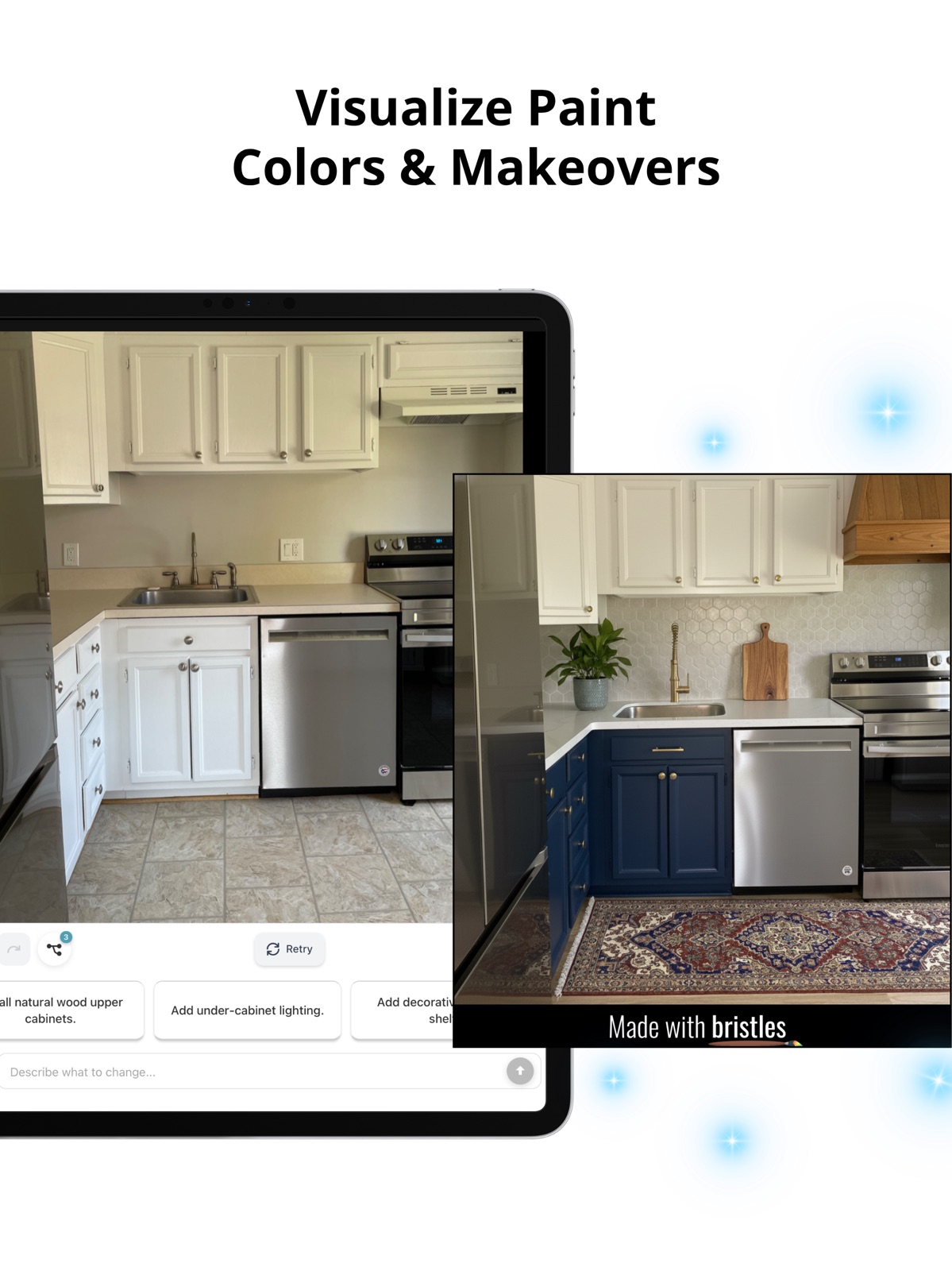


Pricing & paywalls
App Store
- Free to download
- In-app purchases
Ratings & reviews
App Store
-
5/5Professional Furniture Flipper
I’m a professional furniture flipper that found this app during its beta phase. I was more than happy that there was finally a program that fit my specific needs of redesigning furniture without having to learn various programs like photoshop or working around limitations on other programs— or worse, having to hand draw my designs. Since finding this app, I’m able to plan out every furniture flip before getting started so I can visualize my design as well as show clients different options for redesigning their own furniture. I’m able to easily swap out hardware, change the paint color with accuracy due to their color dropper feature from, and add in various design elements within minutes. One of its most unique features is being able to use AI to offer ideas for furniture flips or room redesigns. This is especially helpful when I’m feeling stuck on a design direction. I honestly couldn’t flip furniture as efficiently as I do without this app.
User2748272 · 31 Jul 2026
-
5/5MUST HAVE app for all furniture flippers!!!
I flip furniture as a hobby and I work with clients a lot. This app is perfect for helping me work through different designs to see what I like best as well as for mocking up designs for clients! I’ve found that clients can’t always imagine things in their head so this gives them the ease and comfort of knowing what they’re getting and it comforts me to know they like it before I’ve even created it!! I’ve been using this app back when it was just a web browser version and it just keeps getting better and better! The developers are constantly putting out new and improved features that I never even thought about having but make my life easier. They are great at implementing feedback, responding to questions and I am so impressed with this app’s abilities. In my opinion it is pretty intuitive, there was a learning curve at first like most design apps. But take the time to learn and play with it! I promise you will not regret it!!
monkey_hm99 · 31 Jul 2026
-
5/5New Updates to the App are amazing!
I’ve been using bristles as a furniture artist for a few years now and it has really helped not only with mock ups for commissioned pieces and sharing with clients, but also for seeing through my ideas before starting and staging before taking photos. I opted to leave a review because the newest update to the app unlocked so many new and helpful features I couldn’t keep my thoughts to myself. I became a brand ambassador overnight. There is now an undo button which saves so much time. I also do a lot of negative space design and the tape tool where you can either add or remove paint on specific layers really helps take my designs to the next level! The update also has paint suggestions and even a tool to help curate designs using ai if you want. I couldn’t imagine a better app for furniture design! Round of applause Bristles. You deserve an ovation!
Works great so far · 31 Jul 2026
-
5/5Game Changer
Bristles is a game changer! I use this app to dream up designs for future furniture pieces to refinish. It has saved so much time on decision-making when it comes to how a piece will be refinished. I can upload a client’s piece of furniture, digitally refinish it in Bristles and then send to my client so they can see what their piece will look like once completed. They are always adding new features to make it even more precise. You can even let AI design your furniture or room for you! 10/10 recommend!
ahughes0627 · 31 Jul 2026
-
3/5Has potential
This app has great potential and is a highly sought product for furniture refinishers. Its a bit pricey though so I think the features need to be flushed out better to command this price point. I am testing it out with the 7 day trial. The AI generator has not worked for me despite trying numerous pieces of furniture, I get no results. The taping is a bit cumbersome and could use an offset so you can see where the points are getting set. Some of the tool names are not very intuitive and work clumsily. I cant find where to delete a project. Working on layers is not at all what I would expect. There is a lot of guessing on the part of the user as to how to get this to work. An AI background remover would be great. Id love to QA this app for a free subscription.
Julesxxooo · 31 Jul 2026
Privacy & accessibility
App Store
Privacy
- Data Linked to You — Analytics — Diagnostics — Crash Data Developer declared
- Data Linked to You — Analytics — Identifiers — User ID Developer declared
- Data Linked to You — Analytics — Usage Data — Product Interaction Developer declared
- Data Linked to You — App Functionality — Contact Info — Email Address Developer declared
- Data Linked to You — App Functionality — Identifiers — User ID Developer declared
- Data Linked to You — Developer’s Advertising or Marketing — Contact Info — Email Address Developer declared
- Data Linked to You — Developer’s Advertising or Marketing — Identifiers — User ID Developer declared
- Data Linked to You — Developer’s Advertising or Marketing — Usage Data — Product Interaction Developer declared
- Data Linked to You — Product Personalization — Diagnostics — Crash Data Developer declared
- Data Linked to You — Product Personalization — Identifiers — User ID Developer declared
- Data Linked to You — Third-Party Advertising — Identifiers — User ID Developer declared
- Data Linked to You — Contact Info Developer declared
- Data Linked to You — Diagnostics Developer declared
- Data Linked to You — Identifiers Developer declared
- Data Linked to You — Usage Data Developer declared
- Data Not Linked to You — Analytics — Diagnostics — Performance Data Developer declared
- Data Not Linked to You — App Functionality — User Content — Photos or Videos Developer declared
- Data Not Linked to You — Diagnostics Developer declared
- Data Not Linked to You — User Content Developer declared
- Data Used to Track You — Identifiers — User ID Developer declared
- Data Used to Track You — Identifiers Developer declared
- Data Used to Track You — Usage Data — Product Interaction Developer declared
- Data Used to Track You — Usage Data Developer declared
Accessibility
No accessibility labels collected yet.
Versions
App Store
- 1.0
-
1.0.1
-Updated tutorial videos & "Learn" feed functionality -Enhanced AI idea generator for furniture & interiors -Enhanced AI edge guard and brush control -Enhanced AI eraser -Enhanced app performance
-
1.0.2
-Performance improvements based on user feedback -New backgrounds for furniture staging
-
1.0.3
Faster AI features: our idea generator received a turbo boost and major tune-up based on the most popular furniture refinishing and kitchen DIY trends. Generate better designs 10x faster than before. Smarter paint: We enhanced the color accuracy of paint colors. Add any paint color from a photo using our color dropper feature! Unlimited projects: for all our super users that reached the project limit, you’ll now enjoy unlimited projects! No more deleting projects to make room for new ones. The sky is the limit! Tech Maintenance: Resolved cold boot issues, fixed bugs related to the virtual paintbrush, smart eraser, and deleting assets.
-
1.0.4
You requested AI filters for color and woodgrain and we listened. It's here!! You'll now have the creative control to filter generated design ideas by color and/or woodgrain! AND you can write your own custom design prompts. Want to see a pair of nightstands refinished in a warm oak woodgrain? Snap a pic, type that in, and keep tapping that generate button to see different variations! Want to see your home office redesigned featuring stripes and burgundy? Just snap a pic, and type in "a designer striped burgundy office" Check it out! We can't wait to hear what you think!! Want to request a new feature? We would love your feedback! Please email us at [email protected] any time :)
-
1.0.6
This version includes updates to the AI idea generator. Write a custom prompt or use our AI filters and then keep tapping the generate button to create as many variations as you'd like. Tap "start project" to customize any generated idea with our smart eraser, painting tools, and hardware options. Or add your own hardware from photos! Bookmark generated ideas to access them from the add assets menu. Want to request a feature or ask a question? Email us any time at [email protected]. We'd love to hear from you!
-
1.0.7
Have you tried our new feature to write custom design prompts? We've made it better and completely revamped our paint color library! "How can I buy this color?" is one of the most common questions we're asked. Now our library of colors is shoppable! We've also added a custom color maker with adjustment sliders and a hex code field so you can adjust any color you add from a photo to your liking. Add multiple colors all at once and switch between colors easily once you've painted on your layer. Check it out and let us know what you think!! :)
-
1.0.8
Have you tried our new AI idea generator with custom prompting and filters? This update includes major upgrades to generated designs including a new category for upcycling lamps, light fixtures, vases - any decor item or furniture you find that doesn't fit into the pre-set categories. We've updated the in-app quick start guide to help you get to know how all the new features work together. We hope you enjoy the updates! Do you have a question or feature request? Email us at [email protected]. We'd love to hear from you!
-
1.0.9
Check out the new paint features! It’s easier than ever to paint your furniture or spaces. Try out our new auto paint features to help you paint specific areas like drawers, objects, walls, or details like baseboard! Use our magic eraser to remove old hardware from furniture you’re redesigning or use it to remove builder-grade fixtures you want to replace. Add any product from a photo (from new hardware to new light fixtures and more) to your furniture or space using autoselect. If you need inspiration, check out the AI idea generator to build your own personalized idea feed for your unique pieces and spaces. Lastly, the highly requested undo and redo buttons are now available in the paint menu! We hope you enjoy the app updates. If you have any questions or feature requests, please reach out to us at [email protected]. We’d love to hear from you!
-
1.1.0
We made it easier to paint in as many colors as you'd like! Add unlimited paint colors and wood stains to your projects and swap out colors easily to compare options. We also added zoom to Shape mode so you can edit with ultimate precision. Our AI paint features are 3x faster and more user-friendly with this latest app update. Thanks to our amazing app users who took the time to send in feedback. The Bristles AI app continues to improve because of you. If you have app feedback for us, please reach out to us any time at [email protected]!
-
1.1.1
AI primer is here and it's integrated into every paint layer! That means ultra-smooth finishes when you try different paint colors on textured surfaces like woodgrain. Our new AI paint features make it really easy to paint specified areas like a drawer or the base of a piece. Add multiple layers to try different combinations of paint colors and stains. Need inspiration? Generate unlimited AI designs for your projects. Just tap the "generate a new idea" button to create as many designs as you'd like - the sky's the limit. If you have any questions about our new features, please email us at [email protected]. We're always here and happy to help!
-
3.0.0
· 19 Nov 2025
Bristles 3.0 is here! We’ve added more ways to control, customize, and share your designs • Step-by-step AI design to adjust one detail at a time with full version control • Design timelapse exports that turn your creative process into shareable videos • Auto object extraction from photos and screenshots to turn images of products into flexible design elements • All new features work together with existing features for our most powerful design experience yet
Alternatives
- Renovate AI - Home Remodel App — Same category + similar ratings
- AI Garden Design: Landscape AI — Same category + similar ratings
Availability by market
- US
Data quality & evidence
- Page completeness
- Live store listing
- Last verified
- 31 Jul 2026
- Sources
- App Store
- Independent summary has not been published yet.