
Quick verdict
- What it is
- Store information collected; independent summary not yet available.
- At a glance
-
- $19.99
Categories and search queries
Official categories
- Sports
AppCorpus categories
Key functions
| Function | Availability | Access | Scope | Evidence |
|---|---|---|---|---|
| Family Sharing | Yes | Unknown | App Store | Store published |
Screens
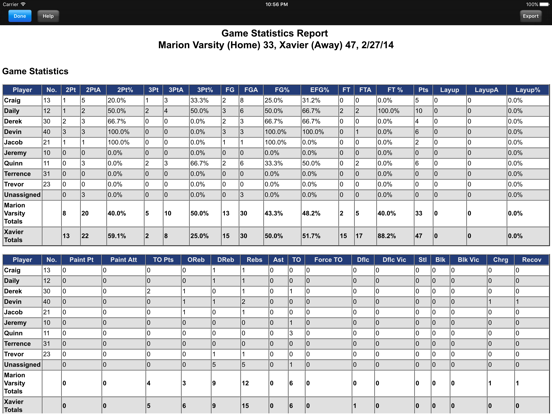
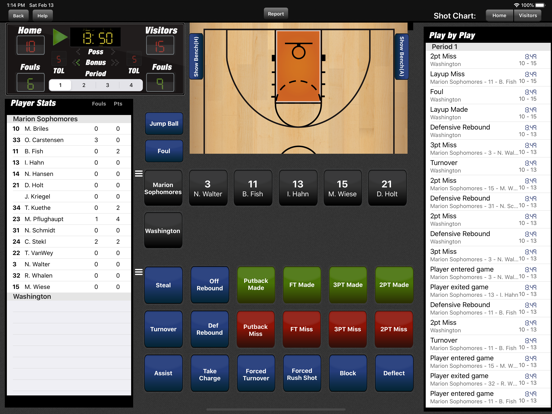
App Store
5 store screenshots


Pricing & paywalls
App Store
Shown for US
- Price: $19.99
Ratings & reviews
App Store
Shown for US
-
5/5Great App! Support Team is helpful as well!
I had what I considered a bug with the app awhile back and the support team contacted me and got a fix out for it soon after. Can’t say enough good things about the app. My only request would be, maybe adding a multi-game deletion in the seasons/games tab. I generally have a lot of games from various tournaments and it takes a large amount of time to go in and delete each game individually. Maybe there is an option for this already, but I have not been able to find it if there is. Thanks for such a wonderful app 🔥🔥🔥
Philosophy92 · 7 Aug 2026
-
4/5Decent, but not perfect
Having used EasyStats for some time, I appreciated some of the advanced stats and features that have been built into this app. For example, tracking steals as turnovers with one click is logical, but doesn’t exist in some other stats apps. Additionally, having some of the advanced stats is fantastic and could be a game changer if a few things were improved with the app overall. I have two complaints, one somewhat minor and one that may limit my use of this app: The minor gripe is that the clock doesn’t allow me to type in a time to change the time. Having to scroll through, especially since the numbers do not roll over (e.g. when going from :01 to :59, I would either have to scroll through all the numbers or play the clock to go down a few seconds) is a time consuming thing in the middle of quick action. If I were perfect at keeping in sync with the clock operator, it wouldn’t be an issue. But I often have to make updates to the times in order for the game flow to display properly. The issue that may keep me from using the app is that there’s no mechanism for syncing between devices. Enabling either a cloud-based sync ability (most ideal) or some way to export/import seasons, teams, and stats between devices would make this app significantly more useful to me. I find that I do live stats on one iPad, film on another iPad, and review the stats on the go on my phone. Other apps support this, and I’ve come to rely on it in my coaching workflows. This app has so much potential; I hope the developers keep improving it and that it becomes something that can be my primary stats app
Techball18 · 7 Aug 2026
-
4/5Tracks a lot of data...
This is an updated review given developer feedback. Over the past few weeks, I have used several basketball data tracking apps and this one definitely tracks the most statistics. Setting things up takes a little practice (not quite as intuitive as some of the other apps I have used in that you need to set up not only your team, but also an opposing team). The one thing that I was not thrilled about was the requirement to register the app in order to see the reports. (At the time, I did not have internet access, so I was not able to review my data after the game. They also had a server problem that would not allow me to register the app, which has since been fixed.) This app costs about twice as much as the other one I was using. It does track more data, but I am not yet sure if the premium was worth it. Time will tell...
FFWest326 · 7 Aug 2026
-
2/5Way too much info
I have to admit, this looks like an awesome app but holy cow, it is very difficult to keep up in a game situation. Trying to keep track of the clock, substitutions, shots, misses, rebounds, fouls and then back to the clock. It was really hard. I understand you can turn the game clock on and off and if I use the app again (and that is a big if), I am going to turn the game clock off as that really isnt important to me but what really is hard is just keeping track of who is in and who is out, especially when there are multiple substitutions on both teams. I think it would be good if we just had a roster of the team and could click on any of the players instead of trying to keep track of who is in or out. Ended up creating a spreadsheet that I think I will probably utilize more than I can use this program which is disappointing considering I spent 20 bucks on the app.
photomedic4321 · 7 Aug 2026
-
2/5Disappointed
I hope this gets better quick. Just started to enter my team and the data entry screen is poorly executed. It was so bad I had to start my review before really digging in further. Here’s my issues so far: There’s no option to continue adding players without going back out to the main screen (free programs offer this); Height entry doesn’t allow you to enter feet-inches. It appears to be in inches? centimeters? Who enters height this way? What about an option to enter grade/class or age level? Maybe it gets better from here? Update1: Continued frustration. Everything is so compartmentalized, that you can only enter data one way. If I want to start a game, but don’t have that team entered I can’t just enter it in the game screen, I have to back out to the games/league screen. Same thing for adding a league. Appreciate the quick feedback from the developer.
rgriffith1 · 7 Aug 2026
Privacy & accessibility
App Store
Privacy
- Data Linked to You — App Functionality — Diagnostics — Other Diagnostic Data Developer declared
- Data Linked to You — Developer’s Advertising or Marketing — Contact Info — Email Address Developer declared
- Data Linked to You — Developer’s Advertising or Marketing — Contact Info — Name Developer declared
- Data Linked to You — Developer’s Advertising or Marketing — Other Data — Other Data Types Developer declared
- Data Linked to You — Contact Info Developer declared
- Data Linked to You — Diagnostics Developer declared
- Data Linked to You — Other Data Developer declared
Accessibility
No accessibility labels collected yet.
Versions
App Store
-
2.4.1
Updated description
-
2.5.0
The subbing panel is now sorted by the Setting in Team Game Rules "On Court Player Sort Order". Corrected Effective Field Goal % when a Put Back was involved.
-
2.6.0
Bug Fixes
-
2.6.1
Bug Fixes
-
2.6.2
Fixed issue where the turnover types list and foul types list was empty.
-
2.6.4
Fixed issue where shot chart wasn't displayed correctly on the iPhone XS Max.
-
2.6.5
Fixed missing report button on Track Stats screen
-
2.6.6
Fixes Shot Chart Report on iPhone X/XR
-
2.7.1
- Dark mode issues were fixed. - Increased size of substitution arrows on iPhone
-
2.7.2
Fixed issue when editing an event caused a crash
-
2.7.3
- Fixed iPad Pro 11 layout issues
-
2.7.4
- Fixed reporting issue where minutes played in Overtime was incorrect - Fixed layout issues for iPad Pro 10.5"
-
2.7.5
- Shot chart and shot zones reports sometimes excluded players that had been in the game. For multi-game shot chart and shot zone reports, it also sometimes included players that didn't appear in the games. - Away player numbers didn't appear correctly in the substitution panel. - Fixed color issues due to changes in iOS15. - Track Stats Bench (iPhone) Sub Player header overlaps player name
-
2.7.6
Fixed issue where Track Stats Button was not appearing for the iPad Mini (6th Generation)
-
2.7.7
Fixed layout issues for the iPad Mini 6th generation
-
2.7.8
- Fixed Dark Mode issues - Fixed layout issues for iPadPro - Fixed layout issues for Reports
-
2.7.9
- Fixes issue where Reports crashed for iOS 12
-
3.0.0
Added the Share function to all Reports. This will allow users to Print directly from the app as well as allowing AirDrop, Mail, Messaging and Save.
-
3.0.1
Fixed issues where reports were not being shared
-
3.0.2
Updated minimum version of iOS
-
3.0.3
Added email option for reports
-
3.0.4
Added logging for some users that cannot export reports
-
3.0.5
Fixed issue where users couldn't email reports due to slash in team name
-
3.0.6
Fixed reporting issue with sharing Shot Chart and Shot Zone report
-
3.0.7
· 18 Mar 2025
- Fixed issue where blank page is added at the end of reports - Fixed issue where Track Stats button was not displayed
Alternatives
- iScout Basketball — Same category + similar ratings
- Stats Tracker for Basketball — Same category + similar ratings
Availability by market
- US
Data quality & evidence
- Page completeness
- Live store listing
- Last verified
- 7 Aug 2026
- Sources
- App Store
- Independent summary has not been published yet.