
Quick verdict
- What it is
- Store information collected; an Apoku editorial summary is not yet published.
- At a glance
-
- Free to download
Categories and search queries
Official categories
- Medical
- Health & Fitness
Apoku categories
Key functions
| Function | Availability | Access | Scope | Evidence |
|---|---|---|---|---|
| Free app | Yes | Free | Context-specific | Store published |
Screens
App Store
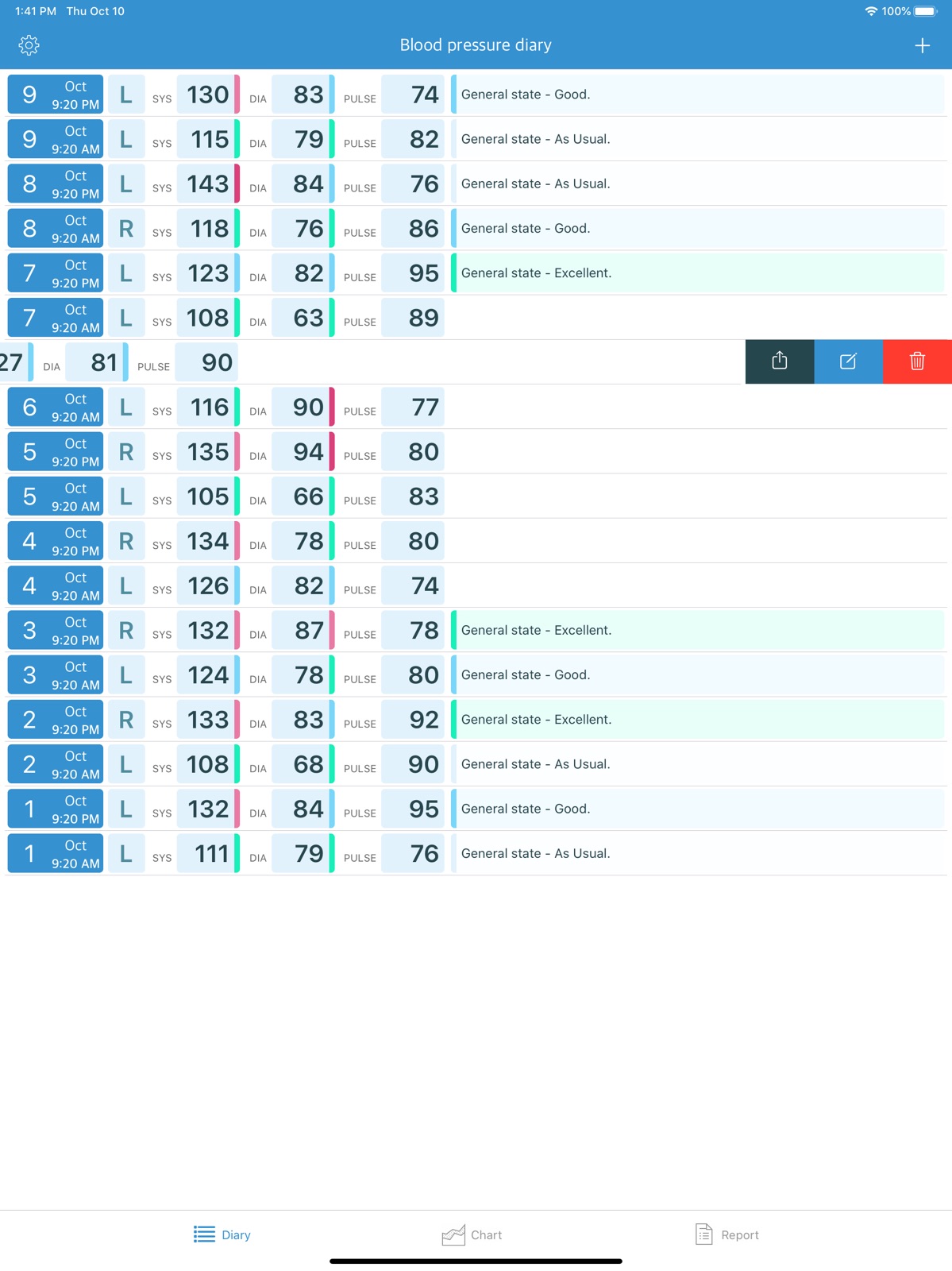
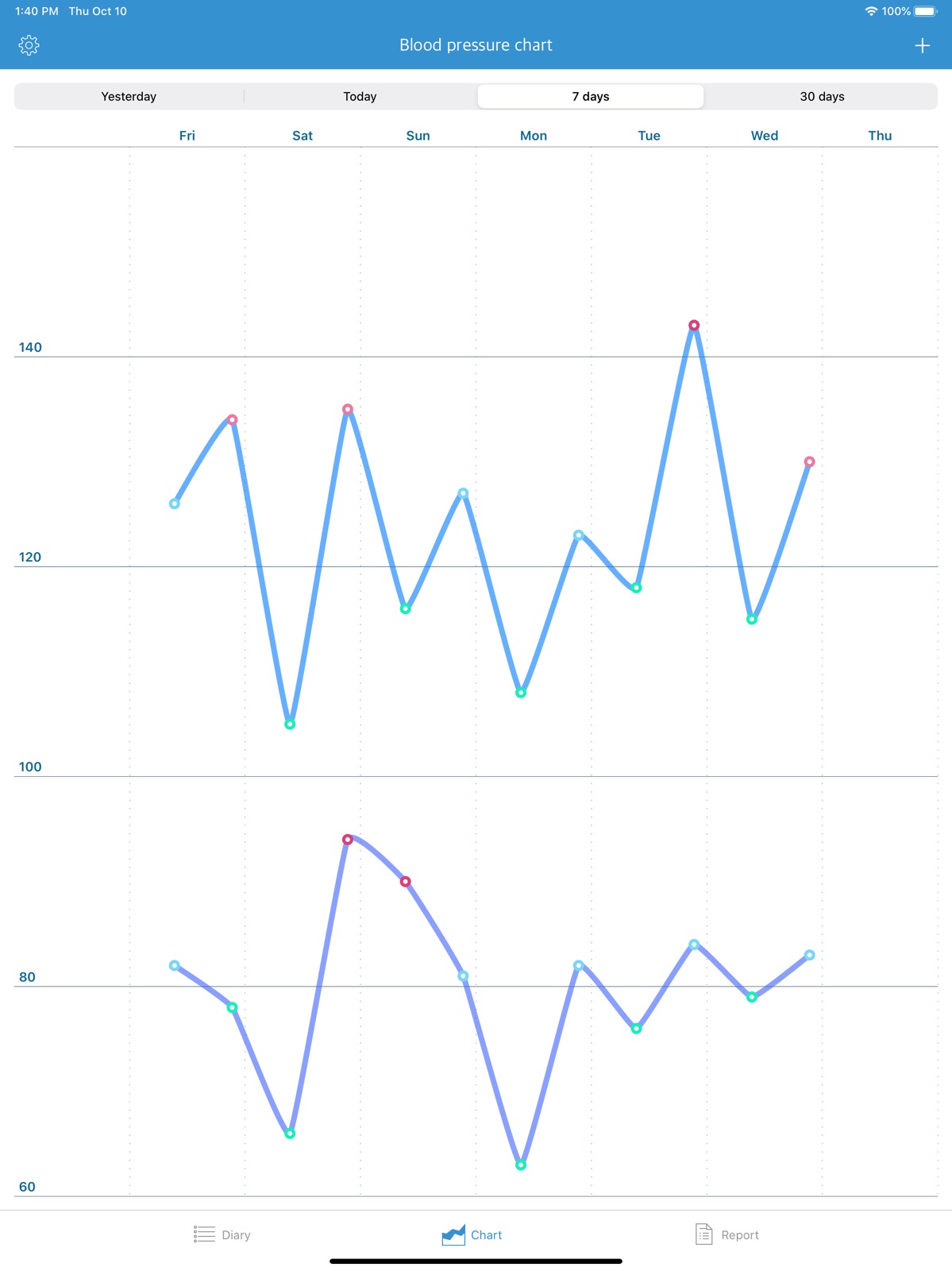
9 store screenshots


Pricing & paywalls
App Store
- Free to download
Ratings & reviews
App Store
-
5/5Honest Review
When I initially installed this app a few months ago, the information about the app specifically stated that no data of the user was collected. I’ve been so pleased with its performance that I today decided to do a review, although I rarely review any apps. I was dismayed to see that now the information about the app reflects that the developer has not advised Apple regarding the user data collected — I’m guessing this changed with the update a while ago. I have found this app extremely helpful and would be happy to pay a nominal fee to use it, but unless it is soon reported to Apple that no data of the user is collected, I will have to delete the app. (This would have been a five star rating before I discovered that data might at present be collected from my phone by the developer.)
Amazed and impressed 55 · 31 Jul 2026
-
2/5Good for only a month, no privacy
Like many I like the interface of this app, it’s the easiest to record my BP. After recording BP for 2 months, I tried to pull the data. You can’t, it will only share the last 30-days. So everything older than a month is locked in the App. Since it does not connect to the Health App, I can’t get the data that way either. Worse for me, since the app was easy, I used it as a log for my symptoms and other health data. No updates for over a year, no privacy disclosure in the App Store. Besides name and BP, the app collects this Usage Data: When you access the Application by or through a mobile device, we may collect certain information automatically, including, but not limited to, the type of mobile device you use, your mobile device unique ID, the IP address of your mobile device, your mobile operating system, the type of mobile Internet browser you use, unique device identifiers and other diagnostic data ("Usage Data").
OZisKTB · 31 Jul 2026
-
4/5Fantastic UI, but needs better history and syncing
The BPDiary app has a beautifully clean, simple user interface. The data entry form is highly intuitive, the tabular data is incredibly readable, and the chart capability is a fantastic visual aid. It makes accessing past data effortless. After using the app for a while, I have a few constructive suggestions and bug reports that would make this a five-star tool for families: • Chart Bugs & Enhancements: Currently, multiple measurements taken on the same day do not register on the chart, even when viewing the single-day view. Additionally, because we take readings infrequently (sometimes missing a month), it would be incredibly helpful to have chart tabs for longer timeframes—like a quarter, half-year, full year, or all-time. Once on a chart tab, the ability to scroll left to intuitively look back through historical data would be a game-changer. • Simple Multi-User Tracking: We need to track blood pressure for multiple family members on a single device. Since one person handles all the data entry, a simple profile selection or "User Tag" on the input form would be perfect. • iCloud Syncing: Our family alternates between using an iPhone and an iPad to log data. Auto-syncing the database via an iCloud folder would ensure that opening the app on either device instantly reflects the most recent measurements. • Data Portability (Import/Export): Any app managing critical health history should allow users to own their data. Adding a CSV import/export feature would let us back up our raw data and seamlessly migrate historical readings from older apps. Thank you for a great utility. I look forward to seeing how it evolves!
Sumner3 · 31 Jul 2026
-
5/5Don’t Change a Thing!
The app is free, it’s simple to use, and it has a nice chart visualization and data export feature. I was using another app that destroyed the user experience with a terrible update. This does exactly what an app like this should do. The only thing I’d even consider changing is how long data is logged for. I see 30 days as the largest timeframe when looking at the report feature. I’ve only started using the app, but should I export my data every month or will it show >30 once that much data has been logged?
Brandon.* · 31 Jul 2026
-
4/5Great, simple app, but could use a couple of items.
The app is absolutely great at what it does, however it would be useful for another section of data for placing blood pressure monitor type so it is easily documented on the sheet. I just place it in parenthesis next to my name, but would be nicer if it was its own line of info. For your birthday, it would be great to put your whole birth date as opposed to just the year. If you are born at the end of the year, and reading this at the beginning of the year, the age will be incorrect until your birth date. Sure, I can adjust it to the year after, but then that’s an extra step I have to think about to place my age as data.
Great app! (Add more?) · 31 Jul 2026
Privacy & accessibility
App Store
Privacy
- Data Not Linked to You — Analytics — Diagnostics — Crash Data Developer declared
- Data Not Linked to You — Analytics — Identifiers — Device ID Developer declared
- Data Not Linked to You — Analytics — Usage Data — Product Interaction Developer declared
- Data Not Linked to You — App Functionality — Diagnostics — Crash Data Developer declared
- Data Not Linked to You — App Functionality — Usage Data — Product Interaction Developer declared
- Data Not Linked to You — Diagnostics Developer declared
- Data Not Linked to You — Identifiers Developer declared
- Data Not Linked to You — Usage Data Developer declared
Accessibility
No accessibility labels collected yet.
Versions
App Store
-
1.10.3
A dark theme is now available. Minor bugs have been fixed.
-
1.10.4
Fixed a note input issue on iPad with iOS 26. Other minor improvements and fixes.
-
1.10.5
· 12 Feb 2026
Fixed incorrect color display for blood pressure readings. Other minor bug fixes.
- 1.2.0
-
1.3
● Use 3D Touch for fast access to "Add new record" menu ● Important blood pressure levels are highlighted in colour ● Export to PDF for iOS 10 ● Fixed minor bugs, realized some improvements
-
1.4
● Added notifications. You won't forget about daily pressure measurements if you set up reminders in the "Params" form. ● Changed "New record" form. ● New fields "General state" and "Note". You can save additional information about your health. ● Since this version, you can edit previously saved records.
-
1.5
Bug fixes and minor improvements.
-
1.6
Minor bug fixes
-
1.6.1
Bug fixes.
-
1.6.2
Bug fixes.
-
1.7
Now you can specify the arm on which blood pressure was checked. Additional information is available on the diary screen for iPad or iPhone in landscape orientation, such as Pulse, Arm, General Health State, Note. Preview mode for diary's records was added for iOS 13 iPhones. Other minor improvements and fixes.
-
1.7.1
Now you can specify the arm on which blood pressure was checked. Additional information is available on the diary screen for iPad or iPhone in landscape orientation, such as Pulse, Arm, General Health State, Note. Preview mode for diary's records was added for iOS 13 iPhones. Other minor improvements and fixes.
-
1.7.2
Bug fixes for iPad
-
1.8
• The color coding of blood pressure levels was changed. • The application now supports both American and European blood pressure classification. You can switch the blood pressure classification in the application settings. • Bug fixes and minor improvements.
-
1.8.1
• The color coding of blood pressure levels was changed. • The application now supports both American and European blood pressure classification. You can switch the blood pressure classification in the application settings. • Bug fixes and minor improvements. • Fix problem with iOS 10.
-
1.9
Changes in the report: • added mean arterial pressure field • added blood pressure chart Bug fixes.
-
1.9.1
Bug fixes.
-
1.9.2
• For iOS 14 date/time pickers were returned to the old visual style • Bug fixes
-
1.9.4
Improved compatibility with new iOS versions and updated the app design.
Alternatives
- Blood Pressure Tracker SmartBP — Same category + similar ratings
Availability by market
- US
Data quality & evidence
- Page completeness
- Live store listing
- Last verified
- 31 Jul 2026
- Sources
- App Store
- Apoku editorial summary has not been published yet.