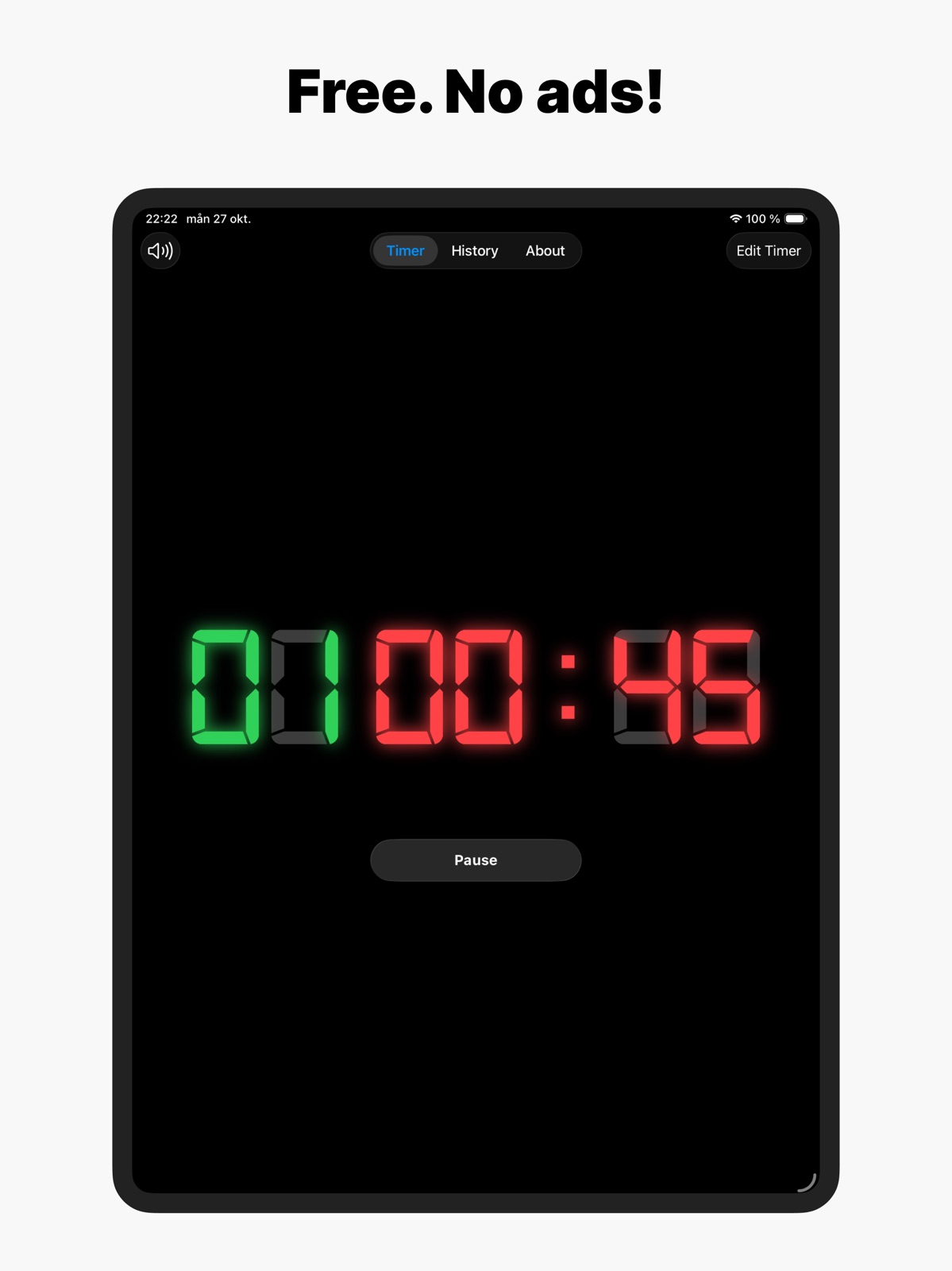
Apoku MCP provides app discovery, detailed cards, evidence, sources and screenshots where available. Unknown or conflicting prices stay explicit.
View JSON
GET /api/v3/apps/1547518531
{
  "app_id": 1547518531,
  "canonical_url": "https://appcorpus.com/apps/box-timer-simple-wod-clock-1547518531",
  "identity": {
    "name": "Box Timer - Simple WOD Clock",
    "slug": "box-timer-simple-wod-clock",
    "developer": {
      "name": "Edvin Linden",
      "url": "https://appcorpus.com/developers/edvin-linden-developer_6ec430e5f20089a49d09a61fe61b1b39"
    },
    "icon_url": "https://is1-ssl.mzstatic.com/image/thumb/Purple211/v4/d0/ee/3b/d0ee3b43-622a-3142-c0c4-21cb9b446a49/BoxTimerAppIcon-0-0-1x_U007epad-0-1-0-sRGB-85-220.png/512x512bb.jpg",
    "stores": [
      "apple"
    ],
    "platforms": [
      "iphone",
      "ipad"
    ],
    "status": {
      "state": "active",
      "label": "Active",
      "last_checked": "2026-08-06",
      "last_checked_label": "6 Aug 2026",
      "banner": null,
      "region_note": null,
      "data_state": "stale",
      "data_state_label": "Some store data may be out of date"
    }
  },
  "listings": [
    {
      "store": "apple",
      "status": "ACTIVE",
      "url": "https://apps.apple.com/us/app/box-timer-simple-wod-clock/id1547518531?uo=4",
      "rating": 4.9,
      "rating_count": 2794,
      "formatted_price": "Free",
      "is_free": true,
      "has_iap": false,
      "has_subscription": null,
      "version": "2026.08.02",
      "updated": "2026-08-06",
      "currency": "USD"
    }
  ],
  "summary": {
    "one_liner": null,
    "summary": null,
    "best_for": [],
    "not_for": [],
    "status": "fallback",
    "at_a_glance": [
      "Free to download"
    ]
  },
  "categories": {
    "official": [
      "Health & Fitness",
      "Utilities"
    ],
    "appcorpus": [
      {
        "category_id": "health-fitness",
        "label": "Health & fitness",
        "url": "https://appcorpus.com/categories/health-fitness"
      },
      {
        "category_id": "utilities",
        "label": "Utilities",
        "url": "https://appcorpus.com/categories/utilities"
      }
    ]
  },
  "use_cases": [],
  "features": [
    {
      "capability_id": "free_app",
      "label": "Free app",
      "availability": "yes",
      "access_level": "free",
      "scope": null,
      "evidence": "Store published"
    }
  ],
  "pricing": [
    {
      "store": "apple",
      "formatted_price": "Free",
      "is_free": true,
      "has_iap": false,
      "has_subscription": null,
      "currency": "USD",
      "market": "de",
      "last_verified": "2026-08-06",
      "rows": [
        "Free to download"
      ],
      "state": "current"
    }
  ],
  "screens": [
    {
      "url": "https://is1-ssl.mzstatic.com/image/thumb/PurpleSource211/v4/db/b3/40/dbb3408c-176d-2128-c20f-7b85066e413b/iPad_-_1.png/1600x1600bb.jpg",
      "store": "apple",
      "platform": "ipad",
      "alt": "Box Timer - Simple WOD Clock ipad screenshot 1"
    },
    {
      "url": "https://is1-ssl.mzstatic.com/image/thumb/PurpleSource211/v4/db/b3/40/dbb3408c-176d-2128-c20f-7b85066e413b/iPad_-_1.png/360x480bb.jpg",
      "store": "apple",
      "platform": "ipad",
      "alt": "Box Timer - Simple WOD Clock ipad screenshot 2"
    },
    {
      "url": "https://is1-ssl.mzstatic.com/image/thumb/PurpleSource221/v4/bf/ce/a4/bfcea4d5-cee0-c1cf-95ff-cd2907f56e12/iPad_-_2.png/1600x1600bb.jpg",
      "store": "apple",
      "platform": "ipad",
      "alt": "Box Timer - Simple WOD Clock ipad screenshot 3"
    },
    {
      "url": "https://is1-ssl.mzstatic.com/image/thumb/PurpleSource221/v4/bf/ce/a4/bfcea4d5-cee0-c1cf-95ff-cd2907f56e12/iPad_-_2.png/360x480bb.jpg",
      "store": "apple",
      "platform": "ipad",
      "alt": "Box Timer - Simple WOD Clock ipad screenshot 4"
    },
    {
      "url": "https://is1-ssl.mzstatic.com/image/thumb/PurpleSource221/v4/0f/5f/4b/0f5f4bb0-44af-be22-5e35-481900d80a21/iPad_-_3.png/1600x1600bb.jpg",
      "store": "apple",
      "platform": "ipad",
      "alt": "Box Timer - Simple WOD Clock ipad screenshot 5"
    },
    {
      "url": "https://is1-ssl.mzstatic.com/image/thumb/PurpleSource221/v4/0f/5f/4b/0f5f4bb0-44af-be22-5e35-481900d80a21/iPad_-_3.png/360x480bb.jpg",
      "store": "apple",
      "platform": "ipad",
      "alt": "Box Timer - Simple WOD Clock ipad screenshot 6"
    },
    {
      "url": "https://is1-ssl.mzstatic.com/image/thumb/PurpleSource211/v4/08/75/e3/0875e35a-7d8d-f06b-c863-df95d2b531b9/iPad_-_4.png/1600x1600bb.jpg",
      "store": "apple",
      "platform": "ipad",
      "alt": "Box Timer - Simple WOD Clock ipad screenshot 7"
    },
    {
      "url": "https://is1-ssl.mzstatic.com/image/thumb/PurpleSource211/v4/08/75/e3/0875e35a-7d8d-f06b-c863-df95d2b531b9/iPad_-_4.png/360x480bb.jpg",
      "store": "apple",
      "platform": "ipad",
      "alt": "Box Timer - Simple WOD Clock ipad screenshot 8"
    },
    {
      "url": "https://is1-ssl.mzstatic.com/image/thumb/PurpleSource211/v4/dc/61/ee/dc61ee03-93df-b6c7-3d62-43e5e2106a83/iPad_-_5.png/1600x1600bb.jpg",
      "store": "apple",
      "platform": "ipad",
      "alt": "Box Timer - Simple WOD Clock ipad screenshot 9"
    },
    {
      "url": "https://is1-ssl.mzstatic.com/image/thumb/PurpleSource211/v4/dc/61/ee/dc61ee03-93df-b6c7-3d62-43e5e2106a83/iPad_-_5.png/360x480bb.jpg",
      "store": "apple",
      "platform": "ipad",
      "alt": "Box Timer - Simple WOD Clock ipad screenshot 10"
    },
    {
      "url": "https://is1-ssl.mzstatic.com/image/thumb/PurpleSource221/v4/41/0d/96/410d9665-cf0e-f0a4-316c-bbac2e0b5a47/Property_1_U003diPhone_6.5_U002c_Property_2_U003diPhone_6.5_-_1.png/1290x1600bb.jpg",
      "store": "apple",
      "platform": "iphone",
      "alt": "Box Timer - Simple WOD Clock iphone screenshot 11"
    },
    {
      "url": "https://is1-ssl.mzstatic.com/image/thumb/PurpleSource211/v4/bd/73/ff/bd73ffc7-d537-3023-5e40-60218dae024b/Property_1_U003diPhone_6.5_U002c_Property_2_U003diPhone_6.5_-_2.png/1290x1600bb.jpg",
      "store": "apple",
      "platform": "iphone",
      "alt": "Box Timer - Simple WOD Clock iphone screenshot 12"
    },
    {
      "url": "https://is1-ssl.mzstatic.com/image/thumb/PurpleSource221/v4/b9/4f/47/b94f47fa-0050-f594-a6d2-e50e73b6ec7c/Property_1_U003diPhone_6.5_U002c_Property_2_U003diPhone_6.5_-_3.png/1290x1600bb.jpg",
      "store": "apple",
      "platform": "iphone",
      "alt": "Box Timer - Simple WOD Clock iphone screenshot 13"
    },
    {
      "url": "https://is1-ssl.mzstatic.com/image/thumb/PurpleSource221/v4/b4/04/53/b404539d-f09d-5cf5-4188-99f6956c3318/Property_1_U003diPhone_6.5_U002c_Property_2_U003diPhone_6.5_-_4.png/1290x1600bb.jpg",
      "store": "apple",
      "platform": "iphone",
      "alt": "Box Timer - Simple WOD Clock iphone screenshot 14"
    },
    {
      "url": "https://is1-ssl.mzstatic.com/image/thumb/PurpleSource211/v4/61/28/64/61286497-8820-6781-c857-cca5fe77b9df/Property_1_U003diPhone_6.5_U002c_Property_2_U003diPhone_6.5_-_5.png/1290x1600bb.jpg",
      "store": "apple",
      "platform": "iphone",
      "alt": "Box Timer - Simple WOD Clock iphone screenshot 15"
    },
    {
      "url": "https://is1-ssl.mzstatic.com/image/thumb/PurpleSource221/v4/cc/f3/89/ccf3890b-2acd-d6c4-cbf1-c6682df844b1/Property_1_U003diPhone_6.5_U002c_Property_2_U003diPhone_6.5_-_6.png/1290x1600bb.jpg",
      "store": "apple",
      "platform": "iphone",
      "alt": "Box Timer - Simple WOD Clock iphone screenshot 16"
    }
  ],
  "data_states": {
    "screens": "current"
  },
  "ratings": [
    {
      "store": "apple",
      "average": 4.9,
      "count": 2794,
      "market": "de",
      "observed_at": "2026-08-06",
      "state": "current",
      "reviews": [
        {
          "rating": 5,
          "title": "Just what I needed and nothing more",
          "body": "I spent hours looking for and trying gym timer apps. Something simple to replace a physical gym clock. Simple stuff, intervals, countdown, up/down timers… the basics… Everything I downloaded had so many features that they were almost unusable. Or simple features (like saving a workout) required payment. Box Timer on the other hand had all the normal features found on a physical gym timer, without any of the unnecessary bloat. Almost like the developer actually goes to a gym and has actually seen a gym timer. Best of all, totally FREE.",
          "author": "J@varican",
          "date": "6 Aug 2026"
        },
        {
          "rating": 5,
          "title": "Simply perfect",
          "body": "For a free app, this is just about perfect! I like the interface, it is simple and resembles what I am used to in the box. No flashy lights, just simple and it works. Two features that would be nice: 1. Something to tap on that counts the number of rounds completed during AMRAPs. So when I’m done with a round I can tap on it to signal that I completed a round. 2. Apple Watch app support, not sure how difficult that would be.",
          "author": "b.jbk",
          "date": "6 Aug 2026"
        },
        {
          "rating": 4,
          "title": "Nice and simple, but has silly bugs",
          "body": "The app is nice and simple and almost perfect, but could use just a tiny bit more UI polish. Specifically, for some inexplicable reason the timer interval setting screen doesn't use the normal Apple time scroller (as seen in the clock app when setting an alarm). Instead it uses a drop-down list with options labeled \"1 second\" through \"59 seconds\". This list way too long and convulses when opened and scrolled, making it really hard to actually select a time.",
          "author": "greg.i",
          "date": "6 Aug 2026"
        },
        {
          "rating": 5,
          "title": "Perfect for home gym and or traveling",
          "body": "I travel weekly for work and was looking for a timer to support my workouts. I stumbled upon this a few years ago and simply forgot it amongst all the other apps I don’t use on a daily basis. About a month ago, I started cleaning up unused apps and found it. Now I use this daily. Thank you for continuing to support this app while others have stop supporting their apps.",
          "author": "Airborne Michael",
          "date": "6 Aug 2026"
        },
        {
          "rating": 5,
          "title": "Simple to use, no ads for now.",
          "body": "The timer is very easy to use, and just what I needed. The only thing more advanced I could think of is a different rest pause between sets of 4 or any other number, so you don’t have to restart the timer for a another exercises that has the same rest times besides a 2 minute rest between a full set.",
          "author": "badwaterdom",
          "date": "6 Aug 2026"
        }
      ]
    }
  ],
  "privacy": [
    {
      "store": "apple",
      "declarations": [
        {
          "title": "Data Not Linked to You",
          "detail": "Analytics — Identifiers — Device ID",
          "source": "Developer declared"
        },
        {
          "title": "Data Not Linked to You",
          "detail": "Analytics — Usage Data — Product Interaction",
          "source": "Developer declared"
        },
        {
          "title": "Data Not Linked to You",
          "detail": "Identifiers",
          "source": "Developer declared"
        },
        {
          "title": "Data Not Linked to You",
          "detail": "Usage Data",
          "source": "Developer declared"
        }
      ],
      "accessibility": [
        {
          "title": "Dark Interface",
          "detail": "SUPPORTED",
          "source": "Store published"
        },
        {
          "title": "Differentiate Without Color Alone",
          "detail": "SUPPORTED",
          "source": "Store published"
        },
        {
          "title": "Larger Text",
          "detail": "SUPPORTED",
          "source": "Store published"
        },
        {
          "title": "Sufficient Contrast",
          "detail": "SUPPORTED",
          "source": "Store published"
        },
        {
          "title": "VoiceOver",
          "detail": "SUPPORTED",
          "source": "Store published"
        }
      ]
    }
  ],
  "changes": [
    {
      "store": "apple",
      "version": "1.16",
      "released_at": null,
      "notes": "General improvements"
    },
    {
      "store": "apple",
      "version": "1.17",
      "released_at": null,
      "notes": "Fixed a bug that made the timer being displayed wrong when using larger text sizes in iOS."
    },
    {
      "store": "apple",
      "version": "2023.11.02",
      "released_at": null,
      "notes": "Updated the about screen to make it easier to navigate."
    },
    {
      "store": "apple",
      "version": "2023.11.03",
      "released_at": null,
      "notes": "Fixed a bug with the layout on iPhone Plus and iPad."
    },
    {
      "store": "apple",
      "version": "2023.11.04",
      "released_at": null,
      "notes": "You can now share Box Timer with your friends using a link to the App Store or a QR code."
    },
    {
      "store": "apple",
      "version": "2024.01.01",
      "released_at": null,
      "notes": "I've added a e-mail as a contact option for when you have a feature request or experienced a bug of some sort."
    },
    {
      "store": "apple",
      "version": "2024.05.01",
      "released_at": null,
      "notes": "I've added support guides that show you how to use the different timers in the app."
    },
    {
      "store": "apple",
      "version": "2024.05.02",
      "released_at": null,
      "notes": "Fixed a problem with the sound not playing on all devices"
    },
    {
      "store": "apple",
      "version": "2024.08.01",
      "released_at": null,
      "notes": "Fixed some minor bugs"
    },
    {
      "store": "apple",
      "version": "2024.10.02",
      "released_at": null,
      "notes": "Fixed a problem with settings not being displayed properly on iPad Mini."
    },
    {
      "store": "apple",
      "version": "2024.10.1",
      "released_at": null,
      "notes": "Fixed a problem with time being displayed wrong in some scenarios."
    },
    {
      "store": "apple",
      "version": "2024.12.01",
      "released_at": null,
      "notes": "Fixed a problem with the settings button disappearing when rotating the device. I've also added TelemetryDeck to collect anonymized usage data in order to make it easier to identify and fix problems like the one mentioned above."
    },
    {
      "store": "apple",
      "version": "2025.03.01",
      "released_at": null,
      "notes": "Minor technical improvements"
    },
    {
      "store": "apple",
      "version": "2025.10.01",
      "released_at": null,
      "notes": "Workout History Is Here! Every workout is now automatically saved. Tap any past session to instantly reuse your timer settings — no more manual setup. Perfect for repeating your favorite WODs, tracking consistency, or quickly jumping back into yesterday's workout."
    },
    {
      "store": "apple",
      "version": "2025.10.02",
      "released_at": null,
      "notes": "Fixed a bug with the beep sound not being played when the iPhone or iPad was on silent mode"
    },
    {
      "store": "apple",
      "version": "2025.10.03",
      "released_at": null,
      "notes": "New features - Pin a workout to the top in the history - Rename a workout in the history - Change sound volume Bug fixes - Fixed an issue with timer being too small on iPad - Fixed multiple issues related to the timer sound"
    },
    {
      "store": "apple",
      "version": "2025.11.01",
      "released_at": null,
      "notes": "- Added color themes in order to improve accessibility for users with color blindness or with screens where the glow is presented badly. - Fixed a bug that caused the timer to change settings when rotating the iPhone"
    },
    {
      "store": "apple",
      "version": "2025.12.01",
      "released_at": null,
      "notes": "Minor bugfixes"
    },
    {
      "store": "apple",
      "version": "2026.01.01",
      "released_at": null,
      "notes": "Starting the timer no longer stops music or other audio playing on your device."
    },
    {
      "store": "apple",
      "version": "2026.02.01",
      "released_at": null,
      "notes": "Updated information in the about view"
    }
  ],
  "alternatives": [
    {
      "app_id": 1317933303,
      "name": "SmartWOD Workout Generator",
      "url": "https://appcorpus.com/apps/smartwod-workout-generator-1317933303",
      "reason": "Same category + similar ratings"
    },
    {
      "app_id": 964854703,
      "name": "The WOD Generator: Workout",
      "url": "https://appcorpus.com/apps/the-wod-generator-workout-964854703",
      "reason": "Same category + similar ratings"
    },
    {
      "app_id": 825019869,
      "name": "CrossFit",
      "url": "https://appcorpus.com/apps/crossfit-825019869",
      "reason": "Same category + similar ratings"
    },
    {
      "app_id": 1567254101,
      "name": "TimerWOD - Workout Timer",
      "url": "https://appcorpus.com/apps/timerwod-workout-timer-1567254101",
      "reason": "Same category + similar ratings"
    }
  ],
  "evidence_summary": {
    "index_state": "S1",
    "evidence_level": 1,
    "level_label": "Live store listing",
    "indexable": true,
    "last_verified_at": "2026-08-06",
    "unknown_fields": [
      "Apoku editorial summary has not been published yet."
    ],
    "sources": [
      "App Store"
    ]
  },
  "availability_markets": {
    "live": [
      "us"
    ],
    "selected": "de",
    "note": "No LIVE observation for DE yet."
  },
  "feature_events": {
    "events": []
  },
  "features_slice": {
    "plans": [],
    "features": [],
    "unknown_features": [],
    "data_cutoff": "6 Aug 2026"
  }
}