
Quick verdict
- What it is
- Bookshelf is a digital textbook reader that allows users to access their VitalSource textbooks and study anywhere. It features offline reading, cross-device syncing, and accessibility features.
- Best for
-
- someone who uses VitalSource textbooks
- a student who wants to study on the go
- At a glance
-
- Free to download
Categories and search queries
Official categories
- Education
- Books
AppCorpus categories
People use this app to
Relevant searches
- download books for a flight
- ebook reader without streaming
- read offline on a commute
Key functions
| Function | Availability | Access | Scope | Evidence |
|---|---|---|---|---|
| Free app | Yes | Free | — | Store published |
| Offline reading | Yes | Free | — |
From listing
|
Screens
22 store screenshots


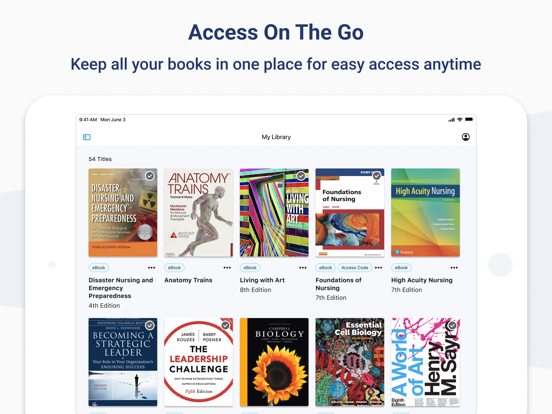
22 store screenshots


Pricing & paywalls
- Free
- Free to download
Ratings & reviews
-
5/5Almost perfect
Over all the app is great. I have been able to down textbooks for school. And I can rent them at a lower cost rather than purchasing them outright. The app so far syncs pretty well between devices. However the major flaw I see with the app is you cannot highlight, or make notes. This is a basic feature and one of the primary reasons to download a digital book app on your phone or tablet. The company only gives the option to make notes (notecards) or highlight text on the website on a computer. The whole point in downloading the app on a tablet is so you don’t have to take your laptop with you everywhere. Being able to highlight text on your textbooks is a basic feature that one looks for in a digital book app. It was real let down when I found out I was unable to do so. Whether you are using an Apple Pencil or your finger you should be able to mark on the pages. Update, the developer reached out regarding the issue I had from my review. Gave instructions on how to address what I needed in the app. I appreciated the feed back on the help. Though done slightly differently than the website version. Indicated to press down on item needed to highlight and the option would come up. I attempted to do so and it has worked. I will continue to use this app.
Starsigma · 30 Aug 2026
-
4/5Back to school
It has been a really long time since I needed to study for anything. Accessing E technology for my textbook is great! I am using on my IPad with ease. Access anywhere and no heavy book to carry around or figure where you last left it. The only problem I’m having is controlling the highlighter function. The page moves really easy while I try to highlight and wants to move the entire screen/page. I don’t have a consistent technique yet to make that stop happening and is a tad frustrating. I have 800 pages to go so I suspect I’ll get better. An accidental swipe left or right takes you to the next chapter and once you go back it drops you back at the top of chapter and you have to try to remember where you were and scrolllllll to get back easier if you can recall a page number to enter and jump to that page (Any tips? For those 2 issues ) Creating flash cards is fantastic !! Quick access to study anytime. I’ll need to reference this book for life so I hope future access won’t be an issue. Crossing fingers as I sit for testing in May 😬
Kan123stupid · 30 Aug 2026
-
3/5For limited time span use only
As per their terms of agreement, titles can be dropped off their distribution list and replaced by versions significantly different in format from the version purchased (if they exist). For students who do not want to keep their books as a future reference this works well given the quality of the bookshelf app. However for those users who are purchasing technical ebooks as future references it is far better to purchase ebooks (as PDFs or otherwise) directly from the publisher. In my personal case, I’ve been purchasing books from VitalSource since 2009, building a small electronic library of approximate $700 in value that I could access anywhere for reference purposes (I am not a student). At the time of purchase none of these books were available via any other ebook mechanism. Unfortunately some of these titles have now dropped off of the publishers list, and were kindly replaced by the vitalsource support staff. Any notes were gone, and the replaced versions had a significantly different, almost WEB page like, format. I can easily predict what is going to happen in the future given that replaceable versions will eventually not even be available. Their support staff was great, but the use case covered by their terms of agreement does not cover my particular use case. Given that PDF versions of these books are now available from Elsevier I recommend this approach instead for consumers who fall into my use case. Otherwise the app is worth a 4 to 5 star rating which I would use to weigh my rating if it were not for the dollar amounts involved.
foldr · 30 Aug 2026
-
1/5Unusable in its current state
I appreciate there is an app that makes it easier to access academic books digitally. But there are some aspects that *must* be fixed because the app is practically unusable right now! At least on iPad. The main two issues are: 1. Any time I interact with the book I am reading, it will skip ahead around 10 pages from where I was. Whether it be from highlighting, trying to bookmark a page, tapping the center to remove the peripheral menu, or sometimes just scrolling as usual, this happens so often that I have considered just getting the physical book to avoid this nonsense. 2. There needs to be similar options to customize and move through the book like with Kindle. The three options to get through the book are to scroll, a paginated swipe, or chapter scroll. Even with the paginated system, I have to actually swipe to change the page every time? I can’t just tap on the right or left of the screen to move forward or back, which aces no sense to me. Every other ereader app does this. As for nice-to-haves, I would appreciate being able to write in the margins to take notes while I read the text. But the two issue above need to be addressed before I can even consider using this app for law school.
SCG-D · 30 Aug 2026
-
3/5Lacking refinement
The biggest gripe I have is that certain sections of the book appear to be pictures instead of accessible text. It’s as if all they did was scan the book and stitch the pictures together in an app. When you attempt to highlight text in these “picture“ sections, it doesn’t let you highlight. Instead, the app acts as if you’re trying to pick up a picture and move it somewhere else. The only thing I’m actually able to highlight is section titles and some information in the section reviews. All of the content within the chapter is a series of pictures I can’t do anything with. Don’t get me wrong I’m satisfied with the fact that I’m able to get all of this information for cheap compared to purchasing the full book, but if they are advertising certain capabilities in this application they should be usable throughout the entire book. For me to give four stars, the entire book would need to be in a unified format of accessible text. For me to get five stars, the book would have to be more interactive than simply QR codes and a few videos.
kallen0611 · 30 Aug 2026
No store reviews collected for Google Play · US
Privacy & accessibility
Privacy
- Data Linked to You — Analytics — Contact Info — Email Address Developer declared
- Data Linked to You — Analytics — Usage Data — Product Interaction Developer declared
- Data Linked to You — App Functionality — Contact Info — Email Address Developer declared
- Data Linked to You — App Functionality — Contact Info — Name Developer declared
- Data Linked to You — App Functionality — Diagnostics — Crash Data Developer declared
- Data Linked to You — App Functionality — Diagnostics — Other Diagnostic Data Developer declared
- Data Linked to You — App Functionality — Diagnostics — Performance Data Developer declared
- Data Linked to You — App Functionality — Identifiers — Device ID Developer declared
- Data Linked to You — App Functionality — Identifiers — User ID Developer declared
- Data Linked to You — App Functionality — Location — Coarse Location Developer declared
- Data Linked to You — App Functionality — Purchases — Purchase History Developer declared
- Data Linked to You — App Functionality — Usage Data — Product Interaction Developer declared
- Data Linked to You — Contact Info Developer declared
- Data Linked to You — Diagnostics Developer declared
- Data Linked to You — Identifiers Developer declared
- Data Linked to You — Location Developer declared
- Data Linked to You — Purchases Developer declared
- Data Linked to You — Usage Data Developer declared
Accessibility
No accessibility labels collected yet.
Privacy
- Data collected — Account management — Financial info — Purchase history Developer declared
- Data collected — Account management — Personal info — Name Developer declared
- Data collected — Account management — Personal info — User IDs Developer declared
- Data collected — Analytics — App info and performance — Crash logs Developer declared
- Data collected — Analytics — App info and performance — Diagnostics Developer declared
- Data collected — Analytics — App info and performance — Other app performance data Developer declared
- Data collected — Analytics, Developer communications, Fraud prevention, security, and compliance — Device or other IDs Developer declared
- Data collected — App functionality, Account management — Personal info — Email address Developer declared
- Data collected — App functionality, Analytics — App activity — App interactions Developer declared
- Data collected — App functionality, Analytics — App activity — In-app search history Developer declared
- Data collected — App functionality, Analytics — App activity — Other actions Developer declared
- Data collected — App functionality, Analytics — App activity — Other user-generated content Developer declared
- Data collected — App functionality, Analytics — Location — Approximate location Developer declared
- Security practices — Your data is transferred over a secure connection — Data is encrypted in transit Developer declared
- Security practices — The developer provides a way for you to request that your data be deleted — You can request that data be deleted Developer declared
Accessibility
No accessibility labels collected yet.
Versions
-
10.0.2
• Miscellaneous bug fixes.
-
10.0.4
• Provides support for dark mode. Note, some books may have a fixed white background that will not change to dark mode. • Accessibility fixes. • Miscellaneous bug fixes.
-
10.1
• Updated sign-in user interface. • Other miscellaneous bug fixes.
-
10.2
• Improves the notes iconography and functionality on the reader interface. • Simplifies the back-to-page functionality so that it is easier to return to your last location in the book. • Adds the ability to filter notes and highlights in the workbook.
-
10.2.1
• Miscellaneous bug fixes
-
10.2.2
• Miscellaneous bug fixes.
-
10.2.3
Miscellaneous bug fixes.
-
10.3
* New sign-in interface. * Adds the ability to zoom figures in an EPUB. * Improvements to notes syncing behavior to prevent data loss if there is an error in syncing. * Adds the ability to expand the table of contents an additional level to make it easier to find your content in books that have deeply nested table of contents.
-
10.3.1
* New sign-in interface. * Adds the ability to zoom figures in an EPUB. * Improvements to notes syncing behavior to prevent data loss if there is an error in syncing. * Adds the ability to expand the table of contents an additional level to make it easier to find your content in books that have deeply nested table of contents.
-
10.3.2
• Adds image viewer support for SVG images in the flashcards and search panel. • Other miscellaneous bug fixes.
-
10.4
This release includes Read Aloud improvements that update the UI, voice selection in the app, simplified reading mode and bug fixes. There are also accessibility improvements and miscellaneous bug fixes to other areas of the app.
-
10.4.1
Miscellaneous bug fixes.
-
10.5
• Adds single and double-page navigation to ePub books. • Updated reader preferences interface that enables users to make smaller changes in text size. • Accessibility improvements. • Other miscellaneous bug fixes.
-
10.5.1
Bug Fixes: • restored horizontal chapter swiping • content positioning improvements • gesture updates to make it easier to access the figure options
-
11.0
* Refreshed design for accessing and searching content * Updated navigation * Added ability to Favorite books * Miscellaneous bug fixes and accessibility improvements
-
11.0.2
* Refreshed design for accessing and searching content * Updated navigation * Added ability to Favorite books * Miscellaneous bug fixes and accessibility improvements
-
11.0.3
* Refreshed design for accessing and searching content * Updated navigation * Added ability to Favorite books * Miscellaneous bug fixes and accessibility improvements
-
11.1
* Accessibility Improvements * Various bug fixes
-
11.1.1
Misc. Bug Fixes
-
11.2
* Dark Mode Preferences Improvements. The app will now follow the system’s dark mode settings. * Various Bug Fixes * Accessibility Improvements
-
11.2.1
* Various Bug Fixes
-
11.3
* MLA, APA, Harvard, and Vancouver citation formats are available * Updated Explore UI * Explore content is integrated into the main search results * Updated support for OS26 * Various bug fixes
-
11.3.1
* MLA, APA, Harvard, and Vancouver citation formats are available * Updated Explore UI * Explore content is integrated into the main search results * Updated support for OS26 * Various bug fixes
-
11.3.2
* MLA, APA, Harvard, and Vancouver citation formats are available * Updated Explore UI * Explore content is integrated into the main search results * Various bug fixes
-
11.4
· 13 Jul 2026
* Highlighting performance has been improved, especially for users with large highlight collections * Smoother scrolling and zooming in PDF books, with significant stability improvements * Improved app stability with fixes for crashes * Stylus annotation support has been removed to improve overall reliability * Improved navigation when deep linking to specific figures and headings in EPUB books
-
11.4.1
· 30 Jul 2026
* Additional crash fixes * Highlighting performance has been improved, especially for users with large highlight collections * Smoother scrolling and zooming in PDF books, with significant stability improvements (iOS only) * Improved app stability with fixes for crashes across all platforms * Stylus annotation support has been removed to improve overall reliability * Improved navigation when deep linking to specific figures and headings in EPUB books
- 11.4.1 · 29 Jul 2026
Alternatives
- Yuzu eReader — Same category + similar ratings
Availability by market
- US
Data quality & evidence
- Page completeness
- Independent summary published
- Last verified
- 30 Aug 2026
- Sources
- App Store, Google Play