
Quick verdict
- What it is
- Store information collected; independent summary not yet available.
- At a glance
-
- Free download · core features require a paid plan
- In-app purchases
- From $7.99/mo
Categories and search queries
Official categories
- Photo & Video
- Entertainment
AppCorpus categories
Key functions
| Function | Availability | Access | Scope | Evidence |
|---|---|---|---|---|
| Free app | Yes | Free | — | Store published |
| In-app purchases | Yes | Limited free | — | Store published |
| Subscription | Yes | Paid | — | Store published |
Screens
App Store
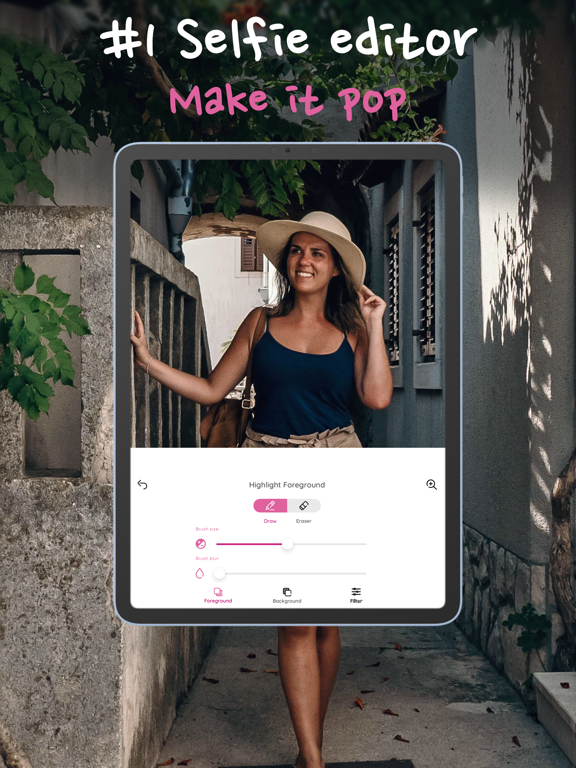
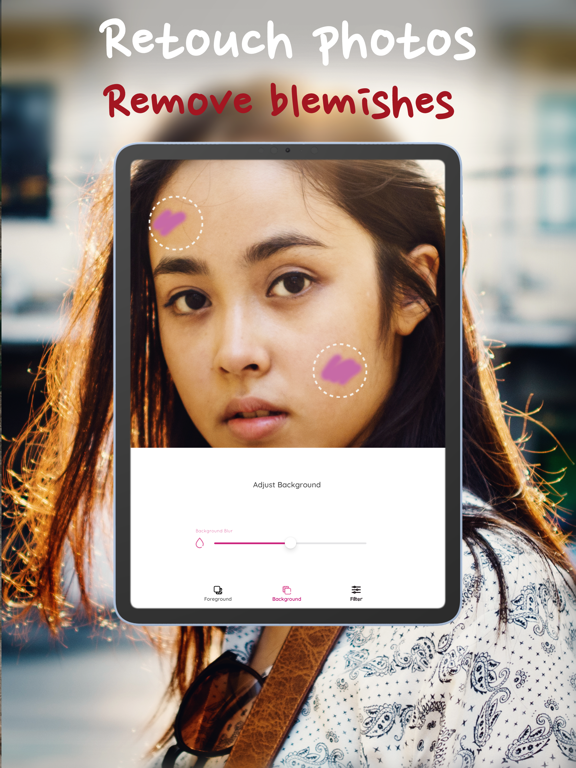
18 store screenshots


Pricing & paywalls
App Store
- 50% Off the Plan — $7.99/month (derived from the IAP title)
Ratings & reviews
App Store
-
4/5Does a simple thing well, with caveats
The depth tool is easy to use and works well. The thickness of your masking stroke & erasability of errors is all easy to adjust, as well. At a $2 minimum for real usability (to remove the watermark & after-photo ads) it's not badly priced, and compares as a paired down version of the tool, if you don't want the sometimes unnecessary bells & whistles of similar apps. I considered giving it a 3 star rating, after being a little peeved on the ads, but felt it did what it claimed, and did it well, so what's there to complain about? If all you want is a Portrait depth tool, and you don't mind paying the two bucks, it's a solid buy. ***note - in-app purchases don't seem to be accessible yet. Pretty new app, so I'm guessing they'll be available soon.
The Coats · 7 Aug 2026
-
5/5Pretty amazing
I wanted a cheaper portrait mode alternative other than buying an iPhone 7. And I did not want to spend money for another camera app that I wouldn't use. It took me maybe 2 minutes to figure out how to cover up the subject of the portrait in order to blur out the rest of the picture. Almost intuitive but not quite. Still the effects are amazing and I am very impressed with this app. Even though the free version gives me everything I need, I am still going to spend the two dollars for the premium version, if only to support the developers of this amazing app. I am a career coach and I am going to recommend this app to all of my clients who use selfies of themselves in their car with their seatbelt on as their LinkedIn profile photo. Now there is no excuse not to have an amazing profile photo by using this app.
coach_Drew · 7 Aug 2026
-
5/5This app really helps!!👍
My experience with this app was great. In the beginning there was a few problems here or there, but nothing bad. I just didn’t exactly know how to use the app because my iPhone doesn’t have Portrait on “camera”. So at first it was hard to find out where the blurry background was supposed to be. My favorite part about this app is whatever u want to not be blurry, u got to color it in. I’m sort of into art and I like coloring. It also gives u the options👍 that’s good too! I gave this app 5 stars ⭐️ it’s probably my best editing app I have! And on Instagram I take pictures of my friends and turn them into portraits... they love it. And I ya the app to color in there face or body and boom!💥 My work here is done. I recommend this app for editing pictures of people💞 ~me
~~~Lucy · 7 Aug 2026
-
4/5Quick and easy to use editing tools
Portrait: Depth Mode Photos is one of the easiest and fast editing App you can download in App Store. Easy to navigate tools you can zoom in and edit the specific area to get the precise results. Quick share to Instagram, Email, Messages. This App is useful for quick editing. But I wish there’s more feature choices in the future Editing Tools on this App to choose from like More background Effects, Emojis, creating Avatar etc. I wish everyone behind this App a success in the future.
Admin Jesy · 7 Aug 2026
-
5/5Very good but better with no ads
This is the best thing next to buying a new phone. Does exactly what I want and I do care about the watermark. Helps support you, But that being said wish you could do everything since the ads are there but they only come up when your are saving so not that big of a deal. Thankyou for this app I really wanted portrait mode cause I got a new iPhone 8 and that does not support it . Apple smh. I think Apple could have done this but idk you did it better cause I don’t see an app from them like this . Keep it up.
shellerboy iiiii · 7 Aug 2026
Privacy & accessibility
App Store
Privacy
- Data Not Linked to You — Analytics — Diagnostics — Crash Data Developer declared
- Data Not Linked to You — Analytics — Usage Data — Product Interaction Developer declared
- Data Not Linked to You — App Functionality — Diagnostics — Crash Data Developer declared
- Data Not Linked to You — App Functionality — Usage Data — Product Interaction Developer declared
- Data Not Linked to You — Diagnostics Developer declared
- Data Not Linked to You — Usage Data Developer declared
- Data Used to Track You — Usage Data — Product Interaction Developer declared
- Data Used to Track You — Usage Data Developer declared
Accessibility
No accessibility labels collected yet.
Versions
App Store
-
1.19.8
Updated Launch Screen
-
1.19.9
Updated Launch Screen
-
1.20.01
Thank you for using Photo Editor: Blur Backgrounds! We are excited to introduce some fantastic new features and improvements in this update, along with bug fixes to enhance your editing experience. Here's what's new: Enhanced Editing Capabilities: We've added new advanced editing tools to take your photo editing to the next level. Now you have even more control over the blur effect, allowing you to achieve precise depth of field adjustments and create stunningly realistic bokeh effects. Introducing the Color Correction feature! Adjust the color balance, saturation, and brightness of your photos with ease. Make your images pop and bring out their true vibrancy. We've also added a new selection tool that enables you to selectively blur or sharpen specific areas of your photo. Perfect for highlighting the subject and creating captivating visual effects. Improved Performance and Stability: We have worked hard to optimize the app's performance and ensure a smooth editing experience. Enjoy faster loading times, quicker rendering of edits, and overall improved stability. Bug Fixes: We've addressed several minor bugs and glitches reported by our users. These fixes include resolving issues related to app crashes during the editing process, improving the accuracy of the selection tool, and enhancing the overall reliability of the app. We've also fine-tuned the user interface to provide a more intuitive and seamless editing experience. The app is now even more user-friendly, allowing you to navigate effortlessly between features and tools. We hope you enjoy using the latest version of Photo Editor: Blur Backgrounds. Your feedback and suggestions are invaluable to us as we continue to improve the app. If you encounter any issues or have any ideas for future updates, please reach out to our support team. Stay tuned for more exciting features and enhancements in upcoming releases. Keep capturing those amazing moments and let your creativity shine with Photo Editor: Blur Backgrounds! Remember to leave us a review on the App Store if you're enjoying the app. Your support means a lot to us.
-
1.20.02
Thank you for using Photo Editor: Blur Backgrounds! We are excited to introduce some fantastic new features and improvements in this update, along with bug fixes to enhance your editing experience. Here's what's new: Enhanced Editing Capabilities: We've added new advanced editing tools to take your photo editing to the next level. Now you have even more control over the blur effect, allowing you to achieve precise depth of field adjustments and create stunningly realistic bokeh effects. Introducing the Color Correction feature! Adjust the color balance, saturation, and brightness of your photos with ease. Make your images pop and bring out their true vibrancy. We've also added a new selection tool that enables you to selectively blur or sharpen specific areas of your photo. Perfect for highlighting the subject and creating captivating visual effects. Improved Performance and Stability: We have worked hard to optimize the app's performance and ensure a smooth editing experience. Enjoy faster loading times, quicker rendering of edits, and overall improved stability. Bug Fixes: We've addressed several minor bugs and glitches reported by our users. These fixes include resolving issues related to app crashes during the editing process, improving the accuracy of the selection tool, and enhancing the overall reliability of the app. We've also fine-tuned the user interface to provide a more intuitive and seamless editing experience. The app is now even more user-friendly, allowing you to navigate effortlessly between features and tools. We hope you enjoy using the latest version of Photo Editor: Blur Backgrounds. Your feedback and suggestions are invaluable to us as we continue to improve the app. If you encounter any issues or have any ideas for future updates, please reach out to our support team. Stay tuned for more exciting features and enhancements in upcoming releases. Keep capturing those amazing moments and let your creativity shine with Photo Editor: Blur Backgrounds! Remember to leave us a review on the App Store if you're enjoying the app. Your support means a lot to us.
-
1.20.03
Thank you for using Photo Editor: Blur Backgrounds! We are excited to introduce some fantastic new features and improvements in this update, along with bug fixes to enhance your editing experience. Here's what's new: Enhanced Editing Capabilities: We've added new advanced editing tools to take your photo editing to the next level. Now you have even more control over the blur effect, allowing you to achieve precise depth of field adjustments and create stunningly realistic bokeh effects. Introducing the Color Correction feature! Adjust the color balance, saturation, and brightness of your photos with ease. Make your images pop and bring out their true vibrancy. We've also added a new selection tool that enables you to selectively blur or sharpen specific areas of your photo. Perfect for highlighting the subject and creating captivating visual effects. Improved Performance and Stability: We have worked hard to optimize the app's performance and ensure a smooth editing experience. Enjoy faster loading times, quicker rendering of edits, and overall improved stability. Bug Fixes: We've addressed several minor bugs and glitches reported by our users. These fixes include resolving issues related to app crashes during the editing process, improving the accuracy of the selection tool, and enhancing the overall reliability of the app. We've also fine-tuned the user interface to provide a more intuitive and seamless editing experience. The app is now even more user-friendly, allowing you to navigate effortlessly between features and tools. We hope you enjoy using the latest version of Photo Editor: Blur Backgrounds. Your feedback and suggestions are invaluable to us as we continue to improve the app. If you encounter any issues or have any ideas for future updates, please reach out to our support team. Stay tuned for more exciting features and enhancements in upcoming releases. Keep capturing those amazing moments and let your creativity shine with Photo Editor: Blur Backgrounds! Remember to leave us a review on the App Store if you're enjoying the app. Your support means a lot to us.
-
1.20.04
The app has been updated to make the user experience easier and efficient. Crafted for both amateurs and pros, it offers a plethora of powerful tools. Elevate portrait photography with advanced depth of field editing. Easily create professional-looking portraits with the blur tool's magic. Extensive library of filters including Focos, Snapseed, Tada, and Ultralight. Transform photos with unique styles and moods. Photoframes add elegance and style to your images. Classic to modern designs enhance visual impact. Seamlessly integrate with Instagram and TikTok for wider audience reach. Share your creativity and gain more followers. Compatibility with Lightroom and Snap for advanced editing. Effortlessly transfer edited photos between apps for perfection. Unique Faceplay feature for facial effects and transformations. Take photos to new levels of creativity and intrigue. Edit landscapes, nature shots, and photos with distracting backgrounds. Easily blur backgrounds to focus on subjects. User-friendly interface for effortless editing, suitable for all skill levels. Say goodbye to complex editing software and hello to professional results.
-
1.20.05
The app has been updated to make the user experience easier and efficient. Crafted for both amateurs and pros, it offers a plethora of powerful tools. Elevate portrait photography with advanced depth of field editing. Easily create professional-looking portraits with the blur tool's magic. Extensive library of filters including Focos, Snapseed, Tada, and Ultralight. Transform photos with unique styles and moods. Photoframes add elegance and style to your images. Classic to modern designs enhance visual impact. Seamlessly integrate with Instagram and TikTok for wider audience reach. Share your creativity and gain more followers. Compatibility with Lightroom and Snap for advanced editing. Effortlessly transfer edited photos between apps for perfection. Unique Faceplay feature for facial effects and transformations. Take photos to new levels of creativity and intrigue. Edit landscapes, nature shots, and photos with distracting backgrounds. Easily blur backgrounds to focus on subjects. User-friendly interface for effortless editing, suitable for all skill levels. Say goodbye to complex editing software and hello to professional results.
-
1.22
The app has been updated to make the user experience easier and efficient.
-
1.22.1
Bug fixes and app improvements + metadata update
-
1.22.2
2024 metadata updates - retouch your photos with blur & improve or enhance the pic with a simple touch up.
-
1.22.4
Upgrade to the latest version for app improvement updates!
-
1.22.7
Upgrade to get the latest app improvements and bug fixes
-
1.22.8
Minor bug fixes and performance improvements
-
2.0.0
Minor bug fixes and performance improvements
-
2.0.1
Minor bug fixes and performance improvements
-
2.0.10
Minor bug fixes and performance improvements
-
2.0.11
· 13 Mar 2026
Minor bug fixes and performance improvements
-
2.0.2
Minor bug fixes and performance improvements
-
2.0.3
Minor bug fixes and performance improvements
-
2.0.4
Minor bug fixes and performance improvements
-
2.0.5
Minor bug fixes and performance improvements
-
2.0.6
Minor bug fixes and performance improvements
-
2.0.7
Bug Fixes
-
2.0.8
Minor bug fixes and performance improvements
-
2.0.9
Minor bug fixes and performance improvements
Alternatives
- Photo Editor · Retouch & Edit — Same category + similar ratings
- Phocus: DSLR Portrait Camera — Same category + similar ratings
- Blur Photo Background — Same category + similar ratings
- Background Eraser: PNG Maker — Same category + similar ratings
- Blur Video & Photo BlurEffect — Same category + similar ratings
Availability by market
- US
Data quality & evidence
- Page completeness
- Live store listing
- Last verified
- 7 Aug 2026
- Sources
- App Store
- Independent summary has not been published yet.