
Quick verdict
- What it is
- Store information collected; an Apoku editorial summary is not yet published.
- At a glance
-
- Free download · core features require a paid plan
- In-app purchases
Categories and search queries
Official categories
- Photo & Video
- Graphics & Design
Apoku categories
Key functions
| Function | Availability | Access | Scope | Evidence |
|---|---|---|---|---|
| Free app | Yes | Free | Context-specific | Store published |
| In-app purchases | Yes | Limited free | Context-specific | Store published |
| Subscription | Yes | Paid | Context-specific | Store published |
| Family Sharing | Unknown | Unknown | Scope unknown | Store published |
Screens
App Store
40 store screenshots

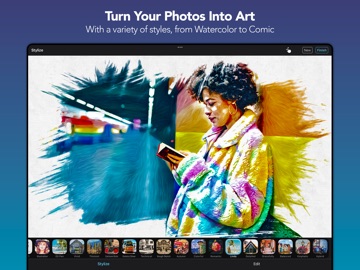

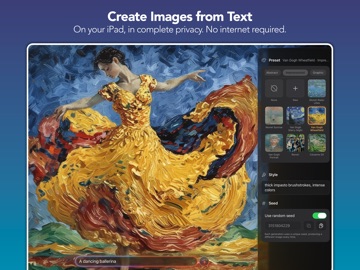
Pricing & paywalls
App Store
Shown for US
- BeCasso Pro Suite
Ratings & reviews
App Store
Shown for US
-
5/5The BEST! Creative, User-friendly and Thoroughly Enjoyable to Use!
I’ve been using BeCasso for over a year now and absolutely love everything about it! I use the oil painting #’s 1, 2 & 3 on at least 3/4’s of my photos in varying degrees as a standard part of editing them as it can make them look more like oil paintings and watercolors. When I’m feeling more “artsy” I can literally get lost for hours experimenting with the endless options on this app. BeCasso both feeds and challenges the artist in me - which I love - and I’ve also been impressed by how user-friendly it is. And most importantly, the response to my enhanced photos and “art” on social media has been very rewarding! Another huge benefit is that I’ve been able to turn what I would’ve considered throwaway photos into some really beautiful pieces as the oils in particular can soften the lines of slightly out of focus photos and fill in the graininess of others while also enhancing the color. I cannot say enough good things about this app and I definitely wouldn’t trade it for any app currently on the market. The developers are also quick to respond to any concerns and have recently added an impressive number of new oil, watercolor, pencil, cartoon and color options that have further enhanced my experience with this app. Another benefit? There is now a relatively new BeCasso group page where you can share your creations. Overall, this app exceeds a 5. I highly recommend it!!
Kck in WA · 6 Aug 2026
-
5/5Turns bad photos into art
Here's my challenge to you: download the app you get a free trial so you can totally try before you buy: scroll through your camera roll and find a picture or pictures that you feel like you're definitely just gonna hit the trashcan icon whether it's cause they're blurry or a low light or your mom looks like SpongeBob SquarePants and your dog looks like a black trash bag attacking SpongeBob- take those photos of pop them into BeCasso start from left or right and click on each filter until you find one that suddenly makes that irredeemable photo palatable maybe even beautiful possibly even magical. That's what happened to me to some photos that I was sure were And I was sad because I wasn't gonna be able to get another copy. This app is amazing . I will literally take one photo and click through the filters and find dozens that I like I'm so glad you can order from the app I haven't done that yet but I do foresee that in my future because each of these is a great postcard and a great art Piece
Alienmermaid · 6 Aug 2026
-
3/5UPDATE TO IOS 11 AND FULL SUPPORT FOR IPHONE X
I just don’t understand the worth of sending out updates that still don’t comply with the latest software support and aren’t maximizing support for new hardware! Update, I read the developers response saying that they did update for iOS 11 in September and also Support the new iPhone X. The reason I mentioned this lack of support is that I went through and read every update listed here for the past 6 months and nowhere did the updates list these changes? So, is it that all the updates aren’t being shown here or what? 2nd update, I received your second developer response and it didn’t make any sense whatsoever. There’s thousands of apps for sale and download currently on the App Store that haven’t been updated since iOS 8. So to expect customers to just assume that a developer wouldn’t allow customers to download an app unless it met all current software and hardware updates is nonsensical. Maybe in the future to avoid confusion you should do as most all other developers do and clearly state in writing to your version updates exactly when you’ve updated to support the latest software and hardware instead of expecting customers to just assume you have just because it’s still available to download. I’m certain that all other users agree.
marcuswmd · 6 Aug 2026
-
5/5Outstanding, all-in-one app
I am amazed there are only 2 reviews for this app. I have used BeCasso (uncompensated) since it first came out years ago and have used it to create all kinds of different transformed photos - some of which I feature on my professional photography website (squareknot dot net) and some which I've sold and/or won competitions with. The best thing about the app is all the typical transformation modes (oil, watercolor, cartoon, drawing) are included in the app. This is great because you can quickly see transformations among all these modes quickly and effectively without having to jump between different apps. Each mode features an amazing number of transformation styles as well. Version 4 has an updated interface - be sure you learn and understand how it works. ALSO! Great, responsive, helpful, and thoughtful user support, 5 of 5! Buy this app - you won't regret it...
BBPullinHard · 6 Aug 2026
-
5/5Best of the photo to art apps
I painstakingly went through every photo to art conversion app in the App Store. This company released BeCasso and ArtCard. I paid for both and pitted them against everything else out there: they are the clear winner. First off, I eliminated any subscription based apps. There is no way for me to get a return on that kind of investment, and none of them appeared to do more than BeCasso. The rest of the apps always had shortcomings. For instance, after you use a filter to convert, you need additional controls for detail, relief, softness, intensity, etc. BeCasso had all that. Last night I gave it the ultimate test and converted for about 6 hours of Hawaii iPhone pictures taken with the iPhone 10 Xs Max. Wow. Some of those pictures are now like masterpieces, and are not cheesy at all. The comic watercolor and comic features also rivals or beats other apps that only focus on those features. The only feature request I would have is to create a new app and merge their Clip2Comic, ArtCard, and BeCasso with all their filters and features. It would be worth $15-20 USD to me, and would certainly be a differentiator for any other app like this. I really just want one app that does it all for filtering affect. It could also cause more folks to leave the Adobe world. I think this company is close if they could pull it off. Thanks to the developers for helping me create some wonderful works of art.
Camera--Guy · 6 Aug 2026
Privacy & accessibility
App Store
Privacy
- Data Not Linked to You — Analytics — Identifiers — Device ID Developer declared
- Data Not Linked to You — Analytics — Purchases — Purchase History Developer declared
- Data Not Linked to You — Analytics — Usage Data — Other Usage Data Developer declared
- Data Not Linked to You — App Functionality — Purchases — Purchase History Developer declared
- Data Not Linked to You — App Functionality — User Content — Photos or Videos Developer declared
- Data Not Linked to You — Identifiers Developer declared
- Data Not Linked to You — Purchases Developer declared
- Data Not Linked to You — Usage Data Developer declared
- Data Not Linked to You — User Content Developer declared
Accessibility
No accessibility labels collected yet.
Versions
App Store
-
4.4.1
These enhancements are designed to make our app more efficient and enjoyable for all users.Embark on your artistic journey as you discover the best and most stunning filters with BeCasso! Custom Vignettes We've given the vignettes a massive overhaul! This update includes 13 new expressive vignettes and advanced customization tools. But that’s not all: You can now personalize your artwork even more by adding your own vignette images. Additionally, our new Auto Retouch feature ensures your main subject stands out. Custom Signatures You can now add your own logo, watermark, or signature to your artwork. Simply load you’re your own signature signature from Files or Photos. Image Playground** Produce fun, original images in seconds with Image Playground directly on your device. Create entirely new images based on descriptions, with suggested concepts and styles such as illustration and animation. Use our app to turn your creations into high-quality art effortlessly. macOS Support Our app is now a native macOS app, offering enhanced performance and features. We've expanded device compatibility to include Intel Macs, ensuring a wider range of users can enjoy the app. To streamline your workflow, we've optimized the user experience with keyboard shortcuts, intuitive navigation, and a sleek, native macOS design. Plus, seamless Finder and file-system integration makes loading and saving images a breeze. UX Improvements We've made significant improvements across all platforms to enhance your experience. The user interface is now more intuitive, with features like hover support for iPad and improved Retouch Tools with a clear visual indicator of the retouch area. Improved Auto Retouch We have improved the Auto Retouch feature for you. Besides usability and cosmetic tweaks, we improved its speed as well as detection accuracy. Magic Eraser* With the new Magic Eraser feature, you decide what stays and what goes in your artwork. Remove imperfections or objects from your photos before they are turned into art. Create truly beautiful masterpieces that reflects your vision. Make It Your Own with Custom Styles With Custom Styles you can personalize and save your very own styles with ease. Use our curated styles as a starting point, fine-tune them to your likings and save them as your new, personalized, very own Custom Style. Custom Styles are synchronized among all your devices, so that you can apply them on any device, everywhere, any time. Curated Styles We are introducing curated styles that showcase the versatility of BeCasso. These curated styles combine BeCasso's multiple effect building blocks to create beautiful and unique looks. New Artistic Styles We have added over 20 new artistic styles, including oil paintings, watercolors, and pencils, giving you even more creative tools to explore. The latest version contains bug fixes and performance improvements. If you have any questions or feedback for us, please feel free to send us an email at [email protected]. Our team is on hand 24 hours a day, so we’ll get right on it. * Device support starts at iPhone 12 (or newer), iPad mini (6th gen), iPad Air (4th gen), iPad (10th gen), iPad Pro 11 inch (3rd gen), iPad Pro 12.9 (5th gen) ** Image playground is available on devices that support Apple Intelligence, only.
-
4.4.2
These enhancements are designed to make our app more efficient and enjoyable for all users.Embark on your artistic journey as you discover the best and most stunning filters with BeCasso! Custom Vignettes We've given the vignettes a massive overhaul! This update includes 13 new expressive vignettes and advanced customization tools. But that’s not all: You can now personalize your artwork even more by adding your own vignette images. Additionally, our new Auto Retouch feature ensures your main subject stands out. Custom Signatures You can now add your own logo, watermark, or signature to your artwork. Simply load you’re your own signature signature from Files or Photos. Image Playground** Produce fun, original images in seconds with Image Playground directly on your device. Create entirely new images based on descriptions, with suggested concepts and styles such as illustration and animation. Use our app to turn your creations into high-quality art effortlessly. macOS Support Our app is now a native macOS app, offering enhanced performance and features. We've expanded device compatibility to include Intel Macs, ensuring a wider range of users can enjoy the app. To streamline your workflow, we've optimized the user experience with keyboard shortcuts, intuitive navigation, and a sleek, native macOS design. Plus, seamless Finder and file-system integration makes loading and saving images a breeze. UX Improvements We've made significant improvements across all platforms to enhance your experience. The user interface is now more intuitive, with features like hover support for iPad and improved Retouch Tools with a clear visual indicator of the retouch area. Improved Auto Retouch We have improved the Auto Retouch feature for you. Besides usability and cosmetic tweaks, we improved its speed as well as detection accuracy. Magic Eraser* With the new Magic Eraser feature, you decide what stays and what goes in your artwork. Remove imperfections or objects from your photos before they are turned into art. Create truly beautiful masterpieces that reflects your vision. Make It Your Own with Custom Styles With Custom Styles you can personalize and save your very own styles with ease. Use our curated styles as a starting point, fine-tune them to your likings and save them as your new, personalized, very own Custom Style. Custom Styles are synchronized among all your devices, so that you can apply them on any device, everywhere, any time. Curated Styles We are introducing curated styles that showcase the versatility of BeCasso. These curated styles combine BeCasso's multiple effect building blocks to create beautiful and unique looks. New Artistic Styles We have added over 20 new artistic styles, including oil paintings, watercolors, and pencils, giving you even more creative tools to explore. The latest version contains bug fixes and performance improvements. If you have any questions or feedback for us, please feel free to send us an email at [email protected]. Our team is on hand 24 hours a day, so we’ll get right on it. * Device support starts at iPhone 12 (or newer), iPad mini (6th gen), iPad Air (4th gen), iPad (10th gen), iPad Pro 11 inch (3rd gen), iPad Pro 12.9 (5th gen) ** Image playground is available on devices that support Apple Intelligence, only.
-
4.4.3
These enhancements are designed to make our app more efficient and enjoyable for all users.Embark on your artistic journey as you discover the best and most stunning filters with BeCasso! Custom Vignettes We've given the vignettes a massive overhaul! This update includes 13 new expressive vignettes and advanced customization tools. But that’s not all: You can now personalize your artwork even more by adding your own vignette images. Additionally, our new Auto Retouch feature ensures your main subject stands out. Custom Signatures You can now add your own logo, watermark, or signature to your artwork. Simply load you’re your own signature signature from Files or Photos. Image Playground** Produce fun, original images in seconds with Image Playground directly on your device. Create entirely new images based on descriptions, with suggested concepts and styles such as illustration and animation. Use our app to turn your creations into high-quality art effortlessly. macOS Support Our app is now a native macOS app, offering enhanced performance and features. We've expanded device compatibility to include Intel Macs, ensuring a wider range of users can enjoy the app. To streamline your workflow, we've optimized the user experience with keyboard shortcuts, intuitive navigation, and a sleek, native macOS design. Plus, seamless Finder and file-system integration makes loading and saving images a breeze. UX Improvements We've made significant improvements across all platforms to enhance your experience. The user interface is now more intuitive, with features like hover support for iPad and improved Retouch Tools with a clear visual indicator of the retouch area. Improved Auto Retouch We have improved the Auto Retouch feature for you. Besides usability and cosmetic tweaks, we improved its speed as well as detection accuracy. Magic Eraser* With the new Magic Eraser feature, you decide what stays and what goes in your artwork. Remove imperfections or objects from your photos before they are turned into art. Create truly beautiful masterpieces that reflects your vision. Make It Your Own with Custom Styles With Custom Styles you can personalize and save your very own styles with ease. Use our curated styles as a starting point, fine-tune them to your likings and save them as your new, personalized, very own Custom Style. Custom Styles are synchronized among all your devices, so that you can apply them on any device, everywhere, any time. Curated Styles We are introducing curated styles that showcase the versatility of BeCasso. These curated styles combine BeCasso's multiple effect building blocks to create beautiful and unique looks. New Artistic Styles We have added over 20 new artistic styles, including oil paintings, watercolors, and pencils, giving you even more creative tools to explore. The latest version contains bug fixes and performance improvements. If you have any questions or feedback for us, please feel free to send us an email at [email protected]. Our team is on hand 24 hours a day, so we’ll get right on it. * Device support starts at iPhone 12 (or newer), iPad mini (6th gen), iPad Air (4th gen), iPad (10th gen), iPad Pro 11 inch (3rd gen), iPad Pro 12.9 (5th gen) ** Image playground is available on devices that support Apple Intelligence, only.
-
4.4.4
These enhancements are designed to make our app more efficient and enjoyable for all users.Embark on your artistic journey as you discover the best and most stunning filters with BeCasso! Custom Vignettes We've given the vignettes a massive overhaul! This update includes 13 new expressive vignettes and advanced customization tools. But that’s not all: You can now personalize your artwork even more by adding your own vignette images. Additionally, our new Auto Retouch feature ensures your main subject stands out. Custom Signatures You can now add your own logo, watermark, or signature to your artwork. Simply load you’re your own signature signature from Files or Photos. Image Playground** Produce fun, original images in seconds with Image Playground directly on your device. Create entirely new images based on descriptions, with suggested concepts and styles such as illustration and animation. Use our app to turn your creations into high-quality art effortlessly. macOS Support Our app is now a native macOS app, offering enhanced performance and features. We've expanded device compatibility to include Intel Macs, ensuring a wider range of users can enjoy the app. To streamline your workflow, we've optimized the user experience with keyboard shortcuts, intuitive navigation, and a sleek, native macOS design. Plus, seamless Finder and file-system integration makes loading and saving images a breeze. UX Improvements We've made significant improvements across all platforms to enhance your experience. The user interface is now more intuitive, with features like hover support for iPad and improved Retouch Tools with a clear visual indicator of the retouch area. Improved Auto Retouch We have improved the Auto Retouch feature for you. Besides usability and cosmetic tweaks, we improved its speed as well as detection accuracy. Magic Eraser* With the new Magic Eraser feature, you decide what stays and what goes in your artwork. Remove imperfections or objects from your photos before they are turned into art. Create truly beautiful masterpieces that reflects your vision. Make It Your Own with Custom Styles With Custom Styles you can personalize and save your very own styles with ease. Use our curated styles as a starting point, fine-tune them to your likings and save them as your new, personalized, very own Custom Style. Custom Styles are synchronized among all your devices, so that you can apply them on any device, everywhere, any time. Curated Styles We are introducing curated styles that showcase the versatility of BeCasso. These curated styles combine BeCasso's multiple effect building blocks to create beautiful and unique looks. New Artistic Styles We have added over 20 new artistic styles, including oil paintings, watercolors, and pencils, giving you even more creative tools to explore. The latest version contains bug fixes and performance improvements. If you have any questions or feedback for us, please feel free to send us an email at [email protected]. Our team is on hand 24 hours a day, so we’ll get right on it. * Device support starts at iPhone 12 (or newer), iPad mini (6th gen), iPad Air (4th gen), iPad (10th gen), iPad Pro 11 inch (3rd gen), iPad Pro 12.9 (5th gen) ** Image playground is available on devices that support Apple Intelligence, only.
-
4.5.0
These enhancements are designed to make our app more efficient and enjoyable for all users. Embark on your artistic journey as you discover the best and most stunning filters with BeCasso! More Precision and Control We've refined all sliders for better control and understandability. You can now see exact values and reset them easily—just double-tap the slider or tap the default value. The signature tool has also been improved, allowing you to move, rotate, and scale your signature freely with touch gestures. Custom Vignettes We've given the vignettes a massive overhaul! This update includes 13 new expressive vignettes and advanced customization tools. But that’s not all: You can now personalize your artwork even more by adding your own vignette images. Additionally, our new Auto Retouch feature ensures your main subject stands out. Custom Signatures You can now add your own logo, watermark, or signature to your artwork. Simply load you’re your own signature signature from Files or Photos. Image Playground** Produce fun, original images in seconds with Image Playground directly on your device. Create entirely new images based on descriptions, with suggested concepts and styles such as illustration and animation. Use our app to turn your creations into high-quality art effortlessly. macOS Support Our app is now a native macOS app, offering enhanced performance and features. We've expanded device compatibility to include Intel Macs, ensuring a wider range of users can enjoy the app. To streamline your workflow, we've optimized the user experience with keyboard shortcuts, intuitive navigation, and a sleek, native macOS design. Plus, seamless Finder and file-system integration makes loading and saving images a breeze. UX Improvements We've made significant improvements across all platforms to enhance your experience. The user interface is now more intuitive, with features like hover support for iPad and improved Retouch Tools with a clear visual indicator of the retouch area. Improved Auto Retouch We have improved the Auto Retouch feature for you. Besides usability and cosmetic tweaks, we improved its speed as well as detection accuracy. The latest version contains bug fixes and performance improvements. If you have any questions or feedback for us, please feel free to send us an email at [email protected]. Our team is on hand 24 hours a day, so we’ll get right on it. ** Image playground is available on devices that support Apple Intelligence, only.
-
4.5.1
These enhancements are designed to make our app more efficient and enjoyable for all users. Embark on your artistic journey as you discover the best and most stunning filters with BeCasso! More Precision and Control We've refined all sliders for better control and understandability. You can now see exact values and reset them easily—just double-tap the slider or tap the default value. The signature tool has also been improved, allowing you to move, rotate, and scale your signature freely with touch gestures. Custom Vignettes We've given the vignettes a massive overhaul! This update includes 13 new expressive vignettes and advanced customization tools. But that’s not all: You can now personalize your artwork even more by adding your own vignette images. Additionally, our new Auto Retouch feature ensures your main subject stands out. Custom Signatures You can now add your own logo, watermark, or signature to your artwork. Simply load you’re your own signature signature from Files or Photos. Image Playground** Produce fun, original images in seconds with Image Playground directly on your device. Create entirely new images based on descriptions, with suggested concepts and styles such as illustration and animation. Use our app to turn your creations into high-quality art effortlessly. macOS Support Our app is now a native macOS app, offering enhanced performance and features. We've expanded device compatibility to include Intel Macs, ensuring a wider range of users can enjoy the app. To streamline your workflow, we've optimized the user experience with keyboard shortcuts, intuitive navigation, and a sleek, native macOS design. Plus, seamless Finder and file-system integration makes loading and saving images a breeze. UX Improvements We've made significant improvements across all platforms to enhance your experience. The user interface is now more intuitive, with features like hover support for iPad and improved Retouch Tools with a clear visual indicator of the retouch area. Improved Auto Retouch We have improved the Auto Retouch feature for you. Besides usability and cosmetic tweaks, we improved its speed as well as detection accuracy. The latest version contains bug fixes and performance improvements. If you have any questions or feedback for us, please feel free to send us an email at [email protected]. Our team is on hand 24 hours a day, so we’ll get right on it. ** Image playground is available on devices that support Apple Intelligence, only.
-
4.6.0
These enhancements are designed to make our app more efficient and enjoyable for all users. Embark on your artistic journey as you discover the best and most stunning filters with BeCasso! New Custom Magic Styles* The Magic filter category just got a major upgrade! We've added more than 20 brand-new Magic Styles to give your photos even more artistic flair. But wait, there's more... you can now create your own Custom Styles! Just load any image, and BeCasso will learn its unique look—right on your device. Turn your favorite artwork or photo into a personalized style you can use again and again. More Precision and Control We've refined all sliders for better control and understandability. You can now see exact values and reset them easily—just double-tap the slider or tap the default value. The signature tool has also been improved, allowing you to move, rotate, and scale your signature freely with touch gestures. Custom Vignettes We've given the vignettes a massive overhaul! This update includes 13 new expressive vignettes and advanced customization tools. But that’s not all: You can now personalize your artwork even more by adding your own vignette images. Additionally, our new Auto Retouch feature ensures your main subject stands out. Custom Signatures You can now add your own logo, watermark, or signature to your artwork. Simply load you’re your own signature signature from Files or Photos. Image Playground** Produce fun, original images in seconds with Image Playground directly on your device. Create entirely new images based on descriptions, with suggested concepts and styles such as illustration and animation. Use our app to turn your creations into high-quality art effortlessly. macOS Support Our app is now a native macOS app, offering enhanced performance and features. We've expanded device compatibility to include Intel Macs, ensuring a wider range of users can enjoy the app. To streamline your workflow, we've optimized the user experience with keyboard shortcuts, intuitive navigation, and a sleek, native macOS design. Plus, seamless Finder and file-system integration makes loading and saving images a breeze. UX Improvements We've made significant improvements across all platforms to enhance your experience. The user interface is now more intuitive, with features like hover support for iPad and improved Retouch Tools with a clear visual indicator of the retouch area. Improved Auto Retouch We have improved the Auto Retouch feature for you. Besides usability and cosmetic tweaks, we improved its speed as well as detection accuracy. The latest version contains bug fixes and performance improvements. If you have any questions or feedback for us, please feel free to send us an email at [email protected]. Our team is on hand 24 hours a day, so we’ll get right on it. * iOS or iPadOS 18 required. Available on devices that support Apple Intelligence, only and the iPhone 14. ** Image playground is available on devices that support Apple Intelligence, only.
-
4.7.0
These enhancements are designed to make our app more efficient and enjoyable for all users. Embark on your artistic journey as you discover the best and most stunning filters with BeCasso! OS 26 and UI improvements We’ve updated the app to run smoothly on the latest operating systems. You’ll notice better performance and improved stability. We also introduce a new fresh look with Liquid Glass. Several screens now feature the new Liquid Glass UI, giving your artwork more space and a cleaner editing experience. Improved Zoom & Canvas Placement We’ve redesigned the zoom view, so your canvas is easier to position — no more sliders getting in the way of your edits! New Custom Magic Styles* The Magic filter category just got a major upgrade! We've added more than 20 brand-new Magic Styles to give your photos even more artistic flair. But wait, there's more... you can now create your own Custom Styles! Just load any image, and BeCasso will learn its unique look—right on your device. Turn your favorite artwork or photo into a personalized style you can use again and again. More Precision and Control We've refined all sliders for better control and understandability. You can now see exact values and reset them easily—just double-tap the slider or tap the default value. The signature tool has also been improved, allowing you to move, rotate, and scale your signature freely with touch gestures. Custom Vignettes We've given the vignettes a massive overhaul! This update includes 13 new expressive vignettes and advanced customization tools. But that’s not all: You can now personalize your artwork even more by adding your own vignette images. Additionally, our new Auto Retouch feature ensures your main subject stands out. Custom Signatures You can now add your own logo, watermark, or signature to your artwork. Simply load you’re your own signature signature from Files or Photos. Image Playground** Produce fun, original images in seconds with Image Playground directly on your device. Create entirely new images based on descriptions, with suggested concepts and styles such as illustration and animation. Use our app to turn your creations into high-quality art effortlessly. macOS Support Our app is now a native macOS app, offering enhanced performance and features. We've expanded device compatibility to include Intel Macs, ensuring a wider range of users can enjoy the app. To streamline your workflow, we've optimized the user experience with keyboard shortcuts, intuitive navigation, and a sleek, native macOS design. Plus, seamless Finder and file-system integration makes loading and saving images a breeze. UX Improvements We've made significant improvements across all platforms to enhance your experience. The user interface is now more intuitive, with features like hover support for iPad and improved Retouch Tools with a clear visual indicator of the retouch area. Improved Auto Retouch We have improved the Auto Retouch feature for you. Besides usability and cosmetic tweaks, we improved its speed as well as detection accuracy. The latest version contains bug fixes and performance improvements. If you have any questions or feedback for us, please feel free to send us an email at [email protected]. Our team is on hand 24 hours a day, so we’ll get right on it. * iOS or iPadOS 18 required. Available on devices that support Apple Intelligence, only and the iPhone 14. ** Image playground is available on devices that support Apple Intelligence, only.
-
4.7.1
These enhancements are designed to make our app more efficient and enjoyable for all users. Embark on your artistic journey as you discover the best and most stunning filters with BeCasso! OS 26 and UI improvements We’ve updated the app to run smoothly on the latest operating systems. You’ll notice better performance and improved stability. We also introduce a new fresh look with Liquid Glass. Several screens now feature the new Liquid Glass UI, giving your artwork more space and a cleaner editing experience. Improved Zoom & Canvas Placement We’ve redesigned the zoom view, so your canvas is easier to position — no more sliders getting in the way of your edits! New Custom Magic Styles* The Magic filter category just got a major upgrade! We've added more than 20 brand-new Magic Styles to give your photos even more artistic flair. But wait, there's more... you can now create your own Custom Styles! Just load any image, and BeCasso will learn its unique look—right on your device. Turn your favorite artwork or photo into a personalized style you can use again and again. More Precision and Control We've refined all sliders for better control and understandability. You can now see exact values and reset them easily—just double-tap the slider or tap the default value. The signature tool has also been improved, allowing you to move, rotate, and scale your signature freely with touch gestures. Custom Vignettes We've given the vignettes a massive overhaul! This update includes 13 new expressive vignettes and advanced customization tools. But that’s not all: You can now personalize your artwork even more by adding your own vignette images. Additionally, our new Auto Retouch feature ensures your main subject stands out. Custom Signatures You can now add your own logo, watermark, or signature to your artwork. Simply load you’re your own signature signature from Files or Photos. Image Playground** Produce fun, original images in seconds with Image Playground directly on your device. Create entirely new images based on descriptions, with suggested concepts and styles such as illustration and animation. Use our app to turn your creations into high-quality art effortlessly. macOS Support Our app is now a native macOS app, offering enhanced performance and features. We've expanded device compatibility to include Intel Macs, ensuring a wider range of users can enjoy the app. To streamline your workflow, we've optimized the user experience with keyboard shortcuts, intuitive navigation, and a sleek, native macOS design. Plus, seamless Finder and file-system integration makes loading and saving images a breeze. UX Improvements We've made significant improvements across all platforms to enhance your experience. The user interface is now more intuitive, with features like hover support for iPad and improved Retouch Tools with a clear visual indicator of the retouch area. Improved Auto Retouch We have improved the Auto Retouch feature for you. Besides usability and cosmetic tweaks, we improved its speed as well as detection accuracy. The latest version contains bug fixes and performance improvements. If you have any questions or feedback for us, please feel free to send us an email at [email protected]. Our team is on hand 24 hours a day, so we’ll get right on it. * iOS or iPadOS 18 required. Available on devices that support Apple Intelligence, only and the iPhone 14. ** Image playground is available on devices that support Apple Intelligence, only.
-
4.7.2
These enhancements are designed to make our app more efficient and enjoyable for all users. Embark on your artistic journey as you discover the best and most stunning filters with BeCasso! OS 26 and UI improvements We’ve updated the app to run smoothly on the latest operating systems. You’ll notice better performance and improved stability. We also introduce a new fresh look with Liquid Glass. Several screens now feature the new Liquid Glass UI, giving your artwork more space and a cleaner editing experience. Improved Zoom & Canvas Placement We’ve redesigned the zoom view, so your canvas is easier to position — no more sliders getting in the way of your edits! New Custom Magic Styles* The Magic filter category just got a major upgrade! We've added more than 20 brand-new Magic Styles to give your photos even more artistic flair. But wait, there's more... you can now create your own Custom Styles! Just load any image, and BeCasso will learn its unique look—right on your device. Turn your favorite artwork or photo into a personalized style you can use again and again. More Precision and Control We've refined all sliders for better control and understandability. You can now see exact values and reset them easily—just double-tap the slider or tap the default value. The signature tool has also been improved, allowing you to move, rotate, and scale your signature freely with touch gestures. Custom Vignettes We've given the vignettes a massive overhaul! This update includes 13 new expressive vignettes and advanced customization tools. But that’s not all: You can now personalize your artwork even more by adding your own vignette images. Additionally, our new Auto Retouch feature ensures your main subject stands out. Custom Signatures You can now add your own logo, watermark, or signature to your artwork. Simply load you’re your own signature signature from Files or Photos. Image Playground** Produce fun, original images in seconds with Image Playground directly on your device. Create entirely new images based on descriptions, with suggested concepts and styles such as illustration and animation. Use our app to turn your creations into high-quality art effortlessly. macOS Support Our app is now a native macOS app, offering enhanced performance and features. We've expanded device compatibility to include Intel Macs, ensuring a wider range of users can enjoy the app. To streamline your workflow, we've optimized the user experience with keyboard shortcuts, intuitive navigation, and a sleek, native macOS design. Plus, seamless Finder and file-system integration makes loading and saving images a breeze. UX Improvements We've made significant improvements across all platforms to enhance your experience. The user interface is now more intuitive, with features like hover support for iPad and improved Retouch Tools with a clear visual indicator of the retouch area. Improved Auto Retouch We have improved the Auto Retouch feature for you. Besides usability and cosmetic tweaks, we improved its speed as well as detection accuracy. The latest version contains bug fixes and performance improvements. If you have any questions or feedback for us, please feel free to send us an email at [email protected]. Our team is on hand 24 hours a day, so we’ll get right on it. * iOS or iPadOS 18 required. Available on devices that support Apple Intelligence, only and the iPhone 14. ** Image playground is available on devices that support Apple Intelligence, only.
-
4.7.3
These enhancements are designed to make our app more efficient and enjoyable for all users. Embark on your artistic journey as you discover the best and most stunning filters with BeCasso! OS 26 and UI improvements We’ve updated the app to run smoothly on the latest operating systems. You’ll notice better performance and improved stability. We also introduce a new fresh look with Liquid Glass. Several screens now feature the new Liquid Glass UI, giving your artwork more space and a cleaner editing experience. Improved Zoom & Canvas Placement We’ve redesigned the zoom view, so your canvas is easier to position — no more sliders getting in the way of your edits! New Custom Magic Styles* The Magic filter category just got a major upgrade! We've added more than 20 brand-new Magic Styles to give your photos even more artistic flair. But wait, there's more... you can now create your own Custom Styles! Just load any image, and BeCasso will learn its unique look—right on your device. Turn your favorite artwork or photo into a personalized style you can use again and again. More Precision and Control We've refined all sliders for better control and understandability. You can now see exact values and reset them easily—just double-tap the slider or tap the default value. The signature tool has also been improved, allowing you to move, rotate, and scale your signature freely with touch gestures. Custom Vignettes We've given the vignettes a massive overhaul! This update includes 13 new expressive vignettes and advanced customization tools. But that’s not all: You can now personalize your artwork even more by adding your own vignette images. Additionally, our new Auto Retouch feature ensures your main subject stands out. Custom Signatures You can now add your own logo, watermark, or signature to your artwork. Simply load you’re your own signature signature from Files or Photos. Image Playground** Produce fun, original images in seconds with Image Playground directly on your device. Create entirely new images based on descriptions, with suggested concepts and styles such as illustration and animation. Use our app to turn your creations into high-quality art effortlessly. macOS Support Our app is now a native macOS app, offering enhanced performance and features. We've expanded device compatibility to include Intel Macs, ensuring a wider range of users can enjoy the app. To streamline your workflow, we've optimized the user experience with keyboard shortcuts, intuitive navigation, and a sleek, native macOS design. Plus, seamless Finder and file-system integration makes loading and saving images a breeze. UX Improvements We've made significant improvements across all platforms to enhance your experience. The user interface is now more intuitive, with features like hover support for iPad and improved Retouch Tools with a clear visual indicator of the retouch area. Improved Auto Retouch We have improved the Auto Retouch feature for you. Besides usability and cosmetic tweaks, we improved its speed as well as detection accuracy. The latest version contains bug fixes and performance improvements. If you have any questions or feedback for us, please feel free to send us an email at [email protected]. Our team is on hand 24 hours a day, so we’ll get right on it. * iOS or iPadOS 18 required. Available on devices that support Apple Intelligence, only and the iPhone 14. ** Image playground is available on devices that support Apple Intelligence, only.
-
4.7.4
These enhancements are designed to make our app more efficient and enjoyable for all users. Embark on your artistic journey as you discover the best and most stunning filters with BeCasso! OS 26 and UI improvements We’ve updated the app to run smoothly on the latest operating systems. You’ll notice better performance and improved stability. We also introduce a new fresh look with Liquid Glass. Several screens now feature the new Liquid Glass UI, giving your artwork more space and a cleaner editing experience. Improved Zoom & Canvas Placement We’ve redesigned the zoom view, so your canvas is easier to position — no more sliders getting in the way of your edits! New Custom Magic Styles* The Magic filter category just got a major upgrade! We've added more than 20 brand-new Magic Styles to give your photos even more artistic flair. But wait, there's more... you can now create your own Custom Styles! Just load any image, and BeCasso will learn its unique look—right on your device. Turn your favorite artwork or photo into a personalized style you can use again and again. More Precision and Control We've refined all sliders for better control and understandability. You can now see exact values and reset them easily—just double-tap the slider or tap the default value. The signature tool has also been improved, allowing you to move, rotate, and scale your signature freely with touch gestures. Custom Vignettes We've given the vignettes a massive overhaul! This update includes 13 new expressive vignettes and advanced customization tools. But that’s not all: You can now personalize your artwork even more by adding your own vignette images. Additionally, our new Auto Retouch feature ensures your main subject stands out. Custom Signatures You can now add your own logo, watermark, or signature to your artwork. Simply load you’re your own signature signature from Files or Photos. Image Playground** Produce fun, original images in seconds with Image Playground directly on your device. Create entirely new images based on descriptions, with suggested concepts and styles such as illustration and animation. Use our app to turn your creations into high-quality art effortlessly. macOS Support Our app is now a native macOS app, offering enhanced performance and features. We've expanded device compatibility to include Intel Macs, ensuring a wider range of users can enjoy the app. To streamline your workflow, we've optimized the user experience with keyboard shortcuts, intuitive navigation, and a sleek, native macOS design. Plus, seamless Finder and file-system integration makes loading and saving images a breeze. UX Improvements We've made significant improvements across all platforms to enhance your experience. The user interface is now more intuitive, with features like hover support for iPad and improved Retouch Tools with a clear visual indicator of the retouch area. Improved Auto Retouch We have improved the Auto Retouch feature for you. Besides usability and cosmetic tweaks, we improved its speed as well as detection accuracy. The latest version contains bug fixes and performance improvements. If you have any questions or feedback for us, please feel free to send us an email at [email protected]. Our team is on hand 24 hours a day, so we’ll get right on it. * iOS or iPadOS 18 required. Available on devices that support Apple Intelligence, only and the iPhone 14. ** Image playground is available on devices that support Apple Intelligence, only.
-
4.7.5
These enhancements are designed to make our app more efficient and enjoyable for all users. Embark on your artistic journey as you discover the best and most stunning filters with BeCasso! OS 26 and UI improvements We’ve updated the app to run smoothly on the latest operating systems. You’ll notice better performance and improved stability. We also introduce a new fresh look with Liquid Glass. Several screens now feature the new Liquid Glass UI, giving your artwork more space and a cleaner editing experience. Improved Zoom & Canvas Placement We’ve redesigned the zoom view, so your canvas is easier to position — no more sliders getting in the way of your edits! New Custom Magic Styles* The Magic filter category just got a major upgrade! We've added more than 20 brand-new Magic Styles to give your photos even more artistic flair. But wait, there's more... you can now create your own Custom Styles! Just load any image, and BeCasso will learn its unique look—right on your device. Turn your favorite artwork or photo into a personalized style you can use again and again. More Precision and Control We've refined all sliders for better control and understandability. You can now see exact values and reset them easily—just double-tap the slider or tap the default value. The signature tool has also been improved, allowing you to move, rotate, and scale your signature freely with touch gestures. Custom Vignettes We've given the vignettes a massive overhaul! This update includes 13 new expressive vignettes and advanced customization tools. But that’s not all: You can now personalize your artwork even more by adding your own vignette images. Additionally, our new Auto Retouch feature ensures your main subject stands out. Custom Signatures You can now add your own logo, watermark, or signature to your artwork. Simply load you’re your own signature signature from Files or Photos. Image Playground** Produce fun, original images in seconds with Image Playground directly on your device. Create entirely new images based on descriptions, with suggested concepts and styles such as illustration and animation. Use our app to turn your creations into high-quality art effortlessly. macOS Support Our app is now a native macOS app, offering enhanced performance and features. We've expanded device compatibility to include Intel Macs, ensuring a wider range of users can enjoy the app. To streamline your workflow, we've optimized the user experience with keyboard shortcuts, intuitive navigation, and a sleek, native macOS design. Plus, seamless Finder and file-system integration makes loading and saving images a breeze. UX Improvements We've made significant improvements across all platforms to enhance your experience. The user interface is now more intuitive, with features like hover support for iPad and improved Retouch Tools with a clear visual indicator of the retouch area. Improved Auto Retouch We have improved the Auto Retouch feature for you. Besides usability and cosmetic tweaks, we improved its speed as well as detection accuracy. The latest version contains bug fixes and performance improvements. If you have any questions or feedback for us, please feel free to send us an email at [email protected]. Our team is on hand 24 hours a day, so we’ll get right on it. * iOS or iPadOS 18 required. Available on devices that support Apple Intelligence, only and the iPhone 14. ** Image playground is available on devices that support Apple Intelligence, only.
-
4.8.0
These enhancements are designed to make our app more efficient and enjoyable for all users. Embark on your artistic journey as you discover the best and most stunning filters with BeCasso! Resume Your Last Editing Session With this update, you can now pick up right where you left off. Our app remembers your unfinished edits, so even if you close it, you can return and continue your work seamlessly. This is the first step toward our upcoming Projects feature. OS 26 and UI improvements We’ve updated the app to run smoothly on the latest operating systems. You’ll notice better performance and improved stability. We also introduce a new fresh look with Liquid Glass. Several screens now feature the new Liquid Glass UI, giving your artwork more space and a cleaner editing experience. Improved Zoom & Canvas Placement We’ve redesigned the zoom view, so your canvas is easier to position — no more sliders getting in the way of your edits! New Custom Magic Styles* The Magic filter category just got a major upgrade! We've added more than 20 brand-new Magic Styles to give your photos even more artistic flair. But wait, there's more... you can now create your own Custom Styles! Just load any image, and BeCasso will learn its unique look—right on your device. Turn your favorite artwork or photo into a personalized style you can use again and again. More Precision and Control We've refined all sliders for better control and understandability. You can now see exact values and reset them easily—just double-tap the slider or tap the default value. The signature tool has also been improved, allowing you to move, rotate, and scale your signature freely with touch gestures. Custom Vignettes We've given the vignettes a massive overhaul! This update includes 13 new expressive vignettes and advanced customization tools. But that’s not all: You can now personalize your artwork even more by adding your own vignette images. Additionally, our new Auto Retouch feature ensures your main subject stands out. Custom Signatures You can now add your own logo, watermark, or signature to your artwork. Simply load you’re your own signature signature from Files or Photos. Image Playground** Produce fun, original images in seconds with Image Playground directly on your device. Create entirely new images based on descriptions, with suggested concepts and styles such as illustration and animation. Use our app to turn your creations into high-quality art effortlessly. macOS Support Our app is now a native macOS app, offering enhanced performance and features. We've expanded device compatibility to include Intel Macs, ensuring a wider range of users can enjoy the app. To streamline your workflow, we've optimized the user experience with keyboard shortcuts, intuitive navigation, and a sleek, native macOS design. Plus, seamless Finder and file-system integration makes loading and saving images a breeze. UX Improvements We've made significant improvements across all platforms to enhance your experience. The user interface is now more intuitive, with features like hover support for iPad and improved Retouch Tools with a clear visual indicator of the retouch area. Improved Auto Retouch We have improved the Auto Retouch feature for you. Besides usability and cosmetic tweaks, we improved its speed as well as detection accuracy. The latest version contains bug fixes and performance improvements. If you have any questions or feedback for us, please feel free to send us an email at [email protected]. Our team is on hand 24 hours a day, so we’ll get right on it. * iOS or iPadOS 18 required. Available on devices that support Apple Intelligence, only and the iPhone 14. ** Image playground is available on devices that support Apple Intelligence, only.
-
4.8.1
These enhancements are designed to make our app more efficient and enjoyable for all users. Embark on your artistic journey as you discover the best and most stunning filters with BeCasso! Resume Your Last Editing Session With this update, you can now pick up right where you left off. Our app remembers your unfinished edits, so even if you close it, you can return and continue your work seamlessly. This is the first step toward our upcoming Projects feature. OS 26 and UI improvements We’ve updated the app to run smoothly on the latest operating systems. You’ll notice better performance and improved stability. We also introduce a new fresh look with Liquid Glass. Several screens now feature the new Liquid Glass UI, giving your artwork more space and a cleaner editing experience. Improved Zoom & Canvas Placement We’ve redesigned the zoom view, so your canvas is easier to position — no more sliders getting in the way of your edits! New Custom Magic Styles* The Magic filter category just got a major upgrade! We've added more than 20 brand-new Magic Styles to give your photos even more artistic flair. But wait, there's more... you can now create your own Custom Styles! Just load any image, and BeCasso will learn its unique look—right on your device. Turn your favorite artwork or photo into a personalized style you can use again and again. More Precision and Control We've refined all sliders for better control and understandability. You can now see exact values and reset them easily—just double-tap the slider or tap the default value. The signature tool has also been improved, allowing you to move, rotate, and scale your signature freely with touch gestures. Custom Vignettes We've given the vignettes a massive overhaul! This update includes 13 new expressive vignettes and advanced customization tools. But that’s not all: You can now personalize your artwork even more by adding your own vignette images. Additionally, our new Auto Retouch feature ensures your main subject stands out. Custom Signatures You can now add your own logo, watermark, or signature to your artwork. Simply load you’re your own signature signature from Files or Photos. Image Playground** Produce fun, original images in seconds with Image Playground directly on your device. Create entirely new images based on descriptions, with suggested concepts and styles such as illustration and animation. Use our app to turn your creations into high-quality art effortlessly. macOS Support Our app is now a native macOS app, offering enhanced performance and features. We've expanded device compatibility to include Intel Macs, ensuring a wider range of users can enjoy the app. To streamline your workflow, we've optimized the user experience with keyboard shortcuts, intuitive navigation, and a sleek, native macOS design. Plus, seamless Finder and file-system integration makes loading and saving images a breeze. UX Improvements We've made significant improvements across all platforms to enhance your experience. The user interface is now more intuitive, with features like hover support for iPad and improved Retouch Tools with a clear visual indicator of the retouch area. Improved Auto Retouch We have improved the Auto Retouch feature for you. Besides usability and cosmetic tweaks, we improved its speed as well as detection accuracy. The latest version contains bug fixes and performance improvements. If you have any questions or feedback for us, please feel free to send us an email at [email protected]. Our team is on hand 24 hours a day, so we’ll get right on it. * iOS or iPadOS 18 required. Available on devices that support Apple Intelligence, only and the iPhone 14. ** Image playground is available on devices that support Apple Intelligence, only.
-
4.8.2
These enhancements are designed to make our app more efficient and enjoyable for all users. Embark on your artistic journey as you discover the best and most stunning filters with BeCasso! Resume Your Last Editing Session With this update, you can now pick up right where you left off. Our app remembers your unfinished edits, so even if you close it, you can return and continue your work seamlessly. This is the first step toward our upcoming Projects feature. OS 26 and UI improvements We’ve updated the app to run smoothly on the latest operating systems. You’ll notice better performance and improved stability. We also introduce a new fresh look with Liquid Glass. Several screens now feature the new Liquid Glass UI, giving your artwork more space and a cleaner editing experience. Improved Zoom & Canvas Placement We’ve redesigned the zoom view, so your canvas is easier to position — no more sliders getting in the way of your edits! New Custom Magic Styles* The Magic filter category just got a major upgrade! We've added more than 20 brand-new Magic Styles to give your photos even more artistic flair. But wait, there's more... you can now create your own Custom Styles! Just load any image, and BeCasso will learn its unique look—right on your device. Turn your favorite artwork or photo into a personalized style you can use again and again. More Precision and Control We've refined all sliders for better control and understandability. You can now see exact values and reset them easily—just double-tap the slider or tap the default value. The signature tool has also been improved, allowing you to move, rotate, and scale your signature freely with touch gestures. Custom Vignettes We've given the vignettes a massive overhaul! This update includes 13 new expressive vignettes and advanced customization tools. But that’s not all: You can now personalize your artwork even more by adding your own vignette images. Additionally, our new Auto Retouch feature ensures your main subject stands out. Custom Signatures You can now add your own logo, watermark, or signature to your artwork. Simply load you’re your own signature signature from Files or Photos. Image Playground** Produce fun, original images in seconds with Image Playground directly on your device. Create entirely new images based on descriptions, with suggested concepts and styles such as illustration and animation. Use our app to turn your creations into high-quality art effortlessly. macOS Support Our app is now a native macOS app, offering enhanced performance and features. We've expanded device compatibility to include Intel Macs, ensuring a wider range of users can enjoy the app. To streamline your workflow, we've optimized the user experience with keyboard shortcuts, intuitive navigation, and a sleek, native macOS design. Plus, seamless Finder and file-system integration makes loading and saving images a breeze. UX Improvements We've made significant improvements across all platforms to enhance your experience. The user interface is now more intuitive, with features like hover support for iPad and improved Retouch Tools with a clear visual indicator of the retouch area. Improved Auto Retouch We have improved the Auto Retouch feature for you. Besides usability and cosmetic tweaks, we improved its speed as well as detection accuracy. The latest version contains bug fixes and performance improvements. If you have any questions or feedback for us, please feel free to send us an email at [email protected]. Our team is on hand 24 hours a day, so we’ll get right on it. * iOS or iPadOS 18 required. Available on devices that support Apple Intelligence, only and the iPhone 14. ** Image playground is available on devices that support Apple Intelligence, only.
-
4.8.3
These enhancements are designed to make our app more efficient and enjoyable for all users. Embark on your artistic journey as you discover the best and most stunning filters with BeCasso! Resume Your Last Editing Session With this update, you can now pick up right where you left off. Our app remembers your unfinished edits, so even if you close it, you can return and continue your work seamlessly. This is the first step toward our upcoming Projects feature. OS 26 and UI improvements We’ve updated the app to run smoothly on the latest operating systems. You’ll notice better performance and improved stability. We also introduce a new fresh look with Liquid Glass. Several screens now feature the new Liquid Glass UI, giving your artwork more space and a cleaner editing experience. Improved Zoom & Canvas Placement We’ve redesigned the zoom view, so your canvas is easier to position — no more sliders getting in the way of your edits! New Custom Magic Styles* The Magic filter category just got a major upgrade! We've added more than 20 brand-new Magic Styles to give your photos even more artistic flair. But wait, there's more... you can now create your own Custom Styles! Just load any image, and BeCasso will learn its unique look—right on your device. Turn your favorite artwork or photo into a personalized style you can use again and again. More Precision and Control We've refined all sliders for better control and understandability. You can now see exact values and reset them easily—just double-tap the slider or tap the default value. The signature tool has also been improved, allowing you to move, rotate, and scale your signature freely with touch gestures. Custom Vignettes We've given the vignettes a massive overhaul! This update includes 13 new expressive vignettes and advanced customization tools. But that’s not all: You can now personalize your artwork even more by adding your own vignette images. Additionally, our new Auto Retouch feature ensures your main subject stands out. Custom Signatures You can now add your own logo, watermark, or signature to your artwork. Simply load you’re your own signature signature from Files or Photos. Image Playground** Produce fun, original images in seconds with Image Playground directly on your device. Create entirely new images based on descriptions, with suggested concepts and styles such as illustration and animation. Use our app to turn your creations into high-quality art effortlessly. macOS Support Our app is now a native macOS app, offering enhanced performance and features. We've expanded device compatibility to include Intel Macs, ensuring a wider range of users can enjoy the app. To streamline your workflow, we've optimized the user experience with keyboard shortcuts, intuitive navigation, and a sleek, native macOS design. Plus, seamless Finder and file-system integration makes loading and saving images a breeze. UX Improvements We've made significant improvements across all platforms to enhance your experience. The user interface is now more intuitive, with features like hover support for iPad and improved Retouch Tools with a clear visual indicator of the retouch area. Improved Auto Retouch We have improved the Auto Retouch feature for you. Besides usability and cosmetic tweaks, we improved its speed as well as detection accuracy. The latest version contains bug fixes and performance improvements. If you have any questions or feedback for us, please feel free to send us an email at [email protected]. Our team is on hand 24 hours a day, so we’ll get right on it. * iOS or iPadOS 18 required. Available on devices that support Apple Intelligence, only and the iPhone 14. ** Image playground is available on devices that support Apple Intelligence, only.
-
4.8.4
These enhancements are designed to make our app more efficient and enjoyable for all users. Embark on your artistic journey as you discover the best and most stunning filters with BeCasso! Resume Your Last Editing Session With this update, you can now pick up right where you left off. Our app remembers your unfinished edits, so even if you close it, you can return and continue your work seamlessly. This is the first step toward our upcoming Projects feature. OS 26 and UI improvements We’ve updated the app to run smoothly on the latest operating systems. You’ll notice better performance and improved stability. We also introduce a new fresh look with Liquid Glass. Several screens now feature the new Liquid Glass UI, giving your artwork more space and a cleaner editing experience. Improved Zoom & Canvas Placement We’ve redesigned the zoom view, so your canvas is easier to position — no more sliders getting in the way of your edits! New Custom Magic Styles* The Magic filter category just got a major upgrade! We've added more than 20 brand-new Magic Styles to give your photos even more artistic flair. But wait, there's more... you can now create your own Custom Styles! Just load any image, and BeCasso will learn its unique look—right on your device. Turn your favorite artwork or photo into a personalized style you can use again and again. More Precision and Control We've refined all sliders for better control and understandability. You can now see exact values and reset them easily—just double-tap the slider or tap the default value. The signature tool has also been improved, allowing you to move, rotate, and scale your signature freely with touch gestures. Custom Vignettes We've given the vignettes a massive overhaul! This update includes 13 new expressive vignettes and advanced customization tools. But that’s not all: You can now personalize your artwork even more by adding your own vignette images. Additionally, our new Auto Retouch feature ensures your main subject stands out. Custom Signatures You can now add your own logo, watermark, or signature to your artwork. Simply load you’re your own signature signature from Files or Photos. Image Playground** Produce fun, original images in seconds with Image Playground directly on your device. Create entirely new images based on descriptions, with suggested concepts and styles such as illustration and animation. Use our app to turn your creations into high-quality art effortlessly. macOS Support Our app is now a native macOS app, offering enhanced performance and features. We've expanded device compatibility to include Intel Macs, ensuring a wider range of users can enjoy the app. To streamline your workflow, we've optimized the user experience with keyboard shortcuts, intuitive navigation, and a sleek, native macOS design. Plus, seamless Finder and file-system integration makes loading and saving images a breeze. UX Improvements We've made significant improvements across all platforms to enhance your experience. The user interface is now more intuitive, with features like hover support for iPad and improved Retouch Tools with a clear visual indicator of the retouch area. Improved Auto Retouch We have improved the Auto Retouch feature for you. Besides usability and cosmetic tweaks, we improved its speed as well as detection accuracy. The latest version contains bug fixes and performance improvements. If you have any questions or feedback for us, please feel free to send us an email at [email protected]. Our team is on hand 24 hours a day, so we’ll get right on it. * iOS or iPadOS 18 required. Available on devices that support Apple Intelligence, only and the iPhone 14. ** Image playground is available on devices that support Apple Intelligence, only.
-
4.8.5
These enhancements are designed to make our app more efficient and enjoyable for all users. Embark on your artistic journey as you discover the best and most stunning filters with BeCasso! Resume Your Last Editing Session With this update, you can now pick up right where you left off. Our app remembers your unfinished edits, so even if you close it, you can return and continue your work seamlessly. This is the first step toward our upcoming Projects feature. OS 26 and UI improvements We’ve updated the app to run smoothly on the latest operating systems. You’ll notice better performance and improved stability. We also introduce a new fresh look with Liquid Glass. Several screens now feature the new Liquid Glass UI, giving your artwork more space and a cleaner editing experience. Improved Zoom & Canvas Placement We’ve redesigned the zoom view, so your canvas is easier to position — no more sliders getting in the way of your edits! New Custom Magic Styles* The Magic filter category just got a major upgrade! We've added more than 20 brand-new Magic Styles to give your photos even more artistic flair. But wait, there's more... you can now create your own Custom Styles! Just load any image, and BeCasso will learn its unique look—right on your device. Turn your favorite artwork or photo into a personalized style you can use again and again. More Precision and Control We've refined all sliders for better control and understandability. You can now see exact values and reset them easily—just double-tap the slider or tap the default value. The signature tool has also been improved, allowing you to move, rotate, and scale your signature freely with touch gestures. Custom Vignettes We've given the vignettes a massive overhaul! This update includes 13 new expressive vignettes and advanced customization tools. But that’s not all: You can now personalize your artwork even more by adding your own vignette images. Additionally, our new Auto Retouch feature ensures your main subject stands out. Custom Signatures You can now add your own logo, watermark, or signature to your artwork. Simply load you’re your own signature signature from Files or Photos. Image Playground** Produce fun, original images in seconds with Image Playground directly on your device. Create entirely new images based on descriptions, with suggested concepts and styles such as illustration and animation. Use our app to turn your creations into high-quality art effortlessly. macOS Support Our app is now a native macOS app, offering enhanced performance and features. We've expanded device compatibility to include Intel Macs, ensuring a wider range of users can enjoy the app. To streamline your workflow, we've optimized the user experience with keyboard shortcuts, intuitive navigation, and a sleek, native macOS design. Plus, seamless Finder and file-system integration makes loading and saving images a breeze. UX Improvements We've made significant improvements across all platforms to enhance your experience. The user interface is now more intuitive, with features like hover support for iPad and improved Retouch Tools with a clear visual indicator of the retouch area. Improved Auto Retouch We have improved the Auto Retouch feature for you. Besides usability and cosmetic tweaks, we improved its speed as well as detection accuracy. The latest version contains bug fixes and performance improvements. If you have any questions or feedback for us, please feel free to send us an email at [email protected]. Our team is on hand 24 hours a day, so we’ll get right on it. * iOS or iPadOS 18 required. Available on devices that support Apple Intelligence, only and the iPhone 14. ** Image playground is available on devices that support Apple Intelligence, only.
-
5.0.0
Introducing Projects This update introduces the new Projects feature. You can now save your edits as projects, allowing you to return and continue your creative work at any time. To enhance usability, we have redesigned the start and finish screens for improved project management and clarity. Projects are automatically synchronized across your devices via iCloud, ensuring seamless access wherever you work. Resume Your Last Editing Session With this update, you can now pick up right where you left off. Our app remembers your unfinished edits, so even if you close it, you can return and continue your work seamlessly. This is the first step toward our upcoming Projects feature. OS 26 and UI improvements We’ve updated the app to run smoothly on the latest operating systems. You’ll notice better performance and improved stability. We also introduce a new fresh look with Liquid Glass. Several screens now feature the new Liquid Glass UI, giving your artwork more space and a cleaner editing experience. Improved Zoom & Canvas Placement We’ve redesigned the zoom view, so your canvas is easier to position — no more sliders getting in the way of your edits! New Custom Magic Styles* The Magic filter category just got a major upgrade! We've added more than 20 brand-new Magic Styles to give your photos even more artistic flair. But wait, there's more... you can now create your own Custom Styles! Just load any image, and BeCasso will learn its unique look—right on your device. Turn your favorite artwork or photo into a personalized style you can use again and again. More Precision and Control We've refined all sliders for better control and understandability. You can now see exact values and reset them easily—just double-tap the slider or tap the default value. The signature tool has also been improved, allowing you to move, rotate, and scale your signature freely with touch gestures. Custom Vignettes We've given the vignettes a massive overhaul! This update includes 13 new expressive vignettes and advanced customization tools. But that’s not all: You can now personalize your artwork even more by adding your own vignette images. Additionally, our new Auto Retouch feature ensures your main subject stands out. Custom Signatures You can now add your own logo, watermark, or signature to your artwork. Simply load your own signature from Files or Photos. Image Playground** Produce fun, original images in seconds with Image Playground directly on your device. Create entirely new images based on descriptions, with suggested concepts and styles such as illustration and animation. Use our app to turn your creations into high-quality art effortlessly. macOS Support Our app is now a native macOS app, offering enhanced performance and features. We've expanded device compatibility to include Intel Macs, ensuring a wider range of users can enjoy the app. To streamline your workflow, we've optimized the user experience with keyboard shortcuts, intuitive navigation, and a sleek, native macOS design. Plus, seamless Finder and file-system integration makes loading and saving images a breeze. UX Improvements We've made significant improvements across all platforms to enhance your experience. The user interface is now more intuitive, with features like hover support for iPad and improved Retouch Tools with a clear visual indicator of the retouch area. Improved Auto Retouch We have improved the Auto Retouch feature for you. Besides usability and cosmetic tweaks, we improved its speed as well as detection accuracy. The latest version contains bug fixes and performance improvements. If you have any questions or feedback for us, please feel free to send us an email at [email protected]. Our team is on hand 24 hours a day, so we’ll get right on it. * iOS or iPadOS 18 required. Available on devices that support Apple Intelligence, only and the iPhone 14. ** Image playground is available on devices that support Apple Intelligence, only.
-
5.0.1
Introducing Projects This update introduces the new Projects feature. You can now save your edits as projects, allowing you to return and continue your creative work at any time. To enhance usability, we have redesigned the start and finish screens for improved project management and clarity. Projects are automatically synchronized across your devices via iCloud, ensuring seamless access wherever you work. Resume Your Last Editing Session With this update, you can now pick up right where you left off. Our app remembers your unfinished edits, so even if you close it, you can return and continue your work seamlessly. This is the first step toward our upcoming Projects feature. OS 26 and UI improvements We’ve updated the app to run smoothly on the latest operating systems. You’ll notice better performance and improved stability. We also introduce a new fresh look with Liquid Glass. Several screens now feature the new Liquid Glass UI, giving your artwork more space and a cleaner editing experience. Improved Zoom & Canvas Placement We’ve redesigned the zoom view, so your canvas is easier to position — no more sliders getting in the way of your edits! New Custom Magic Styles* The Magic filter category just got a major upgrade! We've added more than 20 brand-new Magic Styles to give your photos even more artistic flair. But wait, there's more... you can now create your own Custom Styles! Just load any image, and BeCasso will learn its unique look—right on your device. Turn your favorite artwork or photo into a personalized style you can use again and again. More Precision and Control We've refined all sliders for better control and understandability. You can now see exact values and reset them easily—just double-tap the slider or tap the default value. The signature tool has also been improved, allowing you to move, rotate, and scale your signature freely with touch gestures. Custom Vignettes We've given the vignettes a massive overhaul! This update includes 13 new expressive vignettes and advanced customization tools. But that’s not all: You can now personalize your artwork even more by adding your own vignette images. Additionally, our new Auto Retouch feature ensures your main subject stands out. Custom Signatures You can now add your own logo, watermark, or signature to your artwork. Simply load your own signature from Files or Photos. Image Playground** Produce fun, original images in seconds with Image Playground directly on your device. Create entirely new images based on descriptions, with suggested concepts and styles such as illustration and animation. Use our app to turn your creations into high-quality art effortlessly. macOS Support Our app is now a native macOS app, offering enhanced performance and features. We've expanded device compatibility to include Intel Macs, ensuring a wider range of users can enjoy the app. To streamline your workflow, we've optimized the user experience with keyboard shortcuts, intuitive navigation, and a sleek, native macOS design. Plus, seamless Finder and file-system integration makes loading and saving images a breeze. UX Improvements We've made significant improvements across all platforms to enhance your experience. The user interface is now more intuitive, with features like hover support for iPad and improved Retouch Tools with a clear visual indicator of the retouch area. Improved Auto Retouch We have improved the Auto Retouch feature for you. Besides usability and cosmetic tweaks, we improved its speed as well as detection accuracy. The latest version contains bug fixes and performance improvements. If you have any questions or feedback for us, please feel free to send us an email at [email protected]. Our team is on hand 24 hours a day, so we’ll get right on it. * iOS or iPadOS 18 required. Available on devices that support Apple Intelligence, only and the iPhone 14. ** Image playground is available on devices that support Apple Intelligence, only.
-
5.0.2
Introducing Projects This update introduces the new Projects feature. You can now save your edits as projects, allowing you to return and continue your creative work at any time. To enhance usability, we have redesigned the start and finish screens for improved project management and clarity. Projects are automatically synchronized across your devices via iCloud, ensuring seamless access wherever you work. Resume Your Last Editing Session With this update, you can now pick up right where you left off. Our app remembers your unfinished edits, so even if you close it, you can return and continue your work seamlessly. This is the first step toward our upcoming Projects feature. OS 26 and UI improvements We’ve updated the app to run smoothly on the latest operating systems. You’ll notice better performance and improved stability. We also introduce a new fresh look with Liquid Glass. Several screens now feature the new Liquid Glass UI, giving your artwork more space and a cleaner editing experience. Improved Zoom & Canvas Placement We’ve redesigned the zoom view, so your canvas is easier to position — no more sliders getting in the way of your edits! New Custom Magic Styles* The Magic filter category just got a major upgrade! We've added more than 20 brand-new Magic Styles to give your photos even more artistic flair. But wait, there's more... you can now create your own Custom Styles! Just load any image, and BeCasso will learn its unique look—right on your device. Turn your favorite artwork or photo into a personalized style you can use again and again. More Precision and Control We've refined all sliders for better control and understandability. You can now see exact values and reset them easily—just double-tap the slider or tap the default value. The signature tool has also been improved, allowing you to move, rotate, and scale your signature freely with touch gestures. Custom Vignettes We've given the vignettes a massive overhaul! This update includes 13 new expressive vignettes and advanced customization tools. But that’s not all: You can now personalize your artwork even more by adding your own vignette images. Additionally, our new Auto Retouch feature ensures your main subject stands out. Custom Signatures You can now add your own logo, watermark, or signature to your artwork. Simply load your own signature from Files or Photos. Image Playground** Produce fun, original images in seconds with Image Playground directly on your device. Create entirely new images based on descriptions, with suggested concepts and styles such as illustration and animation. Use our app to turn your creations into high-quality art effortlessly. macOS Support Our app is now a native macOS app, offering enhanced performance and features. We've expanded device compatibility to include Intel Macs, ensuring a wider range of users can enjoy the app. To streamline your workflow, we've optimized the user experience with keyboard shortcuts, intuitive navigation, and a sleek, native macOS design. Plus, seamless Finder and file-system integration makes loading and saving images a breeze. UX Improvements We've made significant improvements across all platforms to enhance your experience. The user interface is now more intuitive, with features like hover support for iPad and improved Retouch Tools with a clear visual indicator of the retouch area. Improved Auto Retouch We have improved the Auto Retouch feature for you. Besides usability and cosmetic tweaks, we improved its speed as well as detection accuracy. The latest version contains bug fixes and performance improvements. If you have any questions or feedback for us, please feel free to send us an email at [email protected]. Our team is on hand 24 hours a day, so we’ll get right on it. * iOS or iPadOS 18 required. Available on devices that support Apple Intelligence, only and the iPhone 14. ** Image playground is available on devices that support Apple Intelligence, only.
-
5.0.3
Introducing Projects This update introduces the new Projects feature. You can now save your edits as projects, allowing you to return and continue your creative work at any time. To enhance usability, we have redesigned the start and finish screens for improved project management and clarity. Projects are automatically synchronized across your devices via iCloud, ensuring seamless access wherever you work. Resume Your Last Editing Session With this update, you can now pick up right where you left off. Our app remembers your unfinished edits, so even if you close it, you can return and continue your work seamlessly. This is the first step toward our upcoming Projects feature. OS 26 and UI improvements We’ve updated the app to run smoothly on the latest operating systems. You’ll notice better performance and improved stability. We also introduce a new fresh look with Liquid Glass. Several screens now feature the new Liquid Glass UI, giving your artwork more space and a cleaner editing experience. Improved Zoom & Canvas Placement We’ve redesigned the zoom view, so your canvas is easier to position — no more sliders getting in the way of your edits! New Custom Magic Styles* The Magic filter category just got a major upgrade! We've added more than 20 brand-new Magic Styles to give your photos even more artistic flair. But wait, there's more... you can now create your own Custom Styles! Just load any image, and BeCasso will learn its unique look—right on your device. Turn your favorite artwork or photo into a personalized style you can use again and again. More Precision and Control We've refined all sliders for better control and understandability. You can now see exact values and reset them easily—just double-tap the slider or tap the default value. The signature tool has also been improved, allowing you to move, rotate, and scale your signature freely with touch gestures. Custom Vignettes We've given the vignettes a massive overhaul! This update includes 13 new expressive vignettes and advanced customization tools. But that’s not all: You can now personalize your artwork even more by adding your own vignette images. Additionally, our new Auto Retouch feature ensures your main subject stands out. Custom Signatures You can now add your own logo, watermark, or signature to your artwork. Simply load your own signature from Files or Photos. Image Playground** Produce fun, original images in seconds with Image Playground directly on your device. Create entirely new images based on descriptions, with suggested concepts and styles such as illustration and animation. Use our app to turn your creations into high-quality art effortlessly. macOS Support Our app is now a native macOS app, offering enhanced performance and features. We've expanded device compatibility to include Intel Macs, ensuring a wider range of users can enjoy the app. To streamline your workflow, we've optimized the user experience with keyboard shortcuts, intuitive navigation, and a sleek, native macOS design. Plus, seamless Finder and file-system integration makes loading and saving images a breeze. UX Improvements We've made significant improvements across all platforms to enhance your experience. The user interface is now more intuitive, with features like hover support for iPad and improved Retouch Tools with a clear visual indicator of the retouch area. Improved Auto Retouch We have improved the Auto Retouch feature for you. Besides usability and cosmetic tweaks, we improved its speed as well as detection accuracy. The latest version contains bug fixes and performance improvements. If you have any questions or feedback for us, please feel free to send us an email at [email protected]. Our team is on hand 24 hours a day, so we’ll get right on it. * iOS or iPadOS 18 required. Available on devices that support Apple Intelligence, only and the iPhone 14. ** Image playground is available on devices that support Apple Intelligence, only.
-
6.0.0
On-Device AI Image Creation With this update, you can generate images from text right inside BeCasso**. We built our generative AI to capture the characteristics of traditional artworks and artists, so every image feels authentic. It all runs directly on your device — without the cloud, without credits, at full privacy. Generating images is easy: write a prompt, choose a style, and start creating. Separate content and style prompts give you distinct control over the scene and the look. For each of the 80 styles, you can view its prompt — so you see which keywords shape the look and can craft your own. Introducing Projects This update introduces the new Projects feature. You can now save your edits as projects, allowing you to return and continue your creative work at any time. To enhance usability, we have redesigned the start and finish screens for improved project management and clarity. Projects are automatically synchronized across your devices via iCloud, ensuring seamless access wherever you work. Resume Your Last Editing Session With this update, you can now pick up right where you left off. Our app remembers your unfinished edits, so even if you close it, you can return and continue your work seamlessly. OS 26 and UI improvements We’ve updated the app to run smoothly on the latest operating systems. You’ll notice better performance and improved stability. We also introduce a new fresh look with Liquid Glass. Several screens now feature the new Liquid Glass UI, giving your artwork more space and a cleaner editing experience. Improved Zoom & Canvas Placement We’ve redesigned the zoom view, so your canvas is easier to position — no more sliders getting in the way of your edits! New Custom Magic Styles* The Magic filter category just got a major upgrade! We've added more than 20 brand-new Magic Styles to give your photos even more artistic flair. But wait, there's more... you can now create your own Custom Styles! Just load any image, and BeCasso will learn its unique look—right on your device. Turn your favorite artwork or photo into a personalized style you can use again and again. More Precision and Control We've refined all sliders for better control and understandability. You can now see exact values and reset them easily—just double-tap the slider or tap the default value. The signature tool has also been improved, allowing you to move, rotate, and scale your signature freely with touch gestures. Custom Vignettes We've given the vignettes a massive overhaul! This update includes 13 new expressive vignettes and advanced customization tools. But that’s not all: You can now personalize your artwork even more by adding your own vignette images. Additionally, our new Auto Retouch feature ensures your main subject stands out. Custom Signatures You can now add your own logo, watermark, or signature to your artwork. Simply load your own signature from Files or Photos. The latest version contains bug fixes and performance improvements. If you have any questions or feedback for us, please feel free to send us an email at [email protected]. Our team is on hand 24 hours a day, so we’ll get right on it. * iOS or iPadOS 18 required. Available only on devices that support Apple Intelligence, plus the iPhone 14. ** Requires iPhone 12 or newer and iOS 26 or newer.
-
6.0.1
· 27 Jun 2026
On-Device AI Image Creation With this update, you can generate images from text right inside BeCasso**. We built our generative AI to capture the characteristics of traditional artworks and artists, so every image feels authentic. It all runs directly on your device — without the cloud, without credits, at full privacy. Generating images is easy: write a prompt, choose a style, and start creating. Separate content and style prompts give you distinct control over the scene and the look. For each of the 80 styles, you can view its prompt — so you see which keywords shape the look and can craft your own. Introducing Projects This update introduces the new Projects feature. You can now save your edits as projects, allowing you to return and continue your creative work at any time. To enhance usability, we have redesigned the start and finish screens for improved project management and clarity. Projects are automatically synchronized across your devices via iCloud, ensuring seamless access wherever you work. Resume Your Last Editing Session With this update, you can now pick up right where you left off. Our app remembers your unfinished edits, so even if you close it, you can return and continue your work seamlessly. OS 26 and UI improvements We’ve updated the app to run smoothly on the latest operating systems. You’ll notice better performance and improved stability. We also introduce a new fresh look with Liquid Glass. Several screens now feature the new Liquid Glass UI, giving your artwork more space and a cleaner editing experience. Improved Zoom & Canvas Placement We’ve redesigned the zoom view, so your canvas is easier to position — no more sliders getting in the way of your edits! New Custom Magic Styles* The Magic filter category just got a major upgrade! We've added more than 20 brand-new Magic Styles to give your photos even more artistic flair. But wait, there's more... you can now create your own Custom Styles! Just load any image, and BeCasso will learn its unique look—right on your device. Turn your favorite artwork or photo into a personalized style you can use again and again. More Precision and Control We've refined all sliders for better control and understandability. You can now see exact values and reset them easily—just double-tap the slider or tap the default value. The signature tool has also been improved, allowing you to move, rotate, and scale your signature freely with touch gestures. Custom Vignettes We've given the vignettes a massive overhaul! This update includes 13 new expressive vignettes and advanced customization tools. But that’s not all: You can now personalize your artwork even more by adding your own vignette images. Additionally, our new Auto Retouch feature ensures your main subject stands out. Custom Signatures You can now add your own logo, watermark, or signature to your artwork. Simply load your own signature from Files or Photos. The latest version contains bug fixes and performance improvements. If you have any questions or feedback for us, please feel free to send us an email at [email protected]. Our team is on hand 24 hours a day, so we’ll get right on it. * iOS or iPadOS 18 required. Available only on devices that support Apple Intelligence, plus the iPhone 14. ** Requires iPhone 12 or newer and iOS 26 or newer.
Alternatives
- Brushstroke — Same category + similar ratings
- Instant Toon: Cartoon Art Cam — Same category + similar ratings
- Prisma: Photo Editor, Filters — Same category + similar ratings
- Pencil Sketch Photo Editor + — Same category + similar ratings
- PaintSnap: Photo to Painting — Same category + similar ratings
- BeFunky — Same category + similar ratings
Availability by market
- US
Data quality & evidence
- Page completeness
- Live store listing
- Last verified
- 6 Aug 2026
- Sources
- App Store
- Apoku editorial summary has not been published yet.