
Quick verdict
- What it is
- Store information collected; an Apoku editorial summary is not yet published.
- At a glance
-
- $19.99
Categories and search queries
Official categories
- Productivity
- Education
Apoku categories
Key functions
| Function | Availability | Access | Scope | Evidence |
|---|---|---|---|---|
| Family Sharing | Unknown | Unknown | Scope unknown | Store published |
Screens
App Store
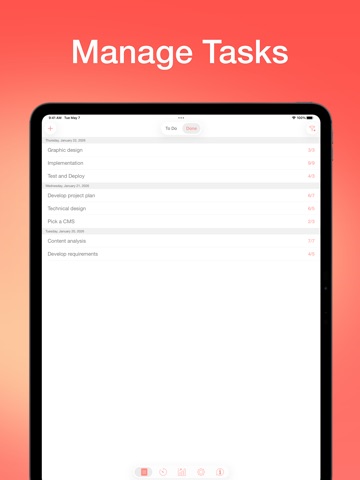
21 store screenshots


Pricing & paywalls
App Store
- Price: $19.99
Ratings & reviews
App Store
-
5/5Simple, minimal, effective.
Great pomodoro timer. The interface / graphics are minimal but I actually quite appreciate this quality—less distractions, less “shiny things”, less novelty in other words, are vastly important and hugely under-estimated means to simply begin tasks… starting the work is, for myself, half the battle. Thus I appreciate that this app has little to no frills, while maintaining core functionality aspects to simply navigate through tasks: tagging and grouping tasks by tag is something I would find challenging to go without, so I appreciate this feature quite a lot. The fact I have been using this app for nearly all of my work—household, office, school, projects—since downloading it over a week ago is exceptionally rare for me. That alone speaks volumes. The novelty thing (“Oohh shiny!!”) is quite a crappy procrastination-distraction habitual behavior, and one which is EXCEPTIONALLY challenging to break. Yet here I am, writing this review, another rarity. Indeed, it has only been a week. However, exceptionally few productivity-oriented apps “make it” past day-2 or day-3 for me—yet this one has made it to day-7 (almost day-8!!)… that is HUGE. This is truly a nice app. Happy I gave it a try, for sure…if my “struggle” resonates at all—it may be quite helpful for you as well!
lissa_chica88 · 6 Aug 2026
-
5/5Great Time Management Tool for Adults too!
I love this app, I use it daily! Time management is my Achilles heel, so being able to visually see the time winding down has been really nice. My favorite feature is probably the minute increment alerts that sound like ticks, they’re super helpful for keeping me on track if I’m listening to anything with headphones and away from my phone. It’s really nice because I don’t have to be using my phone to still get the time-minding reminders I need. Finally this app has been a game changer for me with intimidating tasks. Setting a timer has been a great way for me to break through that initial anxiety and just get started. Breaking down tasks into manageable parts with this app has helped me be both more efficient and effective, so I would suggest it to anyone who could use some help with time management! I used to be embarrassed to use a timer for this purpose because all the reviews made it seem like it was just for kids, but let me tell you I think that ANYONE would benefit from this app if they would like to manage their time more effectively. Definitely worth the money in my opinion ☺️
OllyRand · 6 Aug 2026
-
5/5Keep the Pro
I just started using this app. I find it very helpful for staying on task and for encouraging myself to take care of large tasks in small pieces, instead of waiting for a big chunk of time that never materializes. Whittling away by a Pomodoro or two at a time is much less intimidating than facing a week or a month on one gigantic project. It also encourages me to take regular, short breaks that do not derail my progress. I like the word pro on the badge because it helped me discern the free version I originally downloaded from the paid version. I agree with the people who prefer to use the phone version in order to conserve computer resources. UPDATE: l've had this app for a while now. It's one of my favorites. It does exactly the description says it. And when I use it, my days are far more productive and far more peaceful. I hope the developer continues to update this excellent app so it's always current with the latest operating system.
ThirdEffingNameChoice · 6 Aug 2026
-
1/5Way too buggy and unreliable
I really gave this timer a chance and had numerous interactions with support that were not successful. One minor issue is getting double notifications when the timer is up, not a big deal, but annoying. More seriously, is WHEN THERE IS NO NOTIFICATION, and I keep working or take too long of a break because I wasn’t notified. I’ve read of LOTS of people having this issue, which makes me think this app has been pumped up with fake reviews. This is the ONE THING this app must do right to be useful, and it can’t do it reliably. Then, today I got sidelined with some phone calls so I wanted to start my Pom cycle over from the beginning because I was only halfway through when I got the calls. I should have been able to do this by skipping work intervals and breaks until I got to the end of the four intervals. But the “skip interval” option just takes me back to the beginning of the interval and doesn’t allow me to start a whole new 2-hour Pom. So I’m done with this app. A pomodoro timer needs to do a few simple things, not create frustration. I really like the layout, concept, and Apple Watch integration of this one, but it’s just too buggy to be useful.
Rowena Columbia · 6 Aug 2026
-
5/5Great app to help you stay productive
Be Focused Pro is my favourite app for keeping myself on track to get things done. I use 25-minute intervals to keep my attentive at the job in hand, and knowing I can take a break every 25 minute really eases the anxiety when faced with complex tasks. I've heard of the pomodoro method many times before, but it's this app that has done it for me. It times the 5-minute break too, so I don't go too long when I take breaks. It keeps me on track. The best part is the app syncs between my desktop computer and iPad so, when I go to a different room or location to finish my task, the timer stays with me. At the end of the day, I can see a chart of how many hours I worked toward each task I assigned. I can also see the progress over days and weeks, whether I've been productive or not. Great tool to put the pomodoro method into action. Highly recommended!
wluhan · 6 Aug 2026
Privacy & accessibility
App Store
Privacy
- Data Linked to You — Analytics — Location — Coarse Location Developer declared
- Data Linked to You — App Functionality — Contact Info — Email Address Developer declared
- Data Linked to You — App Functionality — Identifiers — User ID Developer declared
- Data Linked to You — App Functionality — User Content — Other User Content Developer declared
- Data Linked to You — Developer’s Advertising or Marketing — Contact Info — Email Address Developer declared
- Data Linked to You — Developer’s Advertising or Marketing — Contact Info — Name Developer declared
- Data Linked to You — Developer’s Advertising or Marketing — Identifiers — User ID Developer declared
- Data Linked to You — Developer’s Advertising or Marketing — Location — Coarse Location Developer declared
- Data Linked to You — Contact Info Developer declared
- Data Linked to You — Identifiers Developer declared
- Data Linked to You — Location Developer declared
- Data Linked to You — User Content Developer declared
- Data Not Linked to You — Analytics — Usage Data — Product Interaction Developer declared
- Data Not Linked to You — App Functionality — User Content — Customer Support Developer declared
- Data Not Linked to You — Usage Data Developer declared
- Data Not Linked to You — User Content Developer declared
Accessibility
No accessibility labels collected yet.
Versions
App Store
-
1.4
• Ability to edit the number of pomodoros • Reports for the selected task • Auto-start the next timer (option) • Export to a CSV file • Vibration at the end of the timer (option) • 3D Touch • Multiple fixes and improvements
-
1.5
- The app was moved to the new server. Your account data will be moved automatically when you login. - Updated the completion sounds - Added the ability to paste a task list from other applications - Fixed the issue with "Skip break if idle" - Added the ability to hide the task "Other" - Changed the app name - Improved performance - Multiple fixes and improvements
-
1.6
• Updated application icon • Minor fixes and improvements
-
1.7
• Added the ability to adjust the volume of notifications • Added the ability to change frequency and volume of the Chronometer sound • Added the ability to turn off the Chronometer sound for breaks • New Work Completed / End Break sounds added • Added the ability to view the amount of skipped intervals for the preferred period to the Reports • Added a "Pie Chart" to the Reports, which allows to estimate how much time was spent on a certain tasks • Added the ability to change account password • Added support for iPhone X • Multiple fixes and improvements Thanks for using Be Focused. Love the app? Rate us! Your feedback helps us to make Be Focused even better.
-
1.7.1
• Added the ability to adjust the volume of notifications • Added the ability to change frequency and volume of the Chronometer sound • Added the ability to turn off the Chronometer sound for breaks • New Work Completed / End Break sounds added • Added the ability to view the amount of skipped intervals for the preferred period to the Reports • Added a "Pie Chart" to the Reports, which allows to estimate how much time was spent on a certain tasks • Added the ability to change account password • Added support for iPhone X • Multiple fixes and improvements Thanks for using Be Focused. Love the app? Rate us! Your feedback helps us to make Be Focused even better.
-
1.7.2
• Added the ability to adjust the volume of notifications • Added the ability to change frequency and volume of the Chronometer sound • Added the ability to turn off the Chronometer sound for breaks • New Work Completed / End Break sounds added • Added the ability to view the amount of skipped intervals for the preferred period to the Reports • Added a "Pie Chart" to the Reports, which allows to estimate how much time was spent on a certain tasks • Added the ability to change account password • Added support for iPhone X • Multiple fixes and improvements Thanks for using Be Focused. Love the app? Rate us! Your feedback helps us to make Be Focused even better.
-
1.7.3
• Added links to the updated Privacy Policy & Terms of Use • Minor fixes and improvements
-
1.7.4
• Minor fixes and improvements Thanks for using Be Focused. Love the app? Rate us! Your feedback helps us to make Be Focused even better.
-
1.7.5
Minor fixes and improvements
-
1.7.6
Minor fixes and improvements
-
1.7.7
• Fixed sync issues • Other minor fixes and improvements
-
1.7.9
• Fixed synchronization Please update both iOS and macOS versions.
-
2.0
• Ability to specify different timer settings for different tasks • Task details panel where you can: - Add notes to a task - Assign a due date - Specify activity type (you can configure a set of activity types to specify different timer settings for different tasks) - Add or remove tags - Estimate a number of intervals required to complete a task (then you can evaluate the estimation error for completed tasks in reports) - View and manage completed intervals • Improved reports, so now you can: - Switch report units between Intervals and Hours - Configure reports using tags - Evaluate the estimation error for completed tasks - Auto save report settings between application sessions • Filters by tags and due dates to keep focussed on the most important tasks • Improved integration with Focus Matrix • Multiple bug fixes and improvements Please update both macOS and iOS versions. If you use Focus Matrix, please update it as well.
-
2.0.1
• Ability to specify different timer settings for different tasks • Task details panel where you can: - Add notes to a task - Assign a due date - Specify activity type (you can configure a set of activity types to specify different timer settings for different tasks) - Add or remove tags - Estimate a number of intervals required to complete a task (then you can evaluate the estimation error for completed tasks in reports) - View and manage completed intervals • Improved reports, so now you can: - Switch report units between Intervals and Hours - Configure reports using tags - Evaluate the estimation error for completed tasks - Auto save report settings between application sessions • Filters by tags and due dates to keep focussed on the most important tasks • Improved integration with Focus Matrix • Multiple bug fixes and improvements Please update both macOS and iOS versions. If you use Focus Matrix, please update it as well.
-
2.0.2
• Improved sync speed between devices • Added compatibility with the latest version of operating system and latest devices • Other minor fixes and improvements
-
2.1.1
Fixed the problem with saving data on the latest OS versions
-
2.2
• New widgets • Ability to delete account right from the app • Improved work of the app on Apple Watch
-
2.2.1
• Widgets for Lock Screen • Additional widget for Home Screen • Support for the latest devices and OS versions
-
2.3
• Live activities for Lock Screen and Dynamic Island • Widgets for Lock Screen and Home Screen • Minor fixes and improvements
-
2.3.1
• Improved data synchronization • Minor fixes and improvements
-
2.4
• Support for the latest OS version • Minor fixes and improvements
-
2.4.2
• Compatibility with the latest version of Focus Matrix • Minor fixes and improvements Important: If you also use Focus Matrix, please update it to the latest version to ensure smooth syncing with Be Focused.
-
2.5
• Start or stop the timer from the Lock Screen, Controls Center, or Action Button • Integrate with the Shortcuts app to automate workflow (control tasks and timers via Shortcuts app) • Trigger Shortcuts automatically on specific events in Be Focused • Multiple fixes and improvements
-
2.6
• Liquid Glass design • Optimized for the latest iOS • Multiple fixes and improvements
-
2.7
· 19 Feb 2026
• Added Dark Mode support • Multiple fixes and improvements
Alternatives
- Habit & To Do List: Motidayt — Same category + similar ratings
- Focus Timer - Work With Friend — Same category + similar ratings
- Focus Timer: Pomodoro Study — Same category + similar ratings
Availability by market
- US
Data quality & evidence
- Page completeness
- Live store listing
- Last verified
- 6 Aug 2026
- Sources
- App Store
- Apoku editorial summary has not been published yet.