
Quick verdict
- What it is
- Store information collected; an Apoku editorial summary is not yet published.
- At a glance
-
- Free to download
Categories and search queries
Official categories
- Music
- Utilities
Apoku categories
Key functions
| Function | Availability | Access | Scope | Evidence |
|---|---|---|---|---|
| Free app | Yes | Free | Context-specific | Store published |
Screens
App Store
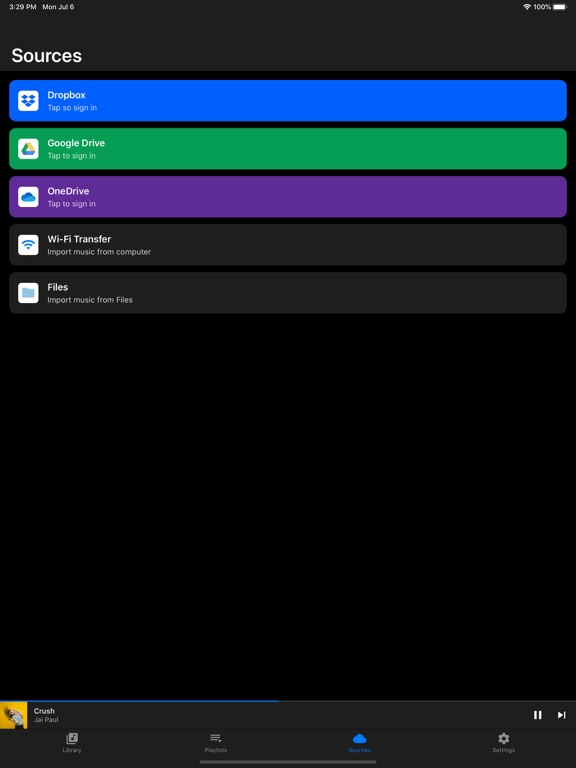
9 store screenshots



Pricing & paywalls
App Store
- Free to download
Ratings & reviews
App Store
-
4/5Good app, does what I need it to do
I was looking for a simple graphic EQ app that would allow me to tweak the EQ settings to accommodate the tonal characteristics of several different sets of headphones that I have (as different models of HP’s and earbuds have their own inherent sonic characteristics, that can vary from just slightly to significant) while listening to MP3 and WAV files that I have stored on my iPhone (12), and I found that this app works well in allowing me to dial in custom EQ curves for each pair of phones/buds that I have. The app was free (or at least the version I installed is the free version), and so far, after listening to music for over half an hour, my listening hasn’t been interrupted even once by any pesky adds or pop-ups, and that’s a pretty rare thing when using free apps. I rated this app only 4 stars, not because I’m unhappy with the app’s overall function or sound quality, but only because there’s no way to save different EQ settings for each of the different sets of phones/earbuds I have… but, I also admit that I’m being pretty picky in my expectations, too, considering that the app is totally free. ;)
DustyStuart · 30 Sep 2026
-
5/5Only imports songs
I have over 20 music folders on my phone in files that are basically playlists , but I could not import these folders into this app . The app wants me to import songs, and that is ok, but when you import songs from your phone onto the app and you have over 2,000 songs it is burdensome to try and recreate a playlist again….especially when the songs you import from your phone don’t have specific titles and names. This app offered almost everything I wanted except for that. I wanted to increase the volume in my sony 720s, and it did that perfectly. However, I can’t use the app if I can’t import playlists or music folders. I just can’t import each song individually. And let’s consider I do import each song individually. I can’t even hide the songs from the “songs” list on this app, and this means if I import 50 songs and create a playlist on this app, then when I want to create a new playlist with 20 more songs those 20 songs are added to the previous 50, and so on. So therefore it’s now 70 songs I have to filter through to make a playlist. Then as I add 20 more songs, you can get the picture. It be becomes ridiculously burdensome to song for song try and create multiple playlists, when the songs you import all stay on the same file. The best solution would have been that after you create a playlist using this app, that you can then go to the songs file and delete the songs from that file while maintaining the songs in the playlist.
Lukekylestanley · 30 Sep 2026
-
5/5Amazing App ! Helps me enjoy music better
Get a better bang off songs only problem is when I tried to log into google drive it says quote “This app is blocked This app tried to access sensitive info in your Google Account. To keep your account safe, Google blocked this access.” I need you guys to fix that . Other than that genuinely a 5/5 and 10/10 . Figure out how you want to download your music because running it off iCloud music library limits you on effects . Best if you have space to manually plug phone into pc and drag music to phone . Even in my vehicle I get a louder sound out of my speakers without compromising the cleanness of the song (as long as you don’t go up TOO high on volume ((red)) )
Bighollow762 · 30 Sep 2026
-
3/5This is only an audio player
If you are looking to boost/adjust your iPhone's sound volume there is no other way than getting a speaker or using the iOS's built-in EQ tucked away in the Apple Music settings found in the Settings app at the Apple Services section before the TV Provider. From there you can scroll down to Audio settings and it will notably adjust sound as you would expect. The EQ does not change the sound drastically depending on the iPhone model but it is the only one you can use on iPhone that works best. There are no third party apps that can change sound quality in any way. But if you want the loudest sound possible on an iPhone it is recommended that you set the iOS built-in equalizer in Apple Music's audio settings and set it to 'Late Night' where it is notably louder that any other setting. If you read this by now you should know not to trust any falsely advertising apps on the iOS only App Store as the developers can tell Apple one thing to then give the users another.
Dr. James King · 30 Sep 2026
-
5/5Is this really free and no ads???
I’ve spent about 20 minutes on the app store looking for an EQ that doesn’t want me to pay a monthly subscription to use it. Downloaded this one, just tested it real quick from a song i have in iCloud drive and it works as expected (the EQ part is all i tested). I saw a review about getting a lot of ads that the developer replied to saying that there was an option in settings to get rid of ads. While i didn’t experience any ads, I was still interested in paying the developer $2-$3 to show my appreciation but i don’t even see an option to purchase the app anywhere. Is this a truly free AND ad-free eq??? :capitalism sweats nervously:
Animaldrummer04 · 30 Sep 2026
Privacy & accessibility
App Store
Privacy
- Data Linked to You — Analytics — Diagnostics — Performance Data Developer declared
- Data Linked to You — Analytics — Identifiers — Device ID Developer declared
- Data Linked to You — Analytics — Location — Coarse Location Developer declared
- Data Linked to You — Analytics — Usage Data — Advertising Data Developer declared
- Data Linked to You — Analytics — Usage Data — Product Interaction Developer declared
- Data Linked to You — Third-Party Advertising — Diagnostics — Performance Data Developer declared
- Data Linked to You — Third-Party Advertising — Identifiers — Device ID Developer declared
- Data Linked to You — Third-Party Advertising — Location — Coarse Location Developer declared
- Data Linked to You — Third-Party Advertising — Usage Data — Advertising Data Developer declared
- Data Linked to You — Third-Party Advertising — Usage Data — Product Interaction Developer declared
- Data Linked to You — Diagnostics Developer declared
- Data Linked to You — Identifiers Developer declared
- Data Linked to You — Location Developer declared
- Data Linked to You — Usage Data Developer declared
- Data Not Linked to You — Analytics — Diagnostics — Crash Data Developer declared
- Data Not Linked to You — Third-Party Advertising — Diagnostics — Crash Data Developer declared
- Data Not Linked to You — Diagnostics Developer declared
- Data Used to Track You — Diagnostics — Crash Data Developer declared
- Data Used to Track You — Diagnostics — Performance Data Developer declared
- Data Used to Track You — Diagnostics Developer declared
- Data Used to Track You — Identifiers — Device ID Developer declared
- Data Used to Track You — Identifiers Developer declared
- Data Used to Track You — Location — Coarse Location Developer declared
- Data Used to Track You — Location Developer declared
- Data Used to Track You — Usage Data — Advertising Data Developer declared
- Data Used to Track You — Usage Data — Product Interaction Developer declared
- Data Used to Track You — Usage Data Developer declared
Accessibility
No accessibility labels collected yet.
Versions
App Store
-
1.17.3
- Small UI improvement.
-
1.17.4
Improvements: - Greatly improved performance. - New Music Services design. Bug fixes: - Fixed a bug where in some cases artwork wouldn't be shown.
-
1.17.5
New features: - Added an A-Z menu to downloads for quick scrolling. - Improved downloads performance. - New app icon.
-
1.17.6
New features: - Added bulk actions to downloads (add multiple songs to a playlist or delete multiple songs at once). - Improved A-Z quick scrolling in downloads. - Improved performance by caching song artwork.
-
1.18
New features: - Stream directly from Dropbox & Google Drive. - Improved downloads screen UX. Bugfixes: - Fixed Audius not working anymore.
-
1.18.1
Bugfix: - Radio would sometimes not load.
-
1.18.2
Bugfix: - This update fixes iTunes problems (not showing songs / crashes).
-
1.18.3
New features: - Fast a-z scrolling trough iTunes songs. - Show iTunes songs artwork.
-
1.18.4
Bugfix: - Fixed Network error.
-
1.18.5
Bugfixes: - Fix lockscreen not showing info anymore. - Fix cloud service sign-in wasn't working anymore on iOS 14.5.
-
1.18.6
- Performance improvements.
-
1.18.7
Bugfix: - Fixed a bug that would cause songs to skip after an audio interruption (such as: phone call, Siri).
-
1.18.8
Bugfixes: - Song's wouldn't repeat more than two times. - Sometimes the lock screen wouldn't show song info.
-
1.19
New features: - Improved FX algorithms (no more distortion). - Apple Music playback. - iCloud Drive (and local files import). - Improved radio screen design. - Add radio stations & Audius songs to playlists. - Free to use FX & no intrusive ads.
-
1.19.1
Bugfix: - App crash on iOS12.
-
1.20
New feature: - A-Z quick menu to quickly jump trough Apple Music Artists & Albums.
-
1.20.1
- Fixes a bug where Dropbox wouldn't show files.
-
1.20.2
- Performance improvements.
-
1.20.3
- Performance improvements. All animations can now run smoothly under 120Hz.
-
1.20.4
Bugfixes: - Share option would auto-close directly after opening it. - Seeking didn't work while streaming from Google Drive. - Sleeptimer was hidden behind a modal and therefore unusable.
-
1.20.5
Stability improvements and bug fixes.
-
1.20.6
Stability improvements and bug fixes.
-
1.20.7
Stability improvements and bug fixes.
-
1.20.8
Stability improvements and bug fixes.
-
1.20.9
· 2 Sep 2024
Stability improvements and bug fixes.
Alternatives
- Bass Booster Volume Power Amp — Same category + similar ratings
- Bass Booster EQ + Volume Boost — Same category + similar ratings
- Volume Booster - EQ Amplifier — Same category + similar ratings
- Equalizer Fx: Bass Booster App — Same category + similar ratings
- Volume Booster Bass Booster — Same category + similar ratings
- Equalizer - Volume Booster EQ — Same category + similar ratings
Availability by market
- US
Data quality & evidence
- Page completeness
- Live store listing
- Last verified
- 30 Sep 2026
- Sources
- App Store
- Apoku editorial summary has not been published yet.