
Quick verdict
- What it is
- Store information collected; independent summary not yet available.
- At a glance
-
- Free to download
Categories and search queries
Official categories
- Finance
- Business
AppCorpus categories
Key functions
| Function | Availability | Access | Scope | Evidence |
|---|---|---|---|---|
| Apple Wallet | Yes | Free | App Store | Store published |
| Free app | Yes | Free | — | Store published |
Screens
App Store
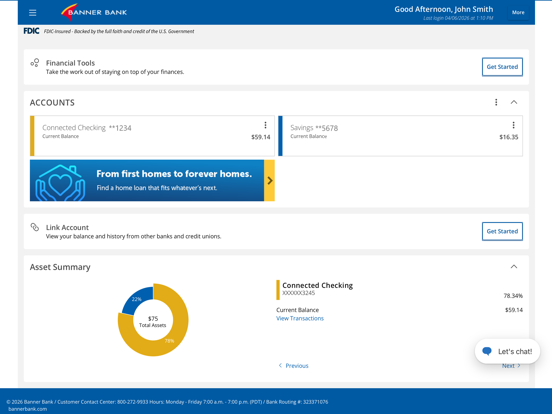
18 store screenshots



Pricing & paywalls
App Store
- Free
Ratings & reviews
App Store
-
5/5Banner Bank
UPDATE: I am just adding on to my previous comment, rating. A couple of weeks ago I needed to find out my account balance. my app was not on the phone I was using so I called the 800 number and, as usual, the person that I FINALLY got a hold of, because it was after regular banking business hours, told me that she had absolutely no way to access account information. Oh she gave me another phone number to call and transferred me so that I did not have to call that phone number and lo and behold, the next person I spoke to was from the very same department and told me the very same thing that they could not access my account information. And, the phone number she gave me took me to the very same automated message that gave me the very same useless information. Let’s just say, I was feeling Very very very very frustrated! If I’m calling a customer service phone number and I want some customer service and I am a current customer and I have a valid current account and all I want to know is the balance then by all means, give me my balance! Ask me a secret question. Ask me a codeword. Do something! But do not tell me that you, the customer service representative, cannot tell me something as simple and Basic as an account balance! I wasn’t asking for personal information. If I have the debit card and no PIN number then knowing the balance won’t do anything for me anyway! The app itself works just fine. But as for the bank? The customer service hours are horrible! … If I’m out and about at midnight and something isn’t working ( money isn’t available when it should be or whatever) the service hours are of no help except for Monday through Friday like 9-5. ( I’m not sure of the exact hours). Otherwise, the app is fine
customer-A · 30 Aug 2026
-
5/5Ease of Use
There’s been a wonderful ease of use in the app for someone like me (which is to say someone with temporal-lobe brain damage post car accident) and the human metrics involved in creating the app are hugely apparent. It’s easy to see balances; relatively easy (relative to me that is… with brain damage) to deposit checks and the support team is very helpful. I live on a tiny island and the local bank (Islander’s Bank) got bought up and gobbled up by Banner Bank. I was worried that I would lose the wonderful humans that ran Islander’s - they all knew me and my mental struggles and were basically financial gurus. I was thrilled - THRILLED - to know they were all now apart of the Banner Bank heading. And everyone I’ve had to speak to through Banner Bank (corporate) has been patient and kind AND very human. I’m glad to know I can feel that my brain and finances are in safe and caring hands.
Max Baden · 30 Aug 2026
-
1/5Banner Bank App
Really disappointed in the bank for making such a app, it is crude to use and it quite often only fails to work properly. Both with face recognition and manually entering your password in can be a problem. Also some times snapshot doesn’t even work. And when it does it takes days to process. Not always, but it’s unreliable. You could never look at your app after 9 PM because your balance will change drastically and most your transactions will disappear. And if they’re pending they could be pending today, tomorrow the next day, the next day, the next day, the next day & when it finally stops pending then it’s dated as that date not the actual date when the transaction in reality occurred. So there is no way to actually use the app as a check register because it will tell you the wrong information about when you actually spent your money. I truly think that because of this glitch, that the bank is actually robbing everyone of there money a little here and a little there. The system used does not make any sense at all & is completely way out of line with the way it’s processes my transactions where I spend money and when I deposit money. I very much dislike this app and would not recommend it to anyone without a lawyer.
Brentanorusselli · 30 Aug 2026
-
5/5Amazing customer service - online app impeccable
I’ve banked with Banner Bank since they were a one branch operation in Walla Walla. A savings account with a passbook (remember those) when I was 4 years of age. That was 60 years ago. The bank has grown, expanded to many western states (still waiting for Northern Nevada… hint hint), and has never lost the hometown feel of a friendly smile, and amazing customer service. If I need personal banking services I drive from Reno over the Sierra to Grass Valley California (101 miles from home). There’s every brand of bank in Reno you could imagine [no Banner :( ]… they’re worth the drive. Mobile banking handles 99% of my needs. Banner Bank is wonderful. If you read this review, I have no ties to Banner other than being a loyal customer. You should give them a chance to be your financial partner as well. You’ll be amazed!
DougTreg · 30 Aug 2026
-
5/5You really need to hire a better app maintenance company
Crashes too much. Errors a lot. Causes big delays just trying to complete online deposits. Every time you tweak it I spends a day or two trying to do the simplest of transactions. Please just shut it down and fix completely whoever keeps messing with little bug fixes is driving we customers nuts. Thanks. One last comment a text warning you are messing with online banking app BEFORE your tech person touches it would save us customers a whole lot of frustration. If I can’t get it to open how on earth can I see some note or warning on your app site? PS. Adding it to your phone system AT THE ANSWER POINT especially after hours would really help. Thanks!
Rachel8118 · 30 Aug 2026
Privacy & accessibility
App Store
Privacy
- Data Linked to You — Analytics — Financial Info — Payment Info Developer declared
- Data Linked to You — Analytics — Identifiers — Device ID Developer declared
- Data Linked to You — Analytics — Identifiers — User ID Developer declared
- Data Linked to You — Analytics — Location — Precise Location Developer declared
- Data Linked to You — Analytics — Other Data — Other Data Types Developer declared
- Data Linked to You — Analytics — Purchases — Purchase History Developer declared
- Data Linked to You — App Functionality — Contact Info — Email Address Developer declared
- Data Linked to You — App Functionality — Contact Info — Name Developer declared
- Data Linked to You — App Functionality — Contact Info — Other User Contact Info Developer declared
- Data Linked to You — App Functionality — Contact Info — Phone Number Developer declared
- Data Linked to You — App Functionality — Contact Info — Physical Address Developer declared
- Data Linked to You — App Functionality — Contacts Developer declared
- Data Linked to You — App Functionality — Diagnostics — Crash Data Developer declared
- Data Linked to You — App Functionality — Diagnostics — Other Diagnostic Data Developer declared
- Data Linked to You — App Functionality — Diagnostics — Performance Data Developer declared
- Data Linked to You — App Functionality — Financial Info — Payment Info Developer declared
- Data Linked to You — App Functionality — Identifiers — Device ID Developer declared
- Data Linked to You — App Functionality — Identifiers — User ID Developer declared
- Data Linked to You — App Functionality — Location — Precise Location Developer declared
- Data Linked to You — App Functionality — Other Data — Other Data Types Developer declared
- Data Linked to You — App Functionality — Purchases — Purchase History Developer declared
- Data Linked to You — App Functionality — Usage Data — Product Interaction Developer declared
- Data Linked to You — Developer’s Advertising or Marketing — Identifiers — Device ID Developer declared
- Data Linked to You — Developer’s Advertising or Marketing — Identifiers — User ID Developer declared
- Data Linked to You — Contact Info Developer declared
- Data Linked to You — Contacts Developer declared
- Data Linked to You — Diagnostics Developer declared
- Data Linked to You — Financial Info Developer declared
- Data Linked to You — Identifiers Developer declared
- Data Linked to You — Location Developer declared
- Data Linked to You — Other Data Developer declared
- Data Linked to You — Purchases Developer declared
- Data Linked to You — Usage Data Developer declared
Accessibility
No accessibility labels collected yet.
Versions
App Store
-
5.0.5304
Performance and security enhancements Sign in with Face ID
-
5.0.5407
Performance and security enhancements
-
5.0.5409
High contrast mode option for enhanced Performance and security enhancements
-
5.0.5413
Minor improvements.
-
5.2.5413
Minor improvements.
-
5.2.5504
This release includes enhancements and fixes. These latest enhancements support the work we’ve been doing behind the scenes to add the mobile features and functionality that you’ve been telling us about in your feedback and fit the way you want to bank.
-
5.3.5509
Version History December 9, 2019 Version 5.5.09 Banner’s latest release introduces enhancements that make your mobile banking easier to use, including: * Updates to our Snapshot Check Deposit feature including faster deposit times * Most users will see an updated look that is sleek and modern with a new quick links bar for one click access to our most used mobile tools * Performance optimization enhancements for all users
-
5.3.5512
Banner’s latest release introduces enhancements that make your mobile banking easier to use, including: •Improvements to the tips and messaging features of Snapshot Check Deposit •Performance optimization enhancements
-
7.0.56041
Banner’s latest release introduces enhancements that make your mobile banking even easier to use, including: •Ability to easily edit your existing recurring or future dated Funds Transfers. •Additional Quick Options are now available from the Accounts menu on the Home Screen, for easier access to our most popular tools. •An all new layout of the Alerts screen makes it easier to manage your alerts or add new ones. •Enhancements to the Quick Bill Pay function include verification points to ensure you’ve entered all the information correctly plus new filter options to view past payments.
-
7.4.5610
Banner’s latest release introduces enhancements that make banking on the go even easier and more convenient. • Personal Financial Management usability enhancements, including expanded error statuses with improved guidance and actionable links to resolve specific issues with linked accounts. • Screen optimization and layout enhancements for improved usability
-
7.5.5620
Version History February 18, 2021 Version 5.6.20 We’re frequently updating our app to bring you the best and most secure banking experience. Turn on auto updates to ensure you always have the latest version. Our current release includes: • Usability enhancements to our online and mobile change of address form. • Minor improvements to maintain optimal stability, security and performance.
-
7.5.5708
Version History August 24, 2021 Version 5.7.08 We’re frequently updating our app to bring you the best and most secure banking experience. Turn on auto updates to ensure you always have the latest version. Our current release includes: • Minor improvements to maintain optimal stability, security and performance. Version History June 24, 2021 Version 5.7.05 We’re frequently updating our app to bring you the best and most secure banking experience. Turn on auto updates to ensure you always have the latest version. Our current release includes: • Minor improvements to maintain optimal stability, security and performance.
-
7.6.5708
August 24, 2021 Version 5.7.08 We’re frequently updating our app to bring you the best and most secure banking experience. Turn on auto updates to ensure you always have the latest version. Our current release includes: • Minor improvements to maintain optimal stability, security and performance.
-
7.6.5713
December 13, 2021 Version 7.6.5713 We’re frequently updating our app to bring you the best and most secure banking experience. Turn on auto updates to ensure you always have the latest version. Our current release includes: • Push Notification technology for receiving real-time Security and Account Alerts on your mobile device without having to open the app. • Additional smaller improvements to maintain optimal stability, security and performance.
-
7.7.5717
Version History May 25, 2022 Version 5.7.17 We’re frequently updating our app to bring you the best and most secure banking experience. Turn on auto updates to ensure you always have the latest version. Our current release includes: • Resolution to Snapshot Deposit™ issue identified by iPhone users • Minor improvements to maintain optimal stability, security and performance.
-
7.7.5722
Version History September 20, 2022 Version 5.7.22 We’re frequently updating our app to bring you the best and most secure banking experience. Turn on auto updates to ensure you always have the latest version. Our current release includes: • Enabling the Zelle Ready Contacts feature, making it easier to send money to those you trust by letting you know which of your contacts are enrolled and ready to accept Zelle payments. • Minor improvements to maintain optimal stability, security and performance.
-
7.7.5724
Version History October 6, 2022 Version 5.7.24 We’re frequently updating our app to bring you the best and most secure banking experience. Turn on auto updates to ensure you always have the latest version. Our current release includes: • Resolved login authentication issue for iOS 16 • Minor improvements to maintain optimal stability, security, and performance.
-
7.8.5802
Version History April 25, 2023 Version 5.8.2 We’re frequently updating our app to bring you the best and most secure banking experience. Turn on auto updates to ensure you always have the latest version. Our current release includes: • Minor improvements to maintain optimal stability, security, and performance.
-
7.8.5803
Version History June 6, 2023 Version 5.8.3 We’re frequently updating our app to bring you the best and most secure banking experience. Turn on auto updates to ensure you always have the latest version. Our current release includes: • Minor improvements to maintain optimal stability, security, and performance. • In app access to manage your debit card – Activate your card, change your PIN, turn your card on/off, set alerts and control when your debit card can be used, and submit international travel plans.
-
8.0.5812
Version History January 23, 2024 Version 5.8.12 We’re frequently updating our app to bring you the best and most secure banking experience. Turn on auto updates to ensure you always have the latest version. Our current release includes: • Bottom navigation for improved ease of access to the most used Mobile Banking tools. • Minor improvements to maintain optimal stability, security, and performance.
-
8.0.5906
Version History September 11, 2024 Version 5.9.06 We’re frequently updating our app to bring you the best and most secure banking experience. Turn on auto updates to ensure you always have the latest version. Our current release includes: • Minor improvements to maintain optimal stability, security, and performance.
-
8.0.5909
Version History November 21, 2024 Version 5.9.09 We’re frequently updating our app to bring you the best and most secure banking experience. Turn on auto updates to ensure you always have the latest version. Our current release includes: • Improvements to Snapshot Deposit. • Additional security options for improved alert notifications and device authentication. • New self-serve features. • Minor improvements to maintain optimal stability, security, and performance.
-
8.2.51000
Version History March 6, 2025 Version 5.10.0 We’re frequently updating our app to bring you the best and most secure banking experience. Turn on auto updates to ensure you always have the latest version. Our current release includes: • Minor improvements to maintain optimal stability, security, and performance.
-
8.2.51003
Version History June 5, 2025 Version 5.10.03 We’re frequently updating our app to bring you the best and most secure banking experience. Turn on auto updates to ensure you always have the latest version. Our current release includes: • Minor improvements to maintain optimal stability, security, and performance.
-
Update Prep for Age Questions
· 21 Apr 2026
Version History April 21, 2026 Version 26.1.0 We’re frequently updating our app to bring you the best and most secure banking experience. Turn on auto updates to ensure you always have the latest version. Our current release includes: • Minor improvements to maintain optimal stability, security, and performance.
Alternatives
- Gesa Digital Banking — Same category + similar ratings
- MyOCCU Mobile Banking — Same category + similar ratings
Availability by market
- US
Data quality & evidence
- Page completeness
- Live store listing
- Last verified
- 30 Aug 2026
- Sources
- App Store
- Independent summary has not been published yet.