
Quick verdict
- What it is
- Store information collected; an Apoku editorial summary is not yet published.
- At a glance
-
- $9.99
- In-app purchases
Categories and search queries
Official categories
- Productivity
- Lifestyle
Apoku categories
Key functions
| Function | Availability | Access | Scope | Evidence |
|---|---|---|---|---|
| In-app purchases | Yes | Limited free | Context-specific | Store published |
Screens
App Store
18 store screenshots

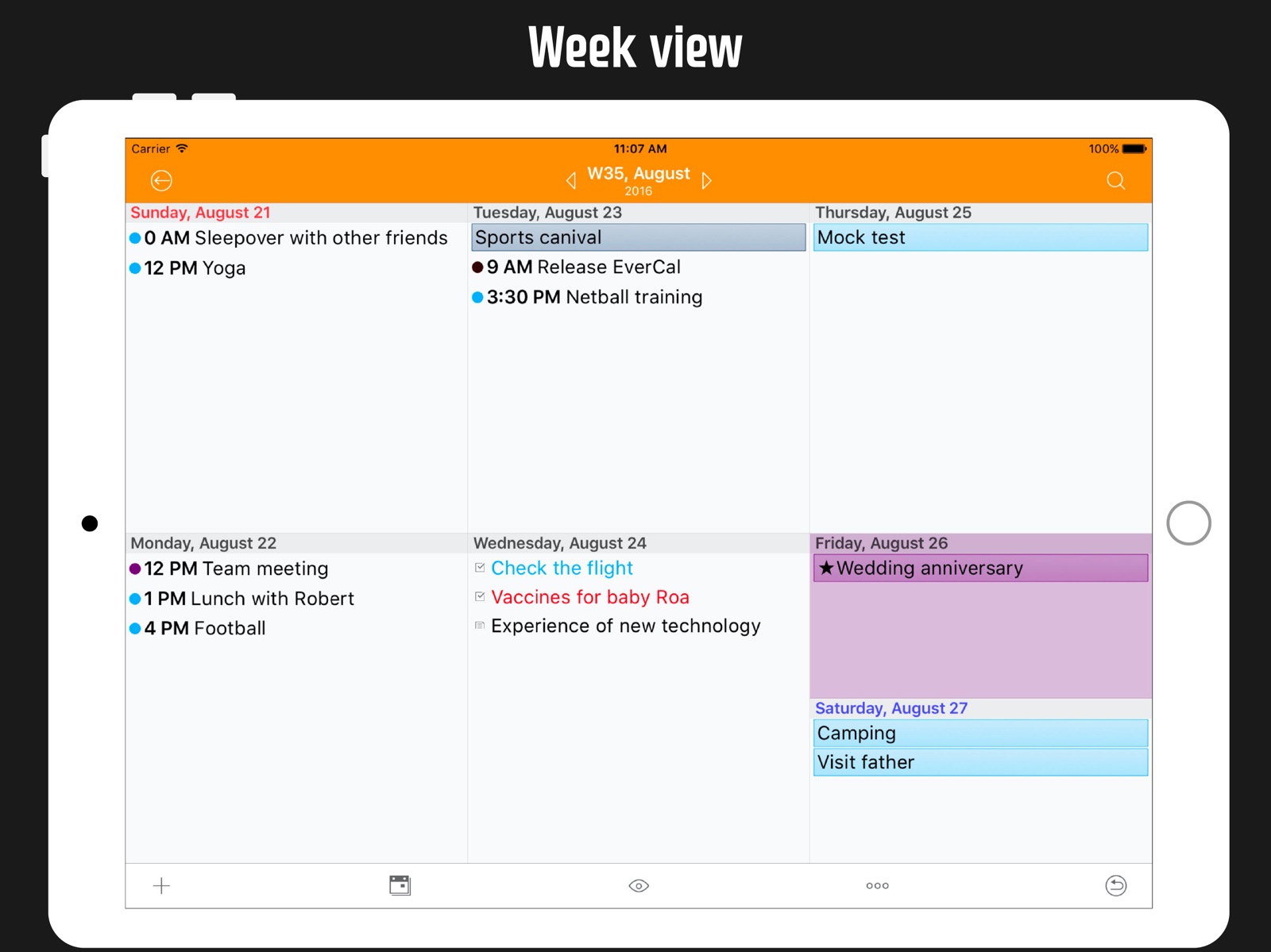


Pricing & paywalls
App Store
- Price: $9.99
- In-app purchases
Ratings & reviews
App Store
-
5/5Sweet. Best calendar I’ve used, and fun.
Still the best calendar app. Love this. I was using two separate calendars, one for work, one for me. Awesome Cal was mine. The other calendar I won’t mention (Pocket Informant) I used since my Blackberry days and recently they changed design AND added a monthly $2.99 subscription fee. I tried hard to continue liking and using it. But, Paying a fee on a calendar that does nothing other than be a calendar is like paying someone to watch you sleep. I quit them and migrated my entire life here to Awesome Cal. I will miss the vertical scrolling and the dark calendar, but, I will survive. It is an Awesome Calendar and has my reminders and Calendars in one place with some fun. Can color the entire day, add stickers, and the return to TODAY page flips are fun. May as well get some enjoyment and laffs out of a calendar. Plus, they don’t charge a subscription fee to access stuff you put on your own phone. I can’t get over how absurd that is. But, all that aside, Awesome Cal just flat out works & is stable & reliable.
Manic Bobo · 30 Jul 2026
-
3/5Updated review
Still our family’s fav iPhone calendar app! But without Dark Mode or Apple Watch support, it’s out of date. There’s also a bug defaulting to 2 alerts. The new app Awesome Cal 2 version addresses these issues, but is not the same calendar display and without the fantastic customizations this one has. Can’t these two be integrated? Been using it since 2011 and still our family go to calendar. The display layout is beautiful, yet simple. Plenty of customizations available. It supports multiple, shareable calendars and notes. It’s SO reliable and easy to add events. Sync all past events forever or choose a time frame. I love the monthly view the best! Seeing the whole month all you events for the in one glance is extremely useful. And with One-button push, I can see weekly or daily agenda. As good as it is, there are a few things needed to bring it up to today’s iOS14 standard: - dark mode support. I’m surprised we don’t have this yet!! Need the ability to attach a photo to a specific event. Yea one can be added to a note, but a note doesn’t save the same purpose as an event. No alerts attached to those. - Alerts keep defaulting to two of them, forcing me to go back in to delete one. - the date clicker gets confused sometimes between am/pm settings edit especially when noon is involved. I would also LOVE an Apple Watch version.
Trac_sea · 30 Jul 2026
-
1/5Latest update version 5.17
I had 10 years worth of notes and stickers to be all deleted with this new update. Even when I add a new note with this updated version, I can only add one before it crashes and the app shuts down. I have to constantly close out the app and what’s the use of syncing notes with iCloud? It didn’t bring my notes back at all and it just keeps syncing endlessly without any results. I loved this calendar. Past tense. All the data I typed from appointments to vacation itineraries to random notes are all gone! I am NOT happy! Update: 2/1/22 I had deleted the app thinking it would help restore my notes but it didn’t then when the update came nothing came back. My mistake. However on my iPad everything restored since I left it alone, so I thought I could just sync it so my iPhone will also get the notes but it just keeps syncing endlessly. I even set my settings to never turn off so the syncing could complete over night. It synced for 8 hours with no results. Please fix the syncing feature so both my iPad and iPhone are the same for the notes. Update 2/1/22 I tried to sync my iPad and iPhone since all my notes only appeared on my iPad so I turned off iCloud Drive, and iCloud note, turned it back on and lost my notes again!!! I regret these updates.
Hip Hip Hooray! · 30 Jul 2026
-
3/5Changed
I have used this calendar for years now mainly because it’s free, but it is also the best calendar. The past year or so though it has been doing something REALLY annoying and that’s why I can now only give it 3 stars. It use to be when you create an event on the calendar you pick the color you want it to be, save it and then it would show the event that color on the calendar. Something happened about a year ago where when you create an event, choose the color, save it, but when you go to the calendar it defaults back to the main default color and you have to re-open the event and select the color again and re-save it before it will take the color you chose. It’s really annoying to have to open every event twice when creating it to get the color you want. For a while I thought it was just a glitch and would get fixed, but it’s been nearly a year and it’s still doing it. Why even have the choice to add a color when originally creating the event if it won’t stay that color? If I didn’t have 10 events almost every day on my calendar it may not be so annoying, but I’m really starting to get fed up with it.
ffjrit01 · 30 Jul 2026
-
5/5Tried dozens - this is the best for IOS
I’ve literally tried dozens of calendar apps over the years. I don’t often leave reviews, but hoped this short review would help other busy executives. This calendar has the best overall UI and readability of any I’ve used on the iPhone. It syncs seamlessly with the native Mac OS calendar including shared calendars so my staff can see where I’ll be and when I have meetings scheduled. If someone adds something to my schedule I can quickly glance at my day or my week and see what’s next. The month view is what finally sold me on this software. I need the ability at a glance to see where I have availability in my calendar to schedule meetings, this does the trick. Entering new meetings wasn’t intuitive at first, it’s simple process but easy easy to overthink it until you use it a few times. It’s a great addition to your digital repertoire of tools, don’t hesitate to give it a try. I’ve been using it for several years, and it’s never failed me.
Bimmernerd · 30 Jul 2026
Privacy & accessibility
App Store
Privacy
- Data Not Linked to You — Analytics — Diagnostics — Crash Data Developer declared
- Data Not Linked to You — Analytics — Usage Data — Other Usage Data Developer declared
- Data Not Linked to You — Diagnostics Developer declared
- Data Not Linked to You — Usage Data Developer declared
Accessibility
No accessibility labels collected yet.
Versions
App Store
-
5.10
New features: Bug fixed: + Fix google task issue. + Minor bugs fixed. Thank you for using AwesomeCalendar! If you leave a review in the App Store, it encourages us to keep improving AwesomeCalendar.
-
5.11
New features: Bug fixed: + Fix google task issue. + Minor bugs fixed. Thank you for using AwesomeCalendar! If you leave a review in the App Store, it encourages us to keep improving AwesomeCalendar.
-
5.12
New features: Bug fixed: + Minor bugs fixed. Thank you for using AwesomeCalendar! If you leave a review in the App Store, it encourages us to keep improving AwesomeCalendar.
-
5.13
New features: Bug fixed: + Google task issue. Thank you for using AwesomeCalendar! If you leave a review in the App Store, it encourages us to keep improving AwesomeCalendar.
-
5.14
New features: + More doodle and text style sticker. + Update lunar date. Bug fixed: Thank you for using AwesomeCalendar! If you leave a review in the App Store, it encourages us to keep improving AwesomeCalendar.
-
5.16
New features: + More doodle and text style sticker. + Update lunar date. Bug fixed: + Update weather api. Thank you for using AwesomeCalendar! If you leave a review in the App Store, it encourages us to keep improving AwesomeCalendar.
-
5.17
New features: + Transfer data to AwesomeCalendar 2. Bug fixed: + Support iOS15. Thank you for using AwesomeCalendar! If you leave a review in the App Store, it encourages us to keep improving AwesomeCalendar.
-
5.17.1
· 24 Jan 2022
New features: + Transfer data to AwesomeCalendar 2. Bug fixed: + Support iOS15. + Database connection error. Thank you for using AwesomeCalendar! If you leave a review in the App Store, it encourages us to keep improving AwesomeCalendar.
-
5.6.1
New features: + Update holidays. + Support Dynamic Type or text size. Bug fixed: + Save a memo without body. Thank you for using AwesomeCalendar! If you leave a review in the App Store, it encourages us to keep improving AwesomeCalendar .
-
5.6.2
New features: + Update holidays. + Support Dynamic Type or text size. Bug fixed: + Save a memo without body. + Crash when printing with iPad. Thank you for using AwesomeCalendar! If you leave a review in the App Store, it encourages us to keep improving AwesomeCalendar .
-
5.6.3
Bug fixed: + Minor bugs fixed. Thank you for using AwesomeCalendar! If you leave a review in the App Store, it encourages us to keep improving AwesomeCalendar .
-
5.6.4
Bug fixed: + Minor bugs fixed. Thank you for using AwesomeCalendar! If you leave a review in the App Store, it encourages us to keep improving AwesomeCalendar .
-
5.6.5
Bug fixed: + Minor bugs fixed. Thank you for using AwesomeCalendar! If you leave a review in the App Store, it encourages us to keep improving AwesomeCalendar.
-
5.6.6
Bug fixed: + Minor bugs fixed. Thank you for using AwesomeCalendar! If you leave a review in the App Store, it encourages us to keep improving AwesomeCalendar.
-
5.6.7
Bug fixed: + Weather fixed. Thank you for using AwesomeCalendar! If you leave a review in the App Store, it encourages us to keep improving AwesomeCalendar.
-
5.7
Bug fixed: + Minor bugs fixed. Thank you for using AwesomeCalendar! If you leave a review in the App Store, it encourages us to keep improving AwesomeCalendar.
-
5.7.1
Bug fixed: + Minor bugs fixed. Thank you for using AwesomeCalendar! If you leave a review in the App Store, it encourages us to keep improving AwesomeCalendar.
-
5.7.2
Bug fixed: + Minor bugs fixed. + Support iOS 13. Thank you for using AwesomeCalendar! If you leave a review in the App Store, it encourages us to keep improving AwesomeCalendar.
-
5.7.3
Bug fixed: + Minor bugs fixed. + Support iOS 13. Thank you for using AwesomeCalendar! If you leave a review in the App Store, it encourages us to keep improving AwesomeCalendar.
-
5.7.4
Bug fixed: + Minor bugs fixed. + Support iOS 13. Thank you for using AwesomeCalendar! If you leave a review in the App Store, it encourages us to keep improving AwesomeCalendar.
-
5.7.5
Bug fixed: + Minor bugs fixed. Thank you for using AwesomeCalendar! If you leave a review in the App Store, it encourages us to keep improving AwesomeCalendar.
-
5.7.6
Bug fixed: + Minor bugs fixed. Thank you for using AwesomeCalendar! If you leave a review in the App Store, it encourages us to keep improving AwesomeCalendar.
-
5.7.7
Bug fixed: + Minor bugs fixed. Thank you for using AwesomeCalendar! If you leave a review in the App Store, it encourages us to keep improving AwesomeCalendar.
-
5.8
New features: + Renew design and buttons. + New popup view design. + More stickers. Bug fixed: + Adjust font size when printing. + Minor bugs fixed. Thank you for using AwesomeCalendar! If you leave a review in the App Store, it encourages us to keep improving AwesomeCalendar.
-
5.9
New features: + Brand new AwesomeShare. Share your event, todo and note with anybody through AwesomeShare. + Old design of day popup view has returned. Bonus: change font size of day popup view at Settings. Bug fixed: + Compatible with old London olympics stickers. + Minor bugs fixed. Thank you for using AwesomeCalendar! If you leave a review in the App Store, it encourages us to keep improving AwesomeCalendar.
Alternatives
- Calendar Widget - Schedule App — Same category + similar ratings
Availability by market
- US
Data quality & evidence
- Page completeness
- Live store listing
- Last verified
- 30 Jul 2026
- Sources
- App Store
- Apoku editorial summary has not been published yet.