
Quick verdict
- What it is
- Store information collected; an Apoku editorial summary is not yet published.
- At a glance
-
- $3.99
- In-app purchases
Categories and search queries
Official categories
- Music
- Entertainment
Apoku categories
Key functions
| Function | Availability | Access | Scope | Evidence |
|---|---|---|---|---|
| In-app purchases | Yes | Limited free | Context-specific | Store published |
| Siri Shortcuts | Unknown | Unknown | Scope unknown | Store published |
Screens
App Store
20 store screenshots

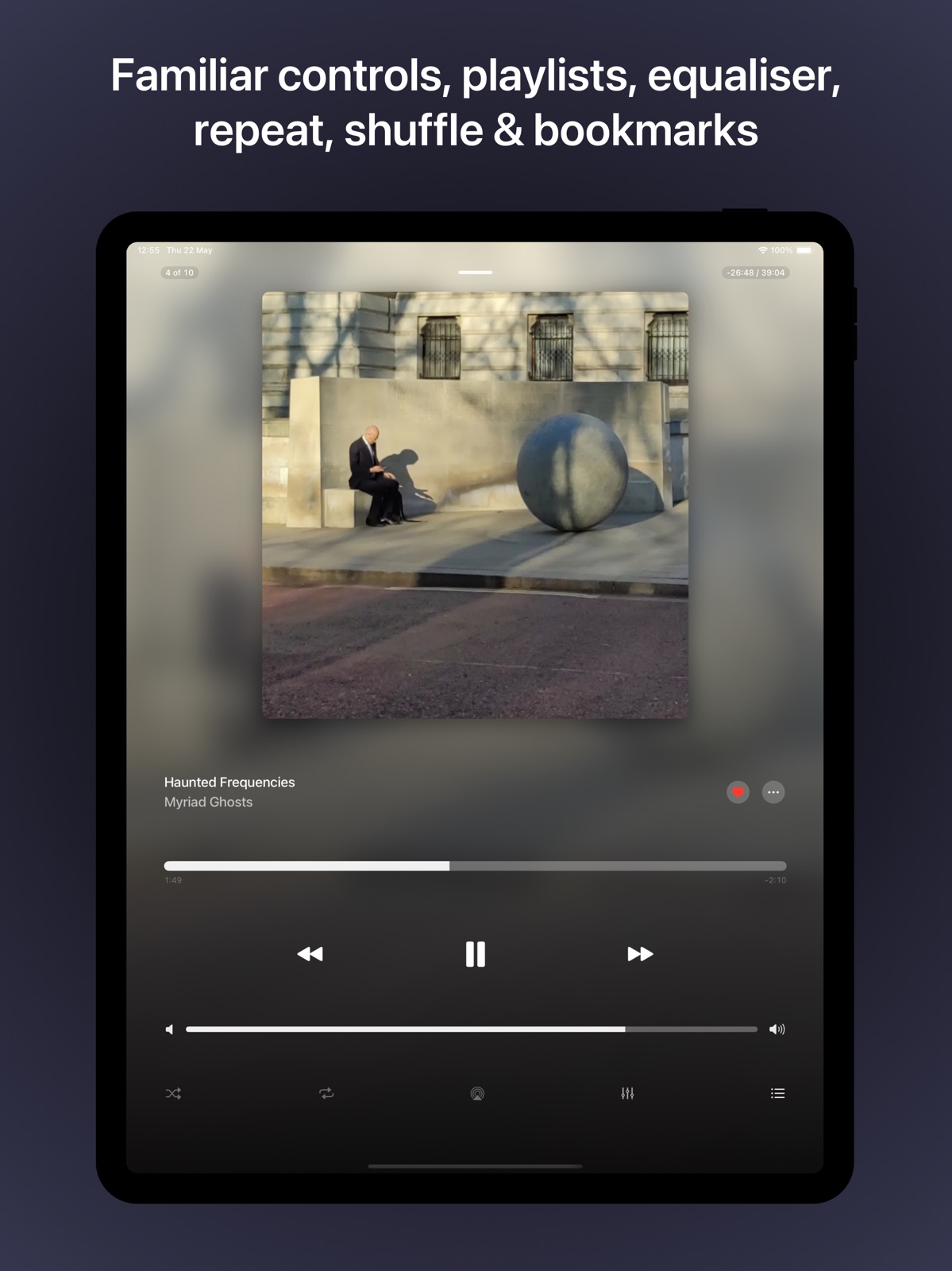


Pricing & paywalls
App Store
- Price: $3.99
- In-app purchases
Ratings & reviews
App Store
-
4/5Really nice app. Could use some tuning
First off, I really like this app and recommend it highly. My library is around 50K songs and it handles it well. Nice interface. Buffers nicely for road trips. Would like to see three things fixed and one new feature. In ID3 tag browsing, Please fix the number of albums listed for each artist as well as the number of songs for each album. Also, when browsing artists by letter, the application hangs. Please add the ability to sort by album artist. Nice work!
Brogue Blaine · 31 Jul 2026
-
5/5The Essential Subsonic App
I originally purchased this app a few years ago and watching it grow to become such a fantastic client for my music has been a wonderful experience. Features are added as consistently as bugs are fixed and with a striving for smoothness and consistency in the interface. Without this app there is a good chance I would have given up on my Subsonic setup before it could have realized its potential. I rarely go out of my way to review an app but when I saw that after all the effort and dedication put in by the developer it only had 3.8 stars I made it a point to profess my appreciation for everything that they’ve done. If you’re looking for an iOS Subsonic client you can end your search here. I look forward to continuing to watch this app grow as I expand my musical horizons.
Tom Simmons · 31 Jul 2026
-
3/5Car play works! But has issues
Very glad that car play finally works. However it seems to get stuck at the end of every track, I have to manually go to the next track. More importantly, all of my playlists are empty when using car play, I have to start the playlists on my phone because that’s the only place they will show up
Minxkitty8 · 31 Jul 2026
-
1/5Very buggy
Want to stop what you are listening to in order to talk with someone. Well you will have to look at where you are in whatever because chances are good it wont start playing again. Oh it says it is playing but there is no sounds. You have to completely close the app the. Reopen and go find the place you were manually and start again. Want to listen to the latest episode of a podcast? Nope it will say you are listening to that latests episode but it will actually be from a month ago. Such a frustrating app to use i wish i never bought
personmanbeing · 31 Jul 2026
-
1/5Lacking playlist support and Apple Watch sync buggy
1. No intuitive way to edit playlist. You can add songs only to “active” playlist which means no way to build multiple playlists at the same time. 2. No way to play playlist in offline mode. Tapping playlists button starts server connection, tapping cache does not list playlists. How do I play my playlist when offline? 3. Syncing 55 songs playlist to Apple Watch took me couple hours. The process seems to be breaking and getting stuck on transcoding or watch sync status. It goes well for couple of songs then I have to restart it.
LuckyM0use2k10 · 31 Jul 2026
Privacy & accessibility
App Store
Privacy
- Data Not Collected Developer declared
Accessibility
No accessibility labels collected yet.
Versions
App Store
-
22.3
V22.3 adds the following features: * Full feature suport for CarPlay. With AVSub you can now access your media library directly from CarPlay. Media browsing is supported, along with Internet Radio, Podcasts, Playlists, Bookmarks and other functions. * Support for 11" iPad display. * Increase playback speed now adjust playback tempo (doesn't sound like a chipmunk!). The old method is still available via the settings. * Fixed a bug where skipping tracks via the lock screen caused in-track seeking also. * Improved German language translations. * Various other small bug-fixes.
-
22.4
V22.4 fixes a bug stopping direct download to the cache.
-
22.5
AVSub V22.5 introduces a super-easy method of getting music onto your Apple Watch with the new AVSub Apple Watch extension. You can now syncronise your Subsonic playlists to your Apple Watch direct from AVSub with a swipe and a tap. AVSub will automatically transcode files to the correct format and synchronise intelligently with your Apple Watch, only sending the appropriate changes, to ensure the sync is as fast as possible. With the AVSub Apple Watch extension, you can play or shuffle your synchronised playlists in the background. The AVSub Apple Watch extension also allows you to manage the playlists on your Apple Watch. The AVSub Apple Watch extension gives you the freedom to take your music with you, without having to carry your phone. Great for exercise!
-
22.6
AVSub 22.6 has the following updates - Improvements to the watch sync process. The default bitrate is now 160kbps and transcoding only occurs if tracks are above this rate. - Added ability to switch between servers by long-pressing the refresh icon on the home screen. - Added ability to refresh the art for a single album by long-pressing the album art on the album-info screen. - Various small bug fixes
-
23
AVSub Version 23 has the following updates - The user interface has been given an overhaul to make it more efficient and better looking - A new Mini Player floats above appropriate views so you can control playback without having to navigate to the Now-Playing screen. - You can now browse your media by Genre from the Get Media menu - The Apple Watch transfer process has been greatly improved, including easy access to Fast Transfer Mode and settings for maximum bitrate control - Playlists are now accessible in CarPlay again - Folder Changing in CarPlay now works again - Google Cast integration has been updated and playback is now fully working again - Various small bug fixes and performance improvements
-
23.1
AVSub v23.1 is a minor performance and bug fix release.
-
23.2
AVSub V23.2 is a general performance improvement release.
-
23.4
AVSub Version 23.4 has the following updates: - You can now connect to a cast device (Google Cast, Fire TV, AVCast) direct from the now-playing screen - Get Media now has options for fetching albums by year and random songs by year - Tap on the artist name in the album info cell to jump to the artists page - Long press on the back button from anywhere to navigatge back up through the screen hierarchy (iOS14) - Improved the look of the now-playing controls - Added Settings options to hide bookmarks, playlists, radio and podcast main menu buttons - Fixed a bug causing Subsonic Playlist problems - Various small tweaks for iOS14 - Internal improvements and bug fixes
-
24
AVSub Version 24 has the following updates: - For iOS 14 users, there's now a Home Screen widget. Choose from small or medium size to quickly access your most recently played albums. - Theres a new source for artist art, including artist logos. - You can now play random songs by genre. - Improved movie meta data lookup. - Improved Chromecast playback. - Many small fixes & improvements.
-
24.0.1
AVSub Version 24 has the following updates: - For iOS 14 users, there's now a Home Screen widget. Choose from small or medium size to quickly access your most recently played albums. - Theres a new source for artist art, including artist logos. - You can now play random songs by genre. - Improved movie meta data lookup. - Improved Chromecast playback. - Many small fixes & improvements.
-
24.0.2
AVSub Version 24 has the following updates: - For iOS 14 users, there's now a Home Screen widget. Choose from small or medium size to quickly access your most recently played albums. - Theres a new source for artist art, including artist logos. - You can now play random songs by genre. - Improved movie meta data lookup. - Improved Chromecast playback. - Many small fixes & improvements.
-
24.1
AVSub Version 24.1 has the following updates: - You can now download TV & Movies direct to the Files app, making them easily accessible to other apps on your device. e.g download a movie to Files and watch later using VLC. - Small fixes & improvements.
-
24.2
V24.2 contains a fix for the bug that prevented the Apple Watch app from starting on WatchOS9
-
24.2.1
This version fixes a bug that stopped CarPlay from working.
-
24.2.2
This version contains a fix for playback in the Apple Watch app.
-
25
AVSub Version 25 has the following updates: - A brand new cache user interface, making more use of space and with improvement to sorting - A brand new video player adding support for most common video formats, including H264 & H265 - Apple Watch app interface improvements - Play all/Shuffle all on Apple Watch - Initial connection to SubSonic is now faster on startup - Improvements to suggestions on the main screen
-
26
AVSub Version 26 brings exciting updates: - Introducing a redesigned media index interface for better usability and aesthetics. - Enjoy album art on your Apple Watch. - Enhanced default media art for audio files. - Larger equalizer handles for easier adjustment. - Improved feedback during server media folder updates. - Fixed display issues with cache download progress. - Resolved playback interruption when disconnecting from Bluetooth. - Fixed background playback issues on Apple Watch. - Various minor improvements and bug fixes. - These updates aim to enhance your AVSub experience with smoother navigation, improved visuals, and better functionality.
-
26.1
AVSub Version 26 brings exciting updates: - Introducing a redesigned media index interface for better usability and aesthetics. - Enjoy album art on your Apple Watch. - Enhanced default media art for audio files. - Larger equalizer handles for easier adjustment. - Improved feedback during server media folder updates. - Fixed display issues with cache download progress. - Resolved playback interruption when disconnecting from Bluetooth. - Fixed background playback issues on Apple Watch. - Various minor improvements and bug fixes.
-
26.1.1
Fix a bug when downloading SubSonic playlists.
-
26.2
V26.2 has a few feature requests: • Scrolling labels are back! If you've enabled scrolling labels in the settings, the full label will scroll, rather than being truncated. • As an alternative to the table index (there's just not enough space), you can now jump straight to media index for a selected letter via a new button in the header. • Added a new Media Index list view type. • Fixed a bug that was preventing access to servers setup behind optional mTLS.
-
26.2.1
V26.2 has a few feature requests: • Scrolling labels are back! If you've enabled scrolling labels in the settings, the full label will scroll, rather than being truncated. • As an alternative to the table index (there's just not enough space), you can now jump straight to media index for a selected letter via a new button in the header. • Added a new Media Index list view type. • Fixed a bug that was preventing access to servers setup behind optional mTLS.
-
26.2.2
V26.2 has a few feature requests: • Scrolling labels are back! If you've enabled scrolling labels in the settings, the full label will scroll, rather than being truncated. • As an alternative to the table index (there's just not enough space), you can now jump straight to media index for a selected letter via a new button in the header. • Added a new Media Index list view type. • Fixed a bug that was preventing access to servers setup behind optional mTLS.
-
27
V27 of AVSub has the following new features and changes: • A brand new Now Playing screen for iPhone – fresh look, smoother experience • An all-new Equaliser screen – fine-tune your sound like never before • A redesigned Playlist screen – easier to browse and manage your music • Fixed issues with Apple Watch sync • Improved TV episode sorting • Resolved a crash with cached artists • Fixed a bug with the video controls overlay • Plus many more small improvements and bug fixes behind the scenes
-
27.1
This version includes several improvements and new features: • All-new Now Playing screen, playlist, and equaliser, redesigned for iPad • Improved table index letters for easier navigation • New option to display the album name in Now Playing media details • Resolved an issue where the Now Playing view would not dismiss as expected • Improved handling of audio interruptions for smoother playback Designed to enhance usability and provide a more consistent experience across devices.
-
27.1.1
· 22 Oct 2025
AVSub V27.1.1 is a small release while bigger things are happening behind the scenes. This release addresses Watch Sync issues. fixes an issue with the Most Recent widget and plays nice with Navidrome!
Alternatives
- Agin Music – Navidrome Client — Same category + similar ratings
- flo - Navidrome Client — Same category + similar ratings
Availability by market
- US
Data quality & evidence
- Page completeness
- Live store listing
- Last verified
- 31 Jul 2026
- Sources
- App Store
- Apoku editorial summary has not been published yet.