
Quick verdict
- What it is
- Store information collected; independent summary not yet available.
- At a glance
-
- From $2.99/mo
- Free to download
- In-app purchases
Categories and search queries
Official categories
- Utilities
- Productivity
AppCorpus categories
Key functions
| Function | Availability | Access | Scope | Evidence |
|---|---|---|---|---|
| Free app | Yes | Free | — | Store published |
| In-app purchases | Yes | Limited free | — | Store published |
Screens
App Store
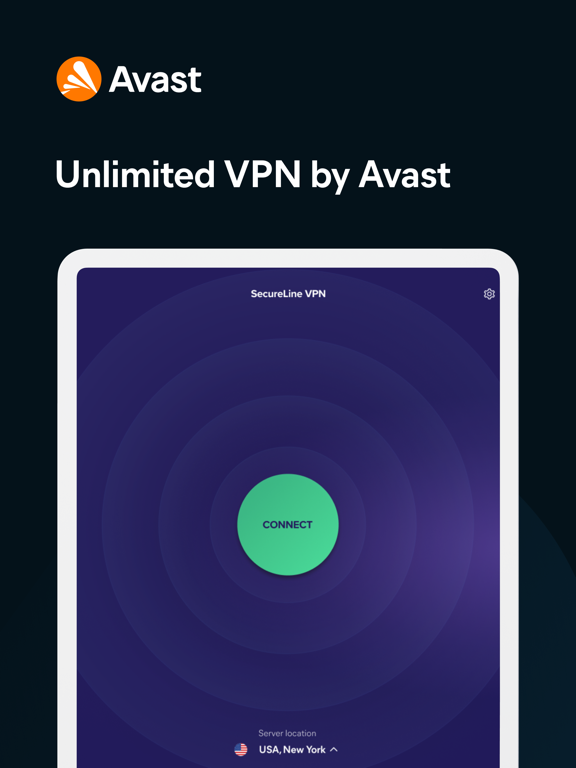
18 store screenshots



Pricing & paywalls
App Store
- 1 Month — $2.99/month
- Monthly Mobile-Only Plan — $4.99/month
- Monthly Mobile-Only Plan — $29.99/year ($2.49/mo)
- Monthly Multi-Device Plan — $7.99/month
- Monthly Multi-Device Plan — $59.99/year ($4.99/mo)
- Avast SecureLine VPN — $2.99
- Avast SecureLine VPN — $19.99
- Secureline VPN 12M MultiDevice — $59.99
- Secureline VPN 1M Multi-Device — $7.99
- Secureline VPN 1Y Multi-Device — $59.99
Ratings & reviews
App Store
-
5/5Review for Avast VPN …
⭐️⭐️⭐️⭐️⭐️ 5-Star Review for Avast VPN I’ve had an excellent experience using Avast VPN, and I want to share how much I appreciate the service. Avast provides a level of security, privacy, and reliability that truly gives me peace of mind every time I go online. The connection is consistently fast, stable, and easy to navigate, whether I’m browsing, streaming, or protecting my personal information on public Wi-Fi. What I value most is how simple and user-friendly the interface is. It doesn’t matter if you’re tech-savvy or not—Avast makes staying protected effortless. I also appreciate the transparency and professionalism of the company. They clearly prioritize customer safety and have built a service that feels trustworthy and dependable. Overall, Avast VPN has exceeded my expectations. The performance, the privacy features, and the smooth experience all deserve recognition. I highly recommend Avast VPN to anyone who wants strong protection, fast speeds, and a VPN they can rely on every day. This is absolutely a 5-star service from my experience.
Sheldon K.Zamora · 30 Aug 2026
-
3/5Improvements are nice but do not consistently work
The latest release includes improvements that would make this a 5 star app if they worked consistently. Unfortunately I’m still experiencing connection issues when I first unlock my phone, along with other random issues. After unlocking my phone about 50% of the time it will show me connected to vpn (via icon next to WiFi icon) but I have no connectivity. When I open the SecureLine app it will say I have no connection and only option is “retry” button. I have to go into settings to physically turn off vpn to get access to my lte or WiFi. Then I can reconnect SecureLine. Another problem is with turning off vpn for short term like 15 minutes. It will not automatically reconnect after 15 min(or an hour), and when I go to settings auto connect IS turned on but it says I’m not connected to SecureLine because I’m on a trusted network— even though I have no trusted networks and it is listing zero. I have to try to disconnect to get reconnected to SecureLine. I actually suggested this feature over a year ago and hope they are able to shake out the bugs so it works as expected. Other random times the vpn icon will show I’m connected but nothing will load until I change vpn location. Things still seem very buggy and not reliable. I’m looking forward to the day I can unlock my phone and open an app/website without my SecureLine vpn locking things up.
BadBrain13 · 30 Aug 2026
-
4/5Good app but needs tweaks
I have ATT internet but am switching to Spectrum. No problem using VPN app while I was an ATT subscriber. Instead of an ATT modem-router combo, I bought my own router to go with the Spectrum modem to avoid rental fees. That is where my troubles began. I could not get the Netgear app to work on my iPad and one suggestion was that VPN could interfere. I ended up switching to a Linksys router. I was able to connect the Linksys app after setting up my account on my laptop, but my internet connection became a problem. I kept getting disconnected. So, I deleted the Avast VPN app on one iPad. No problem connecting on that one. Since I still have ATT, I connected to the internet on my other iPad using ATT and went into the Avast app. I disconnected the “connect automatically when not on a trusted network” feature and was able to connect to the internet again. Then I decided to add the Linksys router to my trusted networks. So far it is working. I went into copious detail so maybe people with more technical knowledge can figure this out. I am not sure if the problem is with Spectrum’s internet settings, the change to a separate router and modem, the app or what. BTW, initially the Spectrum connection worked, then it stopped working later in the day. I may end up manually connecting the VPN if my solution does not continue to work, something I can live with.
Musicalisch · 30 Aug 2026
-
3/5Worked well for a few months then did not...
I started using the Avast VPN on my Iphone and PC. For about 6 months it worked ok except that sometimes Google won’t let you do a search because it detected too many searches from the proxy server everyone was using. So i had to disable the VPN to use Google. I am not sure what happened at 6 months (maybe an update?), but after that it never worked well. Some problems were: - i get a License expired notice in the middle of the license term. Then this cleared after a few days. - the VPN did not turn on automatically like it used to before. I would be using the phone and realize later that the VPN was not active. Then i would manually start the app. That is very inconvenient and resulted in not using it at all. - when i am at home using my WiFi, the app would not allow me to start the VPN at all. It would give a message that said somethinh like “cannot use VPN when using a trusted WiFi connection. Remove trusted WiFi connection to use VPN”. What is the point of this limitation? Even if i am using a trusted WiFi from my home the ISP provider and websites i am accessing can still track me. But the app is not turning VPN on until I forget my WiFi and connect using LTE. Today my license expired so i am not going to renew it. Will try something else for a change this year.
NMJ-sw · 30 Aug 2026
-
4/5Problem after cancellation
Just informing Avast App tech support that I deactivated the trial subscription 24-36 hours before deadline/Ending period! Well I received an email stating that they had tried to charge my account for a (year subscription) , and I would never do any subscription for that period of time “ Too Long” also and thank gawd I moved all my funds to a new card/Account!! Avast inc. please have your app creators or billing people fix this issue because I’ve tried many TRIALS looking for the perfect VPN/DNS/LAN etc Protection, and security for all mentioned and for my iPhone mainly to make my location and self anonymized from all the ad And spam and also employers who have no business having my location among other rules they’d like to have enabled “NOT HAPPENING”! Please fix this as I did unsubscribe well before the subscription ended!! Thanks in advance ...
cereal-Kiiller · 30 Aug 2026
Privacy & accessibility
App Store
Privacy
- Data Linked to You — Analytics — Identifiers — Device ID Developer declared
- Data Linked to You — Analytics — Identifiers — User ID Developer declared
- Data Linked to You — App Functionality — Identifiers — Device ID Developer declared
- Data Linked to You — App Functionality — Identifiers — User ID Developer declared
- Data Linked to You — Identifiers Developer declared
- Data Not Linked to You — Analytics — Usage Data — Product Interaction Developer declared
- Data Not Linked to You — App Functionality — Diagnostics — Crash Data Developer declared
- Data Not Linked to You — App Functionality — Diagnostics — Performance Data Developer declared
- Data Not Linked to You — App Functionality — Purchases — Purchase History Developer declared
- Data Not Linked to You — App Functionality — User Content — Customer Support Developer declared
- Data Not Linked to You — Diagnostics Developer declared
- Data Not Linked to You — Purchases Developer declared
- Data Not Linked to You — Usage Data Developer declared
- Data Not Linked to You — User Content Developer declared
- Data Used to Track You — Identifiers — User ID Developer declared
- Data Used to Track You — Identifiers Developer declared
Accessibility
No accessibility labels collected yet.
Versions
App Store
-
6.0.0
Fresh new look — Our app design is now as cool as our privacy features Under-the-hood tweaks — Just to keep everything running smoothly Connection rules are now much simpler to set up
-
6.0.1
Fresh new look — Our app design is now as cool as our privacy features Under-the-hood tweaks — Just to keep everything running smoothly Connection rules are now much simpler to set up
-
6.1.0
Fresh new look — Our app design is now as cool as our privacy features Under-the-hood tweaks — Just to keep everything running smoothly Connection rules are now much simpler to set up
-
6.1.1
Fresh new look — Our app design is now as cool as our privacy features Under-the-hood tweaks — Just to keep everything running smoothly Connection rules are now much simpler to set up
-
6.2.0
Fresh new look — Our app design is now as cool as our privacy features Under-the-hood tweaks — Just to keep everything running smoothly Connection rules are now much simpler to set up
-
6.3.0
Fresh new look — Our app design is now as cool as our privacy features Under-the-hood tweaks — Just to keep everything running smoothly Connection rules are now much simpler to set up
-
6.4.0
New in this update: Pair devices – You can now easily pair your Android TV to your existing Avast subscription through our new Pair Devices feature. Highlights from our previous update: Fresh designs – Keeping our app looking as cool as our privacy features Better connection – Making it much easier for you to set things up.
-
6.5.0
New in this update: Several bug fixes and performance improvements Highlights from our previous update: Pair devices - You can now easily pair your Android TV to your existing Avast subscription through our new Pair Devices feature.
-
6.6.1
New in this update: Several bug fixes and performance improvements including improved VoiceOver support. Highlights from our previous update: Pair devices - You can now easily pair your Android TV to your existing Avast subscription through our new Pair Devices feature.
-
6.6.2
New in this update: Several bug fixes and performance improvements including improved VoiceOver support. Highlights from our previous update: Pair devices - You can now easily pair your Android TV to your existing Avast subscription through our new Pair Devices feature.
-
6.6.3
New in this update: Several bug fixes and performance improvements including improved VoiceOver support. Highlights from our previous update: Pair devices - You can now easily pair your Android TV to your existing Avast subscription through our new Pair Devices feature.
-
6.7.0
New in this update: Several bug fixes and performance improvements including improved VoiceOver support. Highlights from our previous update: Pair devices - You can now easily pair your Android TV to your existing Avast subscription through our new Pair Devices feature.
-
6.7.1
New in this update: Several bug fixes and performance improvements including improved VoiceOver support. Highlights from our previous update: Pair devices - You can now easily pair your Android TV to your existing Avast subscription through our new Pair Devices feature.
-
6.7.2
New in this update: Several bug fixes and performance improvements including improved VoiceOver support. Highlights from our previous update: Pair devices - You can now easily pair your Android TV to your existing Avast subscription through our new Pair Devices feature.
-
6.7.3
New in this update: Fixed bugs and crashes. Highlights from our previous update: Pair devices - You can now easily pair your Android TV to your existing Avast subscription through our new Pair Devices feature
-
6.7.4
New in this update: Fixed bugs and crashes. Highlights from our previous update: Pair devices - You can now easily pair your Android TV to your existing Avast subscription through our new Pair Devices feature
-
6.8.0
New in this update: Fixed bugs and crashes. Highlights from our previous update: Pair devices - You can now easily pair your Android TV to your existing Avast subscription through our new Pair Devices feature
-
6.8.1
New in this update: Fixed bugs and crashes. Highlights from our previous update: Pair devices - You can now easily pair your Android TV to your existing Avast subscription through our new Pair Devices feature
-
6.8.2
New in this update: Fixed bugs and crashes. Highlights from our previous update: Pair devices - You can now easily pair your Android TV to your existing Avast subscription through our new Pair Devices feature
-
6.8.3
New in this update: Fixed bugs and crashes.
-
6.9.0
New in this update: Fixed bugs and crashes.
-
6.9.1
New in this update: Fixed bugs and crashes.
-
7.0.0
Fixed bugs and crashes.
-
7.0.1
· 17 Feb 2026
Fixed bugs and crashes.
-
iOS App 5.12.0
We're always improving the experience so we’ve fixed some bugs and improved the performance of the app. Let us know what you think!
Alternatives
- Octohide VPN: Private & Secure — Same category + similar ratings
- Mysterium VPN: Fast & Secure — Same category + similar ratings
- Touch VPN Secure Hotspot Proxy — Same category + similar ratings
Availability by market
- US
Data quality & evidence
- Page completeness
- Live store listing
- Last verified
- 30 Aug 2026
- Sources
- App Store
- Independent summary has not been published yet.