
Quick verdict
- What it is
- Store information collected; an Apoku editorial summary is not yet published.
- At a glance
-
- Free to download
- In-app purchases
Categories and search queries
Official categories
- Music
- Productivity
Apoku categories
Key functions
| Function | Availability | Access | Scope | Evidence |
|---|---|---|---|---|
| Free app | Yes | Free | Context-specific | Store published |
| In-app purchases | Yes | Limited free | Context-specific | Store published |
| Family Sharing | Unknown | Unknown | Scope unknown | Store published |
Screens
App Store
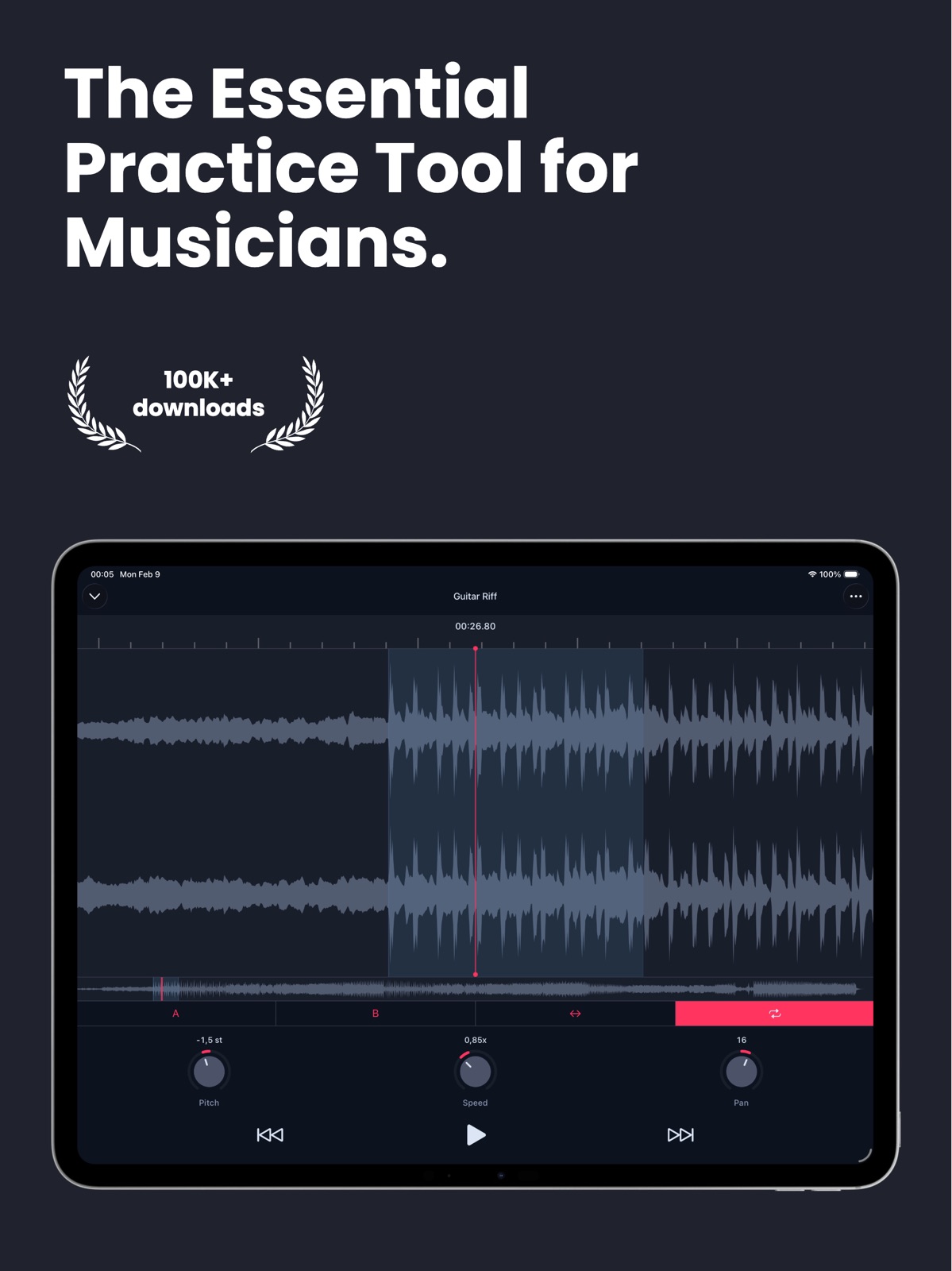
13 store screenshots


Pricing & paywalls
App Store
- Free to download
- In-app purchases
Ratings & reviews
App Store
-
4/5Easy and simple for blind musicians
I was looking for a simple play back pitch change looping application this is pits the Bill easy to use he just grabs files from my iCloud Drive no special activities just bring it up grab a file play it and practice easy enough very nice this app is also very accessible with VoiceOver on my iPhone. It’s hard to find an accessible practice tool like this for people who are blind, so this is a great tool. Also was a great tool for people who are blind.
dpdevendra · 31 Jul 2026
-
1/5Great and Wonderful!! Positive!
Actually freaking ffffing horrible, every single action that USED TO BE FREE is now hidden behind a paywall. You can only have 3 projects and you have to pay to get more. You can’t change the song in a project after saving (unless you want to pay). Also, the quality after it’s been sped up/slowed down wasn’t really that good to begin with. I recommend using a free DAW online or buy a high-end one for a computer/laptop that does the job a lot better. The cheapest version of FL Studio should allow you to do this with ease (turn on “stretch” after importing song as an audio file, then pull the very end edge of the song forward or backward to decrease or increase speed and pitch simultaneously. You can adjust the pitch manually by clicking the file in the channel rack, then clicking and dragging the pitch knob up (+200 cents) for fast or down (-200) for slow.) Hope this helps!
Joshua Henlington · 31 Jul 2026
-
3/5Limited functionality
The functionality is fairly limited. For example, you can’t place marks on the timeline, for example, to mark where a chorus begins and ends. When I set up loops, they do not persist from session to session. Also, I don’t understand the interface. I understood it when I had the free version, but it is different for the paid version. You can’t just pick a song and play it you have to create a project. It’s confusing. All that said. This is a decent app if you just want topractice and be able to create loops, change the key of a song and speed it up and slow it down. No frills for sure.
tommmmmmmmmmmggggg · 31 Jul 2026
-
1/5Why the subscription?!!!
So let me explain this and please read this, it’s very important, I used to love using this app because everything about using the music library was FREE to use because it’s the music I get to pick whatever I want, but ever since I updated it I’m not longer allowed to use my music library for free PERMANENTLY, it’s just not fair for everyone to just add a subscription that includes the music library for NO reason. I mean 25$ JUST for the music library? I’m sorry but I can’t use a music pitcher app if it has a subscription or when I feel forced to pay such an expensive price so I could be allowed to use my music library. PLEASE FIX that and make it free again, I’m sadly no longer gonna use the app anymore not unless everything is free.
AotfangirlSophie · 31 Jul 2026
-
5/5Auto Repeat Music and creating music Playlists
In The next update of the AudioTweak App, Please enable an option for me to auto repeat any music file and also, an option for me to create music playlists to organize music files especially creating music file folders to organize my music files as well? These features should be enabled by the month of January or if possible by New YEARS Day or New Years Eve hopefully. Thanks, Justin
juster batman · 31 Jul 2026
Privacy & accessibility
App Store
Privacy
- Data Not Linked to You — Analytics — Identifiers — User ID Developer declared
- Data Not Linked to You — App Functionality — Diagnostics — Crash Data Developer declared
- Data Not Linked to You — App Functionality — Diagnostics — Other Diagnostic Data Developer declared
- Data Not Linked to You — App Functionality — Diagnostics — Performance Data Developer declared
- Data Not Linked to You — App Functionality — Identifiers — User ID Developer declared
- Data Not Linked to You — App Functionality — Usage Data — Product Interaction Developer declared
- Data Not Linked to You — Diagnostics Developer declared
- Data Not Linked to You — Identifiers Developer declared
- Data Not Linked to You — Usage Data Developer declared
Accessibility
No accessibility labels collected yet.
Versions
App Store
-
5.1.1
AudioTweak 5.0 is here! This major update brings powerful new features and improvements: * Groups – Organize your projects into groups for easier access and better workflow. * iPad UI – Enjoy a refined experience on iPad with a redesigned layout. * Projects from Videos – Create projects directly from videos in your photo library * Search Projects – Quickly find any project with the new search bar. * Performance & Stability – Tons of improvements under the hood to make the app faster, smoother, and more reliable. * iOS 26 Design Ready – Fully updated to align with the latest iOS 26 design system. Heads up: Some advanced features are now part of AudioTweak Pro, available via subscription or one-time purchase. This helps support ongoing development and lets us keep improving the app for everyone. Thanks for using AudioTweak!
-
5.1.10
AudioTweak 5 is here! This major update brings powerful new features and improvements: * Groups – Organize your projects into groups for easier access and better workflow. * Projects from Videos – Create projects directly from videos in your photo library * iPad UI – Enjoy a refined experience on iPad with a redesigned layout. * Search Projects – Quickly find any project with the new search bar. * Performance & Stability – Tons of improvements under the hood to make the app faster, smoother, and more reliable. * iOS 26 Design Ready – Fully updated to align with the latest iOS 26 design system. Heads up: Some advanced features are now part of AudioTweak Pro, available via subscription or one-time purchase. This helps support ongoing development and lets us keep improving the app for everyone. Thanks for using AudioTweak!
-
5.1.11
AudioTweak 5 is here! This major update brings powerful new features and improvements: * Groups – Organize your projects into groups for easier access and better workflow. * Projects from Videos – Create projects directly from videos in your photo library * iPad UI – Enjoy a refined experience on iPad with a redesigned layout. * Search Projects – Quickly find any project with the new search bar. * Performance & Stability – Tons of improvements under the hood to make the app faster, smoother, and more reliable. * iOS 26 Design Ready – Fully updated to align with the latest iOS 26 design system. Heads up: Some advanced features are now part of AudioTweak Pro, available via subscription or one-time purchase. This helps support ongoing development and lets us keep improving the app for everyone. Thanks for using AudioTweak!
-
5.1.12
AudioTweak 5 is here! This major update brings powerful new features and improvements: * Groups – Organize your projects into groups for easier access and better workflow. * Projects from Videos – Create projects directly from videos in your photo library * iPad UI – Enjoy a refined experience on iPad with a redesigned layout. * Search Projects – Quickly find any project with the new search bar. * Performance & Stability – Tons of improvements under the hood to make the app faster, smoother, and more reliable. * iOS 26 Design Ready – Fully updated to align with the latest iOS 26 design system. Heads up: Some advanced features are now part of AudioTweak Pro, available via subscription or one-time purchase. This helps support ongoing development and lets us keep improving the app for everyone. Thanks for using AudioTweak!
-
5.1.13
AudioTweak 5 is here! This major update brings powerful new features and improvements: * Groups – Organize your projects into groups for easier access and better workflow. * Projects from Videos – Create projects directly from videos in your photo library * iPad UI – Enjoy a refined experience on iPad with a redesigned layout. * Search Projects – Quickly find any project with the new search bar. * Performance & Stability – Tons of improvements under the hood to make the app faster, smoother, and more reliable. * iOS 26 Design Ready – Fully updated to align with the latest iOS 26 design system. Heads up: Some advanced features are now part of AudioTweak Pro, available via subscription or one-time purchase. This helps support ongoing development and lets us keep improving the app for everyone. Thanks for using AudioTweak!
-
5.1.14
AudioTweak 5 is here! This major update brings powerful new features and improvements: * Groups – Organize your projects into groups for easier access and better workflow. * Projects from Videos – Create projects directly from videos in your photo library * iPad UI – Enjoy a refined experience on iPad with a redesigned layout. * Search Projects – Quickly find any project with the new search bar. * Performance & Stability – Tons of improvements under the hood to make the app faster, smoother, and more reliable. * iOS 26 Design Ready – Fully updated to align with the latest iOS 26 design system. Heads up: Some advanced features are now part of AudioTweak Pro, available via subscription or one-time purchase. This helps support ongoing development and lets us keep improving the app for everyone. Thanks for using AudioTweak!
-
5.1.15
- Fixed an issue where the Equalizer configuration wasn’t saved or restored properly - Stability improvements
-
5.1.16
* Revamped EQ interface * New global bandwidth control (in octaves): now adjust the bandwidth of all 10 EQ bands at once with a single knob. Narrow for surgical cuts on problem frequencies, or widen for smooth shaping across the spectrum * Various stability improvements and under-the-hood refinements
-
5.1.17
Stability and accessibility improvements
-
5.1.18
Bug fixes and stability improvements
-
5.1.2
AudioTweak 5.0 is here! This major update brings powerful new features and improvements: * Groups – Organize your projects into groups for easier access and better workflow. * Projects from Videos – Create projects directly from videos in your photo library * iPad UI – Enjoy a refined experience on iPad with a redesigned layout. * Search Projects – Quickly find any project with the new search bar. * Performance & Stability – Tons of improvements under the hood to make the app faster, smoother, and more reliable. * iOS 26 Design Ready – Fully updated to align with the latest iOS 26 design system. Heads up: Some advanced features are now part of AudioTweak Pro, available via subscription or one-time purchase. This helps support ongoing development and lets us keep improving the app for everyone. Thanks for using AudioTweak!
-
5.1.3
AudioTweak 5 is here! This major update brings powerful new features and improvements: * Groups – Organize your projects into groups for easier access and better workflow. * Projects from Videos – Create projects directly from videos in your photo library * iPad UI – Enjoy a refined experience on iPad with a redesigned layout. * Search Projects – Quickly find any project with the new search bar. * Performance & Stability – Tons of improvements under the hood to make the app faster, smoother, and more reliable. * iOS 26 Design Ready – Fully updated to align with the latest iOS 26 design system. Heads up: Some advanced features are now part of AudioTweak Pro, available via subscription or one-time purchase. This helps support ongoing development and lets us keep improving the app for everyone. Thanks for using AudioTweak!
-
5.1.4
AudioTweak 5 is here! This major update brings powerful new features and improvements: * Groups – Organize your projects into groups for easier access and better workflow. * Projects from Videos – Create projects directly from videos in your photo library * iPad UI – Enjoy a refined experience on iPad with a redesigned layout. * Search Projects – Quickly find any project with the new search bar. * Performance & Stability – Tons of improvements under the hood to make the app faster, smoother, and more reliable. * iOS 26 Design Ready – Fully updated to align with the latest iOS 26 design system. Heads up: Some advanced features are now part of AudioTweak Pro, available via subscription or one-time purchase. This helps support ongoing development and lets us keep improving the app for everyone. Thanks for using AudioTweak!
-
5.1.5
AudioTweak 5 is here! This major update brings powerful new features and improvements: * Groups – Organize your projects into groups for easier access and better workflow. * Projects from Videos – Create projects directly from videos in your photo library * iPad UI – Enjoy a refined experience on iPad with a redesigned layout. * Search Projects – Quickly find any project with the new search bar. * Performance & Stability – Tons of improvements under the hood to make the app faster, smoother, and more reliable. * iOS 26 Design Ready – Fully updated to align with the latest iOS 26 design system. Heads up: Some advanced features are now part of AudioTweak Pro, available via subscription or one-time purchase. This helps support ongoing development and lets us keep improving the app for everyone. Thanks for using AudioTweak!
-
5.1.6
AudioTweak 5 is here! This major update brings powerful new features and improvements: * Groups – Organize your projects into groups for easier access and better workflow. * Projects from Videos – Create projects directly from videos in your photo library * iPad UI – Enjoy a refined experience on iPad with a redesigned layout. * Search Projects – Quickly find any project with the new search bar. * Performance & Stability – Tons of improvements under the hood to make the app faster, smoother, and more reliable. * iOS 26 Design Ready – Fully updated to align with the latest iOS 26 design system. Heads up: Some advanced features are now part of AudioTweak Pro, available via subscription or one-time purchase. This helps support ongoing development and lets us keep improving the app for everyone. Thanks for using AudioTweak!
-
5.1.7
AudioTweak 5 is here! This major update brings powerful new features and improvements: * Groups – Organize your projects into groups for easier access and better workflow. * Projects from Videos – Create projects directly from videos in your photo library * iPad UI – Enjoy a refined experience on iPad with a redesigned layout. * Search Projects – Quickly find any project with the new search bar. * Performance & Stability – Tons of improvements under the hood to make the app faster, smoother, and more reliable. * iOS 26 Design Ready – Fully updated to align with the latest iOS 26 design system. Heads up: Some advanced features are now part of AudioTweak Pro, available via subscription or one-time purchase. This helps support ongoing development and lets us keep improving the app for everyone. Thanks for using AudioTweak!
-
5.1.8
AudioTweak 5 is here! This major update brings powerful new features and improvements: * Groups – Organize your projects into groups for easier access and better workflow. * Projects from Videos – Create projects directly from videos in your photo library * iPad UI – Enjoy a refined experience on iPad with a redesigned layout. * Search Projects – Quickly find any project with the new search bar. * Performance & Stability – Tons of improvements under the hood to make the app faster, smoother, and more reliable. * iOS 26 Design Ready – Fully updated to align with the latest iOS 26 design system. Heads up: Some advanced features are now part of AudioTweak Pro, available via subscription or one-time purchase. This helps support ongoing development and lets us keep improving the app for everyone. Thanks for using AudioTweak!
-
5.1.9
AudioTweak 5 is here! This major update brings powerful new features and improvements: * Groups – Organize your projects into groups for easier access and better workflow. * Projects from Videos – Create projects directly from videos in your photo library * iPad UI – Enjoy a refined experience on iPad with a redesigned layout. * Search Projects – Quickly find any project with the new search bar. * Performance & Stability – Tons of improvements under the hood to make the app faster, smoother, and more reliable. * iOS 26 Design Ready – Fully updated to align with the latest iOS 26 design system. Heads up: Some advanced features are now part of AudioTweak Pro, available via subscription or one-time purchase. This helps support ongoing development and lets us keep improving the app for everyone. Thanks for using AudioTweak!
-
5.2.0
- Never miss the downbeat again with the new Count-In Metronome. Get a rhythmic lead-in before playback begins and jump in right on time. - The export flow has been reworked and now supports MP4 and WAV alongside CAF. - Improved localizations.
-
5.2.1
- Never miss the downbeat again with the new Count-In Metronome. Get a rhythmic lead-in before playback begins and jump in right on time. - The export flow has been reworked and now supports MP4 and WAV alongside CAF. - Improved localizations.
-
5.3.0
- Projects and groups can now be sorted by Title, Added Date, or Last Opened — find what you need, the way you work. - The color palette has been refreshed with improved accessibility in mind, making AudioTweak more comfortable for more people. - Bug fixes Also new in the previous update: - Count-In Metronome: a rhythmic lead-in before playback so you jump in right on the downbeat - Expanded export formats: the export flow now supports MP4 and WAV alongside CAF - Improved localizations
-
5.3.1
- Projects and groups can now be sorted by Title, Added Date, or Last Opened - The color palette has been refreshed with improved accessibility in mind, making AudioTweak more comfortable for more people - Bug fixes Also new in the previous update: - Count-In Metronome: a rhythmic lead-in before playback so you jump in right on the downbeat - Expanded export formats: the export flow now supports MP4 and WAV alongside CAF - Improved localizations
-
5.3.2
- Projects and groups can now be sorted by Title, Added Date, or Last Opened - The color palette has been refreshed with improved accessibility in mind, making AudioTweak more comfortable for more people - Bug fixes Also new in the previous update: - Count-In Metronome: a rhythmic lead-in before playback so you jump in right on the downbeat - Expanded export formats: the export flow now supports MP4 and WAV alongside CAF - Improved localizations
-
5.3.3
- Projects and groups can now be sorted by Title, Added Date, or Last Opened - The color palette has been refreshed with improved accessibility in mind, making AudioTweak more comfortable for more people - Bug fixes Also new in the previous update: - Count-In Metronome: a rhythmic lead-in before playback so you jump in right on the downbeat - Expanded export formats: the export flow now supports MP4 and WAV alongside CAF - Improved localizations
-
5.3.4
· 26 Jun 2026
- Projects and groups can now be sorted by Title, Added Date, or Last Opened - The color palette has been refreshed with improved accessibility in mind, making AudioTweak more comfortable for more people - Bug fixes Also new in the previous update: - Count-In Metronome: a rhythmic lead-in before playback so you jump in right on the downbeat - Expanded export formats: the export flow now supports MP4 and WAV alongside CAF - Improved localizations
Alternatives
- Anytune: Transcribe & Practice — Same category + similar ratings
Availability by market
- US
Data quality & evidence
- Page completeness
- Live store listing
- Last verified
- 31 Jul 2026
- Sources
- App Store
- Apoku editorial summary has not been published yet.