AppCorpus MCP gives your agent current app data, prices, screens, features and sources.
View JSON
GET /api/v3/apps/6478816955
{
  "app_id": 6478816955,
  "canonical_url": "https://appcorpus.com/apps/audiopitch-pitch-monitor-6478816955",
  "identity": {
    "name": "AudioPitch: Pitch Monitor",
    "slug": "audiopitch-pitch-monitor",
    "developer": {
      "name": "Fabio Vinotti",
      "url": "https://appcorpus.com/developers/fabio-vinotti-developer_128a00b68f06e3a12a33150e095447ef"
    },
    "icon_url": "https://is1-ssl.mzstatic.com/image/thumb/Purple211/v4/25/3e/4b/253e4b8f-655b-acf6-7dd8-223c93f4f3c4/AppIcon-0-0-1x_U007epad-0-1-85-220.png/512x512bb.jpg",
    "stores": [
      "apple"
    ],
    "platforms": [
      "iphone",
      "ipad"
    ],
    "status": {
      "state": "active",
      "label": "Active",
      "last_checked": "2026-08-07",
      "last_checked_label": "7 Aug 2026",
      "banner": null,
      "region_note": null
    }
  },
  "listings": [
    {
      "store": "apple",
      "status": "ACTIVE",
      "url": "https://apps.apple.com/us/app/audiopitch-pitch-monitor/id6478816955?uo=4",
      "rating": 4.7,
      "rating_count": 6,
      "formatted_price": "Free",
      "is_free": true,
      "has_iap": true,
      "has_subscription": false,
      "version": "3.0.2",
      "updated": "2026-06-27",
      "currency": "USD"
    }
  ],
  "summary": {
    "one_liner": null,
    "summary": null,
    "best_for": [],
    "not_for": [],
    "status": "fallback",
    "at_a_glance": [
      "From $0.99/mo",
      "Free to download",
      "In-app purchases"
    ]
  },
  "categories": {
    "official": [
      "Music",
      "Education"
    ],
    "appcorpus": [
      {
        "category_id": "music",
        "label": "Music",
        "url": "https://appcorpus.com/categories/music"
      },
      {
        "category_id": "education",
        "label": "Education",
        "url": "https://appcorpus.com/categories/education"
      }
    ]
  },
  "use_cases": [],
  "features": [
    {
      "capability_id": "free_app",
      "label": "Free app",
      "availability": "yes",
      "access_level": "free",
      "scope": null,
      "evidence": "Store published"
    },
    {
      "capability_id": "in_app_purchases",
      "label": "In-app purchases",
      "availability": "yes",
      "access_level": "free_limited",
      "scope": null,
      "evidence": "Store published"
    }
  ],
  "pricing": [
    {
      "store": "apple",
      "formatted_price": "Free",
      "is_free": true,
      "has_iap": true,
      "has_subscription": false,
      "currency": "USD",
      "market": "us",
      "last_verified": "2026-08-07",
      "rows": [
        "AudioPitch Pro - Monthly — $0.99/month",
        "AudioPitch Pro - Lifetime — $5.99"
      ]
    }
  ],
  "screens": [
    {
      "url": "https://is1-ssl.mzstatic.com/image/thumb/PurpleSource211/v4/9e/c1/f2/9ec1f28b-b68d-f6eb-cd84-fa9e7a6eae18/image1.png/1600x1600bb.jpg",
      "store": "apple",
      "platform": "ipad",
      "alt": "AudioPitch: Pitch Monitor ipad screenshot 1"
    },
    {
      "url": "https://is1-ssl.mzstatic.com/image/thumb/PurpleSource211/v4/9e/c1/f2/9ec1f28b-b68d-f6eb-cd84-fa9e7a6eae18/image1.png/360x480bb.jpg",
      "store": "apple",
      "platform": "ipad",
      "alt": "AudioPitch: Pitch Monitor ipad screenshot 2"
    },
    {
      "url": "https://is1-ssl.mzstatic.com/image/thumb/PurpleSource221/v4/53/e5/d8/53e5d82c-09e3-4c52-b585-6e3381bfd0d3/image2.png/1600x1600bb.jpg",
      "store": "apple",
      "platform": "ipad",
      "alt": "AudioPitch: Pitch Monitor ipad screenshot 3"
    },
    {
      "url": "https://is1-ssl.mzstatic.com/image/thumb/PurpleSource221/v4/53/e5/d8/53e5d82c-09e3-4c52-b585-6e3381bfd0d3/image2.png/360x480bb.jpg",
      "store": "apple",
      "platform": "ipad",
      "alt": "AudioPitch: Pitch Monitor ipad screenshot 4"
    },
    {
      "url": "https://is1-ssl.mzstatic.com/image/thumb/PurpleSource211/v4/5d/65/43/5d6543fb-2a3a-7e77-2263-26d5d5bf9282/image3.png/1600x1600bb.jpg",
      "store": "apple",
      "platform": "ipad",
      "alt": "AudioPitch: Pitch Monitor ipad screenshot 5"
    },
    {
      "url": "https://is1-ssl.mzstatic.com/image/thumb/PurpleSource211/v4/5d/65/43/5d6543fb-2a3a-7e77-2263-26d5d5bf9282/image3.png/360x480bb.jpg",
      "store": "apple",
      "platform": "ipad",
      "alt": "AudioPitch: Pitch Monitor ipad screenshot 6"
    },
    {
      "url": "https://is1-ssl.mzstatic.com/image/thumb/PurpleSource211/v4/09/78/b5/0978b552-6edc-e371-0bc0-adfb4680daab/image1.png/1290x1600bb.jpg",
      "store": "apple",
      "platform": "iphone",
      "alt": "AudioPitch: Pitch Monitor iphone screenshot 7"
    },
    {
      "url": "https://is1-ssl.mzstatic.com/image/thumb/PurpleSource221/v4/92/30/30/923030a6-28a3-8231-298f-ae2fb24d84f8/image2.png/1290x1600bb.jpg",
      "store": "apple",
      "platform": "iphone",
      "alt": "AudioPitch: Pitch Monitor iphone screenshot 8"
    },
    {
      "url": "https://is1-ssl.mzstatic.com/image/thumb/PurpleSource211/v4/96/06/ce/9606cea9-349a-bd40-c203-5a6bb37c6b9b/image3.png/1290x1600bb.jpg",
      "store": "apple",
      "platform": "iphone",
      "alt": "AudioPitch: Pitch Monitor iphone screenshot 9"
    },
    {
      "url": "https://is1-ssl.mzstatic.com/image/thumb/PurpleSource221/v4/14/5a/88/145a88ce-9965-6391-0a09-f9f6c88ac2bd/image4.png/1290x1600bb.jpg",
      "store": "apple",
      "platform": "iphone",
      "alt": "AudioPitch: Pitch Monitor iphone screenshot 10"
    }
  ],
  "ratings": [
    {
      "store": "apple",
      "average": 4.7,
      "count": 6,
      "market": "us",
      "observed_at": "2026-08-07",
      "reviews": [
        {
          "rating": 5,
          "title": "Solid turner great for serious vocal work",
          "body": "I’m a musician based in California, and this is a solid tool. AudioPitch Tuner is accurate, fast, and actually useful when you’re working on pitch in a real way not just casually checking notes. I use it during practice to lock in intonation and stay centered on pitch, especially on sustained notes and tricky transitions. It responds immediately, which makes a big difference compared to a lot of other tuner apps. The interface is clean and straightforward, no distractions—just what you need to focus on your voice. Definitely recommended if you’re serious about improving pitch and developing control.",
          "author": "MusiMoMo",
          "date": "7 Aug 2026"
        }
      ]
    }
  ],
  "privacy": [
    {
      "store": "apple",
      "declarations": [
        {
          "title": "Data Not Linked to You",
          "detail": "Analytics — Identifiers — User ID",
          "source": "Developer declared"
        },
        {
          "title": "Data Not Linked to You",
          "detail": "Analytics — Usage Data — Product Interaction",
          "source": "Developer declared"
        },
        {
          "title": "Data Not Linked to You",
          "detail": "App Functionality — Identifiers — User ID",
          "source": "Developer declared"
        },
        {
          "title": "Data Not Linked to You",
          "detail": "App Functionality — Usage Data — Product Interaction",
          "source": "Developer declared"
        },
        {
          "title": "Data Not Linked to You",
          "detail": "Identifiers",
          "source": "Developer declared"
        },
        {
          "title": "Data Not Linked to You",
          "detail": "Usage Data",
          "source": "Developer declared"
        }
      ],
      "accessibility": []
    }
  ],
  "changes": [
    {
      "store": "apple",
      "version": "1.0.0",
      "released_at": null,
      "notes": ""
    },
    {
      "store": "apple",
      "version": "1.1.0",
      "released_at": null,
      "notes": "Now you can select your preferred accidental (sharp or flat)"
    },
    {
      "store": "apple",
      "version": "1.2.0",
      "released_at": null,
      "notes": "- Added support for transposition - Moved reference pitch picker to the main view"
    },
    {
      "store": "apple",
      "version": "1.2.1",
      "released_at": null,
      "notes": "Fixed a bug that caused the reference pitch picker and the transposition picker to malfunction"
    },
    {
      "store": "apple",
      "version": "1.2.2",
      "released_at": null,
      "notes": "Added settings to customize microphone sensitivity and adjust response speed."
    },
    {
      "store": "apple",
      "version": "1.2.3",
      "released_at": null,
      "notes": "Improved AudioPitch's UI on iPad"
    },
    {
      "store": "apple",
      "version": "1.2.4",
      "released_at": null,
      "notes": "Stability improvements"
    },
    {
      "store": "apple",
      "version": "1.2.5",
      "released_at": null,
      "notes": "Stability improvements"
    },
    {
      "store": "apple",
      "version": "1.2.6",
      "released_at": null,
      "notes": "Stability improvements"
    },
    {
      "store": "apple",
      "version": "2.0.0",
      "released_at": null,
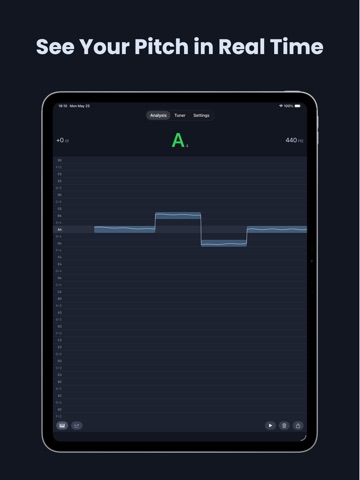
      "notes": "AudioPitch 2.0 is here and it just got more powerful! • New real-time pitch analysis with live visual feedback. Now you can visualize your pitch live on an interactive graph and instantly see how stable and in tune your notes are. • Bug fixes, performance improvements, and UI refinements"
    },
    {
      "store": "apple",
      "version": "2.0.1",
      "released_at": null,
      "notes": "AudioPitch 2.0 is here and it just got more powerful! • New real-time pitch analysis with live visual feedback. Now you can visualize your pitch live on an interactive graph and instantly see how stable and in tune your notes are. • Bug fixes, performance improvements, and UI refinements"
    },
    {
      "store": "apple",
      "version": "2.0.2",
      "released_at": null,
      "notes": "Stability improvements"
    },
    {
      "store": "apple",
      "version": "2.0.3",
      "released_at": null,
      "notes": "The app is now available in Italian and Korean"
    },
    {
      "store": "apple",
      "version": "2.0.4",
      "released_at": null,
      "notes": "AudioPitch is now available in Japanese and Chinese (Simplified). The app is fully localized in both languages."
    },
    {
      "store": "apple",
      "version": "2.0.5",
      "released_at": null,
      "notes": "The color palette has been refreshed with improved accessibility in mind, making AudioTweak more comfortable for more people."
    },
    {
      "store": "apple",
      "version": "3.0.0",
      "released_at": null,
      "notes": "* Piano Roll View The new Piano Roll View lets you see your pitch as notes on a piano roll, giving you a clear, visual representation of pitch over time. * Play / Pause Graph You can now play and pause the pitch graph, that is advancing when pitch is not detected too. * New Tuner Interface (Pro) Redesigned with practitioners in mind. Hold a note in tune for 8 seconds to fill the circle. * Clear Graph (Pro) Reset the pitch graph instantly with the new Clear Graph button. Start fresh anytime without interrupting your session. * Export Piano Roll to MIDI (Pro) Turn your audio into a MIDI file with a single tap. Export the Piano Roll to MIDI and bring your transcriptions into any DAW or notation software."
    },
    {
      "store": "apple",
      "version": "3.0.1",
      "released_at": null,
      "notes": "* Piano Roll View The new Piano Roll View lets you see your pitch as notes on a piano roll, giving you a clear, visual representation of pitch over time. * Play / Pause Graph You can now play and pause the pitch graph, that is advancing when pitch is not detected too. * New Tuner Interface (Pro) Redesigned with practitioners in mind. Hold a note in tune for 8 seconds to fill the circle. * Clear Graph (Pro) Reset the pitch graph instantly with the new Clear Graph button. Start fresh anytime without interrupting your session. * Export Piano Roll to MIDI (Pro) Turn your audio into a MIDI file with a single tap. Export the Piano Roll to MIDI and bring your transcriptions into any DAW or notation software."
    },
    {
      "store": "apple",
      "version": "3.0.2",
      "released_at": "2026-06-27",
      "notes": "* Piano Roll View The new Piano Roll View lets you see your pitch as notes on a piano roll, giving you a clear, visual representation of pitch over time. * Play / Pause Graph You can now play and pause the pitch graph, that is advancing when pitch is not detected too. * New Tuner Interface (Pro) Redesigned with practitioners in mind. Hold a note in tune for 8 seconds to fill the circle. * Clear Graph (Pro) Reset the pitch graph instantly with the new Clear Graph button. Start fresh anytime without interrupting your session. * Export Piano Roll to MIDI (Pro) Turn your audio into a MIDI file with a single tap. Export the Piano Roll to MIDI and bring your transcriptions into any DAW or notation software."
    }
  ],
  "alternatives": [
    {
      "app_id": 6744618279,
      "name": "Pitch Diagram: Vocal Tuner",
      "url": "https://appcorpus.com/apps/pitch-diagram-vocal-tuner-6744618279",
      "reason": "Same category + similar ratings"
    },
    {
      "app_id": 6502740253,
      "name": "PerfectPitch - Chromatic Tuner",
      "url": "https://appcorpus.com/apps/perfectpitch-chromatic-tuner-6502740253",
      "reason": "Same category + similar ratings"
    },
    {
      "app_id": 6751228637,
      "name": "PitchMonitor - Vocal Visual",
      "url": "https://appcorpus.com/apps/pitchmonitor-vocal-visual-6751228637",
      "reason": "Same category + similar ratings"
    },
    {
      "app_id": 6758098531,
      "name": "Vocal Pitch Monitor Track Note",
      "url": "https://appcorpus.com/apps/vocal-pitch-monitor-track-note-6758098531",
      "reason": "Same category + similar ratings"
    },
    {
      "app_id": 6447534878,
      "name": "Tutuner — Pitch tracking tuner",
      "url": "https://appcorpus.com/apps/tutuner-pitch-tracking-tuner-6447534878",
      "reason": "Same category + similar ratings"
    },
    {
      "app_id": 982811087,
      "name": "Nu-Music Player",
      "url": "https://appcorpus.com/apps/nu-music-player-982811087",
      "reason": "Same category + similar ratings"
    }
  ],
  "evidence_summary": {
    "index_state": "S1",
    "evidence_level": 1,
    "level_label": "Live store listing",
    "indexable": true,
    "last_verified_at": "2026-08-07",
    "unknown_fields": [
      "Independent summary has not been published yet."
    ],
    "sources": [
      "App Store"
    ]
  },
  "availability_markets": {
    "live": [
      "us"
    ],
    "selected": "us",
    "note": null
  },
  "feature_events": {
    "events": []
  },
  "features_slice": {
    "plans": [
      {
        "code": "pro",
        "label": "AudioPitch Pro - Monthly",
        "kind": "subscription",
        "status": "store_listed",
        "prices": [
          {
            "storefront": "us",
            "formatted": "$0.99",
            "billing_period": "monthly"
          }
        ],
        "trial": null
      },
      {
        "code": "pro-lifetime",
        "label": "AudioPitch Pro - Lifetime",
        "kind": "unknown",
        "status": "store_listed",
        "prices": [
          {
            "storefront": "us",
            "formatted": "$5.99",
            "billing_period": "one_time"
          }
        ],
        "trial": null
      }
    ],
    "features": [],
    "unknown_features": [],
    "data_cutoff": "7 Aug 2026"
  }
}