
Quick verdict
- What it is
- Store information collected; independent summary not yet available.
- At a glance
-
- Free to download
Categories and search queries
Official categories
- Sports
- Health & Fitness
AppCorpus categories
Key functions
| Function | Availability | Access | Scope | Evidence |
|---|---|---|---|---|
| Free app | Yes | Free | — | Store published |
Screens
App Store
12 store screenshots


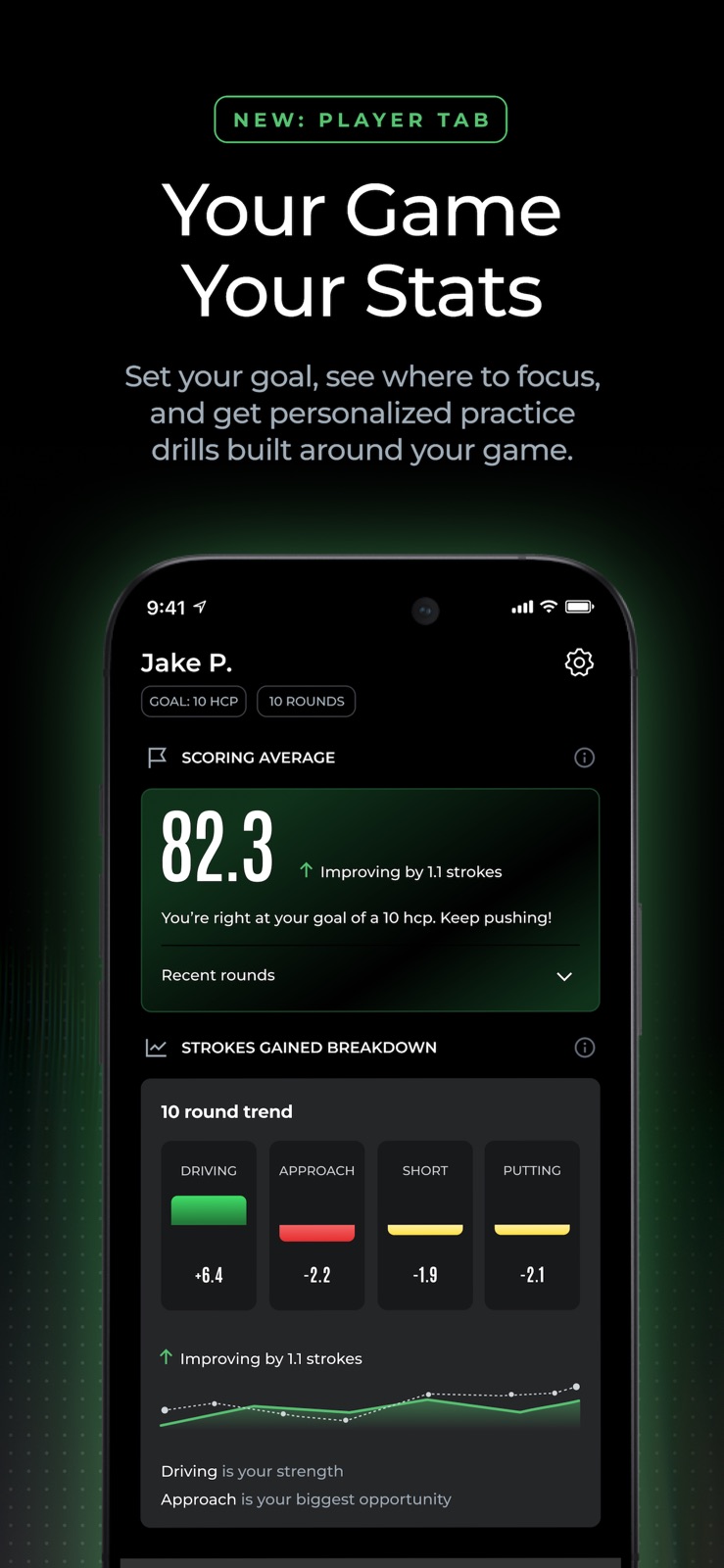

Pricing & paywalls
App Store
- Free
Ratings & reviews
App Store
-
5/5Update 5/22
Arccos has arrived! As an update for the 2022 season, I can happily report the system has now run flawlessly for me over the first six rounds and I’m happy as a clam. Great way to get the finishing touches just right! I loved this the first year I had it. My friends were “green” (pardon the pun) with envy Second year towards the and of the season saw glitchy problems and rounds suspended. Watch would dump out and I had to rebuild the round following the match. Now, in my third year, it’s a complete disaster. I am now deleting the app before every round on both the watch and the phone. It still hangs. The watch loses contact and the time appears on the screen. Especially disappointing because it was the single reason I bought an watch. I don’t know what the problem is. If they are not updating because they think iOS 14 is gonna fix all this, but I hope not. Please dig in Arccos because you are very close to a simply game changing product. Now I will say this. I’ve never in my life worked with a better customer service crew. They are helpful and timely. I would give them alone five stars. I feel bad for them because they really don’t have any answers for everyone having these same issues. Software from Apple and Arccos need to step up their game. **Update 2021 season** I just felt a need to update that the system is near flawless now. They did their homework and after two rounds in, the system is working better than it ever had in the past. Shot tracking, gps distance and watch functionality is now working as advertised and I couldn’t be happier. Putts counting correctly and I like the quick feedback after the round ends. Two thumbs up Arccos!
burr's · 30 Aug 2026
-
5/5Really helps hone your skills, but can be glitchy
I purchased a complete set of Cobra clubs which came with the Arccos Sensors in the grips. After quick and easy install and setup with iPhone and Apple Watch, I was out playing and enjoying the product. It is amazing to start the app and play with your phone in your front pocket while the microphone and sensors in watch acknowledge when a shot is taken. Unlike, other tools like this, you do not have to input your shots or select to track them as u go around the course. The data it provides at end of round with handicaps for all aspects of your game can help fine tune where u need practice and help reduce your handicaps. That being said, recently as others have said I have had a few frustrating rounds where it will start the round and then later when I check or go to change pin location during rounds it shows all my shots are registering to hole 4 still while I’m on hole 9. It did it while I was on Torrey Pines when I really wanted it most. Love the app and the constant improvements. Thank you for the system and look forward to what you provide next.
Memsmah · 30 Aug 2026
-
2/5Lag between watch and phone
There are two issues that are critical, currently. First, when playing a round on watch (you still MUST use your phone to verify that all shots are accounted for on a hole, find ideal flight paths on unfamiliar courses, see distances to water/hazards, etc.), the lag between what the watch records and what the phone records is intolerable. The watch can be two holes ahead. You look at your phone and think “oh, it missed an extra wedge shot and a putt”, add those strokes in, and then it sinks two holes later and you now have EXTRA strokes on your score and you’re already down the road and can’t recall where you were or what you hit, etc. This is a MAJOR bug. Sometimes you can “force” the phone to catch up by swiping up from the bottom of the screen to review shots, and they magically appear. Second, I’m playing more and more courses where the course data (tee location, green location, etc.) is off the charts in accurate! I played yesterday and was reading 500 yds from the hole one green when I was standing on it! You can’t modify this in the app, it’s just unusable. So I have an entire round of no data where I have to use another tool, just to record strokes (or pencil and paper, heaven forbid!). It was completely unusable because you cannot correct this inaccurate hole and tee location data! If you continue to use Arccos, the data it collects will be wholly inaccurate and skew all good data, for the same reason! I’ve provided feedback on these issues in the app itself, I guess negative reviews are the only way to get a problem solved for an expensive product?!
Timbofosho · 30 Aug 2026
-
3/5Works 90% of the time
I have 63 rounds in this year with the Gen 3 sensors using only an Apple Watch Ultra as the sensor. The the stats work great if you remember to set the pin location every hole and you play each hole like you should. The yardages seem to be within 5 yards which is acceptable for an 12 handicap. Some shots out of the rough might not register along with some soft chips. The putting is hit or miss, I have gotten use to checking to make sure each putt was registered. There are some glaring issues and missing items I wish I could change: I know that I have to advance the hole manually to the next on two of the holes on my home course since the tee box is close to the greens. If I attempt to open the app on my phone during the round while using the watch as the sensor I end up with double the strokes because it logs each shot twice, I don’t even touch my phone during a round now. The last thing I would change/add would be distance to a hazard if it is in the direct line of play, the last thing I want to do is mental math when I am paying for a subscription to give me yardages. Overall I am probably at 75% on renewing just because I’m not sure if I want to start building data all over again in a new system.
Mayday1175 · 30 Aug 2026
-
2/5Apple IOS phone app broken with Apple watch
Would be nice to use both the phone app and Apple watch at the same time. Iphone 14 and Apple watch 7. Currently the phone app does not open if you are using the watch for club tracking. I believe this was broken when they rolled out the smoke sensors, which I had purchased above and beyond and only used them once due yo all the phone app issues. You cant look at yardages to objects with the phone app if the watch is tracking. Apple watch misses too many shots. You cant edit shots as you are playing. I do like the after round analytics. That is top notch. I do like that you can set the location of the pin, on the watch. Doesn't record chip shots very well so their is skewing of some of the numbers but oddly enough you can edit the chips on the watch, if you remember to. Support is terrible. Basically fill out a survey after the round! IMO the analytics are excellent but not worth the money as this product currently stands. Too expensive for the frustration you have working out all the nuances. There are other apps that are better at club and distance tracking using the apple watch but the data analytics cant beat arccos. I wish they could get the app right with the apple watch. I would still be a customer!
SMOLI578 · 30 Aug 2026
Privacy & accessibility
App Store
Privacy
- Data Linked to You — Analytics — Contact Info — Other User Contact Info Developer declared
- Data Linked to You — Analytics — Contact Info — Physical Address Developer declared
- Data Linked to You — Analytics — Diagnostics — Other Diagnostic Data Developer declared
- Data Linked to You — Analytics — Health & Fitness — Fitness Developer declared
- Data Linked to You — Analytics — Identifiers — Device ID Developer declared
- Data Linked to You — Analytics — Identifiers — User ID Developer declared
- Data Linked to You — Analytics — Location — Coarse Location Developer declared
- Data Linked to You — Analytics — Location — Precise Location Developer declared
- Data Linked to You — Analytics — Other Data — Other Data Types Developer declared
- Data Linked to You — Analytics — Purchases — Purchase History Developer declared
- Data Linked to You — Analytics — Usage Data — Other Usage Data Developer declared
- Data Linked to You — Analytics — Usage Data — Product Interaction Developer declared
- Data Linked to You — Analytics — User Content — Customer Support Developer declared
- Data Linked to You — App Functionality — Contact Info — Email Address Developer declared
- Data Linked to You — App Functionality — Contact Info — Name Developer declared
- Data Linked to You — App Functionality — Contact Info — Other User Contact Info Developer declared
- Data Linked to You — App Functionality — Contact Info — Phone Number Developer declared
- Data Linked to You — App Functionality — Contact Info — Physical Address Developer declared
- Data Linked to You — App Functionality — Diagnostics — Crash Data Developer declared
- Data Linked to You — App Functionality — Diagnostics — Other Diagnostic Data Developer declared
- Data Linked to You — App Functionality — Diagnostics — Performance Data Developer declared
- Data Linked to You — App Functionality — Health & Fitness — Fitness Developer declared
- Data Linked to You — App Functionality — Identifiers — Device ID Developer declared
- Data Linked to You — App Functionality — Identifiers — User ID Developer declared
- Data Linked to You — App Functionality — Location — Coarse Location Developer declared
- Data Linked to You — App Functionality — Location — Precise Location Developer declared
- Data Linked to You — App Functionality — Other Data — Other Data Types Developer declared
- Data Linked to You — App Functionality — Purchases — Purchase History Developer declared
- Data Linked to You — App Functionality — Usage Data — Other Usage Data Developer declared
- Data Linked to You — App Functionality — User Content — Customer Support Developer declared
- Data Linked to You — Developer’s Advertising or Marketing — Contact Info — Email Address Developer declared
- Data Linked to You — Developer’s Advertising or Marketing — Contact Info — Name Developer declared
- Data Linked to You — Developer’s Advertising or Marketing — Contact Info — Other User Contact Info Developer declared
- Data Linked to You — Developer’s Advertising or Marketing — Identifiers — User ID Developer declared
- Data Linked to You — Developer’s Advertising or Marketing — Location — Coarse Location Developer declared
- Data Linked to You — Developer’s Advertising or Marketing — Other Data — Other Data Types Developer declared
- Data Linked to You — Developer’s Advertising or Marketing — Purchases — Purchase History Developer declared
- Data Linked to You — Developer’s Advertising or Marketing — Usage Data — Other Usage Data Developer declared
- Data Linked to You — Other Purposes — Location — Precise Location Developer declared
- Data Linked to You — Other Purposes — Purchases — Purchase History Developer declared
- Data Linked to You — Other Purposes — Usage Data — Product Interaction Developer declared
- Data Linked to You — Other Purposes — User Content — Customer Support Developer declared
- Data Linked to You — Product Personalization — Contact Info — Other User Contact Info Developer declared
- Data Linked to You — Product Personalization — Contact Info — Physical Address Developer declared
- Data Linked to You — Product Personalization — Health & Fitness — Fitness Developer declared
- Data Linked to You — Product Personalization — Identifiers — Device ID Developer declared
- Data Linked to You — Product Personalization — Identifiers — User ID Developer declared
- Data Linked to You — Product Personalization — Location — Coarse Location Developer declared
- Data Linked to You — Product Personalization — Location — Precise Location Developer declared
- Data Linked to You — Product Personalization — Other Data — Other Data Types Developer declared
- Data Linked to You — Product Personalization — Purchases — Purchase History Developer declared
- Data Linked to You — Product Personalization — Usage Data — Other Usage Data Developer declared
- Data Linked to You — Product Personalization — User Content — Customer Support Developer declared
- Data Linked to You — Contact Info Developer declared
- Data Linked to You — Diagnostics Developer declared
- Data Linked to You — Health & Fitness Developer declared
- Data Linked to You — Identifiers Developer declared
- Data Linked to You — Location Developer declared
- Data Linked to You — Other Data Developer declared
- Data Linked to You — Purchases Developer declared
- Data Linked to You — Usage Data Developer declared
- Data Linked to You — User Content Developer declared
Accessibility
No accessibility labels collected yet.
Versions
App Store
-
6.20.0
Bug fixes and performance improvements
-
6.21.0
Bug fixes and performance improvements
-
6.22.0
Bug fixes and performance improvements
-
6.22.1
Bug fixes and performance improvements
-
6.23.0
Bug fixes and performance improvements
-
6.24.0
Bug fixes and performance improvements
-
6.24.1
Bug fixes and performance improvements
-
6.25.0
Bug fixes and performance improvements
-
6.25.1
Bug fixes and performance improvements
-
6.25.2
Bug fixes and performance improvements
-
6.26.0
Bug fixes and performance improvements
-
6.27.0
Bug fixes and performance improvements
-
6.28.0
1. Smart Laser Rangefinder — first year free. The most accurate "Plays Like" distance in golf, adjusting for slope and live weather including wind speed and direction. Now available as a standalone rangefinder — game tracking subscription or sensors not required. 2. AI Strategy — now available to iOS subscribers. Recommended club and optimal target for every shot. Built on 1.5 billion shots. The same strategy Matt Fitzpatrick used to win his major. 3. Green Maps — now available to iOS subscribers in the US. Powered by LiDAR data, Green Maps give you precise details of every green — slopes, breaks, and optimal miss zones — for more accurate approaches and greater confidence on the putting surface. With Smart Laser, see the exact flag position and read elevation to attack every pin. 9,000+ greens mapped and counting. 4. Bug fixes and performance improvements.
-
6.28.1
Support for Arccos Air and upgraded Link Pro — new AI wearable for automatic Game Tracking. Advanced motion capture tracks every shot automatically. Continued support for Smart Laser Rangefinder — enhanced with AI Strategy and Green Maps. Optimal targets and club recommendations built into every round. Bug fixes and performance improvements.
-
6.30.0
Bug fixes and performance improvements
-
6.31.0
Bug fixes and performance improvements
-
6.32.0
Bug fixes and performance improvements
-
6.34.0
Bug fixes and performance improvements
-
6.35.0
Bug fixes and performance improvements
-
6.36.0
Bug fixes and performance improvements
-
6.36.1
Bug fixes and performance improvements
-
6.36.2
The biggest update we’ve ever made — now rolling out to all iOS members. Every tab has been rebuilt. New AI features throughout. The app no longer just shows you what happened — it tells you exactly what to do about it. What’s new: Shot and club dispersion charts. AI-generated round summaries. Personalized practice plans from your own data. A brand new Courses tab with your full golf history on a global map. Pre-Round Warmup routines built for your game. Plus improved UI, bug fixes and performance improvement.
-
6.37.2
Bug fixes and performance improvements
-
6.38.0
Bug fixes and performance improvements
-
6.39.0
· 28 Jul 2026
Bug fixes and performance improvements
-
6.40.0
Bug fixes and performance improvements
-
6.41.0
· 20 Aug 2026
Bug fixes and performance improvements
Alternatives
- Shot Pattern - Golf GPS — Same category + similar ratings
- TheGrint: Golf Handicap — Same category + similar ratings
Availability by market
- US
Data quality & evidence
- Page completeness
- Live store listing
- Last verified
- 30 Aug 2026
- Sources
- App Store
- Independent summary has not been published yet.