
Quick verdict
- What it is
- Store information collected; an Apoku editorial summary is not yet published.
- At a glance
-
- Free to download
Categories and search queries
Official categories
- Lifestyle
Apoku categories
Key functions
| Function | Availability | Access | Scope | Evidence |
|---|---|---|---|---|
| Free app | Yes | Free | Context-specific | Store published |
Screens
App Store
16 store screenshots


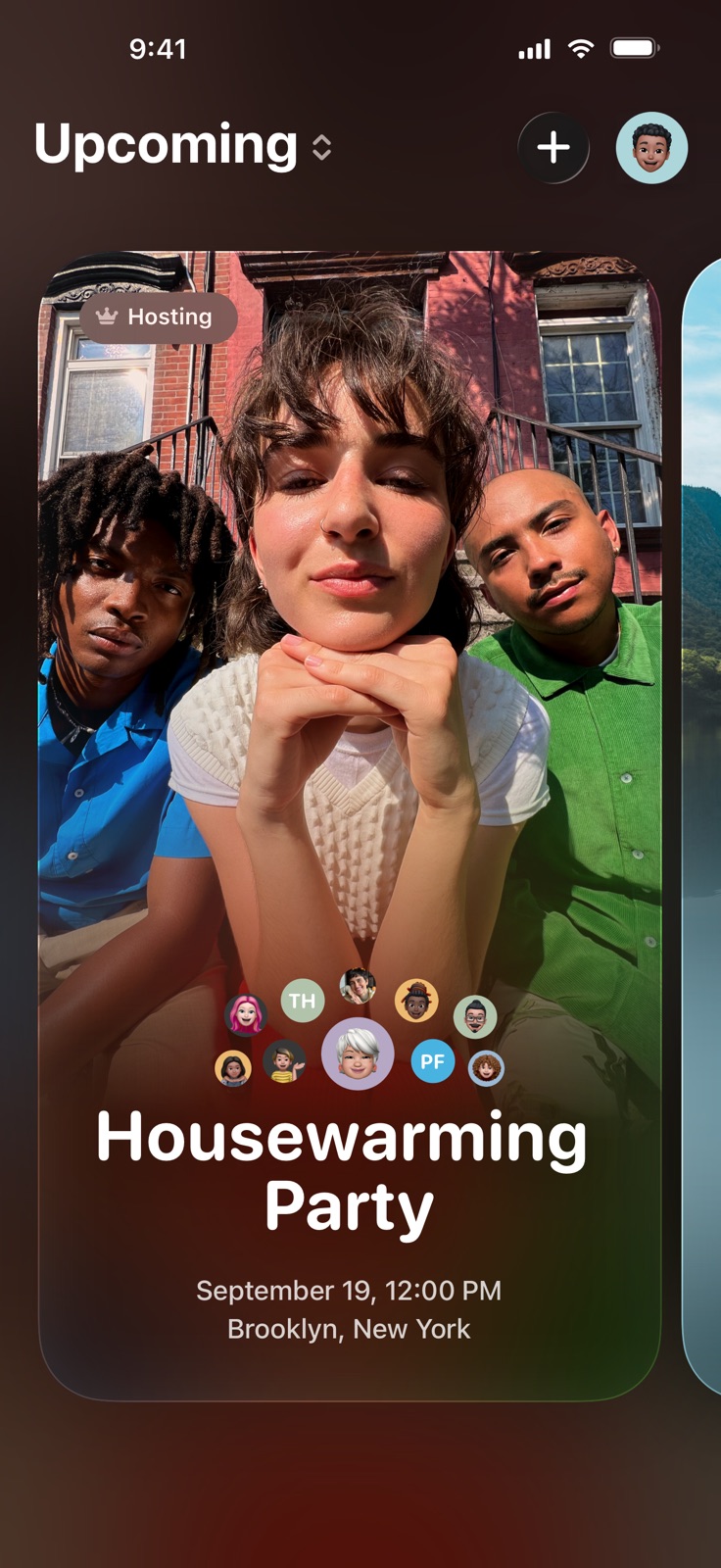

Pricing & paywalls
App Store
- Free to download
Ratings & reviews
App Store
-
5/5Looking forward to seeing the app evolve
I’m very excited to see this app because I have the same idea back to 2016 and I did work on building an app like this for some time, but gave up at the end due to personal reasons. To me, Invites will be the next big social network that is as popular as Facebook and Snapchat, hope they won’t copy it :) People can contribute every detail of their participating the events. The communication, photos and videos will form unforgettable memories in their life. If the app can introduce “public events” that everyone else around the world can randomly watch, then it will be another Tiktok and even BETTER! Payment can also be an interesting part of Invites. Imagine people want to split their bills at the end of the events, they just need to enter their own expense amount and the system can then help calculate who will pay to whom, doesn’t that sound cool and convenient?! The payment system can also allow Invites to integrate with other online services like Uber and Invites can even smartly plan and prepare everyone’s trip during the event! I can’t imagine how far this app can reach to people’s everyday life. Really excited to see my idea come true though it is actually realized by others, but I’m still glad because it proves that I didn’t do the wrong work. Hope Invites becomes one of the most popular social networkin the future, can’t wait to see!
gooddayzy · 30 Sep 2026
-
5/5A great app that is great for putting together an event
Apple Invites has completely transformed the way I plan and organize events. Whether it’s a small gathering, a birthday party, or a big corporate event, this app makes the invitation process seamless and stress-free. The interface is beautifully designed, intuitive, and incredibly user-friendly. One of my favorite features is how effortlessly it integrates with my contacts and calendar, making it easy to send invites and track RSVPs in real time. The customization options are fantastic, allowing me to create invitations that match the theme of my event perfectly. I also love how guests can respond quickly, and I get instant updates on who’s attending. The app runs smoothly with no glitches, and the notifications ensure I never miss an important update. It’s clear that a lot of thought has gone into making this app both functional and elegant. If you’re looking for the perfect way to manage invitations and RSVPs, look no further—Apple Invites is the best out there! Highly recommended!
snyderstevenr · 30 Sep 2026
-
3/5Love the look but missing functionality
I love the apple invites look and feel. For a free version it feels premium. I love the add-ons and the shared albums and the ease of inviting people directly from your contacts. It has the digital wow factor for sure. However It is lacking some key functionality and usability for both those invited and the host. I need to be able to directly manage the invite more effectively. I should be able to share the invite with more than one host. And they should have a host . For the people I invited, many were not able to easily login and respond. They must download the app or login into their iCloud which just seems like two or three more extra steps required than it should to simply RSVP . Responses to invitations should be able to be made easier.. and my other biggest frustration is the fact that as a host I cannot update RSVPs when I get direct messages. Sometimes last minute things happen or older folks don’t wanna download an app or don’t have time based on the circumstances to update the invite, but they do text the host. The host should have a lot more flexibility there. Please make these updates or I will not be using This app for my future parties.
Katerrator · 30 Sep 2026
-
3/5Apple Invites - Good, but needs lots of improvement.
This app is a good 1.0 release but hope Apple adds features soon. Most other invite apps are cumbersome too and luckily this one is pretty straightforward. 1) Love the AI feature — when it works. I luckily got an invite created and launched, but it crashes now when editing AI and selecting my own photo. Crashes on a brand new event now too. 2) Sending invites is fine for a small party, but just invited 80 people and there’s no batch send. It’s a lot of clicks for each one manually. 3) It doesn’t even support a unique mailing list in Contacts- you can only see full address book. 4) As host you need ability to add people or confirm on own but no options here. If you have non-tech savvy guests there’s no option to just add attendees directly, or to add additional guests to count for them. If you want to use Invites to manage your counts you have to go back to every guest and have them change any details. 5) The host interface rocks, is beautiful, and easy to navigate. The “preview” of your invite is misleading. It shows a beautiful continuous scroll of all details. But when guests view, everything is separated in sections and the interface isn’t intuitive. The details pane for the event displays just a few lines and truncates with an ellipsis (…) instead of the nice “See More” button in the host version. Odd that more attention to UI is on the host screens and less on the guest views. I’ve had to do tech support for too many guests to view info and respond. The graphics and overall interface are beautiful as you’d expect. And for simple events the ease of creation and management is fun and so easy in the app. But unless this gets some much needed attention it won’t be useful for events with larger attendees.
maxxtexx · 30 Sep 2026
-
4/5Excited for the app, even more excited for potential updates
This app couldn’t have been released at a more perfect time- my baby is turning one this month! So as I was already reaching out to loved ones, I was able to create an invite link that is also easy for people off iPhone to RSVP to! I love the ability to create an iCloud photo album for guests to upload their photos to. However, their invite management is lacking. If I had not created a checklist in notes, I would have to scroll through my messages to see who all I invited. I can’t view it in the app. The only thing I can see are responses. I also can’t manually add RSVPs, so people that had responded prior to me making my invite link have to refill out their rsvp so that I can keep track of attendee numbers. People can also only RSVP for up to 5 people, which happens to work out this time, but I do have friends with more than 3 kids so if they RSVP for their whole family, I wouldn’t be able to count all of them in the app. I will continue to utilize this app for future event planning, but I do hope to see these updates.
dianne-lonnie · 30 Sep 2026
Privacy & accessibility
App Store
Privacy
- Data Linked to You — Analytics — Usage Data — Product Interaction Developer declared
- Data Linked to You — App Functionality — Contact Info — Email Address Developer declared
- Data Linked to You — App Functionality — Contact Info — Name Developer declared
- Data Linked to You — App Functionality — Contact Info — Other User Contact Info Developer declared
- Data Linked to You — App Functionality — Contact Info — Phone Number Developer declared
- Data Linked to You — App Functionality — Contact Info — Physical Address Developer declared
- Data Linked to You — App Functionality — Identifiers — User ID Developer declared
- Data Linked to You — Developer’s Advertising or Marketing — Usage Data — Product Interaction Developer declared
- Data Linked to You — Contact Info Developer declared
- Data Linked to You — Identifiers Developer declared
- Data Linked to You — Usage Data Developer declared
- Data Not Linked to You — Analytics — Diagnostics — Crash Data Developer declared
- Data Not Linked to You — Analytics — Diagnostics — Other Diagnostic Data Developer declared
- Data Not Linked to You — Analytics — Diagnostics — Performance Data Developer declared
- Data Not Linked to You — App Functionality — Contacts Developer declared
- Data Not Linked to You — App Functionality — Location — Coarse Location Developer declared
- Data Not Linked to You — App Functionality — Location — Precise Location Developer declared
- Data Not Linked to You — App Functionality — User Content — Photos or Videos Developer declared
- Data Not Linked to You — Contacts Developer declared
- Data Not Linked to You — Diagnostics Developer declared
- Data Not Linked to You — Location Developer declared
- Data Not Linked to You — User Content Developer declared
Accessibility
- Dark Interface — SUPPORTED Store published
- Differentiate Without Color Alone — SUPPORTED Store published
- Larger Text — SUPPORTED Store published
- Sufficient Contrast — SUPPORTED Store published
- VoiceOver — SUPPORTED Store published
Versions
App Store
- 1.0
-
1.0.1
This update contains stability and performance enhancements.
-
1.0.2
This update contains stability and performance enhancements.
-
1.1
This update contains stability and performance enhancements.
-
1.10.0
· 21 Jul 2026
• Hosts and guests can now react to replies with emoji, so everyone can share the excitement as the guest list comes together. • A delightful confetti animation now plays when guests reply, making every response feel like a celebration. • This update contains bug fixes and performance improvements.
-
1.1.1
This update contains stability and performance enhancements.
-
1.11.0
· 18 Aug 2026
• Invite guests in one go via email. Select from your contacts or enter addresses manually, and each guest receives their own personal invitation sent from your iCloud Mail. • This update contains bug fixes and performance improvements.
-
1.2
Add a Link tile to link your guests to a gift registry, potluck list, trip planner, and more - right within the event.
-
1.3
New event backgrounds help bring to life your next pool day, drinks with friends, watch party for the big game, and more!
-
1.3.1
This update contains bug fixes and performance improvements.
-
1.3.2
This update contains bug fixes and performance improvements.
-
1.4
* New Invites widget helps you countdown to your next event right on your Home Screen.
-
1.4.1
This update contains bug fixes and performance improvements.
-
1.5
* Calendar sync helps keep all your invites automatically tracked in your calendar. * Liquid Glass updates make the app experience more expressive and delightful. * New app icon crafted from Liquid Glass looks beautiful on the Home Screen. * Shared Albums now allow for video playback right in the Invites app.
-
1.5.1
• New festive event backgrounds help set the vibe for your end-of-year gatherings. • This update contains bug fixes and performance improvements.
-
1.6
• Hosts can now allow guests to specify the number of adults and kids they're bringing. • This update contains bug fixes and performance improvements.
-
1.6.1
This update contains bug fixes and performance improvements.
-
1.6.2
• New backgrounds for your Big Game party are here! • This update contains bug fixes and performance improvements.
-
1.7.0
• Invites countdown widget now features a “Next Upcoming” option to count down automatically to your next closest event, updating as each event passes while still allowing you to manually select a specific event. • This update contains bug fixes and performance improvements.
-
1.8.0
• Image Playground themes are now available in the backgrounds gallery, helping you easily generate an original image to match the vibe of your event. • Hosts can now manually edit the guest list to update guest responses and adjust the number of additional guests. • A new Invites iMessage app lets you quickly share an existing invite without leaving Messages. • A new All Events view in the dashboard helps you easily navigate both your upcoming and past events in one place. • Hosts can now share or download an image of their invite card for easier sharing on social media. • The Apple Music Shared Playlist tile now offers personalized playlist suggestions based on your listening history, along with even more searchable playlists to help you set the perfect soundtrack for your event. • Hosts can now specify the timezone for their event to ensure all guests know when to arrive. • This update contains bug fixes and performance improvements.
-
1.9.0
• Cohosting is now available, letting you easily plan and manage your party with others. • New event backgrounds help set the mood for your next coffee catch-up, boba run, ice cream social, and more. • Hosts can now choose to make invited guests visible to all attendees. • This update contains bug fixes and performance improvements.
Availability by market
- US
Data quality & evidence
- Page completeness
- Live store listing
- Last verified
- 30 Sep 2026
- Sources
- App Store
- Apoku editorial summary has not been published yet.