
Quick verdict
- What it is
- Store information collected; independent summary not yet available.
- At a glance
-
- $19.99
Categories and search queries
Official categories
- Productivity
- Utilities
AppCorpus categories
Key functions
| Function | Availability | Access | Scope | Evidence |
|---|---|---|---|---|
| Family Sharing | Yes | Unknown | App Store | Store published |
Screens
App Store
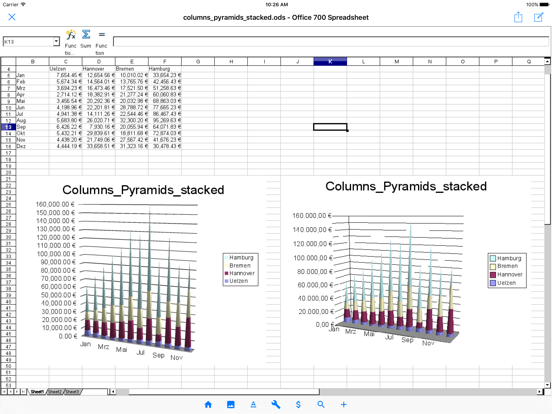
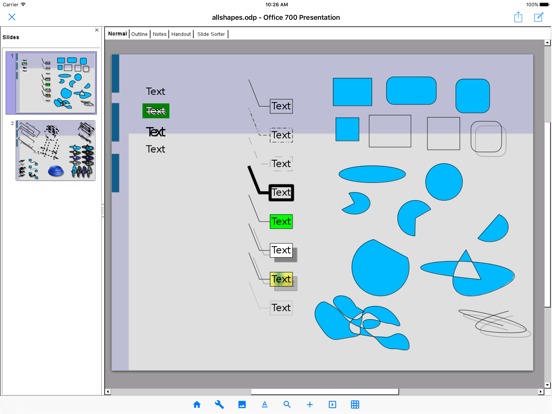
14 store screenshots


Pricing & paywalls
App Store
- Price: $19.99
Ratings & reviews
App Store
-
5/5At last!
So glad to have a functional iOS app for ODS spreadsheets. Now the Open Document format works across the multiple platforms I use - Mac, Linux, Windows 10, and iOS, and I don’t need Office 365. While the menu system is taking some getting used to, it provides me with what I need.
Jargonistic · 6 Aug 2026
-
1/5I’m shocked this has over a 4 rating...
This is so buggy that it makes working on a document impossible. First problem I encountered was resizing the document on the screen. I pinched to make it smaller, nothing moved, so I pinched the screen again, still nothing. Repeated again. Still nothing. I thought the program had frozen. Then suddenly the screen jumped and all the pages in the document were tiny thumbnails. So I had to repeat this in the other direction. I never could get the page on the screen to be the size I wanted, because it doesn’t move with you. You have to make the motion and guess where might be good, then remove your fingers and wait for several seconds to see if it is right. Next problem was in scrolling. It operated much then same as the zoom in / out. Very glitchy and non responsive. Also, there was one page in my document that every time it scrolled to the bottom of that page, it would jump back to the top of it. It wouldn’t scroll past that page, even though there were more pages in the document. The layout is also very unfriendly. The icons in the ribbon are so squished together that they are all truncated and unlegible, even though there is plenty more space in the ribbon and they could be much larger. I used this for five minutes and knew that even with Pages’ limitations and the annoyance of not having Word on here, I’d go crazy trying to overcome the shortcomings of this program. Save yourself some coffee money and avoid this program!
ZanziB777 · 6 Aug 2026
-
5/5Another step in narrowing the gap
This app makes it a step closer to helping iPads replace laptops! Not going to say it is perfect, but it at least can get the job done! Also will probably only get better with time!
denris97 · 6 Aug 2026
-
3/5Glitchy
It took me a while to find this program. When I did, I ended up having to buy it. (Open office was free). I bit the bullet and paid. Now I find that this version is not smart enough to update the formulas in calc when you insert new rows.(open office did) Unless there is an option I am overlooking that is..
Grey Hound37 · 6 Aug 2026
-
5/5I use AO Office / 700, everyday!
I use the spreadsheets to keep track of my book, reading, movie lists. This Office Suite is great. I use the open document format offline in my phone’s storage.
srfromcali · 6 Aug 2026
Privacy & accessibility
App Store
Privacy
- Data Not Linked to You — Analytics — Usage Data — Product Interaction Developer declared
- Data Not Linked to You — App Functionality — Diagnostics — Crash Data Developer declared
- Data Not Linked to You — App Functionality — Diagnostics — Performance Data Developer declared
- Data Not Linked to You — App Functionality — Identifiers — User ID Developer declared
- Data Not Linked to You — App Functionality — Usage Data — Product Interaction Developer declared
- Data Not Linked to You — Diagnostics Developer declared
- Data Not Linked to You — Identifiers Developer declared
- Data Not Linked to You — Usage Data Developer declared
Accessibility
No accessibility labels collected yet.
Versions
App Store
-
5.4.1
Version 5.4.1 Improved Text Import dialog by adapting native UI.
-
5.4.2
Version 5.4.2 Enhance security by encryption with personal information in the app storage.
-
5.4.3
Version 5.4.3 Support for Unicode 15.0 and OpenType-SVG fonts.
-
5.4.4
Version 5.4.4 Update code base to the Apache OpenOffice 4.1.15.
-
5.4.5
Version 5.4.5 Improved Paragraph dialog by adapting native UI.
-
5.4.6
Version 5.4.6 Fix for function names in the formula in XLSX export.
-
5.4.7
Version 5.4.7 Fix for function names in the formula in XLSX export.
-
5.4.8
Version 5.4.8 Improved Character dialog by adapting native UI.
-
5.4.9
Version 5.4.9 Support for password-protected DOCX/XLSX/PPTX files.
-
5.5.0
Version 5.5.0 Support for password-protected DOCX/XLSX/PPTX files.
-
5.5.1
Version 5.5.1 Support for modern password-protected DOC files.
-
5.5.2
Version 5.5.2 Support for modern password-protected XLS files.
-
5.5.3
Version 5.5.3 Support for modern password-protected PPT file format.
-
5.5.4
Version 5.5.4 Support for exporting with Agile Encryption.
-
5.5.5
Version 5.5.5 Support for read-only mode in DOCX/XLSX/PPTX.
-
5.5.6
Version 5.5.6 Support for decryption with ODF Wholesome Encryption.
-
5.5.7
Version 5.5.7 Support for the animation in the PPTX export.
-
5.5.8
Version 5.5.8 Support for the embedded video in the PPTX. Support for Unicode 15.1 / Unicode 16.
-
5.5.9
Version 5.5.9 Update PDFium Library Version.
-
5.6.0
Version 5.6.0 Fix for Complex Field Character in docx import and export.
-
5.6.1
PDF Import - Improved rendering of embedded fonts, annotations, and dashed lines. - Fix for word spacing issues in imported PDFs. - Fix for crashes when importing certain PDF files. Writer - Fix for losing field data (Author, Date, Edit Time, Template Name, etc.) when saving to DOCX or DOC format. - Fix for crash when importing certain DOCX files. Paste Special - Improved Paste Special dialog for mobile. Stability - Fix for crashes and freezes in various operations.
-
5.6.2
Writer - Improved style dialogs (Character, Paragraph, Page, Header/Footer, Footnote, Column, Text Grid, Conditional) for mobile. - Fixes for DOCX round-trip of table width, cell margins, borders, alignment, background, and non-splittable rows. Stability - Fix for crashes in various operations. App - Age Range declaration is now available worldwide.
-
5.6.3
Writer - Improved style dialogs (Character, Paragraph, Page, Header/Footer, Footnote, Column, Text Grid, Conditional) for mobile. - Fixes for DOCX round-trip of table width, cell margins, borders, alignment, background, and non-splittable rows. Stability - Fix for crashes in various operations. - Fix for disabled text fields not appearing dimmed. - Fix for losing % suffix when picking entries from the font size combo. App - Age Range declaration is now available worldwide.
-
5.6.4
Improved style dialogs by adapting native UI.
-
5.6.5
· 22 Jul 2026
Writer - Improved style dialogs (Character, Paragraph, Page, Header/Footer, Footnote, Column, Text Grid, Conditional) for mobile. - Fixes for DOCX round-trip of table width, cell margins, borders, alignment, background, and non-splittable rows. Stability - Fix for crashes in various operations. - Fix for disabled text fields not appearing dimmed. - Fix for losing % suffix when picking entries from the font size combo. App - Age Range declaration is now available worldwide.
Alternatives
- Collabora Office — Same category + similar ratings
- ONLYOFFICE Documents — Same category + similar ratings
- OpenDocument Reader - view ODT — Same category + similar ratings
- TextEdit - Text Editor — Same category + similar ratings
- Office Suite-Word, PDF, Sheets — Same category + similar ratings
- MobiPDF・PDF Text Editor・Reader — Same category + similar ratings
Availability by market
- US
Data quality & evidence
- Page completeness
- Live store listing
- Last verified
- 6 Aug 2026
- Sources
- App Store
- Independent summary has not been published yet.